ChatGPT
 Perplexity
 Claude
 Grok
Grok Google AI Mode
Popups aren't only a B2C tool. B2B sites use them as marketing touchpoints too.
Below I cover the role they play in SaaS and B2B campaigns, the benefits you can expect when you use them well and, the part you probably came for, examples of B2B popups used by well-known B2B companies.
Understanding Popups in a B2B Context
Popups in a B2B environment are short, attention-grabbing add-ons that appear on a website or landing page. They ask visitors (often decision makers or influencers in the buying cycle) to take one specific next step, such as signing up for a demo or downloading a white paper.
In B2B, a popup earns its place by tying an offer to a business problem:
- They can highlight ROI-driven offers (e.g., “Learn how to reduce costs by 30% this quarter”).
- They re-engage visitors about to abandon a page and point them to a relevant case study or data sheet.
- They're an immediate channel for lead capture, starting with the business email address.
Do popups work for B2B lead generation?
They do, with two caveats our own data makes plain. First, the baseline: the median popup that asks for an email or phone number converts 0.83% of its displays into leads; the top 25% reach 1.96% and the top 10% reach 3.87%. That comes from our 2026 popup benchmark, which covers 28,674 campaigns from 11,533 businesses that ran a popup with Popupsmart between January 2024 and September 2026.
Second, software sites start from a lower base. Industry medians rest on 27-206 lead-collecting campaigns each; the statistically reliable gaps are Finance & Insurance over Software & Technology and Health & Beauty over Healthcare & Medical. I read that as a warning against copying a store's discount popup onto a SaaS site: a B2B visitor needs a reason that fits their buying stage, like a demo, a data report or a template.
The email addresses tell the same story. 59% of email addresses collected by popups are Gmail addresses; 12% use a business or other domain. If your sales team only works company addresses, a generic newsletter popup will fill the list with personal ones.
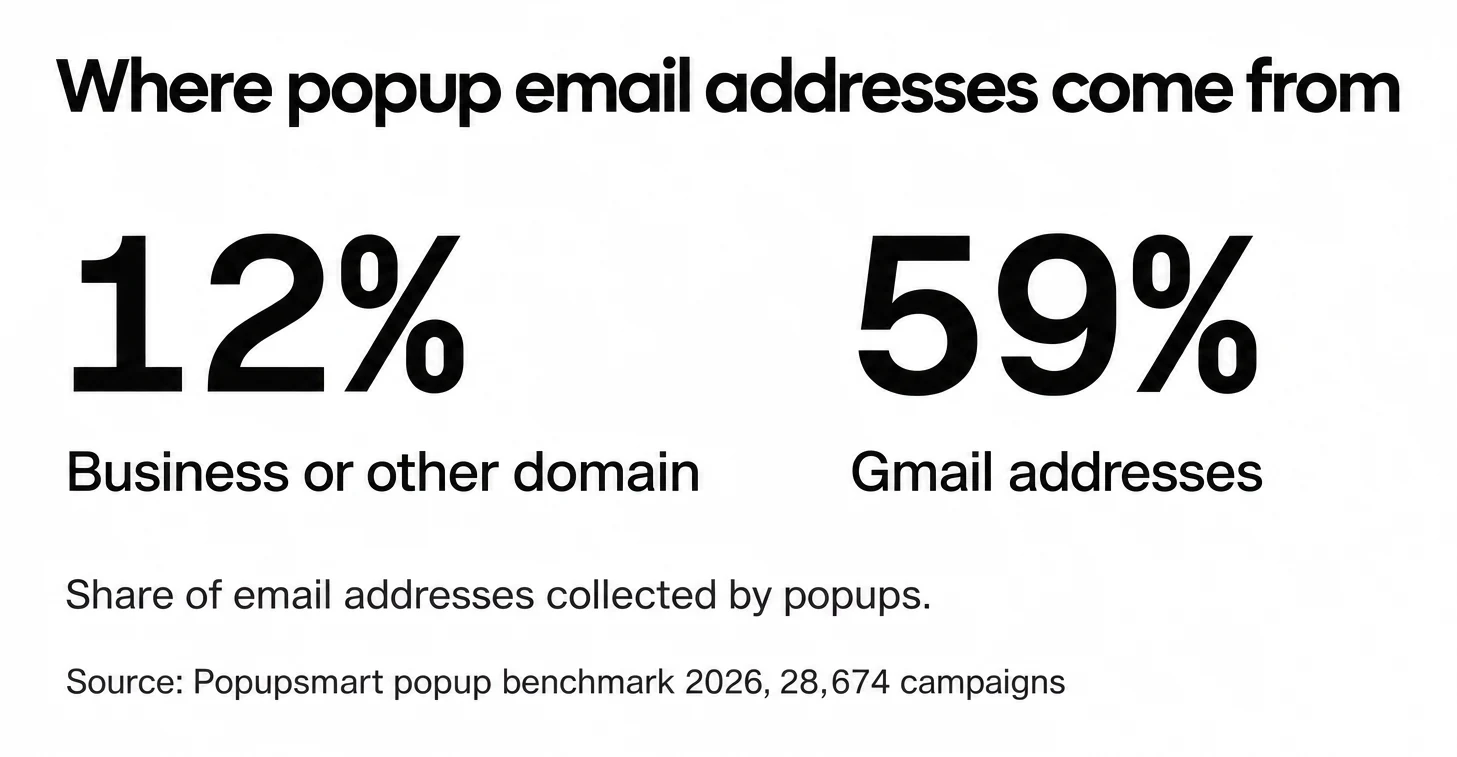
Device matters here too. Emails collected on desktop are about twice as likely to be at a business or other non-consumer domain: 21% vs 9.5% on mobile. That doesn't mean desktop converts better. On mobile the median popup converts 1.02% vs 0.57% on desktop, so you trade volume for work addresses when you target desktop only.
B2B Popup vs B2C Popup
The messaging is about the business. B2B popups lean less on discounts and quick sales and more on ROI, tech integrations or time saved, and they tend to carry more data than a typical B2C popup.
The sales cycle is longer. A B2B purchase usually involves several stakeholders, so the popup is where the conversation starts: it captures the lead, and you nurture it over time.
And the offer is often educational. B2B popups send prospects to whitepapers, case studies or webinars because the buyer wants in-depth information before deciding.
That content earns trust early in the relationship.
12 Real Examples of Popups for B2B from B2B Companies
In B2B and SaaS marketing, the popup type you pick affects how many leads you capture and how fast they move through the sales cycle. The purchases are complex, so fit each popup to the prospect's business, funnel stage and role.
Below are the most common B2B popup types, each with real examples and a note on why they work.
We captured every screenshot below in January 2025. All eleven companies were still operating when we checked on 1 October 2026, but the offers, events and designs on their sites may have changed since the capture.
1. Exit-Intent B2B Popups
Exit-intent popups appear when a visitor is about to leave your site. It's your last chance to catch their interest. They work well for collecting feedback, or for offering a resource that keeps the visitor from bouncing.
Keep your expectations in line with the data, though. Exit intent shows no statistically reliable advantage: popups on the most sensitive exit-intent setting converted 1.10% vs 0.78% without exit intent (median campaign), a gap that could be chance. Use it for the visitors it reaches on their way out, not for a guaranteed lift.
B2B Popup Examples:
- Bloomreach runs an exit-intent popup on its “new” product tour page, and the popup asks users for feedback on their experience.
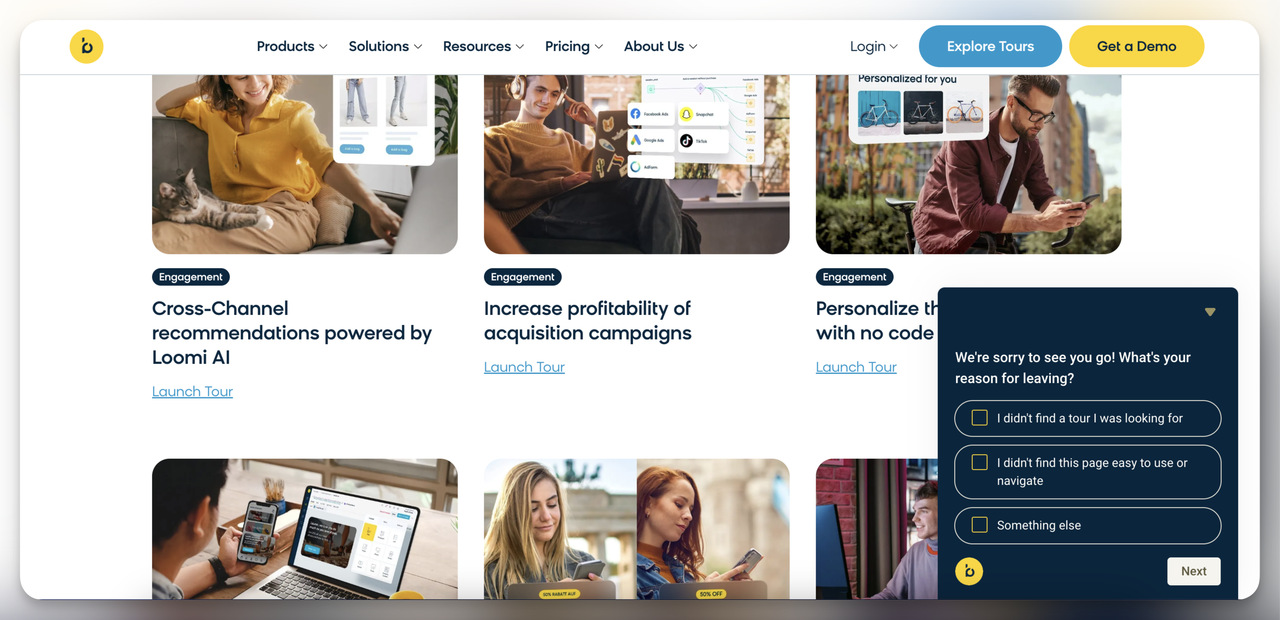
Why it’s effective: The page is new, so Bloomreach uses the popup to learn how usable and relevant visitors find it. That's how a team refines a page after launch: by asking the people leaving it.
Key Features: Simple feedback form and user-friendly design.
- Popupsmart showed an exit-intent popup on our pricing page to re-engage visitors. It pointed them to the free plan as a reason to stay.
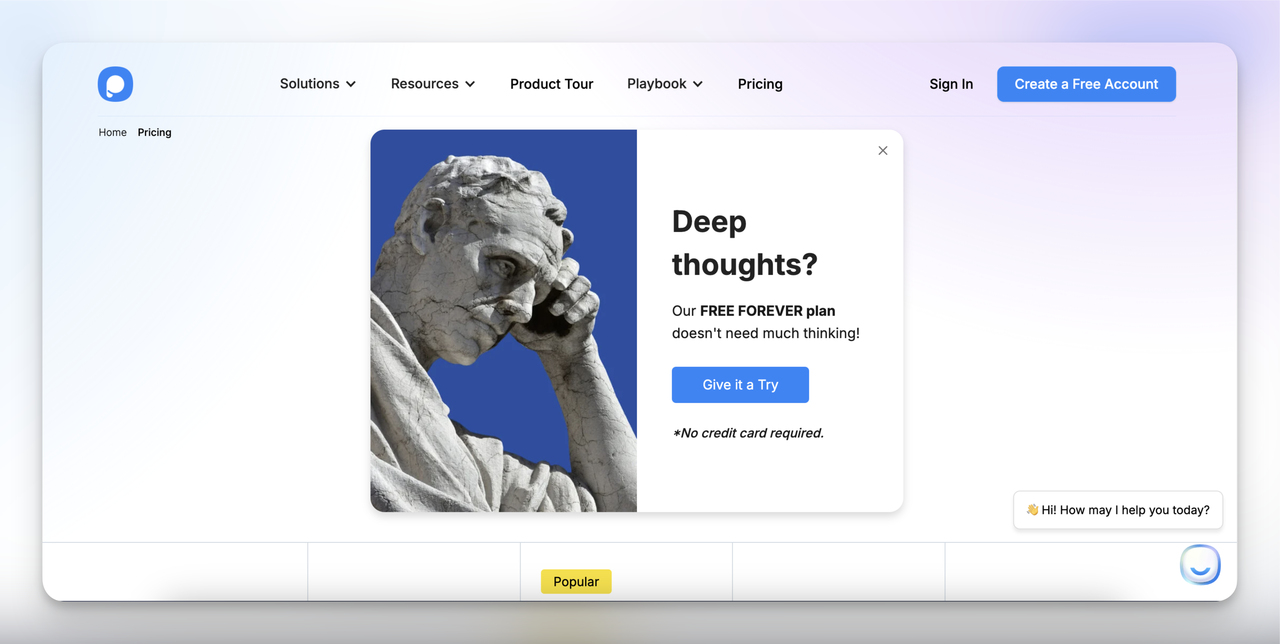
Why it’s effective: The promise of a free plan reduces barriers and encourages exploration. Today's free plan covers 5K pageviews a month.
Key Features: Minimalistic design, clear value proposition, and a "No credit card required" line under the button.
- Oracle NetSuite uses its exit-intent popup to promote the “CFO’s Guide to AI and Machine Learning.”
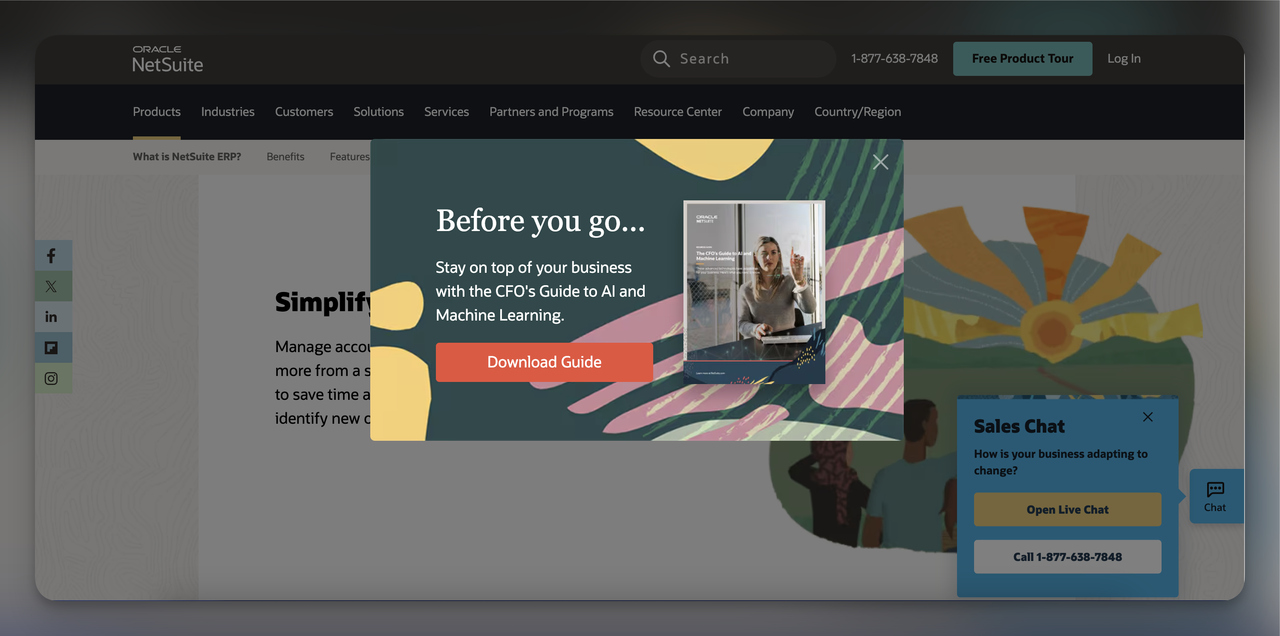
Why it’s effective: It speaks to one decision-maker, the CFO, with an educational resource written for that role.
Key Features: Strong CTA (“Download Guide”) and professional visuals.
2. Lead Capture B2B Popups
Lead capture B2B popups collect contact details from visitors, such as email addresses or phone numbers. They work best with an offer worth trading those details for: exclusive content, a discount or a free trial.
B2B Popup Examples:
- Dotdigital uses an email popup to invite visitors to its newsletter.
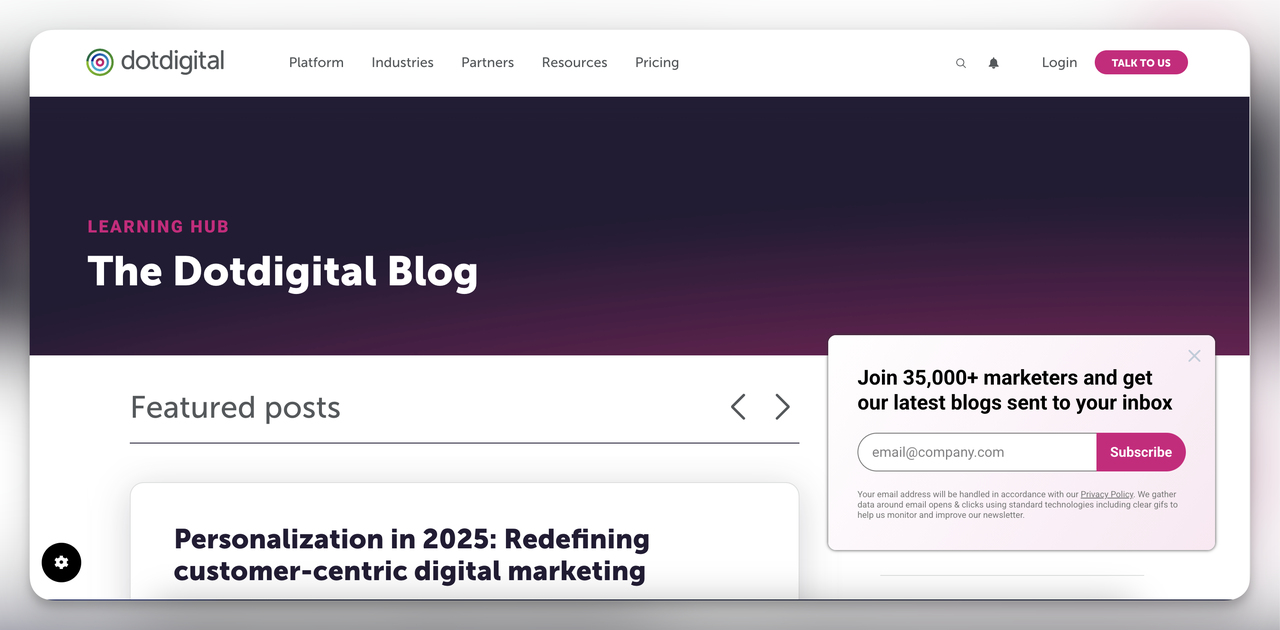
Why it’s effective: One line (“Join 35,000+ marketers”) gives the newsletter credibility and a bit of exclusivity.
Key Features: Clean, professional design, strong social proof, and a clear call to action.
- Zendesk was using an announcement bar to promote its “CX Trends 2025” event when we captured it.
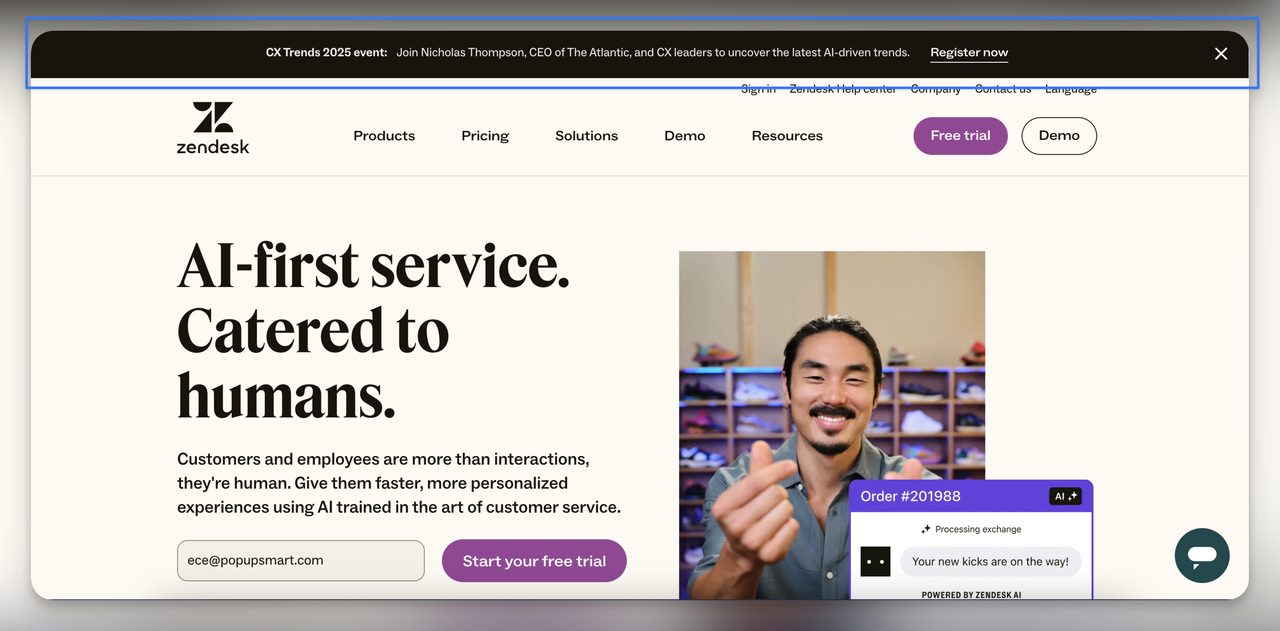
Why it’s effective: It speaks to professionals who follow CX trends and sends them straight to registration.
Key Features: Non-intrusive placement and direct event registration link.
- NinjaOne uses a teaser popup that expands into a lead capture form when clicked. The teaser is small, so it invites a click without crowding the page.
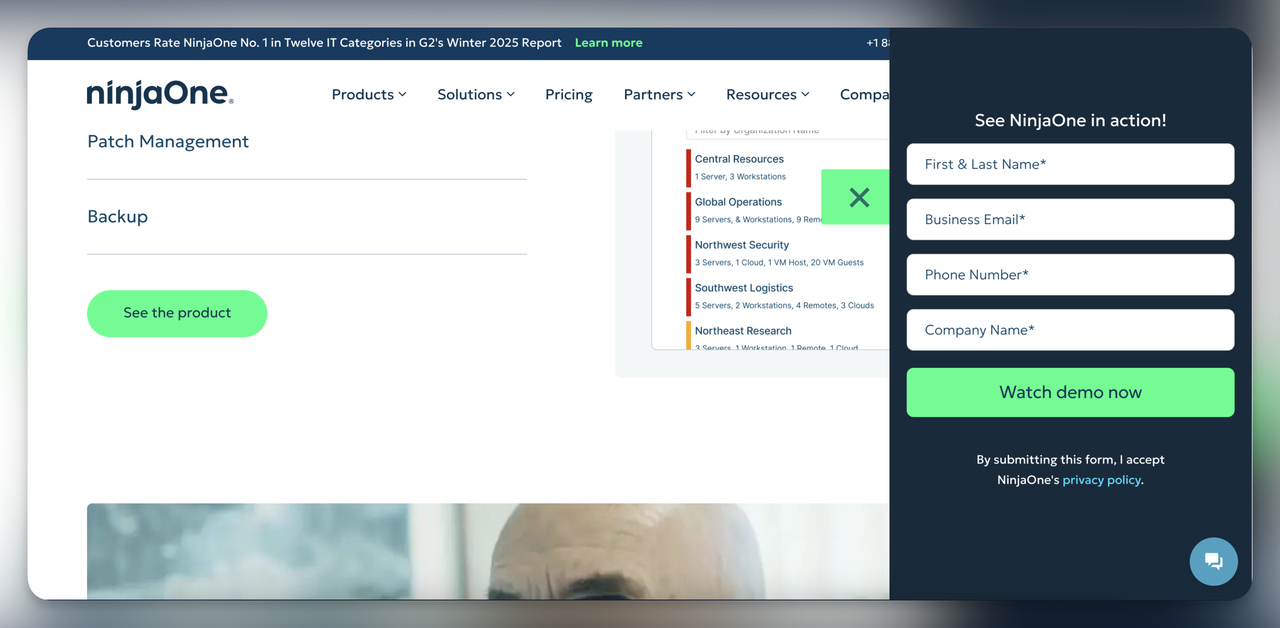
Why it’s effective: The teaser costs the visitor nothing, and the full form opens only for people who clicked to see it.
Key Features: Compact initial design transitioning into a full-form popup. Note the four required fields: that's a deliberate trade of volume for qualification, which we come back to in the lead-quality section.
3. Multi-Step B2B Popups
Multi-step popups split information or an action into smaller steps, so each screen asks the visitor for less.
Examples:
- MoEngage uses a multi-step popup. The first step introduces its interactive demo with a value proposition; the second is the lead capture form.
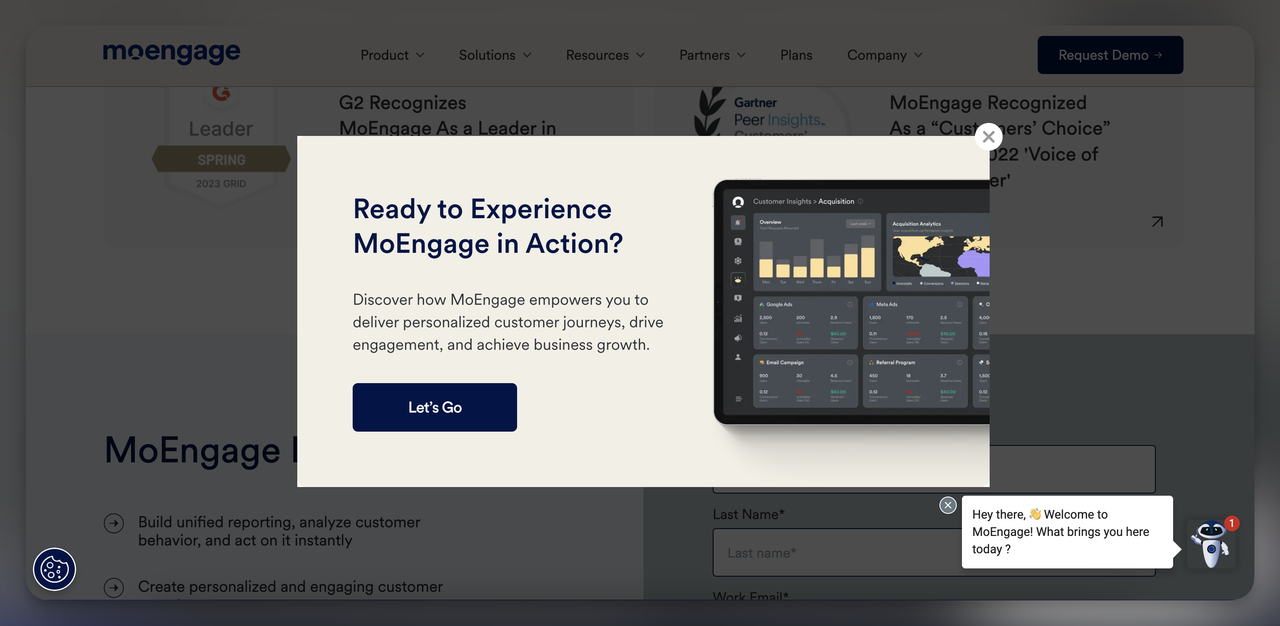
Step 1 sells the demo on its benefits.
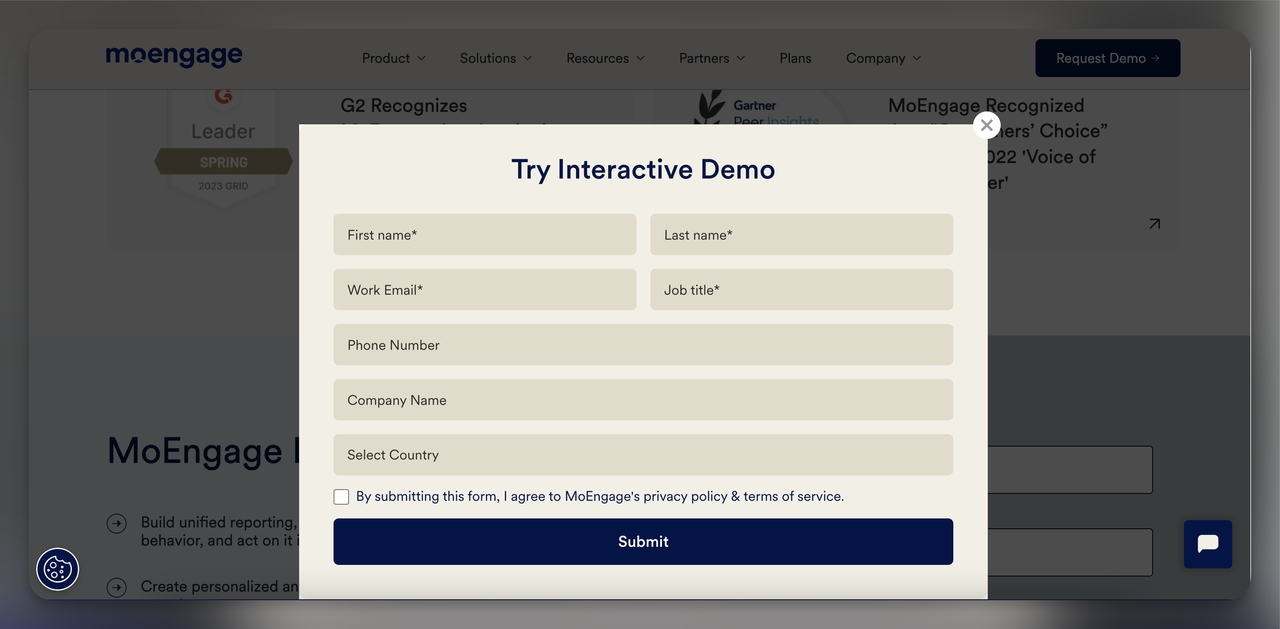
Step 2 is the lead form.
Why it’s effective: The visitor says yes to a clear, short message (“Ready to Experience MoEngage in Action?”) before seeing a single field. Name, email and job title come in the second step.
One caution from our data: multi-step forms show no measurable conversion advantage over single-step forms once step-1 clicks without contact details are excluded. Use a first step because it qualifies or explains, not because you expect it to lift the lead rate.
4. Video-Embedded B2B Popups
Embedding a video in your popup lets you show what the product does, or let a customer tell their success story, in a way a block of text can't.
Example:
- Cloud Campaign runs a video popup about its agency-friendly platform's key features, such as time savings and customizable branding.
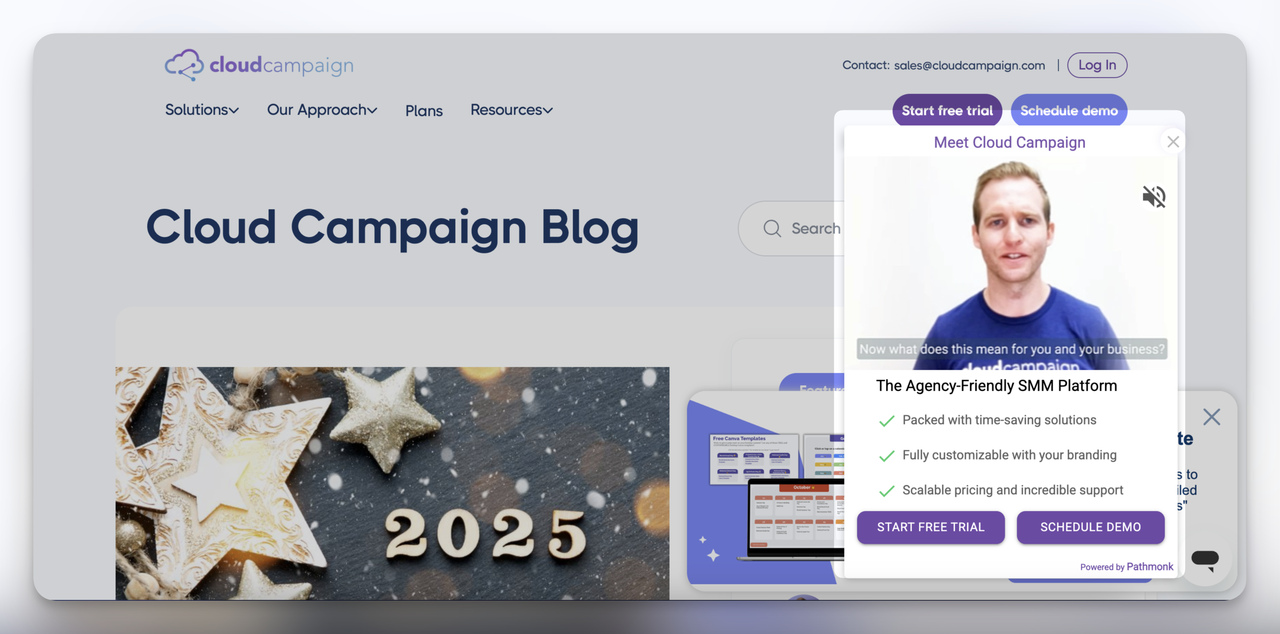
Why it’s effective: A time-strapped decision-maker gets a quick overview of the platform's value without reading a feature page.
Key Features: Embedded video, a short benefit list and clear CTA buttons (“Start Free Trial” and “Schedule Demo”).
5. Social Proof B2B Popups
Social proof popups put recognition, awards or customer testimonials to build credibility in front of the visitor.
Examples:
- Insider (now Insider One) used a popup to announce its recognition as a G2 Winter ‘25 Report Leader in Customer Data Platforms. The company has since rebranded as Insider One.
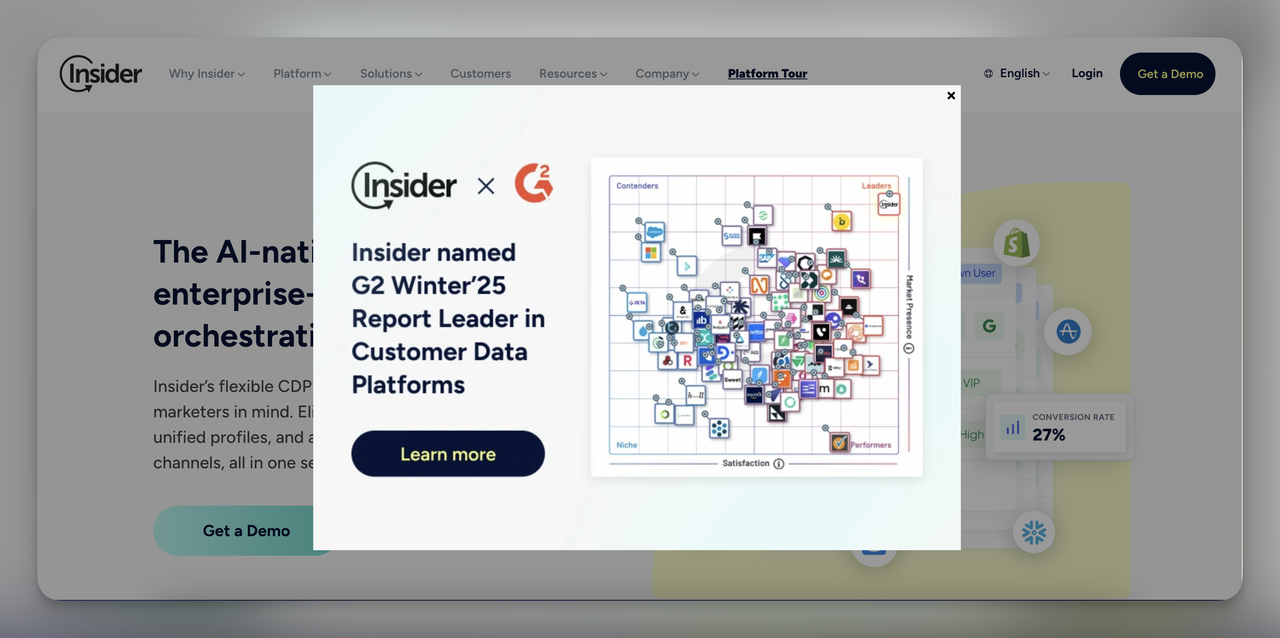
Why it’s effective: The claim comes from G2, not from Insider, which makes it easier to believe.
Key Features: Visual representation of their leaderboard ranking and direct link to learn more.
- Semrush uses a popup that leans on competitor benchmarking and asks readers to create a free account.
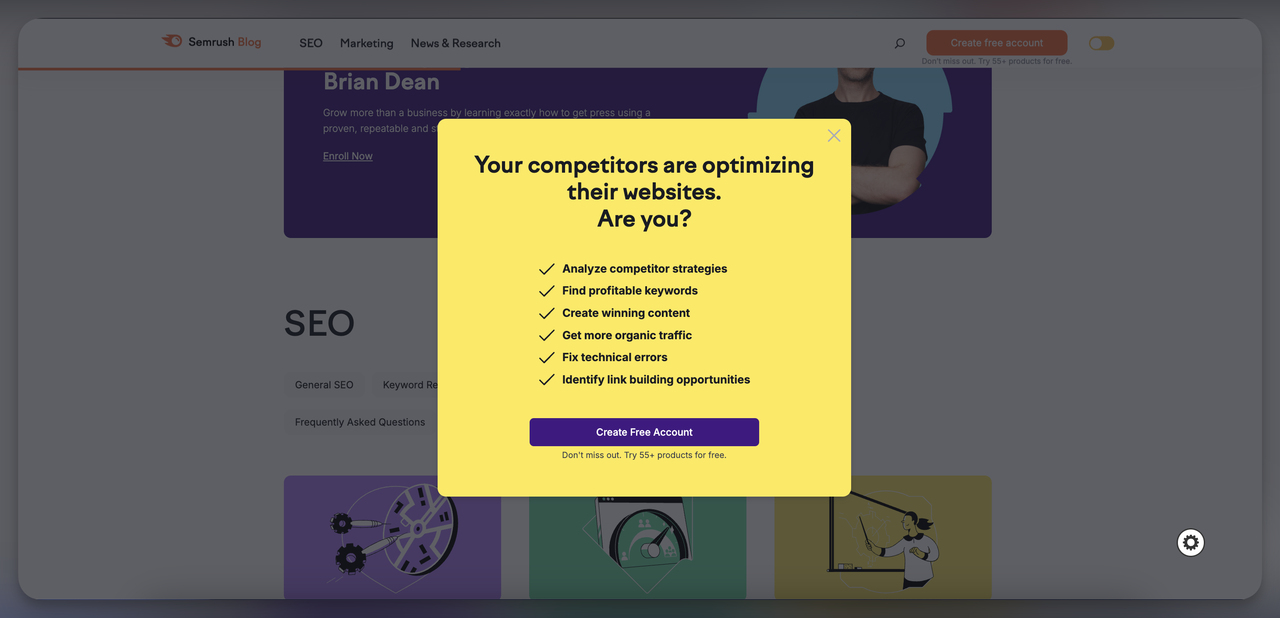
Why it’s effective: The headline turns a reader's worry about competitors into a reason to sign up.
Key Features: Bright, attention-grabbing design and clear checklist of benefits.
6. Content-Driven B2B Popups
Content-driven popups send visitors to whitepapers, webinars or blog posts. That suits a B2B audience that wants detail before it buys. Our ebook popup examples show more ways to gate a guide or report.
Examples:
- On the CloudCampaign blog, a popup invites readers to download free resources such as a Social Media Audit Template.
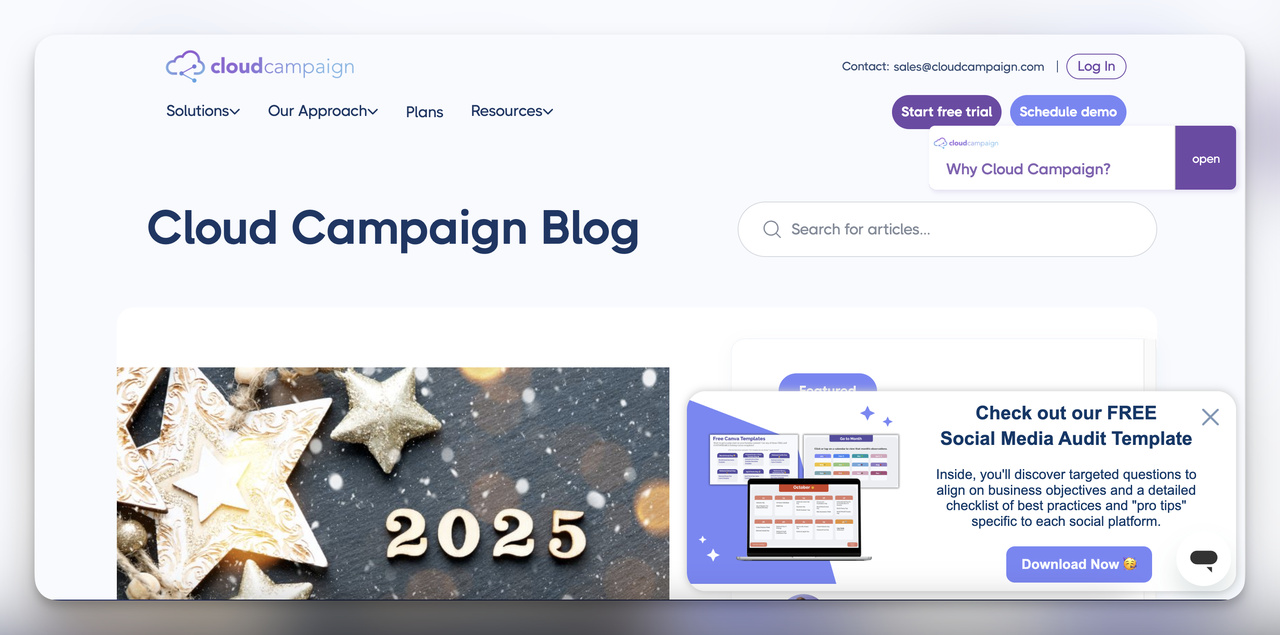
Why it’s effective: A template the reader can use the same day makes CloudCampaign look like a helpful source.
Key Features: Emphasis on free value (downloadable template) and supports lead nurturing by capturing email addresses.
- Navan used a popup at the start of 2025 for a rewards promotion: $500 in travel rewards for creating a company account and booking a business hotel stay.
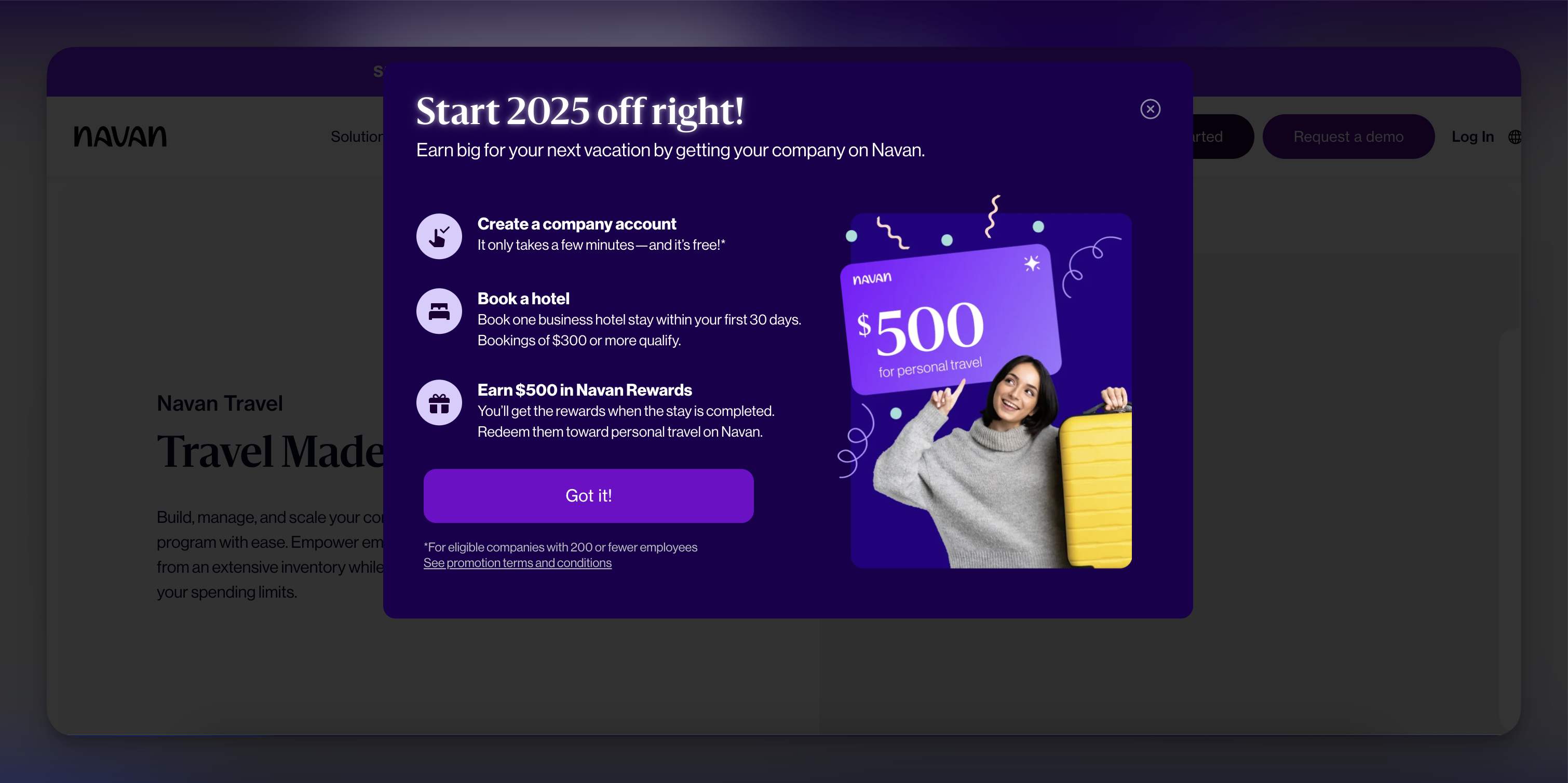
Why it’s effective: The step-by-step breakdown of rewards is easy to understand and incentivizes users to act quickly.
Key Features: Clear instructions, bold visuals, and a compelling value proposition.
B2B popup use cases at a glance
The 12 examples cover six jobs. Here's each one with the offer, the fields to ask for and the trigger that fits it:
| Goal | Offer | Fields to ask for | Trigger and targeting | Example above |
|---|---|---|---|---|
| Demo request | A short walkthrough or interactive demo | Work email, company name | Pricing and product pages, after a delay | NinjaOne, MoEngage |
| Content download | Guide, report or template | Work email | Blog and resource pages, on scroll | Oracle NetSuite, Cloud Campaign |
| Event or webinar signup | A seat at a live session | Work email, name | Announcement bar on every page | Zendesk |
| Newsletter | Regular industry insights | Blog pages, new visitors | Dotdigital | |
| Free trial or free account | Product access with no sales call | Blog and feature pages | Semrush, Popupsmart | |
| Feedback | One question on the way out | None | Exit intent on a new page | Bloomreach |
How to Create B2B Popups?
Popupsmart is a no-code popup builder for building professional B2B popups quickly. Its advanced targeting options let you decide which B2B visitors see a popup, and when. The steps below build one targeted popup for a B2B campaign. For the form itself, field by field, see how to create a popup form for your website.
Step 1: Define Your Popup Objective
Decide what the popup is for before you open the builder. Most B2B popups do one of these jobs:
- lead generation, collecting business emails or phone numbers for follow-up;
- content promotion, sending visitors to whitepapers, case studies or webinars;
- re-engagement, giving visitors a reason to act before they leave.
Step 2: Customize the Popup
-
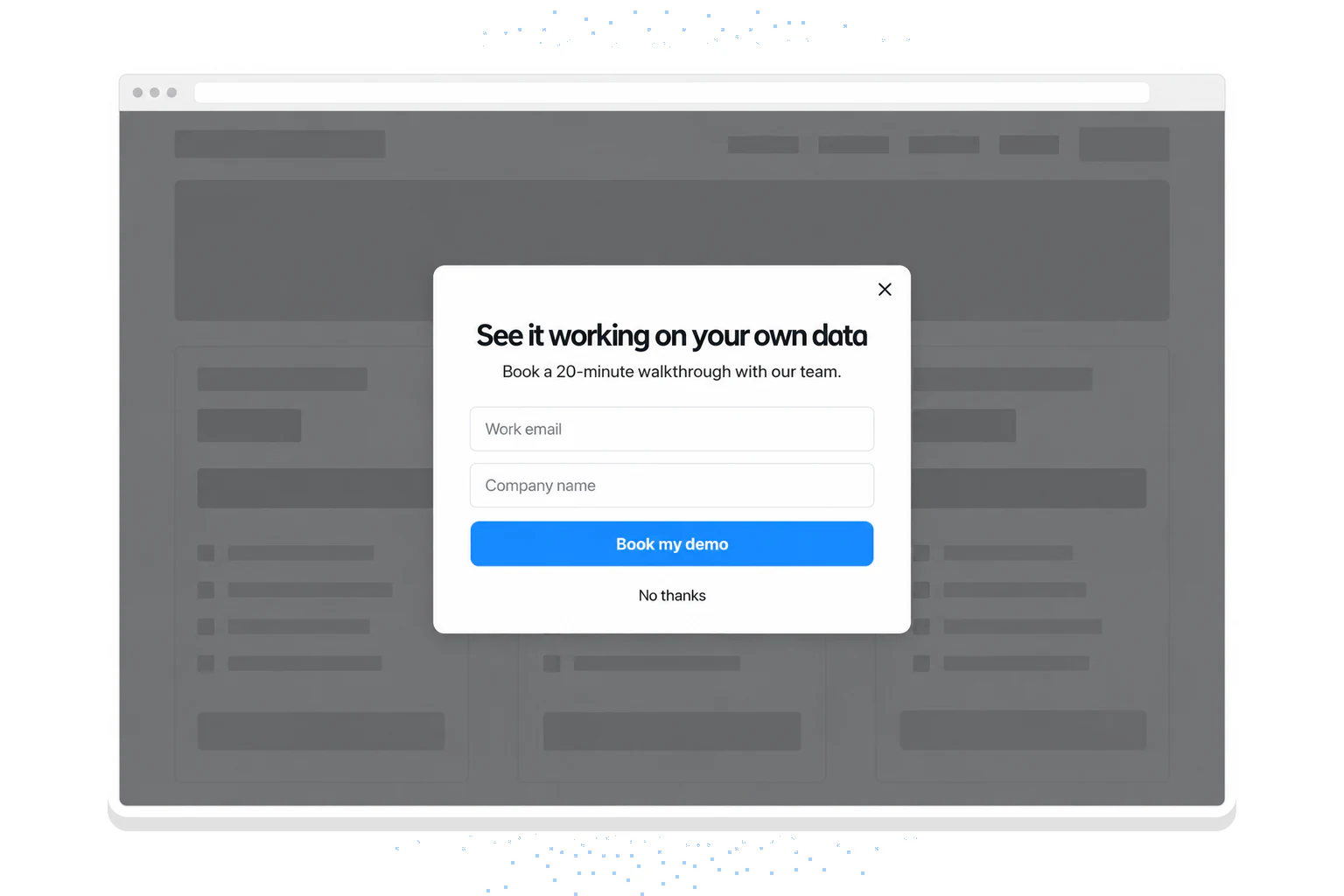
Open the popup templates and pick one that fits your objective: a lead capture form template for gathering contact details, or a content promotion template if you’re sending visitors to a case study or blog post.
-
Or ask for it: In the app, the Popupsmart AI agent takes a chat request and builds the whole campaign, template, targeting and integrations, then publishes it, on every plan. A request like "a demo popup for our pricing page, work email and company name, sent to HubSpot" is enough to start.
-
Write the copy. Start with a headline that gives a reason to read on: “Unlock Insights: Download the Latest CFO Guide.” Add supporting text that states the value (e.g., “Learn how AI is transforming financial operations”), then a strong CTA like “Get the Guide” or “Schedule a Demo.”
-
Pick professional, industry-relevant images or icons, and keep the design clean.
Step 3: Advanced Segmentation for Targeted Delivery
Popupsmart’s segmentation lets you show a different popup to each B2B audience segment. These are the settings to use.
- Target Audience:
Visitor Type:
- Select Returning Visitors if you're nurturing warm leads or existing clients.
- Use New Visitors to capture cold leads who might need an introduction to your brand. In our data, popups targeted at new visitors only convert 1.13% vs 0.77% for popups shown to everyone.
Device Type:
- Choose Desktop when work addresses matter more than volume. Desktop leads are more often at a business domain, while mobile popups convert more overall (see the data above).
URL-Based Targeting:
- Target specific pages, such as your pricing or product tour pages, like the examples above.
- Example: Set the rule to show the popup on URLs containing /pricing to engage users evaluating your plans.
Behavioral Triggers:
- Exit intent triggers the popup when users are about to leave and gives them a final reason to stay (e.g., “Wait! Download this Free Guide”).
- A time delay shows the popup after a short wait on high-engagement pages like blogs or case studies. In Popupsmart's 2026 data, popups that wait before appearing convert 0.83% vs 0.61% for popups shown the instant the page loads (median campaign), a lean rather than a proven gap, and the exact delay length (0-5 seconds vs 21-60 seconds) makes no measurable difference to conversion.
- A scroll trigger displays the popup once the user has scrolled 50% of the page, which signals interest.
- Cookie targeting personalizes by what visitors did before. Target the ones who interacted with previous campaigns, and exclude anyone who already signed up for a demo or subscribed.
- Geo-targeting shows localized popups for global businesses; you could promote a webinar based on the visitor’s country or city.
Layering rules is worth the setup time. Popups set up with three targeting rules convert 1.09% vs 0.71% for popups with none or one (median campaign): a correlation, since marketers who target carefully may also write better offers.
Step 4: Fine-Tune Popup Behavior
- Keep lead capture forms small and unobtrusive. For a slide-in, put the popup in the bottom-right corner, and know the trade-off: center modal popups convert 0.88% vs 0.49% for corner/slide-in boxes (median campaign).
- Keep animations in your popup subtle. A “Fade In” catches the eye without getting in the visitor's way.
- Always include a clear “X” button so visitors can dismiss the popup easily.
Step 5: Send leads to your CRM
A B2B lead is only useful once sales can see it. Connect the popup before you publish:
- HubSpot: the HubSpot popup integration adds each lead to a static list, and phone numbers and SMS consent map in the integration's Match Fields step.
- Salesforce: the Salesforce integration creates each submission as a Lead or a Contact.
- Anything else: Zapier, Make or a webhook reach the CRMs without a native connection. The help center lists 19 destinations; browse the integrations for setup guides.
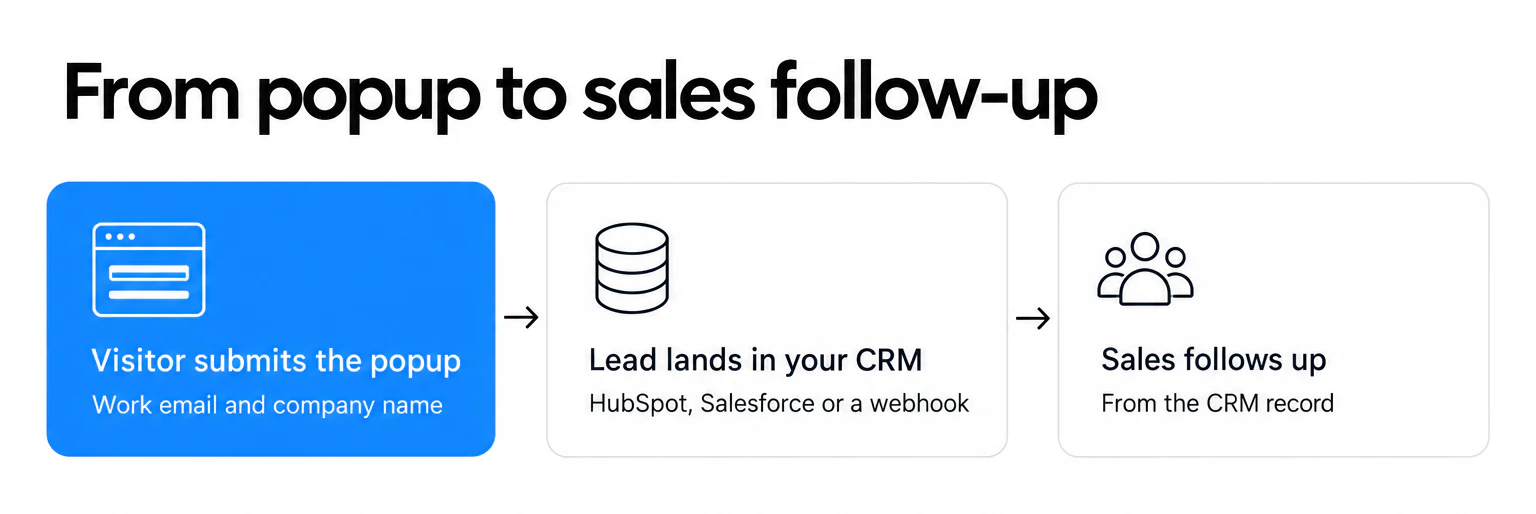
Most businesses skip this step. Among businesses whose popups collect an email or phone number, 16% connect an external tool (email platform, CRM or webhook) and 64% turn on the built-in autoresponder email; across all businesses in the benchmark, 93% connect no external tool. For a B2B team that's the gap to close first: a lead sitting in a popup dashboard doesn't get a follow-up call.
Step 6: Publish and Test
- Publish the popup once the design and targeting rules are done.
- Run A/B Tests on headlines, CTAs and designs.
- Watch popup views, leads, interactions and conversion rate in Popupsmart’s analytics dashboard.
Why Popupsmart for B2B?
- No developer needed: Popupsmart installs with one JavaScript snippet or a Google Tag Manager tag, on Shopify, WordPress, Webflow or the site your team built. Once signed up, most people build and publish a campaign in the app in under 5 minutes.
- Advanced Targeting Options: Segment audiences precisely to address different buying cycle roles. Popupsmart describes its targeting as 18+ targeting and trigger options, including URL, visitor type, traffic source, geo-location and cookies.
- Your CRM, not ours: leads go to HubSpot, Salesforce and the other destinations on the help center's list of 19. Some need Zapier, Make or a webhook rather than a native connection.
- Agent-ready: the Popupsmart AI agent builds and publishes a campaign from a chat, and the Popupsmart MCP server and CLI give your own AI agent everything the app does: generate a popup from a template, set targeting and triggers, connect integrations and publish. An agent working through them publishes a campaign in under a minute. Both are on every plan, the free one included.
- Several sites on one account: from 3 websites on Basic to unlimited websites on Expert, which suits agencies and companies with regional sites.
- Versatility: Customize popups for every stage of the B2B funnel, from awareness to decision-making.
There's a free plan, and paid plans start at $39 a month; see pricing. One honest limit: pricing is metered on site pageviews, so a high-traffic site pays for its traffic even when a popup targets only the pricing page.
B2B Popups Best Practices and Tips
A good popup idea still flops if it's badly designed or badly timed. The practices below come from what I’ve learned in my current position, with our benchmark data where we have it.
Designing for Impact
- Use Minimalistic Design
Keep the text short and focused on a single message. Clean visuals beat clutter.
Make the “close” or “X” button obvious. Nobody likes hunting for it.
- Strong CTAs
Use direct language: “Start Free Trial,” “Get My Report,” or “Book a Consultation.” Put the CTA in a bold color that contrasts with the background, then test a few variations and measure how each one performs.
- Design Checklist
A clear headline (e.g., “Accelerate Your B2B Growth”).
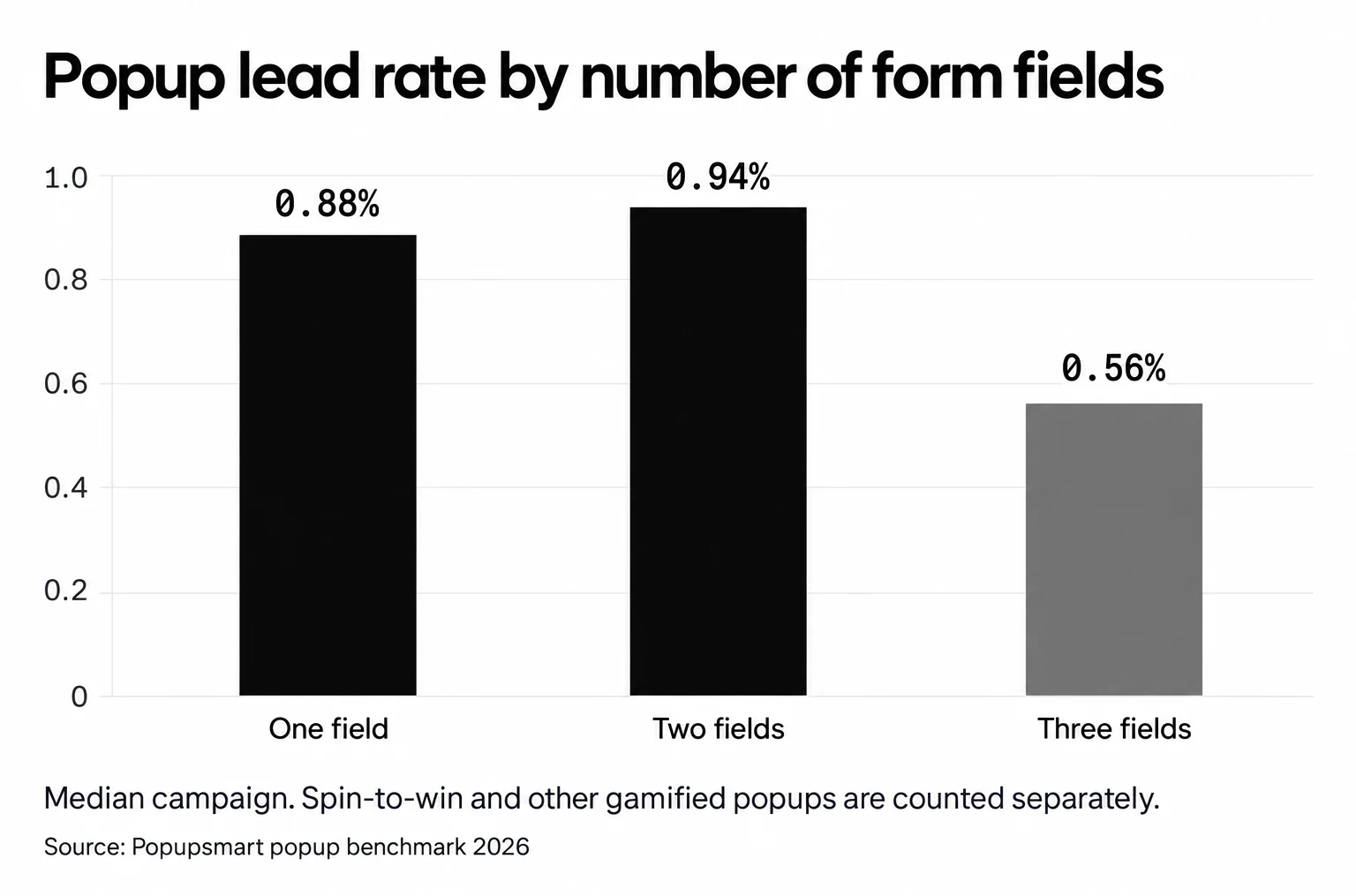
Limited form fields, ideally one or two. Popups asking for one or two fields convert 0.88% and 0.94%, against 0.56% for three fields (median campaign; spin-to-win and other gamified popups are counted separately).
Eye-catching visuals or images that draw the eye to the offer.
One main goal (no multiple CTAs).
Lead quality: what to ask and what sales needs
B2B forms pull in two directions. Sales wants job title, company size and phone; the lead rate wants fewer fields. The examples above sit at both ends: NinjaOne asks for four fields, MoEngage for seven in its second step, Dotdigital for one.
What the benchmark says about the extra fields:
- Name: adding a name field alongside the email shows no reliable effect: the overall gap in its favour (1.25% vs 0.88% for email only) reverses among campaigns whose form rarely changed (0.74% vs 0.79%).
- Phone instead of email: forms that ask for a phone number instead of an email look weakest (0.46% vs 0.88% for email only), though that gap is not statistically reliable.
- More steps: a second step doesn't lift the lead rate on its own (see the MoEngage example above).
My rule for a B2B popup: ask for the work email and one qualifier that routes the lead, such as company name or team size. Let the CRM, an enrichment tool or the first sales email collect the rest.
Timing and Targeting Strategies
Match the trigger to what the visitor is doing:
- A time delay shows the popup after a short wait rather than on page load; in our data the length of the delay made no measurable difference.
- A scroll trigger fires once the user has read a specific portion of your page.
- Exit intent makes a final offer when visitors try to leave.
Practical Example: Timed vs. Triggered Popups
A test worth running on a SaaS blog: a timed popup (appearing 20 seconds in) against a scroll-based popup (triggered at 50% page scroll). The scroll version waits for visitors who reached mid-page and so showed deeper interest before seeing the offer. Run both on the same pages at the same time, and judge on leads your sales team accepts, not on popup clicks. Our guide to A/B testing popups covers the setup.
Then narrow the audience:
- Geo-targeting delivers localized offers if your service varies by region.
- Behavioral targeting shows different popups to new and returning visitors.
- Campaign-specific landing pages get popups written for leads from a specific email or social campaign. Visitors arriving from an email or SMS campaign convert on popups at 1.81% vs 0.74% for visitors from organic search.
Benefits of Using Popups for B2B
1. Increased Lead Generation: B2B sales funnels are long, so lead capture carries a lot of weight. Popups give you:
- Quick forms for demos or consultations
- Targeted messages for different market segments
- Reminders about trial sign-ups or product tours
2. Improved User Engagement: B2B visitors often skim content, so well-timed popups help you:
- Offer immediate next steps when interest is at its peak
- Provide a secondary piece of content or a relevant offer
- Collect zero-party data through conversational popups
3. Higher Conversion Rates: Popups can add urgency or put the value up front. In my direct experience, a short-term offer (a limited-time free audit, say) can nudge undecided leads to take the next step faster.
The Impact of Popups in B2B
However well a popup is designed, you’ll still measure it and refine it. These are the metrics to track and the tools that help.
Metrics to Track B2B Popup Success
- Conversion Rate: Percentage of users who complete the desired action (form fill, email subscription, demo request, etc.)
- Bounce Rate: Are users bouncing (leaving immediately) after encountering a popup? If the bounce rate spikes, review your messaging or consider adjusting the popup’s timing.
- Time on Site: Popups that encourage further exploration (e.g., linking to related content) can increase dwell time. Keep an eye on how long visitors remain on your site post-popup.
- Click-Through Rate (CTR): Evaluate how many visitors click on your CTA within the popup. Experiment with CTA language and button design to improve this metric. For reference, the median popup records a click on 2.25% of its displays; the top 10% reach 11.67% (10,768 campaigns).
- In our benchmark, the median lead-collecting popup converts 0.83% of its displays, the top 25% reach 1.96% and the top 10% reach 3.87%. The distance between the median and the top 10% is why continual testing matters more than any single best practice.
- Sales-accepted leads: For B2B, count how many popup leads sales accepts and how many book a meeting. A popup that doubles leads with personal addresses may do less for pipeline than one that brings fewer work emails.
Tools and Technologies for B2B Popup Analytics
- Google Analytics (GA4): Basic tracking of site behavior, including conversion funnels. Enable GA4 event tracking to see how many form submissions or clicks popups generate. Pair with UTM parameters for source attribution
- Popup-Specific Platforms: Popup builders such as Popupsmart offer:
-> Drag-and-drop popup builders
-> Popup views, leads, interactions and conversion rate per campaign
-> A/B testing features to optimize headlines, CTAs, and timing
- Your CRM: once leads flow into HubSpot or Salesforce, report on the popup's leads as their own source, so you can follow them to meetings and deals.
Conclusion
Popups can do a lot for B2B marketing professionals, SaaS product managers, and growth hackers who want more leads and more conversions from their site. With a relevant message, good timing and a careful design, a popup is where the conversation with a potential client starts.
To start, pick the popup type that fits your goal (lead capture, exit intent or a personalized popup), keep the layout minimal and the CTA strong, and target carefully. Keep the form to one or two fields, send every lead to your CRM, and track conversion rate, time on site, click-through rate and the leads sales accepts.
Judge your B2B popups on that last one. A popup that fills the CRM with leads sales accepts has earned its place in your B2B marketing mix.
Frequently Asked Questions
1. How do I choose the right type of B2B popup for my campaign?
Choosing the right popup depends on your campaign goals. For example, if you want to re-engage users about to leave your site, use an exit-intent popup. If your goal is to collect business emails or schedule demos, lead capture popups are ideal. Multi-step popups are useful for breaking down complex actions, while content-driven popups can direct users to whitepapers or webinars. Social proof popups are great for showcasing testimonials or awards.
2. What are the best practices for segmenting B2B popup audiences?
Segmenting your audience helps you target the right people with the right message. For example, you can target new visitors with introductory offers while focusing on returning visitors with tailored content. Use URL-based targeting to show popups on specific pages, like pricing or product features. Behavioral targeting allows you to trigger popups based on user actions, like scrolling or exit intent. You can also use geolocation to offer localized content and cookies to exclude users who have already converted.
3. What targeting rules work best for B2B popups?
Effective targeting rules include URL-based rules to show popups on high-intent pages, such as pricing or product pages. Behavioral rules, like triggering popups based on exit intent or after a specific time on the page, ensure timely delivery. Geographic targeting helps localize offers or promote region-specific events, while campaign-specific rules customize popups for visitors from specific email or ad campaigns.
4. Do popups work for B2B lead generation?
Yes, when the offer fits the visitor's stage. Across 3,034 Popupsmart popups that ask for an email or phone number (January 2024 to September 2026), the median converts 0.83% of its displays into leads, and the top 10% reach 3.87%. Industry medians vary, and Software & Technology sits below Finance & Insurance by a statistically reliable gap, so B2B teams should treat the offer and the page as the levers.
5. How many form fields should a B2B popup ask for?
Start with one or two. In Popupsmart's 2026 benchmark, popups asking for one or two fields convert 0.88% and 0.94%, against 0.56% for three fields (median campaign). Ask for the work email and one qualifier, then let your CRM or a follow-up email collect the rest.
6. Can B2B popup leads go straight to a CRM?
Yes. Popupsmart sends leads to HubSpot (to a static list) and to Salesforce (as Leads or Contacts), and to other tools through Zapier, Make or a webhook. The help center lists 19 destinations in total.