ChatGPT
 Perplexity
 Claude
 Grok
Grok Google AI Mode
The six strategies below include specific settings, data, and implementation steps drawn from Popupsmart's 2026 benchmark (28,674 campaigns, January 2024 to September 2026).
Why Does Popup Timing Affect Your Conversion Rate?
Quick overview of all 6 popup timing strategies:
1. Time-Delay Triggers: Don't show a popup the instant the page loads; let visitors engage with content first. How long you wait matters less than whether you wait.
2. Frequency Capping: Limit repeat views to prevent fatigue and protect user experience; in our data, conversion falls from the third time a visitor sees the same popup in a week.
3. Scroll-Depth Targeting: Trigger popups after 30-50% scroll to reach visitors who've shown genuine interest in your page content.
4. Exit-Intent Detection: Catch abandoning visitors at the moment they move to leave, with a last offer worth testing rather than a guaranteed lift.
5. Audience-Based Timing: Segment new vs. returning visitors, traffic source, and device type to show the right popup at the right moment for each group.
6. A/B Testing Your Timing: Run controlled experiments on delay, trigger type, and offer to find what actually works for your specific audience.
Popup timing determines whether visitors see your offer as helpful or annoying. Show a popup 2 seconds after page load, and you interrupt someone who hasn't even read your headline. Show it after they've spent 30 seconds scrolling through your content, and you're reaching a person who's already engaged.
According to a large-scale field experiment published in the Journal of Interactive Marketing (2006), the delay before a pop-up promotion appears and the page on which it's shown are variables you can manipulate to improve the response, beyond the message itself. The experiment varied the timing of pop-up promotions on an informational website and measured both clickthrough and whether users left the site.
That's the core tension: every second of delay trades off between catching more visitors (some will leave before the popup fires) and converting at a higher rate (those who stay are more qualified). The six strategies below help you find the right balance for your site.
Omnisend's 2025 benchmark, across 1.24 billion email popup displays, breaks conversion down by delay. The spread is narrow, from 1.8% to 2.4%, and the 6–10 second peak is small, which squares with our finding that delay length isn't a reliable lever. Treat these as starting points, not universal truths:
| Delay before popup shows | Omnisend conversion rate (2025) |
|---|---|
| 0–1 seconds | 1.9% |
| 1–5 seconds | 2.3% |
| 6–10 seconds | 2.4% |
| 11–15 seconds | 2.1% |
| 16–30 seconds | 1.9% |
| 31–60 seconds | 1.8% |
| 60+ seconds | 1.9% |
Source: Omnisend popup benchmarks (averages for email popups). Not comparable with Popupsmart's median campaign lead rates, which count only submissions with an email address or phone number.
1. Time-Delay Triggers: Let Visitors Engage Before You Ask
A time-delay trigger holds your popup back for a set number of seconds after page load. Instead of interrupting the moment someone arrives, it waits until they've had a chance to absorb your page content. This separates your popup from the "instant overlay" pattern that users have been trained to close reflexively.
How to Implement
1. Check your average time on page in Google Analytics (Engagement > Pages and screens). If your average session is 45 seconds, a 10-second delay targets visitors in the top 80% of engagement.
2. In Popupsmart popup builder, set the trigger to "After X Seconds." Start with a short delay, such as 5 seconds; in our data the length of the delay made no measurable difference, so pick one and spend your testing on the trigger type and the offer.
3. Avoid delays under 3 seconds. At that point, the page hasn't fully rendered on most connections, and you're effectively showing an instant popup with extra steps.
4. For long-form content (2,000+ words), a scroll-depth trigger usually fits better than a longer delay: it waits for reading, not for the clock (see strategy 3).
5. For content sites where engagement builds across pages, use the "After X Page Visit" trigger as an alternative to a time delay. Instead of counting seconds on a single page, it holds the popup until a visitor has viewed a set number of pages (2-3 works well) — a stronger signal that they're genuinely exploring your site rather than about to bounce.

Setting a time-delay trigger in Popupsmart's campaign builder.
Our data doesn't support a single best delay. In Popupsmart's 2026 benchmark, popups that wait before appearing convert 0.83% of their displays against 0.61% for popups shown the instant the page loads (median campaign): the direction holds in every year of data, but the difference is not statistically reliable, so treat it as a lean, not a rule. The exact delay length (0–5 seconds vs 21–60 seconds) makes no measurable difference. Getsitecontrol, a popup vendor, reports a steeper gap from over 200 of its users' popups: delays longer than 5 seconds converted 5.26% against 3.46% for 2 to 5 seconds.
| Timing setting (Popupsmart 2026 benchmark) | Lead rate | What the test says |
|---|---|---|
| Waits before appearing | 0.83% | A lean over page load: same direction every year, not statistically reliable |
| Shows the instant the page loads | 0.61% | |
| Delay of 0–5 seconds vs 21–60 seconds | – | No measurable difference |
Leads with an email address or phone number ÷ popup displays, median campaign, January 2024 to September 2026.
Expected impact: a modest lift at most over firing on page load, since in our data the gap is a lean; measure it on your own page. Sites with 5,000+ monthly visitors can read the test within 14 days. Lower-traffic sites should run the test for 30 days to reach statistical significance.
2. Frequency Capping: Stop Showing the Same Popup to the Same Person
Frequency capping limits how often a single visitor sees the same popup across sessions or page views. Without it, a returning visitor who closed your popup yesterday sees it again today, and again tomorrow. Each repeated impression erodes trust and trains users to ignore your campaigns entirely.
How to Implement
1. Set your popup display frequency to "once per session" as a baseline. This means a visitor who closes the popup on page 1 won't see it again until their next visit.
2. For email capture campaigns, switch to "stop showing after submission." There's no reason to keep asking someone who already gave you their address.
3. For promotional popups (sales, seasonal offers), set a 3-7 day frequency cap. This gives visitors time to consider the offer without feeling pressured on every visit.
4. If you're running multiple campaigns simultaneously, make sure they don't stack. Seeing a newsletter popup, then a discount popup, then a survey popup in one session is three interruptions too many. Prioritize one campaign per session.
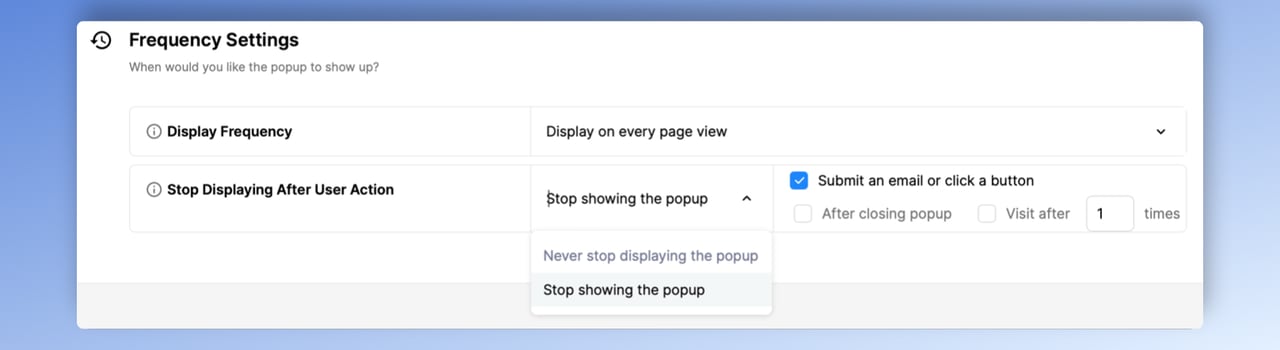
Popupsmart's frequency targeting lets you stop showing popups after a visitor takes action.
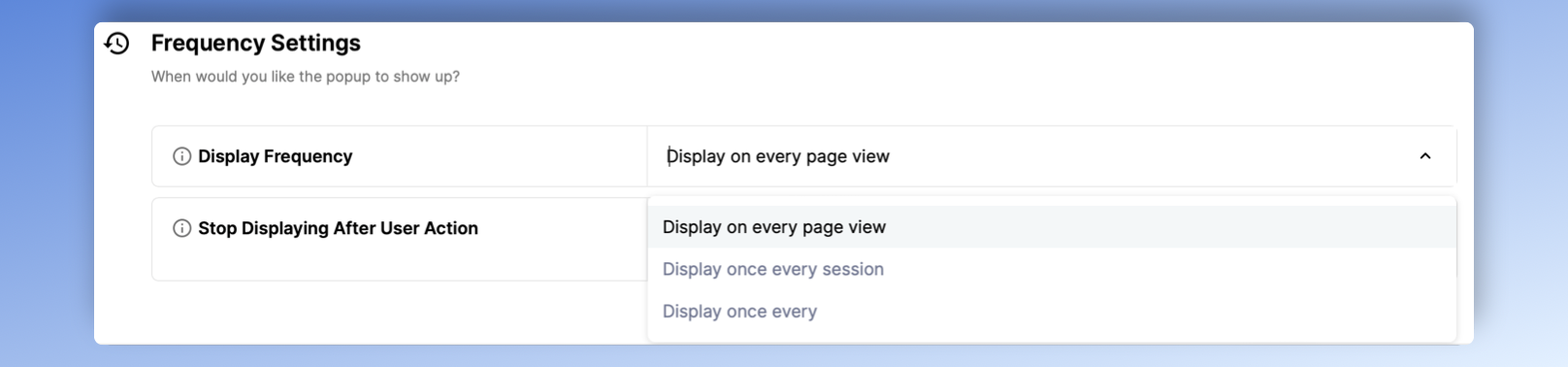
Granular frequency options: per page view, per session, or custom intervals.
In Popupsmart's 2026 data (January 2024 to September 2026; method in the Popupsmart Conversion Benchmark Report), the first two times a visitor sees a popup in a week convert at similar rates (1.33% and 1.22% of displays, pooled). From the third view conversion falls, and from the sixth view it is 0.41%, 31% of the first-view rate. Within the same campaign, showing a popup a second time caused no measurable drop in conversion; the decline begins with the third showing.
Expected impact: fewer wasted displays on visitors who have stopped responding, and a conversion rate that holds up over time instead of the decline from the third view that uncapped campaigns show. Results visible within 7 days.
3. Scroll-Depth Targeting: Reach Visitors Who Are Already Reading
Scroll-depth targeting fires your popup after a visitor scrolls past a set percentage of the page. A visitor who's scrolled 40% of a blog post has read at least the introduction and first few sections. They're engaged enough to consider an offer but haven't finished consuming the content yet. That window is where scroll-based popups perform best.
How to Implement
1. Set the trigger to "After Scrolling X%" in your popup builder. Start at 30-50% for blog posts and content pages. For product pages that are shorter, 25% often works better.
2. Match the scroll threshold to your content structure. If your strongest value proposition is at the 40% mark, trigger the popup right after it. The visitor just saw why your product matters, now you ask them to act.
3. Combine scroll depth with a minimum time-on-page requirement (5+ seconds). This filters out visitors who scrolled quickly to the bottom without reading, which is common on mobile where fast-scrolling is habitual.
4. For mobile visitors, consider a lower scroll threshold than on desktop. Phone visitors scroll faster, so test a lower value rather than copying the desktop setting.
According to Poper's popup best practices guide, displaying a popup after 8–10 seconds or when a user scrolls 30–50% of the page strikes the balance between engagement and reach. Popupsmart's benchmark doesn't publish a scroll-depth comparison, so treat any threshold as a starting point and test it.
Expected impact: most useful on content pages longer than 1,000 words, such as blog posts and resource pages, where a scroll trigger waits for reading instead of the clock. Measurable within 14-21 days at 3,000+ monthly page views.
4. Exit-Intent Detection: Catch Visitors at the Door
Exit-intent popups trigger when a visitor's cursor moves toward the browser's close button or address bar. JavaScript detects the mouseleave event on the document boundary, identifying the exact moment someone decides to leave. Unlike timed or scroll-based triggers, exit-intent fires only at the point of abandonment. You're not interrupting readers; you're making a last offer to someone who was already gone.
How to Implement
1. Set the trigger to "Exit Intent" in your popup campaign settings. Start with medium sensitivity, which Popupsmart's exit-intent guide recommends for most cases. High sensitivity fires on even a slight move toward leaving, which can catch visitors who were only reaching for a bookmark or another tab; low waits until the cursor is close to the close icon.
2. Target returning visitors first. First-time visitors who leave within seconds likely came from a bad search match. Returning visitors who are about to leave represent a genuine re-engagement opportunity.
3. For mobile devices, exit-intent detection doesn't work the same way since there's no mouse cursor. Popupsmart reads a fast upward scroll as exit intent on phones instead, once the campaign is enabled for mobile. As an alternative, the inactivity mode fires when visitors are inactive for a specified period, which catches disengaged mobile users.
4. Your exit-intent offer should be different from your main page CTA. If your page already asks for an email signup, the exit popup should offer something extra: a discount, a lead magnet, or free shipping. Repeating the same ask they already ignored won't work.
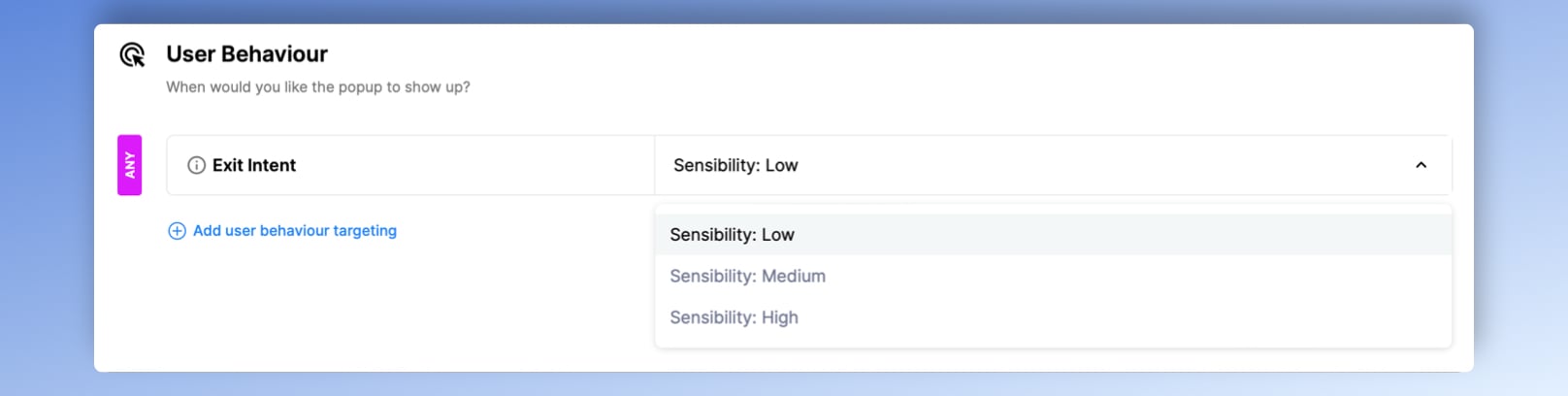
Configuring exit-intent trigger sensitivity in Popupsmart's targeting panel.
Claims that exit popups beat timed ones by a wide margin don't hold up in the larger datasets. In Omnisend's 2025 benchmark, exit-triggered popups converted about 1.8%, below scroll-triggered popups (about 2.1%). Popupsmart's 2026 benchmark finds no statistically reliable advantage either: popups on the most sensitive exit-intent setting converted 1.10% of their displays against 0.78% without exit intent (median campaign), a gap that could be chance. Our exit-intent data covers what that means for your setup.
Expected impact: uncertain, so test it. Exit intent is a last offer to visitors who are leaving, and neither our data nor Omnisend's shows it beating other triggers. Measurable within 14-21 days on sites with 10,000+ monthly visitors. Lower-traffic sites need 30-45 days.
5. Audience-Based Timing: Different Visitors Need Different Triggers
Audience-based timing adjusts when and how popups appear based on who the visitor is, not just what they do on the page. A first-time visitor from a Google search has different intent than a returning customer who came from your email campaign. Treating them identically wastes the targeting data you already have.
How to Implement
1. Segment by visit count. New visitors (first session) should see a softer offer: a content download, newsletter signup, or free resource. Show discount or pricing popups only to returning visitors (2+ sessions) who've demonstrated ongoing interest. New visitors are also the likelier to convert: in Popupsmart's 2026 benchmark, the same popup converts better for new visitors in 75% of campaigns.
2. Segment by traffic source. Visitors from organic search are in research mode, so give them informational offers and let them read first. Visitors from email campaigns already know your brand, so promotional offers and shorter waits fit. In our data, visitors arriving from an email or SMS campaign convert on popups at 1.81% against 0.74% for visitors from organic search.
3. Segment by device. Desktop visitors stay longer per session and engage with more pages. Mobile visitors make quicker decisions and bounce faster. Use shorter delays and simpler popup designs on mobile. In Popupsmart's 2026 benchmark, 63% of popup displays happen on mobile, and the median popup converts 1.02% of its mobile displays against 0.57% on desktop; our mobile vs. desktop popup behavior analysis covers the device split.
4. Use page-level targeting. Show popups only on pages that match the offer. A countdown timer popup promoting a flash sale belongs on product pages, not your About page. A lead magnet popup fits blog posts, not your checkout flow.
5. Segment by page-visit depth. With the "After X Page Visit" trigger, hold your popup until a visitor has browsed a set number of pages this session (3+ is a good start). Someone on their third page is far warmer than a first-page bouncer, so this reserves your best offer for visitors who've already shown they're invested.
In my experience building Popupsmart's targeting engine, separating new and returning visitor campaigns is one of the most dependable changes you can make, and the benchmark backs it: the same popup converts better for new visitors in 75% of campaigns (median gap 0.30 percentage points). Traffic source is the next split. One Shopify merchant, for example, created separate campaigns for organic search traffic (a content offer) and social media traffic (a discount offer); in our data, visitors arriving from social media convert on popups at 1.22% against 0.71% for direct visitors (median campaign).
Expected impact: the clearest audience gap in our data is new visitors, 1.13% against 0.77% when targeted on their own. The wider your traffic mix (organic + paid + social + email), the more a split can matter. Results visible within 14 days.
6. A/B Testing Your Popup Timing: Stop Guessing, Start Measuring
A/B testing popups means running two or more popup timing variants simultaneously, splitting traffic evenly, and measuring which configuration produces higher conversions with statistical confidence. Without testing, every timing decision is a guess. With testing, you find out whether 5-second or 15-second delay works better for your specific audience on your specific pages.
How to Implement
1. Start with your highest-traffic page. You need volume for statistical significance. A page with 500 daily visitors can produce a reliable result in 7-10 days. A page with 50 daily visitors needs 60+ days.
2. Test one variable at a time. If you change the delay AND the offer AND the design, you won't know which change caused the result. Start with timing (5s vs. 15s delay), then test trigger type (scroll vs. time), then test the offer itself.
3. Define your success metric before launching. Is it popup conversion rate (submissions / impressions)? Or is it page-level conversion rate (purchases / total visitors)? A popup that converts at 10% but increases bounce rate by 20% isn't a net win.
4. Run tests for a minimum of 7 days so every day of the week is covered. In our data, weekend visitors show no measurable difference in popup conversion from weekday visitors once each popup is compared with itself, but your traffic mix can still shift by day. Time of day does show up: the same popup converts better in the morning (06:00–11:59 visitor time) than between midnight and 6 a.m. in 69% of campaigns.
5. Use your analytics platform to track secondary metrics during the test. Watch bounce rate, pages per session, and time on site alongside popup conversion rate. The best popup timing configurations improve conversions without damaging overall site engagement.
In a Klaviyo community discussion on popup timing, one member, drawing on dozens of tests they had seen, suggests starting with a 30-second delay on a site where visitors stay about a minute, so the page finishes rendering and visitors can scan it first. The specific optimal delay varies by site, which is exactly why testing matters. There's no universal "best" delay, only the best delay for your audience.
Expected impact: the first test usually tells you the most; subsequent tests produce smaller, incremental gains. Budget 30-60 days for a complete testing cycle across your top 3-5 pages.
Where to Start: Prioritization by Effort and Impact
Not every strategy requires the same investment. Here's how to sequence your implementation based on what we've seen work across Popupsmart customer accounts:
| Priority | Strategy | Effort | Impact | Best For |
|---|---|---|---|---|
| 1 | Time-Delay Triggers (any short wait) | Low | Medium (a lean in our data) | Every site running instant popups |
| 2 | Frequency Capping | Low | High | Sites with returning visitors seeing repeated popups |
| 3 | Exit-Intent Detection | Low | Uncertain (no reliable advantage in our data) | E-commerce and SaaS sites with cart or signup abandonment |
| 4 | Scroll-Depth Targeting | Medium | Medium | Content-heavy sites and blogs with long-form pages |
| 5 | Audience-Based Timing | Medium | High | Sites with mixed traffic sources (organic + paid + email) |
| 6 | A/B Testing Timing | High | High | Sites with 5,000+ monthly visitors ready to optimize |
Start with strategies 1-3. They take under 15 minutes each to set up and produce the fastest results. Once those are running, layer in scroll targeting and audience segmentation. Save A/B testing for after you've implemented the basics, so you have a reasonable baseline to test against.
Start by Not Firing on Page Load, Then Build From There
If you take one thing from this guide: stop showing popups the instant the page loads, and don't spend time hunting for the perfect second. Set a short delay or a behavior trigger on your highest-traffic page today and measure the result for two weeks. In our data waiting is a lean rather than a proven gap, so your own test is what tells you how much it's worth.
Once you've got that baseline, layer in frequency capping (strategy 2) and exit-intent detection (strategy 4). These three strategies together cover the three biggest popup timing mistakes: showing too early, showing too often, and missing the last chance to convert abandoning visitors.
For teams ready to go further, combine audience segmentation with A/B testing to find the exact timing configuration for each visitor segment. The gap between a median popup (0.83% of its displays) and a top-10% one (3.87% or more) comes from these details together, not from the timer alone.
Try Popupsmart free to set up these timing strategies on your site. The builder supports every trigger type covered in this guide, from time delays and scroll depth to exit intent and audience segmentation, with no code required.
Frequently Asked Questions
How Do You Set Optimal Popup Timing?
Start by not firing on page load. In Popupsmart's 2026 benchmark, popups that wait before appearing convert 0.83% of their displays against 0.61% for popups shown the instant the page loads (median campaign), a lean rather than a proven gap, and the length of the wait (0-5 seconds vs 21-60 seconds) made no measurable difference. So pick a short delay that lets the page render, or a scroll or exit trigger, then A/B test it against your current setting on your highest-traffic page. The version with the higher lead rate without increased bounce rate is your winner. Revisit the test quarterly as your traffic mix changes.
What Is a Popup Schedule?
A popup schedule controls when your campaigns are active based on date, time, or event. For example, a Black Friday popup might run November 25-30, a holiday shipping deadline popup might run December 15-20, and your standard email capture popup runs year-round. In Popupsmart, you can schedule popup campaigns to start and stop on specific dates, so seasonal promotions don't overstay their welcome.
What Are Best Practices for Popup Frequency?
Cap repeat views. In Popupsmart's 2026 benchmark, the first two times a visitor sees a popup in a week convert at similar rates (1.33% and 1.22% of displays, pooled); from the third view conversion falls, and from the sixth view it is 0.41%, 31% of the first-view rate. So a cap of two views per visitor per week fits the data, and a popup should stop once the visitor has signed up. Never run more than one popup per page view. If you have multiple active campaigns, set priority rules so only the most relevant one fires per session.
How Does Popup Timing Affect Conversions?
Popup timing affects conversions in two ways: directly (the lead rate of the popup itself) and indirectly (impact on page engagement metrics). The direct effect is smaller than most guides claim: in Popupsmart's 2026 benchmark, popups that wait convert 0.83% of their displays against 0.61% on page load (median campaign), a lean rather than a proven gap, and the delay length made no measurable difference. Where the popup runs moves it more: popups on cart and checkout pages convert 4.57% against 1.07% on the home page. The indirect effect matters too: poorly timed popups that increase bounce rate hurt your popup UX and overall SEO performance.
How Long Are Popups Usually Open?
Not long. In Popupsmart's 2026 data, 71% of visitors who close a popup do so within 5 seconds of it appearing, and 61% of popup leads are submitted within 30 seconds. Design your popup message to communicate the value proposition in under 5 seconds of reading time, which means 15-25 words of headline text. Keep the form short: popups asking for one or two fields convert 0.88% and 0.94% of their displays, against 0.56% for three fields (median campaign).
What changed in this post
The post used to recommend an 8-second delay and said "2026 data favors 6–10 seconds". That table was Omnisend's 2025 benchmark, with two rows misread, and Popupsmart's own 2026 benchmark (January 2024 to September 2026, 28,674 campaigns) finds that waiting before a popup appears is a lean and the delay length makes no measurable difference. The advice now follows that data, and the Omnisend table shows Omnisend's actual figures. We also re-checked every source: the "34.57% after 8 seconds" figure is not on the page it was credited to, the BDOW "6–10 second range" is an 8-second example rather than a finding, the Journal of Interactive Marketing study is described as its abstract states, and a case-study claim that exit popups beat timed ones "by 2-3x" was removed. The per-strategy "expected impact" percentages and a merchant's before-and-after figures had no source on record and were removed, a note card that repeated the 8-second claim was taken out, and the exit-intent sensitivity advice was corrected to match Popupsmart's help center. Added from the benchmark: repeat-view, audience, traffic-source, page-type, time-of-day and close-timing figures. Frequency, exit-intent and device figures first came in on 2026-09-24.
Initial publication.