 ChatGPT
 Perplexity
 Claude
 Grok
Grok Google AI Mode
So, if you have been wondering how to clean your email list without accidentally cutting off valuable subscribers, this guide will walk you through email scrubbing in a practical, calm, no-panic way. Let’s clean the garden without pulling out the flowers.
What Is Email Scrubbing?
Email scrubbing is the process of reviewing, cleaning, and organizing your email list so you are not sending campaigns to invalid addresses, fake signups, inactive subscribers, spam traps, or people who no longer want to hear from you.
In simpler words, it is how you clean your email list before your list starts hurting your email marketing results.
I like to think of email scrubbing as a quiet maintenance habit. It is not the most glamorous part of email marketing, I know. It does not have the sparkle of a new campaign idea or the drama of a launch email. But it is one of those behind-the-scenes jobs that keeps everything else working better.
A scrubbed email list usually includes people who are more likely to:
- Receive your emails successfully
- Open or click your campaigns
- Recognize your brand
- Stay subscribed
- Convert when the timing is right
A messy list, on the other hand, can include contacts that quietly drag your performance down.
| Contact Type | Why It Can Hurt Your Email List |
|---|---|
| Invalid email addresses | They can increase bounce rates. |
| Fake or mistyped emails | They waste space and reduce list quality. |
| Long-term inactive subscribers | They lower engagement signals. |
| Spam traps | They can damage sender reputation. |
| Duplicate contacts | They make reporting and segmentation messy. |
| Unsubscribed users | They should not receive future marketing emails. |
This is why email scrubbing is closely tied to email hygiene. The goal is not just to delete people. The real goal is to understand which contacts are healthy, which ones need re-engagement, and which ones should be removed for the good of your sender reputation.
And honestly, that distinction matters.
Because when people hear “clean email list,” they sometimes imagine a ruthless delete button. But good email list cleaning is more thoughtful than that. It is not about shrinking your audience for the sake of it. It is about making sure your emails go to people who can receive them, want them, or still have a reasonable chance of engaging with them.
So, when I talk about email scrubbing in this guide, I mean a practical mix of:
- Removing invalid or harmful contacts
- Segmenting inactive but potentially valuable subscribers
- Running re-engagement campaigns before deleting people too fast
- Keeping your email database clean from the moment someone signs up
That is the heart of it: fewer ghosts, better signals, cleaner sending.
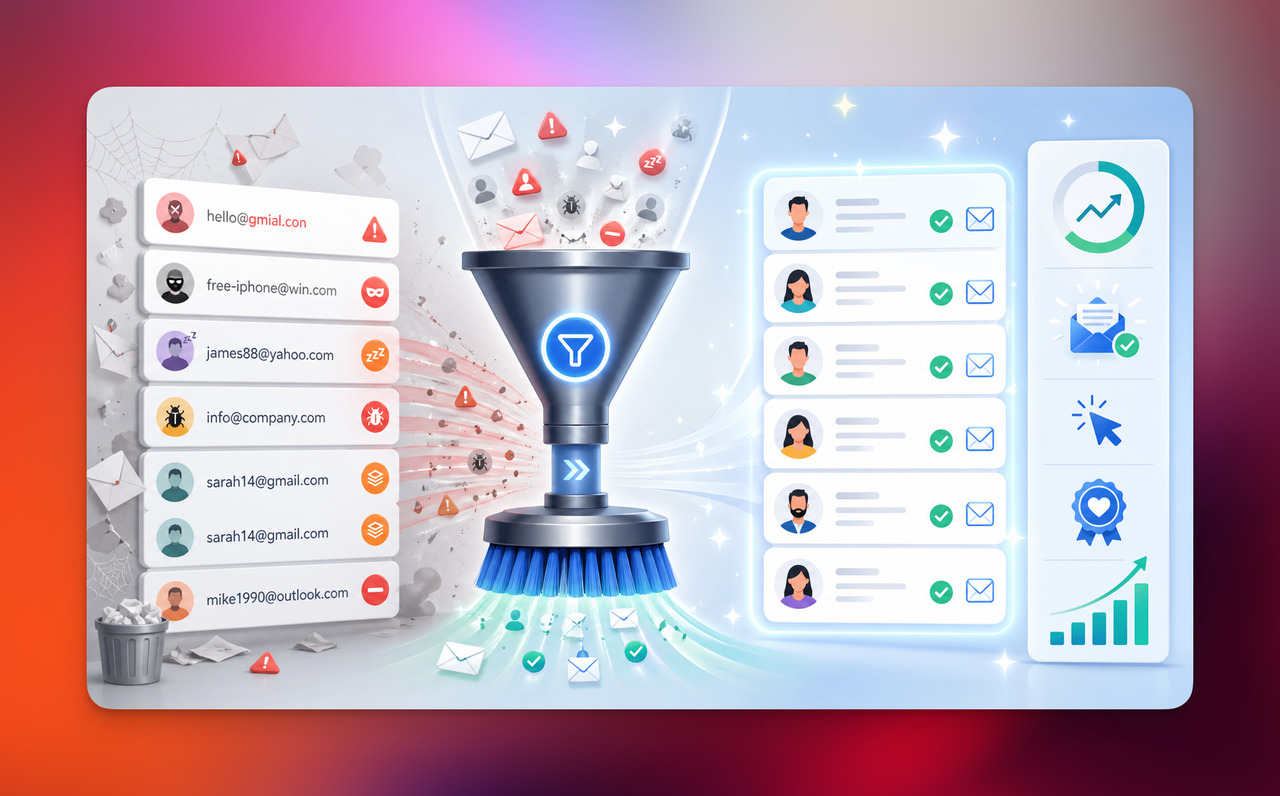
Why Email Scrubbing Matters for Email Marketing
I know “email scrubbing” can sound like one of those technical chores you keep pushing to next week. But in email marketing, list quality quietly shapes almost everything: deliverability, open rates, clicks, conversions, and even how trustworthy your brand looks in the inbox.
A clean email list gives your campaigns a better chance to land where they belong: in front of real people.
An unclean list does the opposite. It sends weak signals to mailbox providers. Too many bounces, spam complaints, or ignored emails can make your future campaigns work harder just to reach the inbox.
According to Google’s email sender guidelines, senders should keep spam rates reported in Postmaster Tools below 0.10% and avoid ever reaching 0.30% or higher. That is a small number, but it says a lot: inbox trust is fragile.
How Email Scrubbing Affects Deliverability
Email deliverability is not only about sending an email. It is about whether that email actually reaches the inbox.
When you clean your email list, you reduce the signals that can make mailbox providers suspicious. That includes hard bounces, invalid addresses, spam traps, and subscribers who have ignored your campaigns for a long time.
Here is the simple version:
| If Your List Has... | It May Lead To... |
|---|---|
| Too many invalid addresses | Higher bounce rates. |
| Too many inactive subscribers | Lower engagement rates. |
| Spam traps or risky contacts | Sender reputation issues. |
| Old, unverified leads | More deliverability problems. |
| Confused or unwilling subscribers | More spam complaints. |
In my experience, email deliverability problems rarely appear out of nowhere. They usually grow slowly, like dust on a shelf. One old import here, one unchecked lead magnet there, one forgotten signup form from two years ago… and suddenly your “big list” is not as strong as it looks.
That is why email list scrubbing is not only a cleanup task. It is a prevention habit.
Why a Bigger List Is Not Always a Better List
This is the part many marketers do not love hearing at first: a larger email list can still perform worse than a smaller, cleaner one.
I get it. Watching your subscriber count go down can feel uncomfortable. It can feel like losing progress. But list size is not the same as list strength.
A list of 10,000 people where only 600 regularly engage may be less valuable than a list of 4,000 people who actually open, click, reply, buy, or remember you.
Here is how I usually think about it:
| Big but Messy List | Smaller but Clean Email List |
|---|---|
| More contacts on paper | More reachable contacts. |
| More bounces and inactive users | Better engagement signals. |
| Harder to understand performance | Cleaner campaign reporting. |
| Higher risk of deliverability issues | Healthier sender reputation. |
| Feels impressive | Works better. |
Email scrubbing helps you stop treating every contact as equally valuable. Some subscribers are active. Some are quiet but still worth nurturing. Some should be re-engaged. Some should be removed.
And that is not a bad thing.
A clean email list is not smaller in the sad sense. It is sharper. It gives your emails more room to breathe, more chances to be seen, and more honest data to learn from.
How to Clean Email List Step by Step
If you are wondering how to clean your email list without making a mess of your data, I would not start with deleting contacts right away.
That is usually the biggest trap.
A good email scrubbing process is more like sorting a bookshelf than throwing books into a fire. Some contacts should go. Some need a new segment. Some need one last chance to raise their hand.
Here is the step-by-step process I’d use. 👇
1. Find Invalid, Fake, or Misspelled Email Addresses
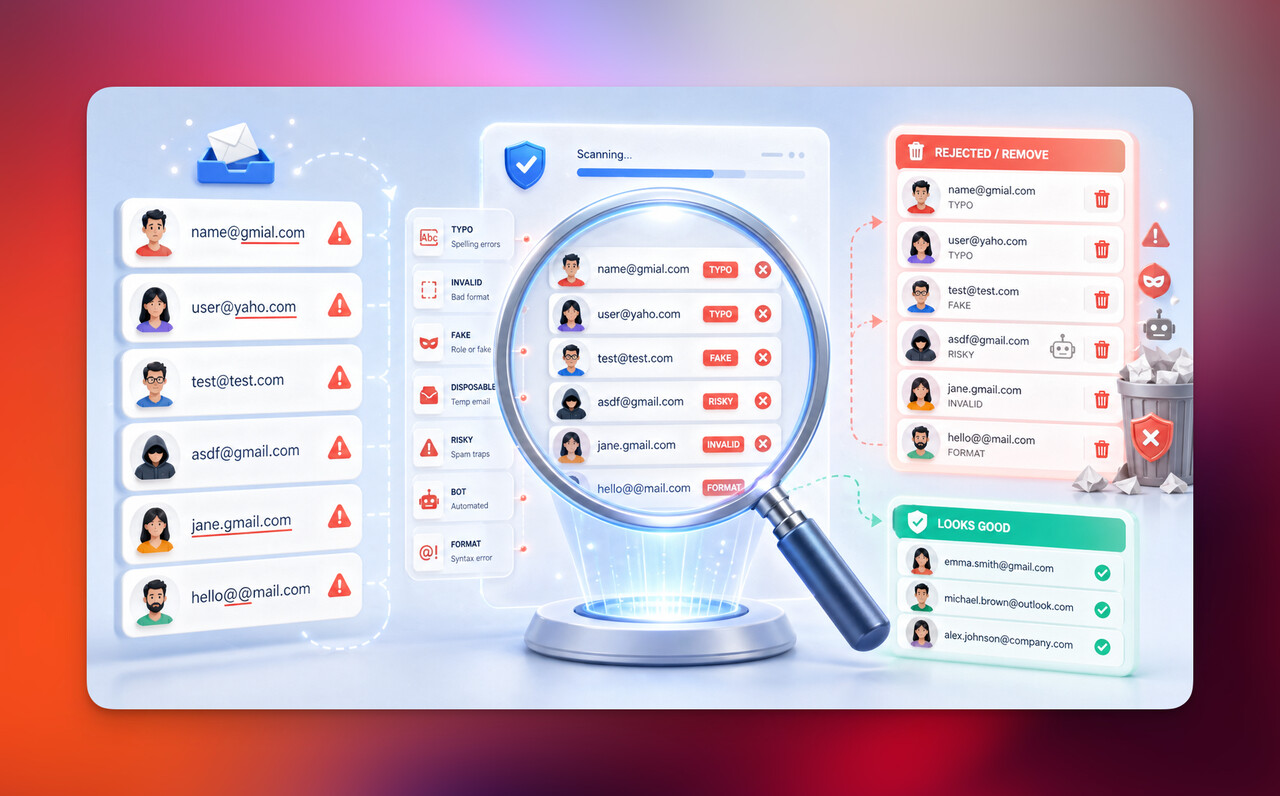
Start with the obvious list quality issues first.
These are usually email addresses that were typed incorrectly, submitted carelessly, or added through old forms without enough validation.
Common examples include:
- [email protected]
- [email protected]
- [email protected]
- [email protected]
- addresses with missing symbols or broken formatting
- clearly fake entries from bots or spam submissions
These contacts do not help your email marketing. They only add noise.
If you use an email validation or email verification tool, this is where it can help you identify addresses that are invalid, disposable, risky, or unlikely to receive your emails.
At this stage, your goal is simple: remove contacts that clearly cannot receive your campaigns.
2. Remove Hard Bounces
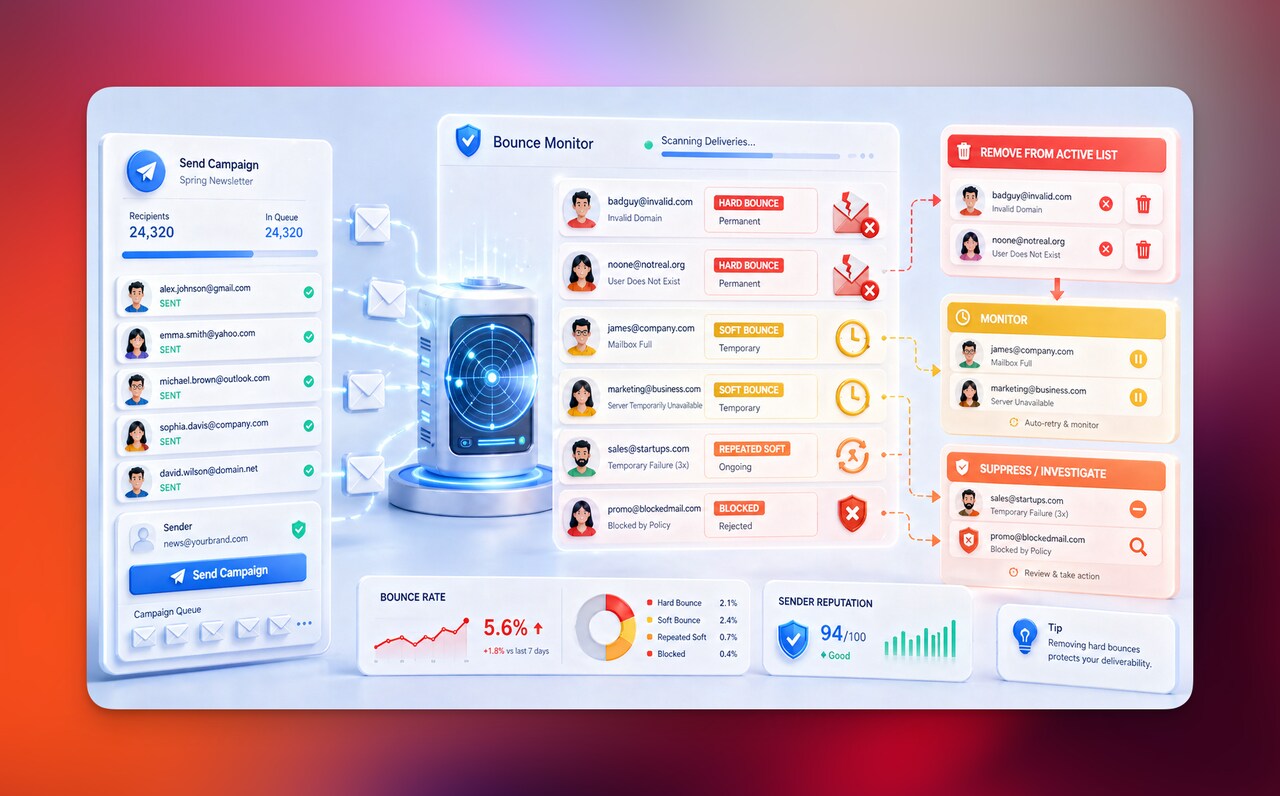
A hard bounce means your email could not be delivered for a permanent reason. Usually, the address does not exist, the domain is invalid, or the recipient server rejects it permanently.
Unlike a soft bounce, which can happen because of a temporary issue, a hard bounce is a strong sign that the contact should not stay on your active sending list.
| Bounce Type | What It Usually Means | What I’d Do |
|---|---|---|
| Hard bounce | Permanent delivery failure. | Remove from active list. |
| Soft bounce | Temporary delivery issue. | Monitor before removing. |
| Repeated soft bounce | Ongoing delivery problem. | Segment or suppress. |
| Blocked email | Server or policy rejection. | Investigate sender reputation. |
Most email marketing platforms automatically suppress hard-bounced contacts, but I still think it is worth checking. Automation is helpful, but it is not a replacement for knowing what is happening inside your list.
If your bounce rate keeps climbing, your email list hygiene probably needs attention.
3. Identify Inactive Subscribers
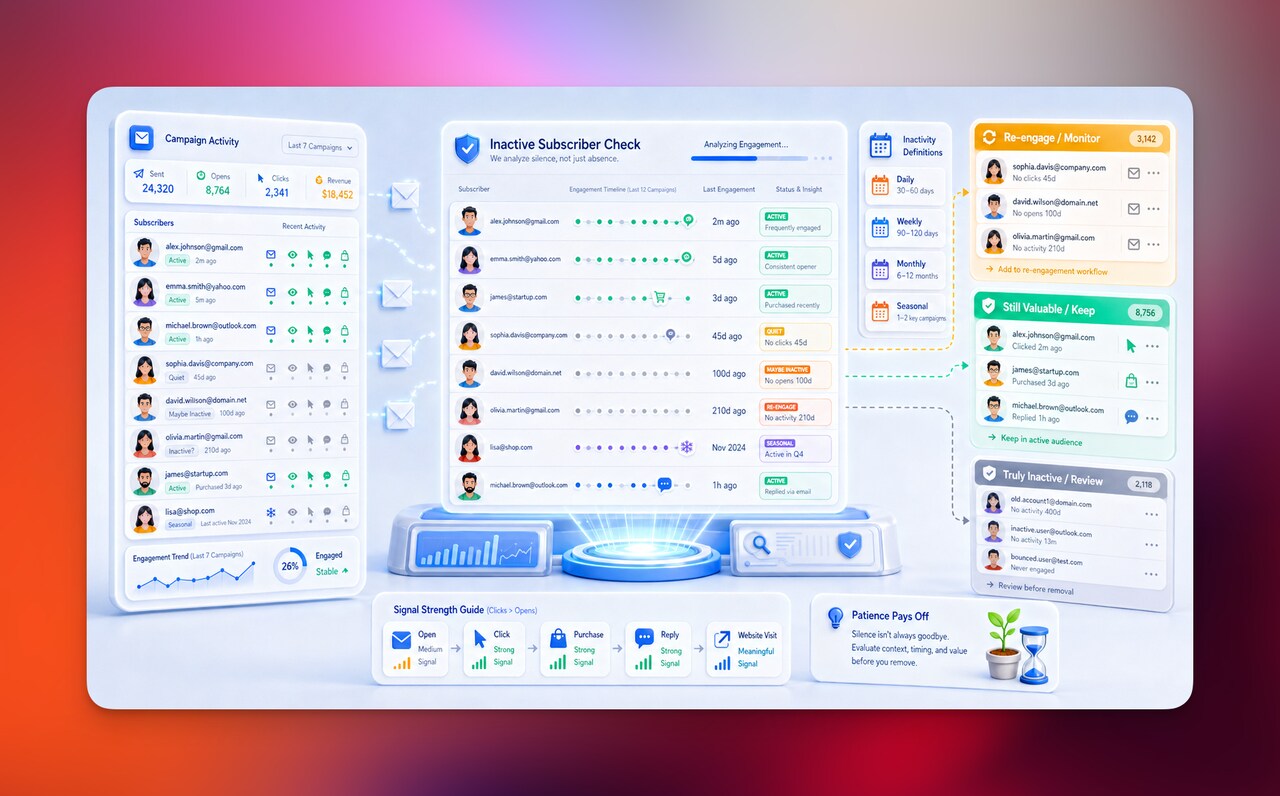
Now we move from “bad data” to “quiet people.”
Inactive subscribers are not always worthless. This is where email scrubbing needs a little patience and judgment.
Someone may not have opened your last five emails because:
- your timing was off
- the subject lines did not interest them
- they only care about seasonal offers
- they read without clicking
- privacy changes made open tracking less reliable
- they are still interested, just not urgently
So I would avoid treating all inactive subscribers the same.
Instead, define inactivity based on your business and email frequency.
| Sending Frequency | Possible Inactive Subscriber Definition |
|---|---|
| Daily emails | No opens or clicks in 30–60 days. |
| Weekly emails | No opens or clicks in 90–120 days. |
| Monthly emails | No opens or clicks in 6–12 months. |
| Seasonal emails | No engagement across 1–2 key campaigns. |
For most brands, clicks are a stronger signal than opens. Opens can be affected by privacy features and inbox behavior, but clicks usually show clearer intent.
So before you remove inactive subscribers, ask: have they clicked, purchased, replied, visited from email, or engaged in any meaningful way?
That answer matters.
4. Run a Re-Engagement Campaign Before Deleting Contacts
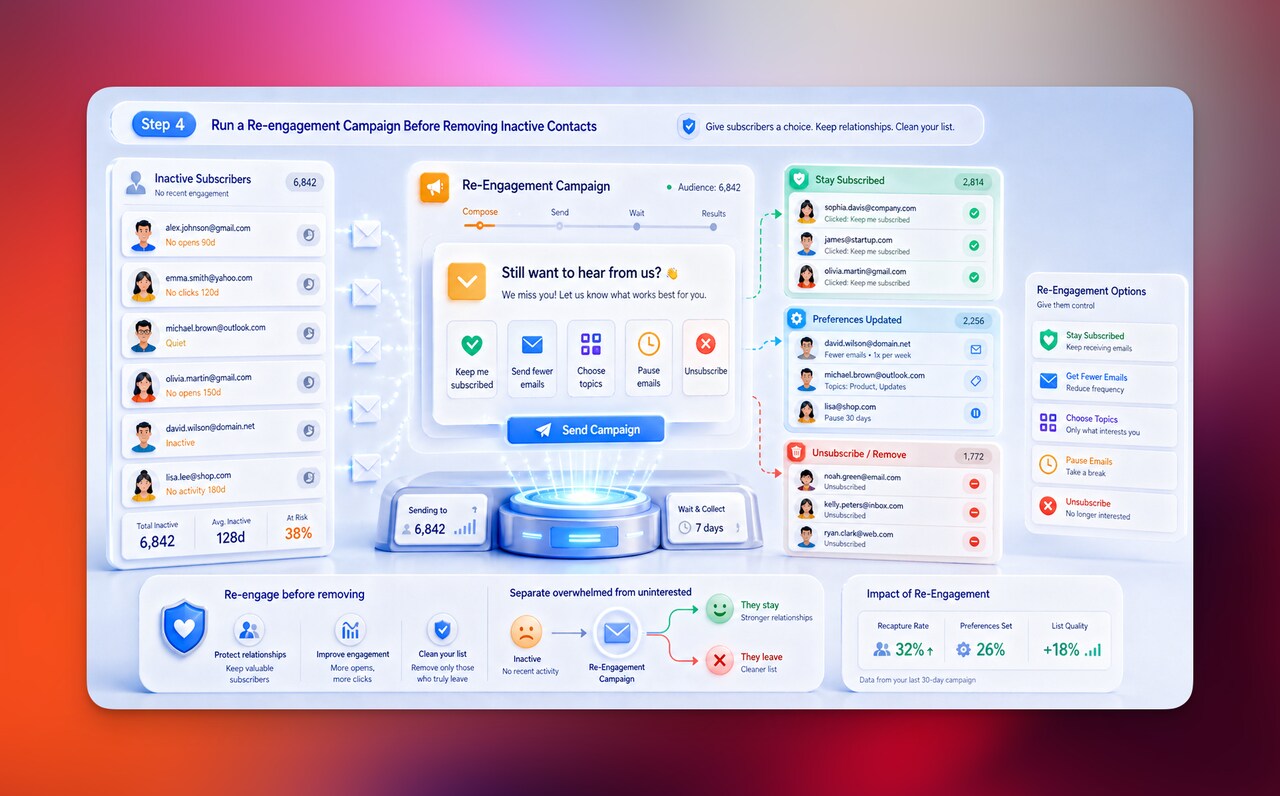
Before you remove inactive subscribers, give them a graceful door back in.
A re-engagement campaign is your “still interested?” moment. It lets people confirm whether they want to stay on your email list.
You do not need to overcomplicate it. In fact, I think simple works better here.
A good re-engagement email might say:
- “Still want to hear from us?”
- “Should we keep sending you these?”
- “Want to update what you receive?”
- “Click here to stay on the list.”
- “No action needed if you’d rather stop receiving emails.”
The tone should feel human, not desperate.
| Option | Why It Helps |
|---|---|
| Stay subscribed | Keeps genuinely interested people. |
| Get fewer emails | Reduces fatigue. |
| Choose topics | Improves relevance. |
| Pause emails | Keeps the relationship open. |
| Unsubscribe | Protects trust and list quality. |
In my experience, this step is worth doing because it separates “not interested anymore” from “still interested, but overwhelmed.”
And those are two very different subscribers.
| Segment | How to Treat Them |
|---|---|
| Past customers with low email engagement | Send fewer, more relevant campaigns. |
| Leads from high-intent pages | Nurture with educational content. |
| Seasonal buyers | Send around peak buying periods. |
| Webinar or demo leads | Use product-focused follow-ups. |
| Blog subscribers | Send helpful guides, not hard sells. |
This is one of my favorite parts of email scrubbing because it makes the process smarter. You are not just cleaning your email list. You are learning what different people need from you.
Sometimes, the problem is not that subscribers are bad. Sometimes, the list is just too broad.
6. Remove Spam Traps and Risky Contacts
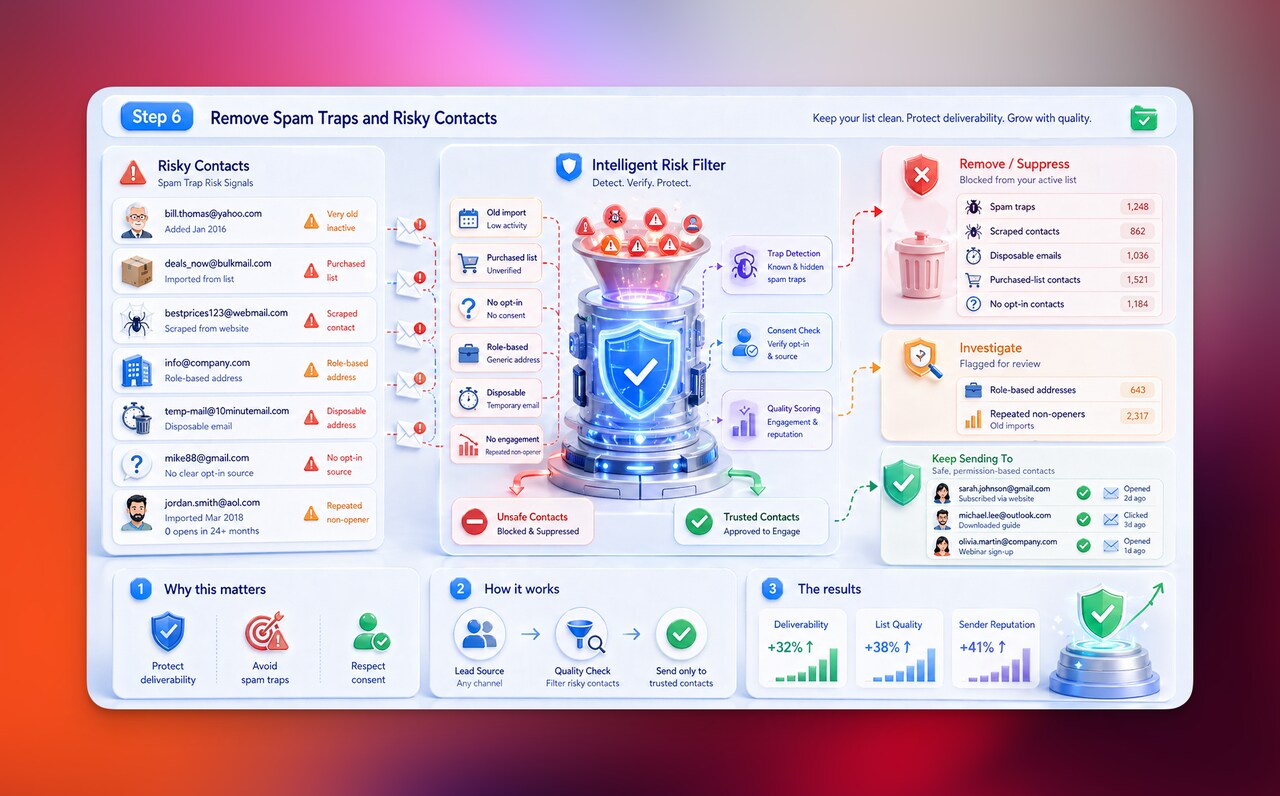
Spam traps are email addresses used to catch poor sending practices. They can appear on your list through old databases, purchased lists, scraped contacts, abandoned addresses, or low-quality lead sources.
And yes, they are as unpleasant as they sound.
You usually cannot identify every spam trap manually, but you can reduce the risk by removing contacts that show warning signs.
Risky contacts may include:
- very old contacts with no engagement
- addresses from purchased or rented lists
- scraped contacts
- role-based addresses like info@, admin@, or sales@
- disposable email addresses
- contacts with no clear opt-in source
- repeated non-openers from old imports
This is also why I do not recommend buying email lists. Aside from the trust problem, they can seriously damage your deliverability.
Consent matters. Relevance matters. A clean list starts before the first email is ever sent.
7. Update Subscriber Preferences
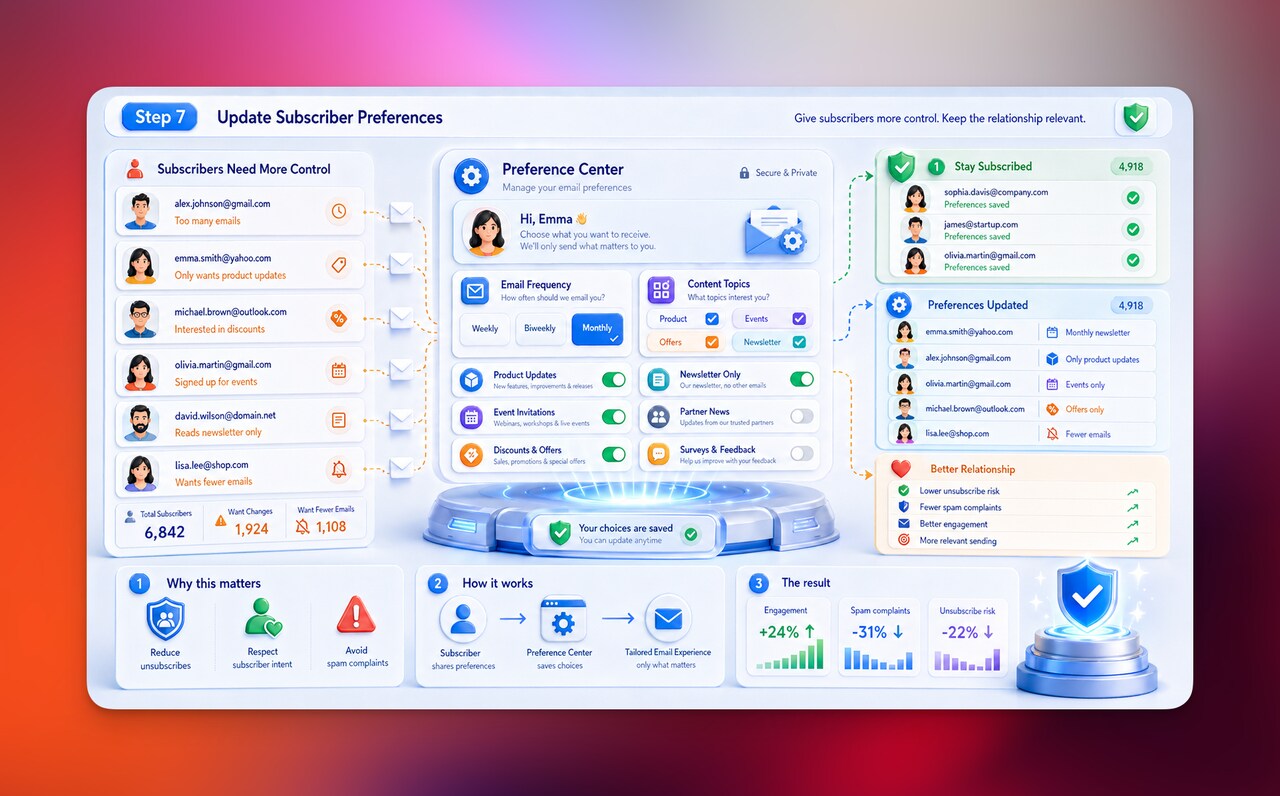
Email scrubbing should not only remove people. It should also give subscribers more control.
Sometimes people unsubscribe because they do not hate your brand. They just do not want that many emails. Or they only care about one topic. Or they signed up for one type of content and started receiving something else.
A preference center can help you keep good subscribers without forcing them into an all-or-nothing choice.
You can let people choose:
- email frequency
- content topics
- product updates
- event invitations
- discounts and offers
- newsletter-only emails
This is one of those small email hygiene habits that feels polite and performs well.
Because when subscribers can shape the relationship, they are less likely to hit spam, ignore every email, or leave forever.
A clean email list is not only technically clean. It also respects what people actually want. That is the part I care about most.
Email Scrubbing vs. Email Verification: What’s the Difference?
Email scrubbing and email verification are closely related, but they are not the same thing.
I see people mix these two up a lot, and honestly, I get why. Both help you clean your email list. Both can improve email deliverability. Both are part of good email list hygiene.
But they solve slightly different problems.
Email verification checks whether an email address is valid, deliverable, and formatted correctly.
Email scrubbing is broader. It looks at the overall health and usefulness of your email list, including invalid addresses, inactive subscribers, risky contacts, engagement patterns, spam complaints, unsubscribes, and segmentation.
Here is the easiest way to see the difference:
| Process | What It Checks | Main Goal |
|---|---|---|
| Email verification | Is this email address valid and deliverable? | Remove or flag bad addresses. |
| Email scrubbing | Is this contact still healthy, useful, safe, and relevant? | Improve list quality and campaign performance. |
So, email verification is usually one part of the email scrubbing process.
Think of it like this:
Email verification tells you, “Can this person technically receive your email?”
Email scrubbing asks, “Should this person still be on this active email list?”
That second question is where things get more interesting.
Because a contact can have a valid email address and still hurt your email marketing performance.
For example:
| Contact Situation | Verification Result | Scrubbing Decision |
|---|---|---|
| Valid address, active reader | Valid | Keep. |
| Valid address, no engagement for 18 months | Valid | Re-engage or segment. |
| Invalid address | Invalid | Remove. |
| Valid address, repeated spam complaints | Valid | Suppress. |
| Valid address, purchased list contact | Valid | Remove or avoid sending. |
| Valid address, old customer with seasonal interest | Valid | Segment carefully. |
This is why I would not rely on email verification alone.
It is helpful, especially when you are importing a list, cleaning old data, or checking new leads before they enter your automation. But it does not tell the full story.
A verified email list can still be messy if it is full of people who never engage, never consented properly, or no longer care about your emails.
A scrubbed email list looks at the human side too: behavior, interest, permission, timing, and relevance.
And that is where better email marketing usually begins.
Signs Your Email List Needs Cleaning
Sometimes your email list tells you it needs attention before things get really messy. You just have to know where to look.
In my experience, email list cleaning becomes much easier when you treat these signs as early warnings, not emergencies. A clean email list is not something you fix once and forget. It is something you keep listening to.
Here are the biggest signs your email list needs cleaning. 👇
High Bounce Rates
If your emails are bouncing more than usual, that is one of the clearest signs your email list needs scrubbing.
A bounce means your email was not delivered. A few bounces are normal, especially if your list is growing. But when bounce rates keep rising, you may have too many invalid email addresses, outdated contacts, fake signups, or old leads sitting in your database.
There are two main types of bounces:
| Bounce Type | What It Means | What To Do |
|---|---|---|
| Hard bounce | The email cannot be delivered permanently. | Remove or suppress the contact. |
| Soft bounce | The email cannot be delivered temporarily. | Monitor before removing. |
| Repeated soft bounce | Temporary issue keeps happening. | Segment, suppress, or investigate. |
| Sudden bounce spike | Something changed in list quality or sending setup. | Review recent imports, forms, and campaigns. |
A high bounce rate can hurt email deliverability because it tells mailbox providers that your list may not be well maintained.
According to Mailchimp, a hard bounce often happens when an email address does not exist, a domain name does not exist, or the recipient email server has completely blocked delivery.
So if your bounce rate starts climbing, do not ignore it. It is usually your list waving a little red flag. 🚩
Low Open and Click Rates
Low engagement is another strong sign that your list may need cleaning.
Of course, not every low open rate means your list is bad. Your subject line may have missed the mark. Your timing may have been off. Your offer may not have been relevant enough.
But if your open rates and click through rates are dropping campaign after campaign, it may mean your email list has too many inactive subscribers or contacts who are no longer interested.
Here is how I usually read the signals:
| Engagement Signal | What It Might Suggest |
|---|---|
| Low opens | Subscribers may not recognize you, care about the topic, or see your emails. |
| Low clicks | The content or offer may not match subscriber intent. |
| No engagement for months | The contact may need re-engagement or segmentation. |
| High opens but low clicks | Subject line works, but email content or CTA may need improvement. |
| Low engagement from one source | A specific signup form or lead source may be low quality. |
Clicks are especially important because they show more active interest than opens.
Since Apple’s Mail Privacy Protection can affect how opens are measured, I would avoid making email scrubbing decisions based on open rates alone. Apple explains that Mail Privacy Protection can hide IP addresses and prevent senders from learning whether a user opened an email.
That does not mean open rates are useless. It just means they need context.
If someone has not opened, clicked, purchased, replied, or visited from email in a long time, they probably deserve a place in your inactive segment.
More Spam Complaints
Spam complaints are one of the most serious signs that your list needs attention.
A spam complaint happens when someone marks your email as spam instead of unsubscribing or ignoring it. That is a much louder signal than a low open rate.
And inbox providers pay attention to it.
As I mentioned earlier, Google recommends keeping spam rates reported in Postmaster Tools below 0.10% and avoiding rates of 0.30% or higher.
If your spam complaints are increasing, ask yourself:
- Did these subscribers clearly opt in?
- Are we sending more often than expected?
- Did the content change suddenly?
- Are unsubscribe links easy to find?
- Are old contacts receiving emails after a long silence?
- Did we import contacts from a questionable source?
In my opinion, spam complaints are not just a deliverability issue. They are also a trust issue.
People usually mark emails as spam when they feel surprised, annoyed, confused, or trapped. That is why good email scrubbing should also include reviewing consent, frequency, and expectations.
Poor Inbox Placement
You can have a campaign that is technically “sent” and still not really reach people.
That is the painful little difference between delivery and deliverability.
If more of your emails are landing in spam or promotions folders, or if engagement suddenly drops without a clear content reason, poor inbox placement may be part of the problem.
A messy list can contribute to this because mailbox providers look at signals like:
- bounce rates
- spam complaints
- engagement
- sending consistency
- list quality
- authentication setup
- recipient behavior
Email scrubbing will not fix every deliverability issue by itself. You may also need to review authentication, sending domain health, content quality, and frequency.
But cleaning your email list is still one of the first places I would look, because list quality affects so many of those signals.
Too Many Inactive Subscribers
Every email list has inactive subscribers. That is normal.
People change jobs. They switch inboxes. They lose interest. They sign up for one thing and never come back. Sometimes they still like your brand, but not enough to read every email.
The issue is not having inactive subscribers.
The issue is letting them pile up forever.
| Inactive Subscriber Type | Best Next Step |
|---|---|
| Recently inactive | Keep monitoring. |
| Inactive but purchased before | Segment and send less often. |
| Inactive but high-intent lead | Try a focused re-engagement campaign. |
| Inactive for 6–12+ months | Re-engage, then suppress if no response. |
| Inactive with no clear opt-in source | Remove or suppress. |
| Inactive from old imported list | Clean carefully before sending again. |
This is where email scrubbing becomes less about vanity metrics and more about honest audience health.
A list full of silent subscribers can make your campaign data feel foggy. You cannot clearly tell whether your message failed, your offer was weak, or your audience was simply not there anymore.
Cleaning your email list helps clear that fog.
And as someone who cares about words, I’ll say it this way: your emails need readers, not just recipients.
How to Keep Your Email List Clean After Scrubbing
Cleaning your email list once is helpful. Keeping it clean after that is where the real magic happens.
Because if the same low-quality leads, fake emails, inactive subscribers, and unclear opt-ins keep entering your database, email scrubbing turns into a loop. You clean the list, it gets messy again, you clean it again, and the cycle continues.
I would rather fix the source.
The best way to keep a clean email list is to be more intentional about how people subscribe in the first place. That means your forms, popups, lead magnets, checkout opt-ins, and newsletter CTAs should attract people who actually understand what they are signing up for.
Here are a few simple habits that help:
- Use clear signup copy so people know what they will receive.
- Avoid vague lead magnets that attract random, low-intent subscribers.
- Add email validation to reduce fake or mistyped addresses.
- Use double opt-in if your list quality needs extra protection.
- Segment new subscribers based on where they signed up.
- Make unsubscribe and preference options easy to find.
- Review lead sources regularly to spot low-quality forms or campaigns.
This is also where a tool like Popupsmart can help. After email scrubbing, your goal should not be “collect as many emails as possible.” It should be “collect better emails from the right visitors.”
With Popupsmart, you can create targeted popups and forms that appear based on visitor behavior, page URL, device, traffic source, timing, or exit intent. So instead of showing the same generic email popup to everyone, you can match the offer to the visitor’s context.
For example:
| Situation | Popupsmart Popup Idea |
|---|---|
| Visitor reading a blog post | Show a relevant newsletter or guide popup. |
| Visitor about to leave a product page | Show an exit-intent offer. |
| Returning visitor | Show a more personalized signup message. |
| Mobile visitor | Show a mobile-friendly popup experience. |
| Visitor from a specific campaign | Show a campaign-specific form or offer. |
That kind of targeting helps you build a cleaner email list from the beginning because subscribers are entering through more relevant, intentional paths.
And when you connect Popupsmart with your email marketing platform, you can send new leads into the right lists or segments instead of dropping everyone into one big, messy bucket.
To me, this is the healthiest way to think about list growth: first, clean your email list with proper email scrubbing. Then, improve the way new subscribers enter your world.
Because a good list is not built only by removing bad contacts.
It is built by attracting better ones.
Final Thoughts on Email Scrubbing
Email scrubbing is not about making your list look smaller. It is about making your email marketing work better.
A clean email list gives you clearer data, healthier deliverability, fewer bounces, and a better chance of reaching people who actually want to hear from you. And honestly, that is the audience worth protecting.
In my experience, the best way to think about email list cleaning is not as a one-time rescue mission. It is more like regular maintenance. You check your list, remove what clearly should not be there, re-engage the quiet people, segment the valuable subscribers, and keep your signup sources clean from the beginning.
Because a strong list is not just built by collecting more email addresses.
It is built by respecting the people behind those addresses. 💌
Frequently Asked Questions About Email Scrubbing
1. Does email scrubbing delete subscribers permanently?
Not always. Email scrubbing can mean deleting contacts, but it can also mean suppressing, segmenting, or moving subscribers into a re-engagement flow. I would permanently delete contacts that are clearly invalid, fake, duplicated, risky, or collected without proper consent, but I would segment inactive yet potentially valuable subscribers before removing them completely.
2. What is the difference between cleaning and scrubbing an email list?
Email list cleaning and email scrubbing are often used together, but I see email scrubbing as the broader process. Cleaning usually focuses on removing invalid, bounced, fake, or duplicate contacts, while scrubbing also looks at inactive subscribers, spam complaints, risky contacts, engagement patterns, and segmentation decisions.
3. Can email scrubbing hurt my email list size?
Yes, email scrubbing can reduce your visible list size, but that is not always a bad thing. If you remove invalid addresses, hard bounces, spam traps, fake signups, and subscribers who never engage, your list may look smaller, but it becomes healthier, more accurate, and more useful for real email marketing performance.
4. Should I scrub my email list before a big campaign?
Yes, I would clean your email list before a major campaign, product launch, seasonal sale, or important newsletter push. Checking invalid addresses, hard bounces, inactive contacts, old imports, and risky segments before a large send can help reduce bounce rates and give your campaign a better chance of reaching the inbox.
5. How do I know which inactive subscribers to keep?
I would not judge inactive subscribers by opens alone. Look at stronger context like past purchases, previous clicks, signup source, lifecycle stage, website activity, and form intent; for example, a past customer who has been quiet for a few months may still be worth keeping in a quieter segment, while an old imported contact with no clear opt-in and no engagement for a year is a stronger removal candidate.
- You might also like:
- 60+ Types of Popups for Every Goal and Beyond
- Top 13 Popup Use Cases To Increase Conversions