ChatGPT
 Perplexity
 Claude
 Grok
Grok Google AI Mode
They come from real brands across SaaS, e-commerce, and DTC. Each teardown shows the exact hero copy, CTA placement, social proof, and visual choice that earns the click before a visitor scrolls. You'll get a pattern checklist, common mistakes, what Google says about the first screen, and a testing playbook by the end.
What is above the fold?
Above the fold is everything a visitor sees on a web page before scrolling. The term comes from print newspapers, where the top half of the folded front page had to sell the paper on the newsstand; on a screen, the fold is the bottom edge of the browser window, so it sits in a different place on every device, window size and zoom level.
Newspaper editors stacked the most important headline, the strongest photo, and the masthead in the top half of the front page so the story sold itself from a newsstand rack. The page literally folded in the middle, and the half facing up had to do all the work.
The web borrowed the term from print, and early web designers crammed every sign-up form, value prop, and trust badge into the first screen of a desktop monitor. They had a reason. In 1997, Jakob Nielsen wrote in Changes in Web Usability Since 1994 that in his early studies only 10% of users would scroll a navigation page to see links below the first screen, and that by then most users scrolled when they visited a long home page.
That number has shifted a lot since. People scroll now, on every device. But the first viewport is still where the visitor decides whether to keep reading or close the tab.
Today, "the fold" isn't a fixed pixel height. It's whatever shows on the visitor's screen, which depends on device, orientation, browser chrome, and zoom level. The homepages in this post were checked in a 1440 × 900 laptop window, and the mobile notes come from a 390 × 844 phone viewport. Your hero has to work in all of them. Some marketers call this first screen the top of the fold; it's the same thing.
In display advertising the phrase has a second meaning: an ad slot placed where it's visible without scrolling. How much of the first screen goes to ads is also what Google's page layout change looked at, as the SEO section below shows.
Why above the fold matters in 2026
People spend most of their attention on the first screen, even though they scroll. In its 2018 eyetracking study of scrolling and attention, Nielsen Norman Group found that users spent about 57% of their page-viewing time above the fold and 74% in the first two screenfuls. In its 2010 study the above-the-fold share had been 80%.
That 2015 analysis comes from The Fold Manifesto, where Nielsen Norman Group also makes the point that matters for design: users do scroll, but only if what's above the fold looks promising enough. The first screen decides whether the rest of the page gets read.
Heroes that work usually have one thing in common. The visitor knew, within a heartbeat, what the product does and what to do next. When that's clear, the visitor is invested enough to scroll. When it's not, you get a bounce, and your retargeting budget pays for nothing.
People still argue that the fold is dead. It isn't. Scroll behavior changed, but the cost of a bad first impression got worse, not better, because attention is more contested than ever.
Key elements of effective above the fold sections
The above the fold sections in this post share a small set of ingredients. Every example in the next section uses some mix of them.
• A clear value proposition: One sentence that names the product, the audience, and the outcome. If a stranger can't tell what you sell after reading the headline once, rewrite it. "Inventory management for restaurants that hate spreadsheets" beats "The future of restaurant tech." These unique selling proposition examples show the same idea in one line.
• A primary CTA: One button, in the dominant brand color, with action-led copy ("Start free," "Get a demo," "Shop the sale"). Not three buttons. Not a button plus a phone number plus a chat widget all yelling at once. Decision fatigue starts before the visitor scrolls.
• A hero visual that does work: A product screenshot, a real customer photo, a short looping video, or an annotated UI shot. Stock photography of people in suits shaking hands does not count. The visual should show what the product looks like or what life with the product looks like.
• Navigation that matches intent: Top-level links should reflect the visitor's likely next step (Pricing, Product, Customers), not your internal org chart (Solutions, Resources, Company).
• Social proof, not vanity metrics: A logo wall of recognizable customers, a star rating with the review count, or a one-line quote from a named customer. "Trusted by industry leaders" is invisible. "Used by 12,400 Shopify stores" is concrete.
• Trust signals where they reduce friction: A G2 badge near a SaaS pricing CTA, a money-back guarantee near an e-commerce purchase button, free-shipping copy on a DTC hero. Place trust where doubt happens, not in a footer nobody reads. Our guide to using e-commerce trust badges covers where each badge earns its place.
• Scarcity or urgency, used sparingly: Live order counts, low-stock notes, sale countdowns. Real urgency converts. Fake urgency that resets every visit kills trust on the second visit, so don't fake it. The same rule holds for countdown timer popups.
• Mobile-first sizing: Design the hero for a phone held upright first. If your headline, CTA, and one visual element fit in that first screen, you're safe. Then expand for desktop.
20 above the fold examples from live homepages
Here are the 20 brand examples. They span SaaS, e-commerce, fashion, food, automotive, and tooling. Each section explains what the brand does above the fold, why the choice works in context, and the takeaway you can borrow tomorrow.
Every screenshot was taken on 10 October 2026 in a 1440 × 900 browser window, as a first-time visitor with no account. Cookie banners and country pickers were closed first, because they depend on where the visitor is. Melula's homepage hadn't changed, so its earlier screenshot stays. Three sites (EyeBuyDirect, Tesla, Walmart) blocked the automated visit, so their sections describe the earlier capture, in the past tense.
| # | Brand | Category | Above the fold in October 2026 | Main call to action |
|---|---|---|---|---|
| 1 | Ahrefs | SaaS | Promo band for a new product above the hero | Get Started (promo), Sign up (nav) |
| 2 | Allbirds | DTC footwear | Split lifestyle photo, two shopping paths | Shop Men, Shop Women |
| 3 | Apple | Consumer tech | One product on black, two buttons | Learn more, Buy |
| 4 | Bobo's | Packaged food | Announcement of a new way to shop | Learn More, Find Stores |
| 5 | Calvin Klein | Fashion | Sale panel over a brand video | Shop Women, Shop Men, Shop Kids |
| 6 | Dyson | Home appliances | Deal hero with a live countdown | Shop now |
| 7 | EyeBuyDirect | Eyewear | Earlier capture: discount code beside a lifestyle photo | Shop now |
| 8 | Fomo | SaaS | Illustration of social proof in real life | Start 14-day trial |
| 9 | Fossil | Watches and accessories | Video hero with a watch on the wrist | Shop His, Shop Hers |
| 10 | HubSpot | SaaS | Platform promise with two paths | Get a demo, Get started free |
| 11 | Instatus | SaaS | Downtime headline, three-line product summary | Start free |
| 12 | Kylie Cosmetics | Beauty | Product-led fragrance hero | shop now |
| 13 | Little Caesars | Food delivery | Order starter above a priced offer | Pickup, Delivery, Order now |
| 14 | Melula | Kids' fashion | Unchanged minimal hero | Visit our shop |
| 15 | Oskar Gydell | Jewelry | Wrist close-up with currency selector | Collection button |
| 16 | Popupsmart | SaaS | Looping product demo next to the headline | Get Popupsmart Free |
| 17 | Shopify | SaaS | Video of merchants, rotating headline | Start for free |
| 18 | Tesla | Automotive | Earlier capture: one car, two buying paths | Custom Order, Existing Inventory |
| 19 | Walmart | Retail | Earlier capture: dense deal layout | Several department paths |
| 20 | Zapier | SaaS | Product animation under a two-button sign-up | Start free with email, Start free with Google |
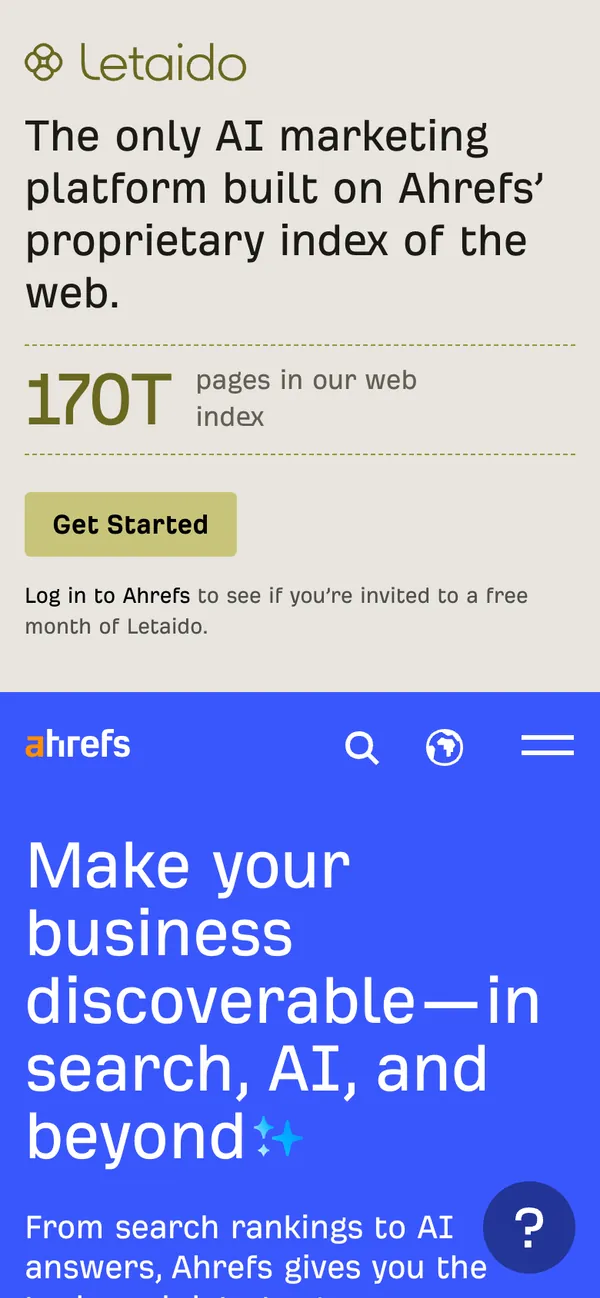
1. Ahrefs
Ahrefs is an all-in-one SEO platform built around backlink and keyword data, and it now pitches search and AI visibility together. Its homepage changed a lot since this post's first edition, and the October 2026 version shows what a promo band costs above the fold.
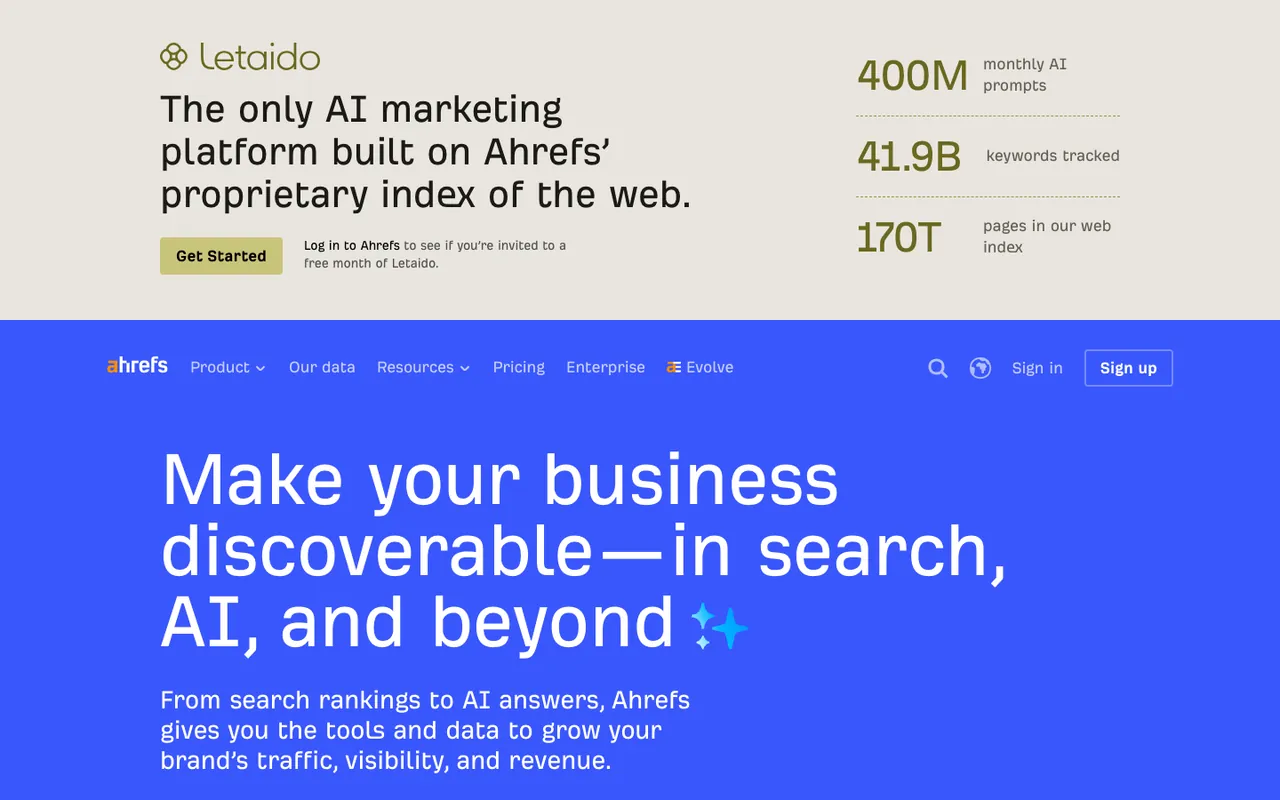
What it does: A beige band sits above Ahrefs' own navigation and takes the top 360 pixels. It introduces Letaido, "the only AI marketing platform built on Ahrefs' proprietary index of the web," with a "Get Started" button and three big numbers: 400M monthly AI prompts, 41.9B keywords tracked, 170T pages in its web index. Below it, the royal-blue Ahrefs hero keeps its signature color and a headline in a font size you can read from across the room, about making your business discoverable "in search, AI, and beyond." The subhead promises the tools and data to grow traffic, visibility, and revenue.
Why it works: The blue is instantly Ahrefs, and the headline names the outcome (being found in search and AI answers) without naming a feature. The three numbers in the band are specific, and specific beats adjectives. The cost: two products compete for one first screen. At 1440 × 900 the hero's own "Start for Free" button starts at 907 pixels, just under the fold, so the only Ahrefs sign-up button a laptop visitor sees is "Sign up" in the nav.
Key takeaway: A promo band above the nav is space rented from your own hero. If you add one, check that the hero's button still shows on the smallest screen you care about.
2. Allbirds
Allbirds sells minimalist shoes and apparel built from natural materials. Their hero is unmistakably DTC fashion, but the conversion craft is closer to a SaaS landing page.
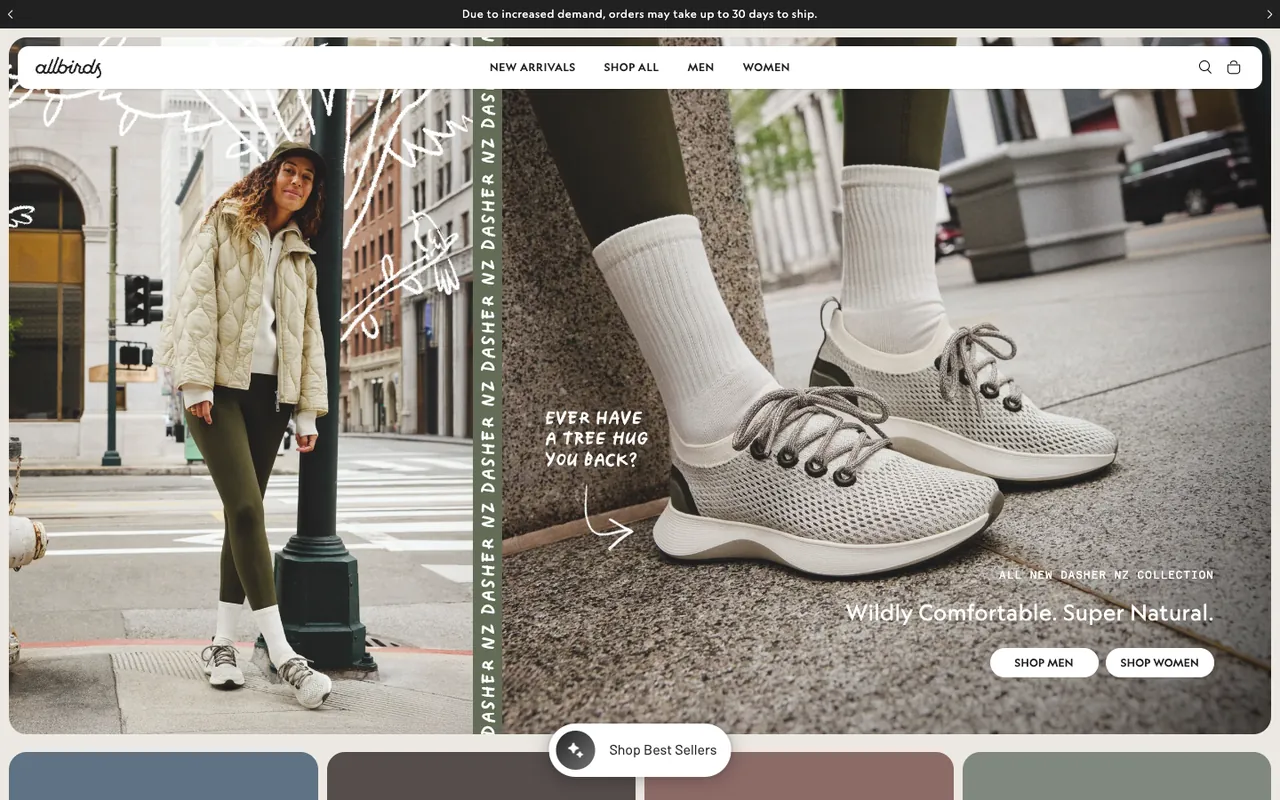
What it does: A slim black bar on top rotates shipping messages, including "Free ground shipping on orders over $100" and a note that orders may take up to 30 days to ship. A floating white nav keeps it short: New Arrivals, Shop All, Men, Women. The hero is a split photo, a woman leaning on a lamp post on the left and a close-up of the new Dasher NZ sneakers on the right, with hand-drawn doodles and a scribbled line, "Ever have a tree hug you back?" Bottom right: "All new Dasher NZ collection," the headline "Wildly Comfortable. Super Natural.," and two buttons, Shop Men and Shop Women.
Why it works: Splitting the audience at the hero saves a click and a bounce. Shoe shoppers don't want a unified catalog. They want their section. The "Super Natural" line does brand work in two words instead of a paragraph. On a 390 × 844 phone viewport, Allbirds crops the hero to the sneaker close-up and keeps both buttons inside the first screen.
Key takeaway: When your audience self-segments, segment them at the hero. Two CTAs that route to the right category beat one generic "Shop now" every time.
3. Apple
Apple needs no intro, but the discipline of their hero is worth studying. They treat above the fold like a billboard for whatever they want you to care about this month.
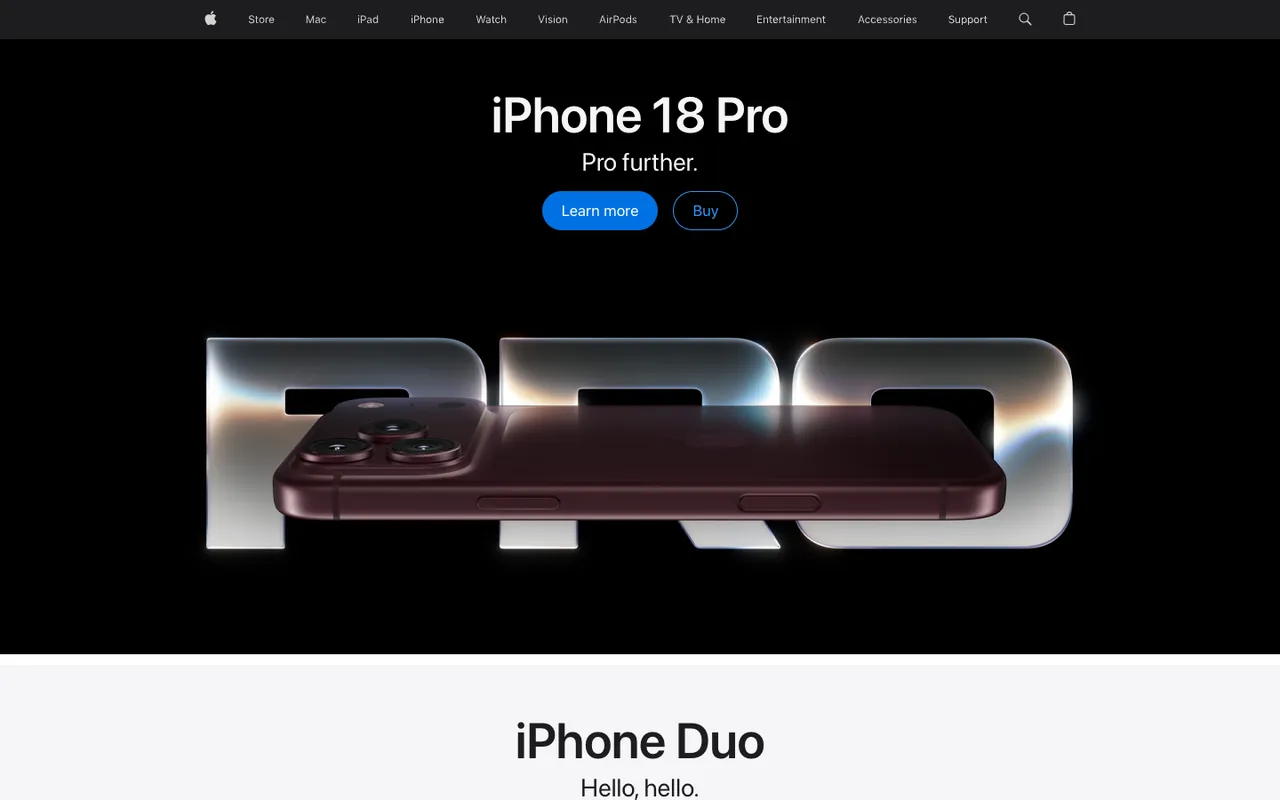
What it does: Black background. One product hero shot, beautifully lit: iPhone 18 Pro lying across giant chrome "PRO" letters. Product name, a two-word positioning line ("Pro further."), and two CTAs: "Learn more" and "Buy." Top navigation is word-only and minimal. The next product's headline (iPhone Duo) starts at the bottom edge of the screen.
Why it works: The two-CTA pattern (educate or transact) covers both buyer stages without forcing a choice. Apple knows some visitors are researching and some are ready, so they give both a button. The black background kills competing visual noise, so the product is the only thing your eye can land on. The next section peeking in at the bottom tells the visitor the page goes on, which avoids what Nielsen Norman Group calls a false floor.
Key takeaway: Use the "Learn more / Buy" two-CTA split for any product where the buyer journey has both a research and a transaction path. It suits considered purchases better than a single button.
4. Bobo's
Bobo's makes oat bars and snacks aimed at the healthy-but-tasty crowd. Their hero used to turn a packaged-goods category into a warm, inviting moment; in 2026 it carries a business change instead.
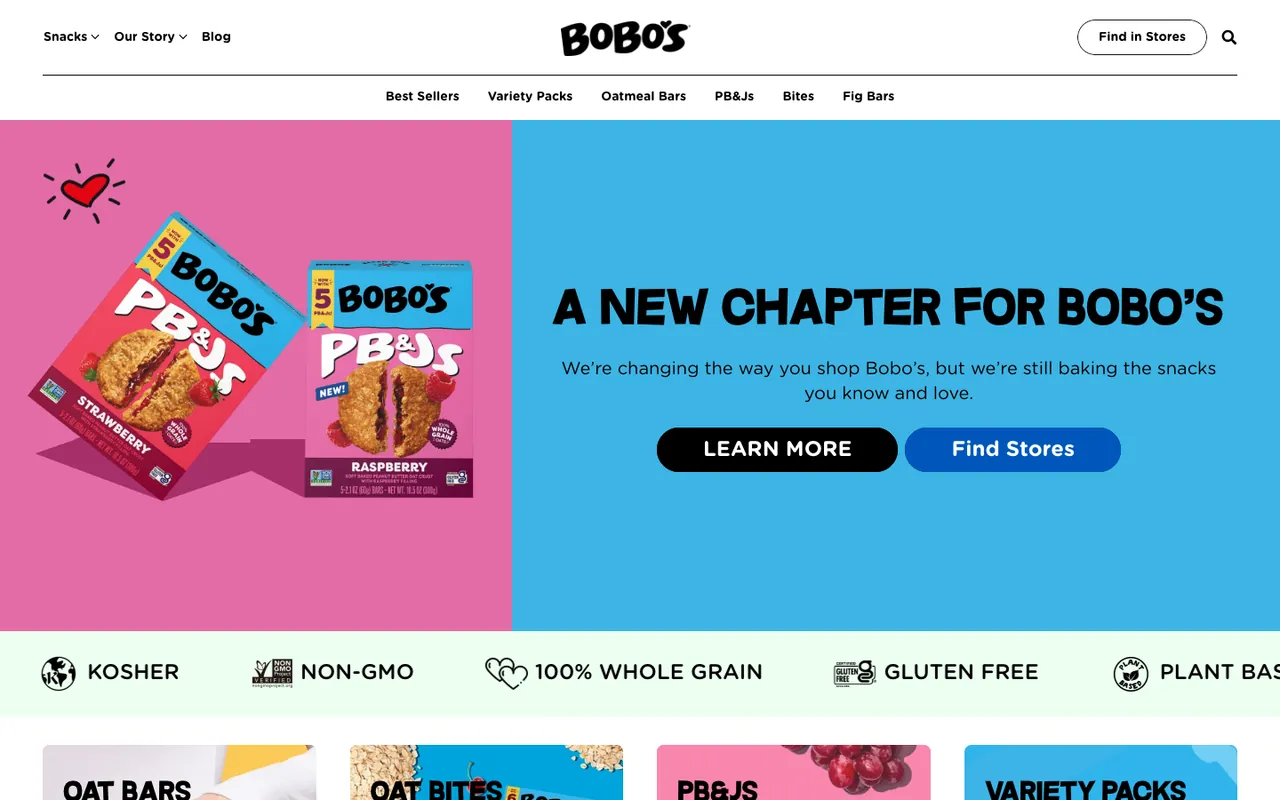
What it does: A split hero. On the left, two boxes of Bobo's PB&Js on a pink panel. On the right, on sky blue, the headline "A New Chapter for Bobo's" and one line: "We're changing the way you shop Bobo's, but we're still baking the snacks you know and love." Two buttons: Learn More and Find Stores. The header's own button says "Find in Stores," and a scrolling strip under the hero lists the snacks' labels (kosher, non-GMO, gluten free, 100% whole grain).
Why it works: When a brand changes how people buy, the first screen has to say so before anything else, or returning shoppers go looking for the old path. Bobo's states the change in one line, reassures in the same sentence, and gives the new path (Find Stores) the same weight as the explanation.
Key takeaway: When the way customers buy from you changes, put the change and the new path above the fold. A returning visitor shouldn't have to scroll to find out what happened.
5. Calvin Klein
Calvin Klein is a fashion house with a strong visual identity. Their hero leans into brand-led design, not product-led, which is unusual and works because the brand is famous. In October 2026 a sale panel sits on top of it.
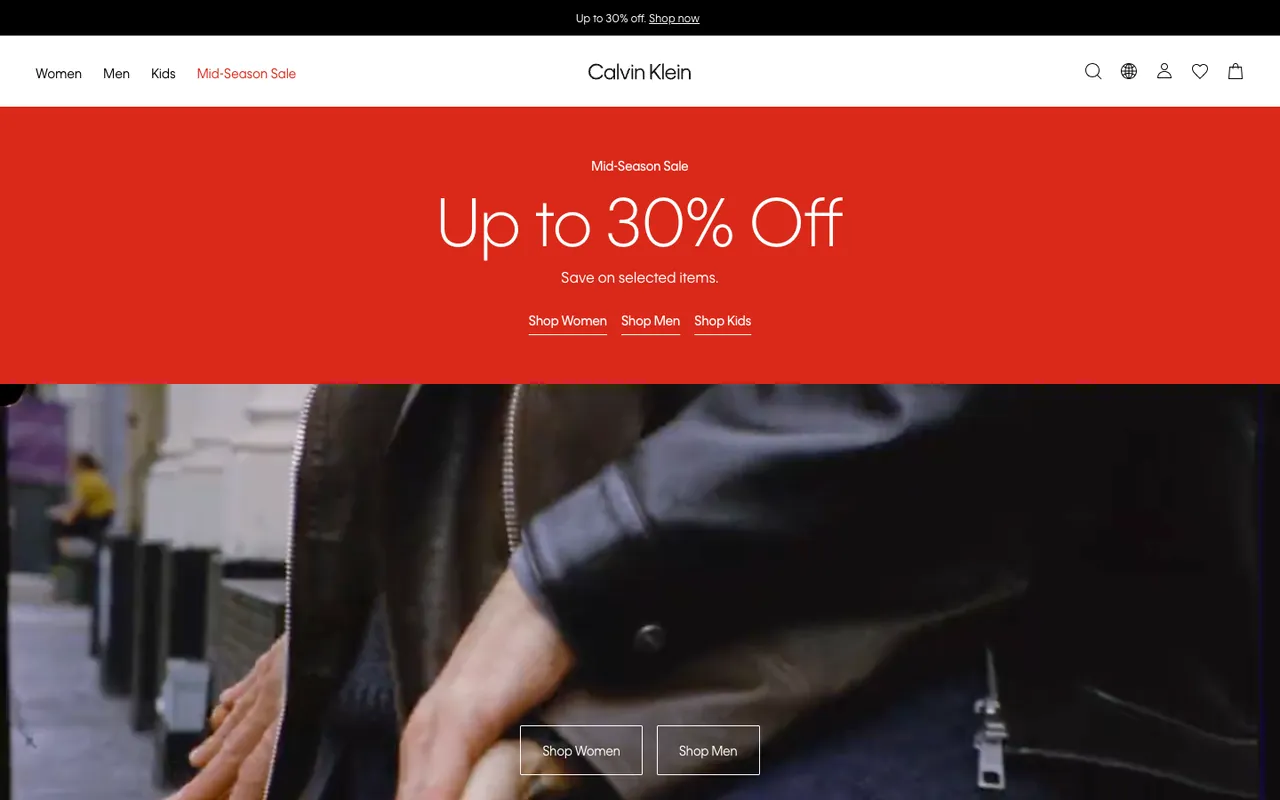
What it does: A black top bar announces the sale immediately: "Up to 30% off. Shop now." Under the nav (Women, Men, Kids, and Mid-Season Sale in red), a red panel repeats it in large type: "Mid-Season Sale. Up to 30% Off. Save on selected items," with three text links for Women, Men and Kids. Below the panel, a street-style video of two models in leather jackets runs behind two outlined buttons, Shop Women and Shop Men.
Why it works: When your brand is recognizable, you can sell the lifestyle before the product. Calvin Klein doesn't need to explain what a leather jacket is. They need you to want theirs. The triple sale signal (top bar, red panel, red nav link) makes the discount unmissable without a single popup.
Key takeaway: Earn the right to a brand-led hero before you use one. If you're not a household name, lead with the product and outcome instead.
6. Dyson
Dyson sells premium home appliances. Their hero used to be moody, dark, and confident, the visual equivalent of an Apple Keynote. In October 2026 it is in sale mode, and it still looks premium.
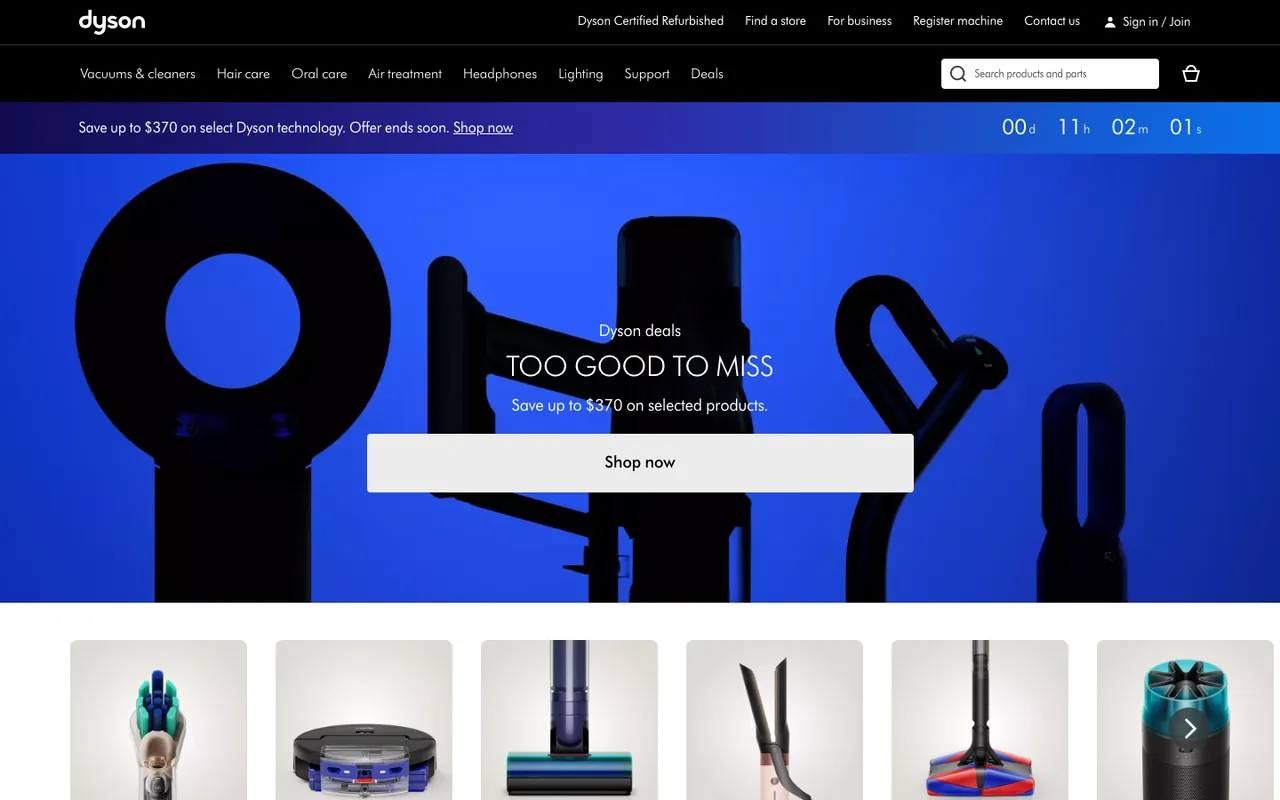
What it does: A black two-row header: utility links (Dyson Certified Refurbished, Find a store, For business, Register machine, Contact us, Sign in / Join), then categories from Vacuums & cleaners to Deals and a wide search bar. Under it, a blue bar: "Save up to $370 on select Dyson technology. Offer ends soon," with a live countdown in days, hours, minutes and seconds. The hero shows Dyson products as black silhouettes on electric blue, with "Dyson deals," "Too good to miss," "Save up to $370 on selected products," and one wide "Shop now" button.
Why it works: The silhouettes keep the premium feel while the copy sells a discount: you recognize the shapes of the hair dryer and the vacuum without a product name. One saturated color reduces visual competition, and the countdown puts a deadline in the same eye-line as the button. In our capture it showed 0 days and 11 hours left.
Key takeaway: If a premium brand has to run a sale, let the product shapes carry the brand and keep the discount to one line and one button. Use a countdown only for an offer that really ends.
7. EyeBuyDirect
EyeBuyDirect sells affordable prescription glasses online, a category where building trust above the fold matters more than usual. Its site blocked our automated visit in October 2026 (an access-denied page), so this breakdown describes the earlier capture.
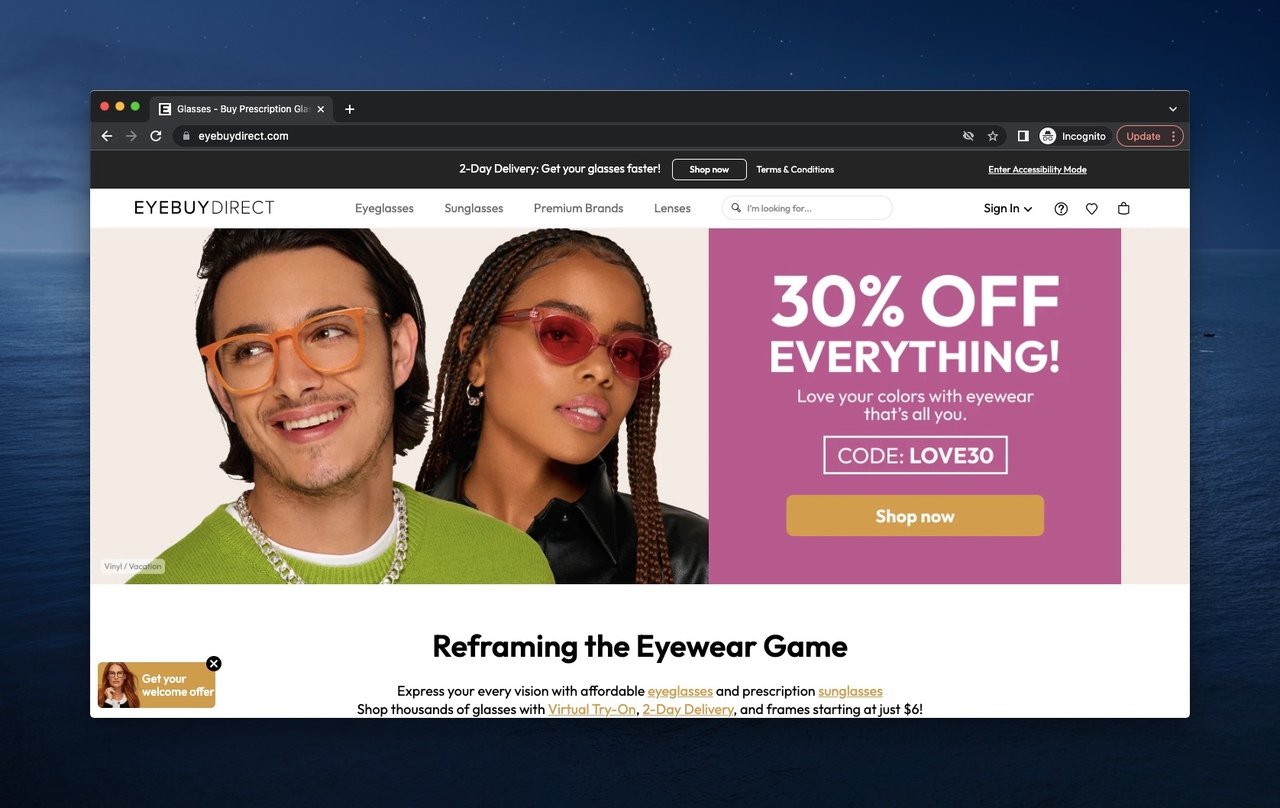
EyeBuyDirect's hero, captured in or before January 2024; the site blocked automated capture in October 2026.
What it did: A lifestyle shot of two people wearing the glasses. Next to it, a pink panel with "30% OFF EVERYTHING!", the code LOVE30 and a "Shop now" button. A small "Get your welcome offer" tab in the bottom-left corner worked as a passive welcome popup for first-time visitors. A bar above the nav promised 2-Day Delivery, and the nav listed the categories a glasses shopper looks for: Eyeglasses, Sunglasses, Premium Brands, Lenses.
Why it worked: Buying prescription glasses sight unseen requires a leap of faith. The lifestyle photo showed real people happily wearing the product, which lowers anxiety. The discount code removed the price objection in the same eye-line, so the visitor didn't have to scroll to find a reason to convert. It's the job a discount popup does on pages where the hero can't carry the code.
Key takeaway: If your category has trust friction (sight-unseen, made-to-order, returns-heavy), put the social proof and the risk-reducer in the hero. Don't bury them on a help page.
8. Fomo
Fomo is a social proof tool that displays live notifications of recent customer actions on websites. It now lives at usefomo.com (in October 2026, fomo.com points to an unrelated crypto trading app), and its hero still practices what it preaches.
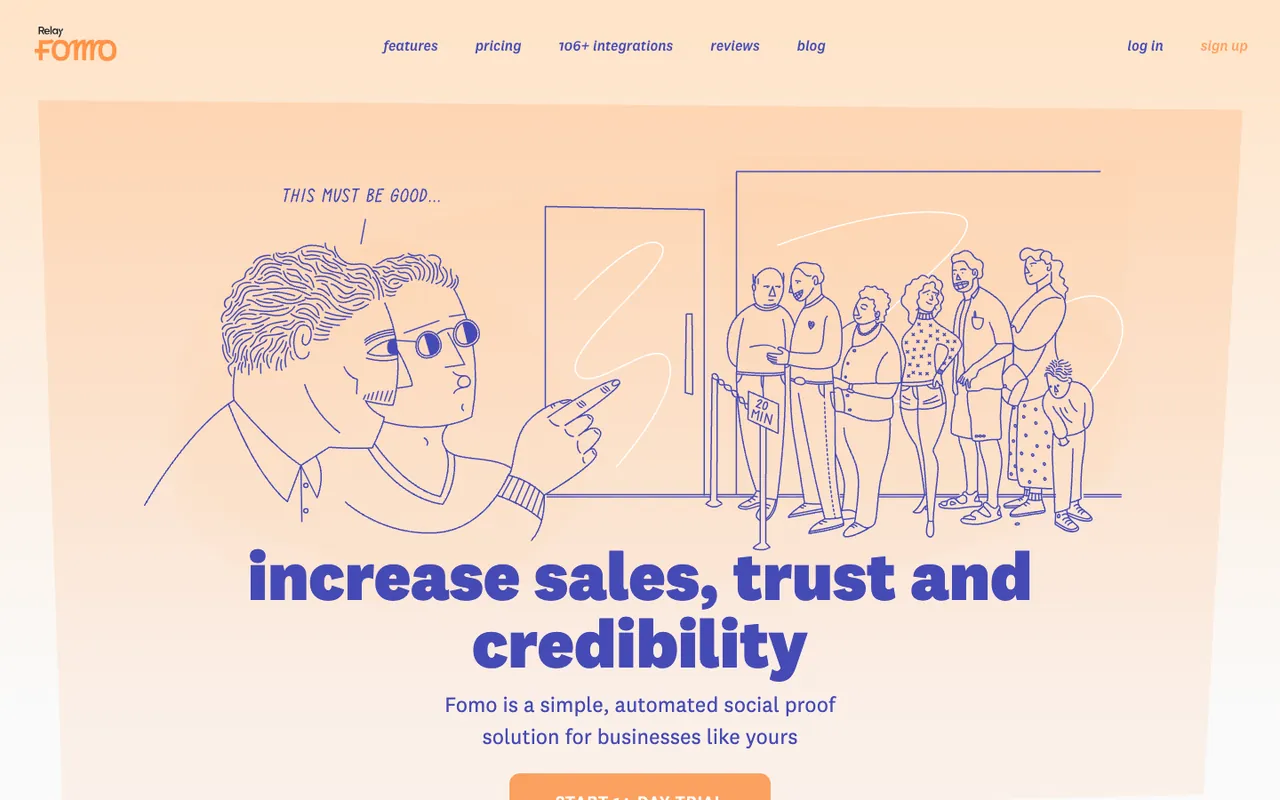
What it does: A playful line illustration: a man in sunglasses points at a queue waiting outside a door, next to a "20 MIN" sign, thinking "This must be good..." The headline reads "increase sales, trust and credibility," with "Fomo is a simple, automated social proof solution for businesses like yours" under it. The nav is casual and lowercase: features, pricing, 106+ integrations, reviews, blog. The "Start 14-day trial" button sits right on the fold at 1440 × 900, with only its top edge in view.
Why it works: Illustrations beat stock photography for explaining abstract products. Social proof is invisible; you can't photograph it. So Fomo drew the offline version everyone recognizes: a queue outside a door. The casual tone signals "we're a friendly tool, not enterprise software," which matches the small-to-medium business buyer they're targeting. The trial button on the fold is the weak spot: a laptop visitor has to scroll a few pixels to see it whole.
Key takeaway: When your product is intangible, illustrate the concept rather than photographing the dashboard. A two-second illustration teaches what a screenshot can't. Then make sure it doesn't push the button under the fold.
9. Fossil
Fossil is a fashion accessories brand best known for watches. Their hero leans into seasonal storytelling and product introduction.
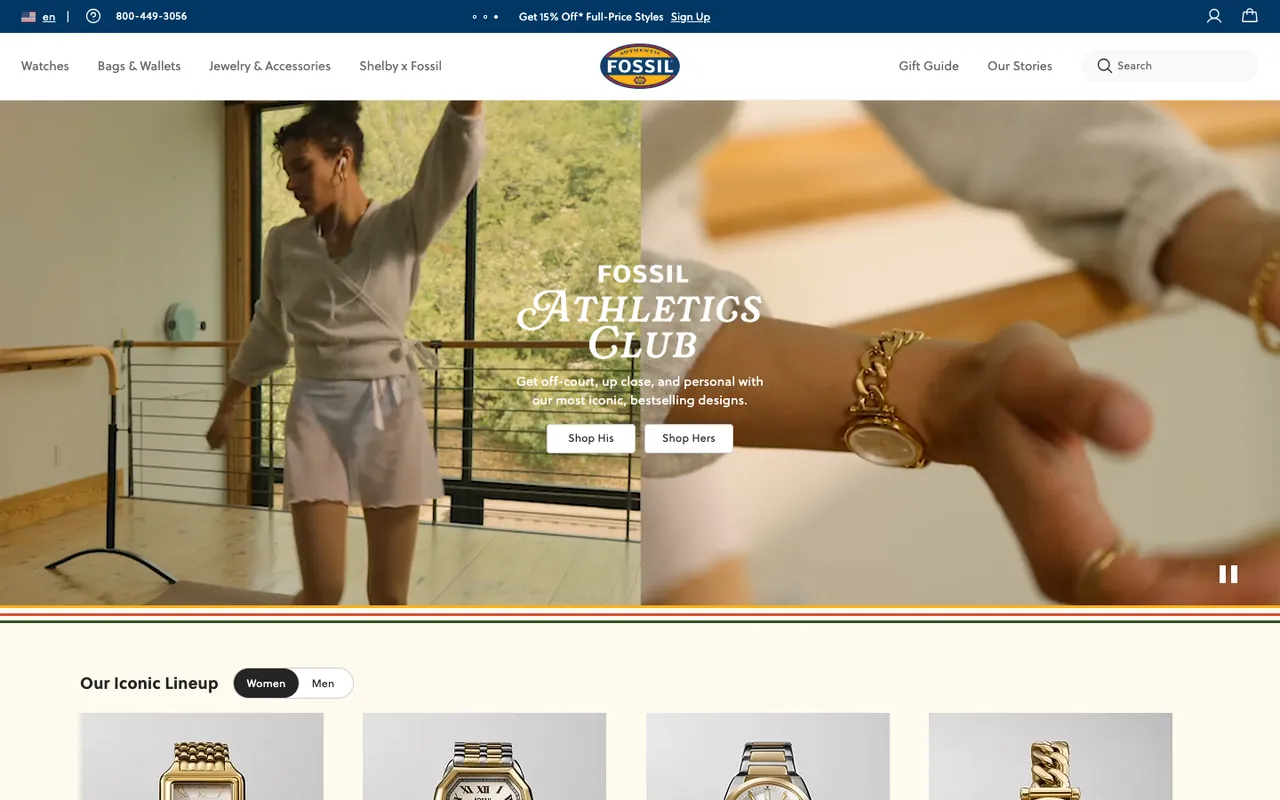
What it does: A navy utility bar with the country selector, a customer-service phone number and rotating offers (in our capture, "Get 15% Off* Full-Price Styles" with a Sign Up link). A wide nav exposes the main categories before the visitor needs to click: Watches, Bags & Wallets, Jewelry & Accessories, Shelby x Fossil, Gift Guide, Our Stories, plus a search field. The hero is a full-width video for "Fossil Athletics Club": "Get off-court, up close, and personal with our most iconic, bestselling designs," with two CTAs, Shop His and Shop Hers, and a pause button in the corner. The frame we caught shows a gold watch on a wrist.
Why it works: Showing the watch on a wrist (not floating on a sweep) helps the buyer judge size and proportion, which is hard to do when buying a watch online. The wide nav reduces the number of clicks to the right product family, which matters because Fossil sells across so many sub-brands. The pause button gives visitors control over the moving video.
Key takeaway: For products where fit, scale, or context matters (watches, eyewear, furniture), shoot the product in use, not isolated. It saves a return.
10. HubSpot
HubSpot sells a CRM and marketing platform. Their hero used to sell the platform with a numbers-first proof point; in 2026 it sells the whole platform with one long promise and two buttons.
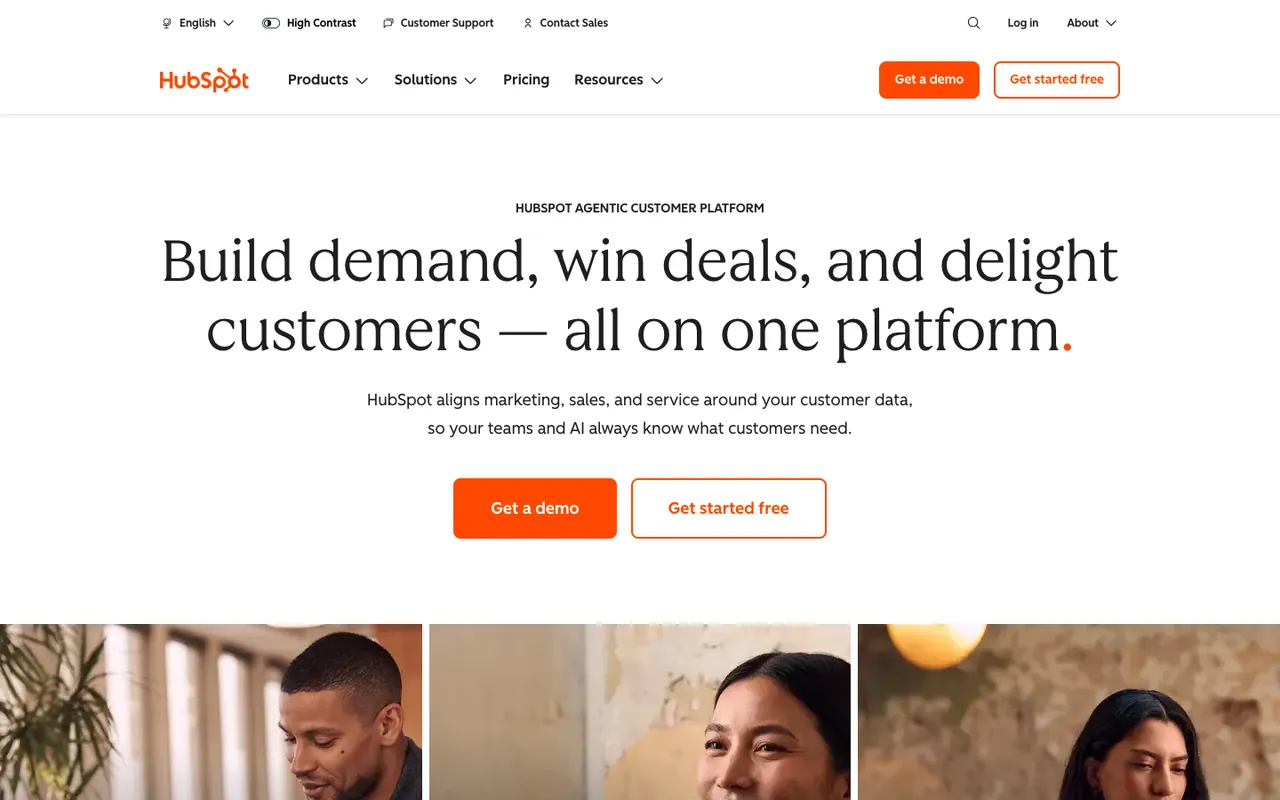
What it does: A white page with a small eyebrow, "HubSpot Agentic Customer Platform," and a large serif headline: "Build demand, win deals, and delight customers," ending with "all on one platform." The subhead says HubSpot aligns marketing, sales, and service around your customer data. Two CTAs: "Get a demo" (filled orange) and "Get started free" (outlined), repeated in the nav. A thin utility bar above the nav carries a language picker, a High Contrast switch, Customer Support and Contact Sales. On our first visit, a chat greeting from HubSpot's assistant opened in the corner.
Why it works: The free-tier CTA covers the self-serve buyer; the demo CTA covers the enterprise buyer. Splitting the funnel at the hero is how HubSpot serves a 10-person agency and a 10,000-person enterprise from the same homepage. The High Contrast switch puts an accessibility setting above the fold, where people who need it can find it.
Key takeaway: If your product spans self-serve and sales-led pricing, give both paths a button in the hero. Forcing every visitor through one funnel kills conversion at the wrong end.
11. Instatus
Instatus builds status pages: the public-facing dashboards that tell users when your service is up or down. Their hero is dark, fast, and playful.
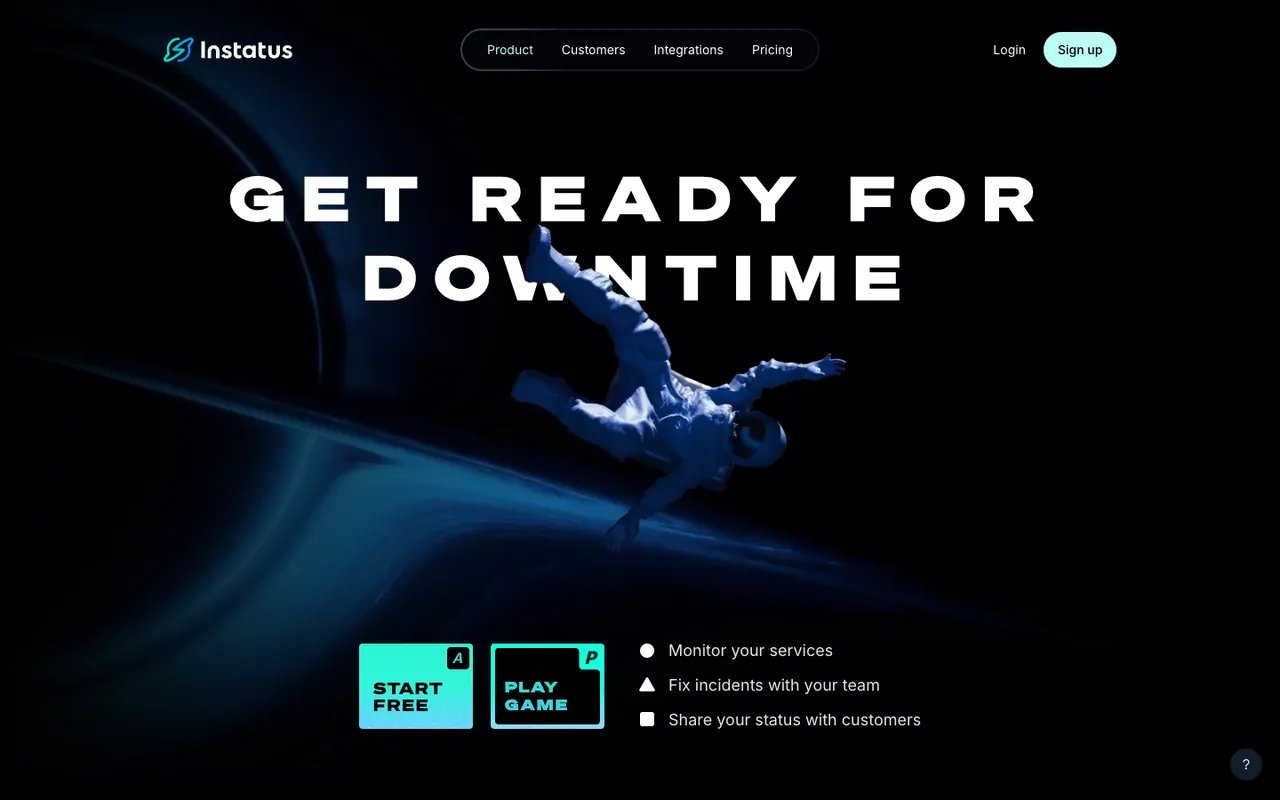
What it does: A black background, a 3D astronaut falling through a blue light trail, and an all-caps, wide-spaced headline: "Get ready for downtime." Two square buttons styled like keyboard keys, "Start free" (marked A) and "Play game" (marked P), sit next to three one-line benefits: Monitor your services, Fix incidents with your team, Share your status with customers. A pill-shaped nav covers Product, Customers, Integrations, and Pricing.
Why it works: The headline turns the buyer's worst day into the pitch, so the visitor reads it as "these people know my problem." The three lines explain the product in 13 words, in the order the work happens: watch, fix, tell. The keyboard-key buttons are a small nod to a developer audience.
Key takeaway: Name the moment your buyer fears, then say what the product does in three short lines. Three lines get read; a paragraph in a hero rarely does.
12. Kylie Cosmetics
Kylie Cosmetics is a celebrity-led beauty brand. Their hero used to be built around the founder's personal brand and rotating collaborations. In October 2026 it is product-led: the founder's name is in the logo, not in the photo.
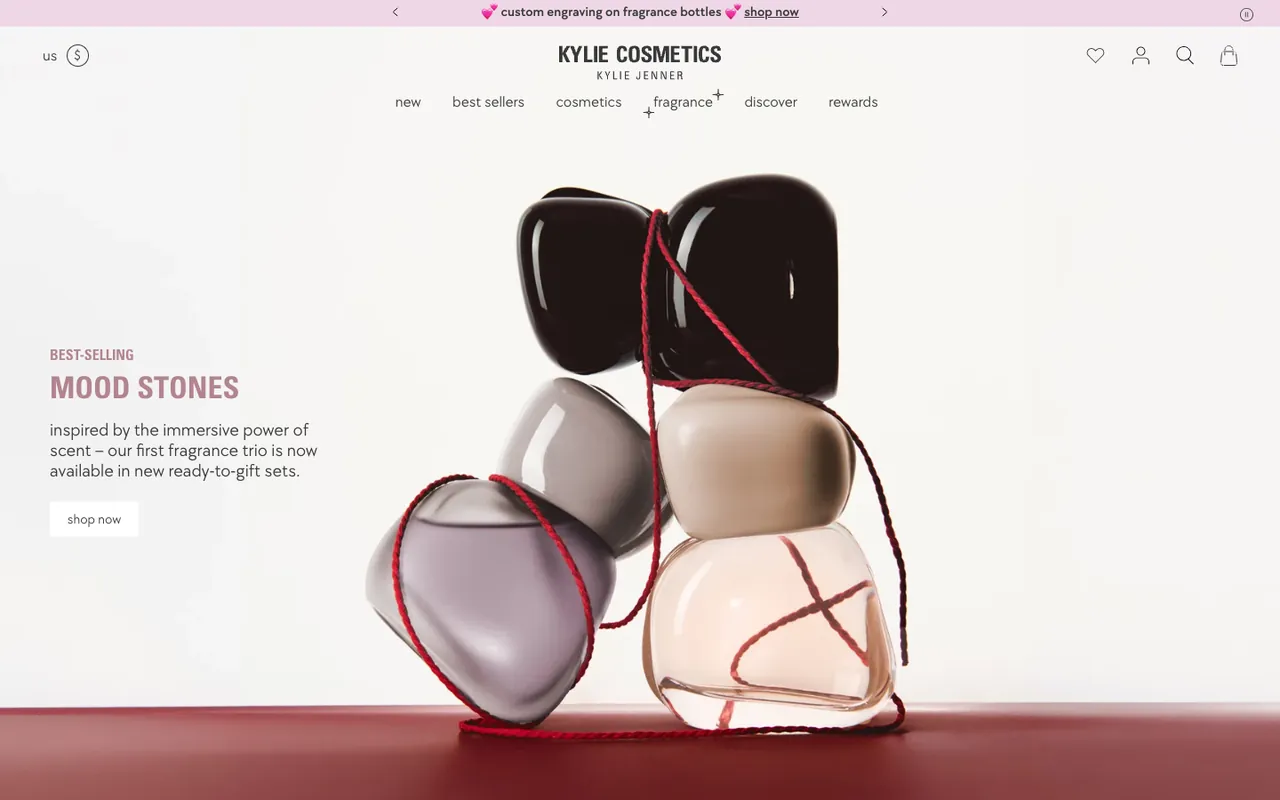
What it does: A pink announcement bar rotates offers (free makeup pouch with a minimum order, custom engraving on fragrance bottles) and has a pause button for the rotation. The logo lockup reads Kylie Cosmetics with "Kylie Jenner" under it, and the nav is short and lowercase, running from "new" and "best sellers" to "rewards." The hero is a sculptural stack of fragrance bottles tied with red string. On the left: "Best-selling Mood Stones," a line about the brand's first fragrance trio now coming in ready-to-gift sets, and a small "shop now" button. Search and account icons stay constant in the header so the cart and login never move.
Why it works: The founder's name under the logo keeps the celebrity signal without spending the photo on it, so the hero can sell one product. "Best-selling" is social proof in one word, placed right above the product name. "Ready-to-gift sets" names the reason to buy now.
Key takeaway: A famous name can live in the logo lockup and free the hero for the product. Put the proof word next to the product name, where the eye already is.
13. Little Caesars
Little Caesars is a pizza chain that competes on speed and price. Their hero is built for one job: get the order started.
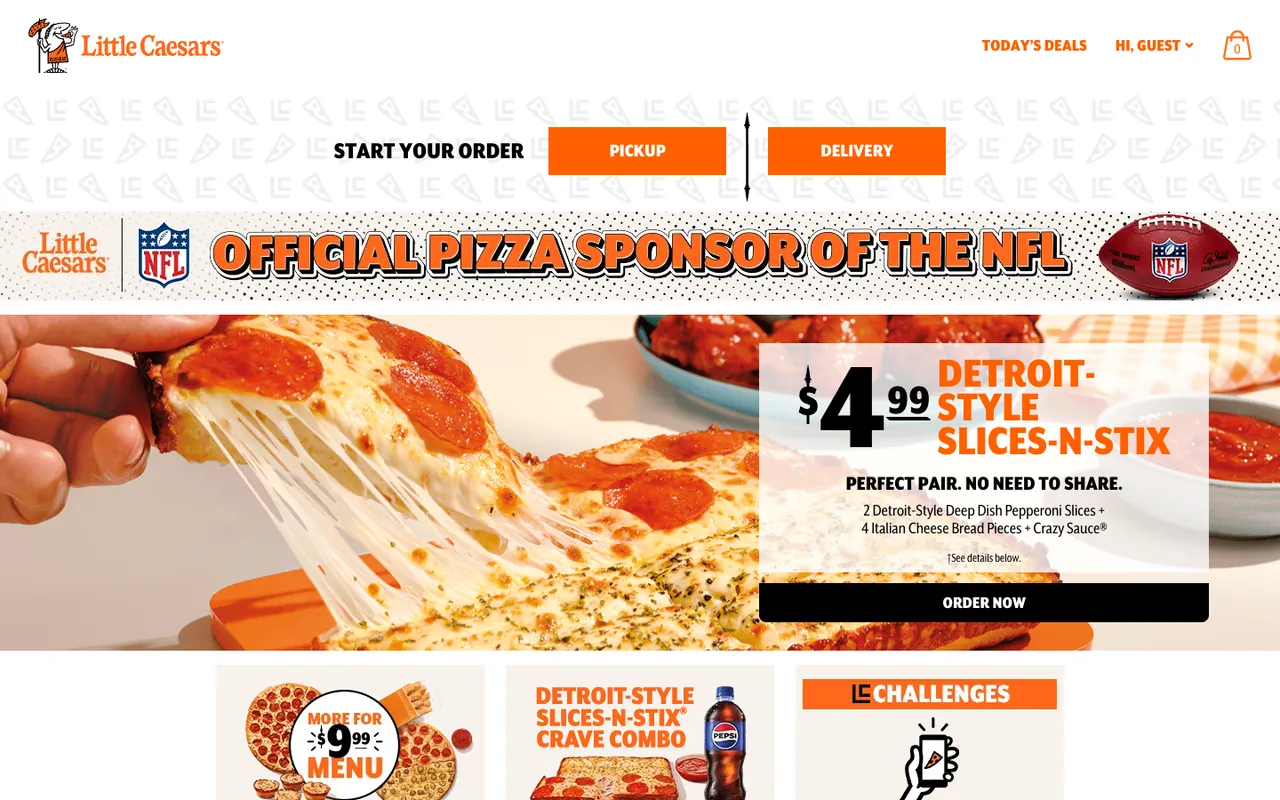
What it does: A "Hi, Guest" personalized greeting. Cart status visible in the header. The first band is the order starter: "Start your order" with two orange buttons, Pickup and Delivery. Under an "Official Pizza Sponsor of the NFL" banner, the biggest visual is the current promotional offer with a price: $4.99 Detroit-Style Slices-N-Stix, with what's in it and an "Order now" button.
Why it works: Hungry visitors don't browse. They order. Little Caesars cuts every step that doesn't move the visitor toward a transaction. The pickup-or-delivery split is the first decision the page asks for, and the priced offer below gives a reason to make it. On a 390 × 844 phone viewport both the order buttons and the offer's "Order now" stay inside the first screen.
Key takeaway: For high-intent transactional categories (food, on-demand services, urgent buys), strip the hero down to one offer and one decision. Anything else is friction.
14. Melula
Melula is a small DTC kids' fashion brand. Their hero is the most minimal on this list, and it works in their favor.
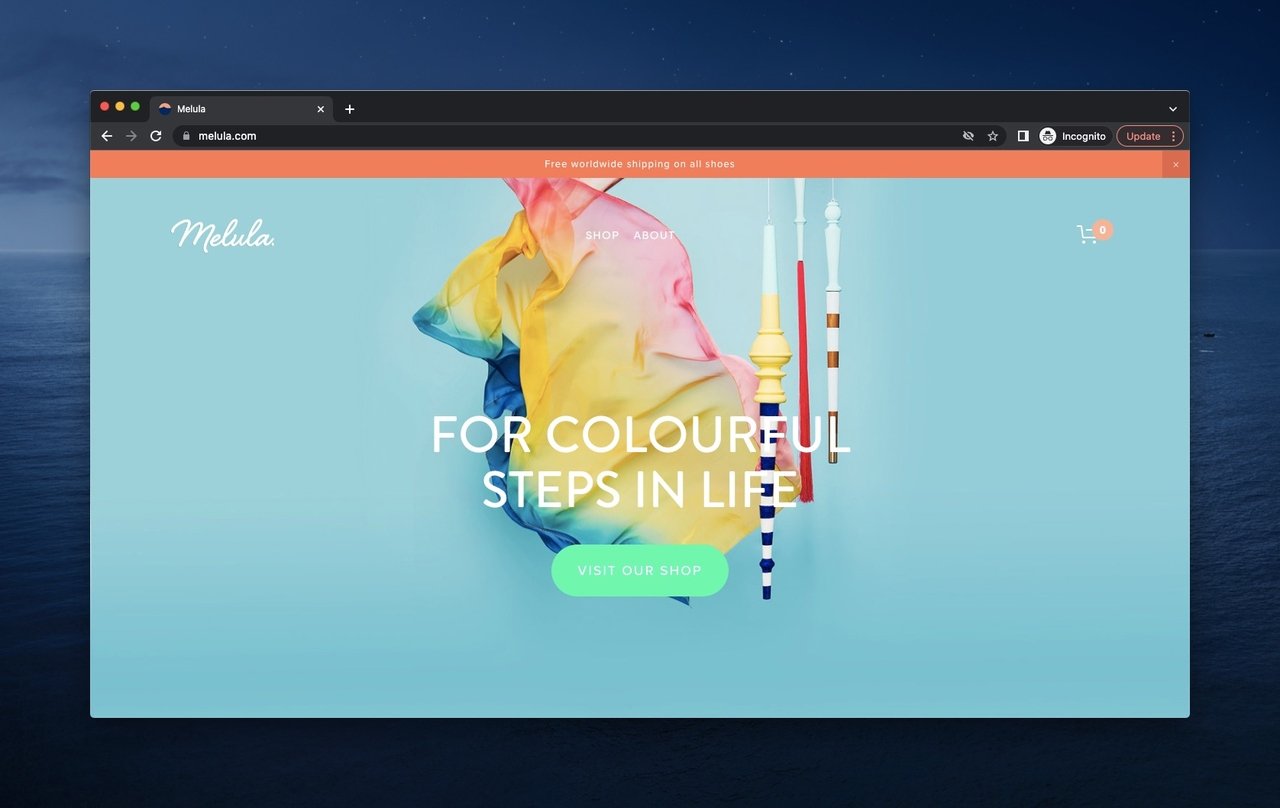
Melula hero with mild palette and minimalist product styling, captured in or before January 2024; unchanged when checked in October 2026.
What it does: A soft blue background. A playful product styling shot with tissue paper and wooden sticks. A short brand-mood headline, "For colourful steps in life." One "Visit our shop" CTA. A worldwide-shipping bar above the nav.
Why it works: Small brands often try to act big and overcrowd the hero. Melula does the opposite and treats the hero like a museum vitrine. The whitespace signals premium and quiet, which matches the parent buyer's emotional response to gifting and kids' fashion.
Key takeaway: If your brand competes on craftsmanship or premium feel, use whitespace as a luxury signal. A hero with one product and one button reads as confident; a hero with five offers reads as desperate.
15. Oskar Gydell
Oskar Gydell is a Swedish handmade jewelry brand. Their hero is restrained, photographic, and quietly informative.
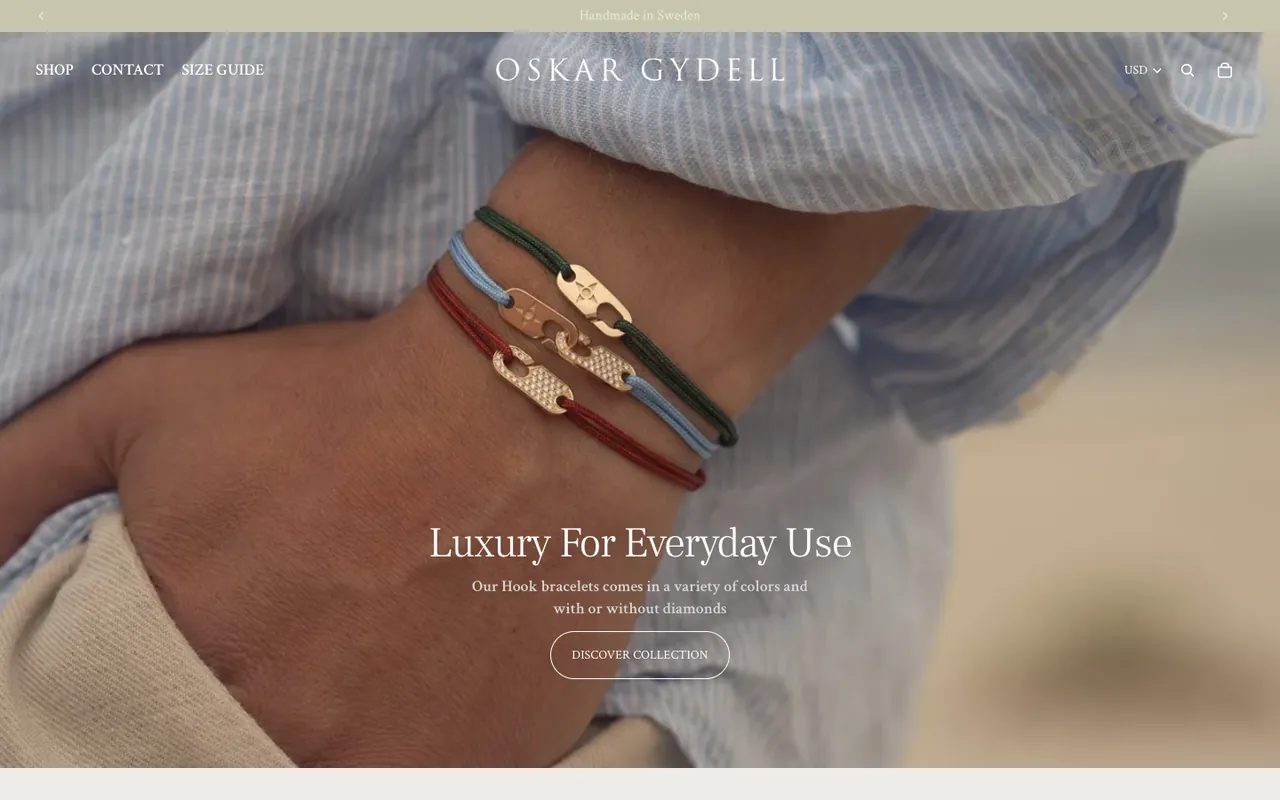
What it does: A sand-colored bar rotates two short trust lines, "Handmade in Sweden" and "High end Jewelry since 2012." The nav puts Shop, Contact and Size Guide on the left, the spaced-out wordmark in the middle, and a currency selector (USD in our visit), search and bag on the right. The hero is a close-up of a wrist wearing three Hook bracelets on colored cords, with "Luxury For Everyday Use," a line about the colors and the diamond option, and a button to the collection.
Why it works: International buyers want prices in their own currency before they add anything to a cart, and the selector sits where they look for it. Putting Size Guide in the main nav answers the fit question before it becomes a reason to leave. The two rotating lines carry the craft story in eight words.
Key takeaway: For cross-border DTC, default to local currency from the first byte. Don't make the visitor open a country picker to find out what they'll pay.
16. Popupsmart
Popupsmart is our own no-code popup builder for e-commerce and SaaS websites. We redesigned the homepage in September 2026, so the screenshot from earlier editions of this post is out of date.
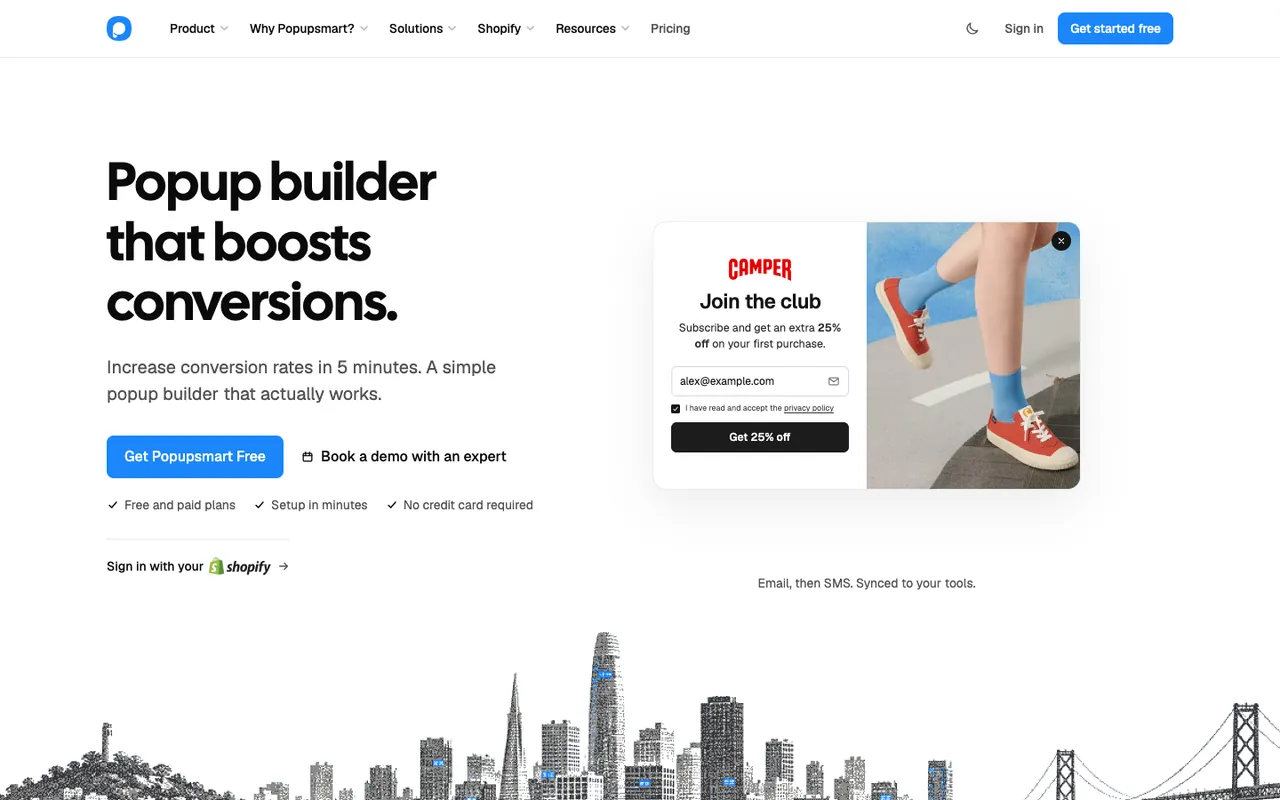
What it does: A five-word headline names the product and the outcome (conversions), and a short subhead promises a simple builder that works. The primary button, "Get Popupsmart Free," sits beside a text link, "Book a demo with an expert." Three check marks follow: Free and paid plans, Setup in minutes, No credit card required. Store owners get their own line: "Sign in with your Shopify." On the right, a looping demo builds one popup: a prompt ("Welcome popup for camper.com, 25% off") and a Generate button, then a card that finds the brand's logo and colors, captioned "Name your brand. AI designs it on-brand." The loop goes on to show a visitor signing up, a targeting rule and an A/B test, labelled as example data. A stippled San Francisco skyline in the brand's blue runs along the bottom of the screen.
Why it works: Showing the product working, not a static screenshot, answers the question "what does this thing actually look like?" instantly. The three check marks answer the three objections a free-plan visitor has (price, effort, a card on file) right under the button.
Key takeaway: If you can show your product running live in the hero (a popup, a chart, an interactive component), do it. A working demo beats a screenshot, and a screenshot beats a paragraph.
17. Shopify
Shopify is the e-commerce platform a huge chunk of online stores run on. Their hero stays fresh through frequent rotation but keeps the same conversion structure.
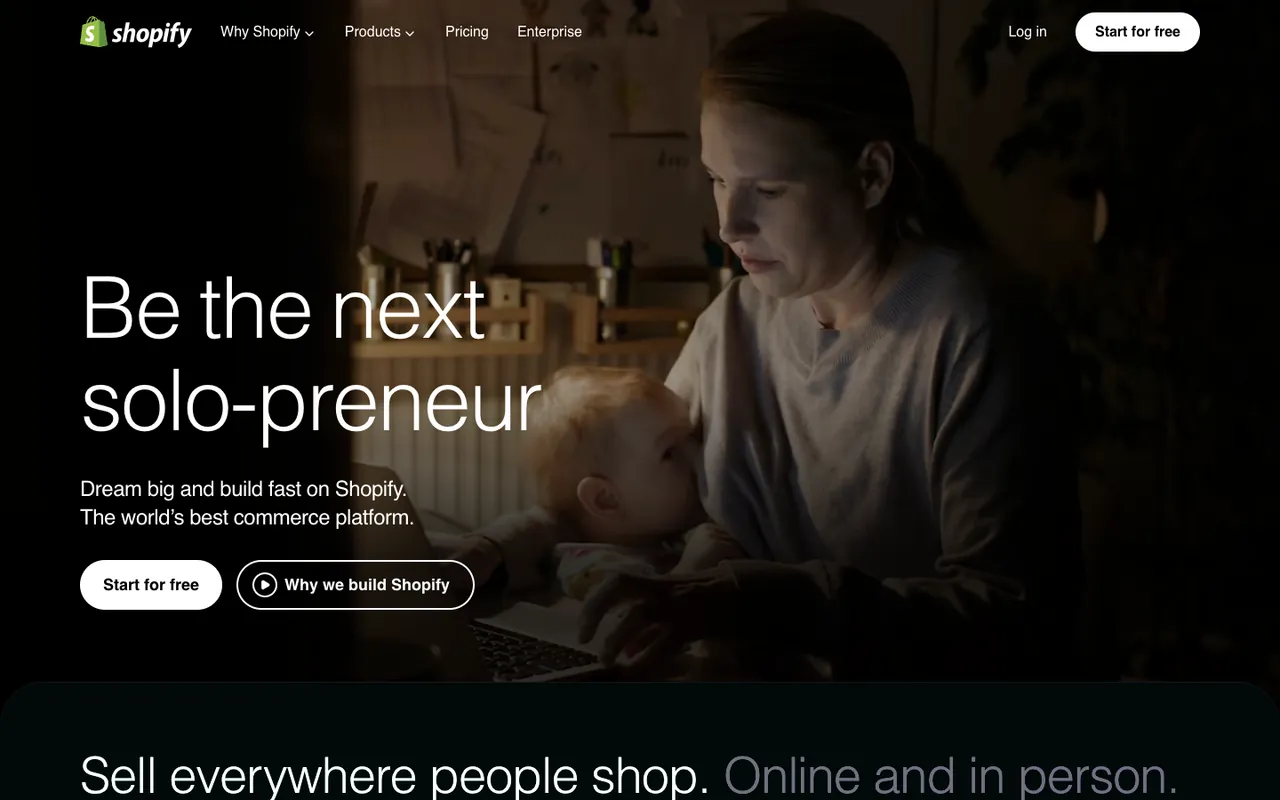
What it does: A full-bleed background video of merchants at work (our capture caught a woman at a laptop with a baby on her lap). The headline starts "Be the next" and rotates its ending: "AI all-star," "solo-preneur," "household name" and more. A short value prop line follows: "Dream big and build fast on Shopify. The world's best commerce platform." Two buttons: "Start for free" and "Why we build Shopify," which plays a video. The hero no longer has the email field earlier versions used.
Why it works: The rotating ending lets one headline speak to several kinds of founders without changing the layout, the promise or the button. The video of real merchants makes the abstract idea of "build an online store" tangible, and the next section's headline ("Sell everywhere people shop.") peeks in at the fold, inviting the scroll. On a 390 × 844 phone viewport, "Start for free" becomes a full-width button inside the first screen.
Key takeaway: If one headline has to speak to several audiences, rotate the ending, not the hero. Keep the button and the promise where they are.
18. Tesla
Tesla sells electric cars and clean energy products direct-to-consumer. Their hero was product-first, marketing-second, by design. Tesla's site returned an access-denied page to our automated visit in October 2026, so this breakdown describes the earlier capture.
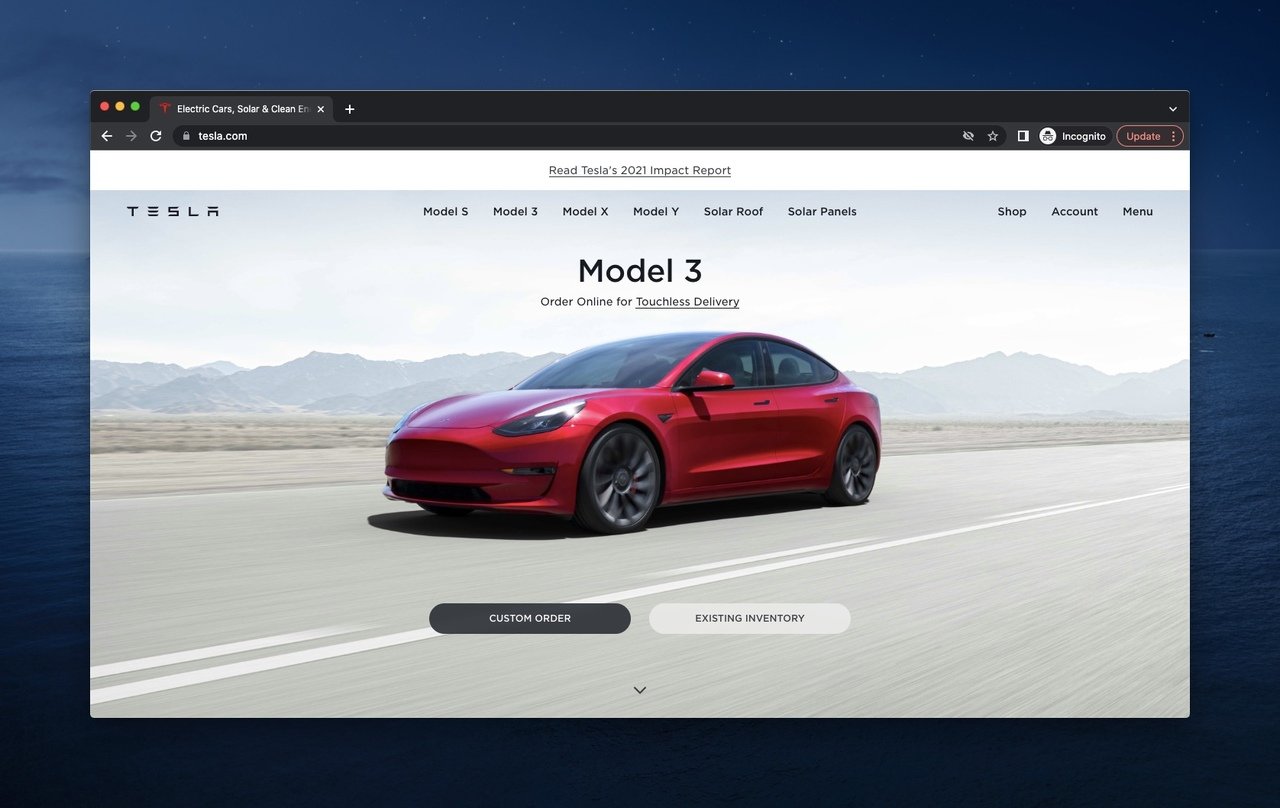
Tesla's hero, captured in or before January 2024; the site blocked automated capture in October 2026.
What it did: A full-bleed photo of a red Model 3 on an open road, with "Model 3" and "Order Online for Touchless Delivery" above it. Two CTAs: "Custom Order" and "Existing Inventory." Top nav was sparse and product-first (Model S, Model 3, Model X, Model Y, Solar Roof, Solar Panels). A slim bar above the nav linked to Tesla's 2021 Impact Report for environmentally motivated buyers.
Why it worked: Tesla didn't show a feature list because the audience already knew the features. They showed the car, the way a luxury brand shows the car, and let visitors choose between configuring a build or grabbing one already in stock. The two-CTA split mirrored the actual buyer split: patient configurers and ready-to-buy buyers.
Key takeaway: For high-consideration purchases, the hero's job is to show the product beautifully and respect the buyer's prior research. Don't re-explain what they already know.
19. Walmart
Walmart is the opposite of every minimalist hero on this list, and that's the right call for their audience. In October 2026 walmart.com answered our automated visit with a "Robot or human?" check, so this breakdown describes the earlier capture.
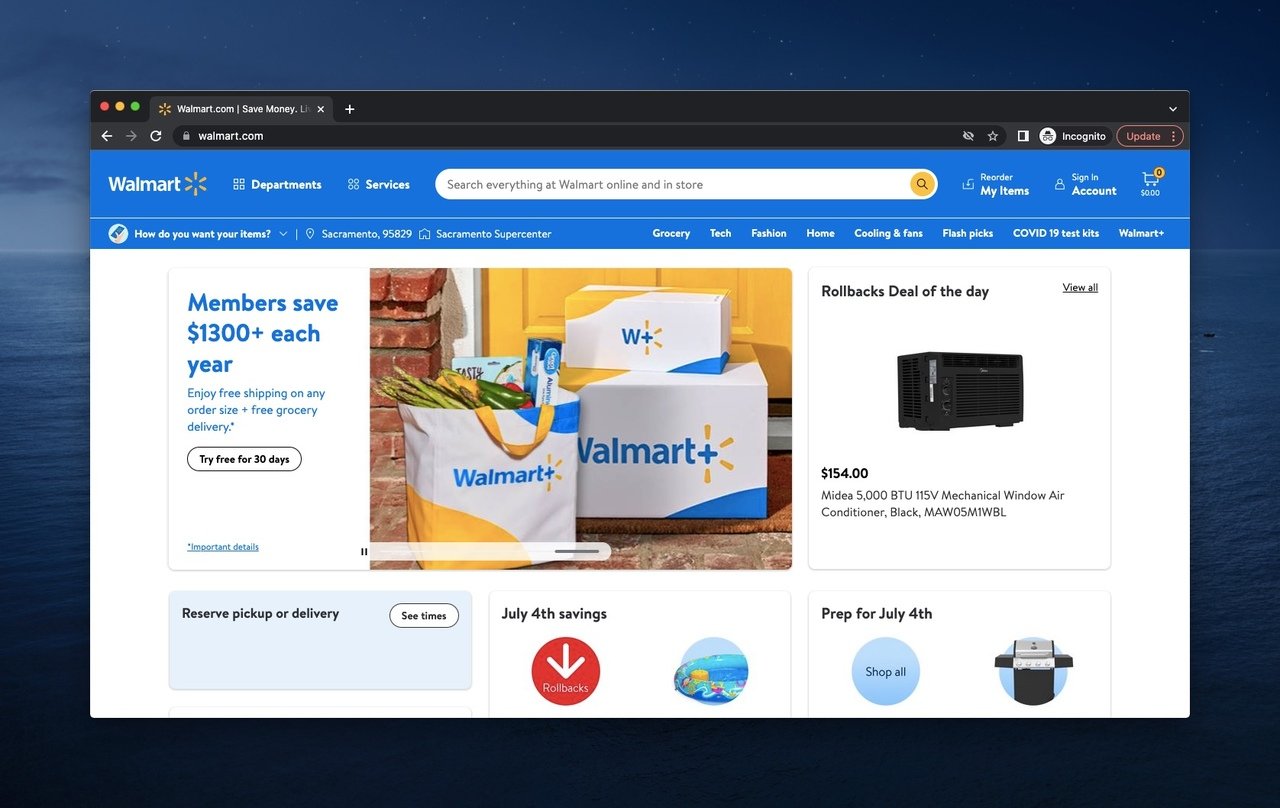
Walmart's hero, captured in or before January 2024; the site showed a bot check to automated capture in October 2026.
What it did: A dense layout with multiple promotional tiles: a Walmart+ membership panel ("Members save $1300+ each year," "Try free for 30 days"), a Rollbacks deal of the day with a price, and tiles for pickup or delivery and July 4th savings. The search bar ran across the header, with Departments, Services, Reorder My Items, Account and the cart around it, and a second bar showed the visitor's store location and category links.
Why it worked: Walmart shoppers arrive with a specific item in mind. They aren't browsing. They're hunting. A dense hero with categories and a search bar is exactly what a hunter needs. Minimalism would actively hurt conversion here because it would force more clicks to find groceries, electronics, or pharmacy.
Key takeaway: Match hero density to visitor intent. Browsers want minimalism; hunters want options. If your traffic is search-driven and category-heavy, a dense, organized hero converts better than a clean one.
20. Zapier
Zapier is the workflow-automation platform that connects thousands of apps. Their hero pairs a clear value prop with a working visual demo.
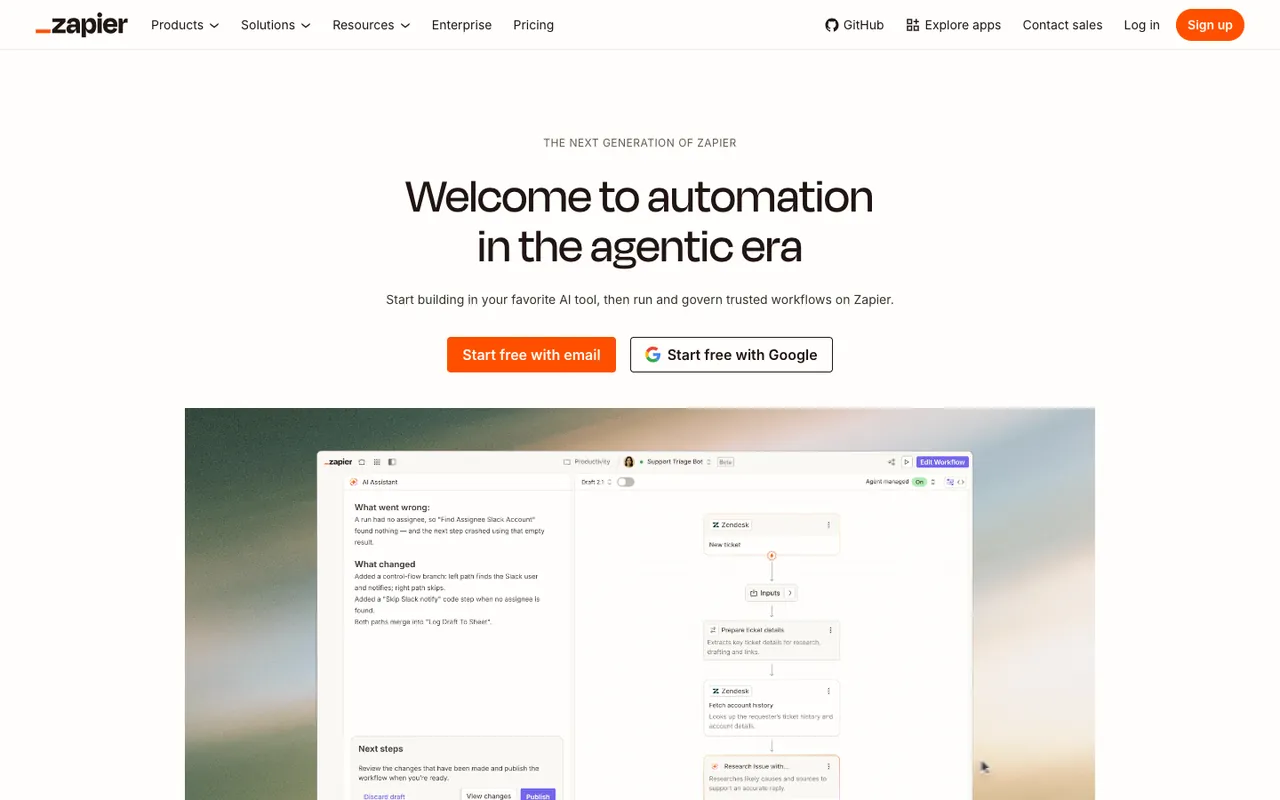
What it does: An off-white page with the eyebrow "The next generation of Zapier," the headline "Welcome to automation in the agentic era," and one line: "Start building in your favorite AI tool, then run and govern trusted workflows on Zapier." Two sign-up buttons: "Start free with email" (orange) and "Start free with Google." Under them, a framed product animation plays on a soft gradient: a notification that Zapier fixed a workflow, then the workflow editor itself, with an AI assistant explaining what went wrong and what changed next to a Zendesk workflow.
Why it works: "Start free with Google" removes the sign-up form for anyone with a Google account, and the email button covers everyone else. The animation shows the product doing actual work, which sells the idea better than a static dashboard. The headline names the moment (AI agents) and the subhead names the job Zapier keeps for itself: running and governing the workflows.
Key takeaway: Put a one-click sign-up next to the email button. The visitor who would quit at a password field never has to meet one.
Common patterns in high-converting above-the-fold designs
Across these 20 homepages, the patterns repeat. These are the ones that show up most.
• One headline, one CTA, one decision: The strongest heroes ask the visitor to make exactly one choice. Even when there are two CTAs, they route to two non-competing paths (research vs. transact, demo vs. free). When a hero asks for three or more decisions in the first viewport, none of them stands out.
• Outcome-led headlines, not feature-led: "Make your business discoverable" beats "AI-powered backlink analysis tool." Buyers want the outcome named in their language, not yours. Feature words can wait until below the fold. The same rule drives these product headline examples.
• Product-as-hero, not stock-photo-as-hero: Real product screenshots, real product animations, real customer photos. Most brands on this list show their actual product or actual users.
• Social proof at eye level: Customer logos, live signup counts, star ratings, named testimonials, or one word like "best-selling." Move social proof from the footer to within reach of the primary CTA.
• Friction removed in the same breath as the ask: Free shipping threshold near the cart, "no credit card required" near the signup CTA, a one-click Google sign-up next to the email button. Don't make the visitor scroll to find a reason to say yes. The reason should sit next to the button.
• Top utility bar that earns its space: A slim bar above the main nav for shipping promos, currency, a phone number or a sale countdown. Allbirds, Calvin Klein, Dyson, Fossil, Kylie Cosmetics and Oskar Gydell all use one. It's the most underrated piece of real estate on the page because most teams treat it as decoration.
• A hint that the page goes on: Apple and Shopify let the next section's headline peek in at the bottom of the first screen. Nielsen Norman Group warns about false floors, designs that look finished at the fold; a visible edge of the next section is the cheapest fix.
• Mobile parity, not mobile compromise: The strongest heroes here are re-designed for the phone, not shrunk. Allbirds crops its split photo to the product on mobile and keeps both buttons on the first screen. If your mobile hero feels like a punishment compared to desktop, you've built it wrong.
For more pattern inspiration that pairs with these heroes, the announcement bar examples guide covers the slim utility bar in detail, and these Shopify landing page examples show the same rules on store pages.
Above-the-fold mistakes to avoid
Some patterns kill conversion no matter how good the rest of the page is. These are the common ones.
• Carousel heroes: Rotating sliders with three to five slides are still everywhere. The first slide gets the attention; every slide after it is a message most visitors never wait for. If you have three messages, build three pages, not three slides.
• The "feature soup" headline: "AI-powered, enterprise-ready, secure, scalable platform for modern teams." That's a sentence built by a committee. Cut it. Pick one outcome and one audience, and rewrite.
• CTA invisibility: A "Learn more" button in the same color as the background, the same size as the body text, with no contrast. The button's text needs a contrast ratio of at least 4.5:1 against the button, the level AA rule in WCAG 2.2's contrast criterion. For taps, WCAG's enhanced target size criterion asks for at least 44 by 44 CSS pixels (level AAA); the level AA minimum is 24 by 24.
• Stock-photo team: Five smiling diverse people pointing at a laptop screen. Visitors have seen this image ten thousand times. It signals "we don't have a real product photo." Either show the product or show your real team.
• A promo band that eats the hero: A banner for a sale, an event or a second product, stacked above the nav. Each one pushes the hero down. On a laptop that can cost you the hero's button; on a phone it can cost you the whole first screen.
• Mobile hero that buries the CTA: A mobile hero with a tall image or a promo band that pushes the CTA below the fold on a phone. The CTA has to be visible without scrolling on the smallest viewport you support, or the mobile conversion math breaks.
Does above the fold content affect Google rankings?
Above the fold content affects Google rankings indirectly: Google has acted against first screens that bury the content under ads, and its page experience guidance still asks about ads and intrusive popups. On 19 January 2012, Google announced a page layout algorithm change aimed at sites where the part of the page you see first "either doesn't have a lot of visible content above-the-fold or dedicates a large fraction of the site's initial screen real estate to ads." Such sites, Google wrote, "may not rank as highly going forward." It said the change didn't affect sites placing ads above the fold "to a normal degree," and that it noticeably affected less than 1% of searches globally.
Google now points readers of that post to its page experience documentation. Understanding page experience in Google Search results asks site owners, among other questions: "Does your content avoid using an excessive amount of ads that distract from or interfere with the main content?", "Do your pages avoid using intrusive interstitials?" and "Is your page designed so visitors can easily distinguish the main content from other content on your page?" The same page adds a limit worth knowing: "Beyond Core Web Vitals, other page experience aspects don't directly help your website rank higher in search results."
What a popup may cover on the first mobile screen
A popup that covers the main content of the first mobile screen is the case Google names. In August 2016 Google announced that, from 10 January 2017, "pages where content is not easily accessible to a user on the transition from the mobile search results may not rank as highly." Its first example was "Showing a popup that covers the main content, either immediately after the user navigates to a page from the search results, or while they are looking through the page." It also named a standalone interstitial the user has to dismiss, and a layout where the above-the-fold portion looks like one while the real content sits under the fold.
The same post listed what, used responsibly, would not be affected: interstitials for a legal obligation such as cookie usage or age verification, login dialogs for content that isn't publicly indexable, and "Banners that use a reasonable amount of screen space and are easily dismissible." Google's current page, Avoid intrusive interstitials and dialogs, says the same in fewer words: "Instead of full page interstitials, use banners that take up only a small fraction of the screen," and "Don't obscure the entire page with interstitials."
Timing helps too. In Popupsmart's 2026 benchmark, popups that wait before appearing convert 0.83% vs 0.61% for popups shown the instant the page loads (median campaign); the direction holds in every year of data but the difference is not statistically reliable, so treat it as a lean, not a rule. Rates there are per popup display. Our popup timing guide covers delays and triggers, and the mobile vs desktop popup data breaks down how phones differ.
So on the first mobile screen: let a popup take a small slice of the screen, make it easy to dismiss, and leave the page's own headline in view. Save the full-screen format for legal notices. For the full picture, read our guide on how popups affect SEO.
How to test and optimize your above the fold
You can't audit your hero by staring at it. You need data. Here's a testing stack that works for most sites.
Start with a heatmap. Tools like Hotjar or Microsoft Clarity show you where visitors look and click in the first viewport. If 80% of clicks land on a logo or a nav item instead of the CTA, your CTA isn't pulling its weight. If clicks cluster on a non-clickable element, make that element clickable.
Add a scroll-depth report. What percent of visitors scroll past the fold at all? Compare it by device, because the fold sits in a different place on each. The lower your scroll-past rate, the more your hero has to do alone.
Watch session replays. Pick 10 to 20 sessions from new visitors. Watch where their cursor lingers, where they hover, where they hesitate. Look for visitors tapping something that isn't a link, or scrolling back up to re-read a headline they didn't get. None of this shows up in click data.
Run a single-variable A/B test. Don't redesign the hero in one go. Test one variable at a time: headline, CTA copy, CTA color, hero image, social proof placement. Run each test until your testing tool reports a significant result, not until the first good-looking day. Change five things at once and you learn nothing.
Track time-on-fold. Set a 5-second engagement event in your analytics tool that fires only if the visitor stays on the page without scrolling. Visitors leaving in 3 seconds means the hero isn't earning attention. Staying 15 and not converting means the CTA isn't earning the click. Different problem, different fix.
Use exit-intent or scroll-triggered popups as a backup. Even a good hero won't convert everyone on the first visit. A well-timed popup with a different angle (an offer, a content download, a chat invite) gives you a second chance, as long as it follows the first-screen rules above. Our exit-intent popup examples and the popup UX mistakes to avoid cover how to do that without annoying people.
Audit your above the fold this week
Pick your highest-traffic page. Open it on a phone. Set a 5-second timer. Can you tell what the product is, who it's for, and what to do next, before the timer hits zero? If yes, the hero earns attention. If no, you have your first test.
The 20 examples above aren't templates to copy line for line. They're proof that a few stubborn rules show up across the brands with the clearest first screens: one outcome-led headline, one primary CTA, real social proof, and friction removed where the visitor would object. Pick the two you don't currently do, ship them next sprint, and check your scroll-past rate two weeks later. For a yardstick for the whole page, see what counts as a good website conversion rate.
If popups or sticky bars are part of your above-the-fold strategy, that's the part we build at Popupsmart: start from the popup templates, and keep the first-screen rules above in mind.
Frequently asked questions
Is above the fold different on mobile vs. desktop?
Yes. Mobile users hold their phone in portrait, so horizontal hero layouts collapse into vertical stacks. The order of elements changes too: on mobile the visitor sees headline first, then visual, then CTA, in that vertical sequence. Don't try to shrink your desktop hero. Re-design it. In our October 2026 checks at 390 × 844, Allbirds, Shopify and Little Caesars kept their main buttons inside the first screen.
How do I test if my above the fold is working?
Track three signals: scroll-past rate (what percent of visitors scroll past the fold), time-on-fold (how long visitors stay before scrolling or leaving), and CTA click-through rate from the hero. Compare each one by device. If any of these are way off, the corresponding element of your hero is the one to test first: the headline for fast exits, the button for long stays with no clicks.
Why is above the fold still important?
Because the first viewport is still where the visitor decides whether to invest more time in your page. Nielsen Norman Group's 2018 eyetracking study found that about 57% of page-viewing time went to content above the fold and 74% to the first two screenfuls. Even when visitors scroll, they only scroll if the hero earned the right to be scrolled past.
What is the difference between above the fold and below the fold?
Above the fold is what loads visible on the screen before any scrolling. Below the fold is everything that requires a scroll. Above the fold has to do the persuasion job: value prop, social proof, primary CTA. Below the fold is for elaboration: feature deep-dives, testimonials, FAQ, secondary CTAs. Visitors who never scroll only see above the fold, so it has to work alone. Visitors who do scroll already trust you enough to keep going, so below the fold gets easier to write.
Does above the fold content affect Google rankings?
Indirectly. Google's 2012 page layout change targeted pages whose first screen was mostly ads, and its page experience documentation still asks whether ads or intrusive interstitials get in the way of the main content. Google also says that, beyond Core Web Vitals, page experience aspects don't directly raise rankings; they make the page more satisfying to use.
Other Inspirational Blogs
Email List Building: 13 Proven Methods to Grow Your Email List