 ChatGPT
 Perplexity
 Claude
 Grok
Grok Google AI Mode
Most articles about exit intent popups tell you they convert, then hand you six templates. This one checks the trigger against what our campaigns actually recorded. An earlier version drew on two smaller studies of Popupsmart campaigns; the 2026 benchmark supersedes both. The short answer: exit intent is worth testing, not a guaranteed lift, and three plainer settings have stronger evidence behind them: the page, the audience, and how often one visitor sees the popup.
What Is an Exit-Intent Popup, and How Does the Trigger Fire?
An exit-intent popup is a message that appears the instant a visitor signals they're about to leave a page. It's a display trigger, not a popup style, so the same discount box or email form can fire on exit intent, on a timer, or immediately, depending on how you configure it.
On desktop, exit detection watches cursor velocity and direction. When the mouse moves fast toward the top edge of the browser window, where the back button, address bar, and tabs live, the script reads that as intent to leave and fires the popup. In Popupsmart you choose how eager that reading is: on low sensitivity the cursor has to come very close to the close icon, on high even a slight move toward leaving fires the popup, and the help center's exit-intent guide recommends medium for most cases. On mobile there's no cursor, so tools approximate the signal with a fast scroll back up the page or a back-button press. That approximation is why mobile exit intent is less precise than desktop, a gap most guides skip.
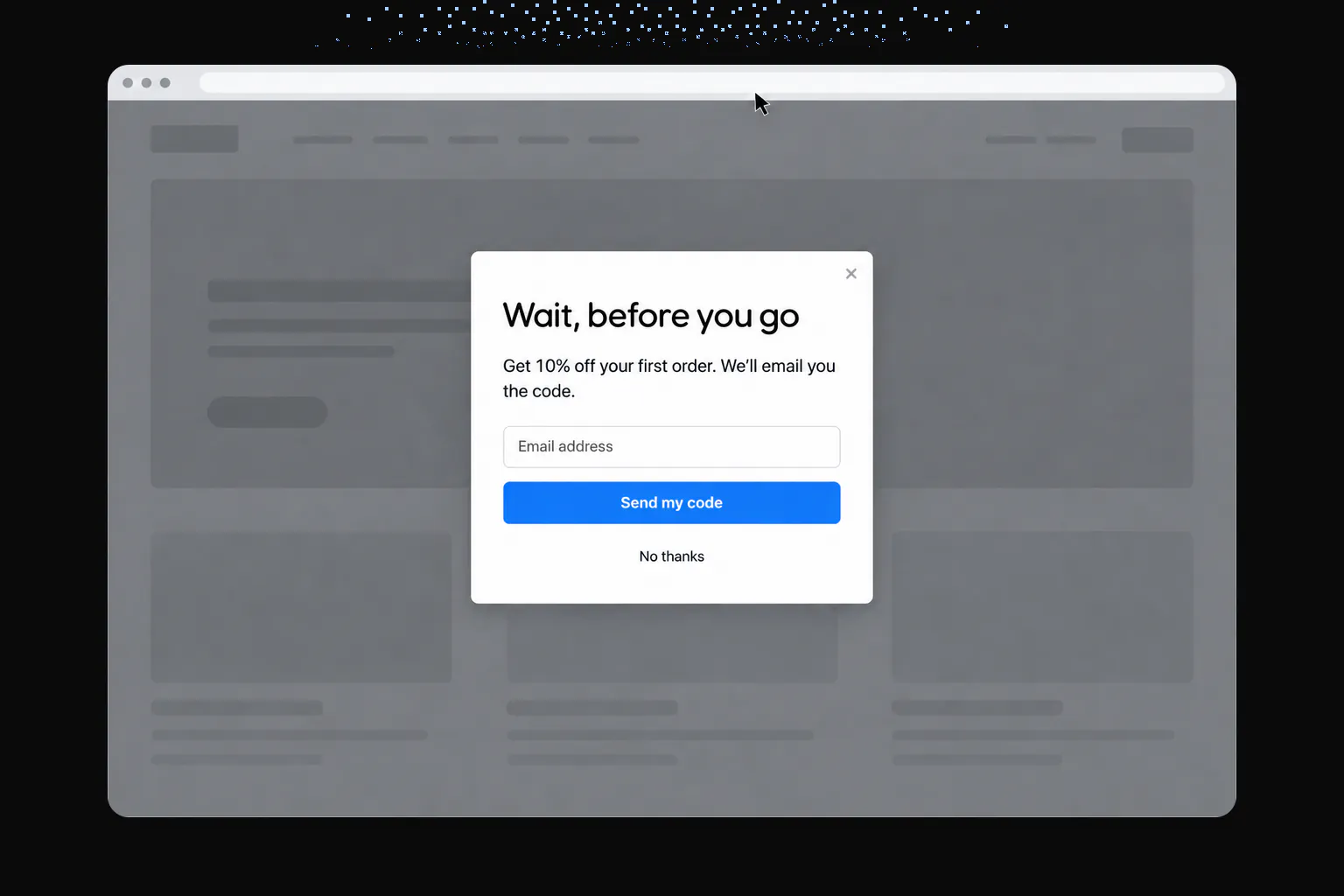
The trigger sits alongside the other options marketers choose from: immediate (fire on page load), time-based (after X seconds), scroll depth (after the visitor scrolls Y percent), and on-click. If you want the fuller picture on why any of these convert at all, our writeup on why popups convert and a gallery of exit intent popup examples both add context this report won't repeat.
What the 2026 Benchmark Shows About Exit Intent
Here's the headline finding: exit intent shows no statistically reliable advantage. Popups on the most sensitive exit-intent setting converted 1.10% of their displays into leads, against 0.78% for popups without exit intent (median campaign). That looks like a gap, and it may be one, but it doesn't hold up once the benchmark corrects for how many comparisons it ran, so it could be chance.
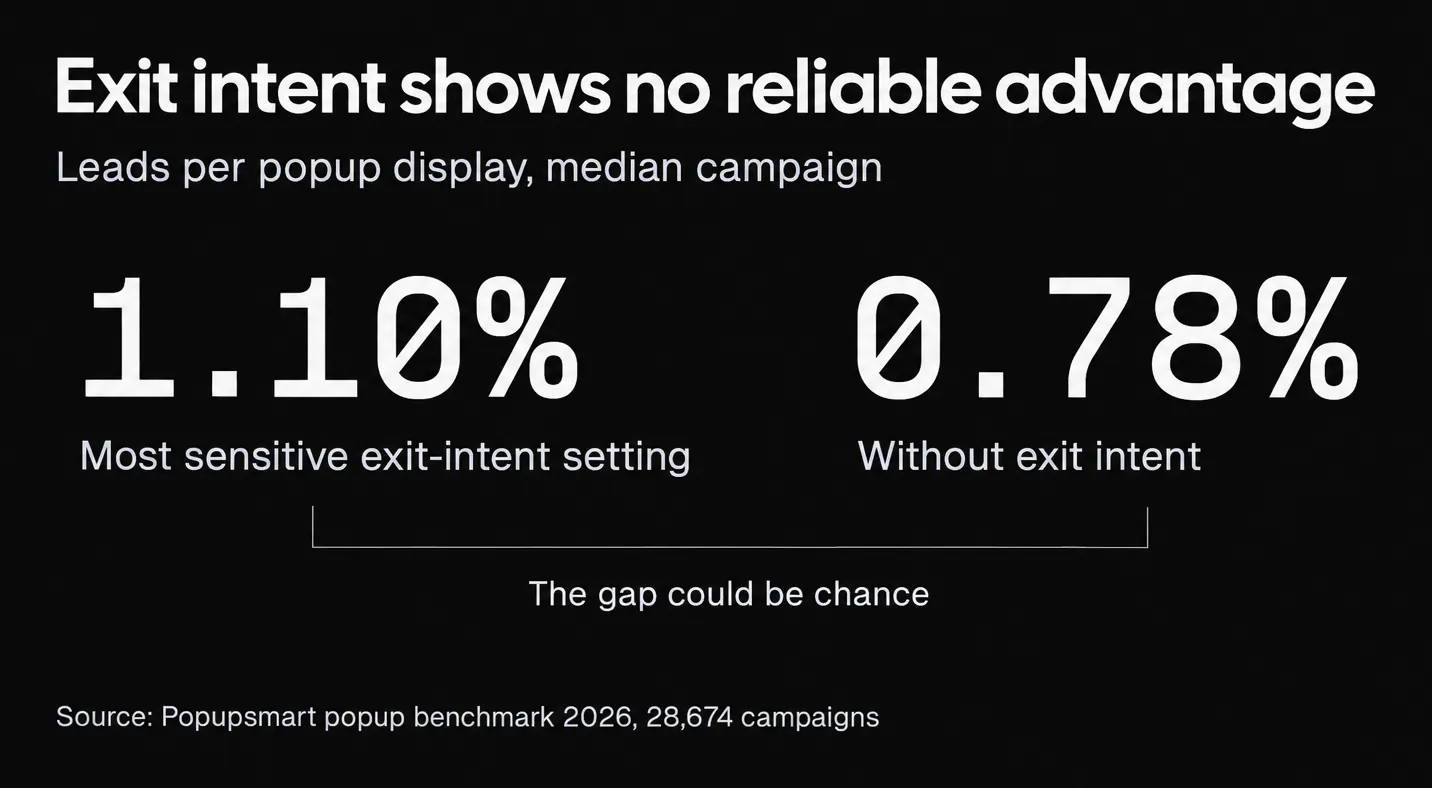

The benchmark holds every trigger comparison to the same rule. A gap is called a difference only when it survives a 5% false-discovery-rate correction across all the comparisons in the benchmark. A gap that points the same way but misses that bar is a lean, and everything else is reported as no measurable difference.
| Comparison (median campaign) | With | Without | What the test says |
|---|---|---|---|
| Exit intent on the most sensitive setting vs no exit intent | 1.10% | 0.78% | Not statistically reliable; could be chance |
| Waits before appearing vs shows the instant the page loads | 0.83% | 0.61% | A lean: same direction in every year of data, not statistically reliable |
| Delay of 0–5 seconds vs 21–60 seconds | – | – | No measurable difference |
Lead rate: leads with an email address or phone number ÷ popup displays, median campaign, January 2024 to September 2026. Source: Popupsmart 2026 benchmark.
Read the table as a ranking of evidence, not of triggers: waiting has the most consistent support, and even that is a lean; exit intent has a bigger gap and weaker support; the length of the wait doesn't register.
There's a plausible reason exit intent doesn't pull clearly ahead, though the data can't prove it: a popup that fires on the way out meets a visitor who has already decided to go. Recovering some of those visitors is real value, but the moment is also the one where attention is lowest.
Inside the Settings: Exit-Intent Sensitivity and Timing
So what should you set if you do run exit intent? Start with sensitivity. The one exit-intent figure in the benchmark comes from the most sensitive setting, the one that fires on the slightest move toward leaving. The benchmark doesn't publish a comparison between low, medium and high, so there's no data-backed default among the three. A reasonable starting point is the help center's medium, then test high if the popup rarely shows. Too eager a setting fires when someone reaches for a bookmark or another tab, which trains visitors to close popups on reflex.
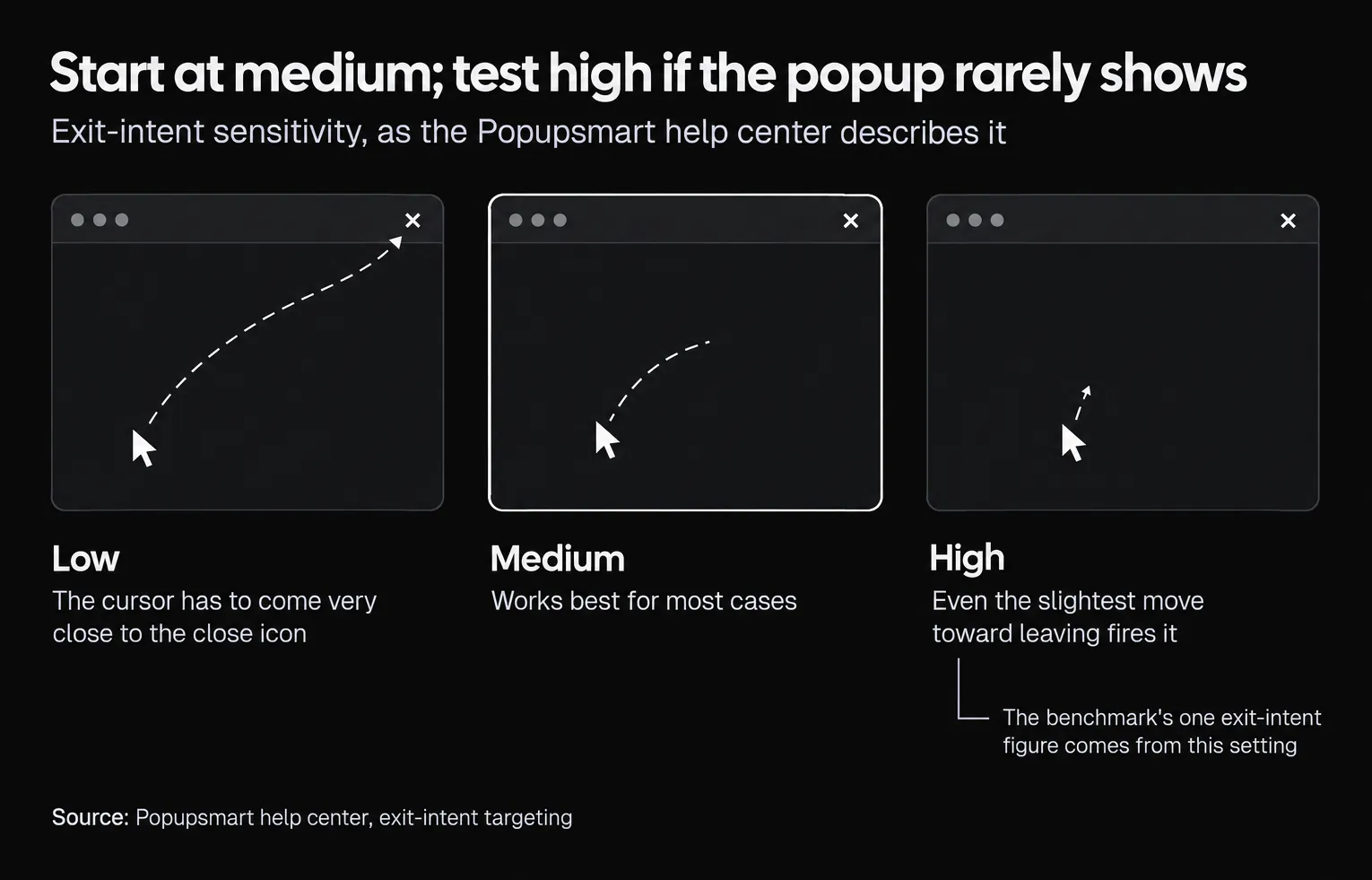
Timing is the second setting, and here the data is clearer about what doesn't matter:
- Waiting beats firing on page load, as a lean. Popups that wait convert 0.83% against 0.61% for popups shown the instant the page loads (median campaign). Omnisend's 2025 benchmark, across 1.24 billion email popup displays, points the same way: 1.9% for popups shown within the first second against 2.4% at 6 to 10 seconds.
- The length of the wait doesn't. A delay of 0–5 seconds and a delay of 21–60 seconds show no measurable difference in our data, so don't agonize over 10 seconds versus 30.
- Visitors decide fast once the popup is up. 71% of visitors who close a popup do so within 5 seconds of it appearing, and 61% of popup leads are submitted within 30 seconds. The first few seconds after the popup appears decide the outcome, so the offer and headline have to land immediately.
There's a shared logic across time delay, scroll depth and exit intent. Each one waits for a signal of engagement or intent before interrupting. That's the opposite of firing on page load, and it's the philosophy behind a well-timed welcome popup or a targeted offer on ecommerce popups. For the full timing picture, see our guide to popup timing.
Display Frequency: How Many Times Should One Visitor See It?
Here's where a setting most teams pick once and never revisit earns attention. Display frequency controls how often the same visitor sees a popup, and the 2026 data shows a clear pattern in repeat views:
| View of the same popup in a week | Lead rate (pooled) |
|---|---|
| 1st | 1.33% |
| 2nd | 1.22% |
| 6th and later | 0.41% |
Leads ÷ displays, all displays pooled. From the third view conversion falls; from the sixth it is 31% of the first-view rate. Source: Popupsmart 2026 benchmark.
Within the same campaign, showing a popup a second time caused no measurable drop in conversion; the decline begins with the third showing. The pooled rates above aren't comparable with the median-campaign rates elsewhere in this post, but the pattern inside the table is what matters: a second chance is free, a fifth isn't.
Who sees the popup matters as much as how often. New visitors convert on popups more often than visitors who were on the site in the previous 7 days: the same popup converts better for new visitors in 75% of campaigns (median gap 0.30 percentage points; pooled 1.28% vs 0.54% of displays). And popups targeted at new visitors only convert 1.13% of their displays against 0.77% for popups shown to everyone (median campaign).
In Popupsmart, both settings live in the Segment step: the display frequency settings (every page view, every session, once, or every day or month, plus when to stop showing), and new or returning visitor targeting.
So Should You Use Exit Intent? What the Data Does — and Doesn't — Prove
Short answer: test it, don't assume it. The 2026 benchmark measured exit intent across real campaigns and found a gap in its favor that could be chance. That's different from "exit intent doesn't work": exit-intent popups collect leads, and on the right page they may well beat your current trigger. What the data can't tell you is that switching the trigger alone will lift your results.
Other companies' benchmarks point the same way, though each counts differently. Omnisend's 2025 email popup benchmark puts exit-triggered popups at about 1.8%, below scroll-triggered popups (about 2.1%) and popups shown after a number of page views (about 2.3%). Wisepops, a popup vendor, reports exit-intent popups at 3.94% on its own platform, below scroll-based popups at 5.37%; the same 3.94% circulates in roundups such as Flint's exit-intent statistics. Neither is a median campaign lead rate, so compare them with ours only as direction: in both, exit intent is not the top trigger.
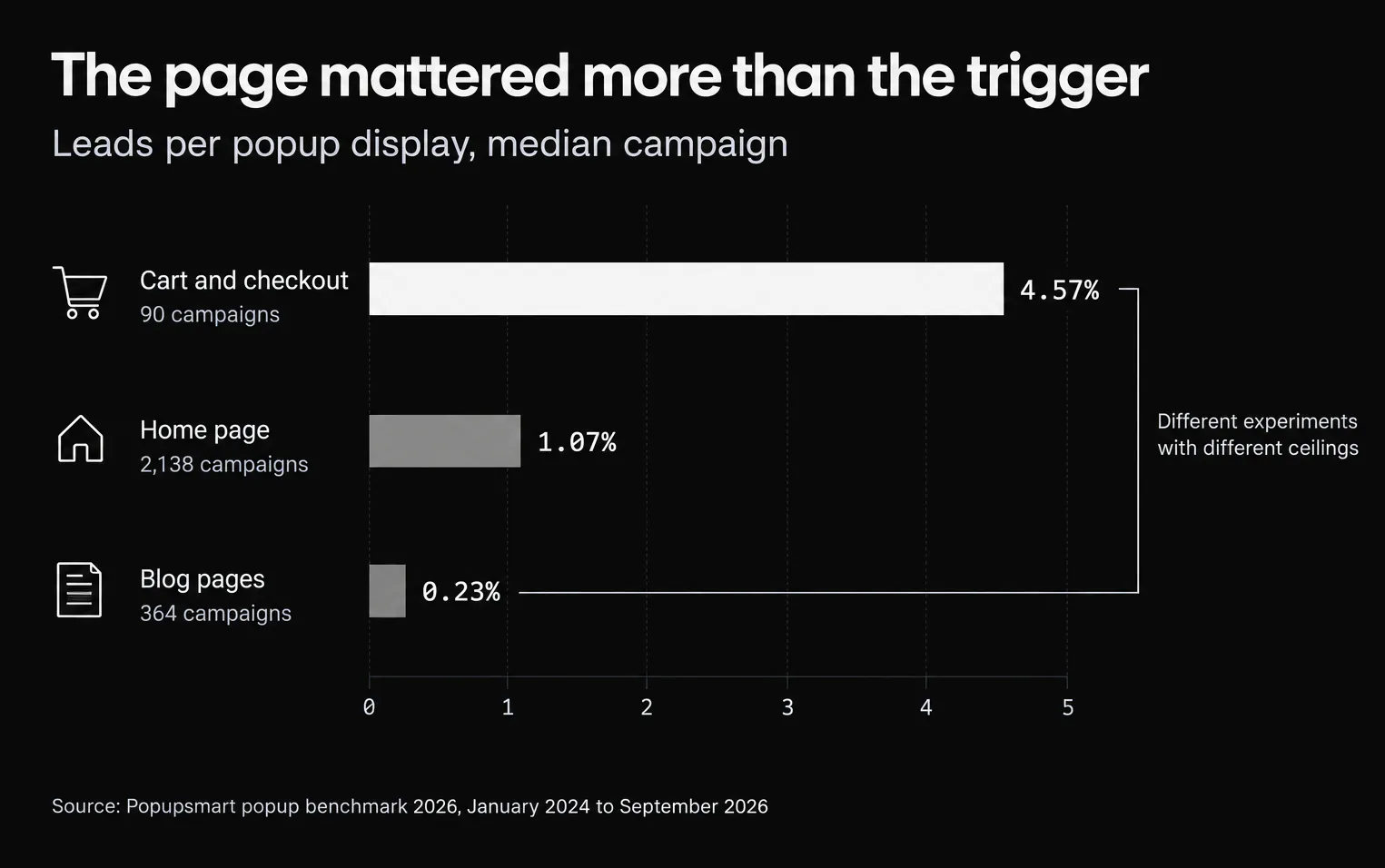
Taken together, they say exit intent works about as well as a decently timed popup, not that it's a sure thing. Where it makes most sense is where leaving is expensive. Across the popups we measured, the median popup on cart and checkout pages converts 4.57% of its displays, against 1.07% on the home page and 0.23% on blog pages (median campaign). An exit popup on a cart page and one on a blog post are different experiments with different ceilings. For context on where any of these rates sit, compare them against a realistic average conversion rate before you judge a popup a failure, and remember a website rate divides by every visitor while a popup rate divides only by the people who saw the popup.
How to Actually Test Behavioral Triggers on Your Own Site
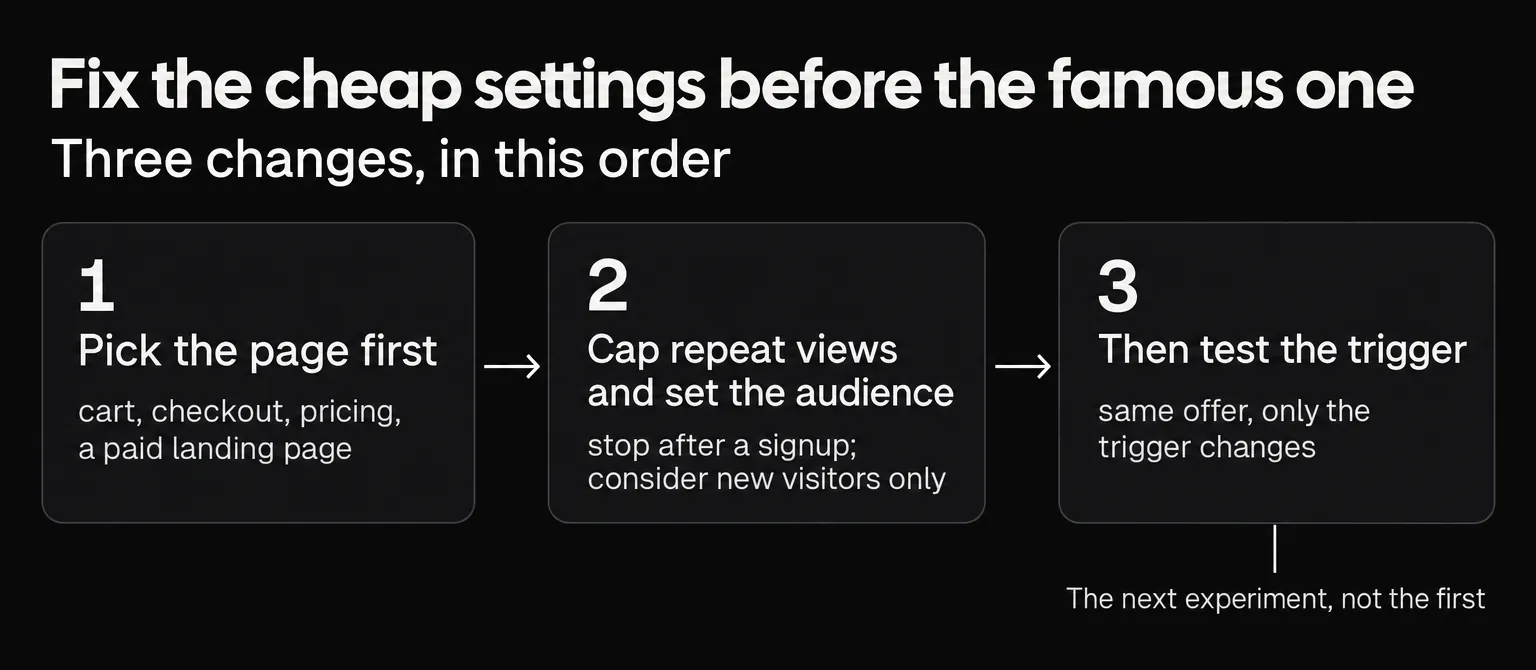
Don't take our aggregate numbers as your answer, use them as your starting hypothesis. The point of a data report is to tell you where to look, and the 2026 data points at three changes worth making before, and around, the trigger test.
1. Pick the page first. Cart and checkout popups convert 4.57% against 1.07% on the home page (median campaign), a wider spread than any trigger comparison in the benchmark. Put your exit popup where a leaving visitor costs you something: cart, checkout, pricing, a paid landing page. A blog post, where readers arrive to read and go, often does better with a scroll or time trigger than an interruption on the way out.
2. Cap repeat views and set the audience. Limit how often one visitor sees the popup (the drop starts at the third view in a week), stop showing it after a signup, and consider showing it to new visitors only: those popups convert 1.13% against 0.77% for popups shown to everyone.
3. Then test the trigger. Run your existing offer on its current trigger against the same offer on exit intent. Keep everything else identical so the trigger is the only variable. Our benchmark only counts a campaign once it has 1,000 displays; hold your test to at least that per variant, and more if the gap you're looking for is small.
Measure the lead rate (leads over displays), not raw opt-ins, and watch bounce rate and revenue per visitor so a "winning" popup isn't quietly costing you engagement. A structured approach to A/B testing your popups keeps these tests clean. When you're ready to build the variants, our library of exit-intent popup templates gives you a starting point, and the exit-intent trigger is included on every plan, including Popupsmart's free plan. Pair the exit test with a solid abandoned cart recovery offer and you've got a real experiment, not a guess.
Methodology and Limitations
This report draws on Popupsmart's 2026 popup benchmark: aggregated, anonymized data from campaigns that ran a popup with Popupsmart between January 2024 and September 2026, validated by an independent recomputation before publication. The full benchmark report documents the method.
Lead rate is a popup submission that contains an email address or phone number, divided by popup displays. Unless a figure says "pooled", it is the median campaign, over campaigns with at least 1,000 displays and 14 active days; the lead-rate medians cover the 3,034 popups that ask for an email or phone number.
Differences, leans and no difference. A gap is stated as a difference only when it survives a 5% false-discovery-rate correction across all the comparisons in the benchmark. Gaps that point the same way but miss that bar are stated as leans; everything else is reported as no measurable difference. The exit-intent comparison misses the bar.
There are limits worth stating plainly, because they shape how far you can push these numbers:
- The trigger comparisons are between campaigns as marketers configured them, not a randomized test. Campaigns that use exit intent may differ in other ways, such as their pages, offers or audiences.
- The exit-intent figure is for the most sensitive setting only. The benchmark doesn't publish a comparison between sensitivity levels.
- The view-count figures are pooled across all displays, and the within-campaign result (no measurable drop at the second showing) is what isolates the effect of a repeat view.
- External benchmarks use their own definitions, usually averages, and aren't comparable with a median campaign lead rate.
What happened to the 500-campaign study. The first version of this post (July 2026) reported a trigger mix from a sample of 500 campaigns and display-frequency results from a separate analysis. Both used different samples and definitions from the 2026 benchmark, and the benchmark does not confirm their conclusions: its view-count data runs against the advice to keep showing a popup after a visitor converts. We retired both studies instead of restating them next to the new numbers.
Frequently Asked Questions
Do exit intent popups really work?
They can, but the evidence that they beat other triggers is weak. In Popupsmart's 2026 benchmark, popups on the most sensitive exit-intent setting converted 1.10% of their displays into email or phone leads, against 0.78% for popups without exit intent (median campaign), a gap that could be chance. Published figures from other companies run from about 1.8% (Omnisend, exit-triggered email popups in 2025) to 3.94% (Wisepops, on its own platform), each counted differently. Treat exit intent as something to test on a high-intent page, not a guaranteed lift.
What is an exit intent popup?
An exit intent popup is a message that appears the moment a visitor signals they're about to leave a page, usually when their cursor moves quickly toward the top of the browser window (the address bar, back button, or a browser tab). On mobile, where there's no cursor, tools approximate it with a fast scroll up or a back-button press. The goal is to make one last offer before the visitor goes.
How do you create an exit intent popup?
Pick a no-code popup builder, create a campaign, and set the display trigger to exit intent instead of immediate or time-based firing. Then choose a sensitivity level, add your offer and email field, set targeting (which pages and which visitors), and pick a display frequency. Test it against your current popup before assuming it wins: in Popupsmart's 2026 benchmark, exit intent showed no statistically reliable advantage over popups without it.
Do exit intent popups work for SaaS in 2026?
They can, especially on high-intent pages like pricing or docs where a leaving visitor is worth recovering with a demo offer or a lead magnet. But there's no first-party proof they beat other triggers for SaaS specifically: across all industries in Popupsmart's 2026 benchmark, the exit-intent gap (1.10% vs 0.78%, median campaign) could be chance. For most SaaS teams it's an experiment worth running on the pricing page, not a guaranteed win.
How do you set up an exit intent popup on Shopify?
Install a popup app from the Shopify App Store, build a campaign, and set the trigger to exit intent. Point it at your cart or product pages, add a discount code or email capture, and set it to show to visitors who haven't already converted. The page matters more than the trigger: in Popupsmart's 2026 benchmark, popups on cart and checkout pages convert 4.57% of their displays against 1.07% on the home page (median campaign).
How do you measure exit intent popup effectiveness?
Track the lead rate (leads divided by displays), not just how many popups showed. Then compare it against the same offer on a different trigger, like immediate fire, using an A/B test so the trigger is the only variable. Watch downstream metrics too: bounce rate, revenue per visitor, and unsubscribe rate. A popup with a high opt-in rate but a spike in refunds or low-quality emails isn't actually effective.
How often should you show an exit intent popup?
No more than twice a week to the same visitor is a sensible cap. In Popupsmart's 2026 benchmark, the first two times a visitor sees a popup in a week convert at similar rates (1.33% and 1.22% of displays, pooled); from the third view conversion falls, and from the sixth view it is 0.41%, 31% of the first-view rate. Stop showing it once the visitor has signed up.
What are the best practices for exit intent popups?
Fire on high-intent pages (cart, checkout, pricing, product) rather than everywhere, cap how often a visitor sees the same popup, and stop showing it after someone converts. Match the offer to the moment of leaving: in Popupsmart's 2026 benchmark, signup popups with a discount code convert 1.46% of their displays against 0.75% without one. Keep the form to one or two fields, A/B test the trigger against your default, and on mobile use a clear close button to avoid an intrusive-interstitial penalty.
What are some exit intent popup examples?
Common exit intent popup examples include a discount code for cart abandoners ("Wait, here's 10% off"), a free lead magnet like an ebook or checklist, a newsletter signup with an incentive, a shipping-threshold reminder, and a short feedback survey asking why the visitor is leaving. The best example for your site depends on the page and the visitor's intent, not a universal template.
Do exit intent popups work on mobile?
Partly. There's no mouse cursor on mobile, so tools can't detect the classic upward cursor movement. Instead they approximate exit intent with signals like a fast scroll up or a back-button press, which are less precise than desktop detection. Popups in general do well on phones: in Popupsmart's 2026 benchmark, the median popup converts 1.02% of its displays on mobile against 0.57% on desktop, a figure for all popups, not exit intent alone. Test a mobile-specific trigger and design rather than assuming the desktop setup carries over.
What changed in this post
The first version reported a trigger mix from a sample of 500 campaigns and display-frequency results from a separate analysis, including advice to keep showing a popup after a visitor converts. Popupsmart's 2026 benchmark (January 2024 to September 2026, 28,674 campaigns) supersedes both studies and does not confirm their conclusions, so they were removed rather than restated. The post now reports the benchmark's exit-intent, timing and repeat-view results with their test outcomes. We also re-checked the third-party figures: the 2.81% exit-intent average the first version credited to Crazy Egg is Wisepops', and was dropped; the 3.94% figure is Wisepops' own platform number; and the 6 to 10 second delay figures come from Omnisend's benchmark.
Initial publication.