ChatGPT
 Perplexity
 Claude
 Grok
Grok Google AI Mode
I've seen website popups do far more in digital marketing than collect emails.
The same box can sell a discount, ask a question or check a visitor's age, depending on what the business needs from that visit.
So below are the examples, each with the part I'd borrow for your own campaigns.
What Are Website Popups?
Website popups are interactive elements that appear on a webpage to capture user attention and encourage specific actions.
Typically, they appear as small windows or overlays that prompt visitors to engage with content, subscribe to newsletters, or take advantage of special offers.
In my experience, a popup is a deliberate interruption of the user’s browsing. It earns that interruption only when the message is timely and relevant to what the visitor is doing.
Most popups do one of these jobs:
- Lead generation: collecting visitor information like email addresses in exchange for content worth having.
- Promotions: putting discounts, sales or special offers in front of shoppers to drive immediate sales.
- Engagement: getting users to answer a quiz or survey, or to follow your social media channels.
- Feedback: asking users what they think so you can improve products or services.
- Compliance: asking for cookie consent or confirming a visitor's age before they browse.
The trigger decides when in the visit a popup shows up:
- Time delay: the popup appears after the user has spent a set amount of time on the page, a sign they're reading.
- Scroll depth: it fires once a user scrolls past a certain percentage of the page, so it reaches people who are exploring the content.
- Exit intent: it detects when a user is about to leave the site and gets one last chance at their attention.
- Click trigger: it opens when a user clicks a specific element, which means the visitor asked to see it.
For every format and trigger in one list, see our guide to the types of popups.
That's a wide spread for one kind of popup. The same format can land at either end of it, depending on its offer, audience and timing.
33 Website Popup Examples That Get Clicks
We captured these 33 popups on the brands' own stores in February 2025. On 1 October 2026 we checked that every brand's store is still online: Doublesoul now sells on doublesoul.co, Flaus on goflaus.com, and poketo.com redirects to its parent company, Pattern Brands. Popups change often, so each caption carries its capture date; what you see on a store today may differ.
Website popups can be pointed at almost any marketing goal, and I've seen different types fit very different business needs. So the real-world examples below go one use case at a time.
We picked them for three things: a clear goal, one offer, and a design choice you could copy with any popup builder. They're grouped by what the popup is for, and each group links to our longer post on that goal.
| Goal | Where to start | Examples here | Go deeper |
|---|---|---|---|
| Email capture and welcome | A centred popup for new visitors | 1–8 | Welcome popup guide, Shopify email capture examples |
| Discount | A signup popup that sends a code | 9–20 | Discount popup examples |
| Exit intent | A popup when the cursor leaves (desktop) | 21–24 | Exit intent popup examples |
| Survey and quiz | A popup with answer buttons | 25–30 | Popup survey examples |
| Promotions, cart and order value | A popup on cart and checkout pages | 31–32 | Cart abandonment popup examples, countdown timer popups |
| Announcement | A top or floating bar | 33 | Announcement bar examples |
| Age verification and cookie consent | A gate before browsing, a corner consent box | 2 example designs | Cookie consent and age verification popups |
Email capture and welcome popup examples
Lead capture popups turn visitors into leads: the visitor hands over contact information and gets content or an offer back. A welcome popup is the version for first-time visitors, and it's the one most stores start with to grow their email list.
Targeting matters as much as the design here. In our 2026 benchmark, popups targeted at new visitors only convert 1.13% vs 0.77% for popups shown to everyone. Our welcome popup guide covers the setup, and the Shopify email capture examples add store-specific layouts.
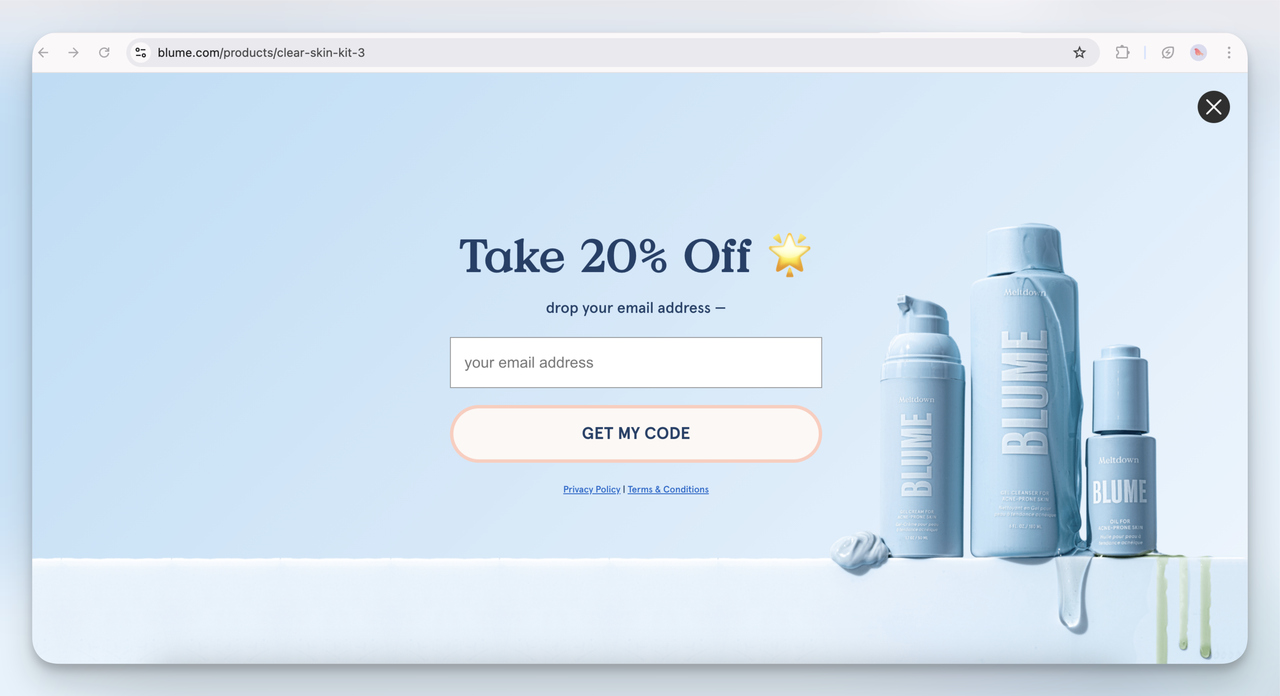
1. Blume Email Capture Popup (Full-Screen)
This is a straightforward full-screen email popup with a clean design.
I think Blume is relying on aesthetic appeal to keep users engaged. The 20% discount is standard, but the softness in color and simple call-to-action make it feel non-intrusive.
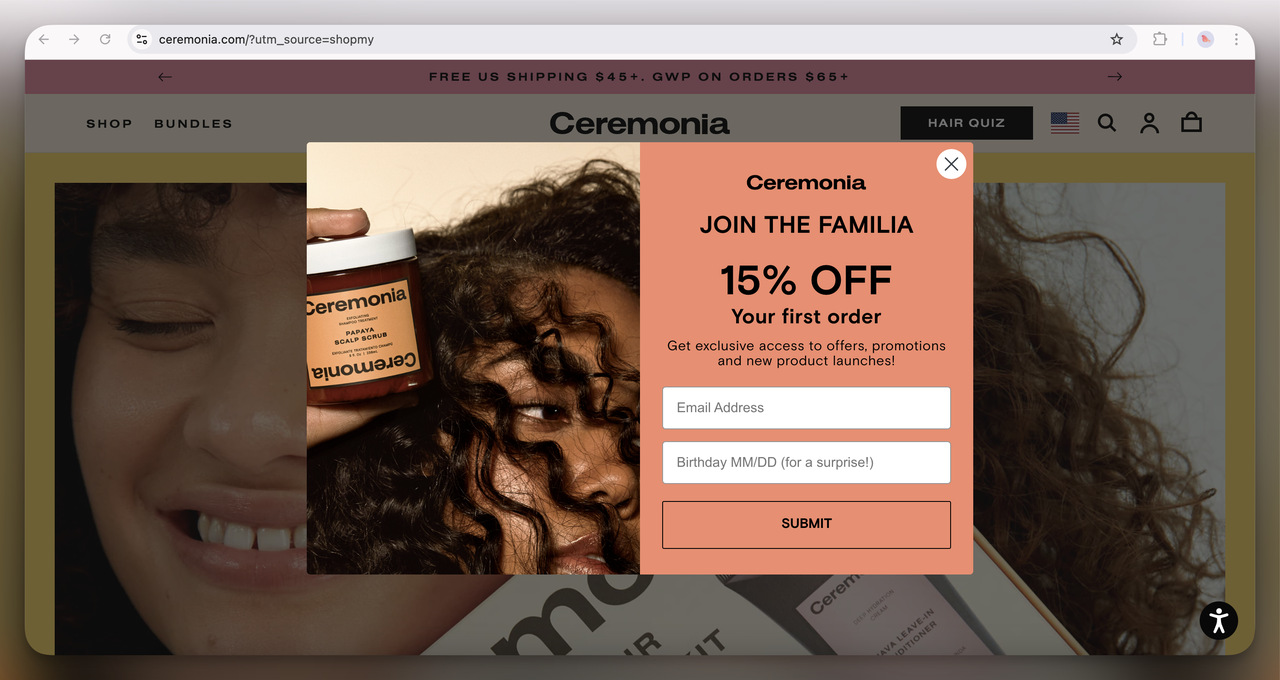
2. Ceremonia Welcome Popup (Overlay)
A simple first-time order discount with an added birthday field for an extra touch. I like the birthday touch. Making users feel special on their birthday is an easy way to build long-term brand loyalty.
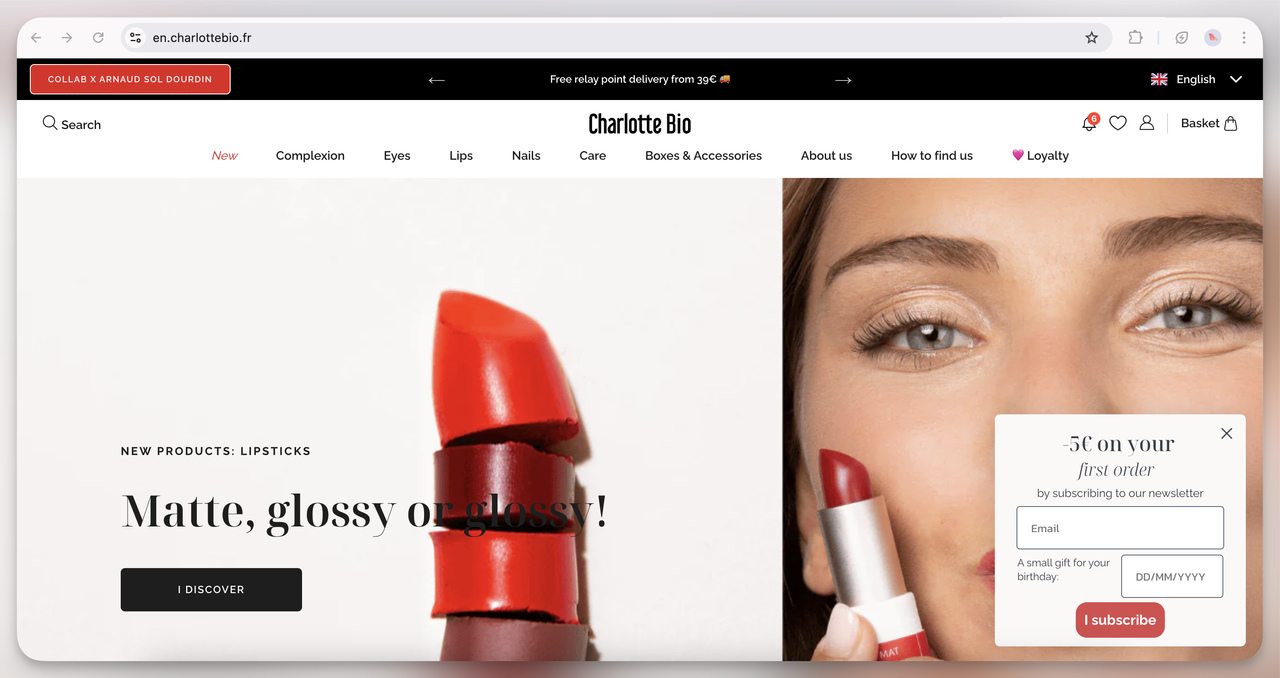
3. Charlotte Bio Birthday Discount Popup (Floating)
Unlike the others, this one is a small floating box in the corner rather than a full-screen or overlay. I think this is less intrusive while still being effective in capturing first-time shoppers.
The birthday reward also gives the brand a reason to email them again later.
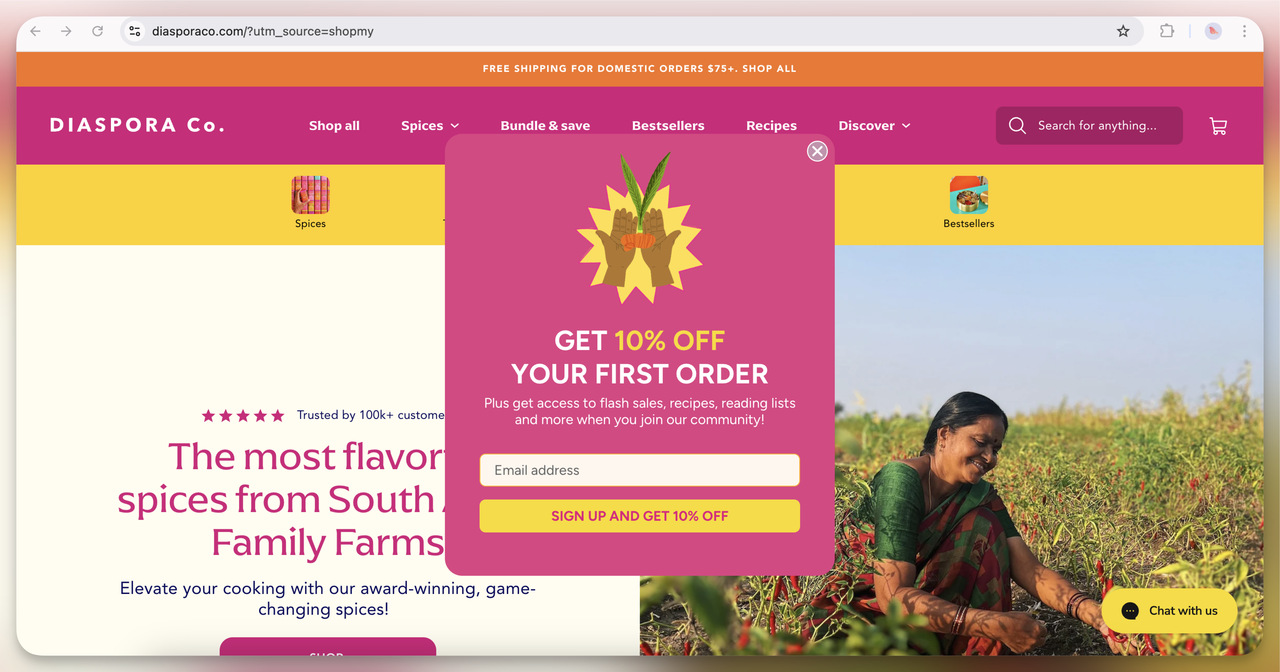
4. Diaspora Co. Welcome Offer Popup (Overlay)
A simple, colorful design that reflects the energy of the brand. The 10% off offer is pretty standard, but what stands out to me is the extra value they list: access to flash sales, recipes, and more. I think they’re trying to build a community here, and the email is only the way in.
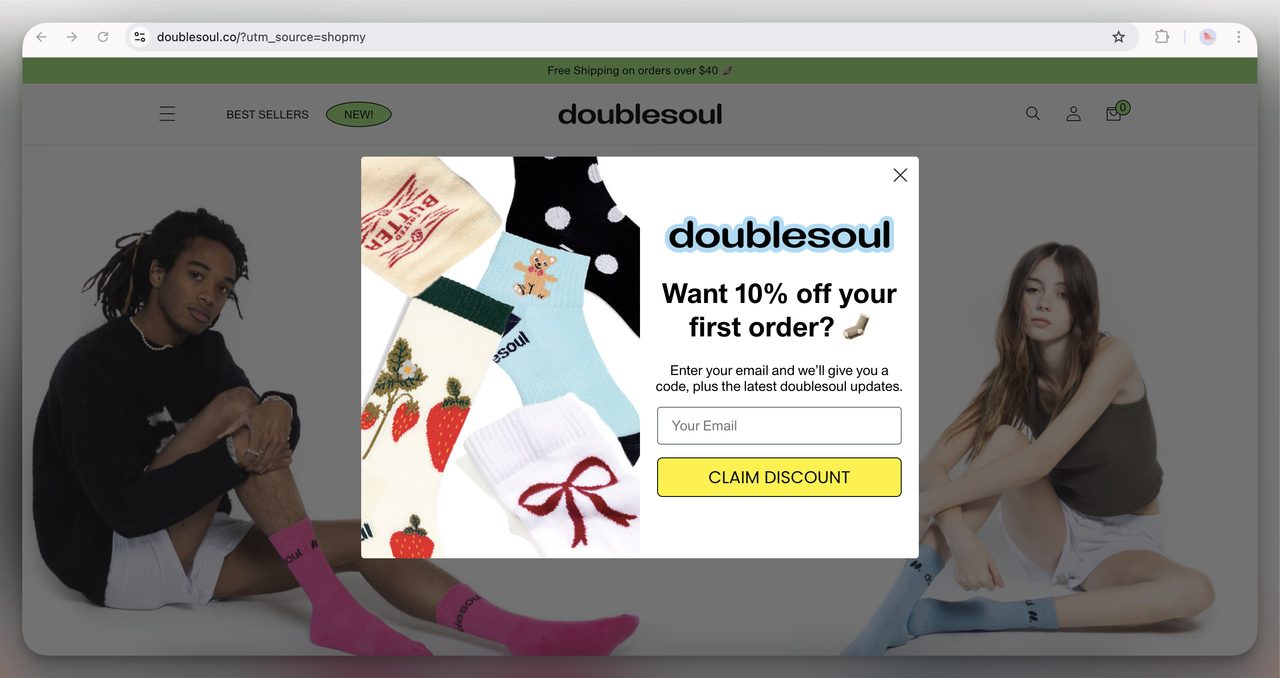
5. Doublesoul First Order Discount Popup (Overlay)
I think the visual use of the product (fun socks) is smart: you see right away what you’re getting.
The 10% off offer is straightforward, but the use of emojis and playful copy keeps it light and friendly. It feels casual, much like their product offering.
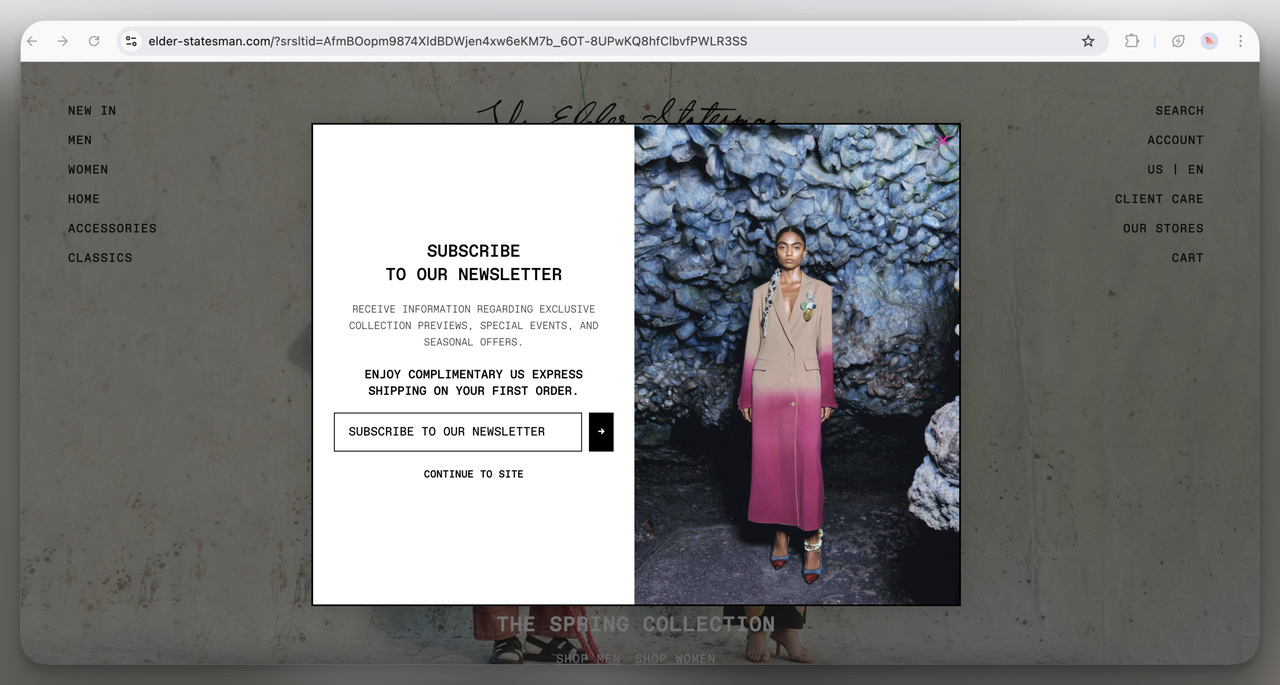
6. Elder Statesman Newsletter Popup (Overlay)
Very minimalist and high-end. I think this approach screams luxury: no loud colors, no bold discount, only an exclusive offer of free shipping and access to special events.
It gives off a premium vibe, which matches the fashion-forward, designer aesthetic of the brand.
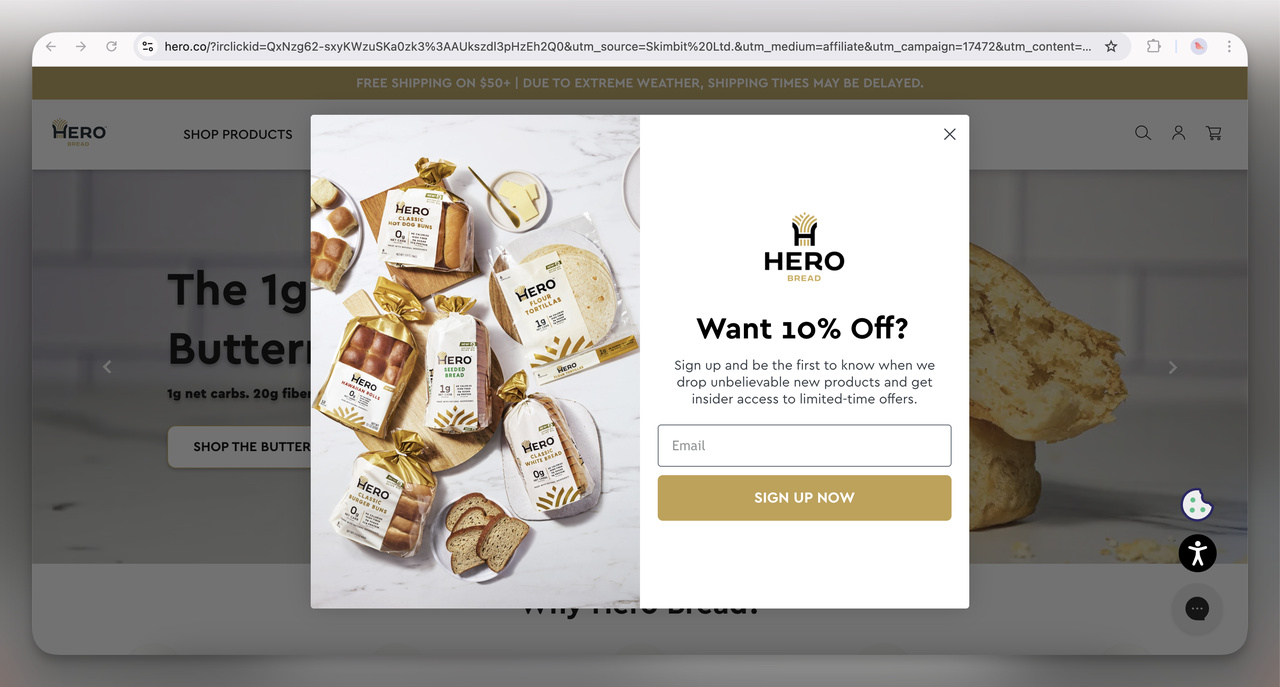
7. Hero Bread Discount Offer Popup (Overlay)
This is a pretty classic email capture popup. I think the 10% discount tied to early access for new products is aimed at building exclusivity. The use of an inviting image of their products reinforces the offer. It feels like they’re saying, "Hey, join our bread-loving family and be the first to try our newest creations!"
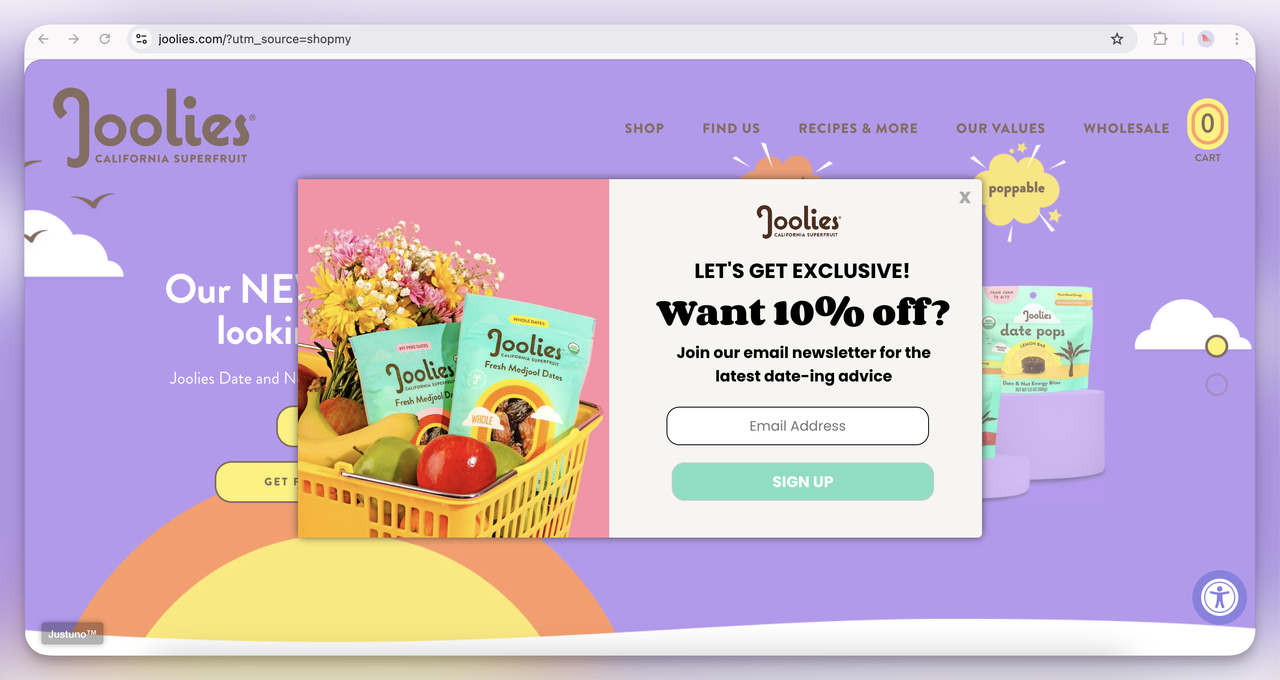
8. Joolies Discount + Newsletter Popup (Overlay)
The playful pastel visuals and puns (“date-ing advice” for dates, get it?) make this popup feel friendly and approachable.
Besides the discount, they pitch the newsletter itself as something fun and useful to read. I think that lands with customers who like a bit of personality in their marketing.
Discount popup examples
Discount popups are the most common popup on the stores we looked at, and the 12 below lead with the discount alone. The design varies, the offer barely does, and our data says the offer's size matters less than having one.
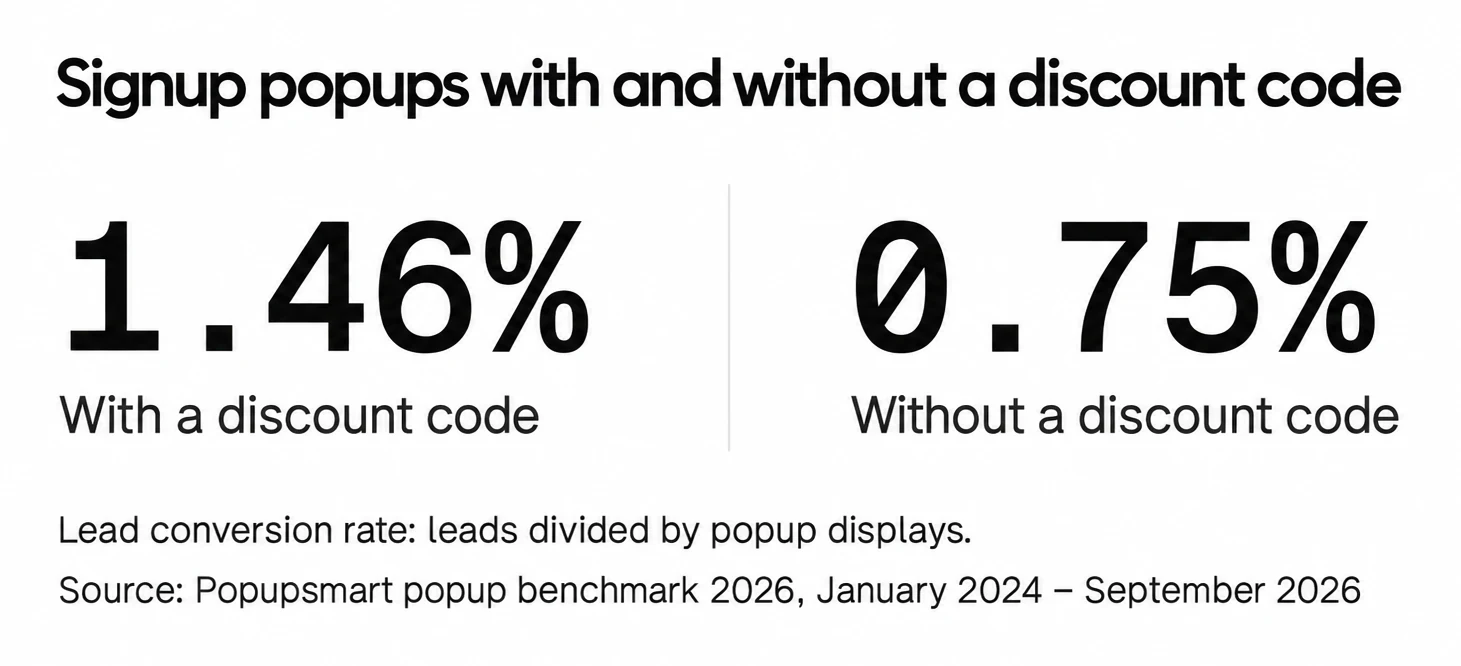
Signup popups that offer a discount code convert 1.46% vs 0.75% for signup popups without one. Bigger discounts did not convert measurably better: 10% off converted 1.25%, 20% off 0.91% and 25-30% off 1.33%, but the larger-discount samples are small (78 and 46 campaigns), so the data cannot rule out a real difference either way. For 21 more layouts and the setup, see our discount popup examples.
9. Flaus Email Signup Popup (Overlay)
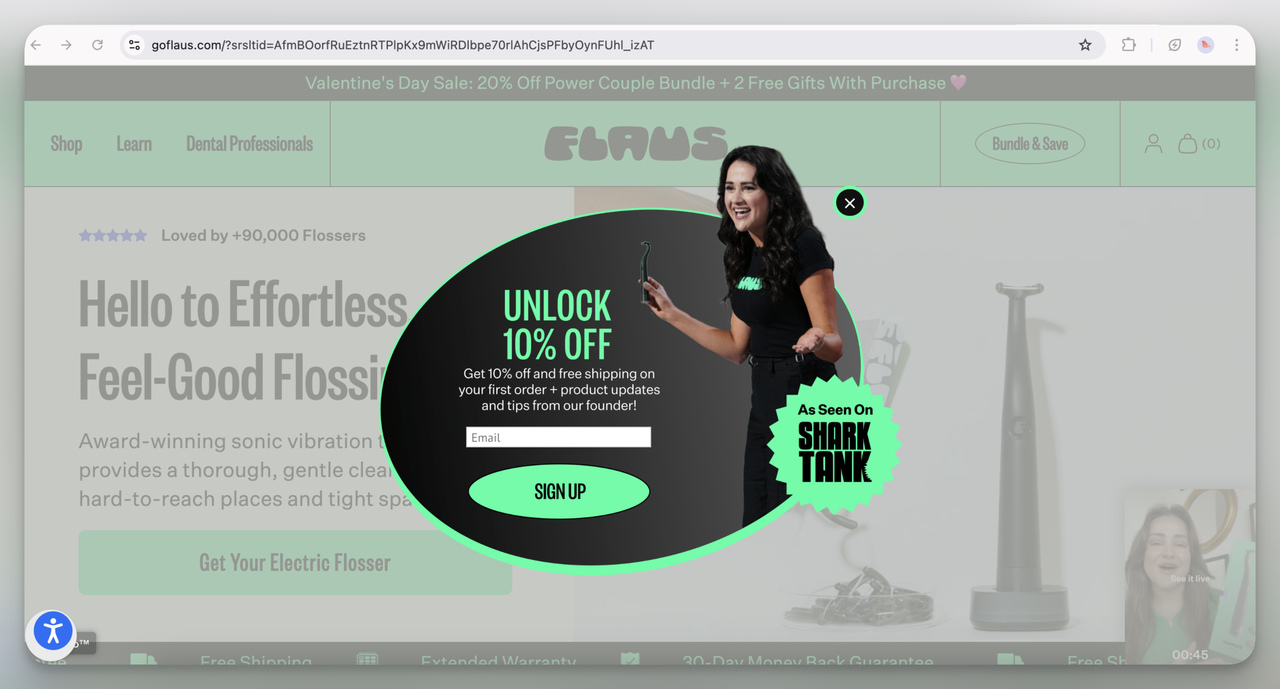
I love the dynamic oval shape of this popup; it visually stands out from the typical rectangle. Offering 10% off along with free shipping is a solid hook, but I think the real kicker here is the "As Seen on Shark Tank" badge, which adds instant credibility and urgency.
10. Girlfriend Collective Discount Popup (Overlay)
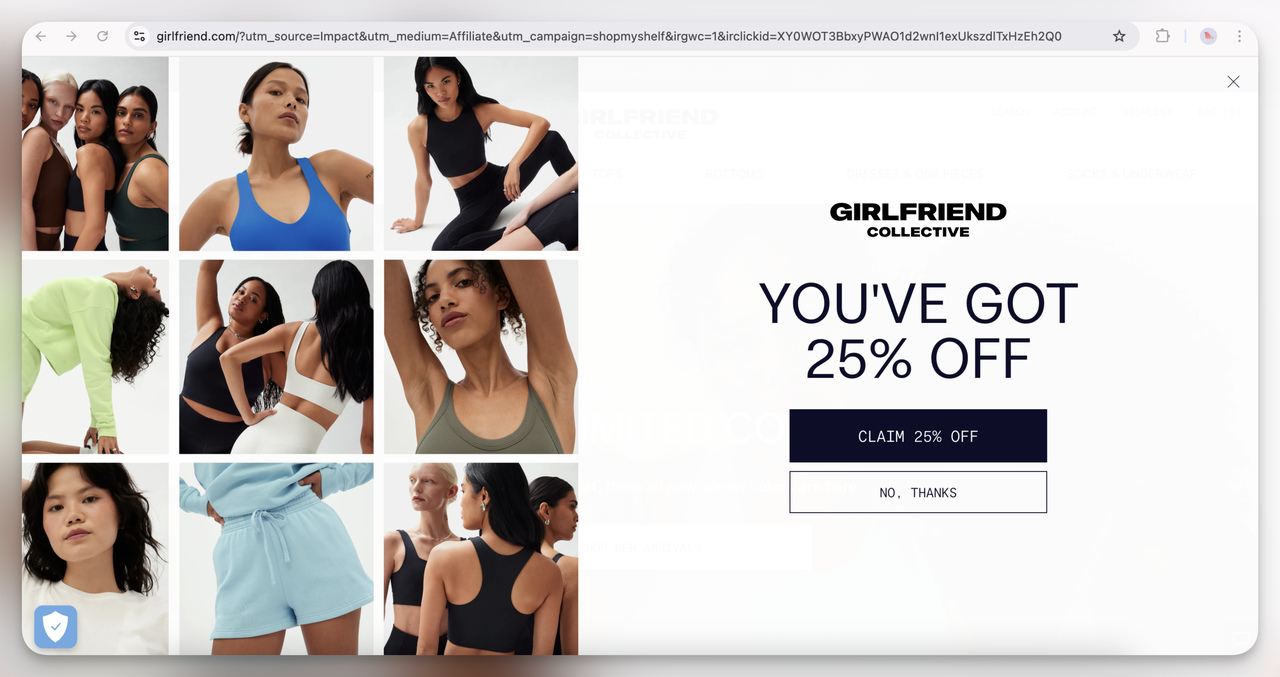
A clean, minimalist design offering a generous 25% off. I think it works because it’s simple and doesn’t overwhelm with too much text.
The diverse model images reflect the brand’s inclusive values. Subtle, but the message is clear.
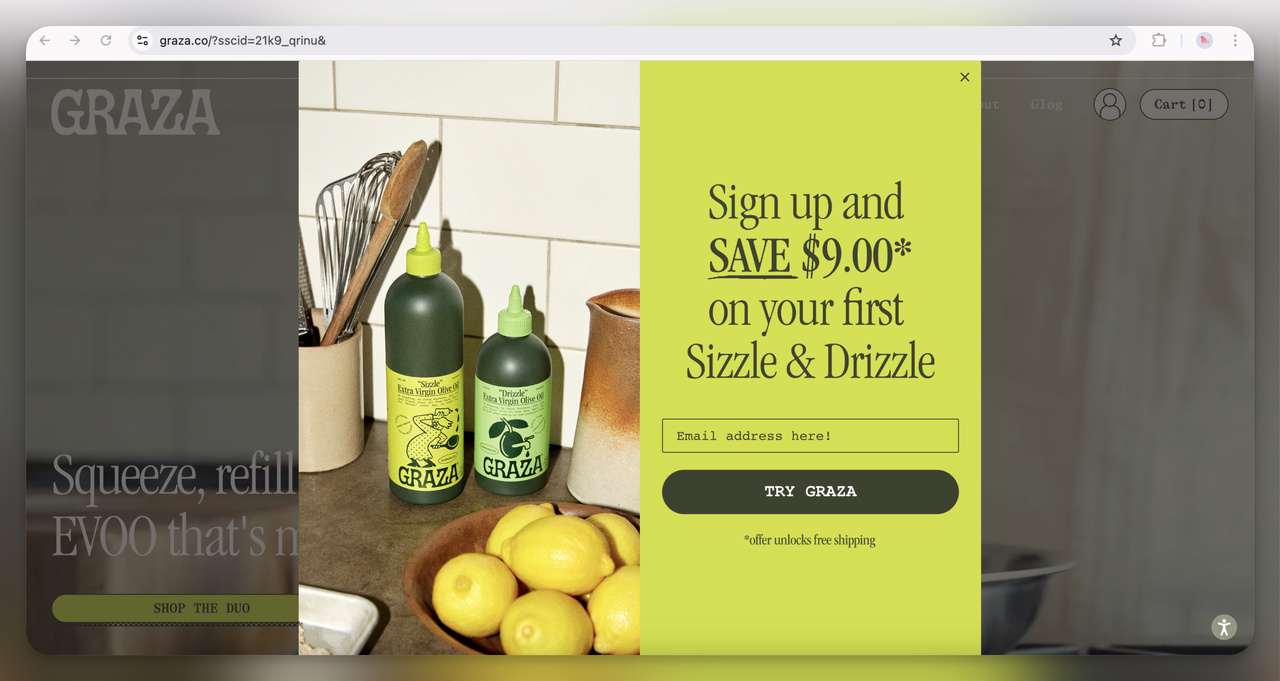
11. Graza Discount Popup (Overlay)
This one immediately grabs attention with its bright neon color; definitely hard to ignore! The $9 discount and free shipping combo is a strong incentive.
I think the casual, handwritten font paired with the kitchen imagery creates a homey, approachable vibe that makes users feel connected to the product.
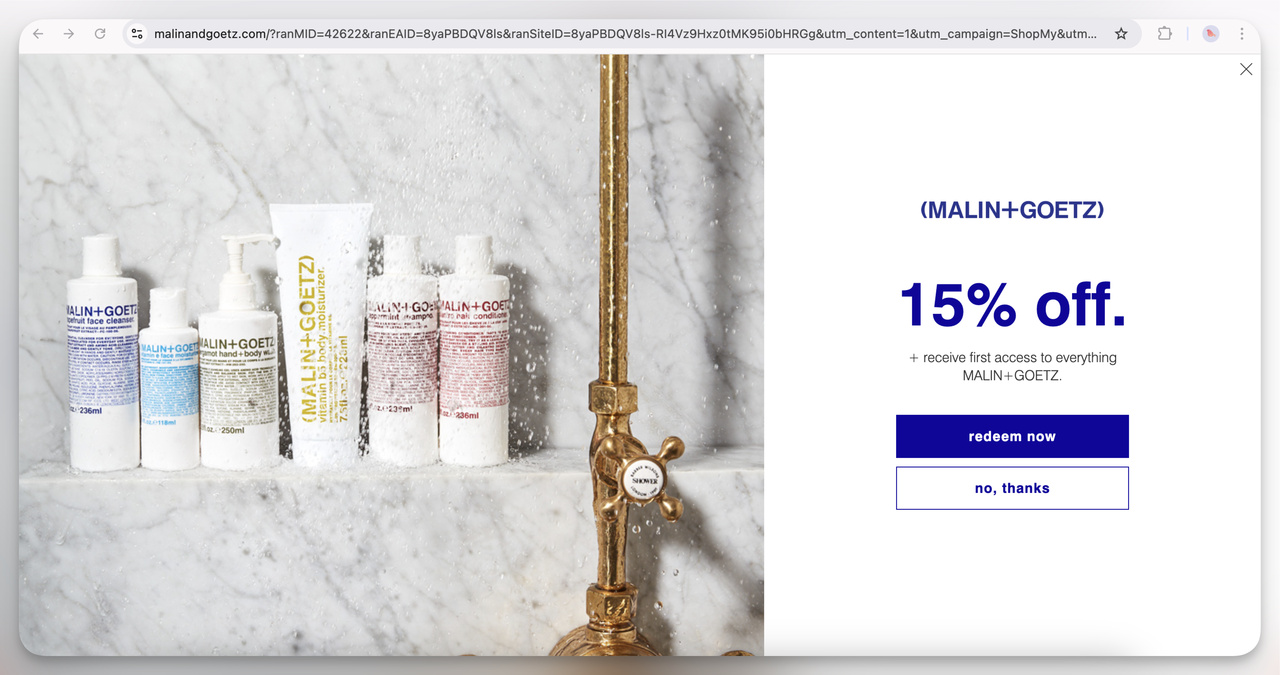
12. Malin + Goetz Discount Popup (Overlay)
The minimalist design reflects their high-end skincare branding. The clean aesthetic paired with a simple 15% off offer gives off a vibe of sophistication. I think they’re targeting users who value simplicity and quality without the bells and whistles.
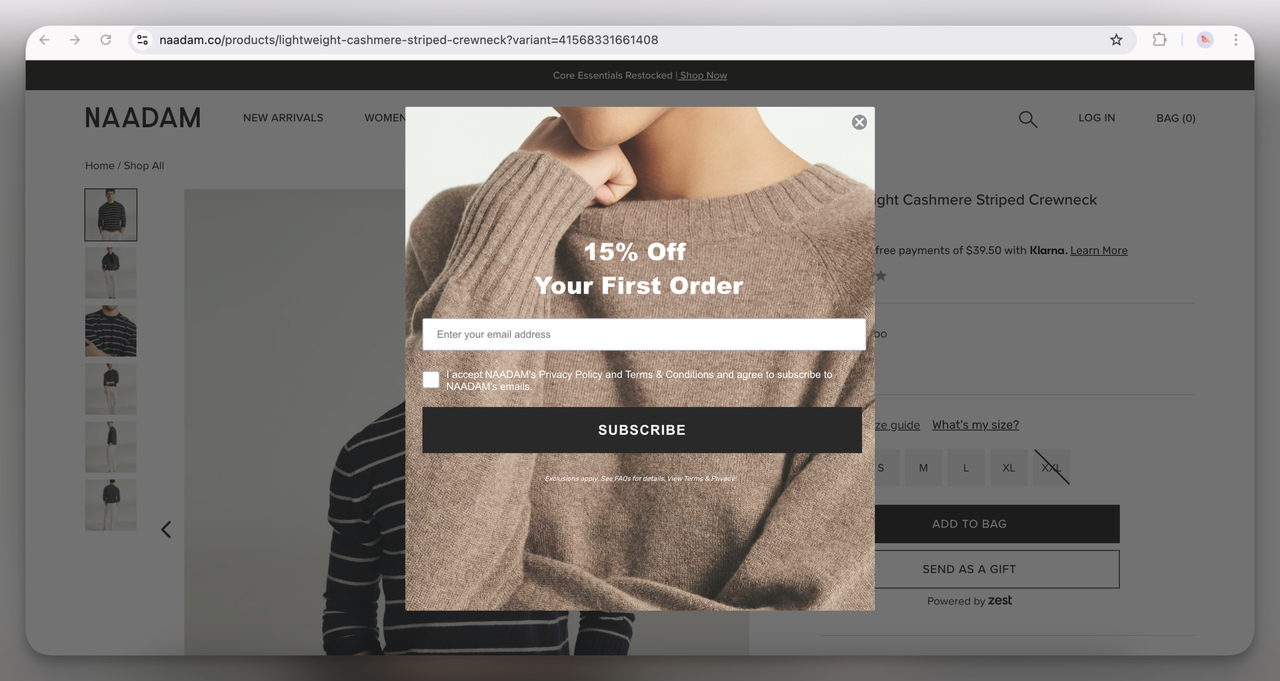
13. Naadam Discount Popup (Overlay)
The soft, cozy cashmere background image fits perfectly with their product vibe. The 15% discount on the first order is pretty standard, but the calming, neutral tones make the offer feel less salesy. I think this is designed to feel like a warm invitation rather than an aggressive sales push.
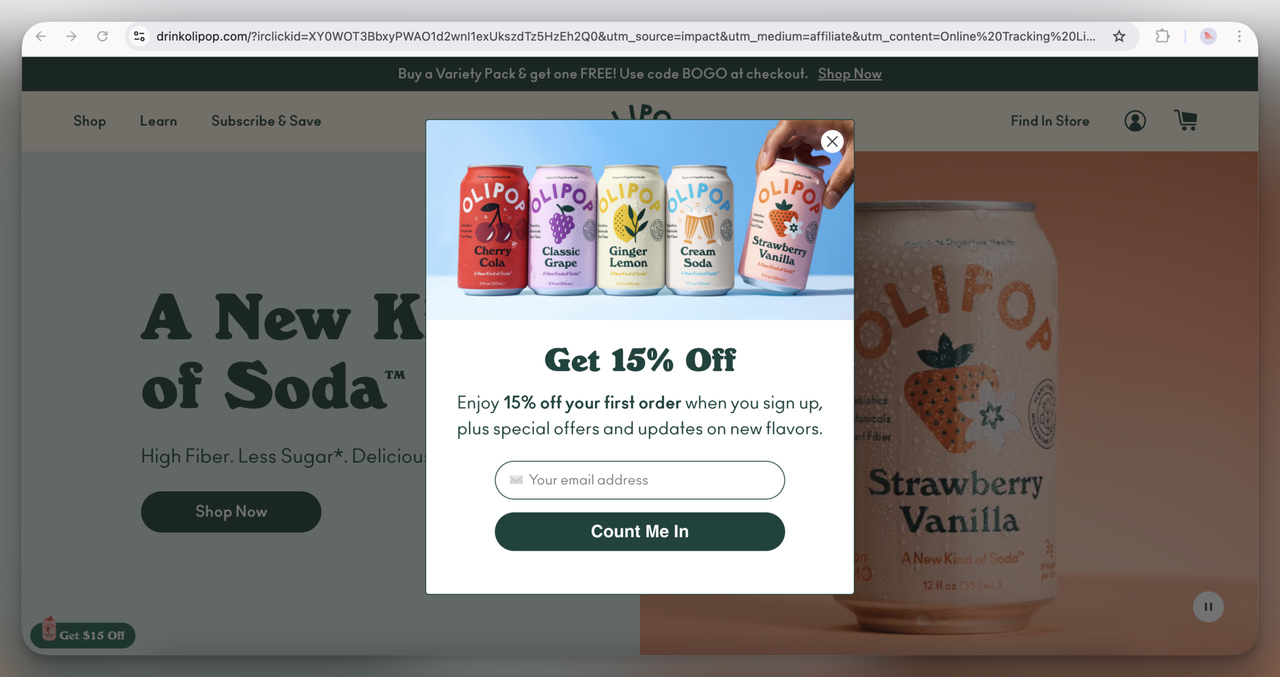
14. Olipop Discount Popup (Overlay)
Bright and playful. Offering 15% off with images of colorful soda cans sets a fresh, fun tone. I think it's aimed at health-conscious shoppers who still like creative branding.
15. Poketo Discount Popup (Overlay)
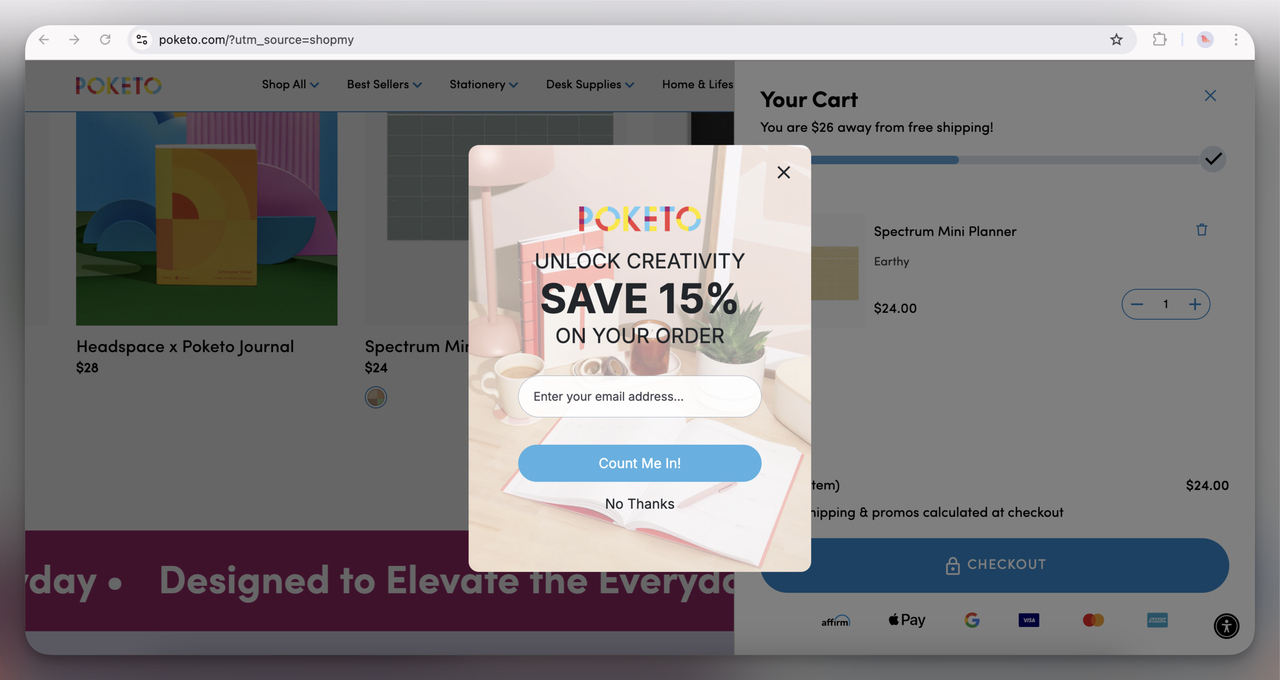
I love how creative this one feels, right in line with the brand’s stationery vibe. The playful desk imagery paired with a solid 15% discount gets users thinking about productivity and creativity. I think the rounded input field softens the design and makes it friendlier.
When we checked on 1 October 2026, poketo.com redirected to its parent company, Pattern Brands, so treat this one as a record of the design rather than a popup you can see live.
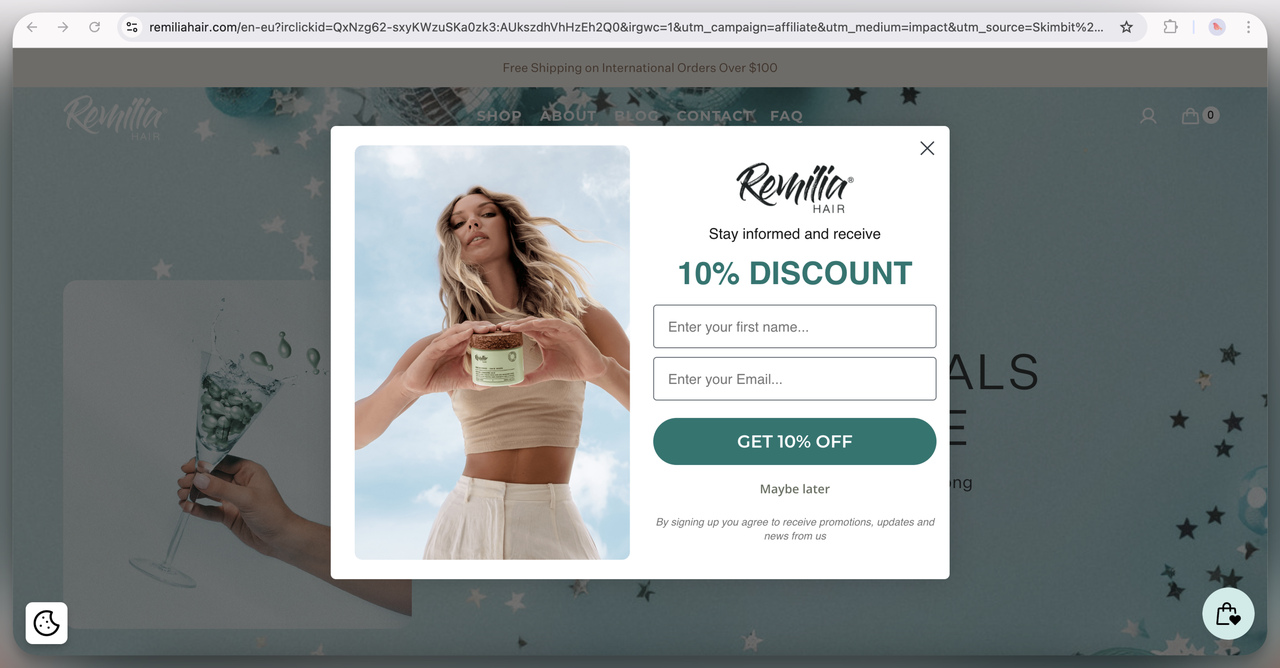
16. Remilia Hair Discount Popup (Overlay)
This design uses a soft, calming color palette with a clean and airy layout. The 10% discount offer is clear and easy to spot. I think it works because the fresh, natural imagery of the model holding the product says health and vitality, which suits a hair care brand.
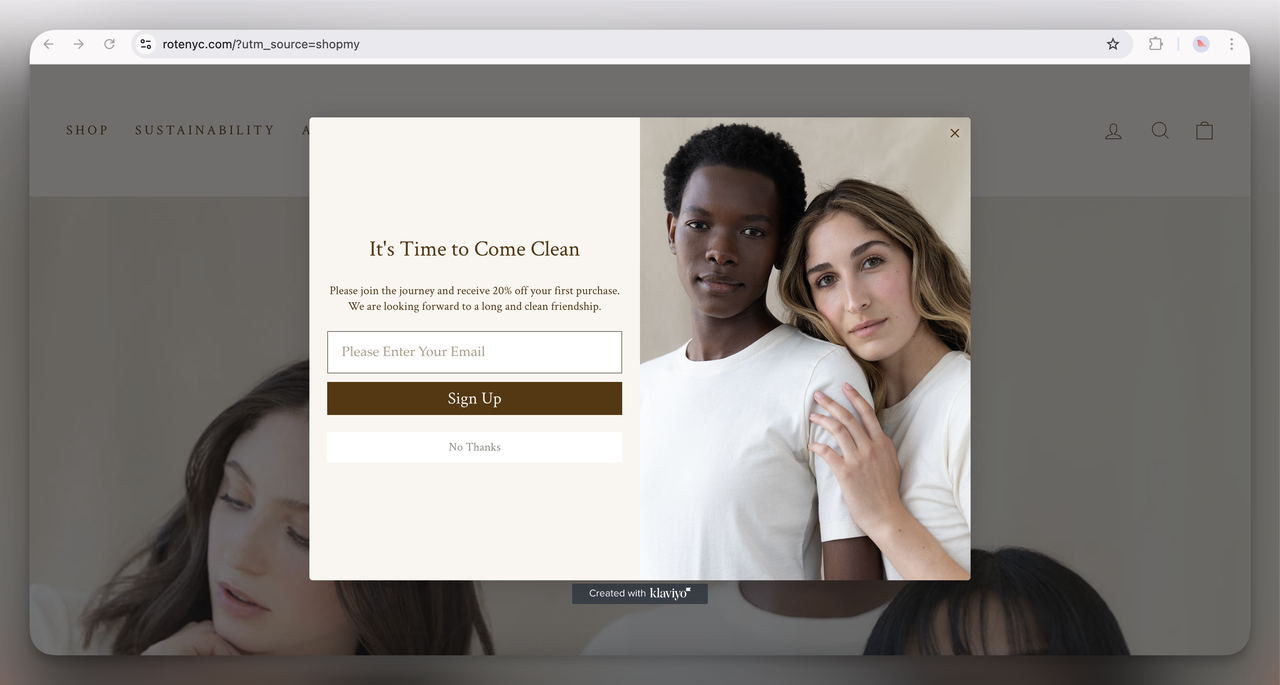
17. Rote NYC Discount Popup (Overlay)
Minimalist and elegant, this popup offers 20% off with a subtle, inviting design. The soft neutral tones and intimate photograph suggest simplicity and purity, which ties in with the brand’s clean beauty mission. It feels personal and sophisticated, and that builds trust.
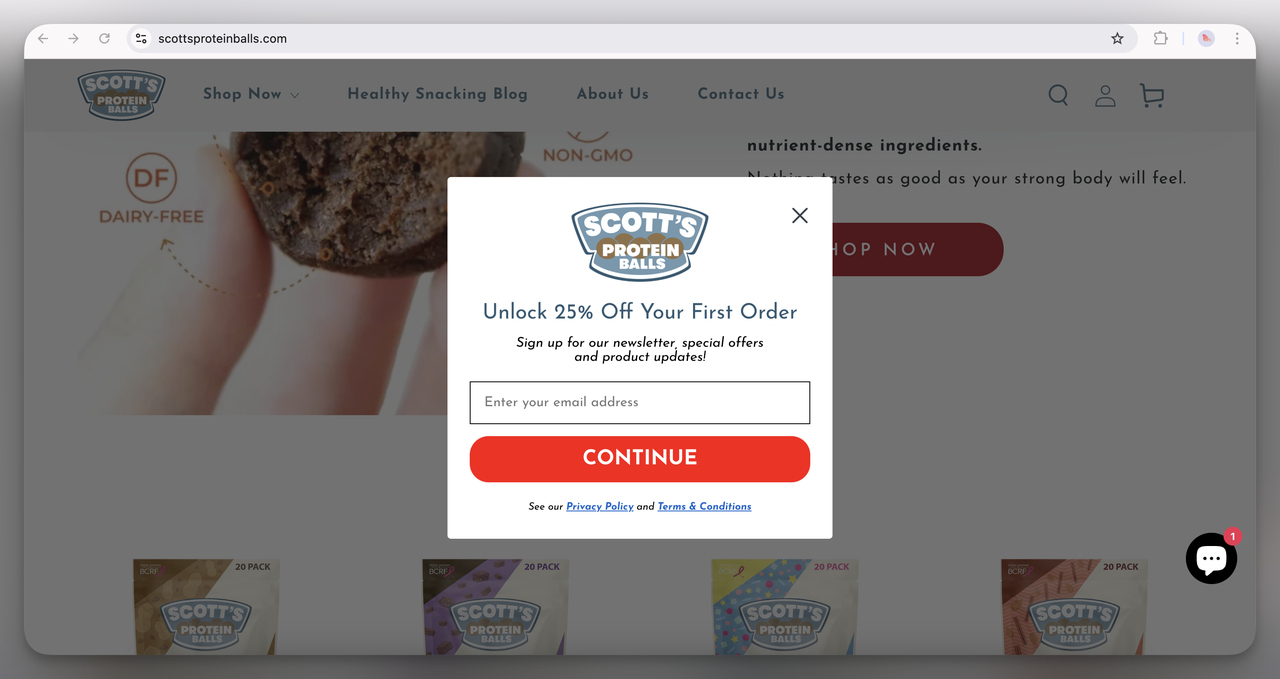
18. Scott’s Protein Balls Discount Popup (Overlay)
This popup is bold and upbeat, offering a solid 25% off. The design is as playful and energetic as the brand. The bright red button and clear call-to-action leave no doubt about the next step.
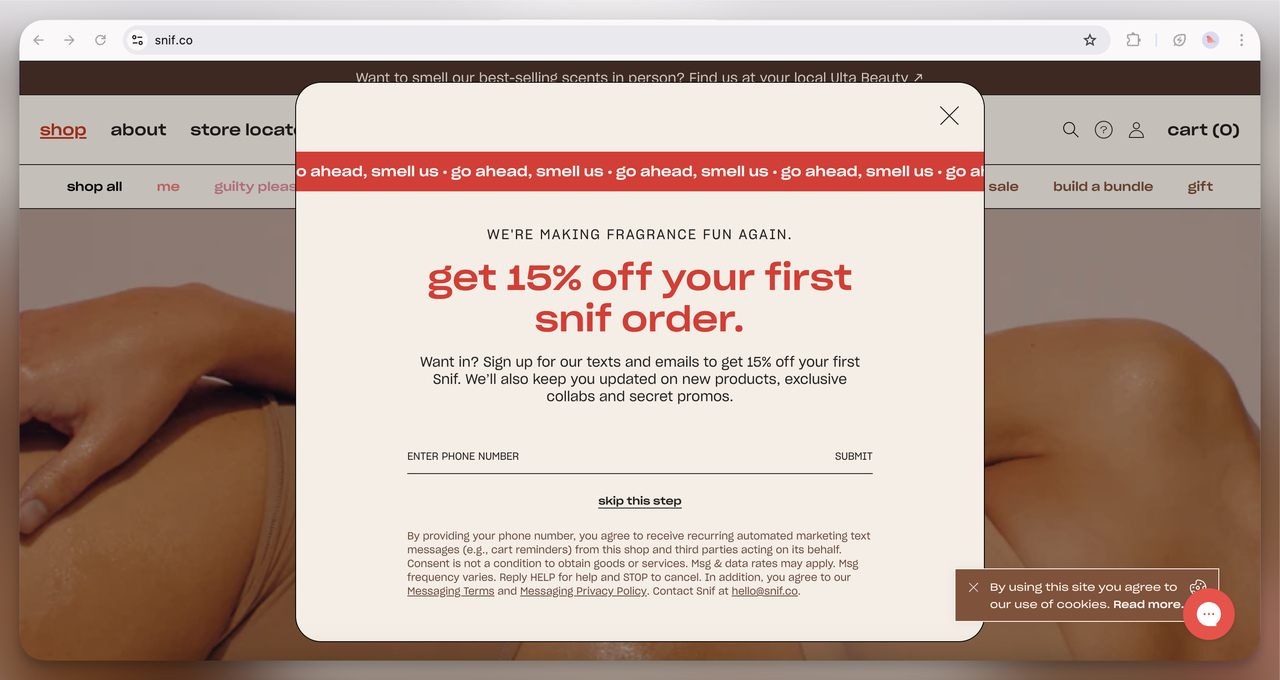
19. Snif Discount Popup (Overlay)
This popup has a playful tone with its bold typography and catchy phrasing. The 15% discount is front and center, and the quirky, scent-related language (“go ahead, smell us”) makes the brand feel fresh and fun. It works well for a fragrance company trying to break traditional norms.
Look at the field, too: Snif asks for a phone number, not an email, with the text-message consent spelled out under it. That's an SMS popup, and our SMS popup guide covers the consent wording.
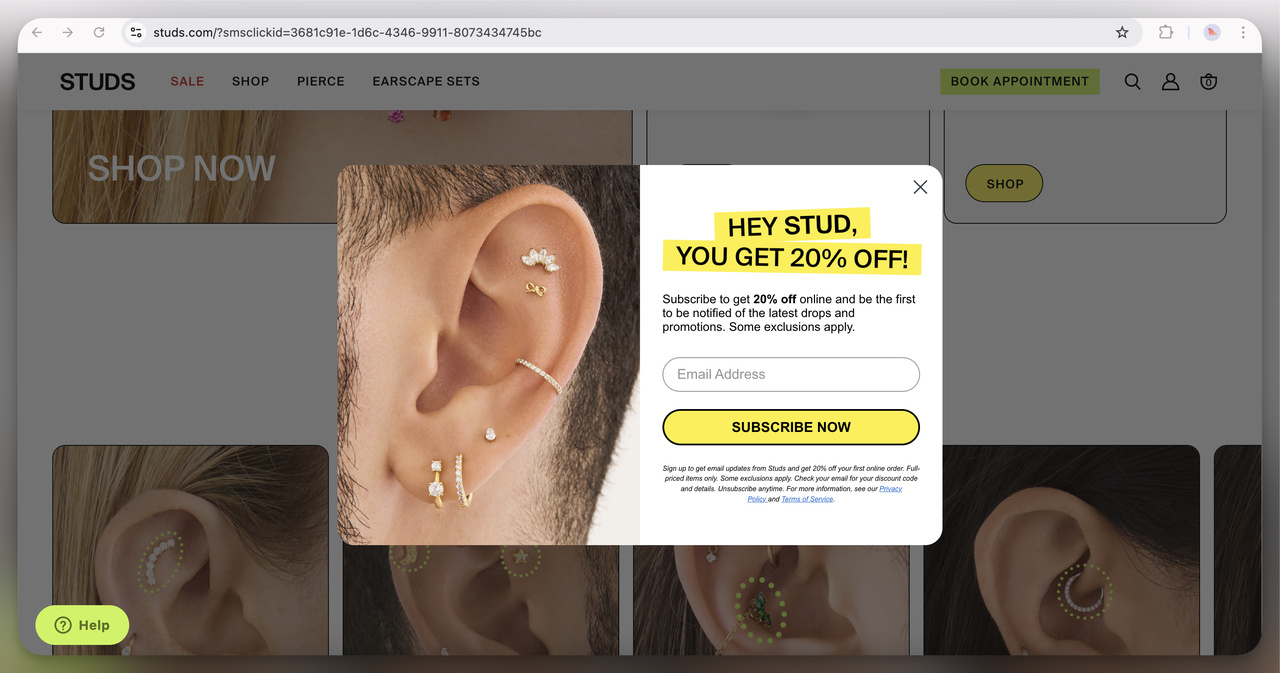
20. Studs Discount Popup (Overlay)
This popup grabs attention with its bold yellow and black color scheme and cheeky headline, “HEY STUD.” Offering 20% off, it’s playful yet straightforward. The up-close image of the ear piercings highlights the product in action, which draws in the target audience.
Exit-intent popup examples
Exit-intent popups are triggered when a user is about to leave the website. Their job is to keep that visitor with a last-minute incentive. On desktop, the trigger reads the cursor heading for the tab bar; phones have no cursor, so mobile exit rules use other signals.
Exit intent does not reliably raise conversion on its own. In our benchmark, exit intent shows no statistically reliable advantage: popups on the most sensitive exit-intent setting converted 1.10% vs 0.78% without exit intent (median campaign), a gap that could be chance. What you say on the way out matters more than the trigger. Our exit intent popup examples collect 55 more.
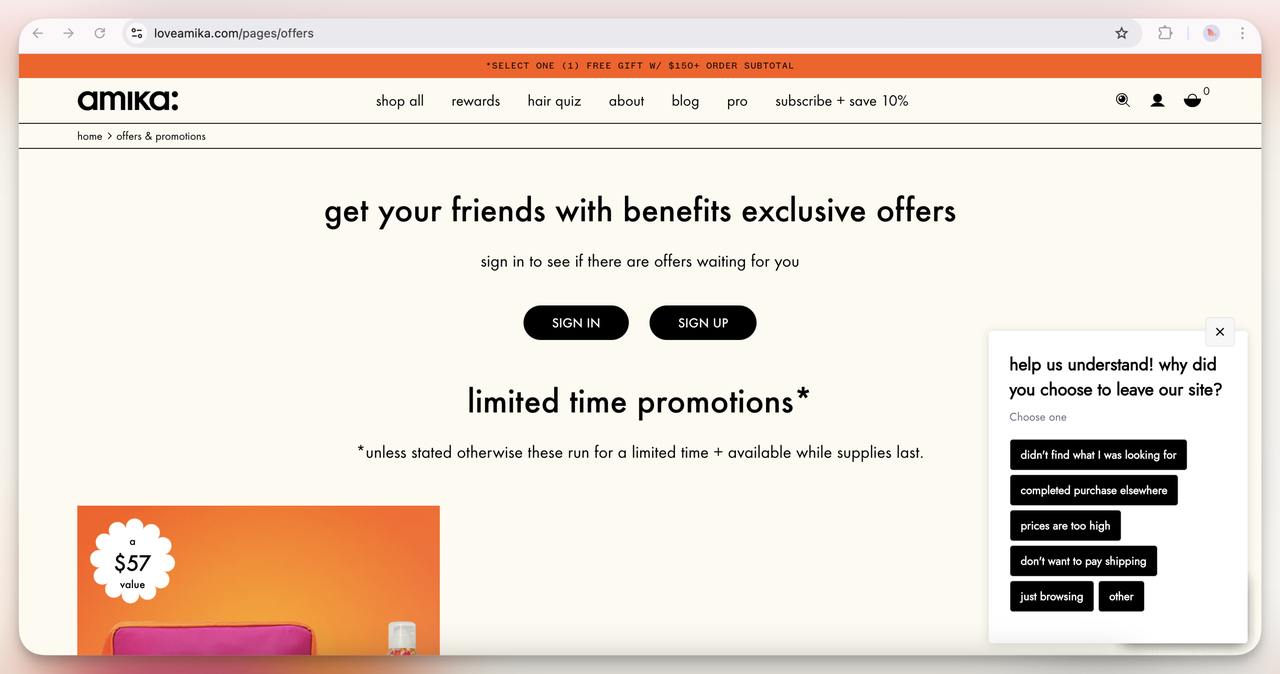
21. Amika Popup (Overlay Exit Intent)
This popup appears when a user is about to leave the site, asking why they are leaving.
I think it’s a great way to collect qualitative data on user behavior. It feels like they’re looking for the purchase barriers. Maybe their pricing or product offerings aren’t matching expectations.
Smart move for optimizing conversion rates in the long run.
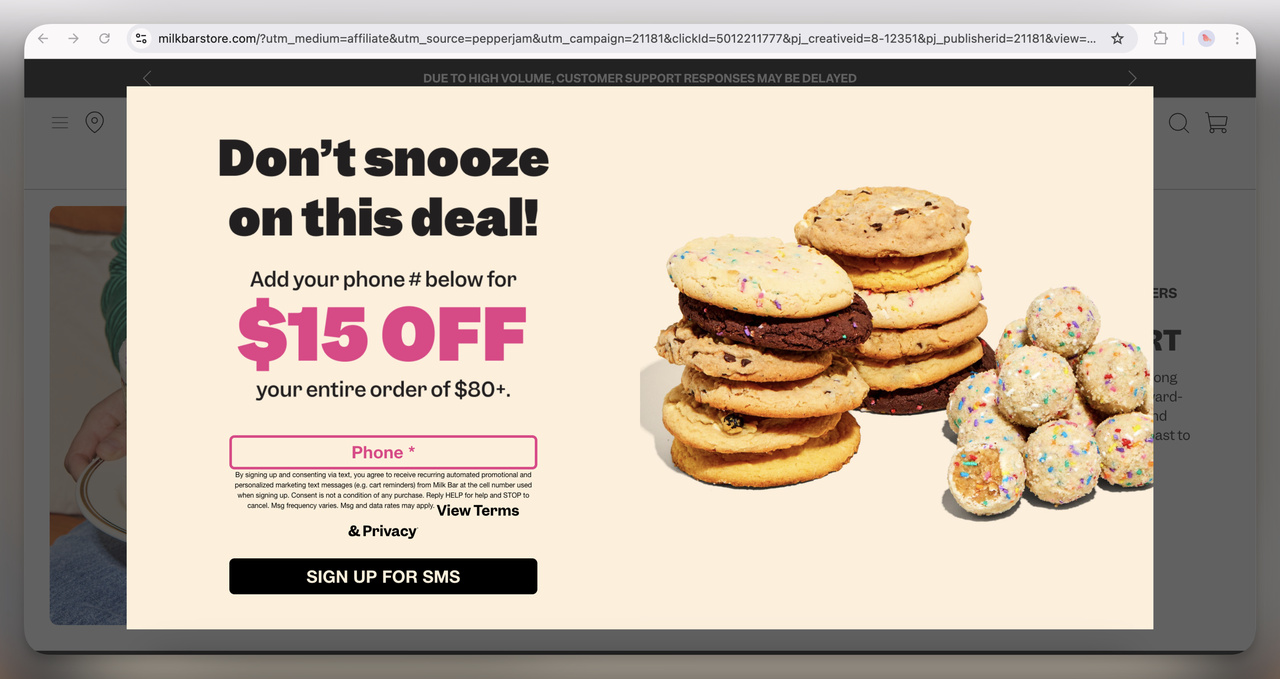
22. Milk Bar Exit-Intent Popup (Full-Screen)
This one is quite aggressive, taking over the whole screen with a discount for phone number submission.
They prioritize SMS marketing over email: the phone number is the whole ask. The FOMO-driven copy ("Don’t snooze on this deal!") adds urgency.
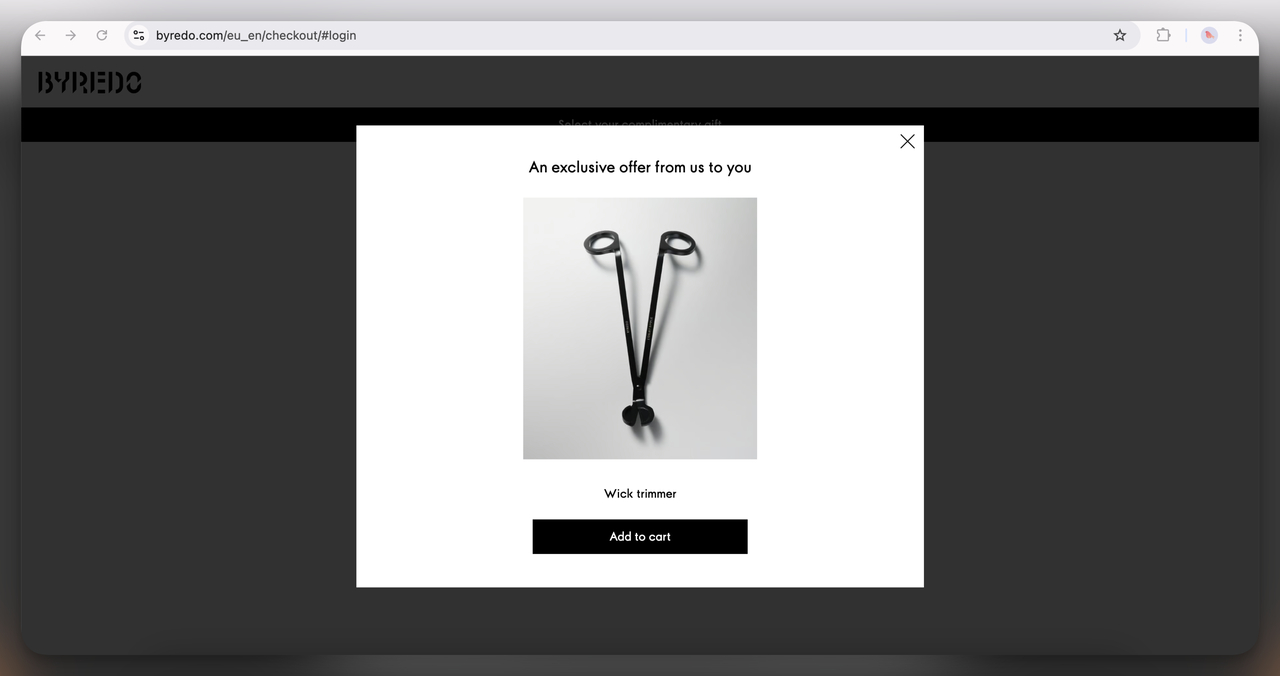
23. Byredo Exit-Intent Popup (Overlay)
A very minimalistic popup offering an exclusive product (a wick trimmer) as an incentive.
I think this aligns well with their luxury branding: rather than offering a discount, they’re providing a product that enhances the experience of their main offering (candles).
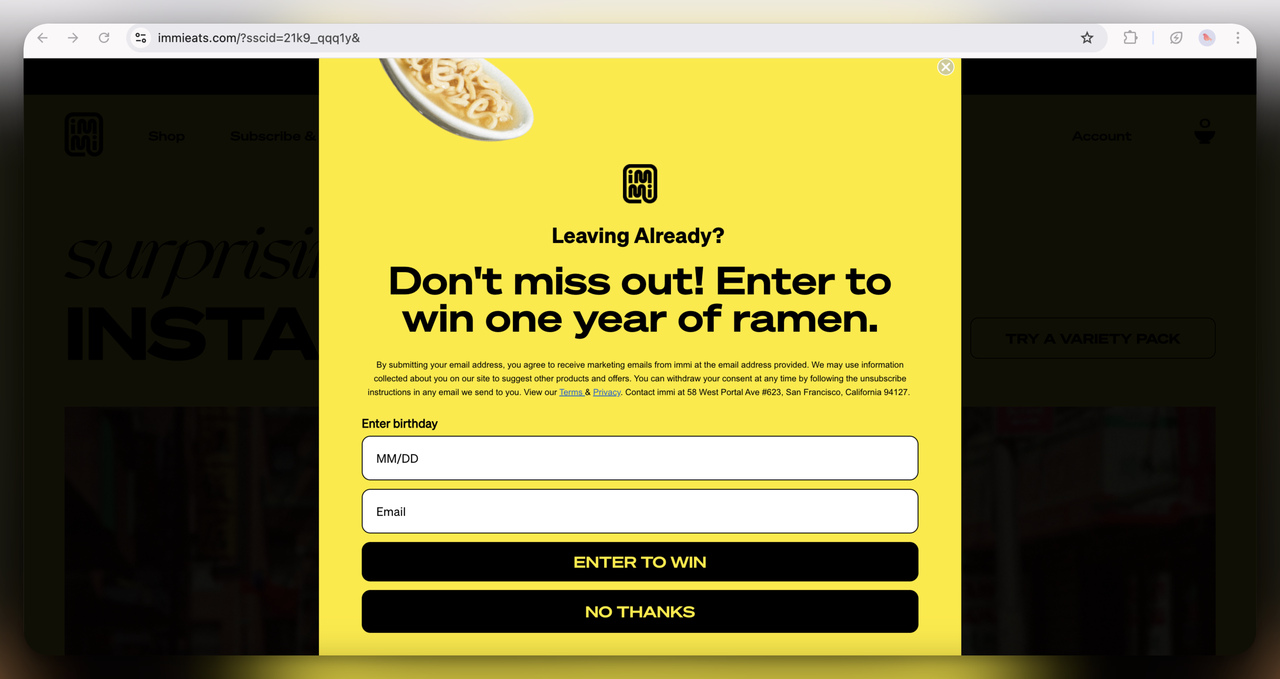
24. Immi Eats Exit-Intent Giveaway Popup (Full-screen)
The bold yellow design and quirky prize (a year of ramen) are impossible to miss! It reads like a last-ditch attempt to keep the user before they bounce. I think this works well for a brand with such a fun, playful product.
Survey, quiz and personalization popup examples
Interactive popups put a quiz, a survey or an interactive form in front of the visitor. They capture leads and tell you what each visitor prefers. Every example below asks one question before (or instead of) the email, and the answer tells the store what to send next.
A related format, the spin-to-win wheel, draws far more clicks but not more leads: spin-to-win and other gamified popups get far more clicks (7.33% vs 1.87% of displays, median campaign; the spin itself counts as a click), but do not collect measurably more email or phone leads than plain signup popups. For feedback forms and question wording, see our popup survey examples.
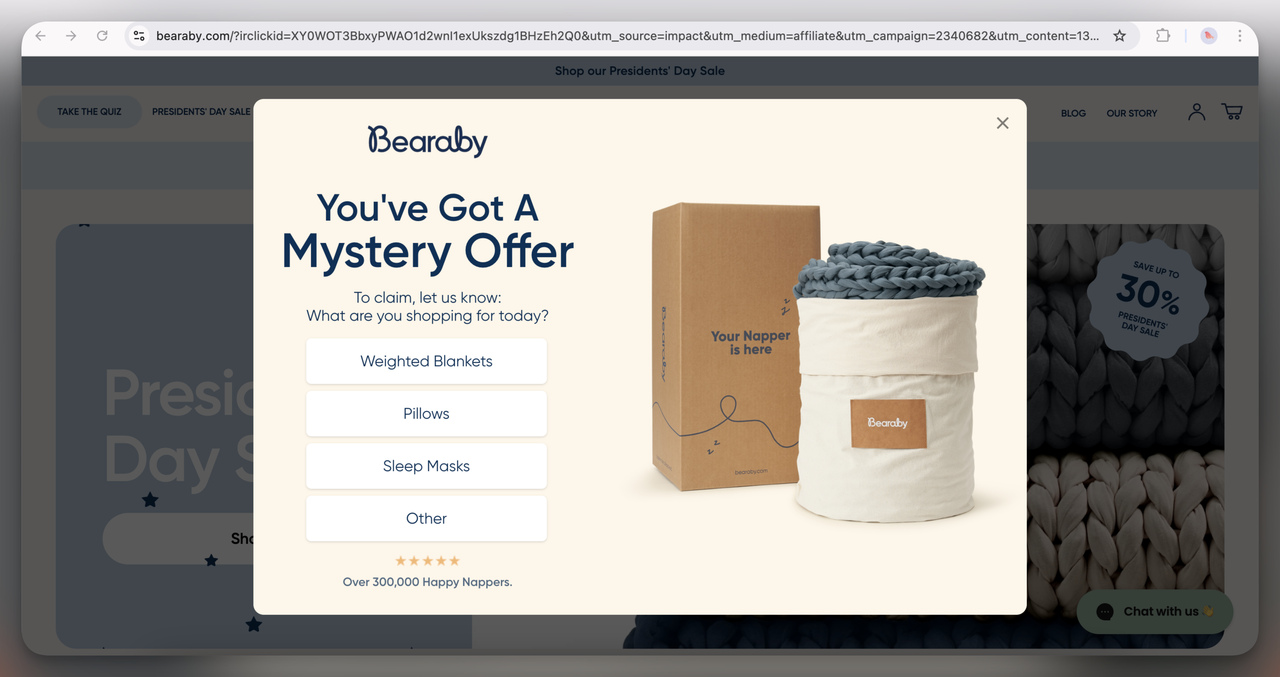
25. Bearaby Mystery Offer Popup (Overlay)
I find this one interesting because it makes the user "work" for their discount by selecting a product category.
That small step can lift engagement and personalizes the offer at the same time. It also quietly collects data on user preferences.
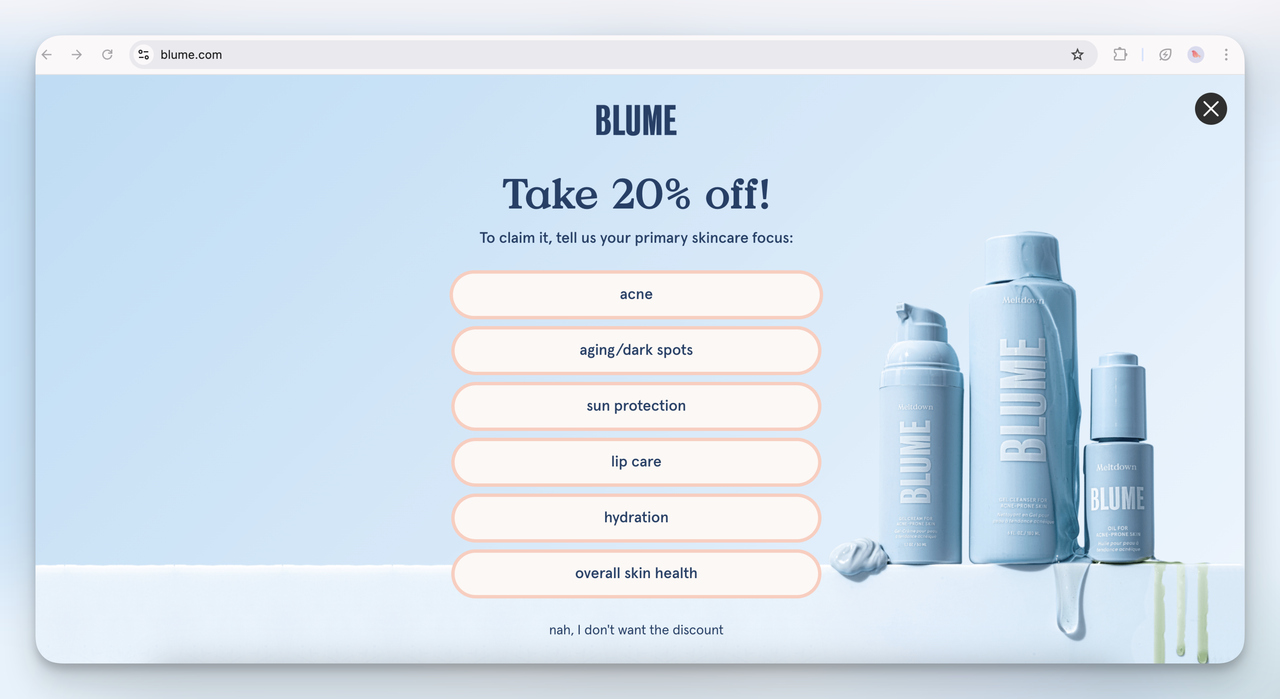
26. Blume Skincare Survey Popup (Full-Screen)
This is a more interactive version of the Blume email popup. Instead of just asking for an email, they’re gathering user preferences.
I like this approach a lot. It goes after the signup and, with the same answers, segments their email list for better targeting.
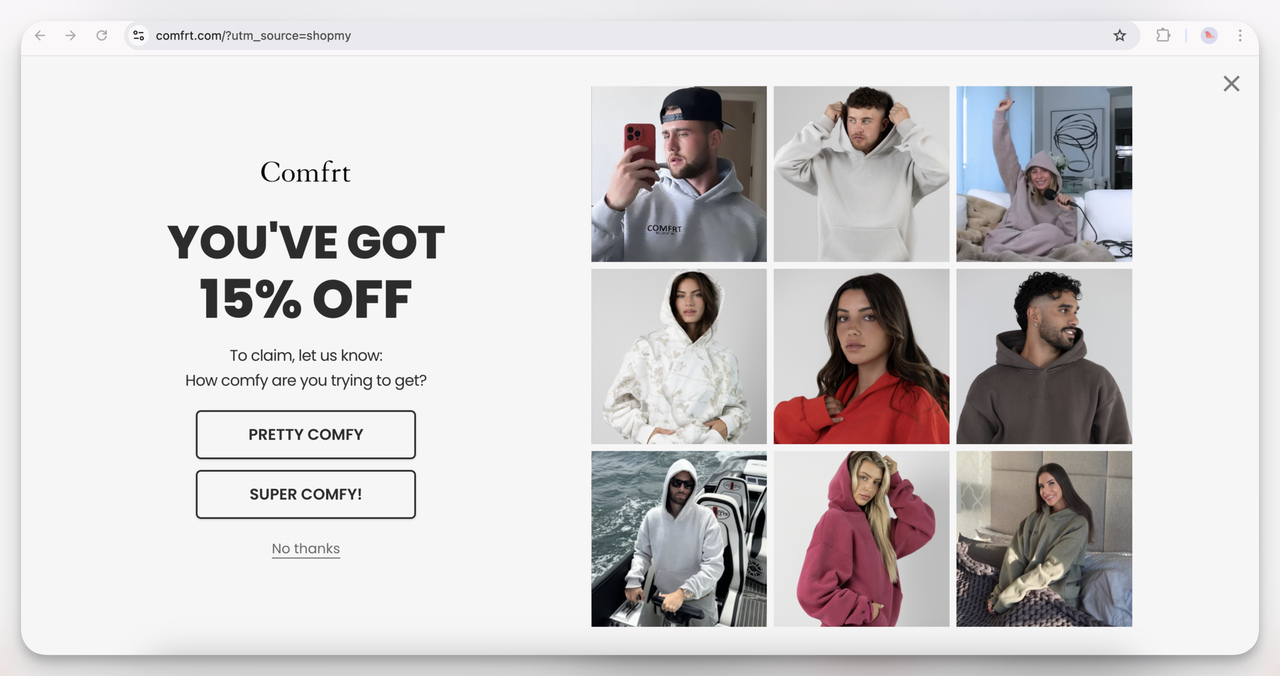
27. Comfrt Interactive Discount Popup (Overlay)
This discount popup feels playful and on-brand. It’s all about "comfy" vibes, and the interactive question ("How comfy are you trying to get?") adds a fun touch.
I think the 15% off is only half of it. The other half is the light-hearted tone, which fits the cozy hoodie brand. Making users smile probably lifts interaction on its own.
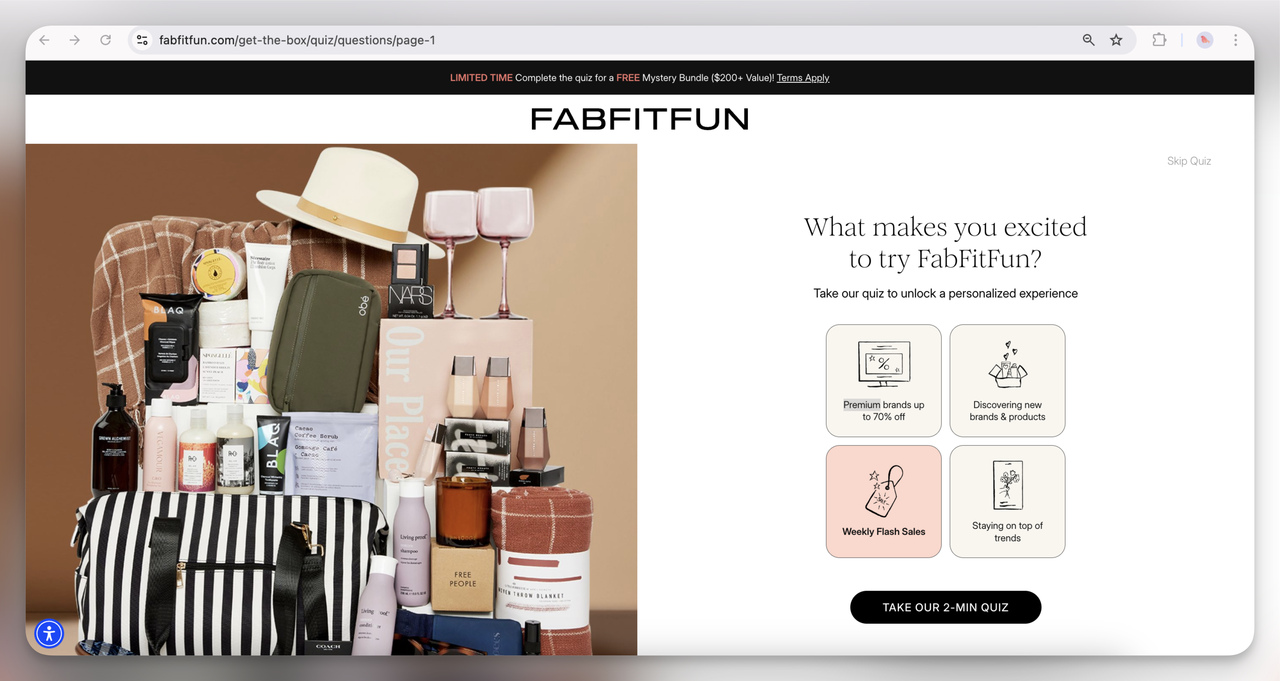
28. FabFitFun Quiz Popup (Interactive Full-Screen)
This one’s all about personalization. I think it’s a smart strategy. Asking what excites users most gets them useful data and gives the shopper a more tailored experience, in one question.
Plus, teasing a “FREE mystery bundle” adds extra incentive to complete the quiz.
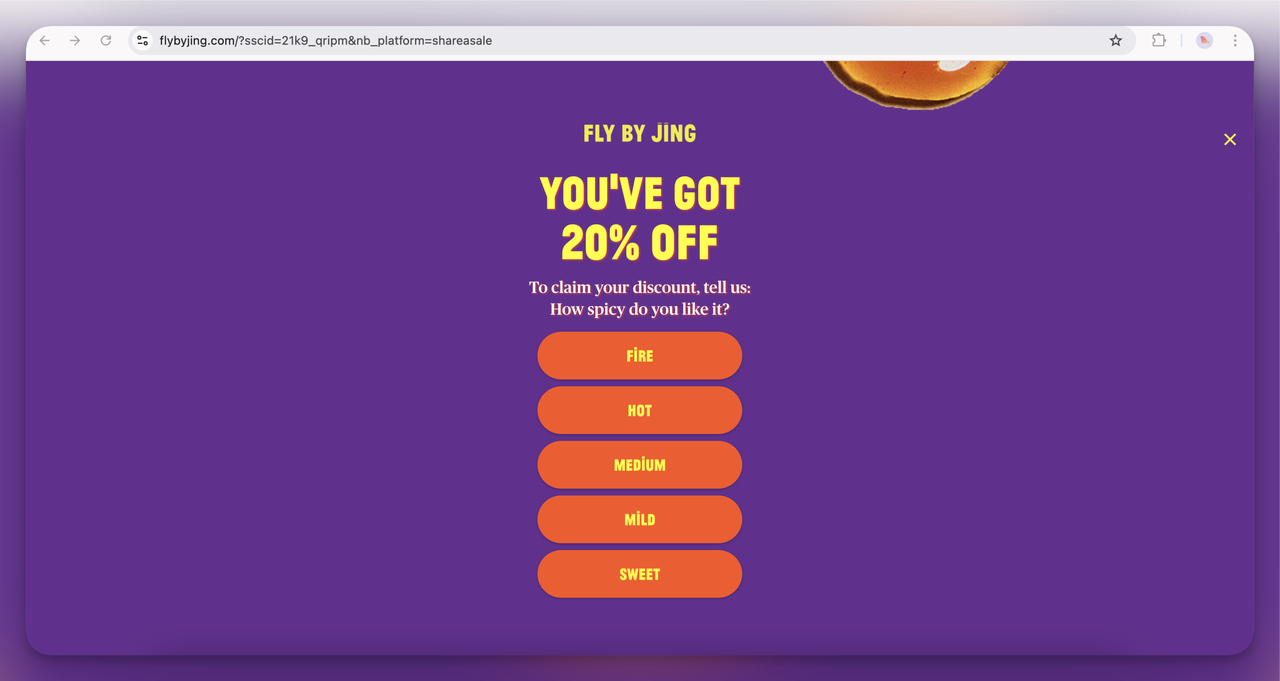
29. Fly By Jing Interactive Discount Popup (Full-Screen)
This spicy quiz is super on-brand! I think it’s a clever way to personalize the experience and make users feel involved while keeping it fun.
And the bold colors and playful copy match the brand’s energetic vibe.
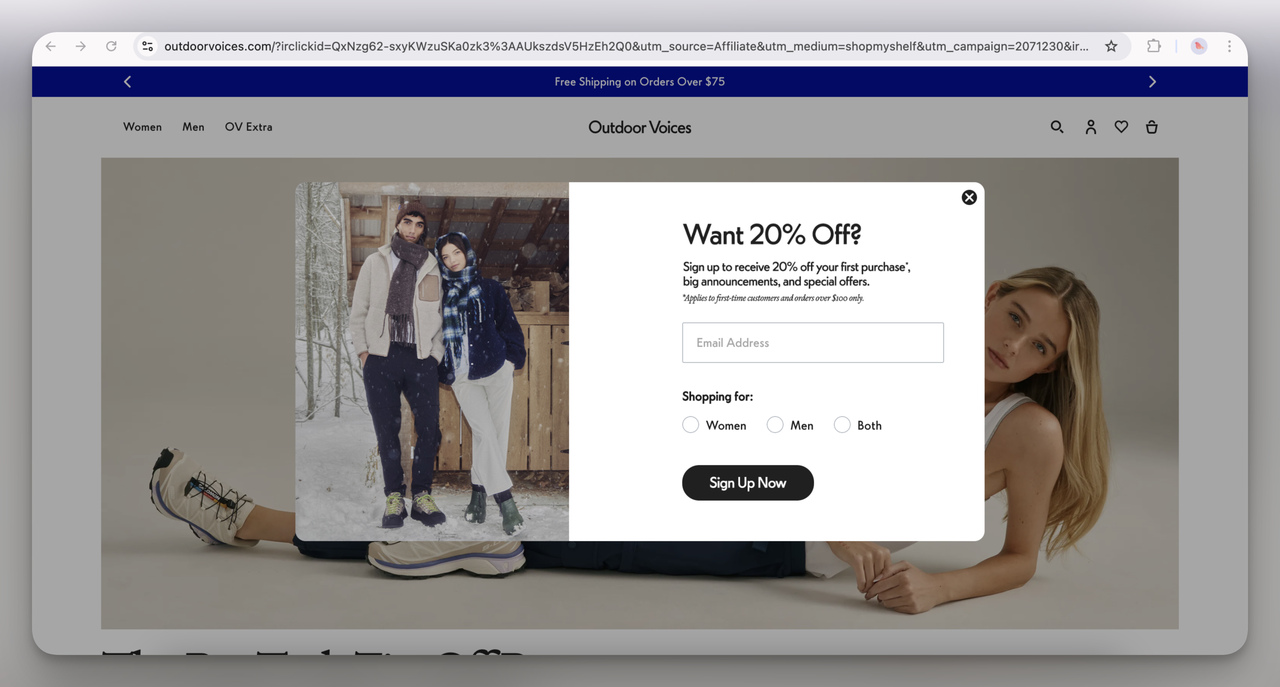
30. Outdoor Voices Signup Popup (Overlay)
The interesting addition here is letting users specify whether they’re shopping for women, men, or both. I think this helps tailor their future email campaigns more effectively. Plus, the 20% off is a solid incentive for new shoppers.
💡 Pro Tip: An interactive element in a popup gets visitors doing something instead of reading, and their answer makes the next offer more personal.
Promotions, cart and order-value popup examples
Promotional and seasonal popups hang an offer on a specific event, holiday or sales period. They run on urgency and exclusivity: the offer won't last, so the visitor acts now.
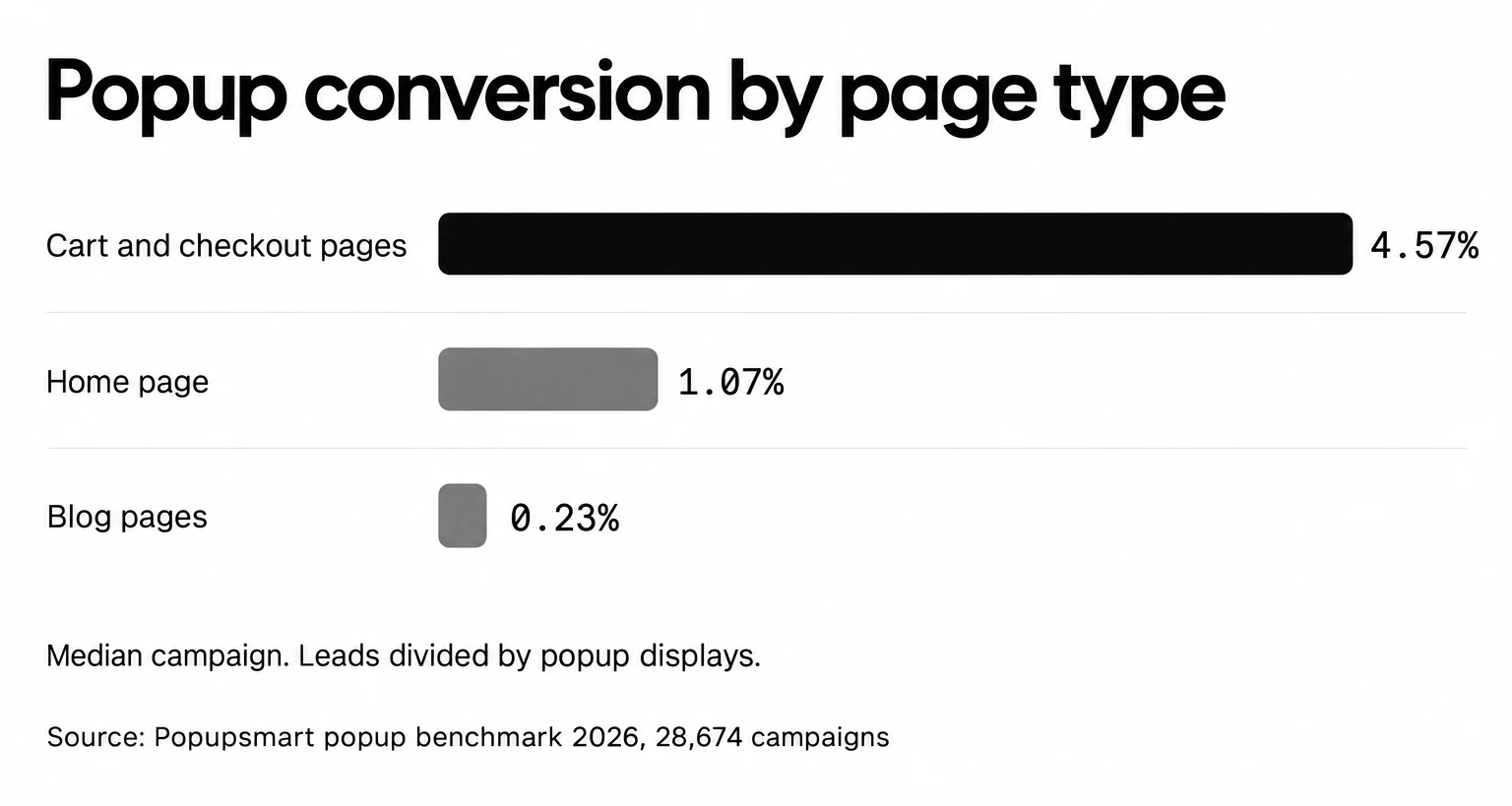
Where the popup runs changes the result more than any design choice here. Popups on cart and checkout pages convert 4.57% vs 1.07% on the home page (median campaign); blog pages convert 0.23%. A shopper with a full cart is ready for a free-shipping nudge or a gift threshold; a reader on a blog post isn't. For recovery offers, see our cart abandonment popup examples; for real deadlines, our countdown timer popups.
31. Ekster Anniversary Sale Popup (Overlay)
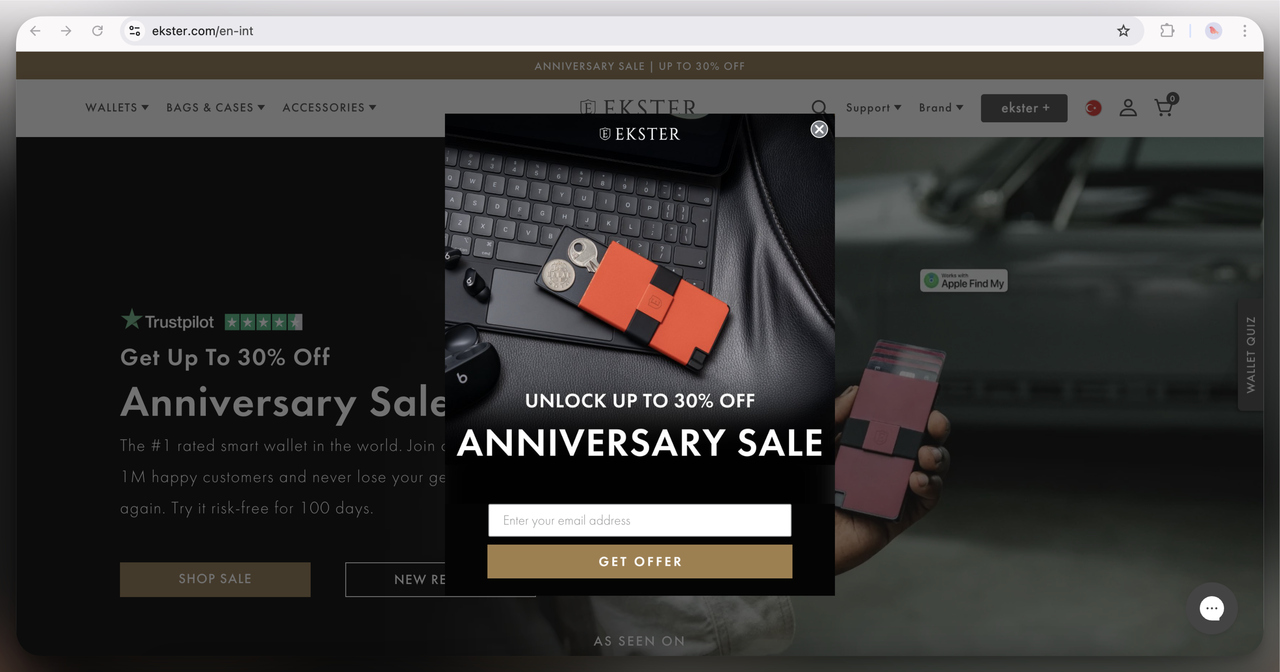
A classic overlay popup that immediately offers a discount (up to 30%) in exchange for an email. I think this works well because it builds urgency with the "anniversary sale" theme. It’s also a strong lead magnet idea because the brand is targeting people who are already interested in the product.
32. Solo Stove Free Gift Popup (Overlay)
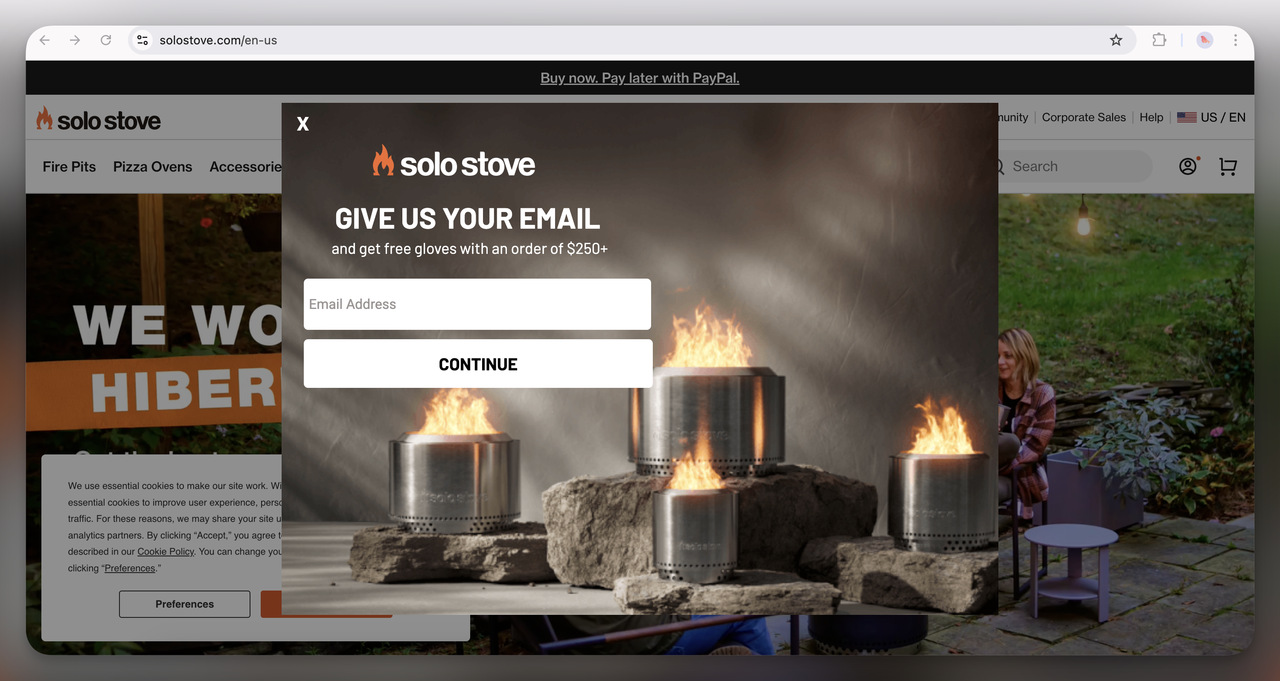
The rustic imagery of fire pits sets the tone for this outdoor brand, and the flames catch your eye right away. Offering free gloves with a purchase over $250 is a practical incentive for users who are likely already considering a purchase.
Floating bar and announcement bar examples
Not every offer needs a box in the middle of the screen. A bar sits at the top or bottom of the page and stays there while the visitor browses. It's the quiet format. Center modal popups convert 0.88% vs 0.49% for corner/slide-in boxes (median campaign), so a bar or a corner box trades some conversion for a lighter touch. Our announcement bar examples show 15 more.
33. Little Spoon Floating Bar
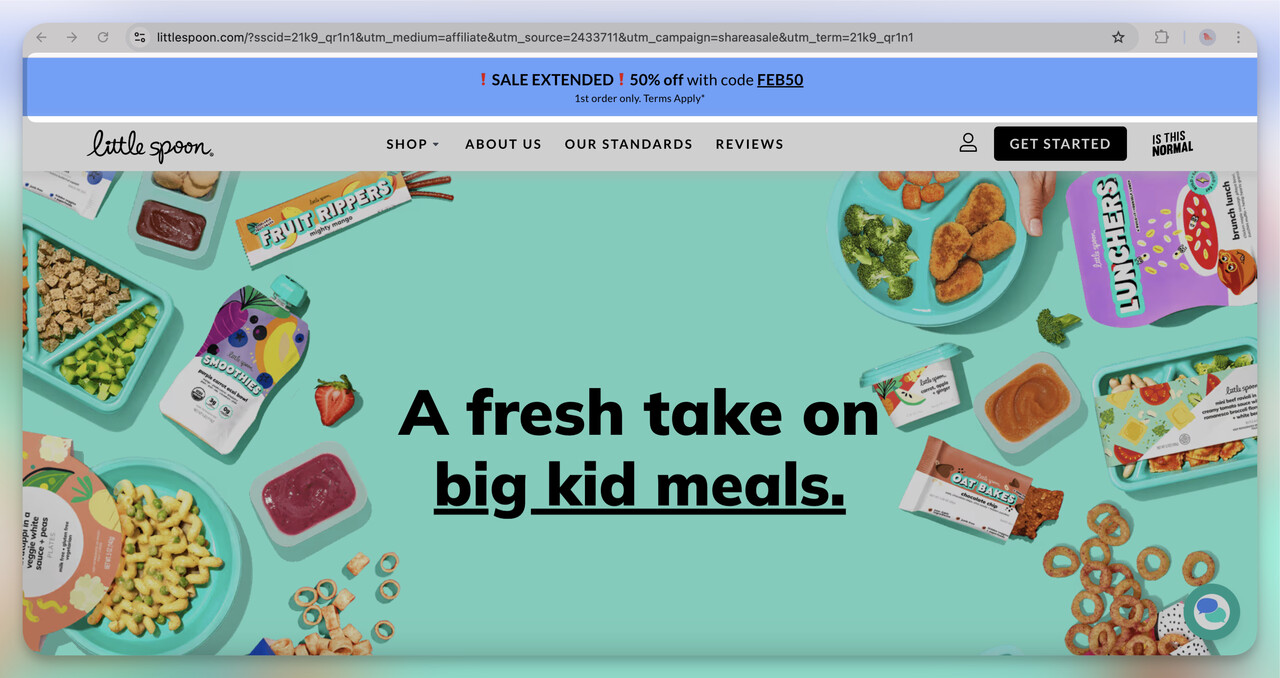
This bar, offering 50% off, is hard to miss but doesn’t feel intrusive. The offer stays in view the whole time users browse, which is smart. I think they wanted to keep the discount top-of-mind without interrupting the flow of the experience.
Age verification and cookie consent popup examples
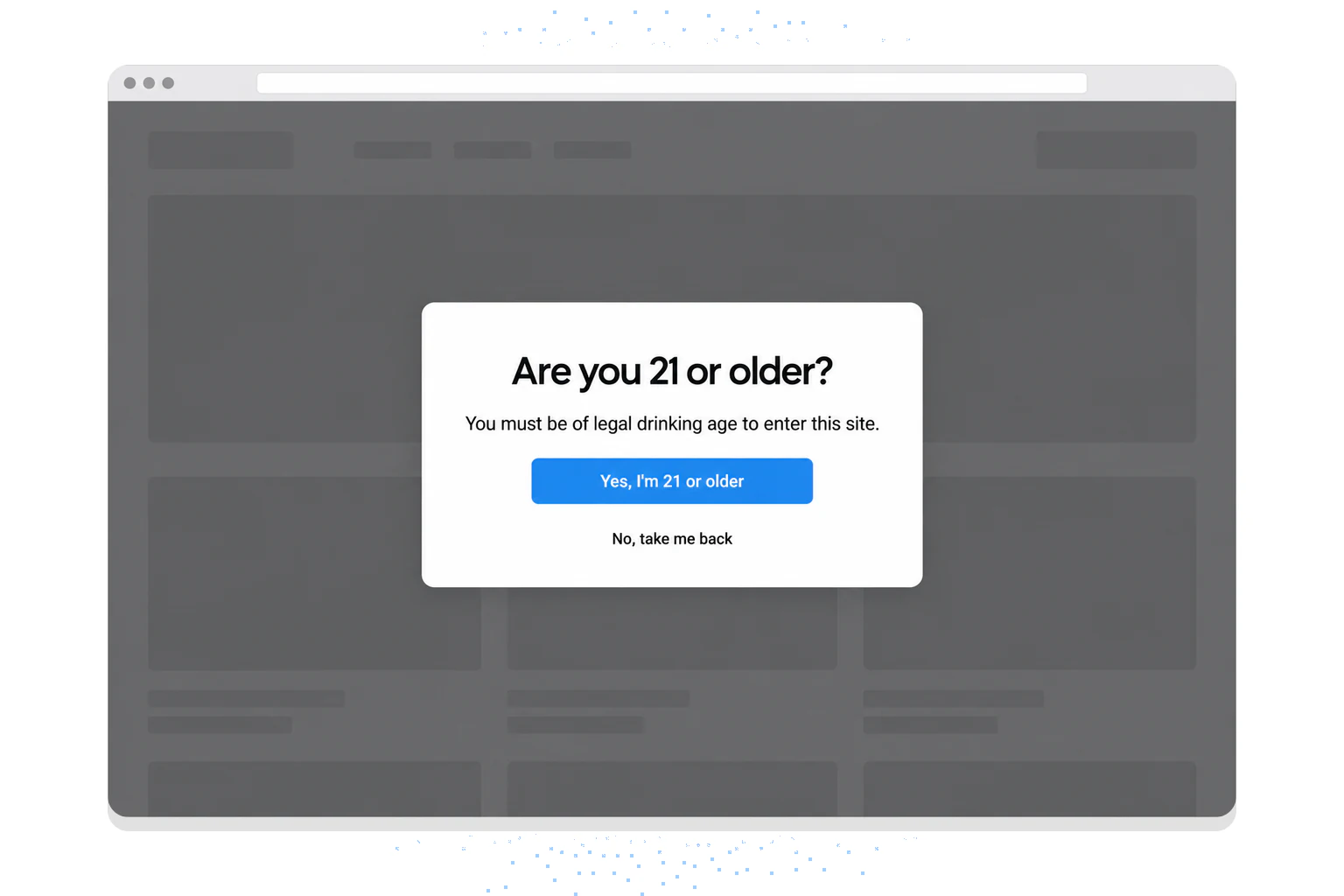
Two popups exist because a law or a policy asks for them, not to collect leads. None of the 33 stores above showed us one, so here are two example designs for fictional stores.
An age verification popup blocks the page until the visitor confirms their age. Stores that sell age-restricted products, alcohol for example, show it on the first visit. Keep it to one question and two answers, with no close button, because closing it would skip the check.
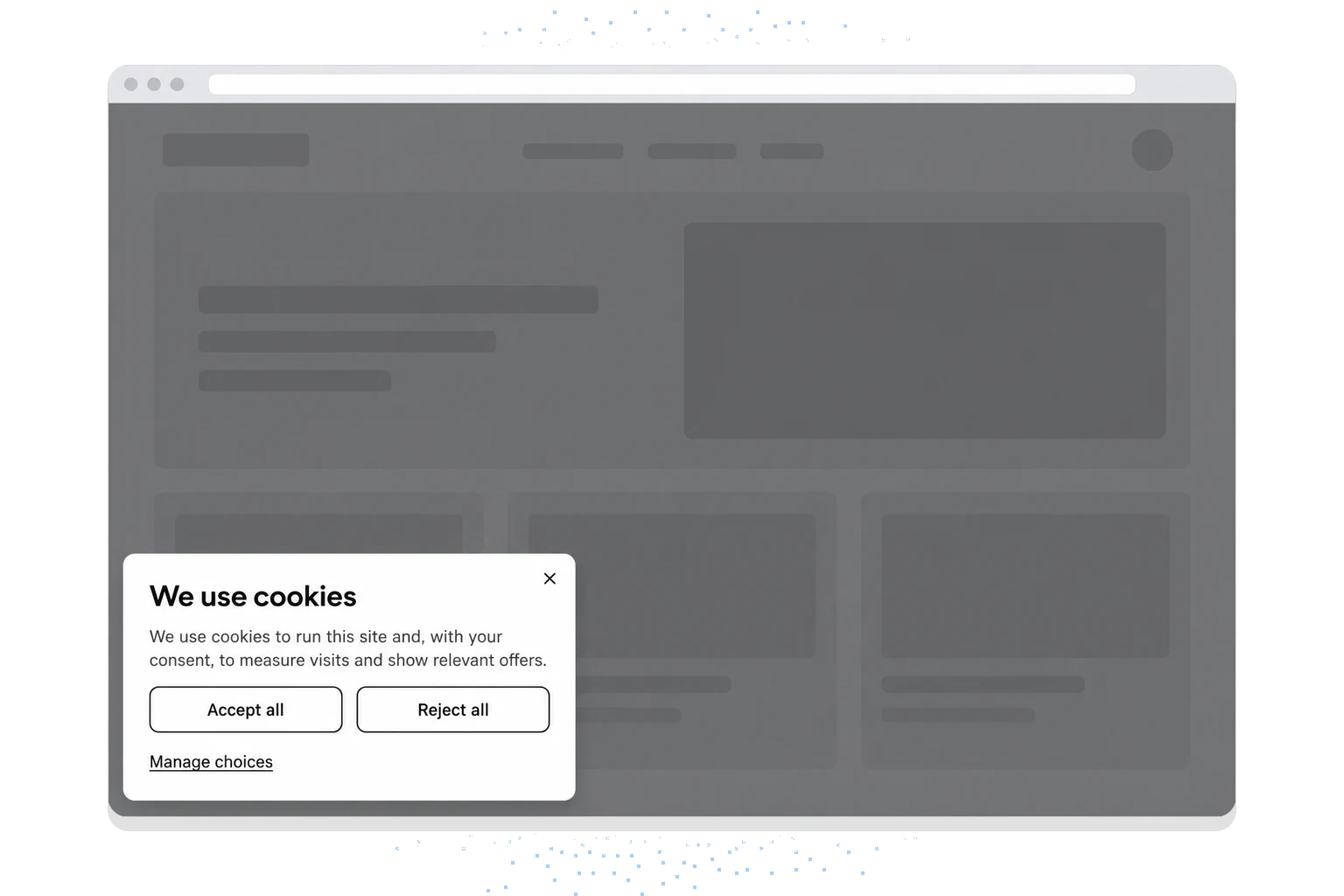
A cookie consent popup asks permission before the site sets non-essential cookies. Under the GDPR, consent has to be freely given and as easy to withdraw as to give, as the EDPB consent guidelines explain. In practice, that means a reject button as visible as the accept button.
Pros and Cons of Using Website Popups
Popups can raise engagement and conversions. They also have real drawbacks, and you should weigh both before you launch one.
Pros:
- More leads: popups capture visitor information, such as email addresses, that you can use in future marketing.
- Better engagement: a piece of content or an incentive worth having adds to the visit and keeps people on your site.
- Targeted promotions: you can show personalized offers and messages based on user behavior and preferences, and those are more likely to convert.
Cons:
- Annoyed users: intrusive or badly timed popups frustrate people and leave a bad impression of your website and brand. In our 2026 benchmark, 71% of visitors who close a popup do so within 5 seconds of it appearing.
- A worse experience: a popup that wasn't designed with care gets in the way of browsing and makes your site harder to navigate.
- SEO risk: Google's guidance on intrusive interstitials warns against popups that cover the main content on mobile right after a visitor arrives from search. Legally required popups, such as cookie consent and age verification, aren't what it targets.
💡 Pro Tip: Keep the benefits and lose most of the drawbacks by making every popup relevant, unobtrusive and worth the visitor's time.
⭐ Key Takeaway: A website popup pays off when the leads and engagement it brings outweigh the annoyance and disruption it causes. Plan for that trade before you launch, not after the complaints.
Best Practices for Using Website Popups
These best practices keep your website popups working for your marketing without hurting the user experience. The lists below cover mobile design, timing, testing and privacy, in that order.
-
Make popups adjust smoothly to every screen size.
-
Use large buttons and easy-to-tap areas on touchscreens.
-
Optimize images and scripts so popups load quickly on mobile networks.
-
Keep messages concise and avoid clutter to maintain clarity on smaller screens.
-
Use gentle animations and avoid full-screen popups to prevent disrupting the browsing experience.
-
Provide an easy and visible way for users to close the popup without frustration.
-
Display popups when users are most likely to engage, such as after spending some time on the page.
-
Restrict the number of times a popup appears to the same user to prevent overwhelming them.
-
Test different headlines, images, and CTAs to see what resonates best with your audience.
-
Track conversion rates, click-through rates, and user engagement to identify successful elements.
-
Keep refining your popups based on test results and performance data.
-
Adjust when and how popups are displayed based on user behavior and engagement patterns.
-
Tell users how their data will be used, and be open about what you collect.
-
Use checkboxes or consent statements to comply with regulations like GDPR and CCPA.
-
Protect the user information your popups collect with strong security.
-
Let users opt out or unsubscribe easily.
Here's what our 2026 benchmark adds to those rules. Every rate is per popup display.
| Practice | What the benchmark found |
|---|---|
| Design for phones first | 63% of popup displays happen on mobile. Mobile visitors convert on popups at 1.02% vs 0.57% on desktop, and click at 2.99% vs 1.34% (median campaign) |
| Wait before showing | Popups that wait before appearing convert 0.83% vs 0.61% for popups shown the instant the page loads (median campaign); the direction holds in every year of data but the difference is not statistically reliable, so treat it as a lean, not a rule |
| Don't agonize over the delay length | The exact delay length (0–5 seconds vs 21–60 seconds) makes no measurable difference to conversion |
| Cap the frequency | The first two times a visitor sees a popup in a week convert at similar rates (1.33% and 1.22% of displays, pooled); from the third view conversion falls, and from the sixth view it is 0.41%, 31% of the first-view rate |
| Target where people arrive from | Visitors arriving from an email or SMS campaign convert on popups at 1.81% vs 0.74% for visitors from organic search |
| Test copy, not colour | Button colour, dark vs light popup backgrounds, urgency words and question headlines show no measurable effect on conversion; the data are too noisy to rule out modest effects |
Key Performance Indicators of Website Popups
To know whether your website popups work, track a few Key Performance Indicators (KPIs). They show how each popup is performing and where it can improve.
- Conversion Rates: This measures the percentage of popup displays that end in the desired action, such as signing up for a newsletter or downloading an ebook. In our benchmark, the median popup that asks for an email or phone number converts 0.83% of its displays into leads; the top 10% reach 3.87%.
- Click-Through Rates (CTR): CTR indicates how often users click on the popup compared to how often it is displayed. The median popup records a click on 2.25% of its displays; the top 10% reach 11.67% (10,768 campaigns).
- Close Rates: 40.5% of popup displays end with the visitor closing the popup (all displays pooled, February 2025 - September 2026, since close tracking began). A close rate far above that points to a popup that shows too early or asks too much.
- Bounce Rates: Bounce rate tells you whether popups are pushing users off your site too early. A high bounce rate might indicate that popups are too intrusive or irrelevant to users' needs.
- Engagement Metrics: Metrics such as time spent on page and pages per session can show whether popups contribute to a more engaging experience.
How to Use Website Popup Examples
Here's how to get from an example you like to a popup running on your own site:
1. Select a Popup Tool: Choose a tool that best fits your needs based on features, ease of use, and budget. We suggest Popupsmart here: Popupsmart offers a free plan at $0 with 5K pageviews a month, and paid plans start at $39 a month. If you're weighing OptiMonk, it prices by pageviews too: a free plan with 10,000 pageviews a month and paid plans from $19 a month for 20,000, read from its pricing page on 22 September 2026. Our Popupsmart vs OptiMonk comparison and the OptiMonk alternatives list cover the differences.
2. Choose a Template: Select a template that aligns with your campaign goals, whether it’s lead generation, promotion, or feedback collection. Our popup templates are sorted by the same goals as this post.
3. Customize Your Popup: Adjust the design, messaging, and CTA to match your brand and objectives. Use high-quality images and short, clear text.
4. Set Triggers and Rules: Define when and where your popup will appear using triggers like exit intent, time delays, or scroll depth. Aim for the moment a visitor is engaged, not the moment they'd find it annoying.
5. Integrate with Marketing Tools: Connect your popup to your email service provider, CRM, or other marketing platforms to automate lead capture and follow-up processes.
6. Test and Optimize: Keep testing different popup elements, such as design, messaging, and triggers, to identify what works best. Use A/B testing to refine your approach based on performance data.
You can also skip the builder: from a chat request, the Popupsmart AI agent builds a whole campaign (template, targeting and triggers, integrations) and publishes it, on every plan, the free plan included.
To Conclude
Website popups can drive user engagement, conversions and leads.
Each popup type above does a different job. The patterns that repeat across the 33: one offer per popup, a reason to sign up beyond the discount, one question when you want to personalize, and the offer placed where the visitor already intends to buy.
If you copy one example first, make it a welcome popup for new visitors with a discount code, then add an exit survey and a cart-page offer.
Frequently Asked Questions
What Are Some Creative Popup Examples for Social Media Integration?
Integrating social media with website popups can widen your online presence. Examples include "Follow Us" popups that offer exclusive discounts for following your profiles, "Share Your Purchase" popups encouraging users to share their buys for rewards, and "Social Proof" popups displaying recent posts or follower counts to build trust. These strategies help increase your brand’s credibility and reach.
What Are Some Legal Considerations When Using Website Popups?
When using website popups, it’s essential to comply with privacy regulations like GDPR and CCPA by obtaining explicit user consent and providing clear privacy notices. Ensure that you handle data securely to protect user information and respect user preferences by allowing easy opt-outs. Non-compliance can result in hefty fines and damage your brand’s reputation.
What Are Some Creative Popup Examples for Content-Driven Blogs?
Content-driven blogs can use interactive popups such as quizzes that offer customized ebooks, scroll-triggered popups providing related resources, and feedback popups requesting user opinions in exchange for free guides. Keep the offer tied to the article: in our 2026 benchmark, popups on blog pages converted 0.23% of their displays (median campaign), against 1.07% on the home page,, so a generic signup box on a blog post rarely earns its place.
What is a good conversion rate for a website popup?
In Popupsmart's 2026 benchmark, the median popup that asks for an email or phone number converts 0.83% of its displays into leads; the top 25% reach 1.96% and the top 10% reach 3.87%. That covers 3,034 popups between January 2024 and September 2026. Compare your popup with these figures, not with a website conversion rate, because they divide by different things.
Do website popups hurt SEO?
Popups don't hurt SEO by themselves. Google's guidance on intrusive interstitials targets popups on mobile that cover the main content right after a visitor arrives from search. Popups required by law, such as cookie consent and age verification, are not what it penalises. Delay signup popups, keep them small on phones, and give them a visible close button.
How often should a popup show to the same visitor?
Twice in a week is the practical limit. In our 2026 benchmark, the first two times a visitor sees a popup in a week convert at similar rates (1.33% and 1.22% of displays, pooled); from the third view conversion falls, and from the sixth view it is 0.41%. Cap the frequency and stop showing the popup to people who already signed up.
Which website popup example should I copy first?
Start with a welcome popup for new visitors that offers a discount code for an email address. In our benchmark, signup popups that offer a discount code convert 1.46% vs 0.75% for signup popups without one, and popups targeted at new visitors only convert 1.13% vs 0.77% for popups shown to everyone. Add exit intent, surveys and cart popups once that one is running.
Check out other related blog posts: