· 22 min read

15 Shopify Marketing Strategies to Drive Sales in 2026

Written by
Berna Partal
-
Updated on:
May 8, 2026

Discover our commitment to transparency and why thousands trust Popupsmart.

General summary

Lists 15 Shopify growth tactics: popups, email/SMS, social media, affiliates/influencers, SEO content and video, UGC, loyalty/referrals, paid ads, brand collaborations, apps, reviews, and giveaways to boost traffic, engagement, and sales.
The best Shopify marketing strategies in 2026 mix on-site capture (popups, sticky bars), email and SMS automation, organic and paid traffic, SEO, loyalty, referrals, and reviews. Pick three, ship them in a quarter, and measure conversion lift weekly. This guide walks through 15 strategies with implementation steps, mistakes to skip, and benchmarks for stores at any stage.
Why Shopify marketing strategy matters

Shopify marketing pattern is the same every time: stores that pick a small number of strategies and execute them well outgrow stores that try to do everything. A "Shopify marketing strategy" is not a list of channels. It's a sequence of decisions about who you're selling to, where they hang out, and what you say when you find them.

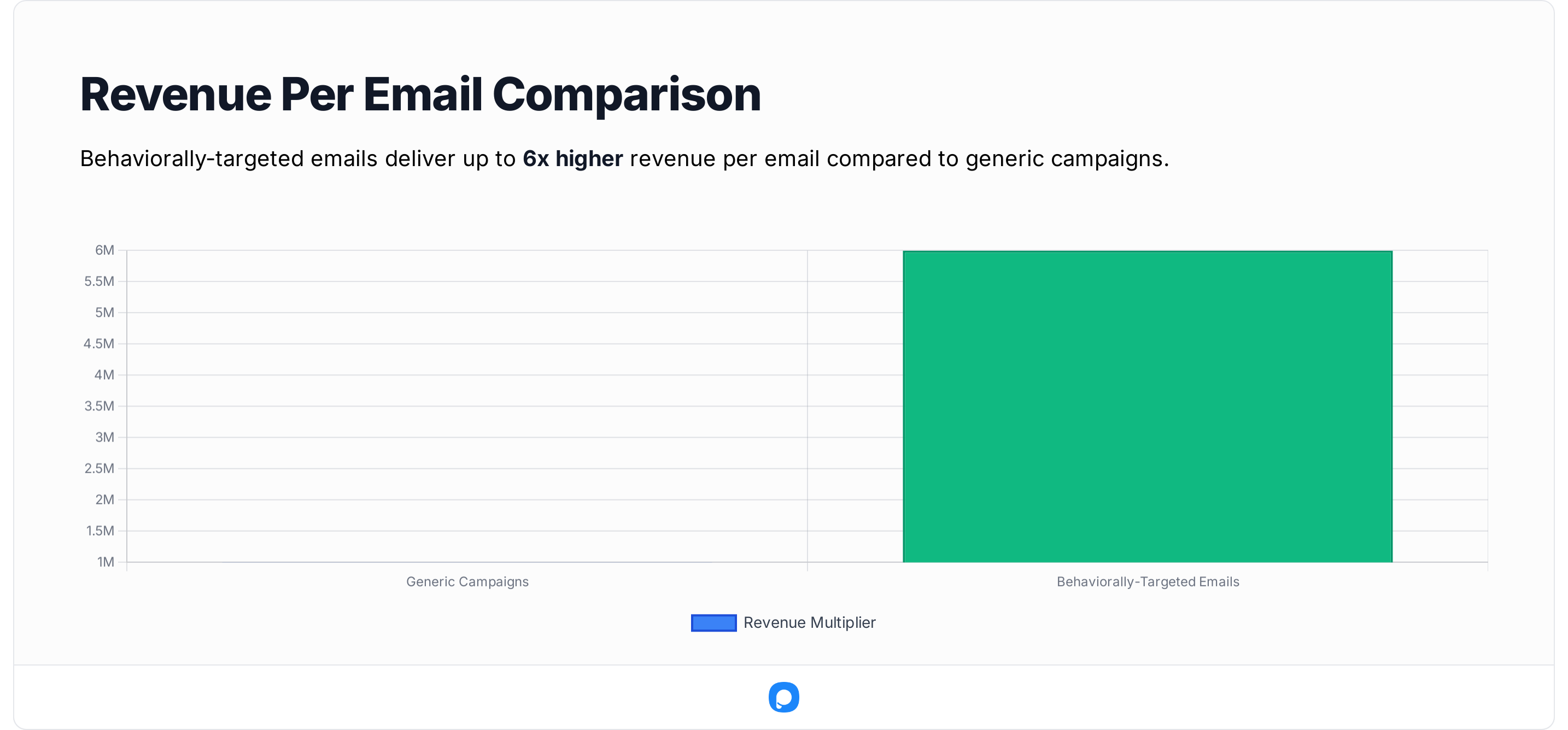
Shopify marketing statistics infographic for 2026 showing 2.5 to 3.5 percent good conversion rate, $11.6B Shopify quarterly revenue closing 2025, 28 percent global ecommerce platform market share, and 30 percent lower conversion when LCP slips from 1.5 to 2.5 seconds
The numbers behind Shopify marketing in 2026.

The macro picture is healthy. According to MSN, Shopify closed 2025 with its highest-ever quarterly and annual revenues, hitting $11.6 billion in revenue, up 30% year-over-year, with $378 billion in GMV. According to Digital Applied, Shopify now commands 28% of the global ecommerce platform market with 5.6 million active stores. Translation: more stores are competing for the same shopper attention, and the bar for marketing has moved up.

Conversion benchmarks back this up. According to Easy Apps, a good Shopify conversion rate in 2026 is 2.5-3.5% across all industries, with top-performing stores hitting 4-6%. If your store is sitting at 1%, you have headroom — every strategy in this list moves that number. If your store is already at 3%, the same strategies still apply, but the lever shifts from "fix what's broken" to "compound what works."

One stat I keep showing customers in our Popupsmart customer audits: according to Shopify research, stores with a 2.5-second Largest Contentful Paint report roughly 30% lower conversion than stores with 1.5-second LCP. Marketing without a fast site is pouring water into a bucket with holes. We'll come back to that in strategy 12.

The 15 strategies below are ordered roughly from highest impact for new stores to most advanced. You don't need all 15. You need three to five that fit your stage, your budget, and your team.

15 Shopify marketing strategies that drive sales

1. Build a strategic popup program for capture and recovery

Popups are the highest-impact on-site marketing tool a Shopify store has, and they're also the most misused. Done well, a popup program captures emails from window-shoppers, recovers carts, surfaces featured collections, and runs seasonal offers — all without a developer. Done badly, it nukes mobile UX and drops bounce rate by double digits.

Shopify templates on Popupsmart template selection page
Popupsmart Shopify-ready templates inside the campaign builder.

Why it works: A first-time visitor leaves a Shopify store within roughly 30 seconds if nothing earns their attention. A targeted popup converts a fraction of that anonymous traffic into emails and SMS subscribers you can re-market to forever. The economics flip from "pay-per-visitor" to "pay-per-relationship."

How to ship it: Install Popupsmart from the Shopify App Store. Build three campaigns to start: a welcome popup with a 10% first-purchase code (trigger: 5-second delay or 30% scroll), an exit-intent popup on product pages (trigger: cursor-leaves-viewport), and a cart-recovery popup that fires when a visitor tries to leave with items in their cart. Use the Shopify element to feature a specific product inside the popup with live pricing and an add-to-cart button.

Adding a Shopify element to a popup on Popupsmart
Adding a Shopify product element directly to a popup campaign.
popup example with Shopify element created with Popupsmart
A finished Shopify popup with product image, price, and CTA.

Common mistake to avoid: Showing the same popup to every visitor on every page. After the third impression, the same popup drops conversion by more than half — I've seen it happen across audits. Frequency-cap every popup to one impression per visitor per 7 days, exclude pages where the user has already converted, and split mobile vs desktop creatives because mobile real estate is brutal. For more on the underlying conversion playbook, the Shopify conversion tactics guide goes deeper into trigger settings.

2. Set up email marketing automation flows

Email is the highest-margin channel on a Shopify store because the cost of sending is near zero and the list compounds month after month. Automation flows — welcome, abandoned cart, post-purchase, win-back — do the heavy lifting while you sleep, and a healthy flow stack typically drives 25-35% of total store revenue for mature DTC brands.

an iPhone displaying an email from Shopify
A product email rendered on iPhone — the format most subscribers actually read in.

Why it works: Triggered emails reach buyers when intent is highest. Someone abandoned a cart in the last hour? They're 15x more likely to convert than a cold email recipient. Welcome flows convert because the subscriber just opted in — they remember you. Win-back flows convert because dormant customers already know your product is real.

How to ship it: Pick a Shopify-native email platform with deep flow templates and visual flow builders. Build four flows in this order: welcome (3 emails over 5 days, leading with the first-purchase incentive promised in your popup), abandoned cart (3 emails over 24 hours with the product image and a soft urgency cue, not a discount on email one), post-purchase (1 email at delivery + 1 review request at day 14), and win-back (1 email after 60 days of inactivity, 1 after 90). Segment your list by purchase recency and average order value before sending campaigns — broadcasting the same message to everyone is the fastest way to burn deliverability.

Shopify email marketing example from Kylie Cosmetics
Kylie Cosmetics — strong product photography, clear hierarchy, single CTA.

Common mistake to avoid: Discounting in email one of the abandoned-cart flow. You're training every shopper to abandon their cart and wait. Lead with the product, the social proof, and the shipping policy. Save the discount for email three.

3. Use organic social media for brand presence

Organic social is where shoppers form an opinion of your brand before they ever click an ad. The goal isn't to "go viral" — it's to be findable, look credible, and give a future paid-traffic visitor enough trust signals that they convert.

Why it works: Shoppers research before buying. After a Meta ad, the next click is often your Instagram handle or your TikTok. If those feeds are empty, dated, or off-brand, you lose the sale even with a perfect ad. Organic also feeds creative for paid — your highest-engagement organic post is almost always your highest-ROAS paid creative.

How to ship it: Pick two platforms based on where your buyer actually scrolls — usually Instagram + TikTok for fashion, beauty, and lifestyle; Pinterest + Instagram for home and decor; LinkedIn + YouTube for B2B. Post 3-4 times per week per platform with a content mix of 50% product-in-context, 30% educational/UGC, 20% behind-the-scenes. Embed your Instagram feed on the homepage so visitors see freshness — ColourPop does this well and links each tile to a product.

Colourpop's Instagram feed on its landing page
ColourPop embeds shoppable Instagram tiles on its homepage.

Common mistake to avoid: Treating organic as a billboard. Posts that only sell get punished by every algorithm in 2026. Mix product posts with educational and entertaining content, and reply to comments within a few hours — the algorithm watches engagement velocity, not just engagement count.

4. Run paid social and search ads

Paid is the fastest way to test demand and scale what works, but it's also the fastest way to incinerate cash if your store isn't ready. After watching 50+ Shopify merchants scale from 6-figure to 8-figure revenue, the ones who win paid first ship a clean site, a tested offer, and three to five email flows — then they buy traffic.

Why it works: Meta and Google sit between your store and ~80% of the buying intent on the open web. Paid social (Meta, TikTok) is best for discovery and demand generation. Paid search (Google, Bing) captures existing demand — people typing your brand name or category. Run both, weighted by funnel stage.

How to ship it: Start with $30-50/day on Meta for one week to test creatives — never optimize for purchases on day one with a small budget; optimize for add-to-carts so the algorithm has signal. Build a Google Search campaign on branded terms first (cheap, high-intent), then expand to category terms once branded is converting. Tag every campaign with UTMs so Shopify Analytics actually attributes revenue. After 14 days, kill any ad set with CAC above your contribution margin and scale the rest by 20% every 3 days.

Common mistake to avoid: Judging Meta ads on day-one ROAS. Iterations need at least 50 conversions before the algorithm has anything useful to learn from. The other one — running ads to your homepage. Send paid traffic to a collection page or a dedicated landing page with the exact offer the ad promised. The mismatch between ad copy and landing page is the #1 reason Shopify ads underperform.

5. Optimize Shopify SEO for product and collection pages

SEO is the long game, and on Shopify it's mostly about three things: product titles, collection page copy, and site speed. Get those right and you'll rank for thousands of long-tail keywords without writing a single blog post.

Why it works: Organic traffic is free and compounds. A collection page that ranks for "men's wool socks" sends you buyers every month for years. According to Blend Commerce, global ecommerce conversion rates hover around 1.9% while Shopify stores typically hit 2.5-3% — and organic traffic almost always converts higher than paid because intent is self-selected.

How to ship it: Audit your top 20 product pages first. Rewrite product titles to follow this format: "[Brand] [Product Name] — [Key Attribute] [Category]" (e.g., "Northbound Merino Crew Sock — Cushioned Hiking Socks"). Add 150-300 words of unique copy to every collection page above the product grid. Configure structured data (Product, Review, BreadcrumbList) — Shopify themes like Dawn ship most of this, but check your theme. Submit your sitemap to Google Search Console and fix any "discovered, not indexed" pages — usually thin or duplicate copy.

Common mistake to avoid: Stuffing collection page copy with the same keyword 15 times. Google's been ignoring keyword density for years. Write copy a buyer would actually read, then check that the primary keyword appears in the H1, the first paragraph, and one image alt. That's enough.

6. Launch a content marketing program (blog + video)

A blog is not a marketing channel. A blog program with a topic strategy, an internal-linking map, and a publishing cadence is a marketing channel. The difference is the difference between 200 monthly visitors and 50,000.

Why it works: Blog content captures top-of-funnel search demand that product pages never can — "how to layer skincare," "best gifts for new homeowners," "shoe size guide." Each post becomes a permanent acquisition asset. Pair it with video (YouTube + TikTok long-form) and you cover both Google and the platforms eating Google's lunch with younger audiences.

How to ship it: Pick five core topic clusters tied to the products you sell. For each cluster, ship one pillar post (2,500+ words, ranks for the head term) and 4-5 supporting posts (1,000+ words, rank for long-tail). Publish weekly for 12 weeks, then re-evaluate. Repurpose every blog into a 90-second TikTok script, a YouTube short, and a long-form Instagram carousel. Reuse the assets — that's the whole point.

Common mistake to avoid: Writing about whatever the team feels like that week. Without a keyword-driven topic plan, you're producing content nobody is searching for. Use a keyword research tool and pick topics where search volume is real and top-ranking pages are beatable. The ecommerce skills breakdown covers the broader skill set behind running a content engine alongside paid and email.

7. Build a customer loyalty program

Acquisition cost is up across every paid channel. Retention is where margin lives. A working loyalty program turns a one-time buyer into a three-time buyer at near-zero marginal cost.

H&M's customer loyalty program example on its website
H&M's loyalty page — clear tiers, clear rewards, no fluff.

Why it works: Repeat buyers spend more per order, return less, and refer friends. According to Uptek, Shopify's overall conversion rate outpaces other platforms by up to 36% — and loyalty members convert at multiples of that because they're already pre-sold on the brand.

How to ship it: Pick a loyalty platform that integrates with your Shopify checkout natively. Start with a points-per-dollar program (1 point per $1 is the cleanest mental model for shoppers). Set the redemption ratio so 100 points = $5, which keeps redemption rate manageable. Add three earning actions beyond purchase — sign up (50 points), follow on Instagram (25), birthday (50). Add tiers once you have 1,000+ active members so high-spenders feel special.

Common mistake to avoid: Launching loyalty before you have a meaningful customer base. Below 500 active customers, loyalty is overhead. Focus on acquisition first, then retention.

8. Launch a referral program

Word of mouth is the highest-trust acquisition channel on the planet, and a referral program turns it into a measurable system instead of an accident.

Asos' referral program example on its website
ASOS — give-and-get referral structure with clear reward visibility.

Why it works: Referred customers have the highest LTV of any acquisition source — they trust the referrer, so they're pre-qualified. The give-and-get structure ($X off for them, $X for you) aligns incentives without paying a third party.

How to ship it: Build a give-and-get referral on the platform you use for loyalty (most loyalty apps include referrals). Set rewards at 10-15% of average order value — too small and nobody refers, too large and you're discounting your way to bankruptcy. Surface the referral link in three places: post-purchase confirmation page, order confirmation email, and a dedicated "/refer" page. Track conversion-by-source so you know what each referral is actually worth.

Common mistake to avoid: Hiding the referral program in the footer. If you're not surfacing it post-purchase — when satisfaction is highest — you're leaving most referrals on the table.

9. Partner with influencers in your niche

Influencer marketing matured in the last two years. The era of "send free product, hope for a post" is dead. The current playbook is paid partnerships with creators sized to your stage — micro for early, mid for scale, celebrity only when contribution margin is fat.

Why it works: Creators with 10K-100K followers in a tight niche have higher engagement rates and lower CPMs than mega-influencers, and their audiences trust product recs because the creator's whole brand is built on that trust. According to Its Fun Doing Marketing, Pura Vida Bracelets generated over $1 million in sales using web push notifications combined with creator-driven content — the channels compound.

How to ship it: Build a list of 50 creators in your niche using TikTok and Instagram search by hashtag. Slide into DMs with a specific brief: deliverables, deadline, deal terms (flat fee + affiliate code), usage rights. Pay for usage rights so you can run the creator's content as paid ads — that's where the real ROI comes from. Track every campaign with a unique discount code so you can attribute revenue down to the creator.

Common mistake to avoid: Optimizing for follower count. A creator with 25K engaged followers in your niche outperforms a creator with 250K disengaged followers every time. Look at average comments and saves, not vanity reach.

10. Use cart abandonment recovery

Cart abandonment is the single largest revenue leak in any Shopify store. Industry benchmarks put cart abandonment around 70%, and recovering even 5-10% of those carts is real money — usually the highest-ROI work a marketer can do in their first 30 days.

Pro tip note that says the fastest Shopify marketing wins are the ones that compound
Pro tip: prioritize strategies that produce reusable assets.

Why it works: A shopper with items in cart has expressed the strongest possible intent short of buying. They got distracted, hit a shipping concern, or got pulled away by a phone call. A well-timed nudge — popup, email, SMS — brings a meaningful percentage of them back.

How to ship it: Stack three layers of recovery. First, an exit-intent popup that fires when a logged-in visitor with items in cart moves toward the close button — offer free shipping, not a discount, on attempt one. Second, a 3-email cart abandonment flow at +1h, +24h, and +72h with progressively stronger incentives. Third, an SMS at +20 minutes for SMS-opted-in carts (highest open rate of any channel — 90%+). Test the order and timing — every store has a different optimum.

Common mistake to avoid: Going straight to a discount in email one. You teach buyers to abandon and wait. Lead with the product image, social proof, and a soft urgency cue. Discount in email three only.

11. Run seasonal giveaways and contests

Giveaways are list-building accelerators. A two-week, well-promoted giveaway can grow an email list by 25-50% — but only if the prize is product-relevant and the entry mechanic is friction-light.

Culture Kings' Shopify giveaway popup example
Culture Kings — clear prize, urgency cue, single field.

Why it works: Giveaways amplify across social because participants share to earn extra entries. The prize self-qualifies the audience — only people who want your product will enter for it. So unlike "win a $500 Amazon card" giveaways, you end up with an email list that actually buys later.

How to ship it: Pick a prize at 5-10x AOV (a bundle, not a single SKU). Run a 2-week window with a popup on the homepage and a sticky bar across the site. Use a referral mechanic — extra entries for each friend referred — to multiply the list. Promote via email to existing subscribers (they refer too), Instagram Reels, and one paid ad campaign with a $5/day budget targeting lookalikes of your buyer list. Announce the winner publicly to drive credibility.

Common mistake to avoid: Picking a generic prize. iPad giveaways grow lists fast, but those subscribers never buy. Tie the prize to your category so the list is qualified from day one.

12. Optimize for mobile and page speed

Most Shopify traffic is mobile. Mobile shoppers are impatient. The store that loads in 1.5 seconds beats the store that loads in 2.5 seconds — even if the slow store has better marketing.

Why it works: Speed compounds with every other strategy. Faster pages mean lower bounce rate, higher organic ranking, lower paid CPC, higher checkout completion. According to Shopify research, stores with 2.5-second LCP report roughly 30% lower conversion than stores with 1.5-second LCP. That's a marketing strategy disguised as a tech project.

How to ship it: Run your homepage and top three product pages through PageSpeed Insights. Compress every image above 200KB to WebP. Lazy-load below-the-fold images. Audit your installed apps quarterly — every Shopify app injects scripts, and each script costs 50-200ms. If you're not using an app actively, uninstall it. Switch to a fast theme like Dawn or Sense if you're on a custom theme that hasn't been performance-audited in 12 months.

Common mistake to avoid: Adding apps without measuring before/after speed. The single biggest cause of slow Shopify stores is app bloat — 30+ apps, half of them unused, all firing scripts on every page load.

13. Add product reviews and UGC

Reviews are the cheapest conversion lift on a Shopify store. Adding star ratings to product cards on collection pages typically lifts collection-to-product CTR by 10-20%. Adding photo reviews on product pages lifts conversion by another 5-15%.

Why it works: Buyers don't trust your copy — they trust other buyers. A product page with 47 reviews and 4.8 stars converts dramatically better than the same page with no social proof, even if the product is identical. UGC (real customer photos) outperforms studio photography on conversion in nearly every test I've run.

How to ship it: Install a Shopify-native review app and configure post-purchase review request emails at +14 days from delivery (not from order — wait until they've actually used the product). Offer 50 loyalty points or a $5 credit for a photo review. Display review widgets in three places: product page hero, just below add-to-cart, and on collection pages as star aggregates. Syndicate top reviews to Google Shopping for free CTR boosts.

Common mistake to avoid: Hiding negative reviews. Buyers smell a curated review section and bounce. A 4.6-star average with mixed reviews converts better than a 5.0 average that reads like a press release.

14. Use exit-intent popups for last-chance offers

Exit-intent is a different beast from welcome popups. It fires only when the visitor signals they're leaving — cursor toward the close button, fast scroll up, idle time. That signal is gold because the alternative is they leave with nothing.

Why it works: Time-delayed popups interrupt readers and irritate visitors who are still engaged. Exit-intent fires at the moment of abandonment, so you're not interrupting anyone — you're catching shoppers who were already gone. The conversion math is simple: a visitor leaving = $0; a visitor leaving + email captured = ~$2-5 in expected lifetime value depending on category.

How to ship it: Build a single exit-intent popup with one offer — your strongest one. For first-time visitors, that's usually 10-15% off plus free shipping. For returning visitors who've already used a welcome code, switch the offer to a content lead magnet ("size guide," "skincare layering chart") because they've seen the discount. Set the trigger sensitivity at 80-85% so it fires reliably without false positives. Cap impressions at 1 per visitor per 14 days. The multi-step Shopify forms guide goes deep on form length vs conversion if you want to A/B test more granular flows.

Common mistake to avoid: Using the same exit popup on every page type. The right offer on a product page (10% off this product) is different from the right offer on the cart page (free shipping if you complete now). Build at least two variants segmented by page intent.

15. Track and iterate with analytics

Marketing without measurement is theater. Every store I've audited that flatlined was making decisions on vibes — the founder thought paid social was working, but nobody had checked attribution against contribution margin in nine months.

Why it works: Analytics turn marketing into a feedback loop. You ship, you measure, you learn what worked, you double down. Without that loop, you're spending money on hope.

How to ship it: Set up GA4, Shopify Analytics, and your ad platforms' native pixels in week one. Tag every campaign with UTMs. Build a weekly dashboard that tracks five numbers only: sessions, conversion rate, AOV, CAC by channel, and contribution margin. Forget vanity metrics — impressions and reach don't pay rent. Run a weekly 30-minute review where you ask three questions: what moved, why did it move, what do we change. The Shopify apps for conversion roundup covers analytics tools that play well with Shopify Analytics.

Common mistake to avoid: Tracking too many metrics. A 40-row dashboard nobody opens is worse than a 5-row dashboard the team checks every Monday. Cut the dashboard until it fits on one screen.

How to prioritize Shopify marketing strategies in your first 90 days

Fifteen strategies is a long menu. Most stores should pick three to five for the first quarter, ship them well, and add the next batch in quarter two. Here's the order I recommend after running this exercise across dozens of stores.

Days 1-30 (foundations): Get your popup program live (strategy #1), set up the four core email flows (strategy #2), and audit speed/mobile (strategy #12). These three together typically lift conversion rate by 30-60% in the first month — without spending a dollar on traffic. If your store is below 1.5% conversion, this is non-negotiable. The order matters: speed audit first (so the rest doesn't get wasted), then popups (so you start capturing emails), then flows (so the captured emails monetize).

Days 31-60 (traffic): Layer in paid (#4) and start an SEO sprint on top product and collection pages (#5). Paid gives you immediate signal on what offers and creatives work; SEO compounds for months. Don't start paid before flows exist — you'll capture leads with no automation behind them and waste the spend.

Days 61-90 (compounding): Add reviews (#13), build a referral program (#8), and start the content engine (#6). At this point you have data: which products convert, which channels are profitable, which segments respond. Pour fuel on the winners. If you have time and budget, start influencer outreach (#9) in week 10 — it takes 30-45 days from first DM to first piece of content live.

Reserved for quarter two: Loyalty (#7) and giveaways (#11) pay back better once you have a base of customers. Launching loyalty with 100 customers is a waste of platform fees. Cart abandonment recovery (#10) and exit-intent (#14) belong in quarter one if you're a higher-traffic store, quarter two if you're below 5K monthly sessions.

The principle: ship what compounds before what doesn't. A welcome popup that builds an email list feeds every email send for the next year. A one-off paid campaign produces revenue once. Pick the strategies whose output becomes input to the next strategy, and you'll outpace stores that chase tactics in isolation.

Shopify marketing tools every store should consider

Tools follow strategy, not the other way around. Pick the strategy first, then the tool. Below are the categories every Shopify store eventually needs and what to look for in each.

a screenshot of the landing page of Popupsmart's Shopify application
Popupsmart's Shopify app — popups, sticky bars, and Shopify product elements without code.

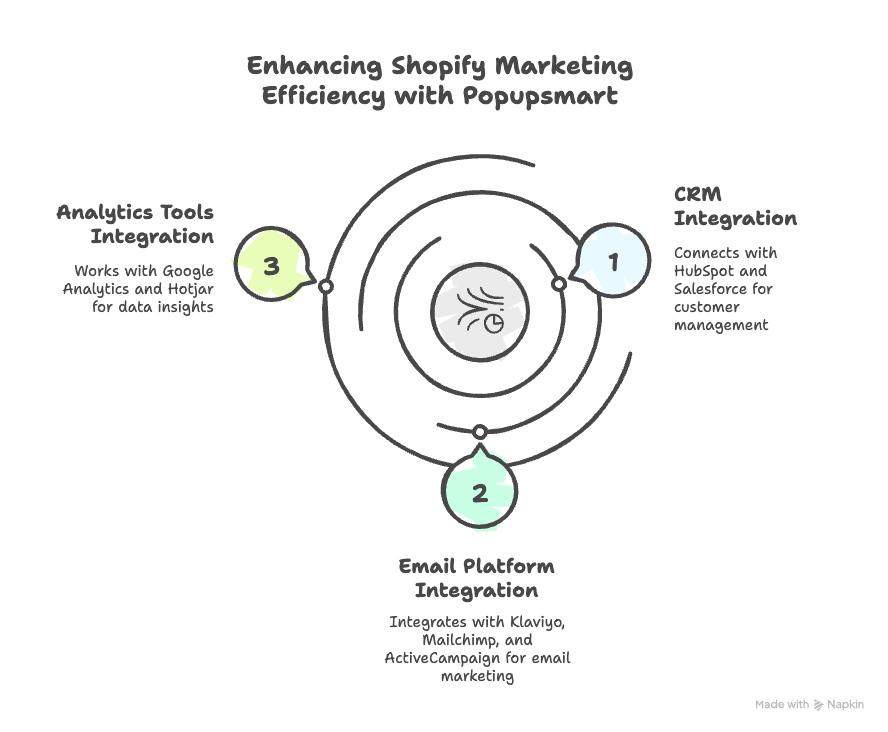
Popup and on-site messaging builders: You want native Shopify integration so popups can pull live product data, no-code editor so the team ships campaigns without engineering, granular targeting (page, audience, behavior), and async script loading so it doesn't tank your speed score. Popupsmart's Shopify app covers all four — install from the app store, build a campaign in five minutes, ship.

Email and SMS automation platforms: Look for native Shopify event sync (so abandoned cart and post-purchase flows fire correctly), visual flow builders, segmentation, and built-in deliverability monitoring. The platform you pick is a 5-year decision — switching costs are real because every flow has to be rebuilt — so test for a month before committing.

SEO and analytics: Google Search Console (free, mandatory), GA4 (free, mandatory), and one paid SEO tool for keyword research and rank tracking. Add a heatmap tool when you have enough traffic to make session recordings useful — usually 5K+ monthly sessions.

Reviews and UGC: Pick something with photo review support, post-purchase email sequencing, Google Shopping syndication, and Shopify Flow integration. Avoid review tools that don't sync to Google — half the reviews collected without that integration are wasted.

Ads tooling: The ad platforms themselves (Meta Ads Manager, Google Ads) are sufficient until you're spending $20K+/month. Above that, look at unified ad reporting tools that pull every channel into one dashboard so you can compare performance apples-to-apples.

One operational tip: every app you install adds scripts to every page. Audit your installed apps quarterly and uninstall anything you haven't actively used in 60 days. Stack bloat is the silent killer of Shopify performance.

Common Shopify marketing mistakes to avoid

I've seen the same five mistakes torpedo Shopify marketing programs across stores of every size. They're worth calling out because they're entirely avoidable.

1. Running ads to a slow site. Paid traffic amplifies whatever your store does — including bouncing fast visitors who didn't get a page in 1.5 seconds. Audit speed before you audit creative. The math: a 25% bounce rate cut from a speed fix is worth more than a 25% CTR lift on ad creative, every single time.

2. Treating email as a broadcast channel. Stores that send the same campaign to their full list every week burn deliverability fast. By month three, half your campaigns land in promotions or spam. Segment aggressively — by purchase recency, by category interest, by engagement — and tailor copy to the segment. A 30K segmented list outperforms a 100K unsegmented list.

3. Optimizing for traffic instead of conversion. A store with 10K monthly visitors at 3% conversion beats a store with 50K visitors at 0.5% conversion in revenue and margin. Conversion-rate work has compounding upside — every channel benefits from it. Traffic work only helps the channel you bought traffic on. Start with the conversion engine; turn on the traffic firehose second.

4. Skipping post-purchase. Most stores treat the order confirmation page like a dead-end. It's not — it's the highest-trust moment in the buyer journey. Use it for a referral ask, a cross-sell, a community invite, or a loyalty signup. The marginal lift is 5-10% on order rate within 90 days.

5. Copying competitors instead of testing. Your audience is not their audience. Their offer might fail on your traffic. Your offer might fail on theirs. Steal frameworks, not specifics — test every tactic against your own buyer data before declaring it canon.

Pick three Shopify marketing strategies and ship this quarter

Reading 15 strategies and shipping zero is the most common outcome of a post like this. Don't let it be yours. Pick three from the foundations bucket — a popup program, four core email flows, a speed audit — and commit to having them live within 30 days. That alone moves most stores from 1-1.5% conversion to 2-2.5%, which on a $50K/month store is $10K-15K in monthly revenue.

If you want a head start on the popup piece, install Popupsmart's Shopify app and ship a welcome popup, an exit-intent popup, and a cart-recovery popup in your first afternoon. The Shopify element pulls live product data, the templates ship in five minutes, and the script loads async so your speed score is safe. From there, layer in email flows, then paid, then content. Three strategies shipped beats fifteen strategies planned, every time.

Pair the popup work with Shopify featured products on key collection pages so visitors who land from organic or paid have a clear next click. The two strategies compound — the popup captures the email, the featured product earns the click, and the email flow closes the sale.

Frequently asked questions

Why is it important to have effective Shopify marketing strategies?

Marketing strategies are how Shopify stores stand out in a market with 5.6 million active stores competing for the same shoppers. Strategy ties channel choice to audience intent — instead of running ads everywhere and hoping, you build a sequence: capture emails on-site, nurture via flows, recover carts, retain via loyalty. Without that sequence, marketing becomes a series of disconnected experiments that never compound. Stores with explicit strategy outgrow stores without one almost every time, mainly because they re-invest learnings instead of starting from scratch every quarter.

How can social media marketing benefit Shopify businesses?

Social media drives three things for Shopify stores: discovery (people who didn't know your brand existed), trust (shoppers who research your handle before buying), and creative supply (your highest-engagement organic post is almost always your highest-ROAS paid creative). The mistake is treating social as a billboard. Posts that only sell get punished by every algorithm in 2026. Mix product, education, and entertainment — and reply to comments fast, because engagement velocity is what the algorithm rewards. Two well-run platforms beat five neglected ones.

What are some tips for creating engaging content for Shopify marketing?

Anchor every piece of content to a specific buyer question and a specific keyword. Lead with the answer in the first 100 words — search engines and AI assistants both reward that. Use real product photography over stock, original data over recycled industry stats, and one specific example over three vague ones. Repurpose every long-form post into 90-second TikTok scripts, Instagram carousels, and email content. Content quality compounds: a single great pillar post drives traffic for years, but only if you treat the topic plan like a product roadmap, not a wish list.

How can influencer marketing help Shopify businesses?

Influencer marketing brings warm, pre-qualified traffic from creators whose audiences already trust their product recs. The current playbook is paid partnerships with creators sized to your stage — micro (10K-100K followers in a tight niche) for early-stage stores, mid-tier when you're ready to scale, celebrity only when contribution margin is fat. Always negotiate for usage rights so you can run the creator's content as paid ads — that's where the real ROI sits. Track every campaign with a unique discount code so attribution is clean and you know what each creator is actually worth.

How long until Shopify marketing strategies show results?

It depends on the strategy. On-site changes — popups, exit-intent, page speed — show measurable conversion impact within 7-14 days. Email automation flows produce revenue within the first month, especially abandoned cart and welcome flows. SEO and content take 90-180 days to compound, so don't judge them at week four. Paid social can show signal in 14 days but needs at least 50 conversions per ad set before the algorithm has anything useful to learn from. Set expectations by horizon: quick wins (popups, flows, speed), mid-cycle bets (paid, reviews, referrals), long-cycle compounders (SEO, content, loyalty).

What's a realistic Shopify marketing budget for a small store?

Most early-stage Shopify stores spend 10-20% of revenue on marketing once revenue clears $20K/month. Below that, the marketing budget is mostly time, not cash — your popup tool, email platform, and SEO work all run on subscription costs under $200/month combined. Once you're spending on paid, structure budgets by channel ROAS: scale channels with positive contribution margin, kill channels that don't pay back. Don't blanket-budget by percentage — let the data tell you which channel deserves more dollars next month.