ChatGPT
 Perplexity
 Claude
 Grok
Grok Google AI Mode
Have you ever visited a website and then a video popup appeared? It catches the eye, right?
Website owners and e-commerce marketers commonly use video popups on their websites for various reasons, such as:
- To increase sales and revenue
- To promote content or products
- To introduce the brand and more
In this article, I will walk through video pop ups and how to create a smart popup video without any coding. Let’s take it from the beginning.

The Importance of Video Marketing in 2026
Video isn't a nice-to-have anymore. It's the default content format for most online audiences.
SellersCommerce also reports that 93% of businesses now use video as a marketing tool. That number has climbed steadily since 2020, and it tells you something: if your competitors are using video and you're not, you're leaving money on the table.
I've watched this shift firsthand. When we launched Popupsmart, most of our users focused on email capture popups and discount offers, and video popups were a niche request. Today I hear the video question far more often. The reason is straightforward: people would rather watch than read.
This matters for B2B SaaS companies especially. Your product demo, your explainer video, your customer testimonial — these assets already exist. But they're buried on a YouTube channel or tucked away on a features page that gets modest traffic. A popup video puts that content in front of visitors at the exact moment they're most likely to engage with it.

The shift to video-first marketing also changes how you think about conversion optimization. Text-based popups still work, but adding video gives you a different kind of attention. Visitors stop scrolling. They listen. And that extra few seconds of engagement can be the difference between a bounce and a signup.
Key Stats Proving Video Marketing Effectiveness
Let's look at the numbers that matter most if you're considering popup videos for your site.
According to Colorwhistle, 100 million internet users watch a video online every day. That's not a ceiling — it's the floor. With short-form video exploding on platforms like TikTok, YouTube Shorts, and Instagram Reels, audiences have been trained to expect video content everywhere, including on the websites they visit.
Sharing behavior backs this up. A report from Lemonlight found that 74% of respondents share between two and six videos per month across various channels. That sharing happens organically — people forward videos to colleagues, post them in Slack channels, and drop them in group chats. A popup video that genuinely helps your visitor has a real chance of being passed along.
What do these numbers mean in practice? They mean your website visitors already consume video content regularly. They're comfortable with the format. They expect it. A popup video doesn't feel foreign to them. It feels normal.
For context, here are the video figures from this section in one place:
| Statistic | Figure | Source |
|---|---|---|
| Businesses using video as a marketing tool | 93% | SellersCommerce |
| Message retained from video vs. text | 95% vs. 10% | SellersCommerce |
| People who watch online videos every day | 55% | Colorwhistle |
| Respondents who share two to six videos a month | 74% | Lemonlight |
These are general video-marketing figures, not popup results, so test a video popup against a static one before you roll it out. Video earns its place in a popup when it is relevant, short, and well-timed.
What Is a Popup Video?
A popup video is a video that appears inside a modal window, lightbox, or overlay on your website. It plays when triggered by a specific action — a button click, a time delay, scroll depth, or even when a visitor tries to leave your page.
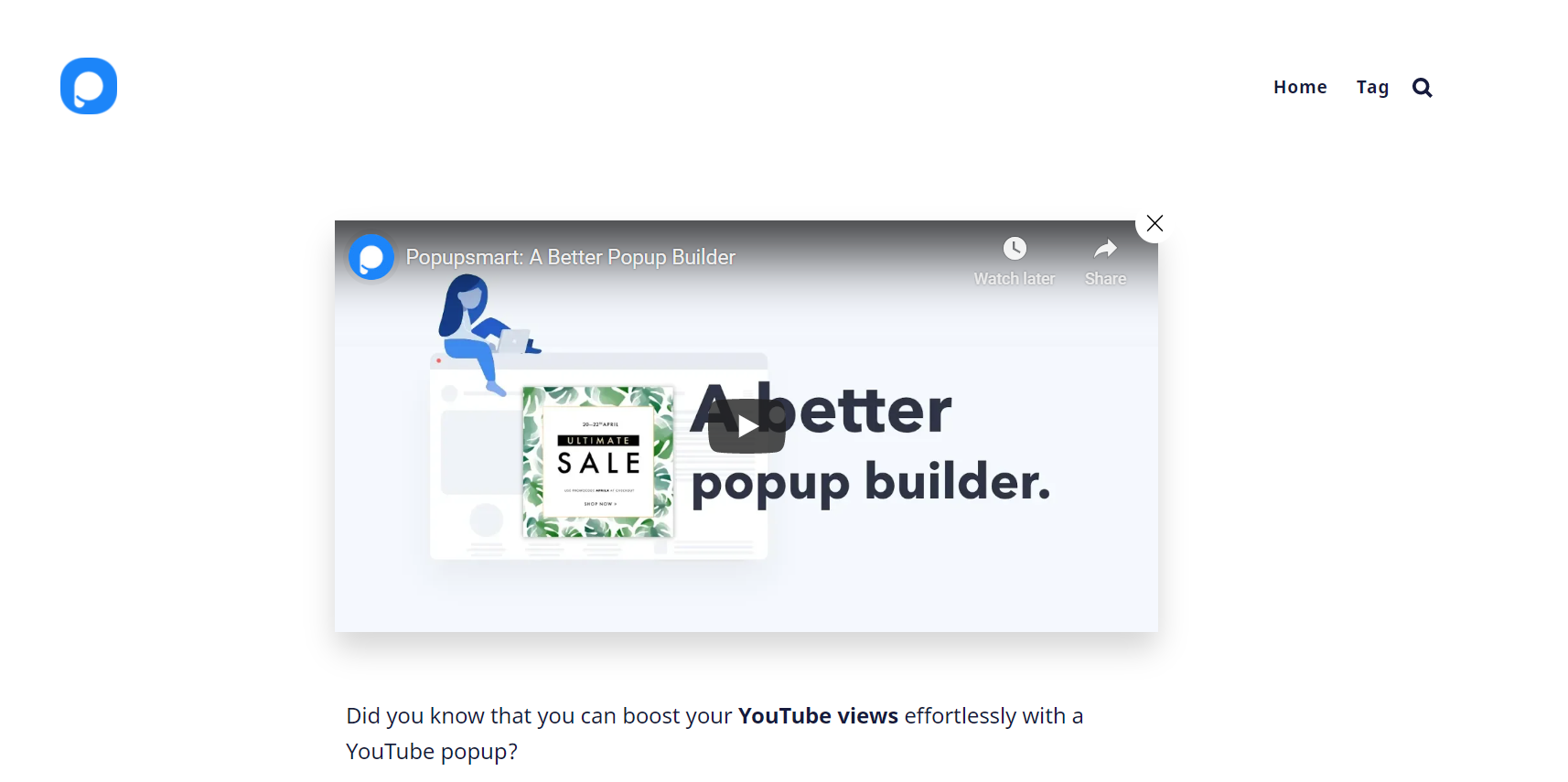
Think of it as a way to bring a YouTube or Vimeo video directly into your visitor's browsing experience without sending them away from your site. The video plays inside an overlay, and when they close it, they're right back where they were on your page.
According to Colorwhistle, 55% of people watch online videos every day. A popup video player lets you put your best video content where those daily viewers already are: on your website.
There are a few common types of popup videos used in marketing:
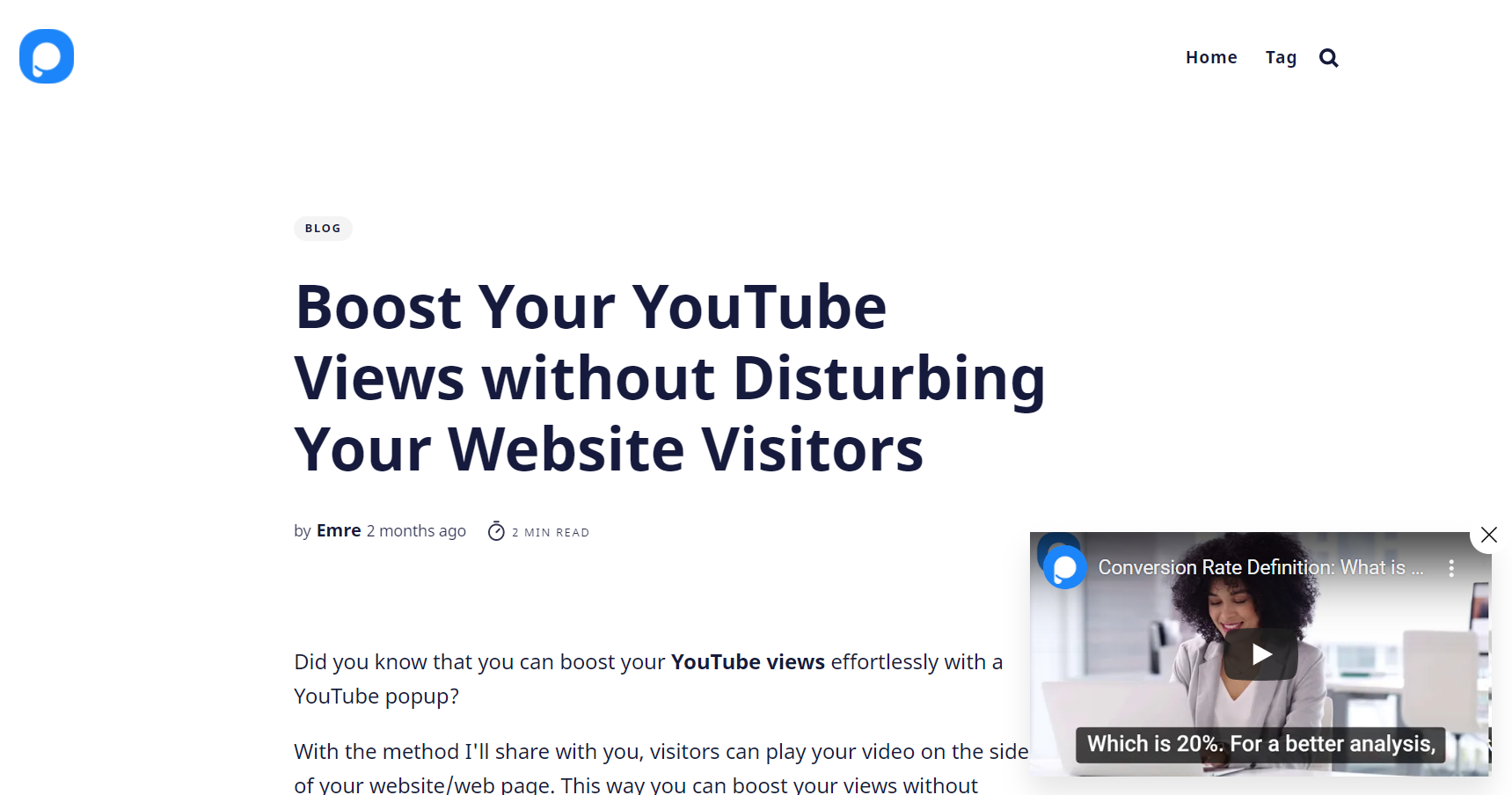
- Click-triggered lightbox: the video opens when a visitor clicks a button, link or thumbnail. Best for product demos, because the visitor asked to see it.
- Timed or scroll-triggered popup: the video appears after a delay or once the visitor has scrolled part of the page. Suits a short video message or offer.
- Exit-intent popup: a short video makes a last pitch as the visitor moves to leave.
- Slide-in video: a smaller player in the corner that plays while the visitor keeps reading.
The distinction matters because different popup types serve different goals. If you're running a SaaS product demo, a click-triggered lightbox popup is usually best. If you're promoting a limited-time offer with a video message, a timed full-screen popup might make more sense. I'll walk you through how to set each of these up later in this guide.
Benefits of Adding Popup Videos to Your Site
Why go through the effort of adding a popup video instead of just embedding a video player on your page? Because popups command attention in ways inline embeds don't.
Here's what the format does well:
Higher engagement rates. An inline video competes with everything else on the page — navigation menus, sidebar widgets, other text blocks. A popup video removes all that noise. The dimmed background and centered player create a focused viewing experience.
Better conversion numbers. In Popupsmart's 2026 benchmark, the median popup that asks for an email or phone number converts 0.83% of its displays and the top 10% reach 3.87%. A video earns its place when it answers the question the visitor has on that page: a product demo video popup on a pricing page, for example, can directly address objections and push visitors toward a signup.
Reduced bounce rates. A popup video gives visitors a reason to stay. If someone lands on your blog post and a relevant video appears after they've read for a while, they're more likely to stick around.
Flexible placement without page redesign. This is the practical benefit marketers forget. Adding an inline video means editing your page layout, worrying about responsive design, and dealing with load time impacts on your Core Web Vitals. A popup video sits in the popup, not in your page layout, so you don't need to touch your existing design.
I should be honest about the limitations, too. Popup videos aren't a shortcut. If your video content is low quality, putting it in a popup won't fix that. If you trigger the popup too aggressively, you'll annoy visitors instead of engaging them. The format amplifies whatever you put inside it — so make sure the content is worth the interruption.
For more ideas on how to use popups effectively, check out these website popup examples from real brands.
Step-by-Step Guide to Adding Popup Videos Without Coding
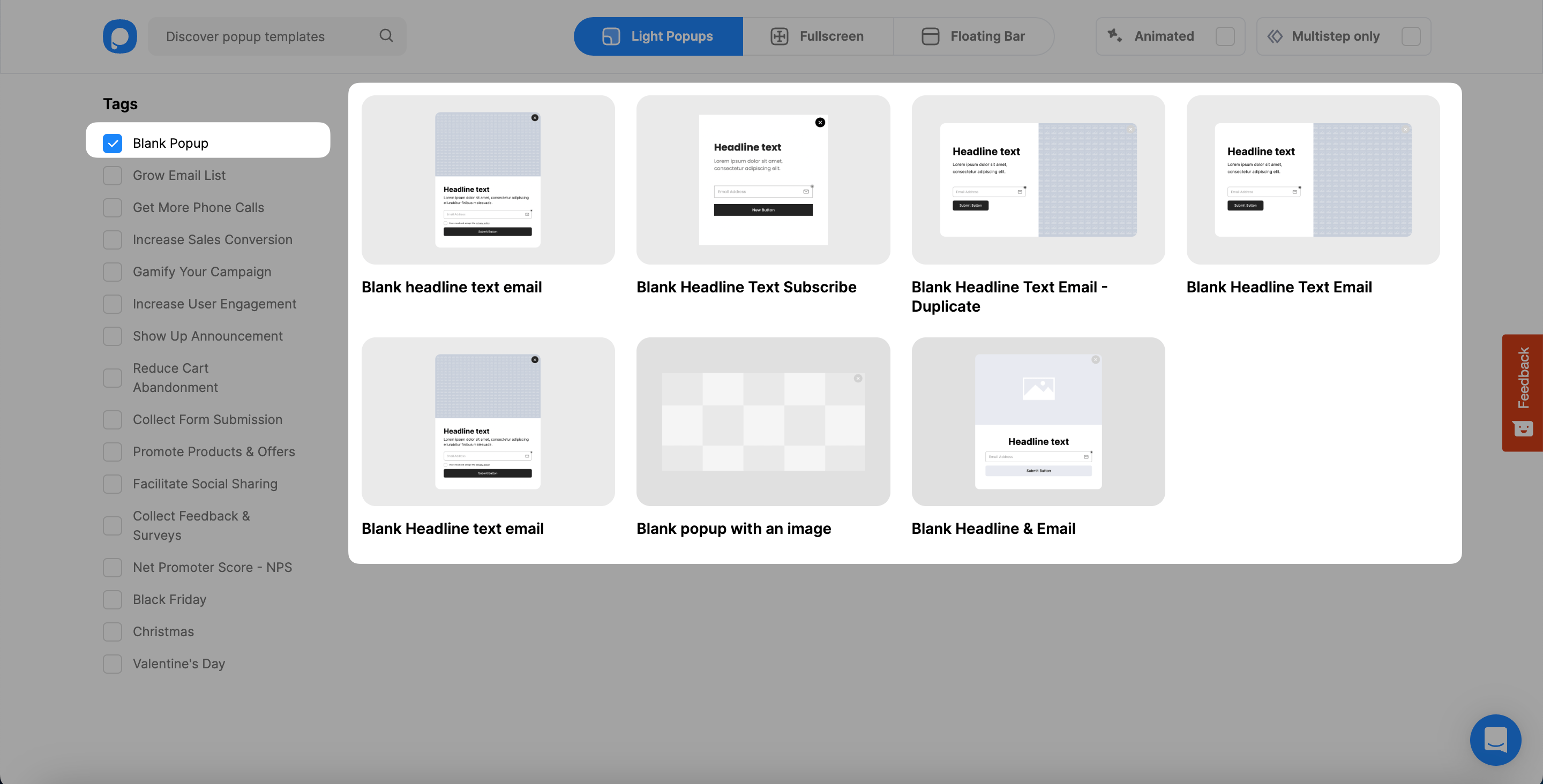
1. Log in to your Popupsmart dashboard and click “New Campaign.” Then, pick the blank popup template from the template selection page.
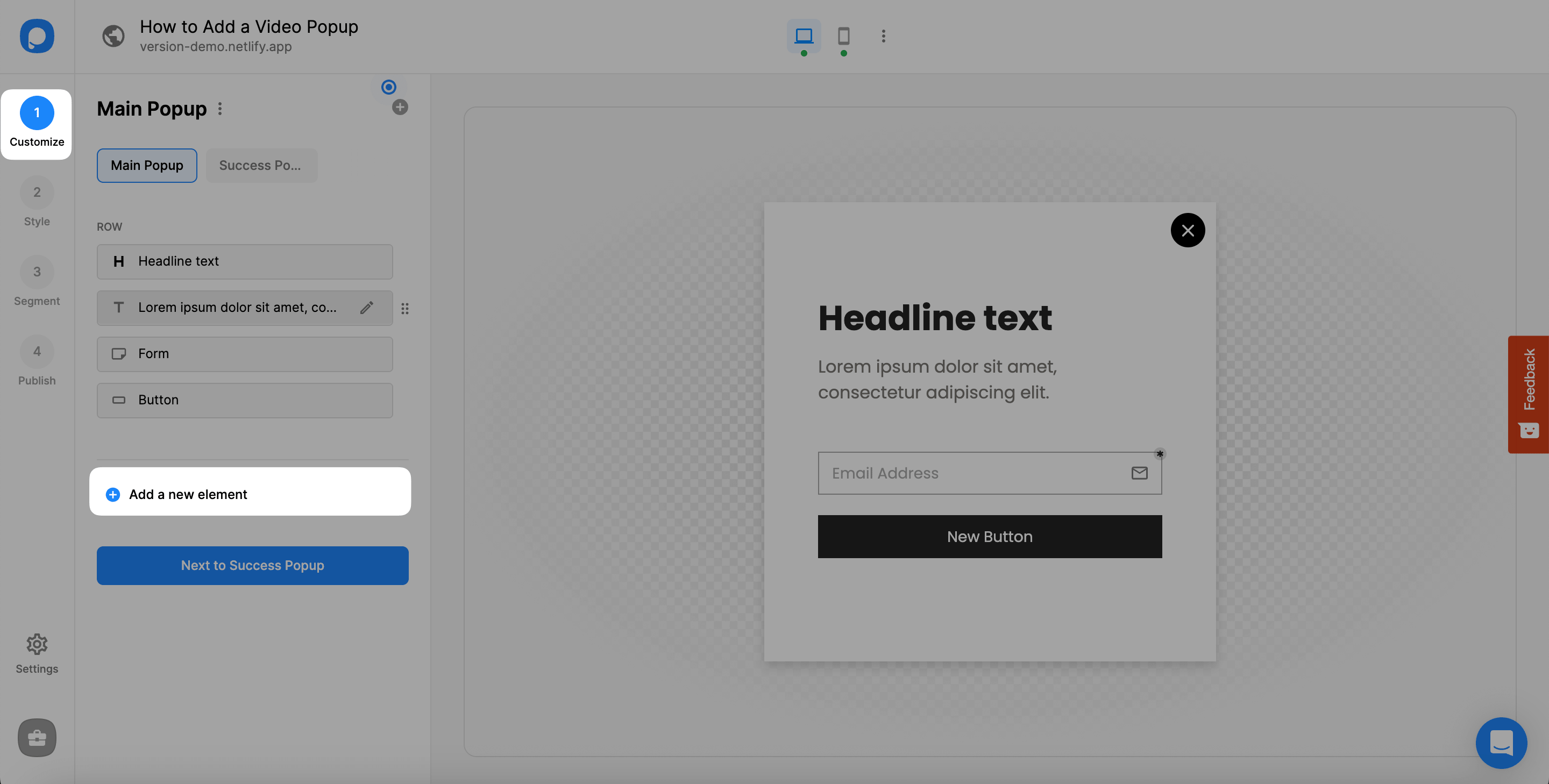
2. In the "Customize" section, click "Add a new element". You can add a video element to any popup template this way, not only the blank one.
For further details, you can see the following:
• How to Add New Elements & Use Drag and Drop Editor
• Which Elements Can I Add to My Popup?
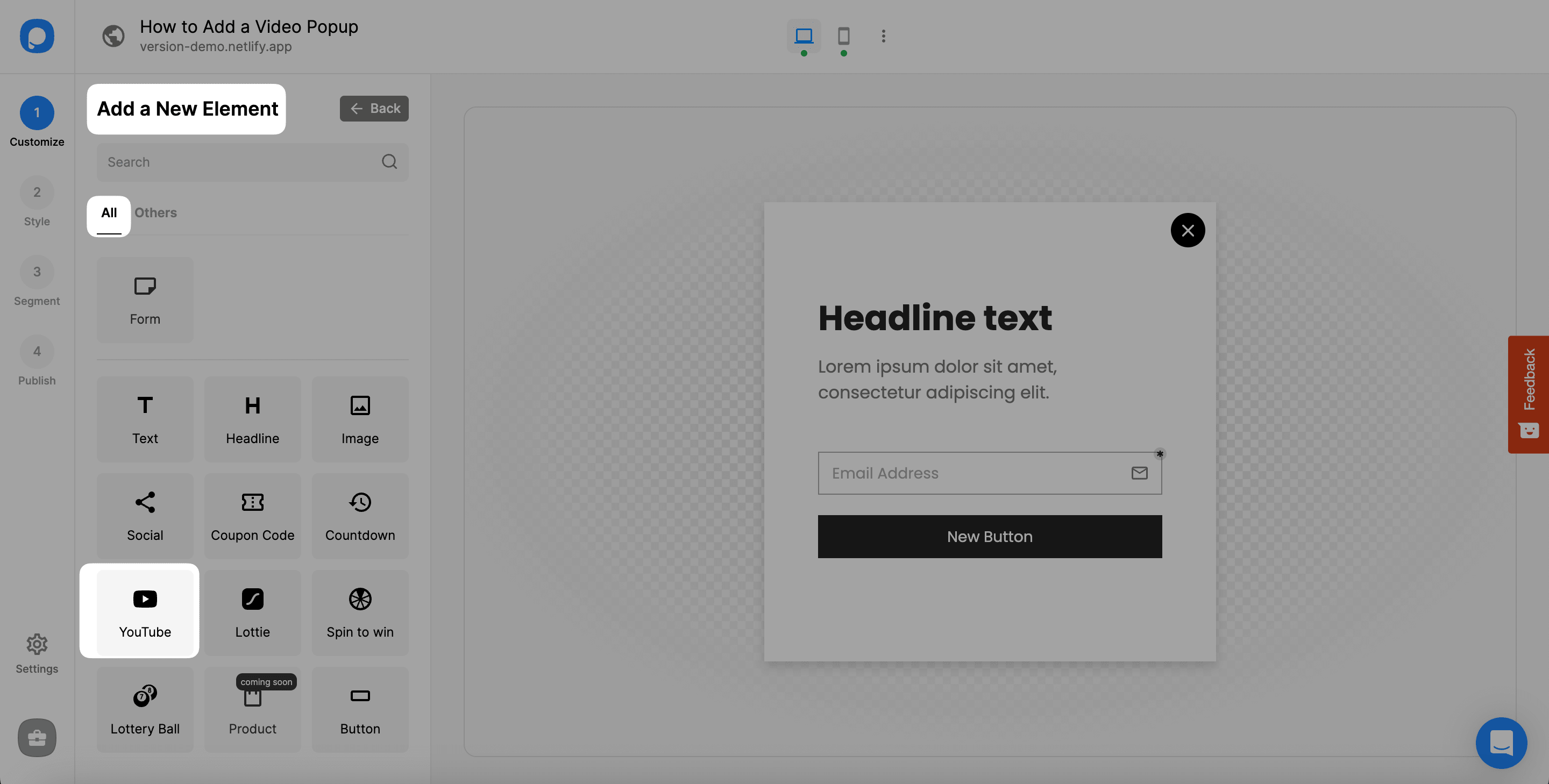
3. You need to choose “YouTube” among all elements when you click Add a New Element.
4. After adding YouTube, click on it and customize by adding a cover image and entering your YouTube video URL to the “YouTube Video URL” part.
Also, you can toggle on and off the Autoplay (muted) to play your video automatically once the user lands on the page however you want.
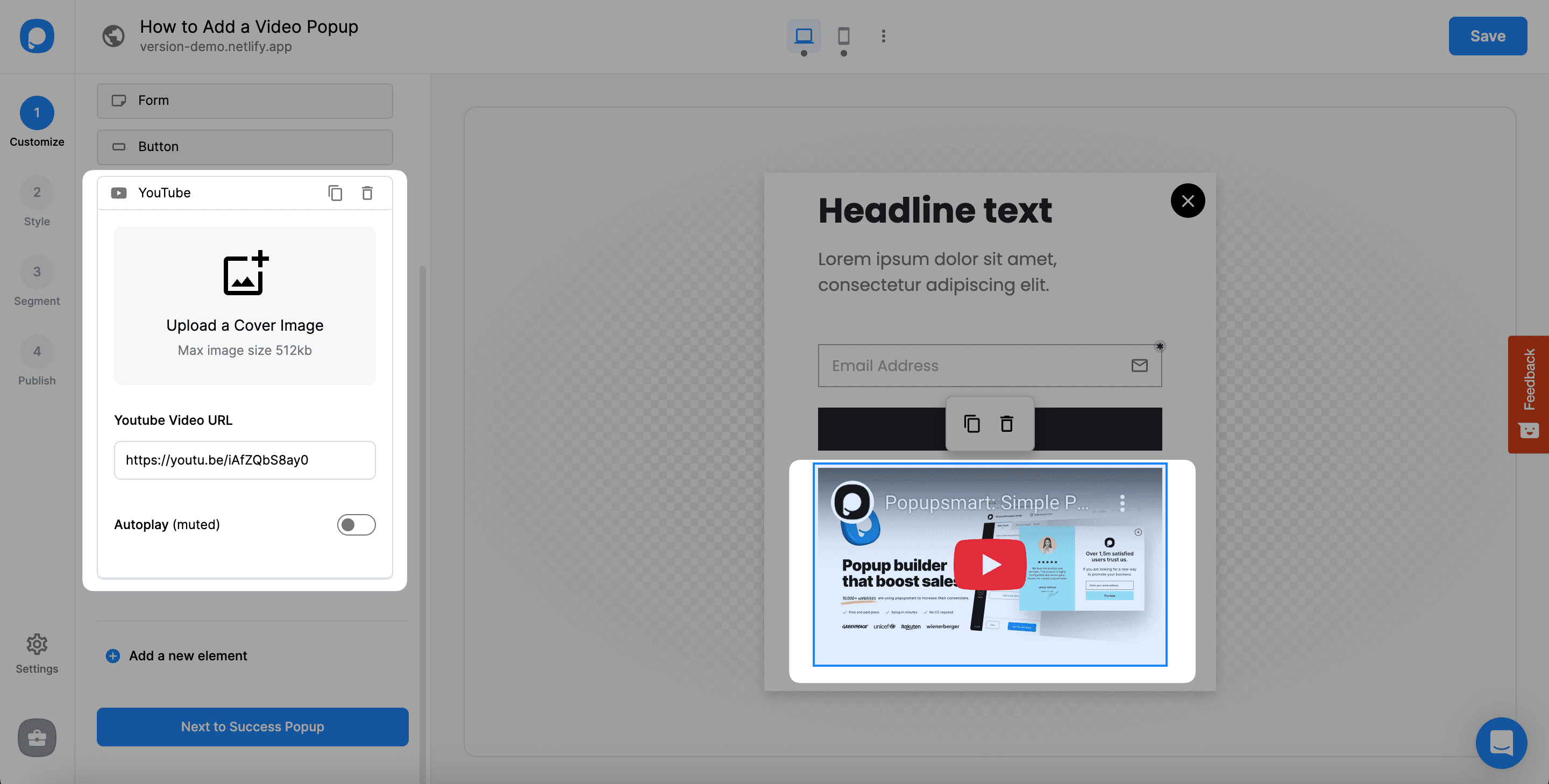
✳️ Important: Popup videos are only compatible with YouTube links.
Also, you can customize your video’s size from the “Style” section.
5. If you want to optimize your popup for mobile devices, you can click on the mobile device icon and enable it.
Then, you can customize it according to your needs and make your video popup mobile-friendly. Save & Publish your popup when you are ready.
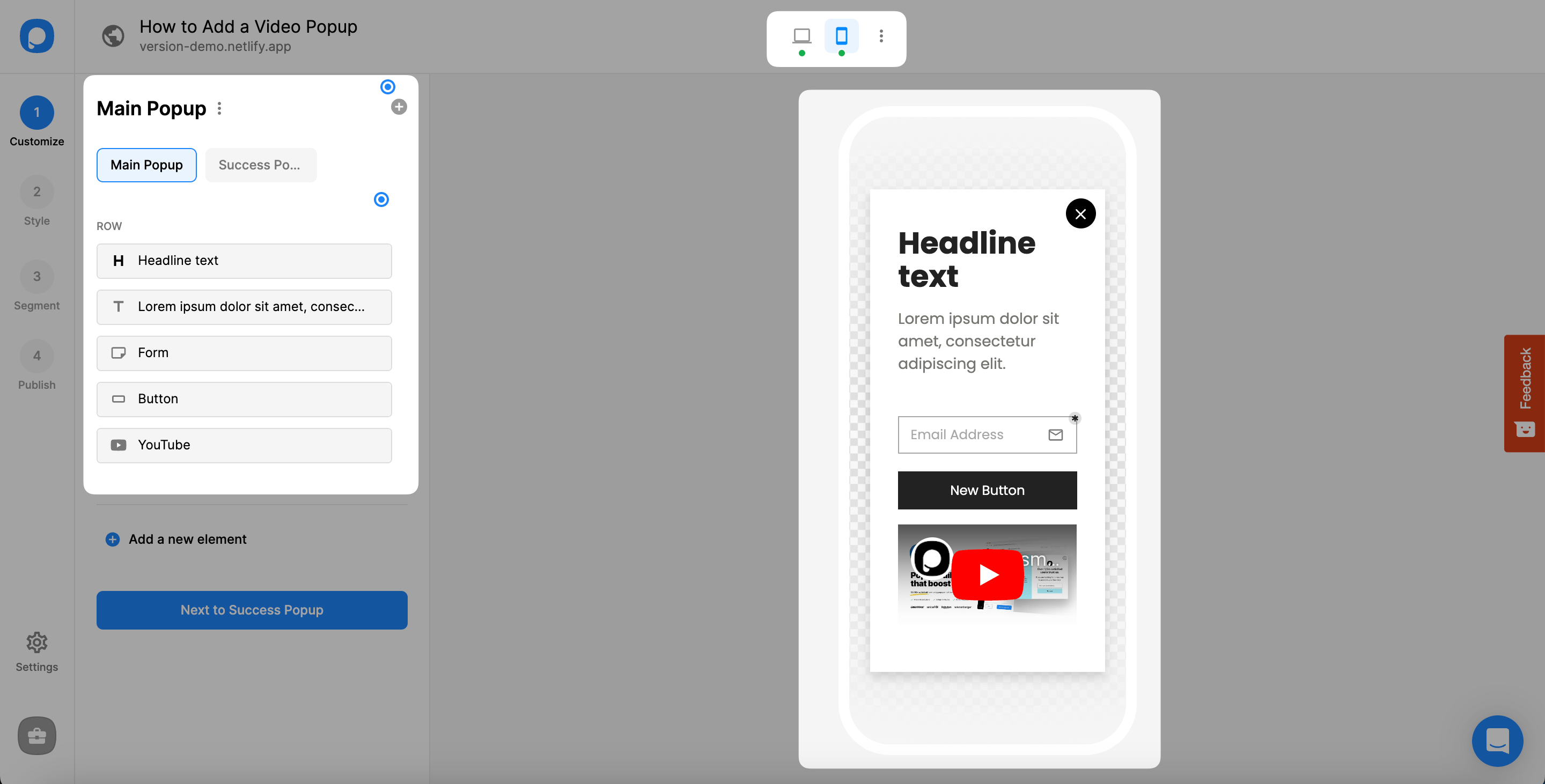
• You can see whether your popup is activated for mobile or not from the middle of your editor screen. Click the desktop or mobile icons to preview each.
• Note that every change you make for the mobile applies to the desktop simultaneously.
You'll know it's working when: Visit your website in an incognito window (to avoid cached sessions), wait for your targeting conditions to trigger, and your popup video should appear.
Watch out for:
- Autoplay: the autoplay option plays the video muted, and some mobile browsers handle autoplay differently.
- Mobile layout: a player sized for desktop can crowd a phone screen, so check the mobile preview.
- Video source: the element takes YouTube links only.
Pro tip: After publishing, I always test on both desktop and mobile within the first 10 minutes. Mobile popup behavior can differ — screen size affects the layout, and some mobile browsers handle autoplay differently. A quick check saves you from annoying your mobile visitors for days before you notice.
Best Tools for Popup Video Implementation
Popupsmart isn't the only option for adding popup videos to your site. Here's a comparison of popup tools in 2026, with prices checked on each vendor's site on 2026-09-26.
| Tool | No-Code Builder | Starting Price | Best For |
|---|---|---|---|
| Popupsmart | Yes | Free (paid from $39/mo) | B2B SaaS sites, WordPress, Shopify |
| Wisepops | Yes | $599/mo (up to 1M pageviews) | E-commerce stores with high traffic |
| OptinMonster | Yes | $210/year (Basic, billed annually; first-year discount offered) | WordPress-heavy sites |
| Elfsight | Yes | Free (paid from $5/mo, billed yearly) | Quick widget-based embedding |
Popupsmart's video element takes YouTube links; check each vendor's documentation for the video sources it accepts.
Full disclosure: I'm the founder of Popupsmart, so I'm biased. But here's my honest assessment: if you need a simple video popup and nothing else, Elfsight will do the job cheaper. If you need targeting rules, A/B testing, exit intent triggers, and analytics alongside your video popups, Popupsmart or Wisepops give you the full toolkit.
For a broader look at popup tools across all use cases, read our guide on the best popup software available in 2026.
Common Mistakes to Avoid with Popup Videos
These are the mistakes I see most often in video popup campaigns.
Mistake 1: Autoplay with Sound
This is the fastest way to make someone leave your site. Modern browsers actually block autoplaying audio in most contexts, so your visitor either hears nothing (confusing) or gets hit with unexpected sound (annoying). If you want autoplay, keep it muted and add captions to your video. Better yet, let visitors click play themselves.
Mistake 2: No Close Button or Hard-to-Find Close Button
Visitors decide fast: in Popupsmart's 2026 data, 71% of visitors who close a popup do so within 5 seconds of it appearing. If they can't find the close button, you've lost them. Make the close button visible, place it in the top-right corner where people expect it, and make the hit target large enough for mobile fingers. Some designers hide the close button to force video views. That approach backfires every time — visitors just leave the entire site.
Mistake 3: Showing Long Videos
A popup is an interruption, even a welcome one. Don't play a 10-minute webinar recording in a popup window. Keep popup videos under 90 seconds. If you have longer content, use the popup as a teaser and link to the full video on a dedicated page.
Mistake 4: Triggering Too Aggressively
Showing a popup video the instant someone lands on your page tells them you care more about your message than their experience. In Popupsmart's 2026 benchmark, popups that wait before appearing convert 0.83% of their displays against 0.61% for popups shown the instant the page loads (median campaign), a lean rather than a proven gap, and the length of the wait made no measurable difference, so any short delay or a scroll trigger will do; our guide to popup timing has the details. And always cap the frequency: conversion falls from the third time a visitor sees the same popup in a week.
Mistake 5: Using the Same Popup on Every Page
Your pricing page visitors and your blog readers have different intents. A product demo video makes sense on your pricing page. A customer testimonial video fits better on your case studies page. Match the video content to the page context. This is where targeting rules earn their keep.
For more guidance on effective call to action examples, check out what's working for other brands right now.
Measuring Success and Optimizing Popup Videos
Publishing a popup video is the starting point, not the finish line. Here's how to track performance and improve results over time.
Key Metrics to Track
Benchmark against numbers that use the same definition. In Popupsmart's 2026 benchmark, the median popup that asks for an email or phone number converts 0.83% of its displays into leads, the top 25% reach 1.96% and the top 10% reach 3.87% (3,034 popups, January 2024 to September 2026). The median popup records a click on 2.25% of its displays, and the top 10% reach 11.67% (10,768 campaigns). Use the click figures for a video popup whose job is a click-through, and the lead figures if it carries a form.
| Metric | What It Tells You | Benchmark or target |
|---|---|---|
| View rate | % of visitors who see the popup | Depends on your targeting; compare pages, not sites |
| Play rate | % of viewers who click play | Set your own baseline in the first two weeks; YouTube Analytics counts plays in embedded players |
| Completion rate | % who watch the full video | Check YouTube's audience retention report and keep the video short |
| Conversion rate | % of displays that lead to the desired action | Lead popups: median 0.83%, top 10% 3.87% (Popupsmart 2026) |
| Close rate | % who dismiss the popup | 40.5% of all popup displays end with a close (Popupsmart 2026, all displays pooled) |
How to Optimize Your Popup Videos
A/B test your trigger. Test the trigger type rather than the delay length: in our benchmark, the length of the delay made no measurable difference, so compare a timed popup with a click-triggered or scroll-triggered one. In my experience, the right trigger depends on page type — blog posts need more patience than landing pages.
Test different video content. Swap a product demo for a customer testimonial and compare conversion rates. A pricing page is a good place to start, because the visitor's open question there is often about trust, and a testimonial speaks to it.
Experiment with popup placement. A lightbox centered on the screen works for most cases, but a sidebar popup that plays while the visitor keeps reading can generate higher completion rates on blog content.
Monitor mobile vs. desktop separately. Mobile visitors interact with popups differently: in Popupsmart's 2026 benchmark, 63% of popup displays happen on mobile, and the median popup converts 1.02% of its mobile displays against 0.57% on desktop. Screen size affects video visibility, and touch targets need to be larger. Check your analytics for each device type independently.
Review your popup performance weekly for the first month, then monthly after that. Look for trends rather than daily fluctuations. A single day's data isn't enough to draw conclusions.
Frequently Asked Questions
What is a popup video on a website?
A popup video is a video that plays inside a modal window or lightbox overlay on a website. Unlike inline video embeds that sit permanently on the page, popup videos appear when triggered by a visitor action like clicking a button, scrolling to a certain point, spending a set amount of time on the page, or attempting to leave the site. The video plays in a focused overlay, and when the visitor closes it, they return to the page exactly where they left off. Popup videos are commonly used for product demos, customer testimonials, and explainer content.
How do you create a popup video for a website?
The fastest way is to use a no-code popup builder like Popupsmart. Upload your video to YouTube, add a YouTube element to your popup, and paste the video URL into it. Configure your targeting rules (when and where the popup appears), install Popupsmart's code on your site once, before the closing body tag, and publish the campaign. No coding knowledge is needed, and WordPress, Shopify, Webflow, and custom HTML sites all support this method.
Are popup videos safe to click?
Popup videos from legitimate marketing tools like Popupsmart, Wisepops, or OptinMonster are safe. They're hosted on trusted video platforms such as YouTube and served through encrypted connections. However, random popup videos that appear on unfamiliar sites, especially those asking you to download software or enter personal information, can be risky. As a website owner, make sure your popup tool uses HTTPS and that the video source is a trusted platform. As a visitor, look for the familiar YouTube player interface as a trust signal.
How much does it cost to add a popup video to your website?
It ranges from free to hundreds of dollars a month depending on the tool and your traffic volume. Popupsmart has a free plan with one live campaign and 5K pageviews a month; paid plans start at $39 a month for more pageviews and campaigns. Elfsight's popup widget also has a free tier, with paid plans from $5 a month billed yearly. You don't need a developer, so there's no additional cost for implementation beyond the tool subscription.
What are the benefits of using popup videos in marketing?
Popup videos increase engagement by putting video content in a focused, distraction-free overlay. They help conversions because video builds trust and explains products better than text alone. They give visitors a reason to stay on the page. And they're practical: you don't need to redesign your page layout to add one, because the video sits in the popup, not in your page. For B2B SaaS sites specifically, popup videos work well for product demos on pricing pages and customer testimonials on landing pages.
What Results to Expect
If you follow the steps in this guide, here's a realistic timeline for what happens after you publish your first popup video:
Week 1: You'll collect baseline data on view rates, play rates, and close rates. Don't make changes yet — let the data accumulate.
Weeks 2-3: Start A/B testing timing and video content. You'll begin seeing which combinations work for your specific audience.
Month 2: With optimized targeting, compare your video popup with the benchmark rather than with a promise. In Popupsmart's 2026 benchmark, the median lead-collecting popup converts 0.83% of its displays and the top 10% reach 3.87%, and page type moves the number: popups on cart and checkout pages convert 4.57%, on the home page 1.07% and on blog pages 0.23% (median campaign). Expect your bottom-of-funnel pages to sit well above your blog.
Month 3 and beyond: You'll have enough data to roll out video popups across additional pages. The compound effect of running video popups on your top 5-10 pages can measurably move your overall site conversion rate.
I'll be direct: results vary. A SaaS company with a polished 60-second product demo will see better numbers than a blog running a generic brand video. The quality of your video content, the relevance of your targeting, and the clarity of your call to action all matter more than the popup tool you choose.

Start Building Your First Popup Video
Adding a popup video to your website doesn't require a developer, a budget, or a week of your time. Pick your best-performing video, set up a campaign in Popupsmart, configure your targeting rules, and go live.
If you're not sure which video to start with, go with a short product demo or a customer testimonial. These two formats answer the questions visitors most often have: what the product does, and whether it works for people like them.
Have questions about setting up your first popup video? Contact our team and we'll help you set it up.
What changed in this post
The post attributed a 4.82% "average popup conversion rate" to Popupsmart; that figure is Wisepops', and it now reads Popupsmart's 2026 benchmark (median 0.83% of displays for lead-collecting popups, top 10% 3.87%). Claims about Popupsmart campaigns that have no source on record were removed: a 2-3x play-rate advantage, a client's 35% lift, expected conversion rates of 4-12%, and the target values in the metrics table. Prices were re-checked on each vendor's site: Popupsmart's paid plans start at $39, not $29; Wisepops starts at $599 a month, not $49; OptinMonster's Basic plan is $210 a year; Slickbox's site no longer responds and was dropped. Popupsmart's video element takes YouTube links only, so the Vimeo mentions were corrected. Three tables that had lost their formatting were rebuilt, missing lists were restored, the steps were renumbered, and an FAQPage schema was added for the five questions.
Initial publication.