 ChatGPT
 Perplexity
 Claude
 Grok
Grok Google AI Mode
Ecommerce product recommendation is the practice of surfacing relevant products to a shopper based on browsing behavior, purchase history, and contextual signals. Done well, it lifts average order value, conversion rate, and retention at once. The 7 tips below pair each tactic with a real brand example, the data behind it, and the implementation steps you can ship this week.
Quick overview of the 7 tips:
1. Segment Your Audience, Amazon: Split visitors by intent and behavior, then serve different shelves to each segment. The single highest-impact tip on the list.
2. Use Reviews as Recommendations, Olipop: Let social proof do the recommending. Bump trust and conversion with a dedicated review surface.
3. Use Visuals and Clear CTAs, Velasca: Recommendations fail without good photography and a single, obvious next step. Design pays here.
4. Use Contextual Recommendations, Valori Jewels: Match what's on screen to what the shopper is doing, whether viewing, comparing, or checking out.
5. Highlight Best Sellers and Trending Items, Rare Beauty: Social proof at scale. The fastest way to help indecisive shoppers commit.
6. Personalize Email Recommendations, Etsy: Moves recommendations off-site to a channel where attention is higher and inventory is wider.
7. Enhance Post-Purchase Experience, Nespresso: Turn a one-time buyer into a repeat customer with the very next email and the very next visit.
What is product recommendation in ecommerce?
Ecommerce product recommendation is a system that suggests products to a shopper using signals like clicks, dwell time, past purchases, cart contents, demographics, and session context. Some engines run on simple rules ("if viewed A, show B"); modern ones run on collaborative filtering, content-based filtering, or hybrid machine learning that updates in real time.
The format is familiar: "Customers also bought," "You might also like," "Recommended for you," "Complete the look." Behind the scenes, the engine is doing pattern-matching at scale. The bigger the catalog, the more lift it produces, because shoppers can't browse 50,000 SKUs by hand.
According to WiseGuy Reports, the product recommendation engine market for ecommerce was valued at $3.75 billion in 2024 and is projected to grow to roughly $15 billion by 2035 at a 13.4% CAGR. That growth is mostly Shopify, BigCommerce, and headless stores layering AI on top of what used to be a manual merchandising job. For more on how this fits into broader site economics, our ecommerce optimization guide covers AOV, retention, and conversion levers side by side.
Why are product recommendations effective in 2026?
Recommendations work because they remove friction from the decision a shopper was already going to make. They're not pushing products onto people. They're answering the question "what else should I look at?" with data instead of guesswork.
The financial case is direct. According to Clerk.io's analysis of Salesforce Shopping Index data, the roughly 7% of shoppers who click a recommendation generate 26% of total revenue and 24% of orders. A tiny fraction of engaged visitors drives a disproportionate slice of the business, and the lever to engage them is one widget.
Here's what changes when recommendations are working:
• Personalized experience: Shoppers feel like the store knows them, without filling out a single quiz. Tailoring matters; our roundup of ecommerce personalization examples shows the format options.
• Higher AOV: Complementary suggestions ("frequently bought together") add items the shopper didn't plan for but happily accepts.
• Faster conversion: Shorter discovery loops mean fewer abandoned sessions on category pages.
• Repeat visits: A returning shopper who sees a fresh, relevant shelf is far more likely to come back next week.
• Inventory insight: Click and conversion data on recommended SKUs tells merchandisers what to push, what to discount, and what to drop.
• Competitive edge: Stores still running "Featured Products" hand-curated lists are losing to anyone with a half-decent engine.
The behavioral angle is just as strong. Bloomreach reports that 56% of customers are more likely to return to sites that offer recommendations, while 74% feel actively frustrated by non-personalized content. That second number is the one to internalize. Generic storefronts now cost goodwill, not just conversions.
How do ecommerce product recommendation engines work?
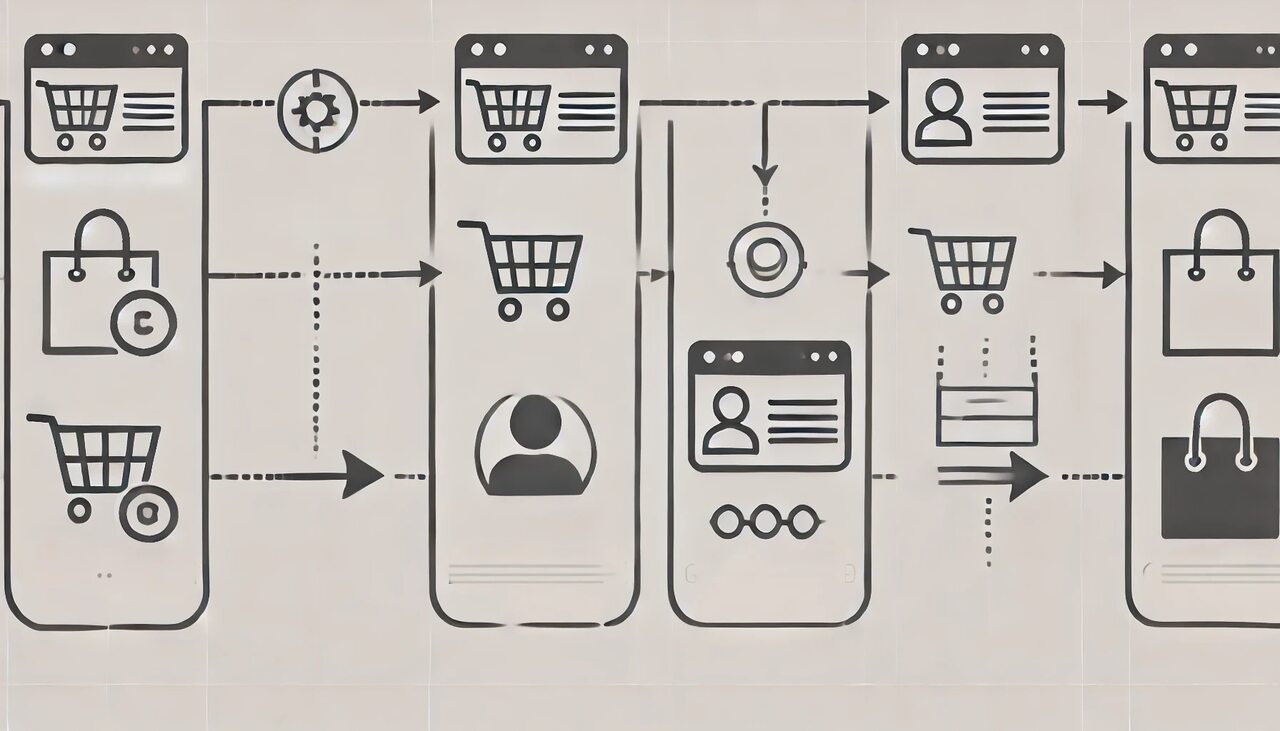
A recommendation engine is a pipeline, not a single algorithm. It collects shopper signals, processes them through one or more models, ranks candidate products, and surfaces the top results in a specific widget on a specific page. Here's the flow most modern engines follow.
1. Data collection: The engine ingests every meaningful interaction (page views, search queries, clicks, time on page, scroll depth, add-to-cart events, purchases, returns, and email opens). It also captures contextual data: device, geography, time of day, referral channel, and session length. The richer the signal layer, the better the output.
2. Data processing and modeling: Three model families do most of the work.
• Collaborative filtering: "Shoppers like you also bought X." The engine finds users with overlapping purchase histories and uses their behavior to predict yours.
• Content-based filtering: "Because you viewed X, here are similar items." The engine compares product attributes (category, color, price band, brand) to surface look-alikes.
• Hybrid models: The combination that powers most production systems in 2026. Hybrid engines weight collaborative and content signals together and adjust the blend based on data sparsity (new shoppers get more content-based suggestions; veterans get more collaborative).
3. Generating recommendations: Once the model has ranked candidate products, the engine renders them in the right surface: homepage hero, product page rail, cart drawer, post-purchase page, or email module. The placement decision is as important as the model itself, which is why product page optimization and recommendation strategy belong in the same conversation.
Tooling has gotten radically more accessible. Shopify, BigCommerce, and headless stacks all expose recommendation APIs, and there's a growing list of AI tools for ecommerce that bolt on with a script tag. The hard part isn't standing up an engine anymore; it's choosing what to show, where, and to whom.
The 8 common types of product recommendation in ecommerce
Most stores end up using four or five of these in rotation. Knowing all eight gives you the menu to pick from when planning each surface.
• Personalized recommendations: One-to-one suggestions built from the shopper's own history (browsing, purchases, wishlists). Highest ceiling, highest data requirement.
• Frequently bought together: Items that pair with the product on screen. Pure cross-sell, the cleanest AOV play in the catalog.
• Related products: Similar SKUs by category, brand, or attribute. Lower lift than "frequently bought together" but easier to populate.
• Top sellers: The store's bestsellers, ranked by units or revenue. Social-proof shortcut; works for new visitors with no behavioral data.
• New arrivals: Fresh inventory, surfaced to returning shoppers who already know your catalog.
• Customer reviews based: Items with the strongest review scores, surfaced as "Top-rated by shoppers." Pairs trust with discovery.
• Trending products: What's moving right now (last 24 hours, last 7 days). Creates urgency without manual merchandising.
• Seasonal recommendations: SKUs aligned with the calendar (holiday gifts, back-to-school, summer drops). Rules-based and easy to schedule.
If you're early in your recommendation journey, start with "Frequently bought together" on product pages and "Top sellers" on the homepage. Those two together cover ~70% of the gain a small store will get in the first 90 days.
7 ecommerce product recommendation tips for 2026 (with examples)
Each tip below pairs a tactic with a real brand example, the data behind why it works, and the implementation steps to ship it. Tips are ordered roughly from highest-impact to most data-dependent.
1. Segment Your Audience — Amazon
What it is: Audience segmentation splits visitors into groups based on intent, behavior, demographics, or lifecycle stage, then serves a different recommendation shelf to each group. A first-time visitor sees bestsellers; a returning shopper sees personalized picks; a cart-abandoner sees the items they almost bought. It's the difference between one storefront for everyone and a storefront that quietly reshapes itself per visitor.
How to implement:
1. Define 4-6 segments to start: First-time visitor, returning visitor, cart abandoner, recent purchaser, high-AOV shopper, and email subscriber. Don't over-segment on day one, or you'll dilute the data.
2. Set the trigger logic in your recommendation engine: Most platforms (Shopify, Klaviyo, BigCommerce) let you target shelves by audience attributes like cookie state, session count, last-purchase date, and average cart value.
3. Build a distinct shelf for each segment: First-time visitors get "Top Sellers." Returning visitors get "Picked for You." Cart abandoners get a homepage banner with their abandoned items plus three look-alikes.
4. Layer in contextual signals: Time of day, weather, geography. A morning visitor in cold climates sees winter coats; an evening visitor in warm climates sees beachwear. Tools that handle geo-targeted popups use the same logic for promotions.
5. Measure per-segment conversion, not site-wide: The point of segmentation is to see each cohort move independently. Site-wide averages mask the wins and losses.
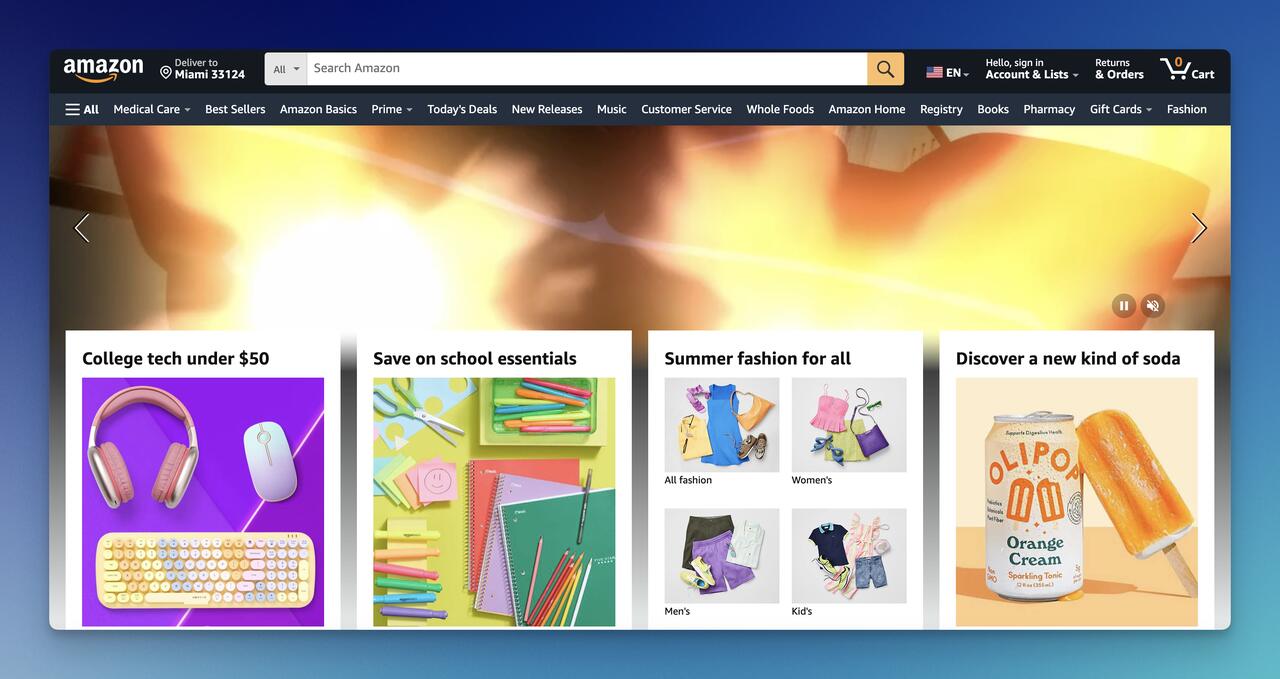
Amazon is the canonical case. The homepage you see is not the homepage your neighbor sees. Every shelf, every banner, every header tab is recomposed for the logged-in shopper. According to Lasting Dynamics, Amazon attributes approximately 35% of its revenue to its recommendation system. That number is the ceiling no one else has matched, but the principle scales down. A Shopify store with 5,000 SKUs and four segments will outperform the same store with one generic shelf, every single time.
Expect 8-15% lift in click-through on recommendation shelves within 30 days of launching basic segmentation. Statistical significance arrives faster on higher-traffic stores; expect 60-90 days for stores under 50K monthly sessions.
2. Use Reviews as Recommendations — Olipop
What it is: Review-driven recommendations surface products by their review score, review count, or review recency, turning customer voice into the merchandising signal. A "Most Loved" shelf or a dedicated reviews page is a recommendation engine wearing a different hat. Shoppers trust other shoppers far more than they trust the store, so review-based shelves convert harder than pure algorithmic picks for first-time visitors.
How to implement:
1. Centralize reviews on a dedicated page: A "/reviews" or "/customer-stories" page that aggregates ratings across the catalog. Olipop does this beautifully: one page, hundreds of star-rated quotes.
2. Surface review counts on product cards: "★4.8 (2,341 reviews)" on every product tile in your recommendation shelves. The count matters as much as the rating.
3. Filter the homepage shelf by review threshold: Show only products with 50+ reviews and a 4.5+ rating in the "Top-Rated" shelf. Hide one-star outliers from algorithmic shelves entirely.
4. Use video and photo reviews: User-generated content has 3-5x the trust signal of plain text. Pull UGC into the recommendation widget where the platform allows.
5. Send a post-purchase review request 7 days after delivery: This is how you build the review volume the shelves depend on.
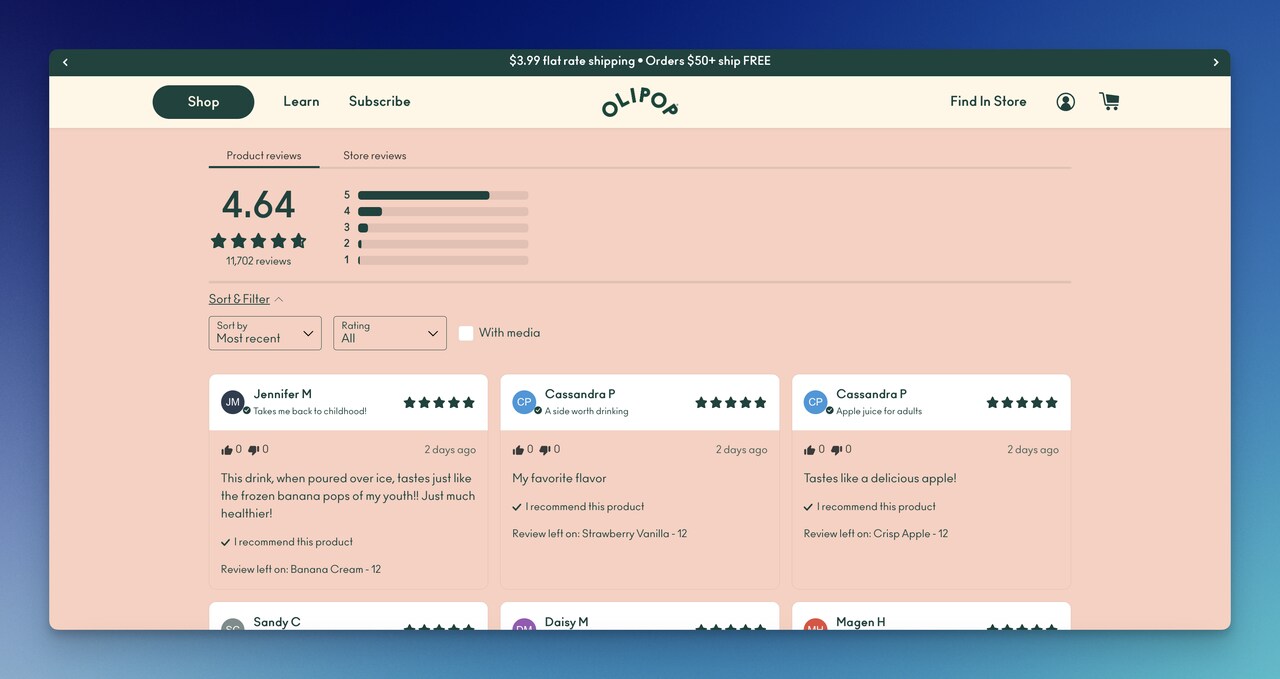
Olipop's reviews page is the entire merchandising strategy in one URL. Customers land on it from Instagram, from Google, from email, and every review is a sales pitch attached to a specific SKU. According to Emarsys research on personalization, 69% of consumers say they're satisfied with the personal product recommendations they receive, and the leading driver of that satisfaction is recommendations that feel earned by other shoppers, not pushed by the brand.
Stores adding a structured review-driven shelf typically see 5-12% conversion lift on the surface where the shelf lives. Reviews compound: the more you have, the more they sell.
3. Use Visuals and Clear CTAs — Velasca
What it is: A recommendation shelf with bad photography and vague buttons is dead inventory. This tip is about the design layer that sits on top of the engine: image quality, image consistency, single-action CTAs, and the visual hierarchy that pulls the eye through the shelf. Velasca demonstrates it: a single hero, a single message, one button. No clutter.
How to implement:
1. Standardize product photography: Same background, same lighting, same crop ratio across the catalog. Inconsistent photography destroys the visual scan of any shelf.
2. Use one CTA per shelf, not three: "Shop Now" beats "Shop Now / Add to Cart / View Details." Multiple CTAs split attention.
3. Keep card copy under 12 words: Product name, price, optional badge ("Bestseller," "New"). Anything longer pushes the CTA below the fold on mobile.
4. Reserve 60% of the card for the image: The image sells; the copy confirms. Cards where text dominates underperform image-led cards by a wide margin.
5. Test card width on mobile: 2.2 cards visible (half a card peeking from the right edge) outperforms 2 full cards because the cut-off implies more inventory.
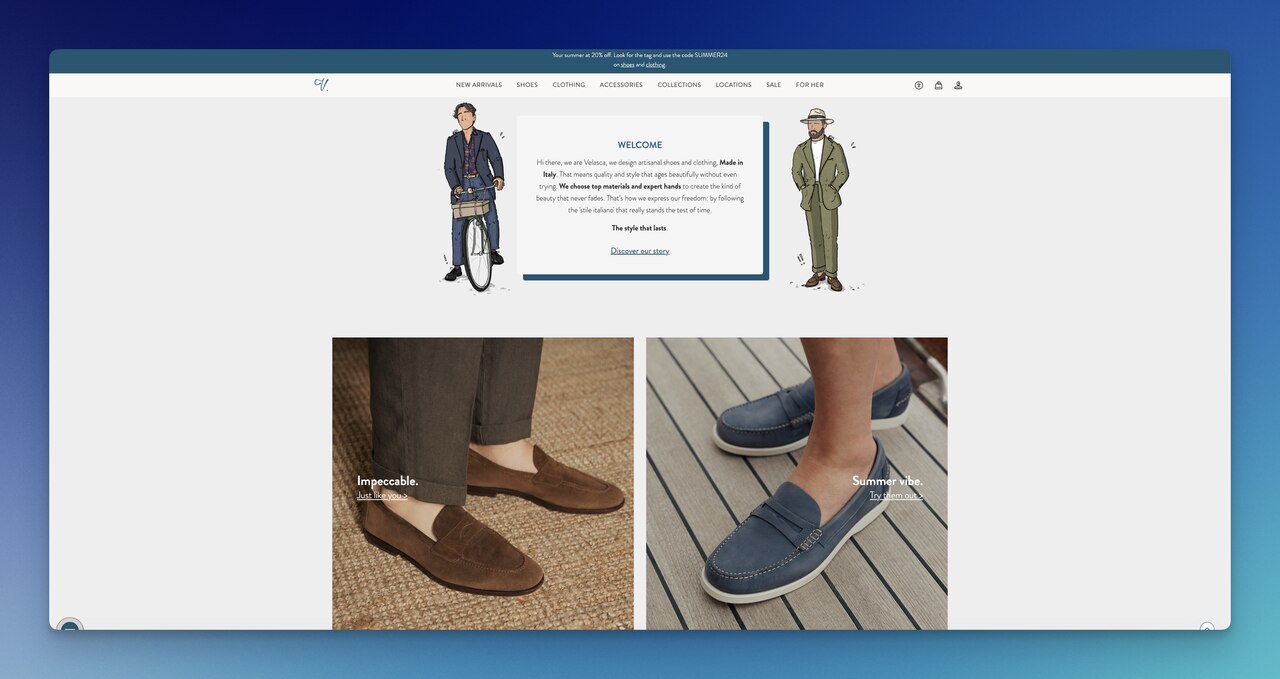
Velasca's homepage is the showcase. The visitor lands on a full-bleed image, a one-line note, and a single CTA. No recommendation algorithm in the world saves a store from cluttered design. The cleanest shelves in our customer base have card-level CTR 2-3x higher than the busiest ones. If your recommendations aren't getting clicks, the engine is rarely the problem; the cards are.
Expect 15-25% lift in click-through on recommendation cards within 14 days of a visual standardization pass, even before touching the underlying model.
4. Use Contextual Recommendations — Valori Jewels
What it is: Contextual recommendations match the suggestion to what the shopper is doing right now, not what they did last week. Browsing a necklace? Show matching earrings. Cart has $80 of jewelry? Show items that push to the $100 free-shipping threshold. Checking out? Show low-cost add-ons. It's recommendation tied to the moment, not the profile.
How to implement:
1. Map five context triggers: Product page view, category page view, cart with sub-threshold value, cart with abandoned-payment state, post-purchase. Each gets a distinct shelf.
2. On product pages, run "Complete the Look": Three to five items that visually or functionally pair with the viewed product. For Valori Jewels, that's matching earrings to necklaces.
3. On cart pages with sub-threshold totals, run "Add $X to unlock free shipping": Surface items priced exactly in the gap. This is the highest-converting cart-level shelf in our data.
4. On checkout, run "Last-minute add": One row, low-ticket items (under $15), single-click add-to-cart. Battery, gift wrap, sample-size companions.
5. After purchase, run "Goes with what you just bought": The bridge to repeat purchase. Tip 7 expands on this.
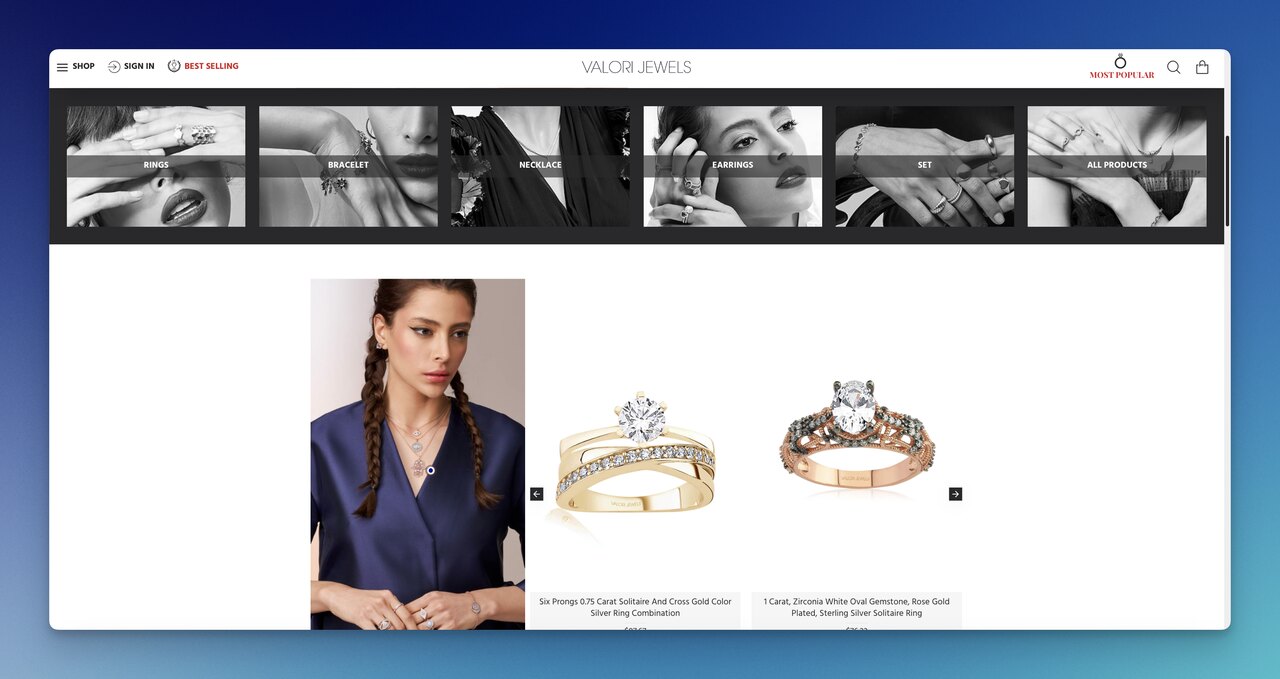
Valori Jewels uses moving cards on the homepage organized by jewelry category, with each card surfacing the price upfront, so a shopper browsing for a $50 piece doesn't waste a click on $500 inventory. That price-visible, context-aware approach is the small touch that compounds. Contextual recommendation shelves consistently outperform static "Recommended For You" shelves by 20-40% on click-through, because they ride the shopper's existing intent instead of trying to redirect it.
5. Highlight Best Sellers and Trending Items — Rare Beauty
What it is: Bestseller and trending shelves are the social-proof shortcut. They're especially powerful for first-time visitors who have no behavioral history for an algorithm to work with, and for indecisive shoppers stuck between similar SKUs. "What everyone else is buying" is a perfectly valid recommendation when personalization data is thin.
How to implement:
1. Build two distinct shelves: "All-Time Bestsellers" (last 12 months of unit sales) and "Trending Now" (last 7 days, weighted toward velocity). They tell different stories.
2. Place the bestseller shelf on the homepage above the fold: First-time visitors hit it before they've given the algorithm any signal. The shelf converts on social proof alone.
3. Tag bestseller cards visually: A "Bestseller" badge in the top-left of the card adds friction-free credibility. Some stores see 8-15% CTR lift from badges alone.
4. Refresh trending weekly: A "Trending" shelf that hasn't updated in three weeks is no longer trending. Automate the refresh; most platforms support it natively.
5. On product pages, run "People also viewed": A cousin of the trending shelf, scoped to the current category. Higher relevance than site-wide trending.
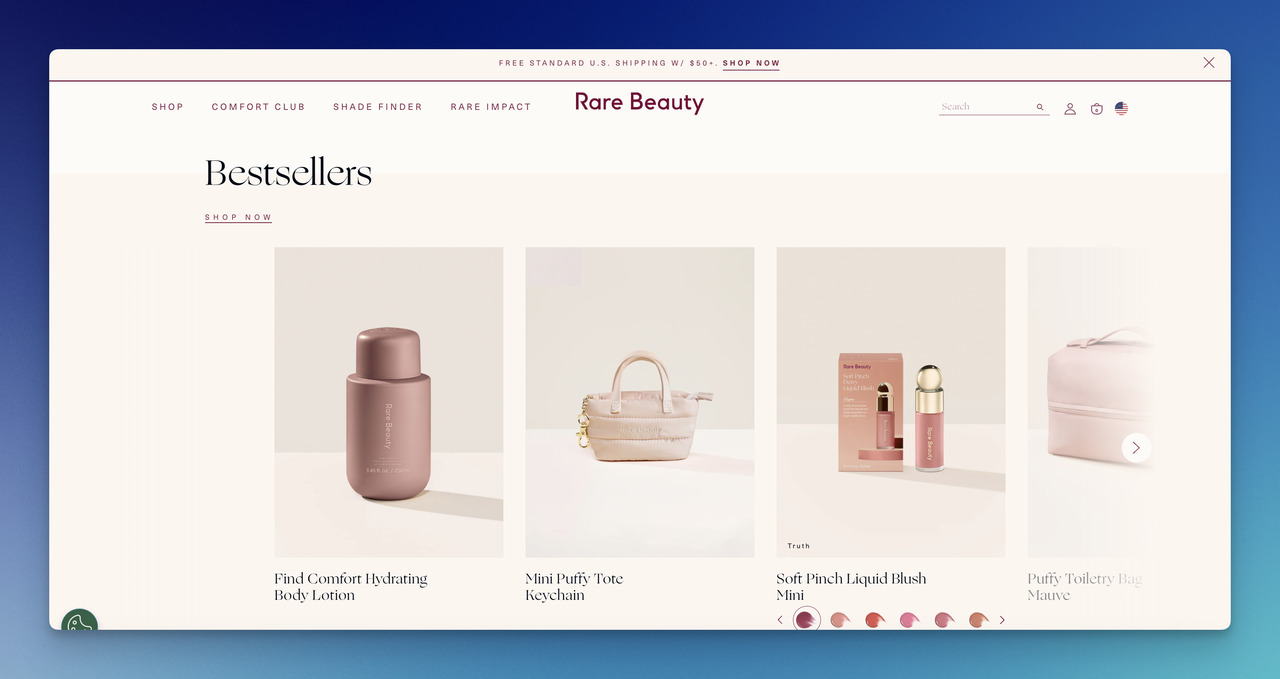
Rare Beauty leans on animated homepage media followed by a Bestsellers shelf with the CTA tucked right under the title, so there are no extra clicks to start shopping. The pattern works because Bestsellers do double duty: they reduce decision fatigue for new shoppers and validate inventory choices for returning ones. Pair the shelf with the popups in our ecommerce popups roundup, and you'll capture intent without interrupting the browse.
Expect 10-20% revenue contribution from the bestseller shelf within the first 60 days, depending on traffic distribution. Higher-traffic homepages see the lift faster.
6. Personalize Email Recommendations — Etsy
What it is: Email is the channel where recommendation engines earn their second life. The same model that powers the homepage can populate "Picks for you" modules in transactional emails, weekly digests, abandoned-cart sequences, and re-engagement flows. Email also has the cleanest attribution: you know exactly who opened, clicked, and bought, and you can iterate on the recommendation logic without touching the site.
How to implement:
1. Add a 3-product "Picks for You" module to every transactional email: Order confirmation, shipping notification, delivery confirmation. Each is a recommendation surface most stores waste.
2. Build a weekly digest segmented by purchase history: Recent buyers get "New in [category you bought]." Lapsed buyers get "We added these since you last visited."
3. Use abandoned-cart emails to recommend alternatives, not just nag: "Still thinking about the [product]? Shoppers like you also looked at these three." Lifts open-to-purchase rate over generic reminders.
4. Sync the email engine with the on-site engine: If a shopper just bought a product, the next email shouldn't recommend it again. Cross-channel deduplication is table-stakes in 2026.
5. Test product count per email: 3 products converts better than 6 in most categories. More choices, more paralysis.
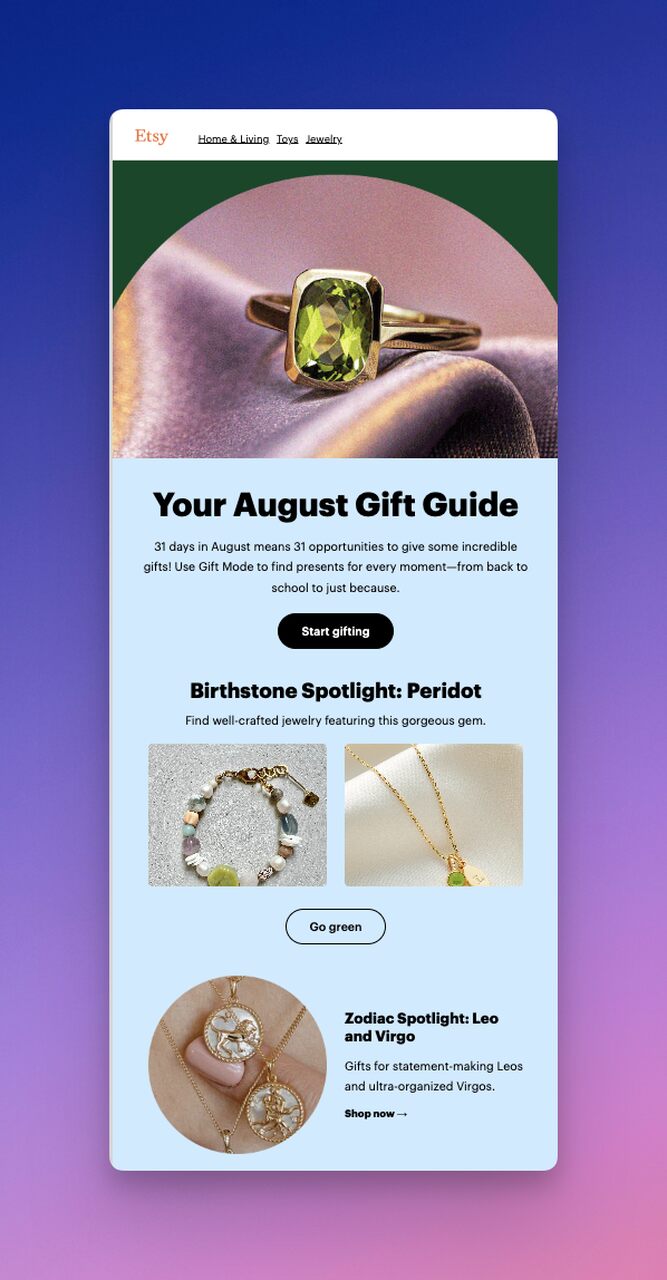
Etsy's monthly "new gift ideas" email is the template: animated header, three to six visually distinct picks, deep links to category pages so the shopper doesn't dead-end on a single SKU. The case for email recommendations is documented: according to a Yespo case study, retailer Antoshka boosted monthly revenue by 20% after adding recommendations to its email program. Email is the highest-ROI surface for recommendations because the audience is already opted-in and the cost-per-send is near-zero.
7. Enhance Post-Purchase Experience — Nespresso
What it is: The post-purchase window (the 30 days after a delivery lands) is when a one-time buyer either becomes a repeat customer or churns silently. Recommendations placed in post-purchase emails, account pages, and reorder flows are the bridge. They turn the "thanks for your order" page into a second sales surface and the order-confirmation email into a discovery moment.
How to implement:
1. Build a "Goes with what you bought" module on the order-confirmation page: Three products that pair with the just-bought SKU. Nespresso uses this exact pattern: after a pod order, the page surfaces cups, machines, and accessories.
2. Send a "How's it going?" email 7-14 days after delivery: Embed a 3-product shelf of complementary items and a review request. Double-duty.
3. Add a "Reorder" shelf to the account dashboard: The shopper's most-bought items, one-click reorder. For consumables (coffee, supplements, beauty), this is the single highest-LTV feature you can ship.
4. Time a replenishment email to estimated depletion: If the average customer reorders coffee pods every 28 days, send a recommendation email on day 24. Don't wait for them to remember.
5. Use the unboxing moment: Insert a QR code on the packing slip linking to a personalized "Next time, try…" landing page. Physical-to-digital recommendation works disproportionately well for premium brands.
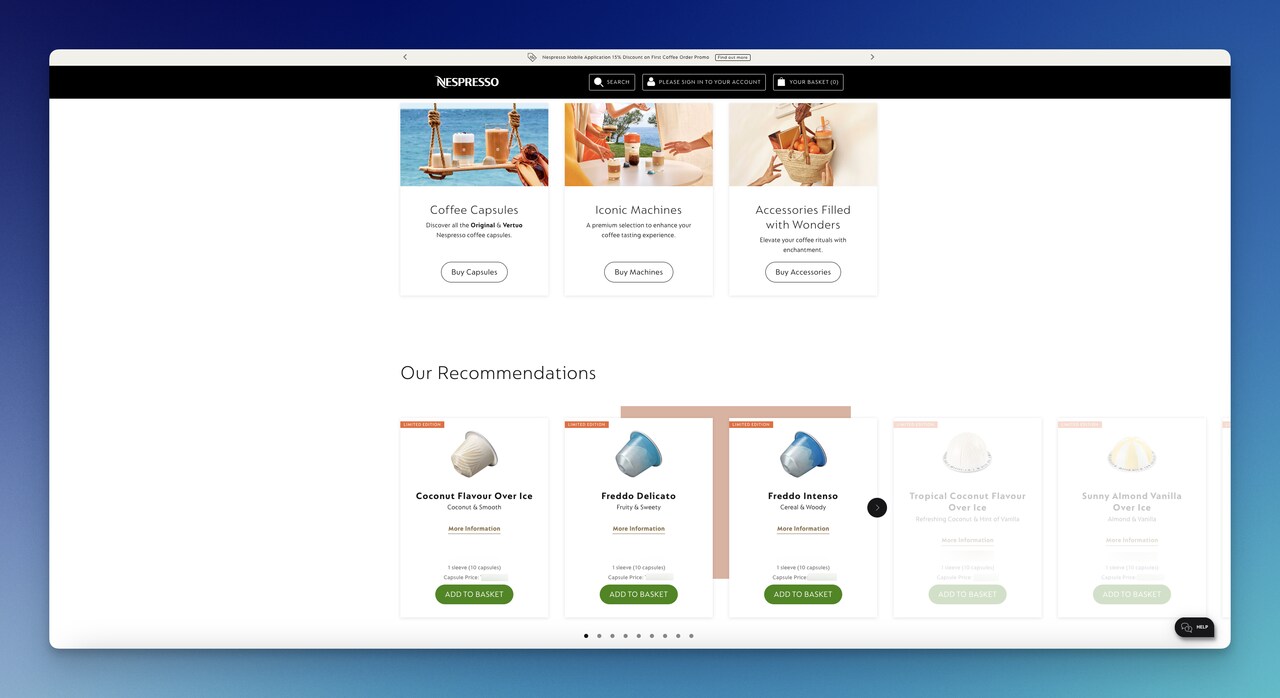
Nespresso's "Our Recommendations" section reads like a catalog the customer chose themselves: coffee they've sampled, machines that match their setup, accessories sized to their orders. It's not selling. It's resupplying. Stores that add structured post-purchase recommendation flows typically see repeat-purchase rate climb 12-25% within a quarter, with the biggest gains in consumable categories.
Common challenges and solutions in product recommendations
Recommendation systems fail in predictable ways. The four challenges below cover ~80% of what slows stores down, and each has a solution that doesn't require rebuilding the engine.
Challenge 1: Irrelevant suggestions. Shoppers see a swimsuit recommendation while buying a winter coat. According to Zoovu's ecommerce search report, one in every three products on a search results page is irrelevant, and the same gap shows up in recommendation widgets. The fix is honest data hygiene: clean product tags, accurate category trees, and recency-weighting in the model so last-week's browse doesn't dominate this-week's recommendations.
Challenge 2: Cold-start problem. First-time visitors have no history, so the personalized engine has nothing to personalize. The fix is to default cold sessions to social-proof shelves (Top Sellers, Trending, Most Loved) and switch to personalized shelves after 3-5 meaningful interactions in the session.
Challenge 3: No guided discovery. Shoppers land on the homepage and don't know where to start. Zoovu found that 85% of ecommerce search results pages lack any guided discovery element. Recommendation engines fill that gap when they're placed early in the journey: a "Help me choose" surface above the bestseller shelf, with simple filters (price, occasion, category) that route shoppers into focused recommendations.
Challenge 4: Recommendation fatigue. Returning shoppers see the same shelf, week after week. The fix is recency-weighting and rotation: don't repeat a SKU in a shelf within 14 days, and freshen the model's training data weekly. Stale recommendations train shoppers to ignore them.
Measuring success of your recommendation strategy
If you can't measure it, you can't justify it. The metrics that matter for ecommerce product recommendation aren't the same as the metrics for paid traffic or SEO. The engine has its own scorecard.
Track these per surface (homepage, product page, cart, checkout, email), not site-wide:
• Recommendation CTR: Clicks on the shelf divided by impressions. Healthy ranges are 3-7% on homepage, 8-15% on product pages, 12-25% on cart.
• Recommendation revenue per session: Revenue attributable to shoppers who clicked any recommendation, divided by sessions. The single cleanest "is it working?" metric.
• AOV lift among recommendation clickers vs. non-clickers: If clickers spend less than non-clickers, the engine is steering people toward cheaper SKUs. Bad sign.
• Repeat purchase rate lift: Compare repeat rate for shoppers who saw a post-purchase recommendation vs. those who didn't. This is where Tip 7 pays off.
• Surface-level conversion rate: The conversion rate of sessions that included a recommendation impression, by surface.
The ROI case can be dramatic. Yespo documented a 1,734% ROI increase for the Pampik online store after deploying personalized recommendations across the site and email channel. That's an outlier number, but it speaks to how cheaply the lever can scale once it's running.
Set a baseline before you launch each shelf (14 days of pre-launch data) so you can prove the lift. Stores that skip the baseline can't tell whether the engine is working or the seasonality is.
Future trends in ecommerce recommendations for 2026 and beyond
Three shifts are already underway that change how recommendation strategy will work over the next 18 months.
Real-time personalization at scale. The lag between behavior and recommendation is collapsing from minutes to milliseconds. Modern engines update the shelf between clicks. Click a black sweater, the next shelf rebuilds before the page renders. The implication: stores still running batch-trained models on yesterday's data are now visibly behind. Real-time inference is the new floor.
Generative AI product descriptions paired with recommendations. The same engine that picks the product can now write a one-line "why this" caption tailored to the shopper. "We picked this because you've been browsing fall jackets." The captions lift CTR roughly 15-25% in early production data, because they collapse the cognitive gap between "here's a product" and "here's why you'd want it."
Conversational discovery. Chat-first interfaces, sitting alongside the catalog rather than replacing it, are absorbing the "help me choose" use case. A shopper asks "what's a good gift for a coffee lover under $80" and gets a curated three-product shelf instead of a search results page. The interface is new; the engine underneath is the same one powering your homepage today.
The throughline for 2026: recommendation engines stop being a widget and become the substrate of the shopping experience. Stores that treat recommendations as a feature lose ground to stores that treat them as the architecture.
How to recommend products in ecommerce with popups
Popups give you a recommendation surface that doesn't depend on a recommendation engine. That's useful for stores still on basic Shopify themes, and powerful even for stores running full engines. The pattern: trigger a popup at a meaningful moment (intent to exit, cart threshold, scroll depth), and use it to recommend one specific product or category. Three popup formats that consistently work:
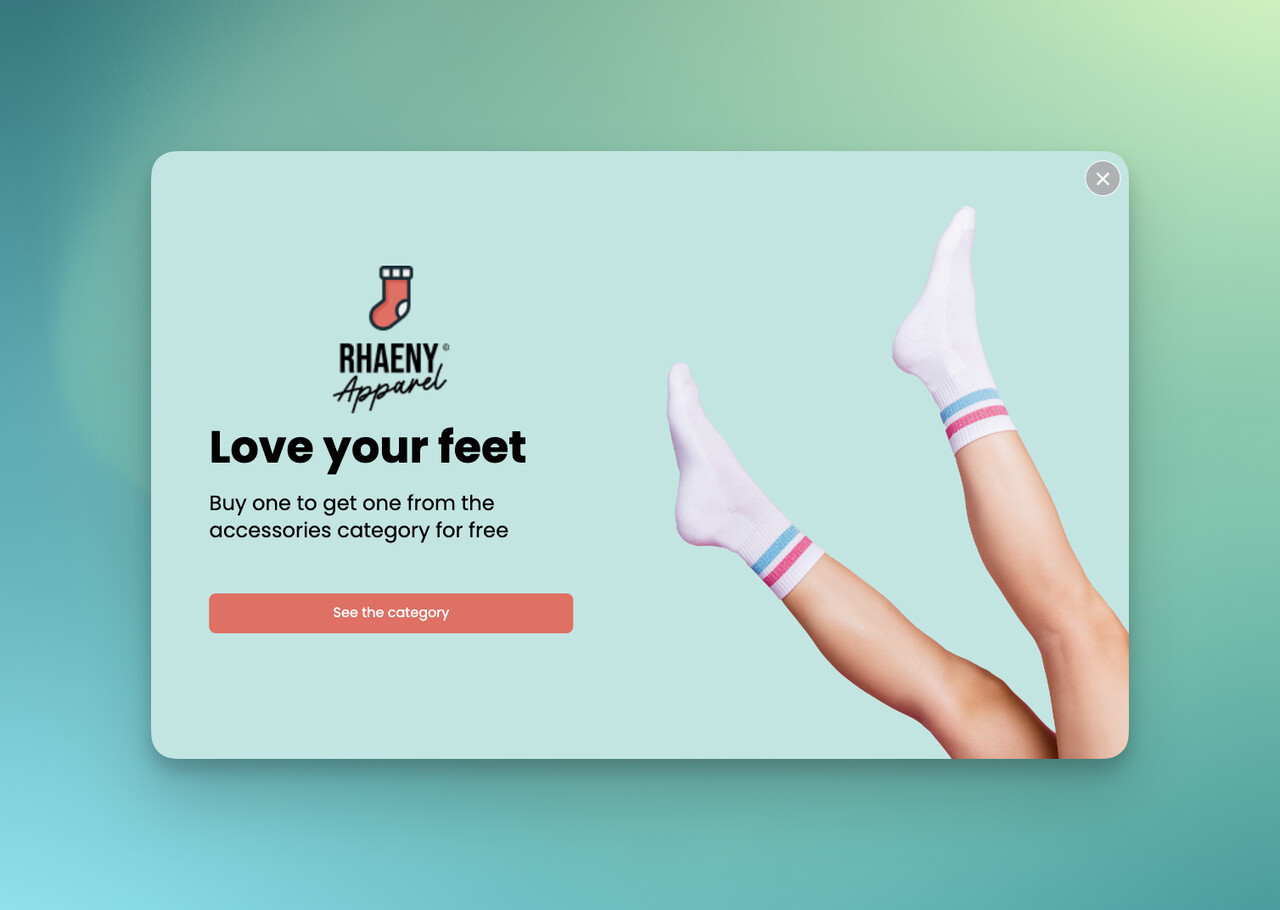
The BOGO offer popup. Surface a "buy one, get one free" deal aligned with a category the shopper is browsing. Simple, high-converting on first-time visitors. See our recommendation popup recipe for the AOV-specific variant.
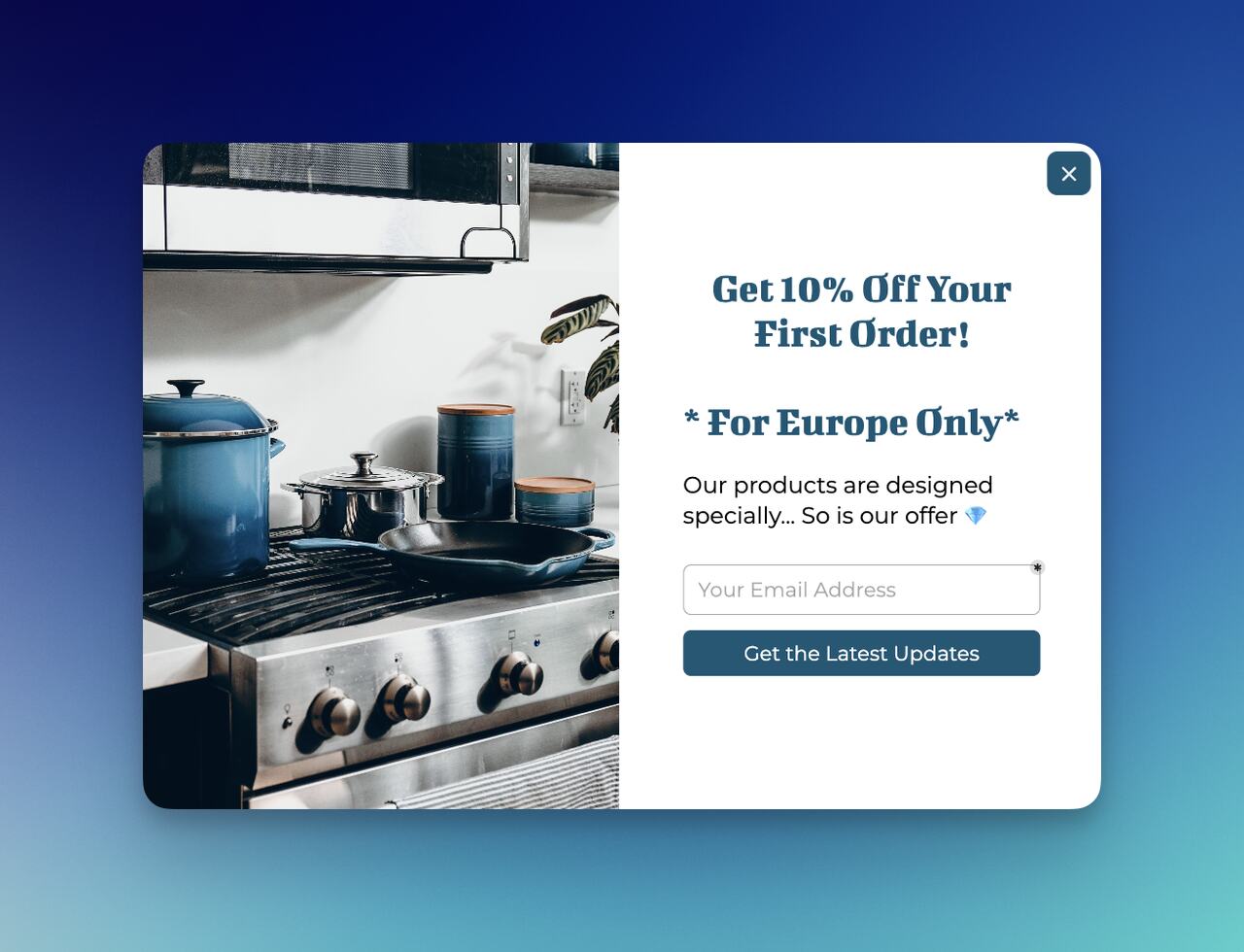
The lead-capture-plus-recommendation popup. Capture an email in exchange for a curated category page or a recommendation digest. Two outcomes from one popup: a list addition and a primed visitor.
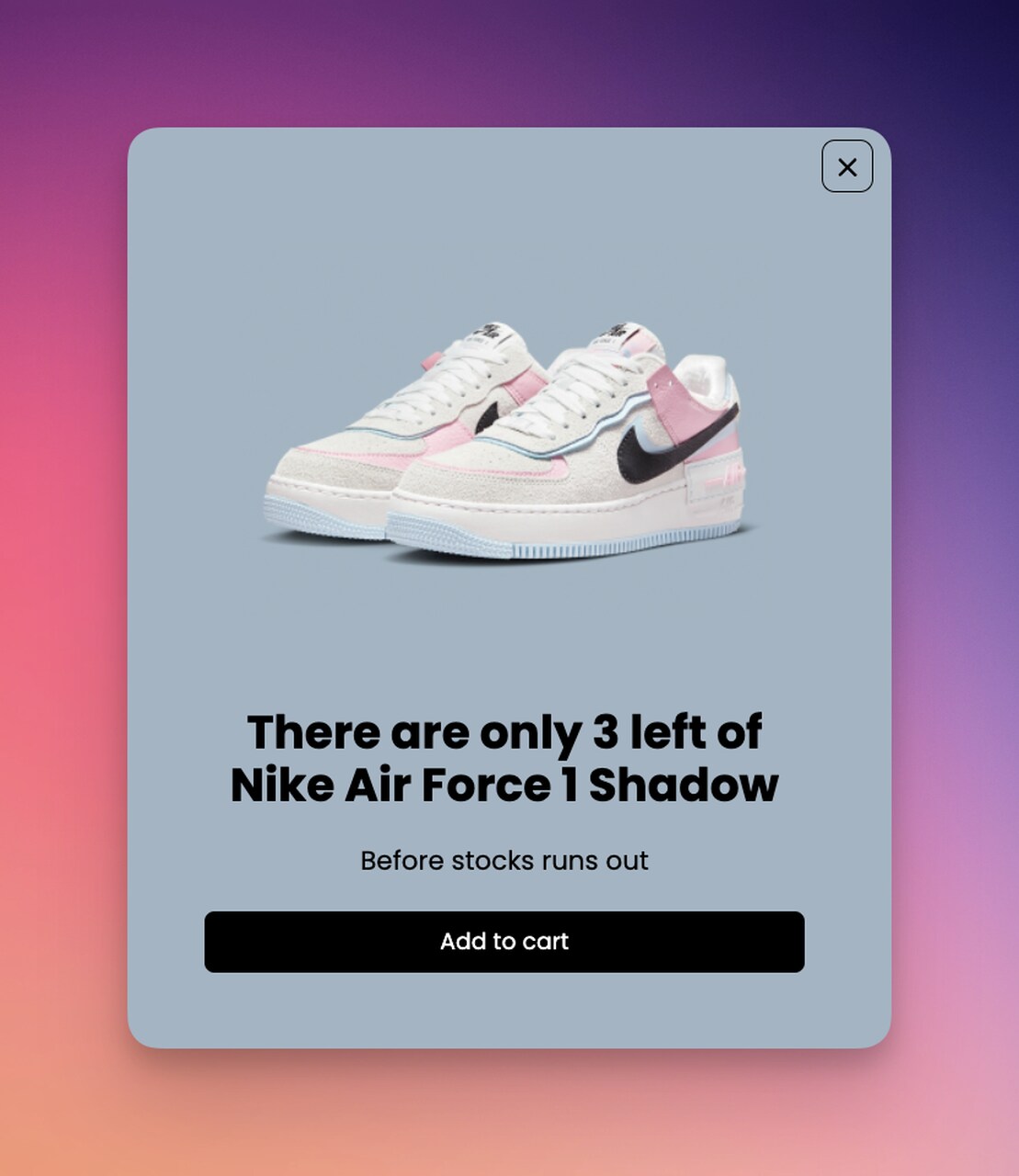
The urgency popup. Pair a recommendation with a time-bound element like "Selling fast" or "Only 4 left at this price." Use sparingly; urgency loses power if every popup uses it.
Your next move on product recommendations
If you take one thing from this guide, take this: ecommerce product recommendation is the cheapest, fastest-compounding growth lever most stores still under-use. The engine is no longer the bottleneck; every modern platform ships one. The work is choosing what to show, where, and to whom.
Three places to start this week:
1. Audit your homepage. Does the first shelf a new visitor sees rely on social proof (Bestsellers, Top-Rated) instead of empty personalization? If not, swap it today.
2. Add a 3-product module to every transactional email. Order confirmations, shipping notifications, delivery confirmations. They're recommendation surfaces you're already paying to send.
3. Build a post-purchase shelf. A "Goes with what you bought" module on the order-confirmation page is the single biggest lift on repeat-purchase rate in 2026.
If you want to layer recommendation popups on top of your existing engine without touching theme code, Popupsmart's recommendation templates ship in under 30 minutes. Pick a template, drop in three SKUs, set the trigger, ship.
Frequently asked questions
How does an ecommerce product recommendation system work?
An ecommerce product recommendation system collects shopper signals (clicks, purchases, demographics, session context), runs them through one or more models (collaborative filtering, content-based filtering, or hybrid), ranks candidate products, and renders the top results in a specific surface (homepage, product page, cart, checkout, or email). Modern engines update in real time, so the recommendation changes between page loads as the shopper's behavior evolves.
What are good examples of product recommendation in ecommerce?
Amazon's segmented homepage, Olipop's review-driven shelves, Velasca's single-CTA design, Valori Jewels' contextual cards, Rare Beauty's bestseller shelf, Etsy's personalized email picks, and Nespresso's post-purchase recommendations are the canonical examples, and each illustrates a different tip in this guide. For 8 more breakdowns, our product recommendation examples piece walks through Sephora, IKEA, Apple, and four others in detail.
How do I build an ecommerce recommendation system using machine learning?
Most stores don't build from scratch. Shopify, BigCommerce, and headless commerce platforms expose recommendation APIs out of the box, and SaaS tools (Klaviyo, Nosto, Dynamic Yield, Bloomreach) layer on top. If you're building custom, the stack is usually Python + a vector database + a collaborative filtering model (matrix factorization or neural collaborative filtering) trained on your event log. Start with a hybrid approach that combines content-based filtering (for cold-start users) with collaborative filtering (for known users), and refresh the model weekly.
What is collaborative filtering for ecommerce product recommendations?
Collaborative filtering recommends products based on the behavior of similar shoppers. If shoppers A and B both bought items X and Y, and shopper A also bought item Z, the engine recommends Z to shopper B. It's "people like you also bought" in algorithmic form. The strength is that it surfaces non-obvious connections: products that share no attributes but tend to be bought by the same people. The weakness is the cold-start problem: new shoppers and new products have no behavioral history to learn from.
How can product recommendations increase average order value?
Recommendations lift AOV three ways: cross-sell ("frequently bought together" adds a complementary item to the cart), upsell ("you might prefer this premium version" trades up the original SKU), and threshold nudging ("add $X for free shipping" pushes the cart over a value bar). The cleanest gains come from cart-page contextual recommendations, where shoppers have the highest purchase intent and the lowest resistance to one more item.
Where should I place product recommendations in my store?
The five highest-converting surfaces are: homepage (bestsellers and personalized for return visitors), category pages (related and trending), product pages (frequently bought together and similar items), cart page (complementary items and free-shipping nudges), and post-purchase pages and emails (reorder and complementary). Most stores under-use cart and post-purchase surfaces, which are typically the highest-converting surfaces in the funnel.
How do I measure if my recommendation engine is working?
Track recommendation CTR per surface, recommendation revenue per session, AOV lift among clickers vs. non-clickers, and repeat purchase rate lift for shoppers exposed to post-purchase recommendations. Set a 14-day baseline before launching any new shelf, then compare. If CTR is below 3% on the homepage, 8% on product pages, or 12% on the cart, the engine (or the design) needs tuning.
Articles you might like:
• What is Behavioral Marketing
• 11 Product Bundling Examples