ChatGPT
 Perplexity
 Claude
 Grok
Grok Google AI Mode
Each type of landing page serves a unique purpose, and when used correctly, they can increase your conversion rates.
These 13 Shopify landing page examples show how Bruvi, Press, L'ange, Cowboy, Allbirds, mnml, FIGS, Verve, Pela, Lulu and Georgia, Satya, and Parachute drive conversions through single-goal layouts, video, comparison tables, and customer-led social proof you can copy this week.
Why Shopify landing pages matter for your store
A Shopify landing page is a page in your Shopify store that's built for one campaign or one audience and asks the visitor to do one thing: buy a product, book a trial, join a waitlist or claim a sale. Your homepage has to serve every visitor at once; a landing page only has to persuade the shopper who clicked one ad, email or link. The lesson: a homepage tries to please everyone, a landing page persuades one buyer. If your store's overall conversion rate is the bigger worry, start with how to increase your Shopify conversion rate.
And the room to copy what already works keeps growing. Thousands of merchants in your category have already tested layouts, hero copy, and CTA placements you can study for free. Below, I broke down 13 of the best ones I have seen, organized by page type, so you can borrow the patterns that fit your funnel. Every store in this list runs on Shopify, a few of them (FIGS, Cowboy) on a custom storefront built on top of it.
Key elements of a high-converting Shopify landing page
Before you steal layouts from the 13 examples below, get the fundamentals right. The pages that convert well tend to share the same seven traits, regardless of vertical or price point.
Single conversion goal: One page, one decision. Not "shop now or read our story or sign up for the newsletter or follow us on Instagram." Pick one action and remove every link that does not lead to it, including the main navigation if you can get away with it.
Above-fold value proposition: Within seconds of the page loading, the visitor needs to know what you sell, who it is for, and why it beats the alternative they almost bought instead. Bruvi (example 1 below) does this with a three-word headline and a "How it Works" video button. Cowboy does it with a one-line offer ("Book a free test ride"). Both work because both answer the visitor's first question without scrolling. Our product headline examples show how to write that first line.
Visual hierarchy: The eye should travel down the page in the order you intend, anchored by hero image, headline, sub-headline, primary CTA, supporting proof, secondary CTA. If you cannot squint at a wireframe and predict the path, neither can a first-time shopper.
Mobile-first layout: Design the mobile version first, then expand for desktop. Hero images should crop cleanly to 1:1 or 4:5, copy should be readable at 16px without zooming, and the primary CTA should sit thumb-distance from the bottom of the screen. That's most of mobile landing page design.
Social proof and reviews: Star ratings near the price, review counts ("rated 4.8 by 12,400 customers"), press mentions, and user-generated photos do more for trust than polished studio shots. Pela's review page (example 9) is built almost entirely on this principle.
Frictionless CTA: The button copy should restate the value, not the action. "Get my first bag" reads better than "Submit" or "Buy now" because it carries the promise. Keep the form to one field if you can; ask for the rest in a follow-up email.
Page speed under 2.5 seconds: Google's Core Web Vitals guidance on Largest Contentful Paint calls 2.5 seconds or less good. Compress hero images, lazy-load anything below the fold, and preload your one critical font weight. Shopify's web performance reports show your store's Core Web Vitals, including a report by page URL, so you can check a landing page once it gets traffic.
Types of Shopify landing pages
Not every campaign needs the same page architecture. Seven page types cover almost every Shopify use case. Knowing which type to build first is half the battle, because each one has its own copy structure, hero pattern, and conversion goal.
Product landing page: Built around one SKU. Hero video or photo, four to six benefit blocks, comparison to a known competitor, social proof, and a single "buy" CTA repeated three times down the page. Best for the hero products that drive most of your revenue.
Collection landing page: Groups a curated set of SKUs around a theme (gifts under $50, wet-weather shoes, holiday sale). Adds filtering, sort, and category navigation. Best for paid traffic from broad-match keywords like "winter boots."
Lead capture page: Trades something useful (test ride, sample box, size guide PDF, early-access email list) for an email or phone number. Best for high-consideration purchases where the buyer is not ready in session one. Our opt-in page examples cover this type in depth.
Promotional or sale page: Built for one campaign window, like an anniversary or Black Friday. Time-bound copy, countdown timer, and a sitewide discount banner. The page should expire when the sale ends, not get repurposed.
Seasonal page: Like a sale page, but tied to weather, holidays, or cultural events rather than a discount. Allbirds' wet-weather collection is the textbook example.
Coming soon page: Builds a waitlist before launch. Combines countdown, email capture, and product preview. It's as useful for ecommerce drops as for a store that hasn't opened yet: mnml (example 6) shows the product-level version, and the Shopify password page covers the whole-store version.
Bundle page: Lets the shopper build a custom kit and see the discounted total in real time. Best for consumables or subscription products where average order value matters more than first-order conversion.
13 Shopify and ecommerce landing page examples that drive conversions
I picked these 13 examples because each one teaches a distinct principle, and each page was live on its Shopify store when we checked it on 11 October 2026. Where a page had changed since our last update, the screenshot is new and dated October 2026. They are organized roughly by funnel position: product and collection pages first, then lead capture and promotional pages, then community and content pages.
| # | Store | Page type | What to copy |
|---|---|---|---|
| 1 | Bruvi | Product | A comparison table against the brands buyers already know |
| 2 | Press | Collection | Icon navigation and a "Shop by Function" filter |
| 3 | L'ange | Sale | Deal mechanics (codes, percentages) named in the hero |
| 4 | Cowboy | Lead capture | A free test ride instead of a "buy" button |
| 5 | Allbirds | Seasonal | Existing products regrouped around the weather |
| 6 | mnml | Coming soon | Prices shown before launch and an "Add to waitlist" button |
| 7 | FIGS and Allbirds | Bestsellers | Consistent photography and attribute filters |
| 8 | Verve | New arrivals | A "New arrival" badge and a best-selling sort |
| 9 | Pela | Customer reviews | Proof in layers: a big number, three stories, a review feed |
| 10 | Lulu and Georgia x Élan Byrd | Collaboration | The designer's story before the product grid |
| 11 | Lulu and Georgia | Limited-time offer | A sale tab in a different color |
| 12 | Satya | Loyalty program | Ways to earn as tiles, ways to redeem as a short list |
| 13 | Parachute | Blog | Buying-guide questions as post titles |
1. Bruvi: product landing page
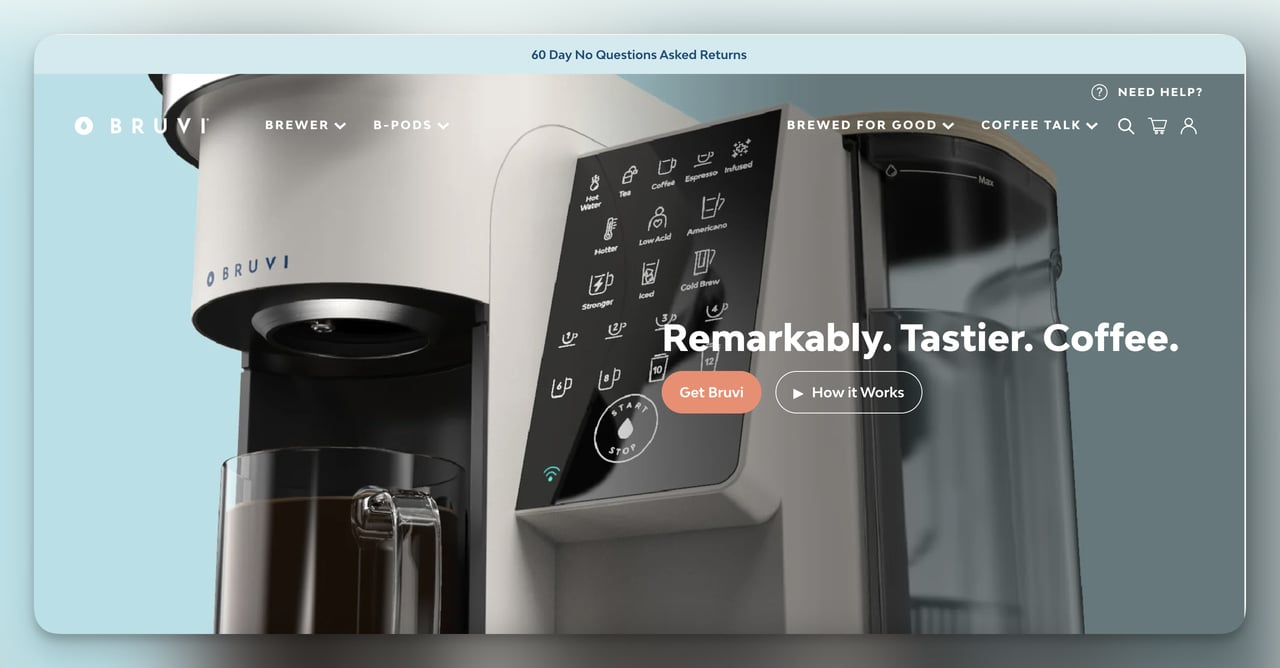
What it does: Bruvi sells a single-serve coffee machine, and the brewer page is built around one decision: get Bruvi or keep scrolling. The hero pairs a three-word headline ("Remarkably. Tastier. Coffee.") with a "How it Works" button that opens a product video. Below the fold, four short value props (Auto Optimized Brewing, Hygienic Brew, More Coffee, Better Coffee) expand into longer learn-more sections so casual readers stay short and serious buyers can dig in.
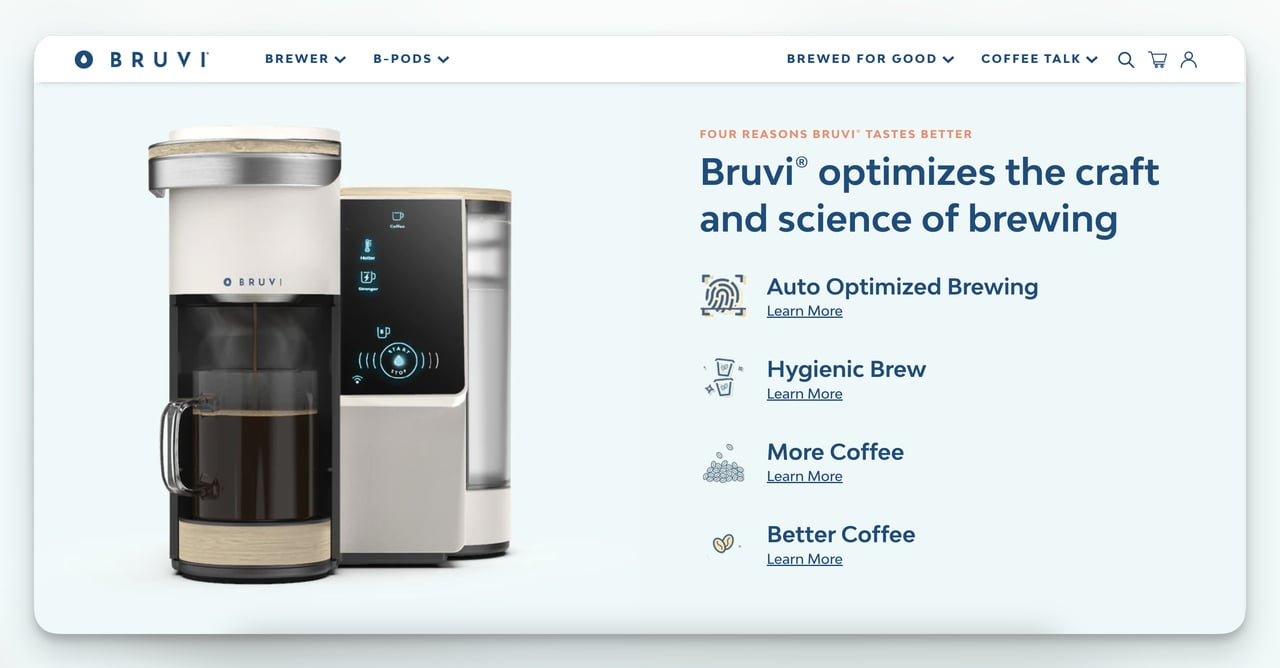
Why it works: The hero gives the whole pitch in three words and leaves the explanation to one optional click, which is why the page feels effortless. Bruvi also includes a comparison table against Keurig and Nespresso, which most brands avoid out of fear, but specificity beats vagueness when buyers are evaluating two options anyway. The shopper picks the rival from a drop-down, and a "Try it in your space" 3D viewer further down lets them zoom and rotate the brewer.
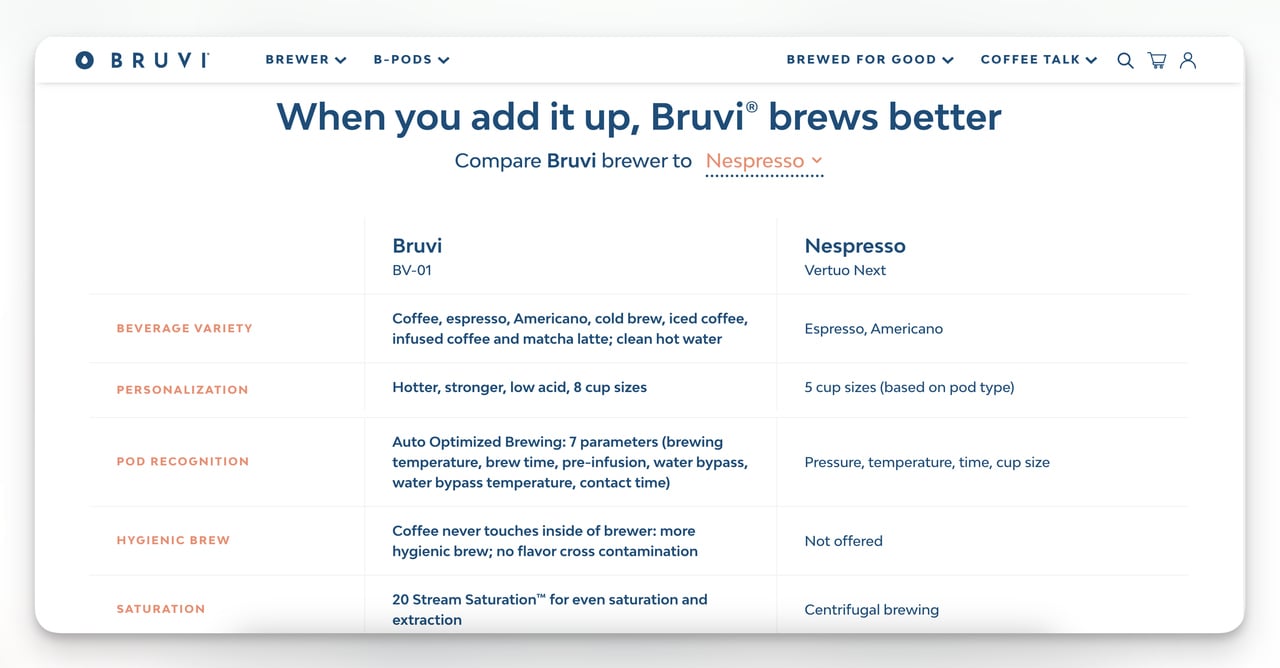
Steal this idea: If you have a product that takes more than 30 seconds to explain in writing, replace your hero image with a short video and add a comparison table to the second screen. Both moves reduce the hand-waving and force the buyer to make a yes-or-no decision faster.
2. Press: collection landing page
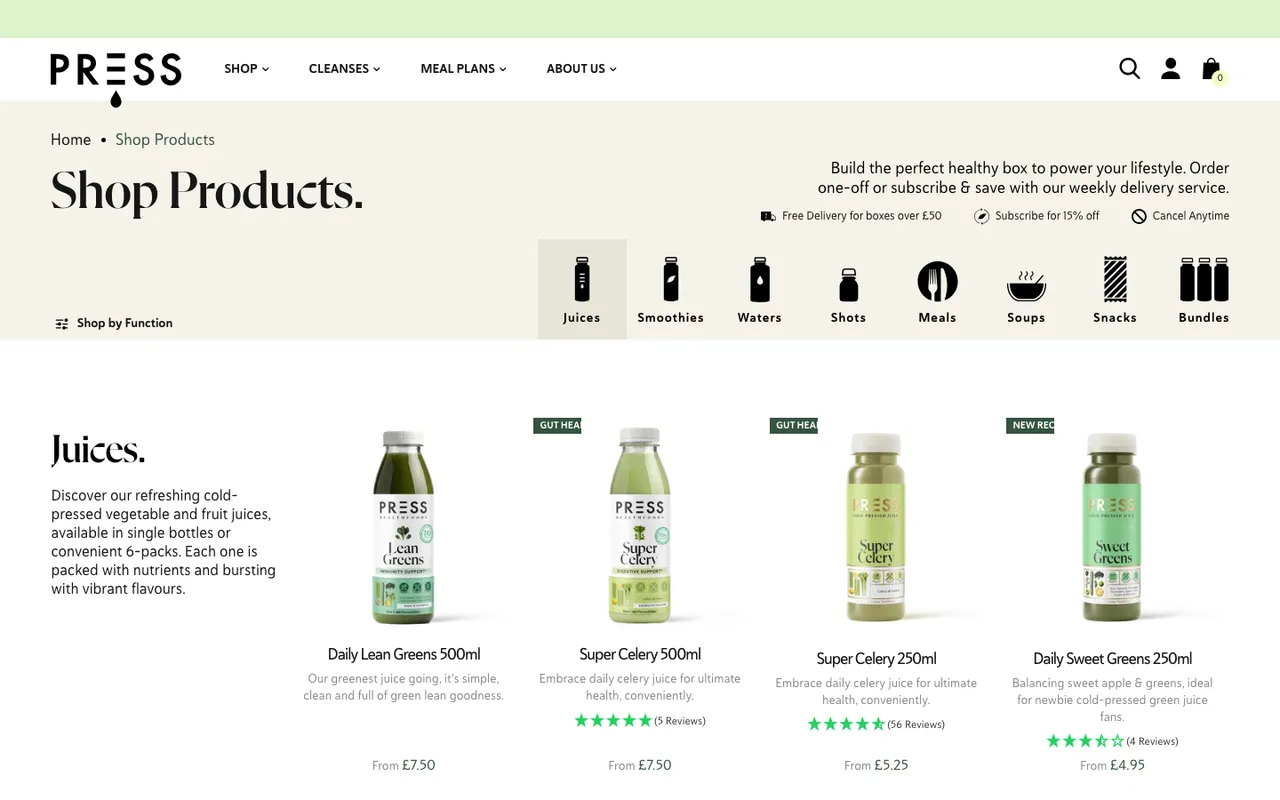
What it does: Press, a UK cold-press juice brand, used to run a separate "Health Boxes" collection page. That URL now redirects to its "Shop Products" page, which does the job for the whole range. A one-line promise ("Build the perfect healthy box to power your lifestyle") sits next to three delivery perks: free delivery for boxes over £50, 15% off with a subscription, and cancel anytime. Below it, an icon row (Juices, Smoothies, Waters, Shots, Meals, Soups, Snacks, Bundles) lets visitors self-select within two seconds, and a "Shop by Function" control groups products by need.
Why it works: The icon system replaces a wall of product names with a visual menu, which is a smarter mental model when shoppers do not know what specific juice they want yet. "Shop by Function" adds a second path for people who arrive with a goal rather than a product in mind, and the benefit badges on the cards ("Gut Health") answer that goal at a glance.
Steal this idea: If your collection page reads like a SKU spreadsheet, regroup products by problem (sleep, focus, recovery) instead of category (capsules, powders, drops). Put your delivery or subscription perks in the header, where every shopper reads them before the first product.
3. L'ange: promotional sale page
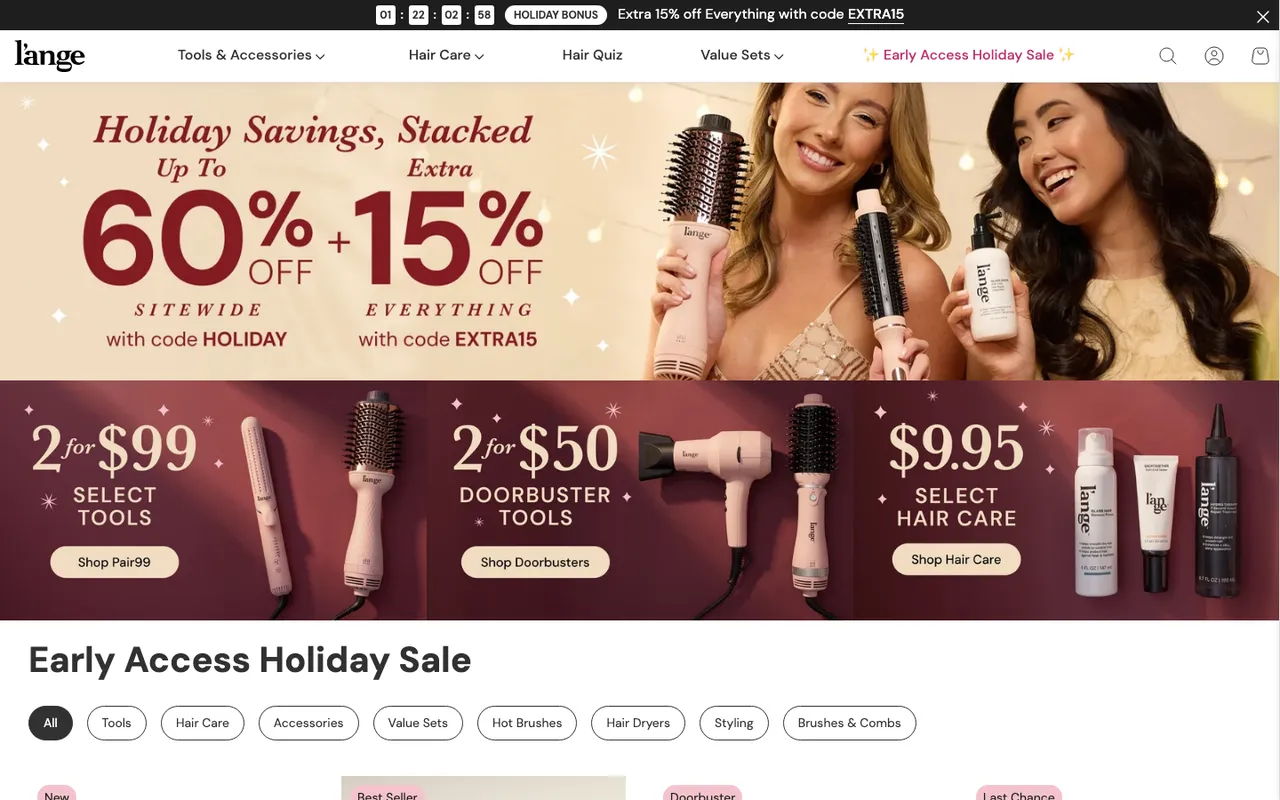
What it does: L'ange runs its sale page as a seasonal landing page that changes with each campaign; in October 2026 it was an "Early Access Holiday Sale." The hero spells out the deal mechanics ("Holiday Savings, Stacked": up to 60% off sitewide with code HOLIDAY, plus an extra 15% off everything with code EXTRA15), and a "Holiday Bonus" countdown runs in the announcement bar. Three tiles split the offer by price point (2 for $99 select tools, 2 for $50 doorbuster tools, $9.95 select hair care), and filter chips (Tools, Hair Care, Value Sets, Hot Brushes, Hair Dryers and more) sit above the product grid.
Why it works: Naming the codes and percentages in the hero removes the "what's the actual deal?" question before the shopper scrolls. The three price-point tiles give bargain hunters, gift buyers and replenishment shoppers their own door, and the sale's link in the main menu is styled differently from the rest, so returning visitors find it again. The countdown adds urgency. That works when the deadline is real, and it backfires when the clock resets on every visit.
Steal this idea: Tie your next sitewide promo to a real milestone, your founding date, your 100,000th customer, your first appearance on a retailer shelf, instead of inventing a fake holiday, and put the offer's exact terms in the hero. Run the campaign for 7 days max so the urgency feels earned, not engineered.
4. Cowboy: lead capture page
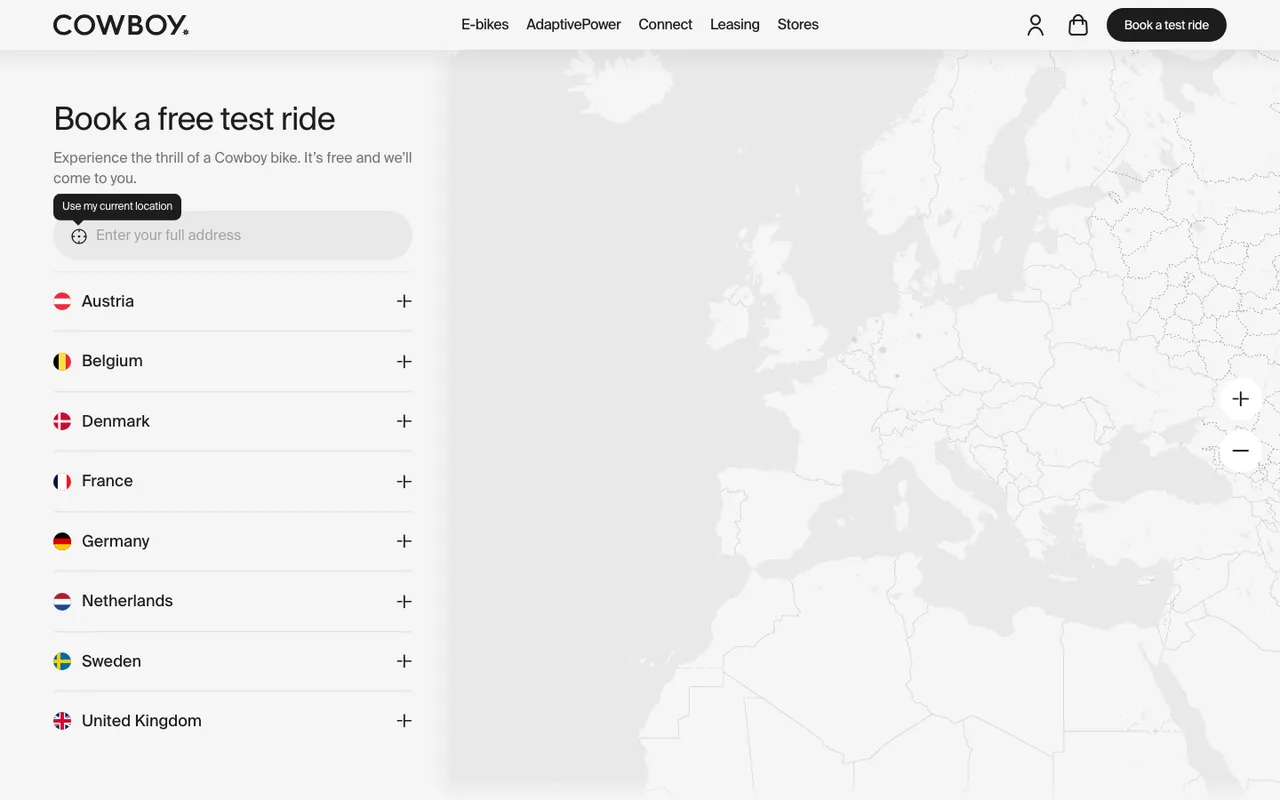
What it does: Cowboy sells electric bikes (its Cruiser was listed from €3,299 when we checked on 11 October 2026), which is way too much for a first-session impulse purchase. So the page does not try to sell. It books a test ride. Shoppers enter their address or pick from eight countries (Austria, Belgium, Denmark, France, Germany, the Netherlands, Sweden and the UK), choose a model and a time, and a Cowboy expert brings the bike to them.
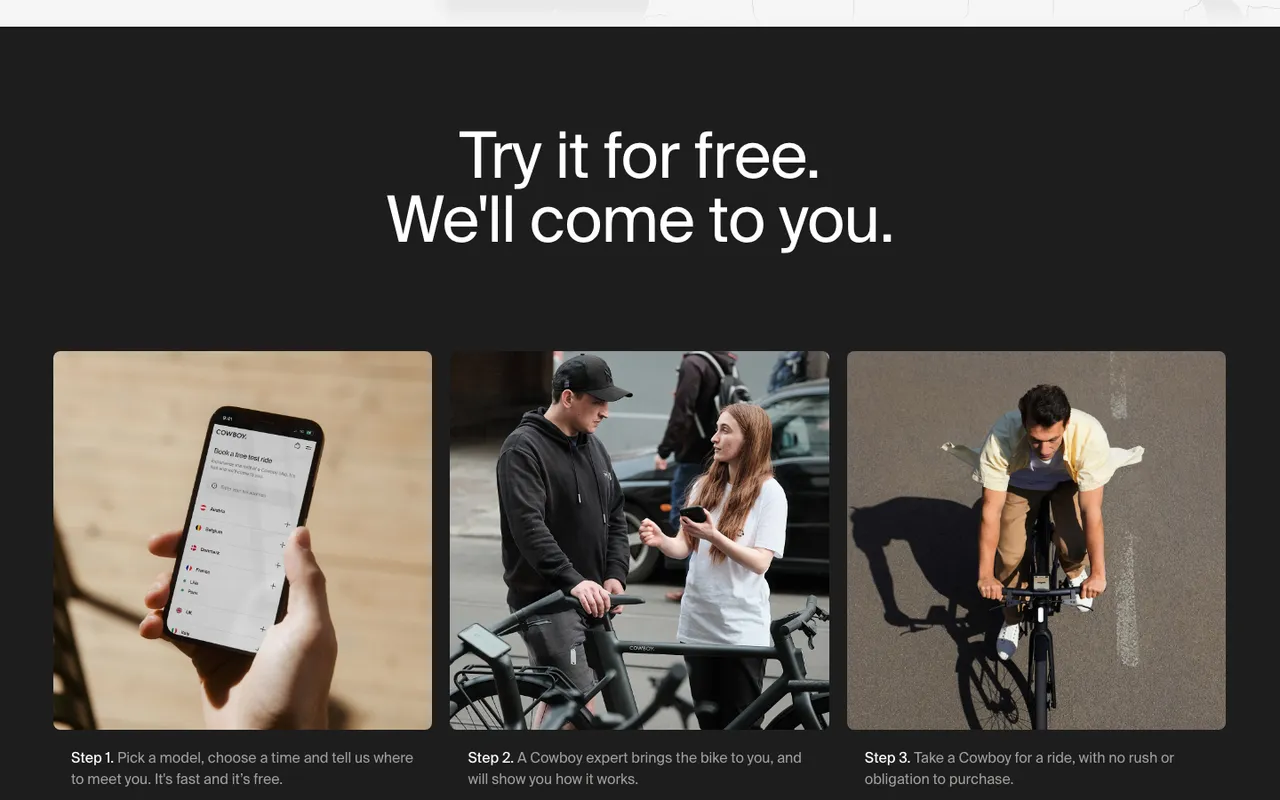
Why it works: The offer matches the price. Nobody is buying a €3,299 bike from a hero shot, but plenty of people will book a free trial that is delivered to their door. The page answers the next objections in three steps ("Try it for free. We'll come to you.") and an FAQ: a test ride typically lasts around 30 minutes, with about 10 minutes of briefing and 10 to 15 minutes of riding, and there's no commitment to buy. Every booking also gives Cowboy an email address, since the FAQ says you get an email recap and invite after booking. This is reciprocity plus future-pacing wrapped in one page. Pair it with email capture popups for a second touchpoint.
Steal this idea: If your AOV is above $300, replace your "buy now" CTA with a low-commitment trial offer (test drive, sample box, 1-on-1 demo). Optimize the page to convert the email, not the sale, and answer the trial's practical questions on the same page.
5. Allbirds: seasonal landing page
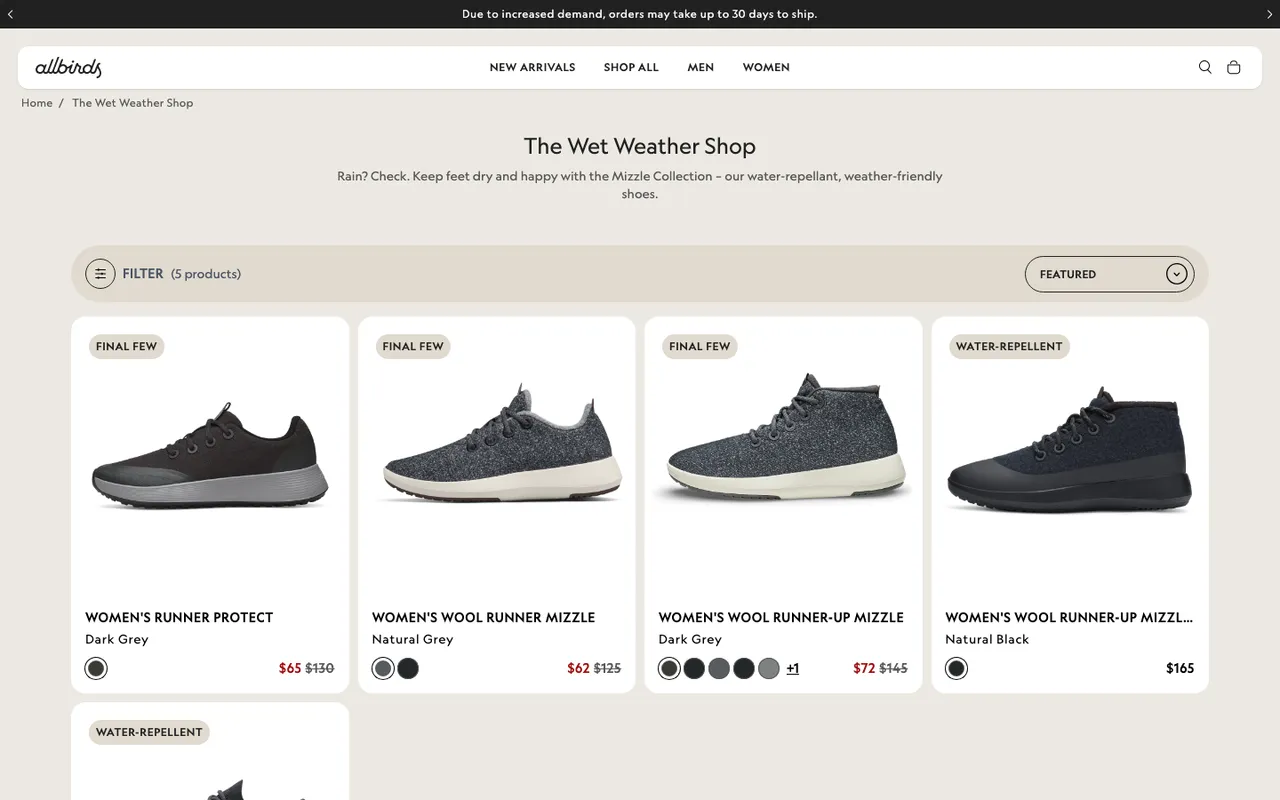
What it does: Allbirds runs "The Wet Weather Shop," a collection that gathers its water-repellent shoes under a one-line promise: "Rain? Check. Keep feet dry and happy with the Mizzle Collection." In October 2026 the women's page held five shoes, each badged "Water-Repellent" or "Final Few," several of them marked down.
Why it works: The page solves a "right product, right moment" problem. Allbirds reframes existing SKUs as the answer to a seasonal problem (rain), which raises perceived relevance without launching new product. The "Final Few" badges add honest scarcity to the end-of-season markdowns.
Steal this idea: Build at least two seasonal pages a year that recycle existing SKUs around a moment (rainy season, back to school, gifting). Write the headline as the shopper's problem, then show only the products that solve it.
6. mnml: coming soon landing page
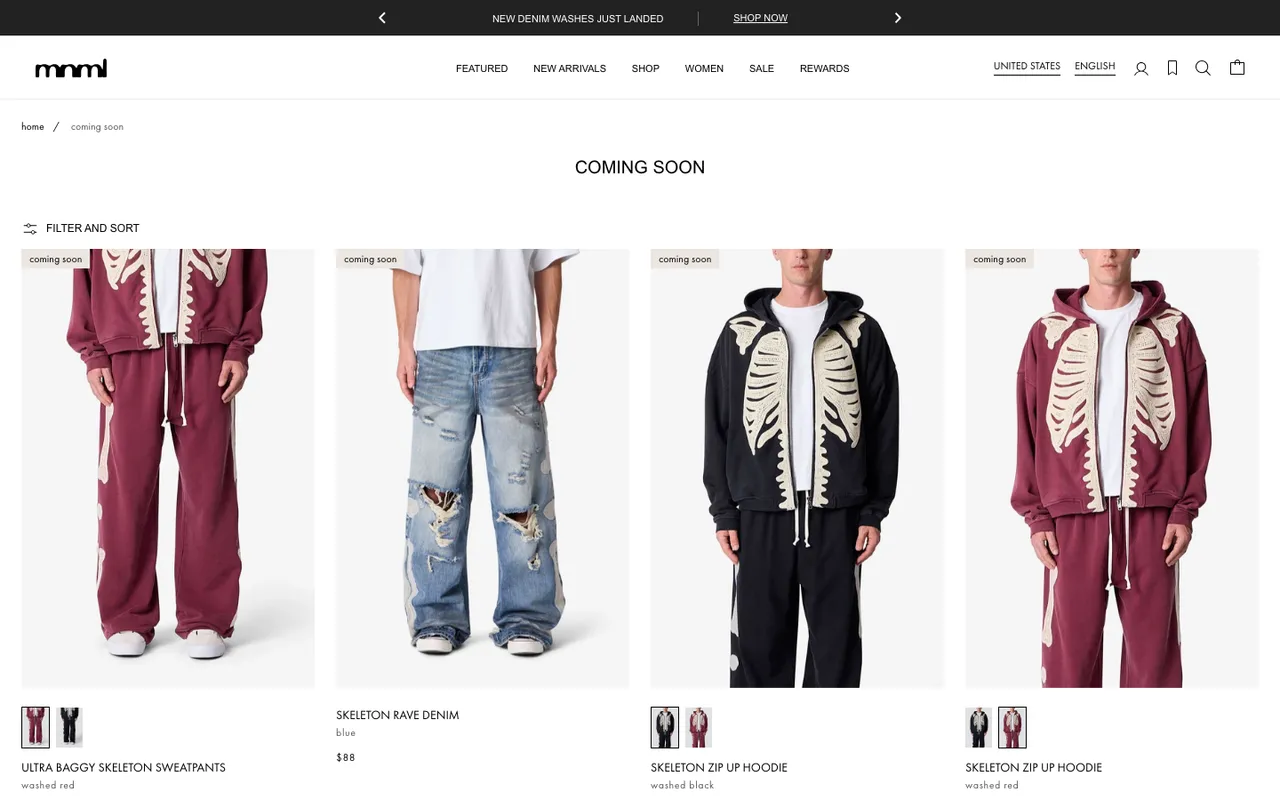
What it does: mnml, an LA streetwear brand, runs a permanent "Coming Soon" collection page with every upcoming SKU listed alongside its price. Each tile carries a "coming soon" tag, and each product page swaps the buy button for "Coming soon: Add to waitlist," so a shopper joins the waitlist for the exact item and size they want.
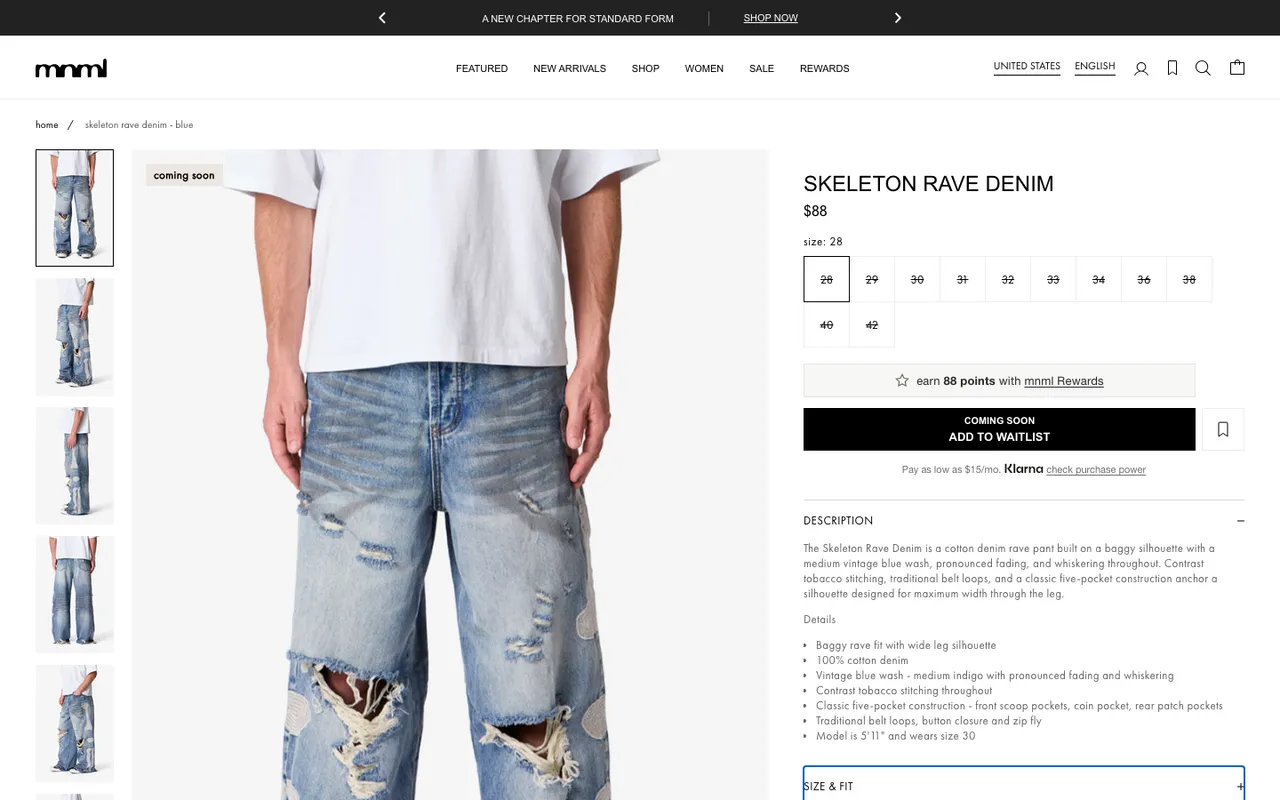
Why it works: Showing the price before launch is the move most brands miss. It pre-qualifies buyers (people who would balk at $108 hoodies opt themselves out before launch day) and anchors the price as fixed rather than negotiable. The waitlist gives mnml a clean email list of people who already know what they want and at what price, which is the warmest pre-launch traffic you can buy.
Steal this idea: If you do drops, build a single "Coming Soon" page in your nav and post upcoming products with prices and waitlist buttons 14 days before launch. You will trade a tiny amount of mystery for a much more efficient launch-day funnel.
Shopify coming soon page: the password page
If the whole store is coming soon, not just a few products, Shopify has a built-in coming soon page: the password page. According to Shopify's help center (checked 11 October 2026), private mode hides every page of your online store from visitors and search engines and shows a customizable landing page instead. To set it up:
- From your Shopify admin, go to Online Store > Preferences.
- In the Store access section, turn on Private mode and enter a password (not your admin password).
- Optional: add a message to your visitors, such as the launch date.
- Click Save, then customize the Password page template in the theme editor.
By default the password page has its own header and footer and an "Email signup banner" section, which Shopify describes as a way for customers to subscribe so they can learn, for example, when your store will open. That's your pre-launch landing page: one promise, one email field.
7. FIGS and Allbirds: bestseller landing pages
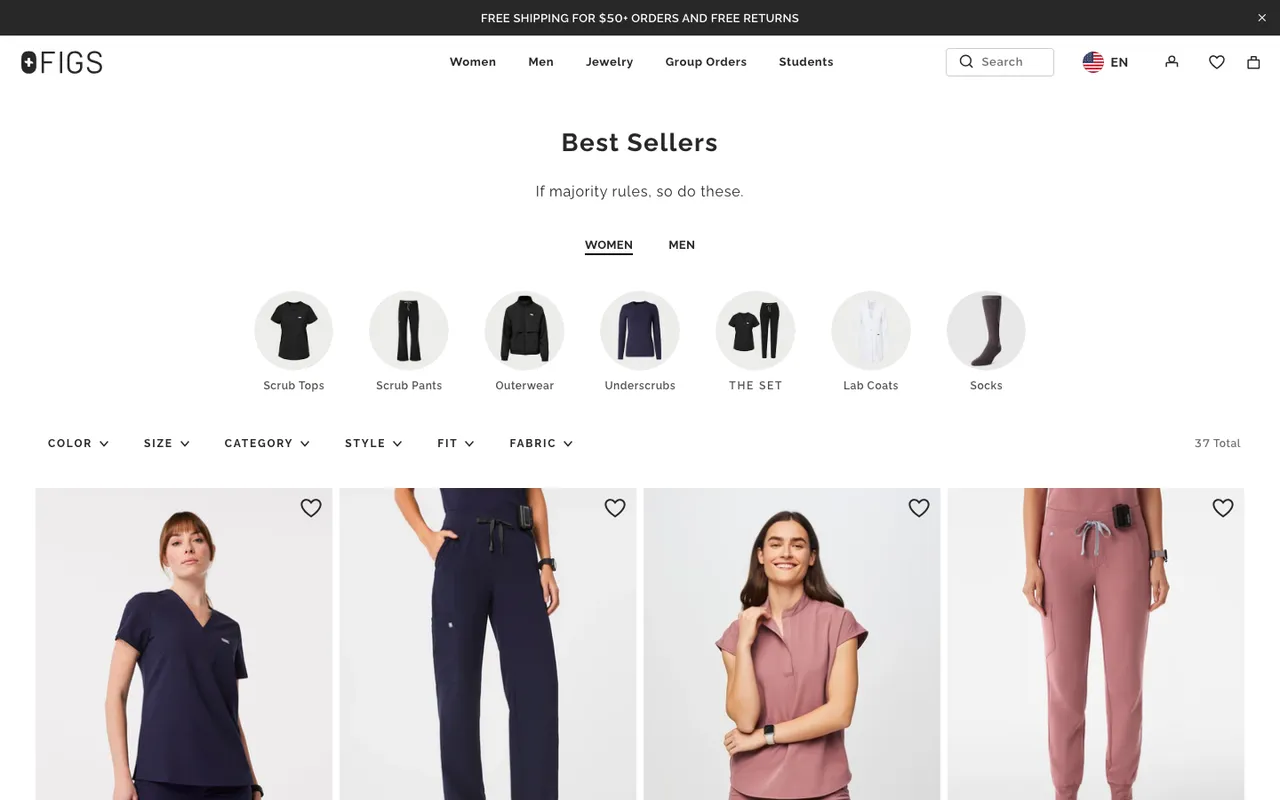
What it does: FIGS, the medical scrubs brand, runs a "Best Sellers" page built around clean filtering. Color, size, category, style, fit, and fabric sit in a filter bar at the top, and every product card uses identical photography (front shot, neutral background, single model pose) so the eye does not have to recalibrate as it scrolls. Above the filters, a one-line header ("If majority rules, so do these.") sits over a Women/Men switch and seven category circles. Allbirds runs a similar bestseller page but adds a custom hero banner that immediately signals "you are on the popular page," plus "Bestseller" badges on the cards.
Why it works: Bestseller pages are basically an applied form of social proof. By bundling top-sellers and stripping every other product type out, the page tells the shopper "these are what people like you bought" without writing the words. FIGS' filter consistency reduces visual noise so shoppers compare on attributes (size, color) rather than image quality.
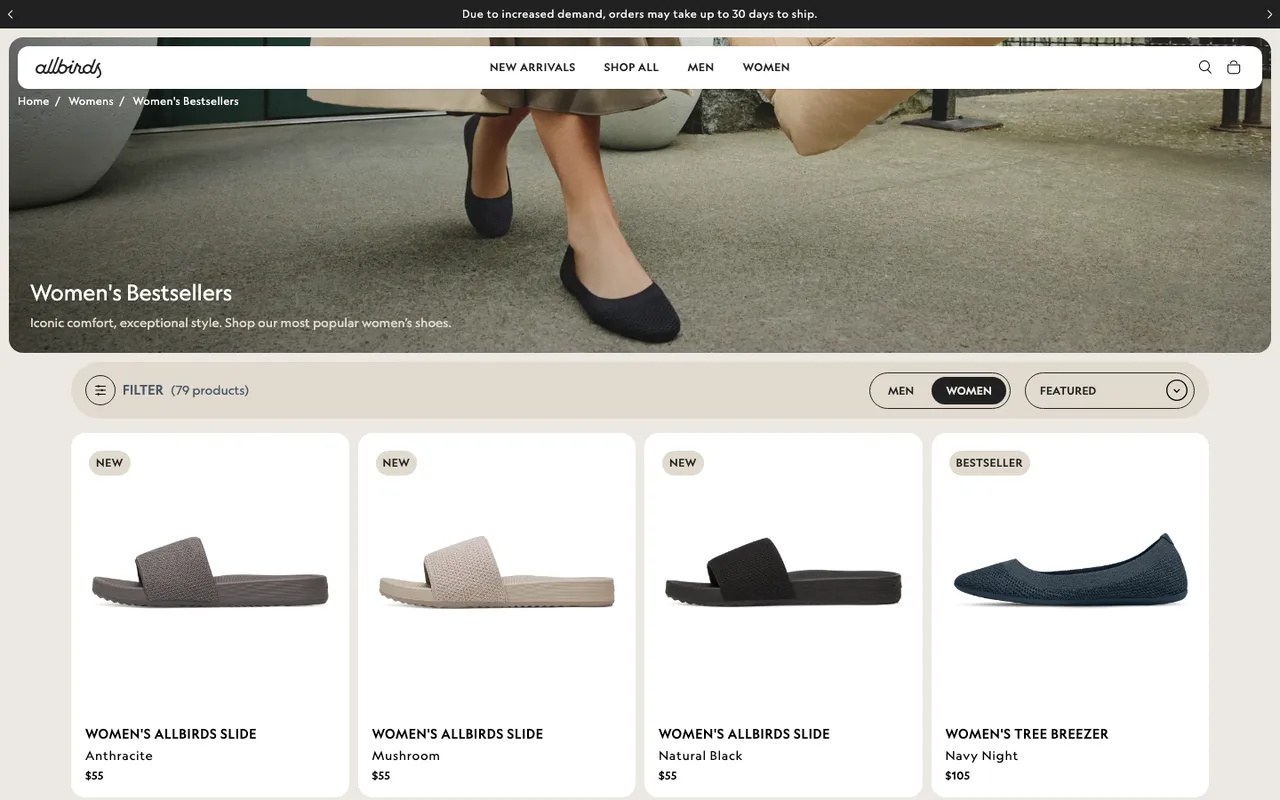
Steal this idea: Build a "Most Loved" or "Top Rated" collection in your nav and pull in your top 12 SKUs by 90-day units sold. Standardize the photography. Add filters that match the variants real shoppers ask about (length, fit, color), not internal taxonomy. The same social pull works for a featured products section on your homepage.
8. Verve: new arrivals landing page
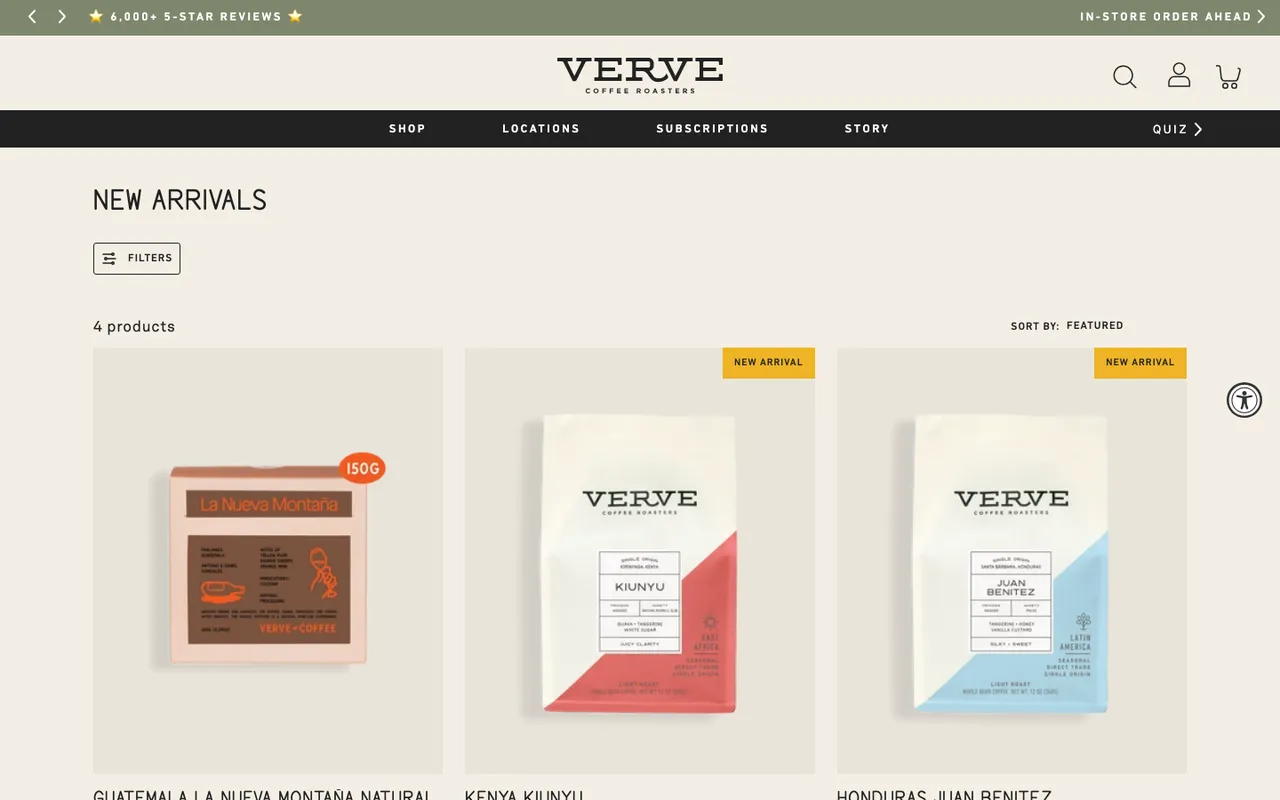
What it does: Verve Coffee runs a "New Arrivals" page with each fresh SKU labeled directly on the product card. The page is sortable by bestseller within new arrivals, which is a smart secondary filter, and the layout reuses the brand's familiar collection grid so returning customers do not have to learn a new pattern. Each card also carries the coffee's tasting notes ("Guava, tangerine, white sugar").
Why it works: A "New Arrivals" page solves a returning-customer problem: how do I see what is fresh without scrolling the whole catalog. Labeling every product as "New" on the card removes the burden of memorizing what was there last week. Sorting by bestseller-within-new-arrivals creates a useful intersection: the freshest stuff that is also already validated.
Steal this idea: If you launch new SKUs more than once a quarter, build a "New Arrivals" page in your main nav and add a "Sort by bestseller" toggle. Send the URL in your post-purchase email 30 days after the order ships, when the buyer is back in market for their next coffee, candle, or t-shirt.
9. Pela: customer review page
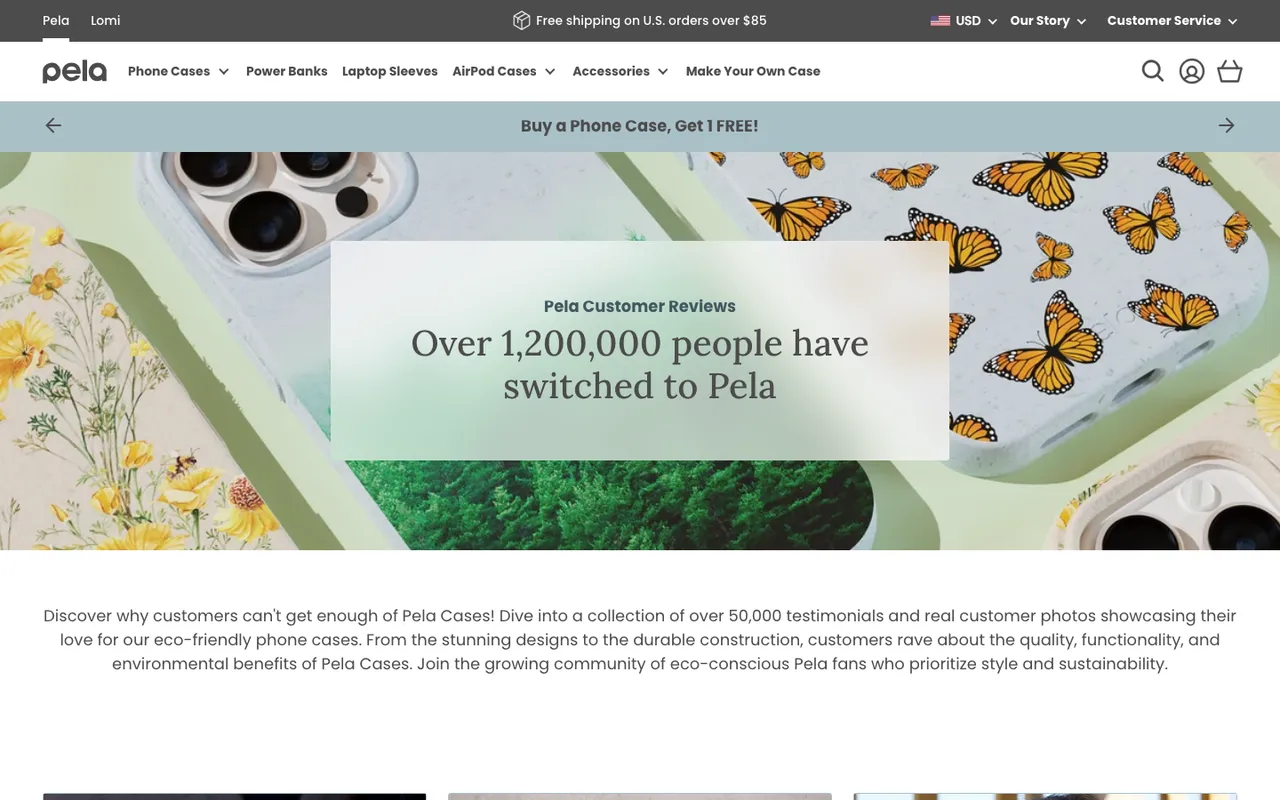
What it does: Pela, a compostable phone case brand, runs a dedicated reviews page that opens with a banner ("Over 1,200,000 people have switched to Pela"), pulls three featured long-form reviews to the top, and fills the rest of the page with a review feed (4.9 out of 5 from 62,506 reviews when we checked on 11 October 2026) and photos pulled from Instagram.
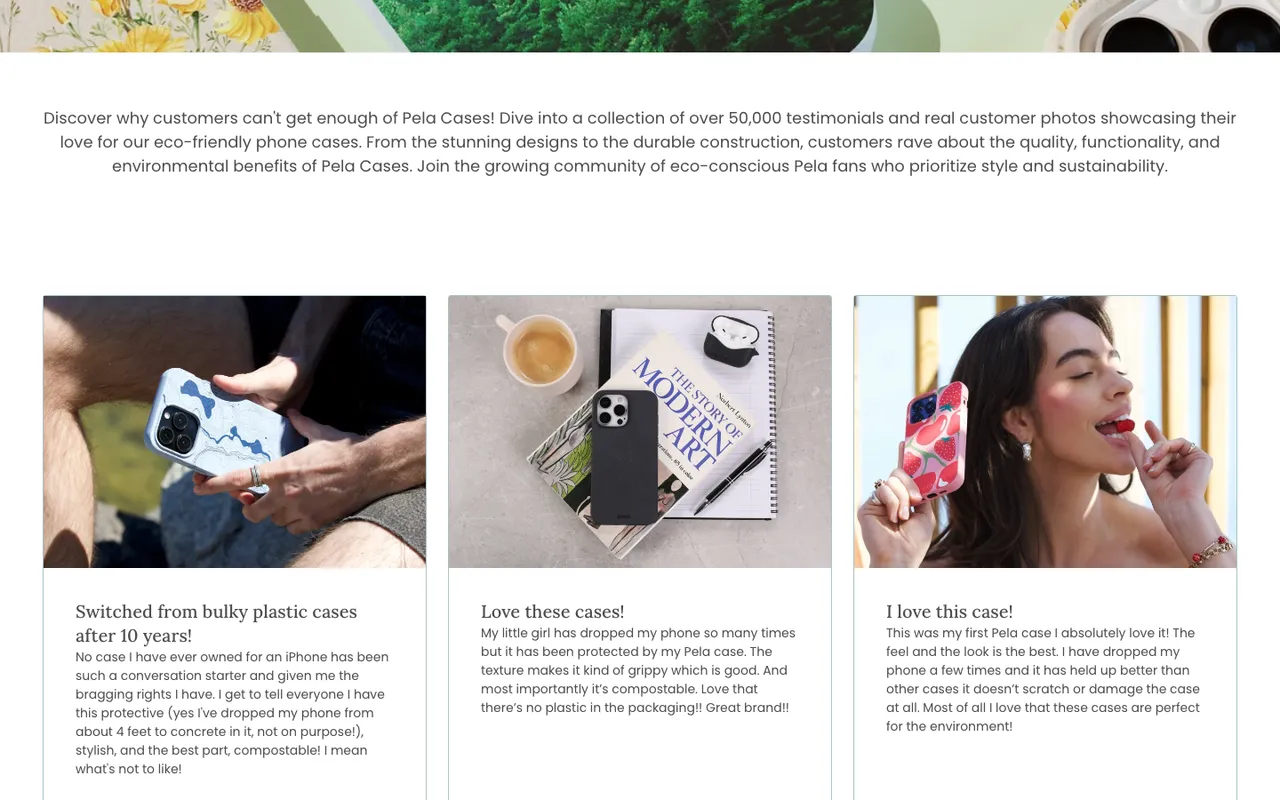
Why it works: Pela understands that reviews answer different objections at different lengths. The "1,200,000 people" banner answers "is this brand legit." The three featured reviews answer "what specifically do people love." All three mention dropping the phone, the doubt a compostable case has to settle. The review feed and Instagram photos answer "do real people actually use this in real life." Three layers of social proof, each calibrated to a different stage of doubt.
Steal this idea: Build a /reviews page (or a "trusted by" page) that layers proof in three tiers: a single big number at the top, three long-form quotes in the middle, a UGC wall at the bottom. Link it from your product pages, your footer, and your post-checkout thank-you.
10. Lulu and Georgia x Élan Byrd: collaboration page
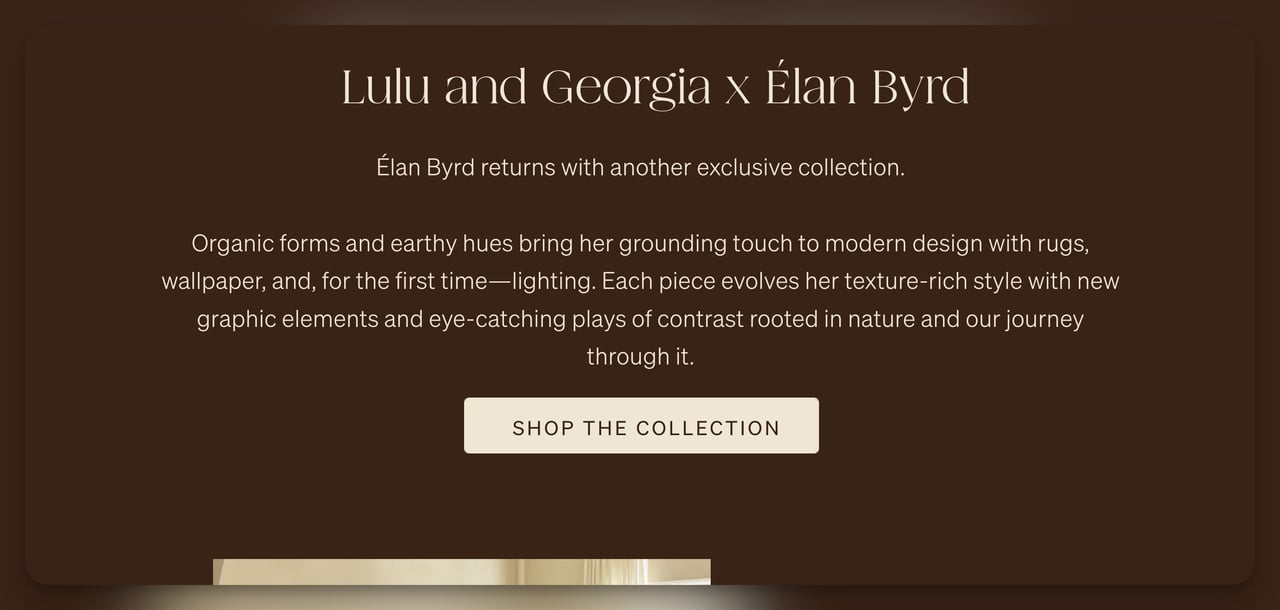
What it does: Lulu and Georgia partnered with designer Élan Byrd on a collection of rugs, wallpaper and, for the first time, lighting, and the collab page is built around lifestyle photography rather than product cards. Hero copy ("from the ground up") and an in-line designer story do most of the persuading; the products show up in styled rooms before they show up as buyable SKUs.
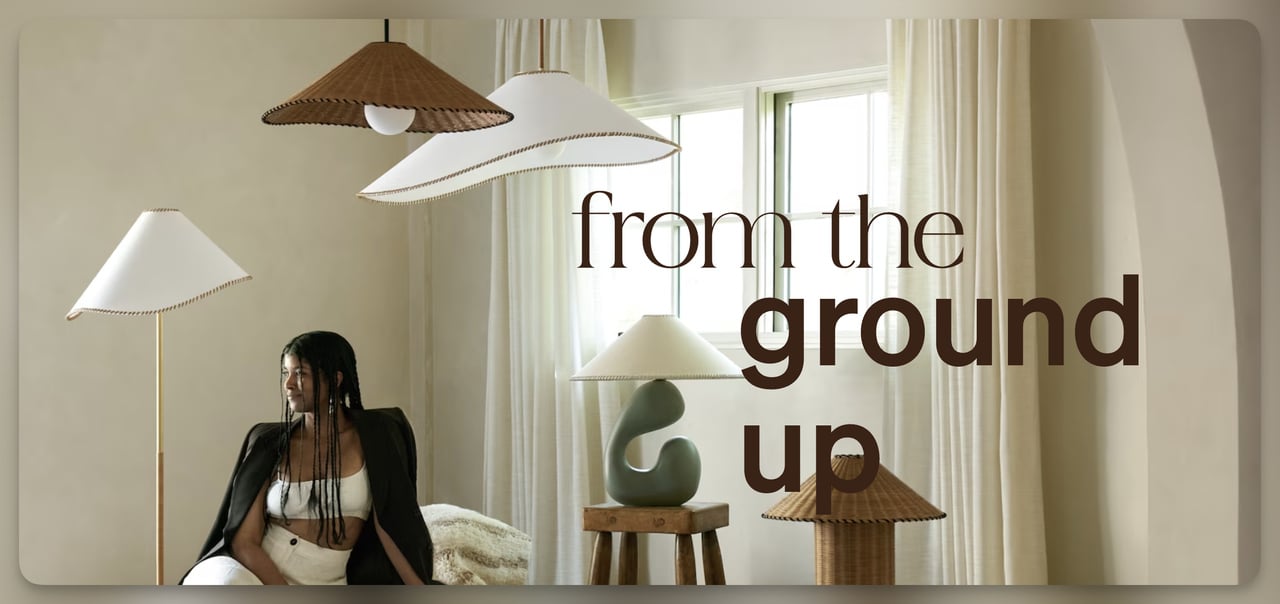
Why it works: Collabs sell story, not specs. By leading with the designer's voice and showing the products in context, Lulu and Georgia raises perceived value before price ever enters the frame. Lifestyle photography also doubles your usable assets for paid social, since each room photo can stand on its own as an ad creative.
Steal this idea: If you partner with a creator, photographer, or fellow brand, build a single dedicated collab page and write the hero copy in the partner's voice, not yours. Open with a 200-word designer note, then show the collection in styled scenes before you show the buyable grid.
11. Lulu and Georgia: limited-time offer page
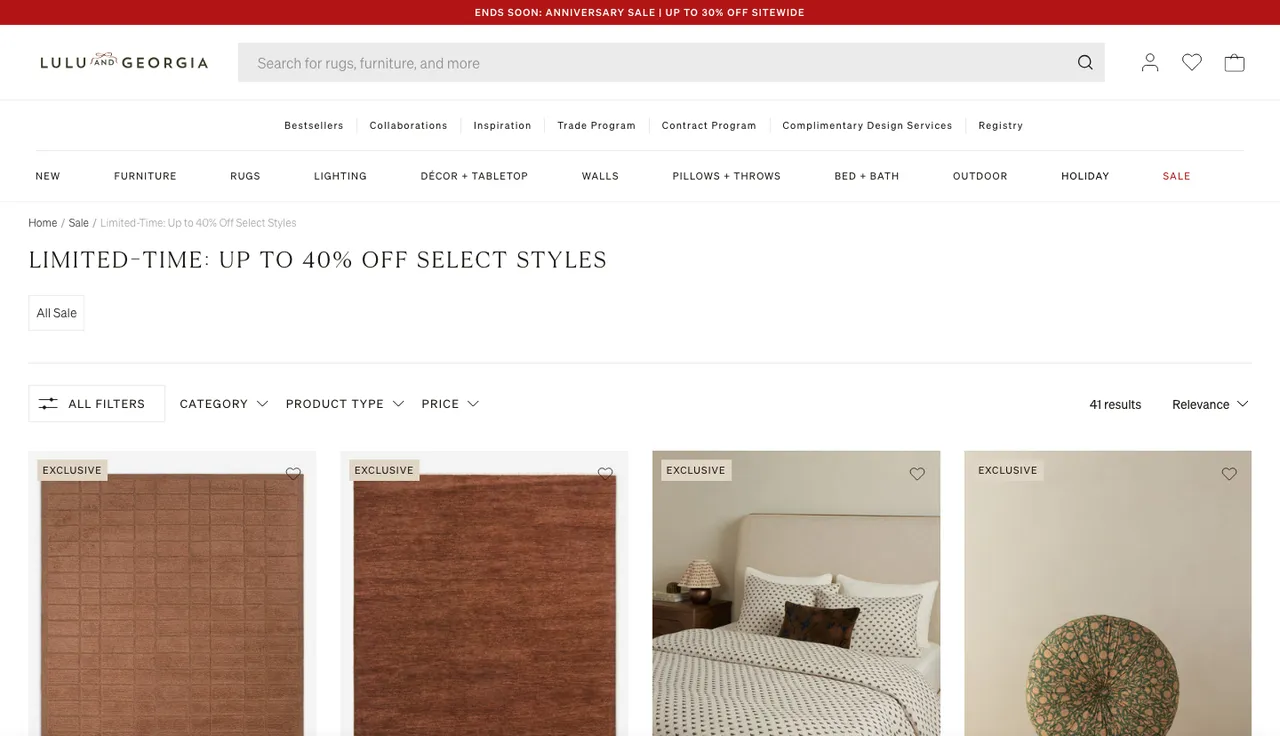
What it does: Lulu and Georgia's "Limited Time Offers" page lives behind a contrasting "Sale" tab in the main nav (red against black). In October 2026 the page opened with "Limited-Time: Up to 40% Off Select Styles," under a red announcement bar for the brand's anniversary sale, and broke the discounted inventory down with Category, Product Type and Price filters so shoppers can self-segment.
Why it works: The colored tab does the heavy lifting. It is the only nav element that breaks the monochrome treatment, which is a textbook isolation effect (Von Restorff). The filters inside the page solve a different problem: a long sale page is overwhelming, but a filtered view of rugs or bedding feels browsable. Pair this with multi-step forms for newsletter signup and you add a second conversion point for visitors who aren't buying today.
Steal this idea: The colored nav tab is the cheapest conversion lift on this list. Make your sale tab visually distinct (a red dot, a different font weight, an underline) and watch your sale-page traffic climb without spending a dollar on ads.
12. Satya: membership landing page
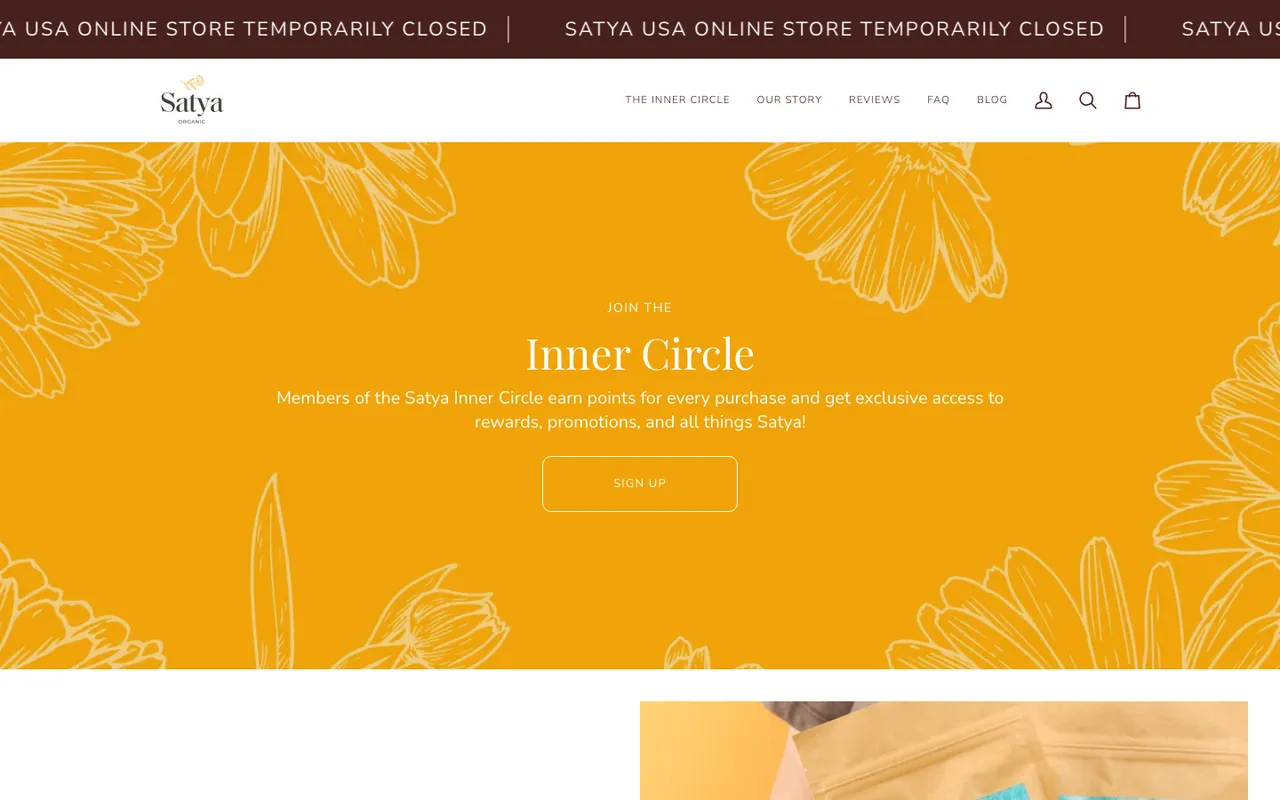
What it does: Satya's "Inner Circle" membership page leads with insider language ("Join the Inner Circle") and lays out the loyalty program in two blocks. "Ways to earn" is a grid of tiles: 1 point per dollar spent, 20 points when you sign up, 10 points for social follows, 30 points per social share, 50 points on your birthday, and $5 off per referral. "Ways to redeem" is a five-line list, from 100 points for $5 off to 500 points for $25 off. One caveat: when we checked on 11 October 2026, a banner said Satya's US online store was temporarily closed, though the Inner Circle page itself was still up.
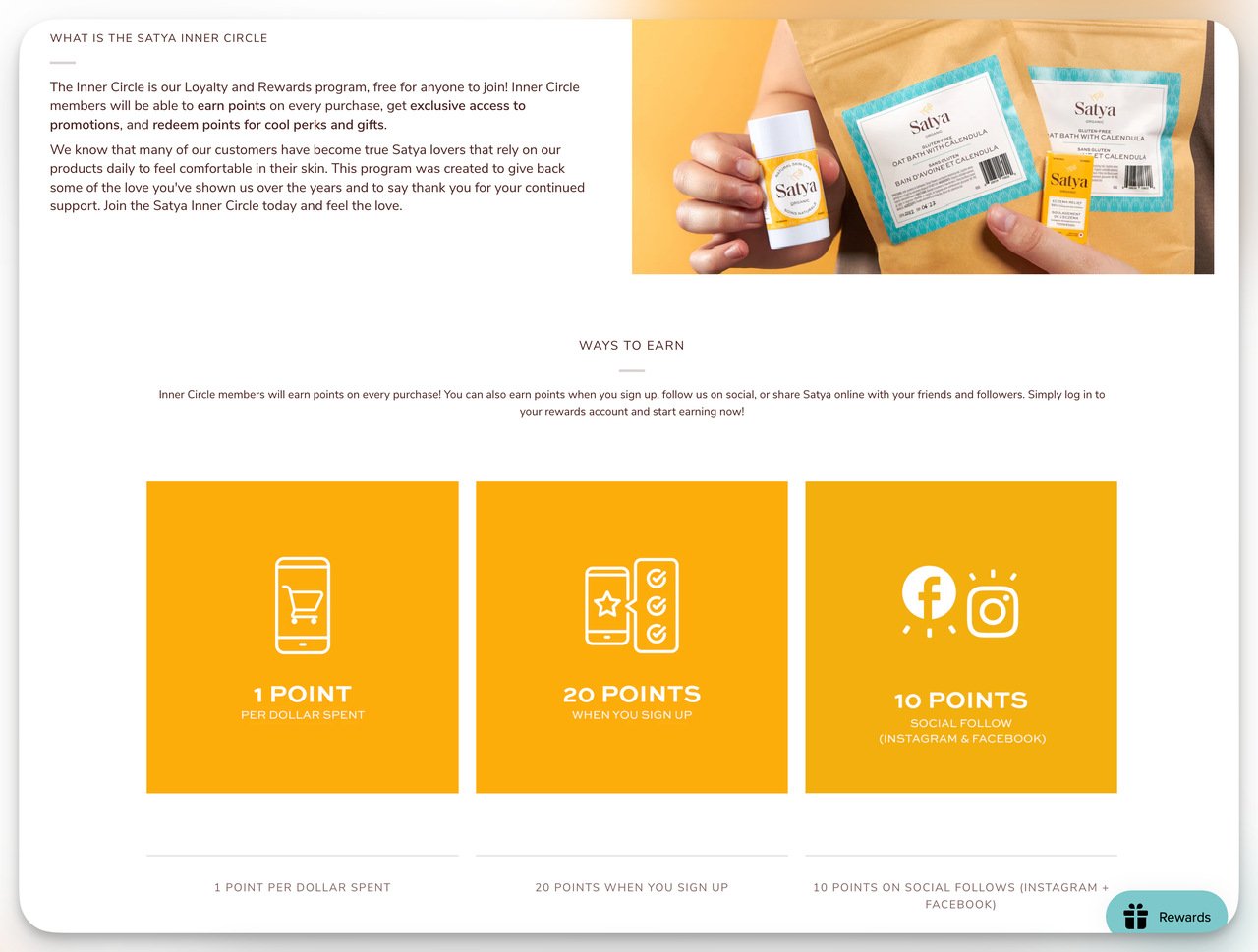
Why it works: Loyalty pages fail when they explain the program in paragraphs. Satya's grid format compresses every rule into a single glance, and the redeem list turns points into dollars without math. The 20-point welcome bonus makes the first action ridiculously easy, and once a shopper has even a tiny balance, sunk-cost psychology starts working in your favor.
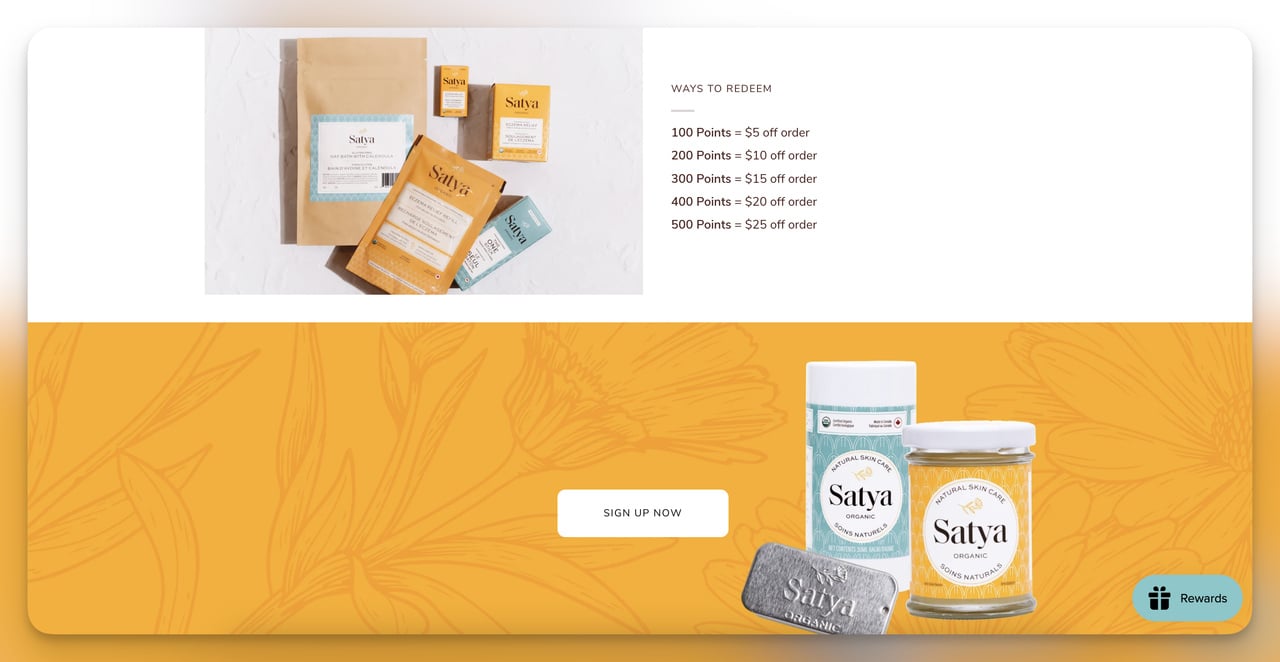
Steal this idea: Lay your loyalty program out in two blocks: ways to earn as tiles, ways to redeem as a short points-to-dollars list. Give a small balance for signing up so the program feels active from minute one.
13. Parachute: blog landing page
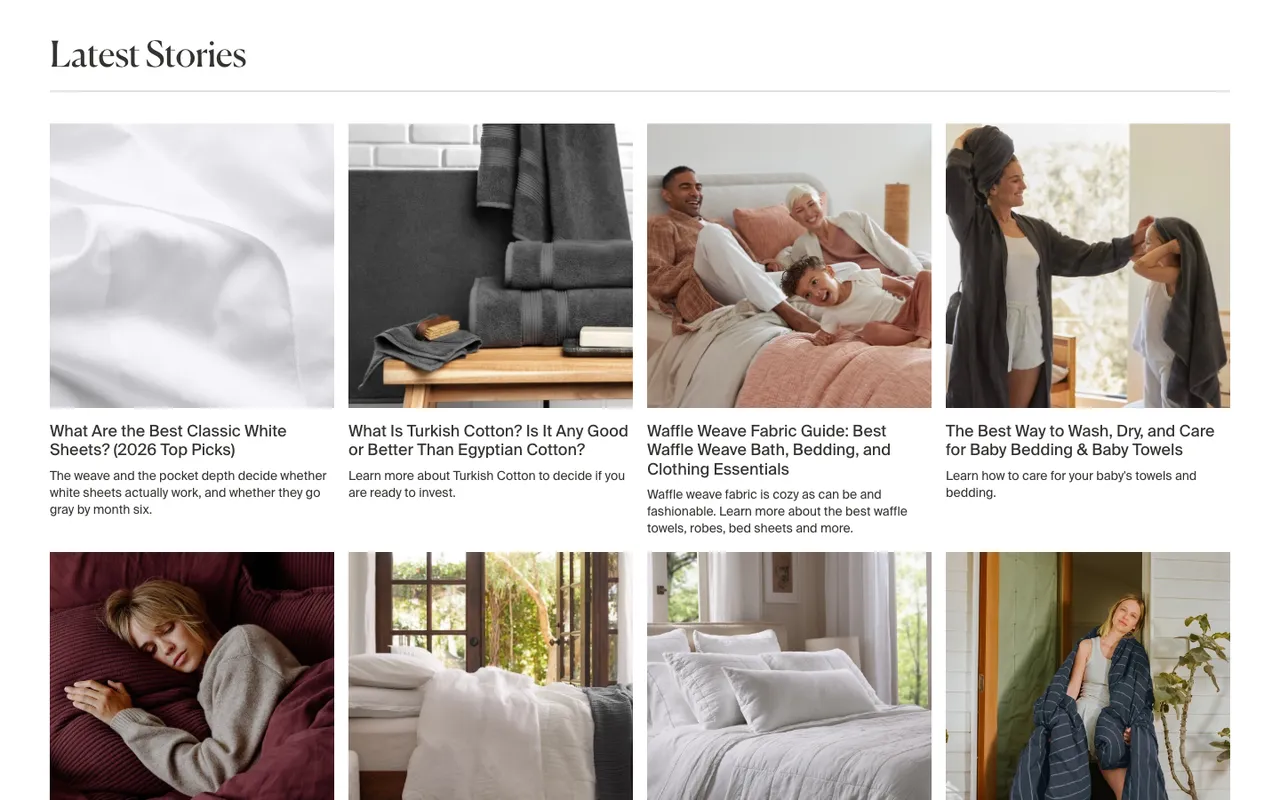
What it does: Parachute, a home-goods brand, used to run its blog on a separate blog subdomain; the blog now lives on the Shopify store itself. Under a full-width "Parachute Blog" hero, a "Latest Stories" grid lists posts written as buying questions ("What Is Turkish Cotton? Is It Any Good or Better Than Egyptian Cotton?", "Duvet vs Comforter: Key Differences & How to Choose"), each with a one-line summary under the title. The store's product menu and cart stay at the top of every post.
Why it works: A content hub earns its place when it answers pre-purchase questions, because that's the moment the reader is comparing options. Parachute's titles mirror the questions shoppers type into search, the one-line summaries tell the reader what they'll learn before the click, and keeping the blog on the store means every guide is one click from the bedding it discusses.
Steal this idea: If you run a blog with 30+ posts, write the titles as the questions your buyers ask before they buy, put a one-line answer under each title, and host the blog on your Shopify store so the product menu follows the reader into every post.
How to build a landing page in Shopify
Once you have decided what type of page to build (and which of the 13 above to copy), you have four ways to actually ship it on Shopify. Each method has a different floor for technical skill and a different ceiling for design control. Pick based on the urgency of your campaign and how much customization you actually need. We checked each method against Shopify's help center and developer docs on 11 October 2026.
1. Shopify Liquid templates (requires coding)
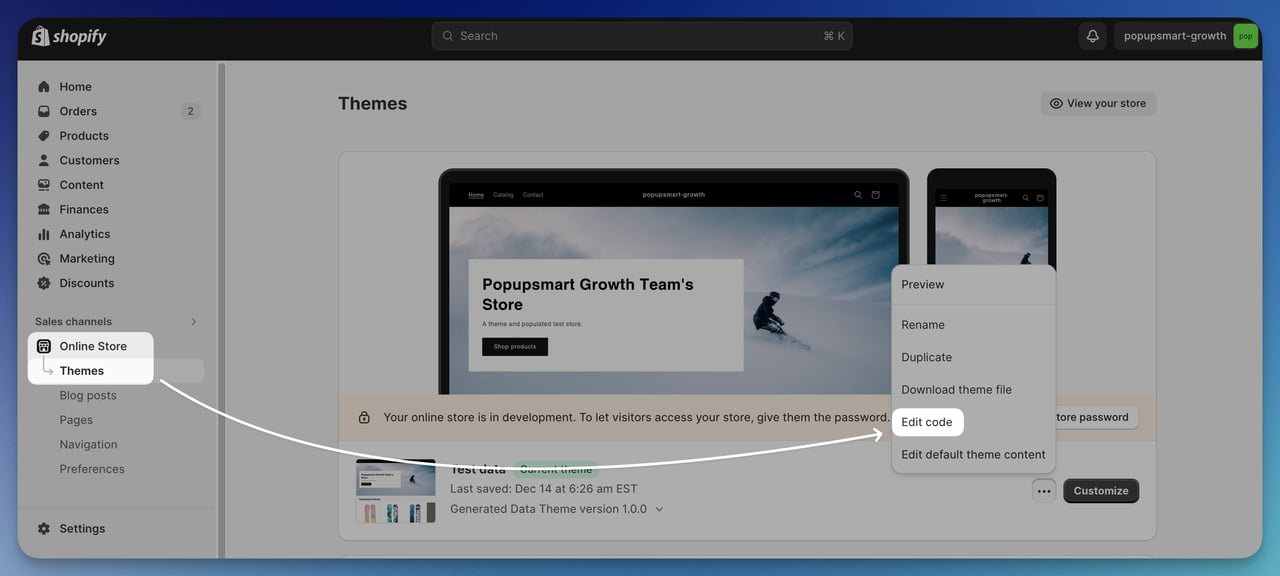
Liquid is Shopify's template language, and writing a custom Liquid file gives you complete control over structure and layout. The trade-off is time. In your admin, open Online Store, click the "…" menu next to your theme, then click Edit code (Shopify recommends duplicating the theme first as a backup). In the templates folder, add a new file named after the page type and your template, like page.custom-landing.liquid; Shopify names alternate templates template-name.template-suffix.file-type. Build the page using HTML and Liquid tags: {{ page.title }} and {{ page.content }} print the page you create in the admin, and {% form 'customer' %} creates a newsletter sign-up form. Save, go to Pages, create the page, and assign your template from the Theme template dropdown. Liquid is the right call when you need a one-of-one design that no theme or app can deliver.
Here is a minimal landing page template you can start from. It passed Shopify's Theme Check in a scratch theme on 11 October 2026:
{%- comment -%} templates/page.custom-landing.liquid {%- endcomment -%}
<section class="landing">
  <h1>{{ page.title }}</h1>
  <div class="rte">{{ page.content }}</div>

  {% form 'customer' %}
    {% if form.posted_successfully? %}
      <p role="status">Thanks, you're on the list.</p>
    {% else %}
      <label for="landing-email">Email</label>
      <input id="landing-email" type="email" name="contact[email]" autocomplete="email" required>
      <button type="submit">Get early access</button>
    {% endif %}
  {% endform %}

  <a href="{{ routes.all_products_collection_url }}">Shop all products</a>
</section>
According to Shopify's developer docs on email consent, the customer form with a contact[email] field creates a customer with that email and marks them as accepting email marketing. If you want sections that a non-developer can rearrange later, use a JSON template instead; Shopify's docs recommend JSON templates whenever a template should hold sections.
2. Shopify product collections
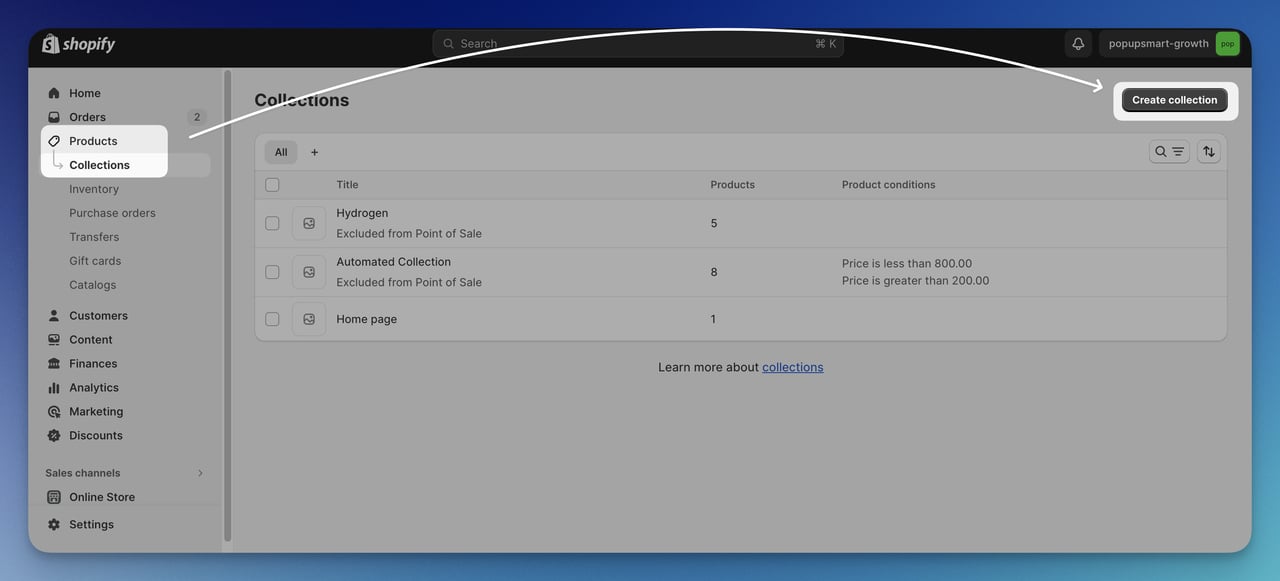
For collection-style landing pages (think Allbirds wet-weather collection or FIGS bestsellers), the native Collections feature in Shopify is fast and free. Go to Products, then Collections, click Add collection (Create collection in admins still on the legacy collections model), and add products either manually or with conditions like "tag includes wet-weather." Give the collection a descriptive title and an SEO-friendly URL handle. Choose a collection image that crops cleanly to 1:1, fill in the search engine listing preview, and assign a template if you have multiple collection layouts. Shopify's help center notes that a new collections model is replacing the legacy manual and smart collections, so the labels in your admin may differ slightly. The result is a landing page for a category-level search without any custom code.
3. Shopify Online Store 2.0 sections
Online Store 2.0 (Shopify's JSON template format) lets you build landing pages by dragging pre-built sections, hero, image-with-text, FAQ, testimonial, into a custom page template. No code required. Go to Online Store, click Edit theme, open the template drop-down at the top (it starts on "Home page"), pick Pages, then Create template; Shopify's help center on templates has the same steps. Pick the sections you want, reorder them, and configure each block in the side panel. Then assign the template in Online Store > Pages through the Theme template drop-down. This is the right starting point for most merchants who do not have a developer on retainer.
4. Page builder apps from the Shopify App Store
If sections are not enough and you do not want to write Liquid, page builder apps in the Shopify App Store give you drag-and-drop control with templated starting points. The App Store's Page builder category listed 384 apps on 11 October 2026. Pick one, install it, choose a template that matches your campaign type (product launch, sale, lead capture), and customize from there. The trade-off is performance, since builder apps load extra JavaScript that can push your page past the 2.5-second mark, so always run a Lighthouse test before publishing.
Free Shopify landing page templates: where to find them
"Shopify landing page templates" usually means one of three things, and all three are free to start:
- A free theme. The Shopify Theme Store's free themes listed 24 themes on 11 October 2026, among them Dawn, Horizon, Sense, Crave, Refresh and Studio. Every theme has a default page template you can build on.
- A page template in your theme. In the theme editor, Create template makes a copy of an existing template that you can turn into a landing page layout without affecting your other pages (method 3 above).
- A builder app's template library. Page builder apps ship their own landing page templates; check each app's listing for a free plan or trial.
Presell pages for Shopify
A presell page sits between an ad and the product page: an advertorial, a "5 reasons" listicle, a quiz or a founder story that warms up cold traffic before it sees the price. Its only job is to make the product page convert better. On Shopify you build one like any other landing page (a page with its own template, usually without the main navigation), point the ad at it, and send its CTA to the product page. Keep the claims on a presell page as checkable as the ones on your product page; it's still your store talking. Cowboy's test-ride page and Parachute's buying guides (examples 4 and 13) do a presell job for expensive, considered purchases.
Shopify collection image size
Shopify's help center (checked 11 October 2026) gives these limits and recommendations for collection images:
| What | Shopify's figure |
|---|---|
| Maximum size for product and collection images | 5000 x 5000 px, or 25 megapixels |
| Maximum file size | Smaller than 20 MB |
| Square product images that usually display best | 2048 x 2048 px |
| Best dimensions for your collection banner | Depends on your theme and theme version |
The figures come from Shopify's product media types page, which covers product and collection images. Shopify's theme images page adds that sections such as image banners crop an image to the shape of their image area, so keep one aspect ratio across your collection images, set a focal point on the subject, and check your theme's documentation for its preferred size.
Common Shopify landing page mistakes to avoid
The same handful of mistakes show up over and over. Fix these before you spend a dollar on traffic.
Mistake 1: Sending paid traffic to your homepage. Your homepage is a navigation menu with a hero image. It tries to please six visitor types at once and converts none of them well. If you are running Meta or Google ads, send every click to a dedicated landing page that matches the ad creative word for word.
Mistake 2: Adding too many CTAs. Every extra button splits attention. If your landing page has "Buy Now," "Learn More," "Sign up for newsletter," "Follow us on Instagram," and "Read the founder story," pick one and delete the other four. The discarded ones can live in the footer.
Mistake 3: Hiding social proof below the fold. Star ratings, review counts, press mentions, and trust badges should sit within the first scroll. By the time the buyer scrolls past the hero, they have already half-decided whether to bounce.
Mistake 4: Using stock photography. Generic stock photos signal "we did not invest enough to take our own photos," and shoppers feel it even if they cannot articulate it. Real product shots, even imperfect ones, are more believable than polished stock.
Mistake 5: Ignoring page speed. A slow hero image costs you visitors before they ever see your offer. Compress images, lazy-load below-the-fold content, and audit third-party scripts ruthlessly, aiming for a Largest Contentful Paint of 2.5 seconds or less.
Mistake 6: Skipping mobile testing. Build the mobile version first. Test it on a real phone, not just a browser resizer. The thumb zone is real, the keyboard covers half the screen during form fills, and 16px is the minimum readable font size without zoom.
Mistake 7: Forgetting the post-click experience. A shopper who clicks "Add to cart" should land on a checkout, not a 12-step funnel with upsells, downsells, and order bumps. Every extra step after the primary CTA is another chance to lose the buyer. Optimize the page, then leave the checkout alone.
Where a popup fits on a Shopify landing page
Sometimes you don't need a new page at all. A popup can do a landing page's job on a page you already have, and two cases come up again and again on Shopify: a waitlist popup on a coming soon collection, and a first-order discount popup for a visitor who isn't ready to buy. mnml (example 6) runs the second one on its Coming Soon page, a "take 20% off your first order" email popup, alongside the product-level waitlist button. Our coming soon popups use case covers when to show one.
Popupsmart builds that kind of popup without code, starting from one of its popup templates: it works on Shopify, WordPress, Webflow, Wix, Squarespace or the site your team built, and it sends the leads to the email tool you already use. In Popupsmart's 2026 benchmark, 35% of popup campaigns on Shopify stores ask for an email or phone number, against 25% on WordPress sites.
Pick three Shopify landing pages to ship
You do not need 13 landing pages. You need three that match your funnel: one product page like Bruvi for your hero SKU, one lead capture page like Cowboy if your AOV is above $300, and one collection or seasonal page like Allbirds or Press for your top paid-traffic keywords. Steal the patterns from the brands above, write copy in your own voice, then ship the rough version this week and refine based on real conversion data instead of internal opinion. The brands on this list did not start with perfect pages either. They shipped, measured, and rebuilt. The ecommerce shoppers waiting on the other side of your ad budget will tell you the rest.
Frequently asked questions
Where can I find a free Shopify landing page template?
Start in the Shopify Theme Store, which listed 24 free themes on 11 October 2026, among them Dawn, Horizon, Sense and Crave. Inside your theme, you can create a new page template from the theme editor, based on an existing one, and build the landing page from its sections. Page builder apps in the Shopify App Store add their own template libraries if you need more layouts.
What is the best Shopify landing page builder?
The honest answer is: the best builder is the one that gets out of your way. If your theme already supports Online Store 2.0 sections, start there before paying for an app. If you need pixel-level control without writing Liquid, page builder apps from the Shopify App Store (its Page builder category) all do roughly the same job, so pick the one with the cleanest editor UI and a free trial. Whichever you pick, audit page speed before publishing.
What are the best practices for Shopify landing page design?
Stick to one conversion goal per page, lead with a value-prop headline that names the buyer and the outcome in one sentence, use a hero video or product photo (not stock), put social proof above the fold, write CTA copy that restates the benefit ("Get my first bag" beats "Buy now"), design mobile-first, and aim for a Largest Contentful Paint of 2.5 seconds or less, which Google calls good. For form-heavy pages, see our roundup of Shopify form examples.
How do Shopify landing pages differ from regular product pages?
A product page is a permanent template tied to one SKU and lives at /products/[handle]. It supports all variants, inventory, reviews, and recommended-product blocks. A landing page is purpose-built for a specific campaign or audience segment and lives at /pages/[handle]. It usually strips out navigation, focuses on one offer, and gets paused or archived when the campaign ends. Use product pages for organic traffic and landing pages for paid.
How long should a Shopify landing page be?
Long enough to answer every objection a first-time shopper has, no longer. For a $25 impulse buy, that might be 400 words and one hero image. For a €3,299 product like Cowboy's Cruiser e-bike, it might be 1,500 words plus video, FAQ, and a step-by-step explainer. Track scroll depth with a heatmap tool such as Hotjar. If most shoppers bail before the third screen, your page is probably too long, or your above-fold pitch is too weak.
Can I A/B test Shopify landing pages?
Yes, and you should. Shopify's Rollouts (Markets > Rollouts in the admin) include an Experiment type that splits visitors between a control and a treatment of your main theme, and Shopify's help center says experiments need the Grow plan or higher. On other plans, use a testing app from the Shopify App Store. Test one variable at a time (headline, hero image, CTA copy, or button color), and only ship the winner if the lift is statistically significant.
Further reading on Shopify and landing pages:
Top 17 Shopify Form Examples for Creating Effective Forms
Email Capture Popup Examples for Shopify (+25 High-Converting)