ChatGPT
 Perplexity
 Claude
 Grok
Grok Google AI Mode
Plenty of marketers first treat the concept as just “putting a product on the homepage.” But choosing what to feature, where, and for how long is a merchandising decision. Done well, it means shoppers spend less time searching and more time buying.
The examples below show how real stores do it, and the platform section shows how to set it up yourself.
What Are Featured Products? Definition and Why They Matter
A featured product is any item you choose to highlight on your storefront or marketing channels. Unlike popular products (which earn their spot through sales volume alone), featured products are hand-picked by your team to serve a business goal: launching a new line, clearing seasonal inventory, or pushing high-margin items.
The distinction matters. Popular products reflect what customers already want. Featured products let you shape what customers see first. That control is why featuring products works as a nudge marketing tactic: you're guiding browsing behavior without restricting choice.
Three reasons featured products earn their spot in your ecommerce strategy:
1. Focused visibility: Highlighting a curated set of 4-8 items cuts through catalog overwhelm. Shoppers browsing a 500-product store don't want to evaluate everything. A featured section gives them a starting point.
2. Brand positioning: The products you feature signal what your brand stands for. A sustainable fashion brand featuring organic cotton basics tells a different story than one featuring sequin party dresses.
3. Purchasing momentum: NielsenIQ's 2026 report A Tale of Two Consumers found that consumers "are willing to trade up when a product earns the premium, and they're just as willing to trade down when that value is unclear." Featured placement can nudge that trade-up behavior by putting premium items where shoppers notice them first, next to a reason to pay more.
How we chose these 12 featured products examples
These 12 examples come from fashion, home goods, outdoor gear, and electronics stores, picked on four criteria. We checked every store's live site again in October 2026, and the screenshots below come from that check:
Placement strategy: Does the brand use a distinct, labeled section rather than just promoting items randomly? We looked for deliberate UI choices that separate featured products from the rest of the catalog.
Visual execution: Do the featured items include product imagery within the navigation or section, not just text links? A picture tells a shopper what a link leads to before they click.
Variety of approach: We wanted examples across different placement types (navbar dropdowns, side menus, top-level tabs, homepage sections) so you can find an approach that fits your store layout.
Reproducibility: Most examples here can be replicated by an ecommerce marketer with access to standard Shopify, WooCommerce, or custom theme tools. Image tiles inside a menu depend on what your theme supports.
Quick Overview of 12 Featured Products Examples
| # | Brand | Placement | Why It Works |
|---|---|---|---|
| 1 | Alo Yoga | Navbar mega menu | "New & Trending" column of curated shops captures browsing intent |
| 2 | Coop Sleep Goods (Pillows) | Navbar dropdown | "Best Seller" and "Consumer Reports Recommended" labels point to one pillow |
| 3 | Coop Sleep Goods (Sheets) | Navbar dropdown | Collection-level featuring reduces choice overload |
| 4 | Everlane (Cult Favorites) | Top-level menu tab | Editorial curation builds trust through "cult" framing |
| 5 | Everlane (New Arrivals) | Navbar dropdown | Pairs featured with trending for urgency |
| 6 | Everlane (Sale) | Navbar dropdown | Price-tier structure speeds deal hunting |
| 7 | Gymshark | Side menu with visuals | Collection photos in the menu show the product before the click |
| 8 | Hydro Flask | Mega menu column | "Featured" column comes before every category list |
| 9 | Patagonia | Top-level "Featured" tab | First tab in the navigation, on desktop and mobile |
| 10 | Dyson | Mega menu image tiles | Tech-forward imagery drives curiosity |
| 11 | Alo Yoga (Atelier) | Top-level tab with "New" badge | Novel products paired with visuals draw clicks |
| 12 | REI | Homepage product row | Popular and strategic picks share one tabbed row |
1. Alo Yoga: Curated Shops in the Mega Menu
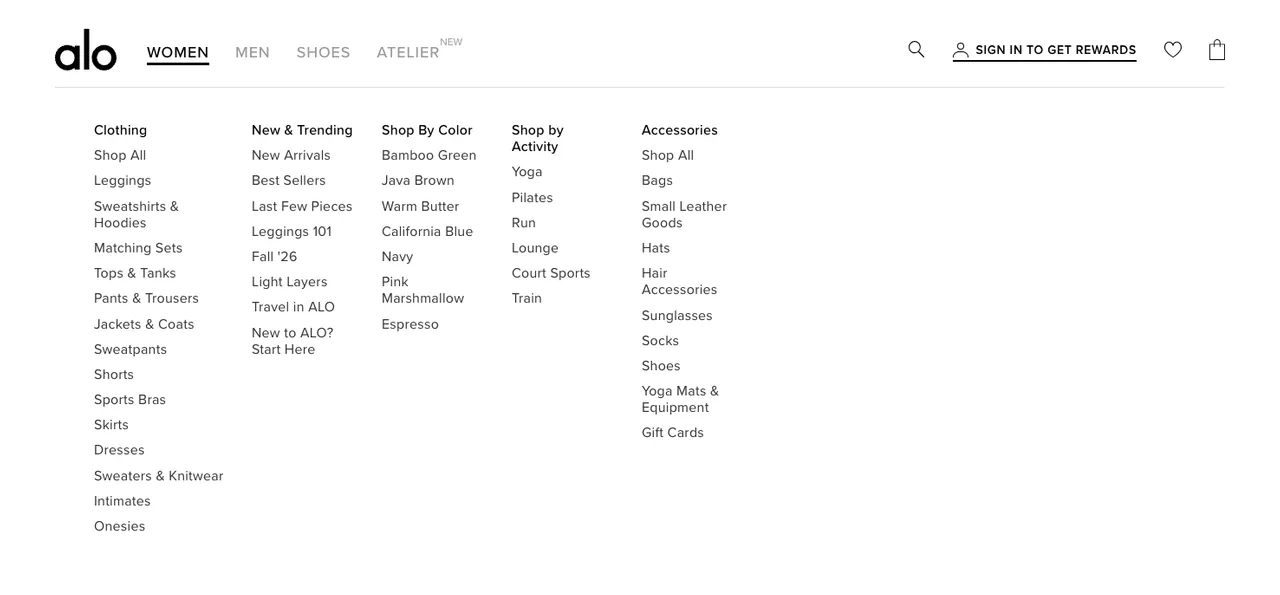
What works: Alo places a "New & Trending" column right after Clothing in its Women mega menu, near the top-left: the first thing your eye hits when hovering over a category. The section groups curated collections (not individual products) so shoppers can browse by theme rather than SKU: New Arrivals, Best Sellers, Last Few Pieces, Fall '26, Travel in ALO and more. The menu is clean, with enough whitespace to keep it scannable despite listing 15+ links. On mobile, the same menu turns into a grid of image tiles, with Best Sellers second and a "Featured Edits" tile further down.
Why it works: Eye-tracking research consistently shows users scan web pages in an F-pattern, reading the top-left corner first. By anchoring its curated shops there, Alo captures attention at the exact moment a shopper is deciding where to browse. Grouping by collection rather than individual product also reduces decision fatigue. You're choosing between eight themes, not hundreds of items.
Key takeaway: Position your featured section at the top-left of dropdown menus. Group products into themed collections of 4-6 rather than listing individual SKUs to cut decision fatigue.
2. Coop Sleep Goods (Pillows): labels that point to one pillow
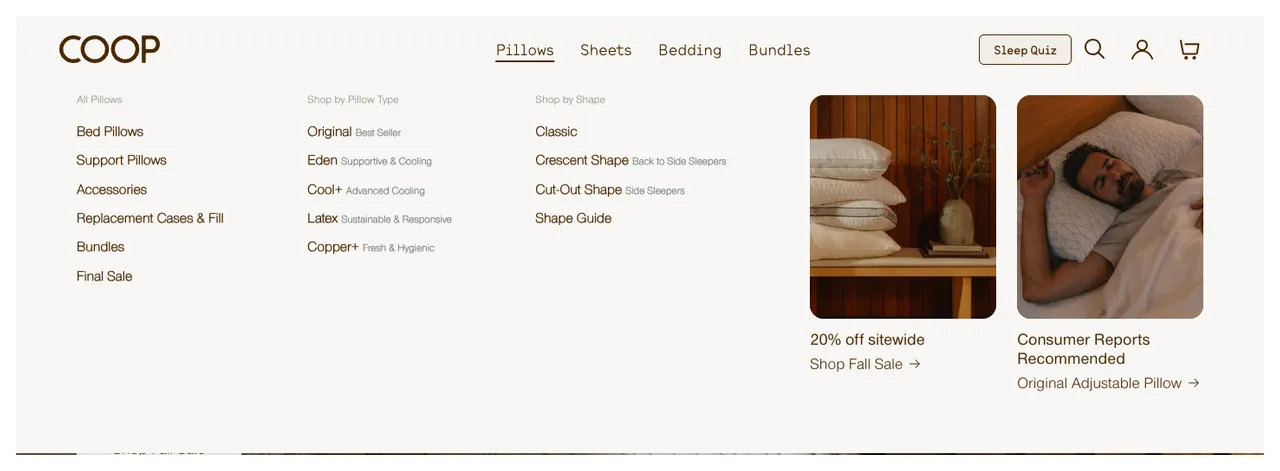
What works: Coop's Pillows dropdown no longer has a separate "Featured" box, so the labels do the featuring. In the Shop by Pillow Type column, the Original pillow carries a "Best Seller" tag, and an image tile on the right spotlights the same Original Adjustable Pillow under the line "Consumer Reports Recommended." The tags do double duty: they tell shoppers where to start, and they tell them why.
Why it works: Social proof (one of the principles in Cialdini's influence framework) says people look to other people's choices when they're unsure. A "Best Seller" tag is proof from other buyers, and "Consumer Reports Recommended" adds an independent expert. Together they nudge the shopper without the pushy feel of countdown timers or a manufactured sense of urgency. Both reduce the anxiety of choosing incorrectly.
Key takeaway: Add status labels like "New" or "Bestseller" to featured items. Each label serves a different buyer psychology: novelty seekers gravitate to "New," risk-averse buyers trust "Bestseller."
3. Coop Sleep Goods (Sheets): Collection-Level Featuring
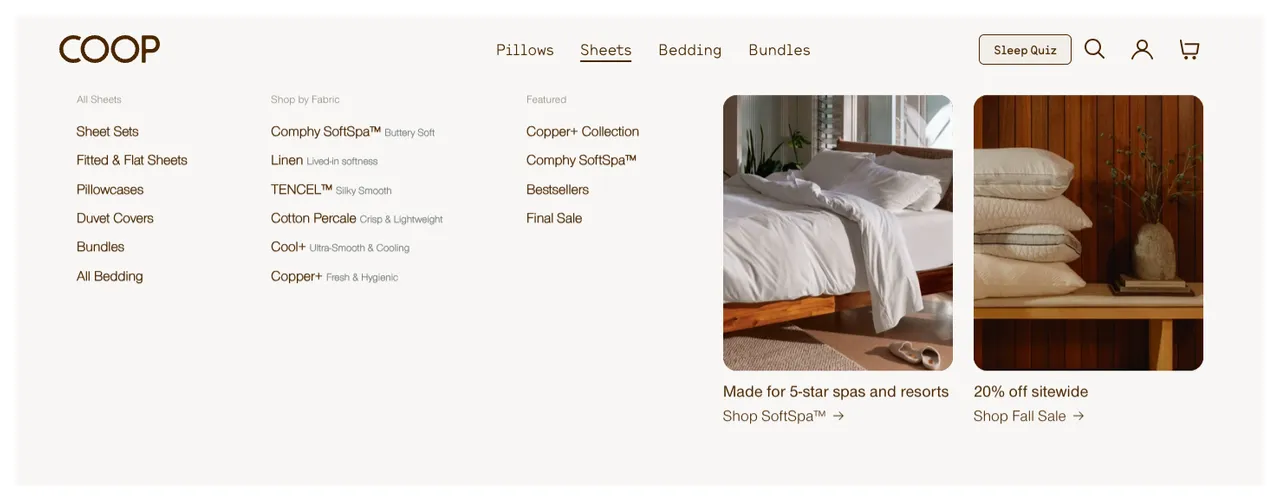
What works: Instead of featuring individual sheet sets, Coop highlights entire collections in a "Featured" column: "Copper+ Collection," "Comphy SoftSpa™," "Bestsellers" and "Final Sale." The featured area is visually separated from the All Sheets and Shop by Fabric lists, next to two image tiles. This approach works because sheet shopping involves multiple decisions (material, thread count, size, color), and collections pre-bundle those decisions.
Why it works: Hick's Law says the time to make a decision increases logarithmically with the number of options. By featuring collections instead of individual products, Coop reduces the effective choice set from dozens of sheet variations to four clear paths. Shoppers after the "Fresh & Hygienic" fabric go straight to "Copper+ Collection." Deal hunters take "Final Sale." Everyone else starts with "Bestsellers." It's efficient, and efficient browsing converts better.
Key takeaway: For product categories with many variants (bedding, apparel sizes, tech accessories), feature collections rather than individual items. Let the collection page handle the granular decisions.
4. Everlane (Cult Favorites): Editorial Trust Through Curation
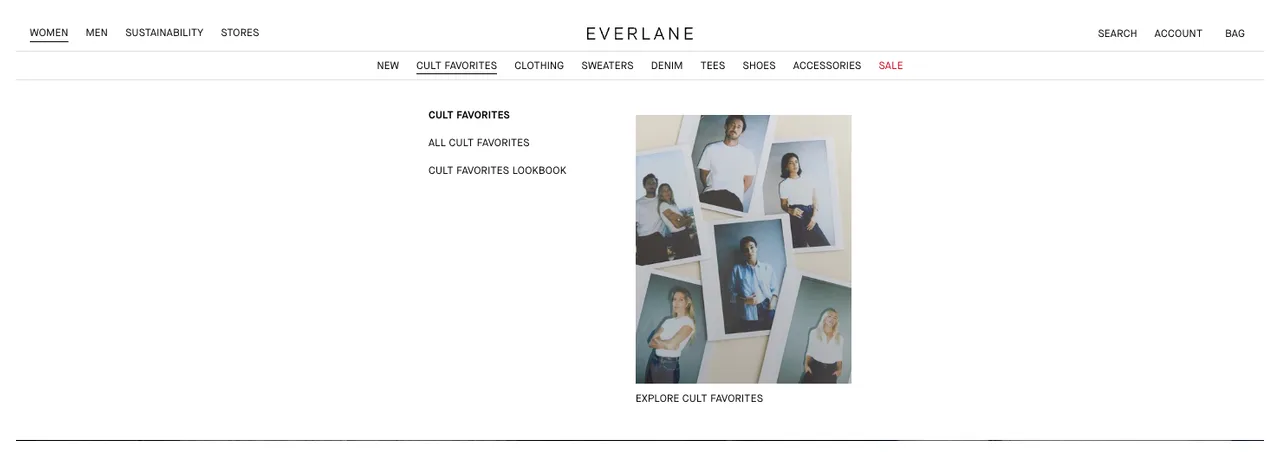
What works: Everlane labels their featured section "Cult Favorites," not just "Featured." That single word, "Cult," transforms a generic product list into an editorial recommendation. The section sits at the top-left of the dropdown, using bold formatting to stand out from secondary navigation links below it. The label also gets its own tab in the main menu, second only to New, and a "Shop Cult Favorites" link sits in the Featured column of the New dropdown. Inside the tab, the links are few (All Cult Favorites, Cult Favorites Lookbook), and a photo grid of people wearing the pieces does the rest.
Why it works: Social proof drives purchasing, but not all social proof is equal. "Bestseller" says "other people bought this." "Cult Favorite" says "people are obsessed with this." The emotional weight is different. Cult implies loyalty, community, and repeated purchases. For a brand like Everlane that competes on transparency and sustainability (not price), that community signal carries more weight than a sales volume metric.
Key takeaway: Rename your featured section to match your brand voice. "Staff Picks," "Cult Favorites," or "Community Loved" each tell a different story than generic "Featured" labels.
5. Everlane (New Arrivals): Pairing Freshness with Trends
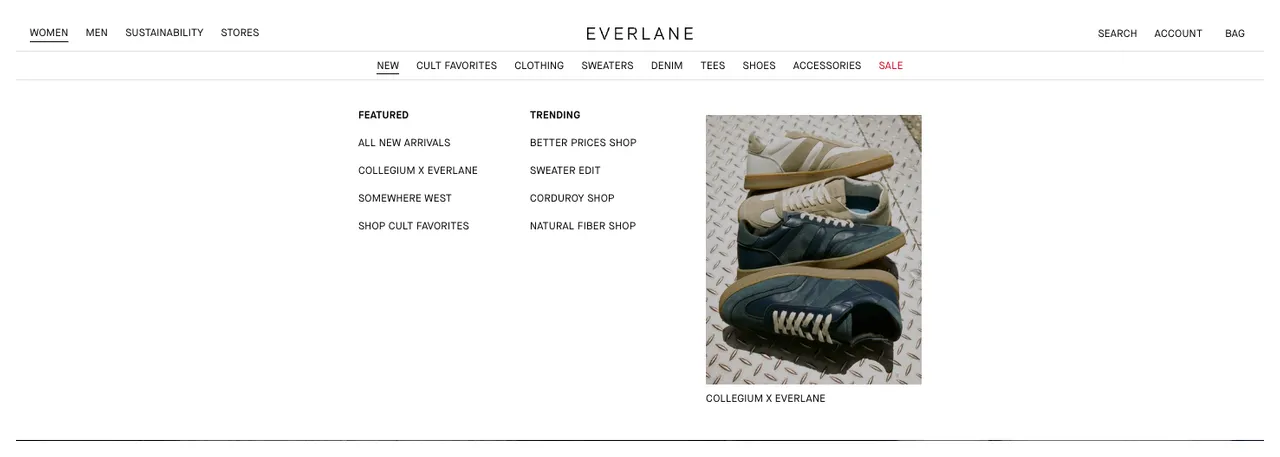
What works: This dropdown places "Featured" next to "Trending" and a product photo in a three-column layout. Each column serves a different browsing intent: discovery (the photo of the newest collaboration), validation (Trending), and curation (Featured). Featured holds All New Arrivals, Collegium x Everlane and the Somewhere West collection; Trending holds edits like the Sweater Edit and Corduroy Shop. The visual hierarchy is flat, meaning no single column dominates. Shoppers self-select their preferred browsing mode.
Why it works: According to Salsify's 2026 Consumer Research, 22% of shoppers now use AI search tools like ChatGPT for product research. That shift means shoppers arrive at your site with more refined intent. By offering three distinct entry points in a single menu, Everlane accommodates the trend-aware shopper, the novelty seeker, and the brand loyalist in one UI element.
Key takeaway: Don't isolate your featured section. Place it alongside New Arrivals or Trending content so shoppers with different motivations can each find their entry point from the same menu.
6. Everlane (Sale): Price-Tier Navigation for Deal Hunters
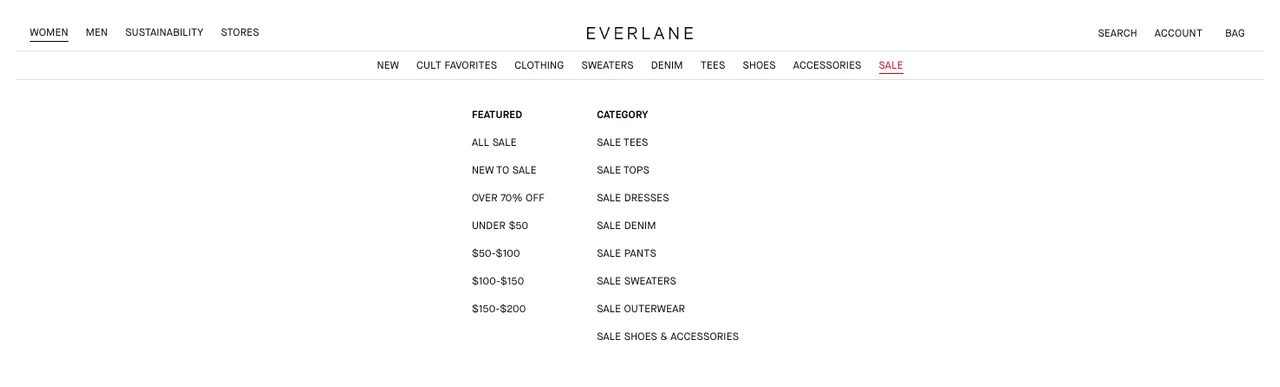
What works: In Everlane's Sale dropdown, the featured section organizes items by price point rather than product category. Shoppers see groupings like "Under $50," "$50-$100" and "$100-$150" in the Featured column, while a separate Category column lists Sale Tees, Sale Dresses and the rest. This structure acknowledges that sale shoppers have a specific budget in mind. They don't want to browse by category and then filter by price. They want to start with price and find products within that range.
Why it works: Mental budgeting at work: sale shoppers set a budget before clicking. If the first thing they see matches that budget range, they feel validated and stay longer. Everlane's price-tier structure removes the friction of filtering, sorting, and potentially finding nothing in their range. It's a pre-filtered experience built into the navigation itself.
Key takeaway: For sale or clearance sections, organize featured products by price tier instead of product category. Sale shoppers think in dollars, not in product types.
7. Gymshark: Visual Product Previews in the Menu
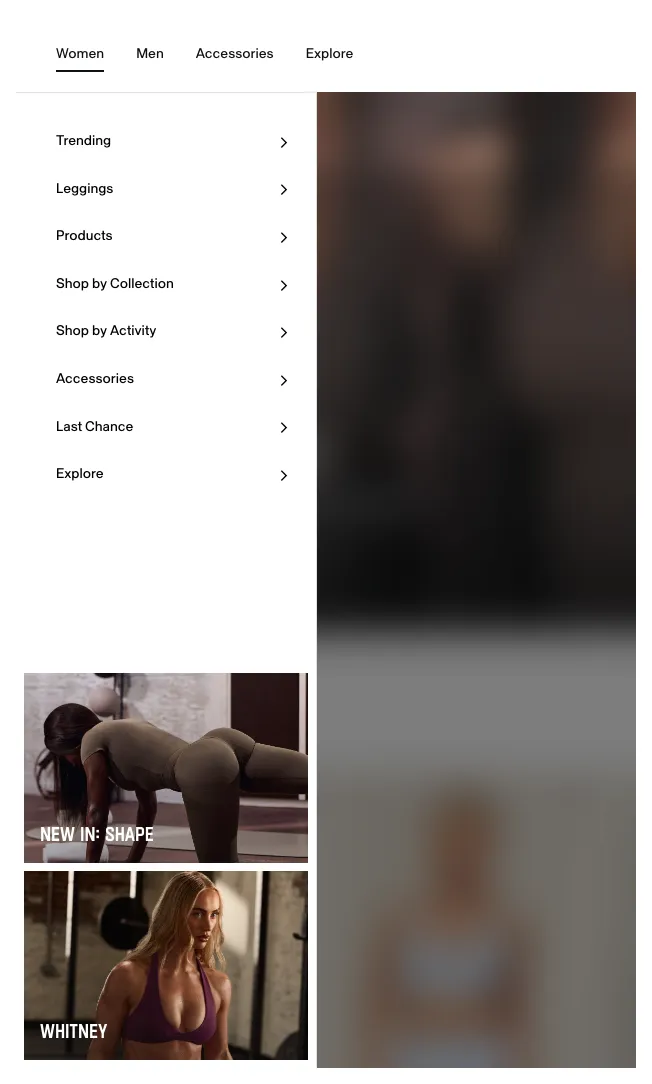
What works: Gymshark's Women menu opens as a side panel and includes actual product photos. Not thumbnails buried in a list, but prominent lifestyle-style images that show the product in context. The top of the panel handles standard category navigation (Trending, Leggings, Products, Shop by Collection), while the bottom is reserved exclusively for featured items with visuals: "NEW IN: SHAPE" and "WHITNEY" when we checked in October 2026.
Why it works: A photo answers "what is this?" before a shopper reads a word. By adding product images to the navigation menu, Gymshark turns a functional UI element into a small shop window. Compare the click-through rate of image tiles with your text links before you decide which one earns the space. For an activewear brand where fit and style are primary purchase drivers, showing the product early in the browsing journey is especially effective.
Key takeaway: If your products are visually driven (fashion, food, home decor), add product images to your navigation menu's featured section. Text links work for commodity products, but visual products need visual discovery.
8. Hydro Flask: a Featured column ahead of the categories
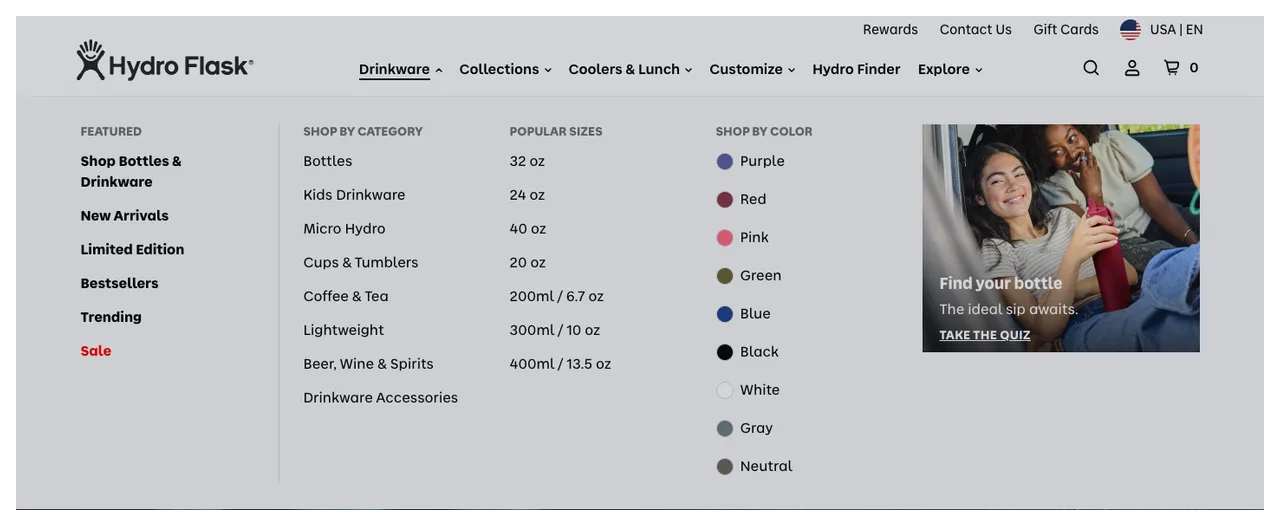
What works: Hydro Flask gives "Featured" its own column at the far left of the Drinkware mega menu, set apart by a thin divider from Shop by Category, Popular Sizes and Shop by Color. Within the column, you'll find Shop Bottles & Drinkware, New Arrivals, Limited Edition, Bestsellers, Trending and Sale. The "Shop Bottles & Drinkware" link at the top catches anyone who wants to browse the full range without committing to a subcategory.
Why it works: By putting "Featured" first in the dropdown (ahead of category, size and color), Hydro Flask signals that these products deserve special attention. The structure (Limited Edition, Trending, New Arrivals) serves three buyer types: collectors who want unique items, trend followers who want what's hot, and regular shoppers checking in on what's new. The "Shop Bottles & Drinkware" link provides an escape hatch for shoppers who don't fit neatly into any subcategory.
Key takeaway: If you rotate featured products regularly, give them the first column of each dropdown rather than burying them inside a product category. It trains repeat visitors to check "Featured" first on each visit.
9. Patagonia: Featured as the first tab
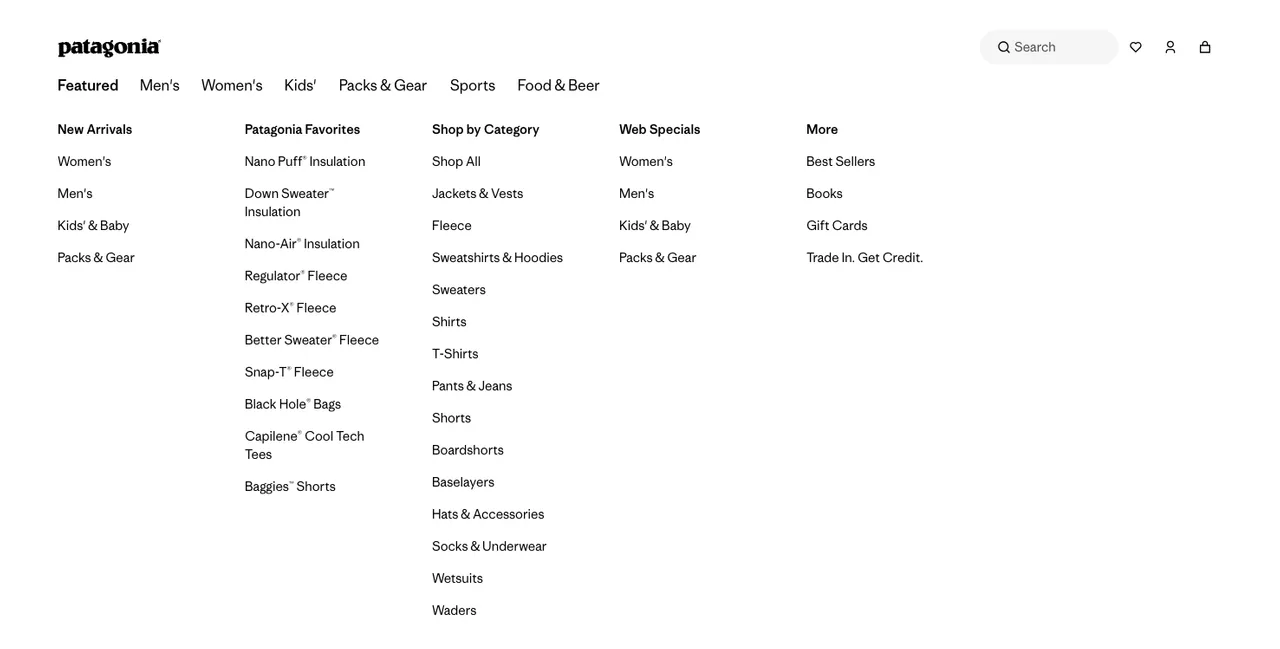
What works: Patagonia positions "Featured" as the first item in its main navigation, ahead of Men's, Women's and Kids'. No scrolling required. No competing elements above it. The simplicity here is the strategy. The dropdown holds New Arrivals, a "Patagonia Favorites" list of the brand's best-known lines (Nano Puff® Insulation, Better Sweater® Fleece, Black Hole® Bags and more), Shop by Category and Web Specials. In the mobile menu, "Featured" is also the first item, which means one tap to access curated products.
Why it works: Menu order is a ranking. By placing "Featured" before the gender and category tabs, Patagonia removes one of the biggest UX friction points in a large catalog: knowing where to start, especially on a small screen. The "Patagonia Favorites" list also teaches first-time visitors which products the brand is known for. First position in the menu means first seen, first tapped.
Key takeaway: Put your featured section as the first item in your navigation, on desktop and in your mobile menu. Every extra scroll or tap stands between a shopper and the products you most want them to see.
10. Dyson: new machines shown as pictures in the menu
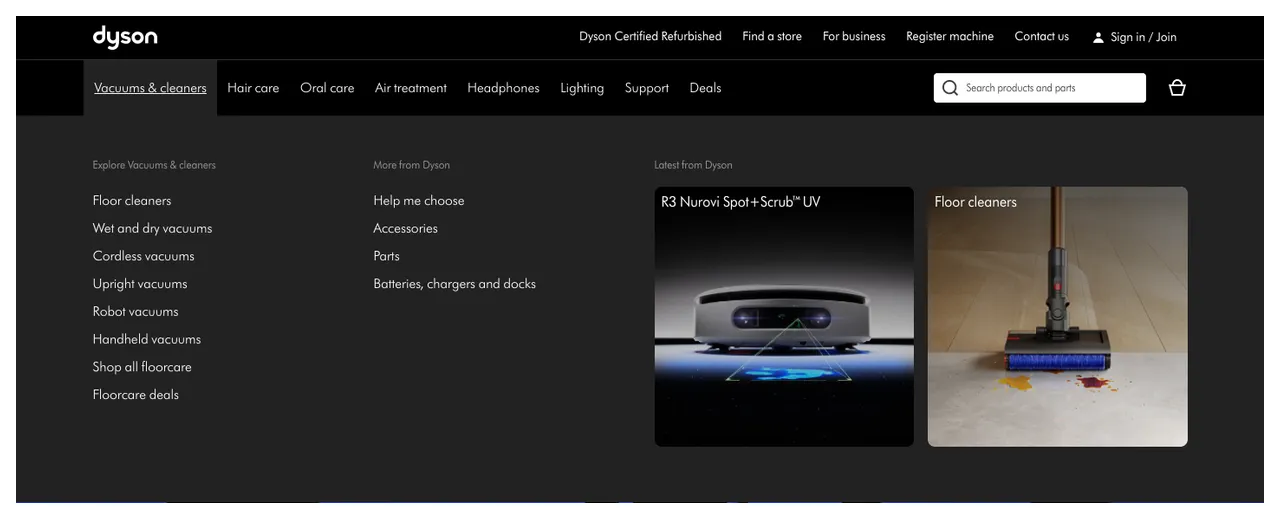
What works: Under its "Vacuums & cleaners" category, Dyson adds a "Latest from Dyson" area highlighting its newest products as large image tiles: in October 2026, the R3 Nurovi Spot+Scrub™ UV and the Floor cleaners range. Each featured item has a product image next to its name, so the menu feels more like a shop window than a navigation list. The pairing of product name plus image works especially well for tech products where the form factor matters. Dyson's homepage repeats the idea with a row headed simply "Featured," where product cards carry "New" and "Special edition" labels.
Why it works: Tech products benefit from showing, not telling. An "R3 Nurovi Spot+Scrub™ UV" link means little to someone unfamiliar with the range. But the same link alongside an image of the actual machine instantly communicates what it is and why it's interesting. Dyson uses featured placement within category-specific dropdowns (not just the main menu), which means the featured items are contextually relevant. You're already browsing vacuums, so seeing the newest vacuum feels natural, not promotional.
Key takeaway: For tech or innovative products, pair featured text links with product images inside category-specific menus. The image does more to explain the product than any label can.
11. Alo Yoga (Atelier): a new tab for a new category
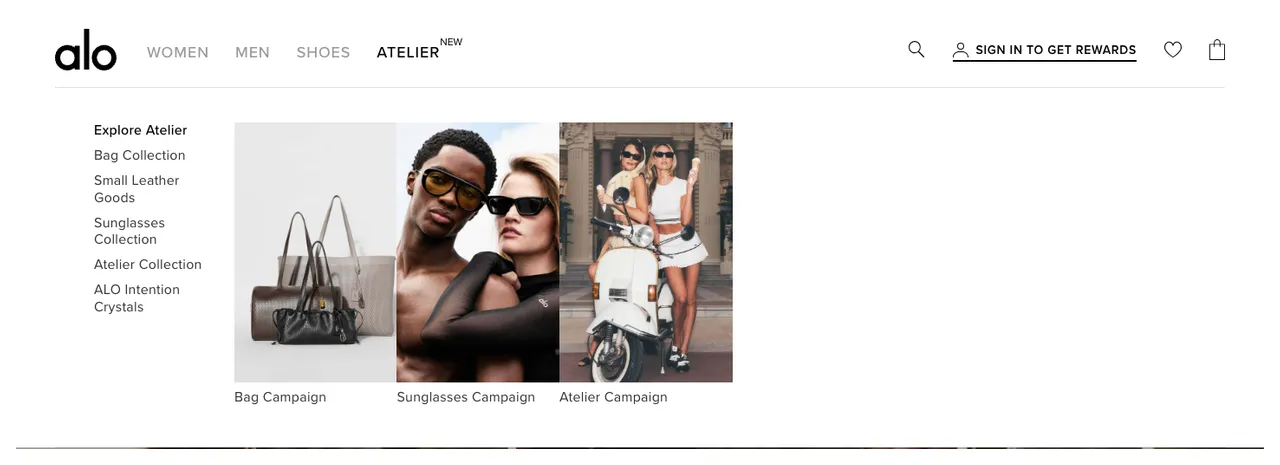
What works: Alo's "Atelier" tab, marked with a small "NEW" badge, sits in the main navigation next to Women, Men and Shoes. Its dropdown features items the brand wants to push beyond its traditional category: a Bag Collection, Small Leather Goods, a Sunglasses Collection and ALO Intention Crystals. Campaign images sit next to the bags, the sunglasses and the Atelier Collection, in the same visual style as the rest of the menu. What's unusual here is the product diversity: a yoga and activewear brand featuring leather goods and eyewear.
Why it works: Brand expansion relies on featured placement. When Alo launches products outside its core category, featuring them prominently signals to shoppers: "This is still us. We're growing." Without that featured placement, a new bag line would get buried in an accessories list and never find its audience among existing Alo customers. Featured products aren't just about highlighting bestsellers. They're about directing attention to items that need strategic visibility.
Key takeaway: Use featured placement for product launches outside your core category. New product lines need visibility you can't get from organic browsing behavior alone.
12. REI: one homepage row, four kinds of featured products
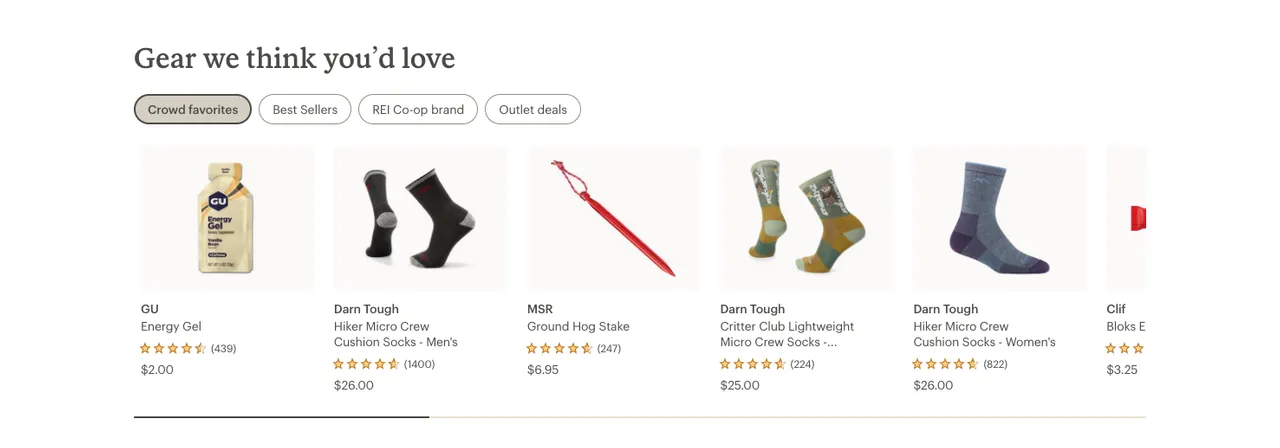
What works: REI runs a featured product row on its homepage titled "Gear we think you'd love," with four tabs: Crowd favorites, Best Sellers, REI Co-op brand and Outlet deals. Each tab swaps the products in the same slot. Every card includes a product image, a star rating with its review count, and the price. Higher up the page, a "Save on handpicked deals" banner promotes selected REI Outlet items.
Why it works: Two of the tabs are popular products (Crowd favorites, Best Sellers), and two are strategic picks: REI's own brand and clearance stock. That's the featured-versus-popular split covered later in this post, built into one homepage component. According to Daasity's 2026 site merchandising report, data-driven insights throughout the customer journey and intelligent cart upsells based on behavior are among the top trends shaping ecommerce. A tabbed row covers both bases: sales data can fill the popular tabs, while the store decides which strategic tabs exist.
Key takeaway: Combine data-driven featured products with editorially curated ones in the same slot. Label each set clearly, so shoppers can tell a bestseller from a product you chose to promote.
Where Should You Showcase Featured Products on Your Website?
Placement determines performance. Across the stores above, one pattern repeats: brands put featured products at the point of navigation intent, where shoppers decide where to go next, not only on static pages.
Here are seven placements to choose from, starting with the most visible:
1. Homepage hero section: Best for first impressions. Use this for seasonal launches, flagship products, or your single strongest promotion. Keep it to 1-3 items maximum. Include clear CTAs ("Shop the Collection," not "Learn More").
2. Navbar mega menu or dropdown: The most common placement among the 12 examples above, and for good reason. Alo Yoga, Everlane, Coop, Hydro Flask, Patagonia and Dyson all use this approach. Navigation menus are visible on every page, making featured products accessible regardless of where a shopper lands.
3. Sidebar or vertical menu: Works well on mobile. Gymshark's side panel and Alo Yoga's mobile menu demonstrate this approach. Place your featured section at the top of the sidebar so it's the first thing shoppers see when they open the menu.
4. Category pages and category menus: Feature products at the top of relevant category pages or inside each category's dropdown. Coop does this within its Pillows and Sheets menus, and Dyson inside Vacuums & cleaners. The advantage: shoppers already have category-level intent, so featured products feel like helpful recommendations rather than interruptions.
5. Dedicated homepage section: A standalone featured products block below the hero. REI's tabbed "Gear we think you'd love" row and Dyson's "Featured" row work well for stores with large catalogs. On Shopify, this is the featured collection section (steps below). Limit to 4-8 items to avoid clutter.
6. Product recommendation popups: Use popups or slide-ins to feature products at strategic moments: exit intent, time on page, or cart addition. A product recommendation popup can spotlight featured items without cluttering your page layout. For timing ideas, see these exit-intent popup examples.
In Popupsmart's Shopify app, the Shopify Products element can take its products from a collection you select, from the visitor's cart, or from a manual pick, so a popup can show the same featured collection as your homepage. Stores on Magento, PrestaShop or a custom-built platform can use the Product Feed element, which reads a Google-compatible product feed.
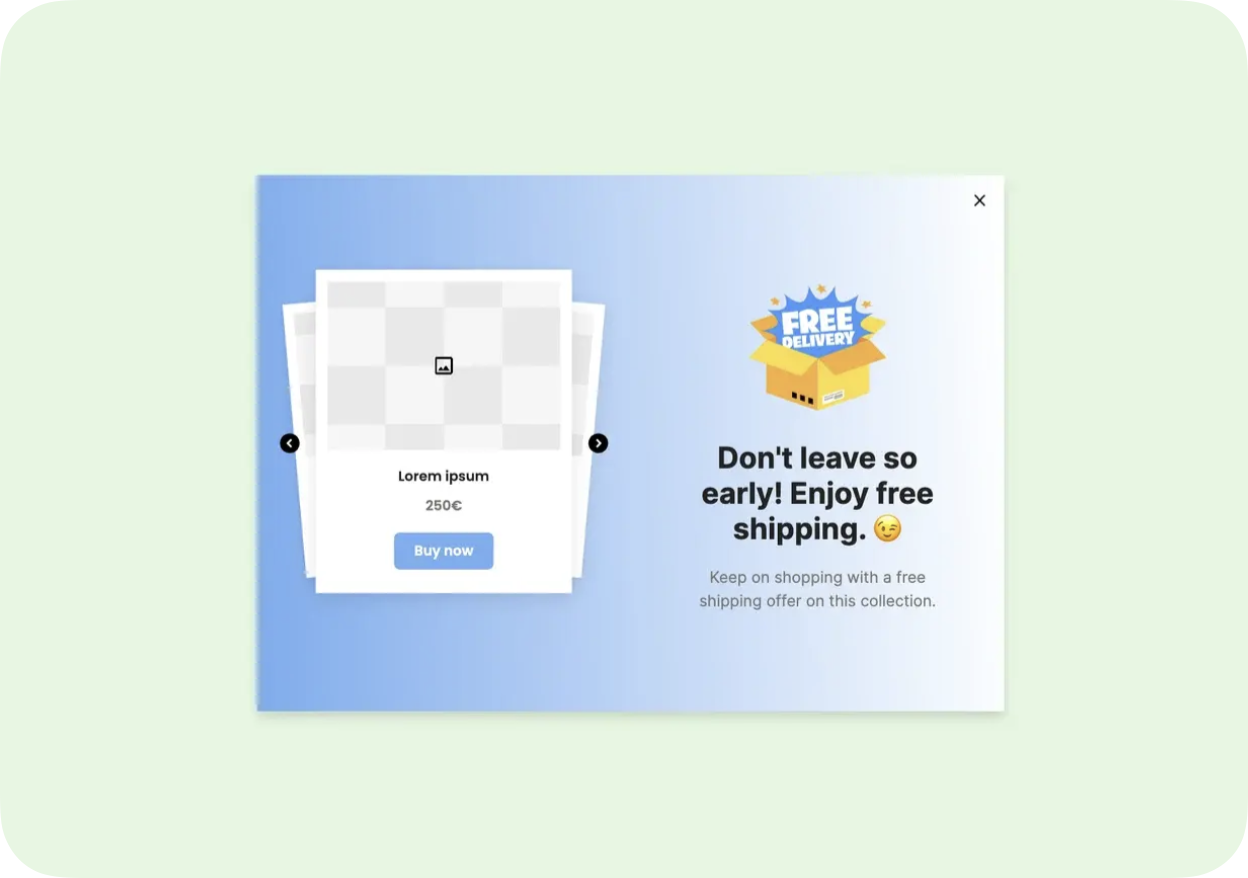
A featured product popup template you can clone for your store: a product carousel with a free-shipping offer
7. Email marketing and newsletters: Feature products in email campaigns to drive engaged traffic back to your site. Use product recommendation emails to personalize featured items based on purchase history or browsing behavior.
How to Select the Right Products to Feature
Picking the wrong products to feature wastes your best real estate. Items that look impressive but don't align with business goals tend to end the same way: high impressions, low conversions.
Use these four criteria to build your featured products list:
Popularity vs. profitability: Bestsellers are safe picks because they've already proven demand. But don't ignore high-margin items that sell less frequently. Featured placement can shift their sales volume significantly. A practical starting point is a mix of about 60% proven sellers and 40% strategic picks (new launches, high-margin items, or clearance inventory you need to move), adjusted once your own numbers come in.
Brand alignment: Every product you feature signals what your brand stands for. A minimalist home goods store featuring a neon novelty item sends mixed signals. Stick to items that reinforce your brand identity. Shoppers who trust your curation will buy more over time.
Audience relevance: Know whether your core customers are bargain hunters, quality seekers, or trend followers. Feature products that match their primary shopping motivation. If 70% of your customers use discount codes, featuring full-price premium items in your hero section is going to underperform.
Data-driven validation: Track conversion rates and click-through rates on your featured products. Rotate underperformers every 2-4 weeks. Use your analytics to confirm whether a product deserves featured status or just seemed like a good idea. A good website conversion rate is 2–5% for most sites, so featured products should aim to outperform your store's baseline.
What Impact Do Featured Products Have on Ecommerce Sales?
Featured products affect three performance dimensions: direct sales, customer engagement, and SEO. Here's how each one works:
Direct sales lift: When shoppers land on a homepage with a clear featured products section, they spend less time in navigation and more time on product pages. This matters because every additional navigation click is a drop-off point. Featured products create a shortcut from landing to product detail page, so shoppers skip category browsing entirely.
Engagement and discovery: Featured sections drive curiosity. Shoppers who click on a featured item often explore related products, which can lift your average order value. This is especially true when you pair featured products with "You May Also Like" or "Complete the Look" cross-sells on the product page itself (see how to upsell and cross-sell on Shopify).
SEO benefits: Featuring products on your homepage and navigation creates strong internal linking to product pages. Those internal links pass authority from your highest-traffic page (usually the homepage) to specific product pages, which helps them rank in organic search. Strategically featured products also give visitors an obvious next click, which keeps them on your site instead of sending them back to the search results.
Commerce.com CEO Travis Hess, quoted in a February 2026 Digital Commerce 360 report, put it this way: "When product discovery begins with a prompt, not a homepage, it is the quality of data that determines whether you get seen, chosen and purchased." This shift means your featured products need clear product headlines, strong product descriptions and structured data to surface in AI-powered shopping tools too.
Featured Products on Shopify vs. WooCommerce: Platform Tips
Implementation varies by platform. Here's how to set up featured products on Shopify and WooCommerce.
Featured Products on Shopify
Shopify has native support for featured collections. You can create a collection, tag products for inclusion, and add it to your homepage through the theme editor and to your navigation through your menus. No code required for basic setups.
How to add products to a featured collection on Shopify
A featured collection on Shopify is an ordinary collection that you show in your theme's Featured collection section. These steps were checked against Shopify's Help Center and Shopify's Horizon theme in October 2026; labels can differ in other themes.
-
Create the collection. In your Shopify admin, go to Products > Collections and click Add collection. Name it, for example "Featured."
-
Choose how products get in. Under Collection type, pick Manual to hand-pick products, or Smart to add them automatically with a condition such as Tag is equal to "featured." Click Save.
-
Add the products. In a manual collection, search or click Browse in the Products section, select your products, then click Save. In a smart collection, add the tag to each product you want featured.
-
Show it on your homepage. Go to Online Store, click Edit theme on your current theme, click Add section and choose Featured collection (Horizon offers it as Grid, Carousel or Editorial). In the section's Collection setting, select your collection, then click Save.
-
Link it in your menu (optional). Go to Content > Menus, open your main menu, click Add menu item, choose your collection under Collections, then click Save menu.
For more advanced setups, Shopify's smart collections let you auto-populate featured products based on conditions like vendor, price, or inventory stock.
Featured Products on WooCommerce
WooCommerce uses a "Featured" product attribute that you can toggle for any product in your catalog.
Quick setup:
1. Go to Products > All Products and click the star icon in the Featured column to mark a product as featured (or open the product and tick "This is a featured product" under Catalog visibility)
2. Use the [products visibility="featured"] shortcode to display them on any page; WooCommerce's shortcode documentation lists it as the replacement for the older [featured_products] shortcode
3. In the block editor, add the Product Collection block and choose its "Featured products" collection
4. For homepage placement, add that block (or the shortcode) to your homepage with the block editor or a page builder
WooCommerce's flexibility means you can display featured products on virtually any page using shortcodes or Gutenberg blocks. The tradeoff is that it requires more manual setup than Shopify's drag-and-drop approach.
What's the Difference Between Featured Products and Popular Products?
These two terms get used interchangeably, but they serve different functions. Here's the distinction:
| Attribute | Featured Products | Popular Products |
|---|---|---|
| Selection | Hand-picked by your team | Determined by sales data |
| Goal | Strategic (launch, margin, brand) | Validation (social proof) |
| Changes | Rotated based on business needs | Shifts with customer demand |
| Control | Full control over what appears | Algorithm or sales-driven |
| Best for | New products, high-margin items, seasonal goods | Building trust with new visitors |
According to Airfocus, sales are the best measure of popularity for an ecommerce company: your highest-selling products are your most popular ones. Featured products are often bestsellers too, but a business can also choose to feature other items, such as a new collection or seasonal stock.
The smartest stores use both. Popular products build trust ("other people bought this, so it must be good"). Featured products drive strategy ("we want you to see this because it serves a business goal"). Coop Sleep Goods does this well: a "Best Seller" label handles the popular product function, while the "Featured" column in its Sheets menu handles strategic promotion. REI puts both in one homepage row.
Putting Featured Products to Work for Your Store
The 12 examples above share a common thread: intentionality. None of these brands randomly throw products into a "Featured" label. Each makes deliberate choices about placement (mega menu vs. sidebar vs. homepage), labeling ("Cult Favorites" vs. "Featured" vs. "New"), and visual execution (text links vs. product images).
Three patterns stood out across the examples:
Position featured products at decision points. The most effective featured sections appear in navigation menus (where shoppers are actively deciding where to browse), not on static pages they might never visit.
Use labels that match your brand voice. "Featured" is functional but forgettable. "Cult Favorites," "Staff Picks," or "Trending Now" add personality and social proof simultaneously.
Show the product, don't just name it. Gymshark and Dyson add product images to featured sections inside navigation menus, so shoppers see the product before they click.
If you're running a Shopify or WooCommerce store and want to start with a low-effort test, create a featured collection of your top 6 products and add it to your main navigation. Measure click-through rates for two weeks, then iterate. For stores looking to promote featured products through targeted popups or slide-ins on Shopify, an ecommerce popup builder like Popupsmart can show that same collection in a popup without touching your theme code.
Frequently Asked Questions
What is a featured item?
A featured item is a single product spotlighted within a featured products collection or section. It can be a bestseller, a new arrival, a limited-edition release, or any product the store wants to push. The "featured" status is temporary and strategic. A product might be featured for a week during its launch, then rotated out as the next priority takes its place.
What are featured products in ecommerce?
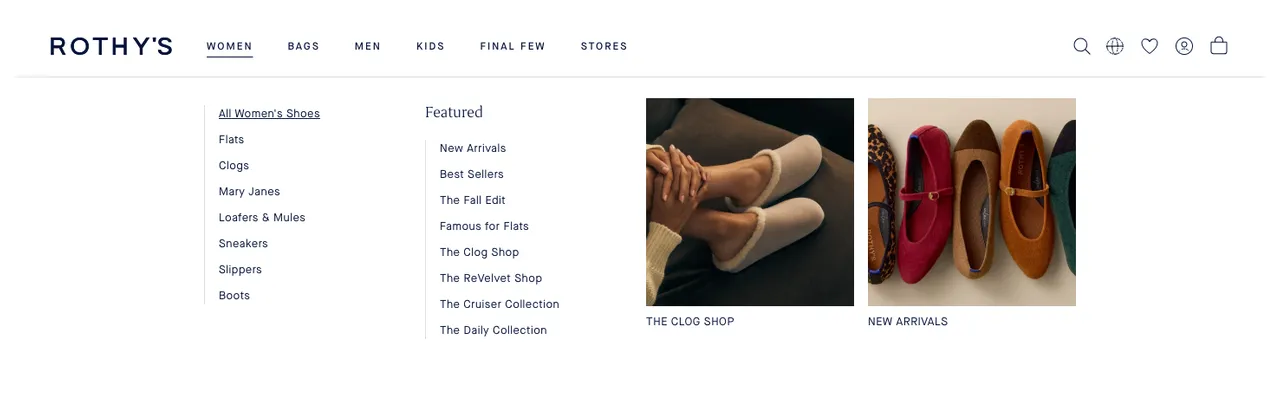
In ecommerce, featured products are items given premium visibility on a website to guide purchasing decisions. They typically appear in navigation menus (like the "Featured" column in Rothy's Women menu or Patagonia's "Featured" tab), homepage sections (like the "Featured" row on Dyson's homepage), category dropdowns, or popup campaigns. The goal is to reduce browsing friction by pointing shoppers toward curated selections rather than making them search through the entire catalog.
How do I add products to a featured collection on Shopify?
In your Shopify admin, go to Products > Collections and open the collection you feature, or click Add collection to create one. In a manual collection, use Browse in the Products section to add items, then click Save. In a smart collection, give products the tag its condition uses, such as "featured." To show the collection on your homepage, add a Featured collection section in the theme editor and select it.
How do you choose featured products for your online store?
Start with your business goal. If you're launching a new product line, feature those items. If you need to improve margins, feature higher-margin products that need more visibility. Then validate with data: check conversion rates, click-through rates, and revenue per featured slot. Rotate products every 2-4 weeks to keep the section fresh. A practical starting mix is about 60% proven performers and 40% strategic picks (new items, seasonal products, or inventory you need to move).
What are the benefits of featured products in ecommerce?
Three main benefits: reduced browsing friction (shoppers find what you want them to see faster), strategic inventory management (you control which products get the most visibility), and a shorter path from the page a shopper lands on to a product page. Featured products also create stronger internal linking structures, which helps product pages rank better in search engines. For stores using ecommerce personalization, featured sections serve as a baseline experience that can be dynamically adapted for returning visitors.
What are examples of product features vs. featured products?
Product features are attributes of an individual item: size, material, battery life, waterproof rating. Featured products are items a store chooses to highlight in premium positions on their website. They're completely different concepts. A product's features determine its value proposition. A product's "featured" status determines its visibility on your site. Both matter for conversions, but they operate at different levels of your ecommerce strategy.