 ChatGPT
 Perplexity
 Claude
 Grok
Grok Google AI Mode
Why Shopify stores use multi-step popup forms:
- Reduce the perceived effort of each screen
- Guide visitors through one clear action at a time
- Segment visitors by their first answer before asking for an email
- Fit small screens, where most popups are seen: 63% of popup displays in Popupsmart's 2026 benchmark happen on mobile
Multi-step popup forms rely on progressive disclosure, showing only what's necessary at each step. Rather than overwhelming visitors, they keep momentum and make completion feel easier.
In my experience optimizing lead generation popups for Shopify stores with Popupsmart, I've seen multi-step forms outperform single-step popups even when the offer stays the same. Across Popupsmart's 2026 benchmark, though, the format shows no measurable advantage once you count only submissions with contact details, so treat a win like that as something to test on your own store, not a rule. When it works, the improvement comes from changing how the form asks for commitment, not what it offers.
With this guide, I'll break down when multi-step popup forms work best on Shopify and how to design them for sustainable conversion rate optimization.
What This Blog Covers 🧭
In this guide, you'll learn:
- 🧩 What multi-step popup forms are and how they work on Shopify
- 📈 What multi-step forms do, and don't do, for conversion rates compared with single-step popups
- 🎯 Best practices for step structure, copy, targeting, and mobile UX
- ⚖️ When to use multi-step vs. single-step popup forms
- ⚙️ A no-code, Shopify-native setup workflow with Popupsmart
- 🔍 Advanced tips on personalization, privacy, and optimization
By the end, you'll know exactly how to use multi-step forms on Shopify to reduce friction and measure whether they raise your conversion rate, without adding complexity.
🤌 Benefits of Multi-Step Popup Forms for Higher Conversion Rates
Multi-step popup forms stand out because they reduce friction at the exact moment visitors hesitate. In my experience working on multi-step forms for Shopify, the biggest improvement usually comes from one thing: making the opt-in process feel lighter. Instead of overwhelming users with multiple fields at once, multi-step form design guides them through small, manageable actions. Whether that adds up to higher conversion rates on your store is something to measure rather than assume, and the data section below shows why.
What I consistently see across e-commerce projects is this: when forms feel easier, users stay engaged longer. By using progressive disclosure methods, multi-step popup forms keep attention focused on a single step without changing the incentive or traffic source.
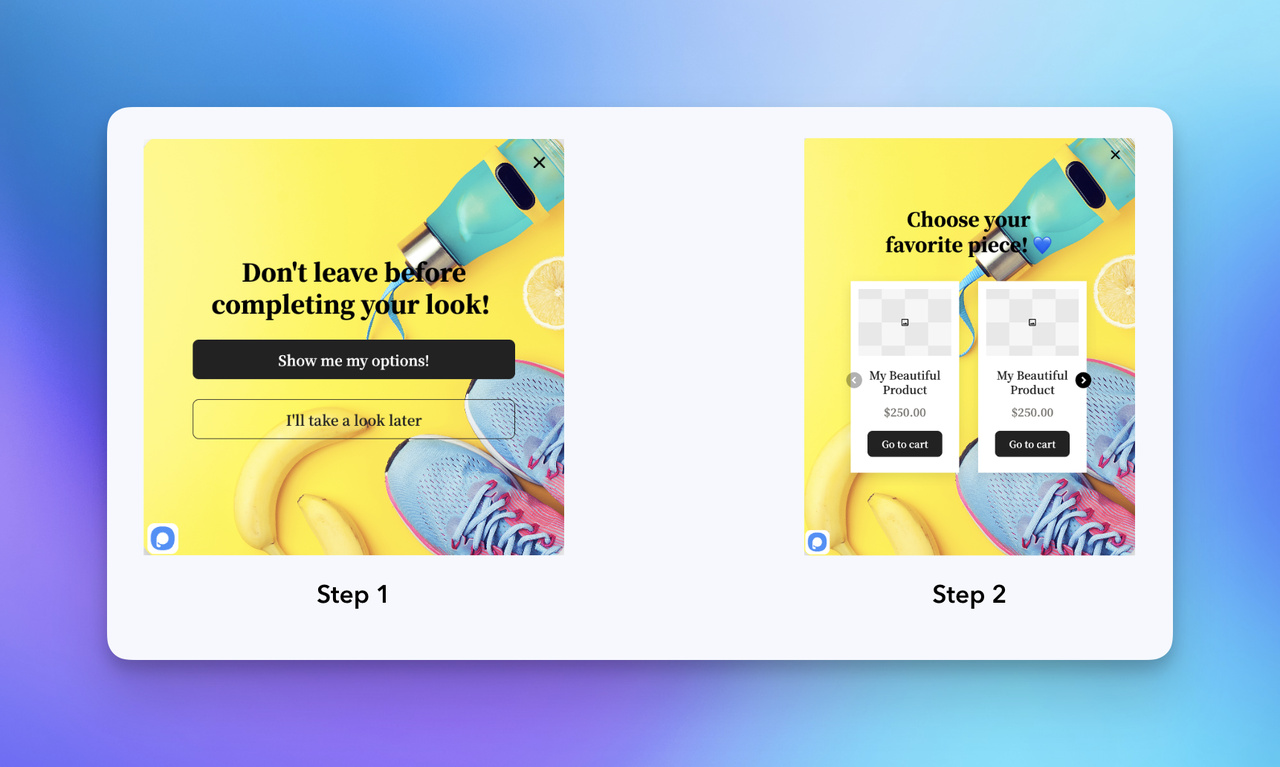 Popupsmart's ready to use multistep popup form template for Shopify
🏃 Reducing Form Abandonment and Increasing Engagement
Form abandonment is one of the most common issues with lead generation popups. Multi-step popup forms address this by showing only what's necessary at each stage, which lowers cognitive load and keeps users moving forward.
The Interaction Design Foundation's form design guide makes the same case: letting users focus on one section at a time can lead to more accurate responses and higher completion rates. This aligns closely with what I've seen while optimizing Shopify popups for real stores, especially when traffic comes from mobile or first-time visitors.
In practice, multi-step forms help because they:
- Reduce perceived effort by limiting visible form fields
- Improve user experience optimization through clear progression
- Encourage completion with visual cues like progress indicators
When I combine this structure with exit-intent triggers, visitors feel guided rather than interrupted. Test that pairing rather than assume it: in Popupsmart's 2026 benchmark, exit intent shows no statistically reliable advantage on its own.
I've also seen how this structure supports early audience segmentation. By starting with a simple question or choice, you gather intent data first, before asking for contact details, which makes the opt-in feel more natural. This works because users are more likely to complete tasks that feel short, predictable, and already in progress. Just keep the two numbers apart: an answer on step one is a click, not a lead.
🌎 What Real Campaign Data Shows About Popup Form Conversion
Real campaign data is where the case for multi-step forms needs care. In Popupsmart's 2026 benchmark (28,674 campaigns, January 2024 – September 2026), multi-step forms show no measurable conversion advantage over single-step forms once step-1 clicks without contact details are excluded. That qualifier matters: the first screen of a multi-step popup usually asks for a click ("What are you shopping for?"), and a report that counts that click as a conversion can make the format look better than it is. Count only submissions that contain an email address or phone number.
For a Shopify reference point, popups on Shopify stores convert at 1.07% vs 0.66% on WordPress sites (median campaign), and 35% of popup campaigns on Shopify stores ask for an email or phone number.
This is especially relevant on mobile. Each step of a multi-step popup form fits naturally within a smaller screen, and the median popup converts 1.02% on mobile vs 0.57% on desktop (mobile vs. desktop popup behavior has the full breakdown). In several Shopify projects I've worked on, simply switching to a multi-step structure improved engagement analytics and increased opt-ins without any changes to copy or design. When you try the same switch, judge it by submissions with contact details, not by activity on step one.
Multi-step forms also make it easier to introduce opt-in incentives gradually. This is especially effective for Shopify stores with many first-time visitors, who are worth targeting on purpose: popups targeted at new visitors only convert 1.13% vs 0.77% for popups shown to everyone. Instead of leading with a discount, you can first ask about intent, then present the incentive as a logical next step. The incentive itself earns its place: signup popups that offer a discount code convert 1.46% vs 0.75% for signup popups without one. This approach supports long-term conversion rate optimization rather than short-term spikes.
🆚 One-Step vs. Multi-Step Popup Forms: When to Use Each
Single-step popup forms still have their place. They work well for very simple asks, such as a basic newsletter signup where only an email address is required. However, they tend to struggle once more context or personalization is needed.
Multi-step popup forms are worth the extra step when:
- The offer requires explanation or choice
- You want to reduce form abandonment
- Personalization or segmentation matters
- The form is part of a broader conversion funnel
For ten concrete setups, from product finders to cart offers, see these multistep popup use cases.
Based on my experience, switching from one-step to multi-step forms for landing page integration can pay off quickly when the form needs context. By spreading the interaction across steps, you can apply form field minimization and call-to-action optimization more effectively, and the first answer tells you who each lead is.
For Shopify stores focused on sustainable growth, these benefits make multi-step popup forms a practical choice, not a trend. They fit naturally into modern CRO software workflows and provide clearer data through analytics tracking tools, making ongoing optimization much easier.
Next, I'll break down how to design multi-step popup forms on Shopify so these benefits have a chance to show up in your numbers.
🎨 Designing Multi-Step Popup Forms: Best Practices and Strategies
Great multi-step popup forms don't just collect data, they guide users through a clear, low-friction experience. In my experience designing multi-step forms for Shopify and e-commerce landing pages, the biggest gains come from aligning form structure with how users naturally make decisions.
Building on the benefits we covered earlier, like reducing abandonment through progressive disclosure, this section focuses on practical design strategies you can apply immediately. The goal is simple: make lead generation popups feel intentional, lightweight, and easy to complete.
Effective multi-step form design starts with understanding user flow. When forms fail, it's usually because they ignore basic UX principles like clarity, pacing, and feedback. When they succeed, it's because each step feels obvious and purposeful. Tools like Popupsmart support this approach with step-based flows, where each button can open a different step, and mobile-friendly layouts, without adding technical complexity.
⌨️ Key Design Principles for Effective Multi-Step Forms
Logical progression is essential for multi-step popup forms. Each step should focus on a single action, ideally with one or two fields. This form field minimization approach reduces cognitive load: in Popupsmart's 2026 benchmark, popups asking for one or two fields convert 0.88% and 0.94%, against 0.56% for three fields (median campaign).
The same Interaction Design Foundation guide notes that breaking a long form into sequential steps makes the task feel less intimidating, and adds a warning: splitting fields that belong together into separate steps is counter-productive.
Key principles to prioritize:
- Start simple: Begin with low-effort questions before requesting personal details
- Clear CTAs: Use action-oriented language that explains what happens next; first-person buttons ("Send my code") convert 1.18% vs 0.80% for neutral wording in our benchmark (English popups, median campaign)
- Visual continuity: Match typography, colors, and spacing with the main site
These popup forms best practices help maintain momentum inside the conversion funnel and align naturally with inbound marketing strategies.
📱 Designing for Mobile-First Experiences
A large share of popup traffic is mobile: 63% of popup displays in Popupsmart's 2026 benchmark happen on mobile. That makes mobile-responsive layouts non-negotiable for multi-step popup forms.
From what I've seen optimizing mobile-heavy stores, small adjustments often make a big difference:
- Larger tap targets and readable font sizes
- Vertical layouts that scroll naturally
- Minimal keyboard interaction when possible
Mobile-friendly, step-based forms work especially well because each step fits comfortably on smaller screens.
This is also where A/B testing popups becomes valuable. Testing step order, CTA copy, or field types often reveals quick wins that improve popup form conversion without redesigning the entire flow. The cleanest test for this guide's question is a multi-step version against your current single-step popup; Popupsmart's A/B testing splits traffic between the two, and A/B testing a popup on Shopify walks through a full test.
🧑💻 Using Conditional Logic for Personalization
Conditional logic allows multi-step popup forms to adapt based on user input, making the experience feel personalized instead of generic. For example, an e-commerce visitor might see different follow-up questions than a B2B user.
This personalization-driven approach:
- Improves relevance by hiding unnecessary fields
- Keeps each step short by skipping what doesn't apply
- Produces cleaner data for analytics tracking tools
In Popupsmart campaigns I've worked on, conditional logic helped segment leads early in the funnel, which made opt-in incentives feel more relevant and improved lead quality downstream. In Popupsmart, the branching comes from button actions: each answer button on the first step can open a different step with Show the Page.
When combined with audience segmentation, conditional flows turn popup forms into guided conversations rather than static questionnaires.
💧 Adding Interactive Elements Without Overcomplicating the Form
Interactive elements like short quizzes or calculators can increase engagement when used intentionally. A simple "find your best option" quiz, for example, can naturally lead into email capture without feeling forced.
The key is restraint:
- Keep interactions short
- Make the value clear upfront
- Tie results directly to the opt-in
The value exchange is what makes this work: a visitor who gets an immediate, personalized result has a reason to share an email for it.
When paired with exit-intent triggers, interactive multi-step popup forms can re-engage hesitant visitors at the right moment.
These strategies work best when applied together. Thoughtful structure, mobile-first design, personalization, and light interactivity turn multi-step popup forms into reliable conversion tools. With Popupsmart, these patterns can be implemented quickly, allowing teams to focus on optimization instead of setup.
↕️ Implementing Multi-Step Forms on Shopify with Popupsmart
If you already have a Shopify store, setting up multi-step forms on Shopify with Popupsmart is a straight-through flow: install the app, create your campaign, open the Advanced Editor to build the steps, customize the popup, then publish it. You don't need to deal with theme code, you simply enable the Popupsmart embed in Shopify when prompted.
Popupsmart offers templates for multi-step popup forms, with built-in A/B testing to refine opt-in incentives.
Pros: Fast setup, multi-step templates and A/B testing in one app, and a 2026 benchmark to compare your results against.
Cons: The Shopify app's quick editor doesn't build multi-step forms; you switch to the Advanced Editor for that.
Step 1 — Install Popupsmart on Shopify
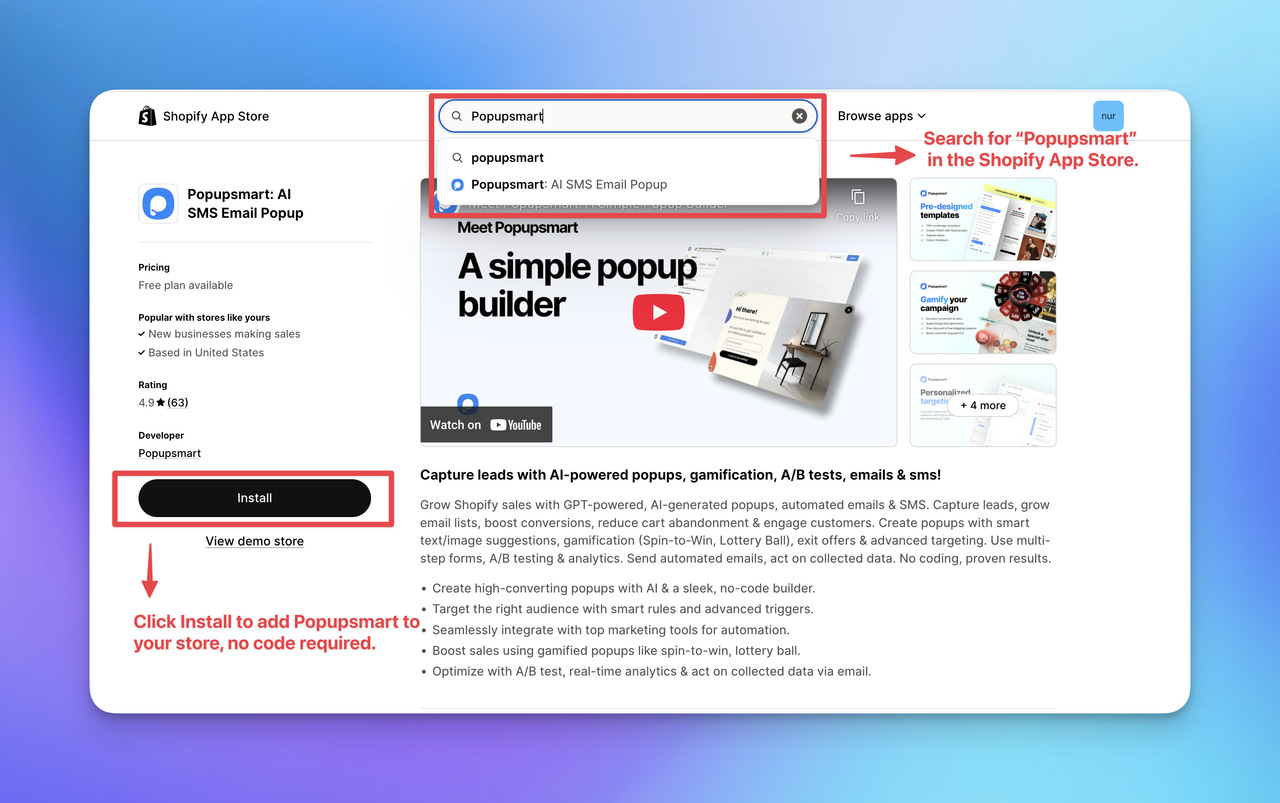
- Open the Shopify App Store
- Search for "Popupsmart: AI Popup, A/B Test"
- Click Install and approve permissions
Shopify will redirect you into Popupsmart automatically once the installation is complete, and a Popupsmart account is created for you.
Step 2 — Create a New Campaign in Popupsmart
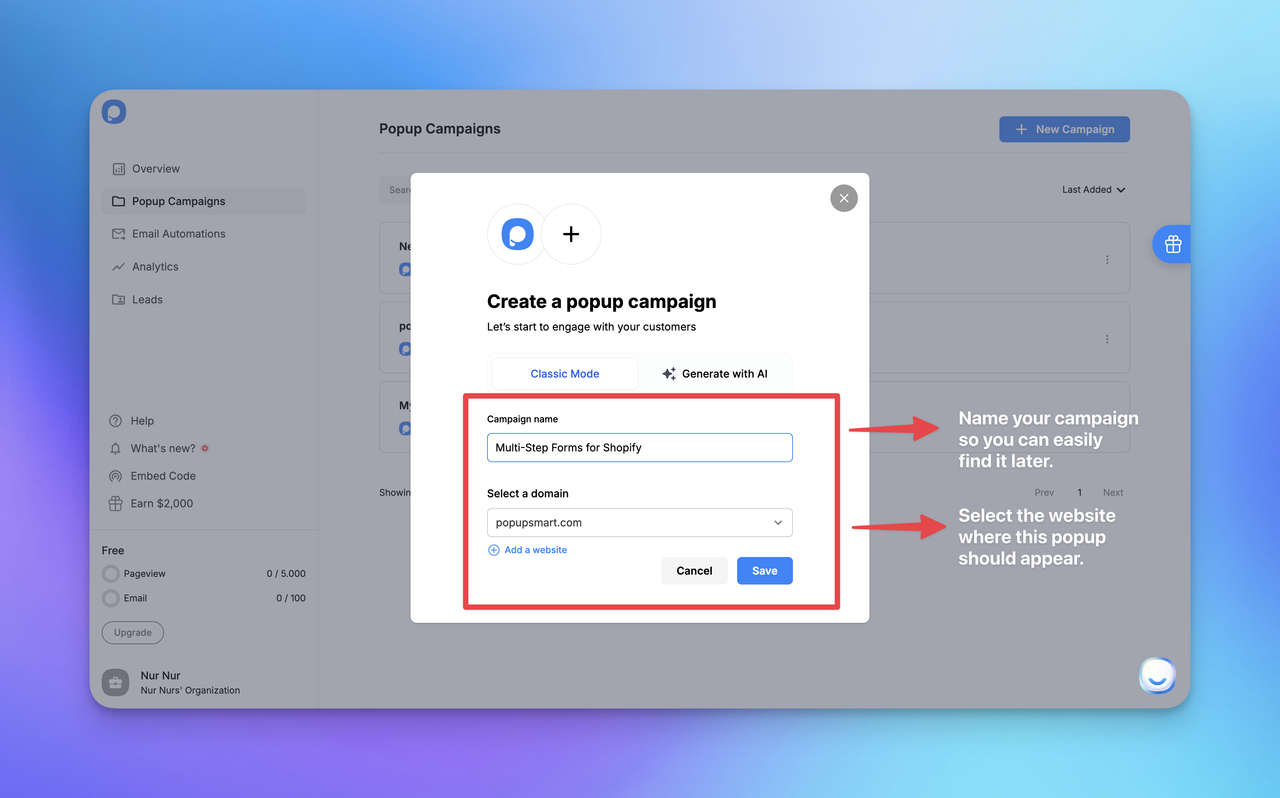
Inside Popupsmart:
- On the Overview page, click Create first campaign (or start a new one next to your existing campaigns)
- Pick a goal, such as Grow My Email List, and a use case
- You'll land on the Design step, where the popup takes shape
Step 3 — Choose a Multi-Step Template
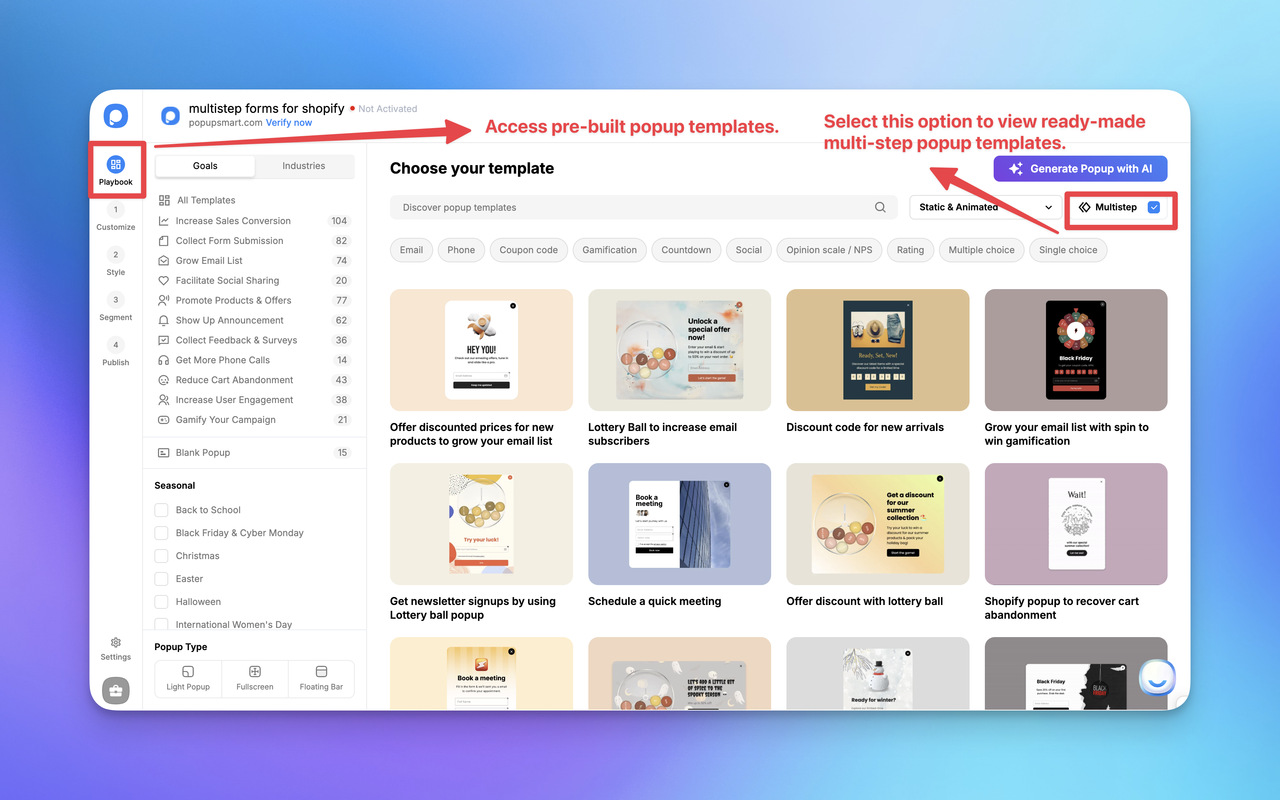
Multi-step forms are built in the Advanced Editor: on the Design step, click the pencil icon on the middle-right of the screen.
There you can start from a multi-step template (the template page has a multi-step filter) or add steps to your own popup with Add a new step, then set each button's action to Show the Page to choose which step it opens. The multi-step popup guide in the help center shows both ways; for forms outside a popup, see how to create multi-step forms with or without code.
Step 4 — Customize the Popup (Customize + Style)
You'll mainly work in two areas:
- Customize: edit images, copy, form elements, and steps
- Style: adjust general + advanced styling such as popup size, position, spacing, and element-level design
This is where your multi-step flow becomes "lightweight" and conversion-friendly.
Step 5 — Select Segment & Targeting
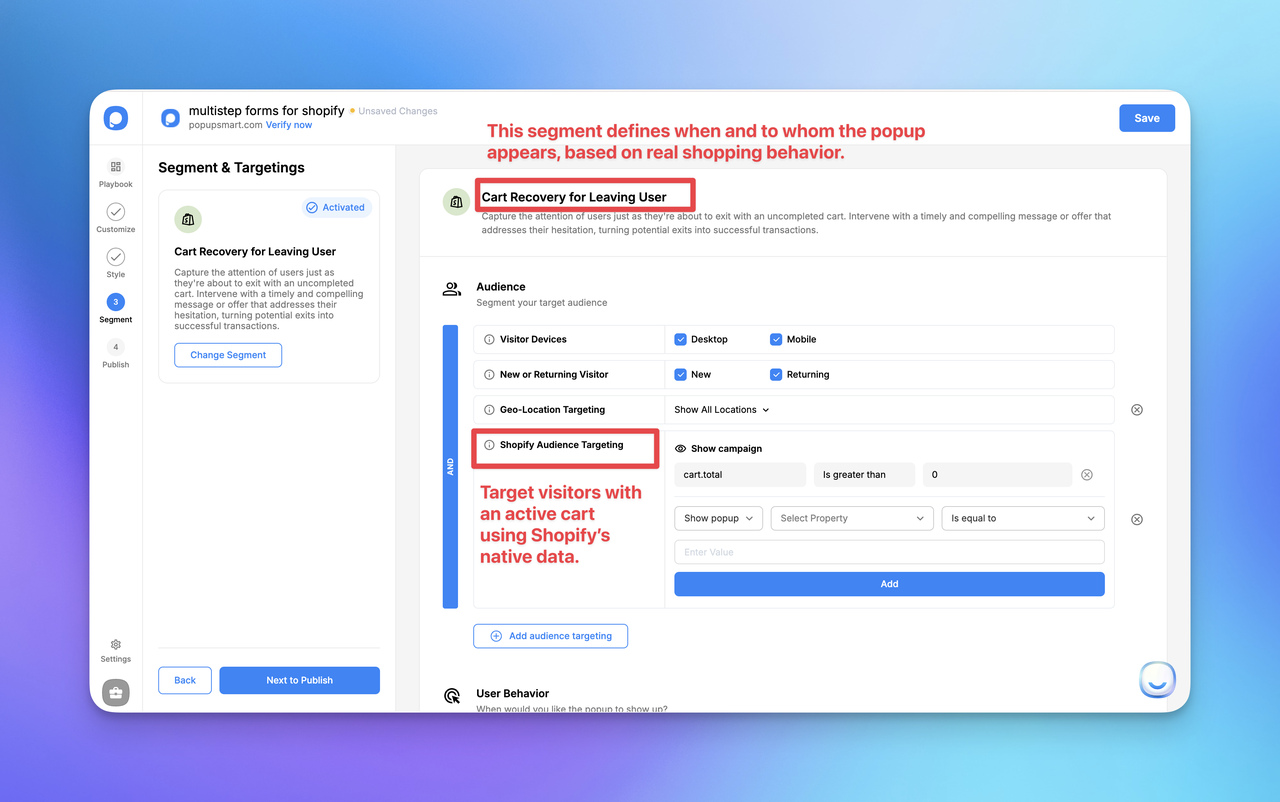
In Segment & Targeting, choose the audience logic based on your goal. Popupsmart suggests preset segments that match the goal you picked, such as cart-related targeting, and in the Advanced Editor you can also target by Shopify data like cart products, cart total or customer tags, so you can pick what matches your use case.
For example, in this blog I'm using "Cart Recovery for Leaving Users" (screenshot above) to show how Shopify audience rules can target visitors with an active cart.
Step 6 — Publish (and Enable Shopify App Embed if Needed)
In the Publish step, you can optionally turn on key actions like:
- Autoresponder Email (send an automated email after form submission)
- Self Email Notification (get notified when someone fills the popup)
- Shopify Customer integration (add leads to your Shopify customer list; needs an email field)
- Integrations (send leads/data to your CRM or messaging tools)
- Google Analytics (track popup events automatically)
Then click Publish.
If Popupsmart isn't enabled in your Shopify theme yet, you'll see a "Verify Popupsmart App" prompt. Shopify will take you to your theme editor, where you enable Popupsmart Embed under App embeds and save.
To keep this blog focused on multi-step forms, I'm not going deep into every verification screen here. If you want the full end-to-end setup (including the verify → save → refresh steps), follow the Shopify getting started guide.
✈️ Advanced Trends and Considerations for Multi-Step Popup Forms
Multi-step popup forms are evolving beyond simple step-based layouts. As user expectations increase, these forms are starting to blend personalization, behavioral insights, and responsible data practices to earn higher conversion rates without compromising trust.
Based on my experience optimizing lead generation popups for e-commerce brands, the biggest shift isn't about adding more features, it's about making forms feel smarter, lighter, and more intentional. This section looks at where multi-step popup forms are heading next and what to consider as you design for the future.
🧠 Smarter Personalization with Dynamic Form Logic
| Trend / Consideration | What it means for multi-step popup forms | Best practice (Shopify-friendly) | What to avoid |
|---|---|---|---|
| Dynamic personalization | Steps/fields adjust based on intent signals (device, pages, behavior) | Keep early steps low-effort, then personalize later steps | Over-personalizing too early or asking for too much data upfront |
| Light gamification | Small interactive touches (progress feedback, quick choices) | Use minimal "momentum" elements (progress indicator, 1-click choices) | Turning the popup into a game that slows completion |
| Privacy-first design | Clear consent + minimal data collection | Collect only what you need per step + explain usage clearly | Dark patterns, pre-checked consent, unclear data handling |
| Mobile performance | Multi-step flow must feel fast on mobile | Large tap targets + short steps + lightweight assets | Heavy animations, slow load, cluttered layouts |
| Measurement & iteration | Optimization based on behavior and results | Track step drop-offs + run A/B tests on one variable | Testing too many changes at once or ignoring step-level data |
The next phase of multi-step popup forms focuses on context-aware personalization. Instead of showing the same steps to every visitor, forms are increasingly adapting based on behavior, device type, and intent signals.
In practice, this means:
- Skipping irrelevant questions
- Adjusting steps based on browsing context
- Showing fewer fields to low-intent visitors
I've seen this approach significantly improve user experience optimization, especially on Shopify stores with many first-time visitors. When a form feels relevant, users are far less likely to abandon it mid-flow.
Input is changing too. The Interaction Design Foundation's form guide lists voice input as an alternative to typing, especially on mobile, and autofill as a way to save users time. If you add AI-assisted prefill, ask for consent first to avoid privacy pitfalls.
Why does this matter? It supports inbound marketing best practices by making email capture feel effortless.
🎮 Gamification: When (and When Not) to Use It
Gamification is often discussed alongside multi-step popup forms, but it's not always the right solution. While interactive elements like quizzes or progress-based rewards can increase engagement, they also introduce friction if overused.
Engagement and leads are also different numbers. In Popupsmart's 2026 benchmark, spin-to-win and other gamified popups get far more clicks (7.33% vs 1.87% of displays, median campaign; the spin itself counts as a click), but do not collect measurably more email or phone leads than plain signup popups.
From what I've observed:
- Light gamification works best when the offer needs explanation
- Traditional multi-step designs perform better for fast opt-ins
- Hybrid approaches often outperform extremes
For example, a simple progress bar or choice-based first step can create momentum without turning the form into a distraction. The most effective multi-step form design balances clarity with engagement, not novelty for its own sake.
When evaluating gamification, always ask:
Does this help the user move forward faster, or slow them down?
🕵️♀️ Privacy, Compliance, and Ethical Design
As multi-step popup forms become more personalized, privacy and compliance become non-negotiable. Regulations like GDPR and CCPA require clear consent, transparent data usage, and minimal data collection.
Best practices I consistently recommend:
- Collect only what you need at each step
- Clearly explain how data will be used
- Avoid dark patterns or misleading copy
Ethical form design isn't just about compliance, it directly impacts long-term popup form conversion. Users who feel respected are more likely to complete forms and stay engaged with your brand.
For teams building multi-step popup forms on Shopify, this also means choosing tools and integrations that support secure data handling and clear consent flows. Trust is a conversion lever, not a legal checkbox.
🏍️ Designing for Sustainability and Performance
One often-overlooked consideration is performance. Heavy scripts, excessive animations, and overly complex logic can hurt page speed and mobile experience.
Modern multi-step popup forms should be:
- Lightweight
- Mobile-first
- Easy to update and test
Reducing technical overhead not only improves conversion rate optimization but also supports a better overall page experience, something Google increasingly values.
As multi-step popup forms continue to evolve, the most successful implementations will focus on relevance, restraint, and responsibility. New features matter far less than thoughtful execution. When innovation supports user intent, rather than distracting from it, multi-step forms remain a useful lead generation tool, as long as you measure them by the leads they bring in.
🚀 Conclusion: Optimizing Your Strategy with Multi-Step Popup Forms
Multi-step popup forms are no longer just a conversion tactic, they're a long-term strategy for building sustainable lead generation: they segment visitors, keep every screen light, and tell you who each lead is. What they don't do is convert more by default. In Popupsmart's 2026 benchmark, the format shows no measurable advantage over single-step forms once step-1 clicks without contact details are excluded, so the design choices in this guide are what decide your result.
Across the examples and frameworks covered in this guide, one pattern remains consistent: multi-step popup forms work best when they respect user intent. Progressive disclosure, lightweight steps, and clear value exchange allow forms to feel helpful rather than intrusive, especially for Shopify stores where most visitors are still in the discovery phase.
📁 Key Takeaways to Apply Immediately
To get consistent results from multi-step popup forms, focus on the fundamentals:
- Design for momentum: Keep early steps simple and ask for commitment gradually
- Segment with intent: Use audience segmentation to show the right message at the right moment
- Count leads, not clicks: Judge the form by submissions with an email address or phone number; an answer on step one is a click
- Optimize with data: Track step-level drop-offs and refine based on real behavior
- Think mobile-first: Ensure every step works smoothly on smaller screens
These principles don't just improve popup form conversion, they strengthen your entire conversion funnel over time.
👣 Your Next Step
If you're ready to apply this in practice, start by launching a simple multi-step popup on your Shopify store and iterate from there.
With Popupsmart, you can install the app from the Shopify App Store, create your multi-step campaign visually, and publish it using Shopify's native App Embed system, no code required.
From there, test small changes: step order, copy, or targeting rules, and the multi-step version against a single-step one. The biggest gains often come from subtle improvements, not complex setups.
Mastering multi-step popup forms isn't about chasing short-term spikes. It's about building a system that adapts to user behavior, earns trust, and compounds results over time. Apply what you've learned here, and you'll be well-positioned to turn more visitors into meaningful, long-term relationships.
FAQs
1. What are multi-step forms on Shopify?
Multi-step forms on Shopify break the signup process into smaller steps, showing one question or action at a time to reduce friction and make each screen easier to complete.
2. Do multi-step forms convert better than single-step popups?
Not by default. In Popupsmart's 2026 benchmark, multi-step forms show no measurable conversion advantage over single-step forms once step-1 clicks without contact details are excluded. They're worth using when you need segmentation or context; judge them by leads with an email address or phone number, not by clicks on the first step.
3. What's a good conversion rate for a Shopify multi-step popup?
Measure leads with an email address or phone number divided by popup displays. In Popupsmart's 2026 benchmark, popups on Shopify stores convert at 1.07% (median campaign), and across all sites the median popup that asks for an email or phone number converts 0.83%, the top 25% 1.96% and the top 10% 3.87%. Multi-step popups don't need a separate target: in the same data they show no measurable advantage over single-step forms once step-1 clicks without contact details are excluded.
4. When should I use multi-step forms instead of single-step forms?
Use multi-step forms when you need segmentation, context, or multiple data points. Single-step forms work best for very simple email-only signups.
5. Are multi-step forms effective on mobile Shopify stores?
They suit mobile, because each step fits naturally on a smaller screen, and mobile is where most popups are seen: 63% of popup displays in Popupsmart's 2026 benchmark happen on mobile. Whether a multi-step version beats your single-step popup on mobile traffic is worth an A/B test.
6. Can I create multi-step forms on Shopify without coding?
Yes. You can install a Shopify app like Popupsmart, build your multi-step popup visually in its Advanced Editor, and publish it using Shopify's App Embed system without writing code.
7. How do multi-step forms reduce form abandonment?
They use progressive disclosure, showing only what's necessary at each step, which lowers the effort each screen asks for and keeps users moving forward.
8. Are multi-step forms compliant with GDPR and privacy regulations?
They can be compliant if you clearly explain data usage, collect only essential information, and include proper consent options.
What changed in this post
The post said multi-step forms convert better than single-step popups. Popupsmart's 2026 benchmark finds no measurable advantage once step-1 clicks without contact details are excluded, so the answer, the FAQ and the meta now say that, and the post explains when the extra step still earns its place. An out-of-date campaign count credited to our benchmark report was removed, and the report is now cited with its current 2026 figures (form fields, mobile, Shopify, discounts, gamified popups, CTAs). References to unnamed "studies" were replaced with the Interaction Design Foundation's form guide or removed, and a voice-input prediction attributed to Bit Form, which its page doesn't contain, was dropped. The setup steps now follow the current Shopify app: the listing name, the Overview page, and the Advanced Editor where multi-step forms are built. A FAQ on what conversion rate to expect was added.
Initial publication.