ChatGPT
 Perplexity
 Claude
 Grok
Grok Google AI Mode
Imagine turning anonymous website visitors into subscribers you can actually reach again, without redesigning your site or running more ads.
That's exactly what well-designed email capture popups do when they're implemented thoughtfully. I've worked closely with growth teams and e-commerce brands on on-site conversion optimization with Popupsmart, and one pattern is consistent: when popups align with user intent, timing, and real value, they become one of the most dependable ways to grow a list you own.
In 2026, email capture popups aren't about interruption.
The best examples are contextual, respectful, and integrated into the user journey, appearing at the right moment to help rather than distract.
Done right, a popup grows your list and leaves the visit better than it found it.
If you're looking for email capture popup examples that actually convert, you're in the right place. In this guide, you'll find 25 email capture popup examples, plus adaptable templates you can use to recreate similar strategies on your own site.
They're written for anyone
- running a Shopify store,
- managing an e-commerce brand,
- or building a SaaS audience,
and each one is practical and easy to apply.
What Is an Email Capture Popup?
An email capture popup is essentially an on-site form that pops up to collect visitor emails, often in exchange for something valuable like a discount or free guide. Think of it as a digital handshake, offering incentive lead magnets to build your list. Popupsmart's benchmark counts a lead as a popup submission that contains an email address or phone number.
These aren't one-size-fits-all. Exit-intent technology detects when users are about to leave and triggers a last-chance offer. Timed popups appear after a set period, while scroll-triggered ones activate once visitors reach a certain page depth. Each type plays into conversion rate optimization by matching user behavior.
Combining popup timing triggers with mobile-responsive designs does more for engagement than polishing the artwork. For high-converting popup templates, focus on clean opt-in form design that feels helpful, not pushy.
Why Email Capture Popups Matter for Your Business
Email capture popups matter for a Shopify store because they turn traffic you already paid for into contacts you can reach again without paying for the visit twice. Building a targeted email list fuels long-term growth. With email marketing automation, you can nurture those leads into customers.
Shopify is where much of this happens. In Popupsmart's 2026 popup conversion benchmark, 43% of the businesses in the benchmark (January 2024 to September 2026) run on Shopify, and 35% of popup campaigns on Shopify stores ask for an email or phone number, against 25% on WordPress sites.
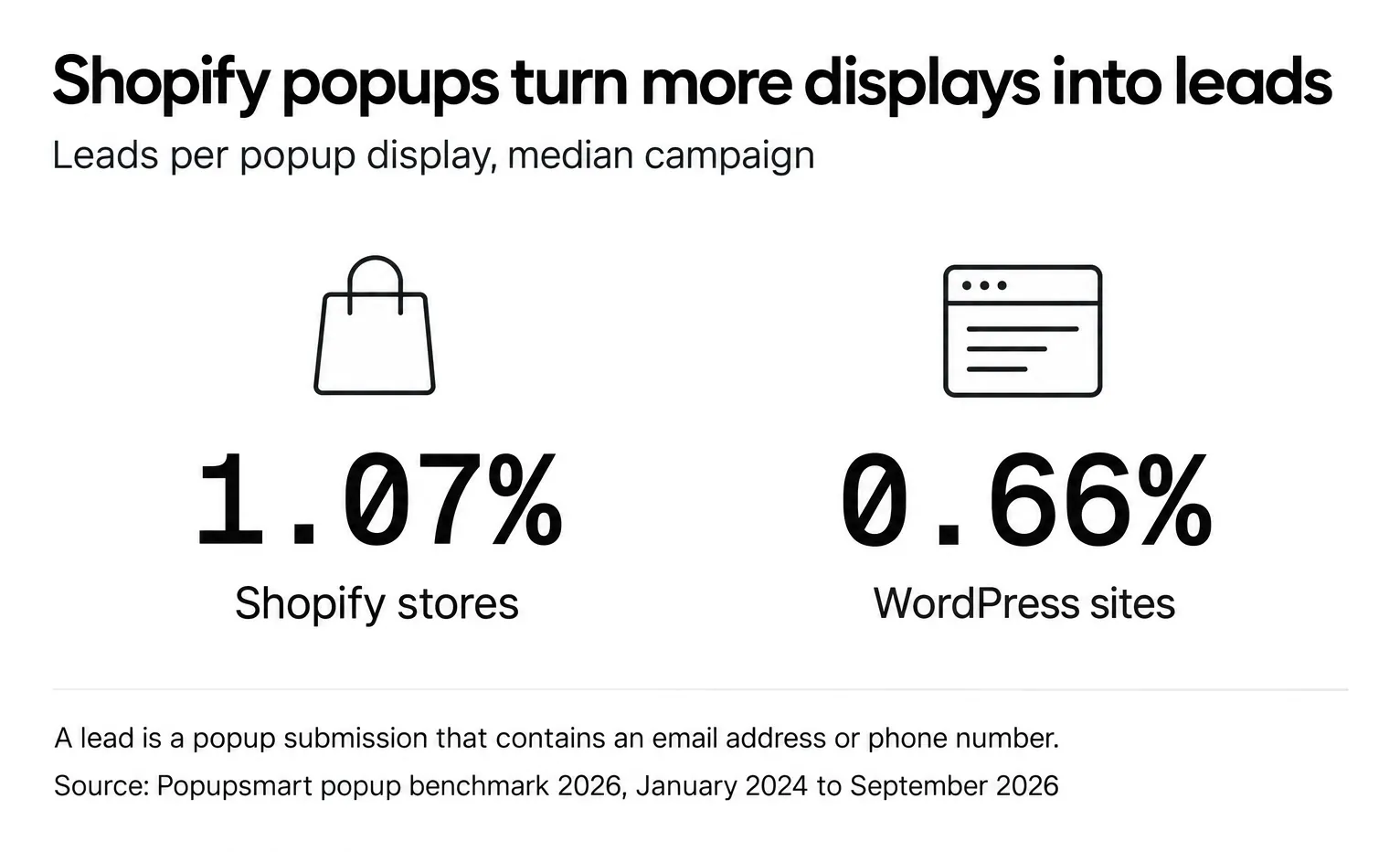
Popups on Shopify stores convert at 1.07% vs 0.66% on WordPress sites (median campaign). The rate is leads divided by popup displays, not by visitors, so compare your own popup on the same basis.
A list built this way gives you better segmentation methods and personalization strategies. For digital marketers, this means more precise funnel optimization and more of the store's revenue coming from a channel it owns.
Benefits of Using High-Converting Email Capture Popups
A high-converting email capture popup is a working part of the store, not a visual add-on. It turns website traffic into long-term subscribers, and subscribers into revenue you can measure.
The difference between a popup and a static footer form is timing: a popup can meet the visitor at the moment of intent, while the footer form waits for someone to scroll all the way down.
Here are the core benefits of using high-converting email capture popups, especially for businesses focused on sustainable list growth, CRO, and lifecycle marketing.
1. Grows your email list and conversion performance
Email capture popups excel because they engage visitors while they're already active on the site, not after they leave. By pairing behavioral triggers with value-driven incentives (like discounts, guides, or exclusive access), popups help convert high-intent visitors into qualified subscribers who are more likely to take action later.
How much list growth is realistic? The answer depends on the offer and the moment more than on the tool.
That spread is the case for converting email popups built around timing, relevance and value: the same kind of popup lands at very different rates depending on what it offers and when it appears.
Popups also feed better segmentation and targeting. Someone who joined through a size-guide popup has told you what they care about, and a footer signup never would. Use it to personalize the next email.
2. Connects with email marketing and automation tools
Another major advantage is how easily popups connect with email marketing platforms and CRM systems. This creates automated workflows that nurture new subscribers immediately, without manual work.
When connected to tools like Klaviyo, Mailchimp, or HubSpot, popup submissions can automatically trigger:
- Welcome flows and onboarding sequences
- Product education or offer delivery
- Tagging and segmentation rules
Nobody copies addresses by hand, and new subscribers get faster, more relevant communication based on why they signed up.
Fewer stores use this than you'd expect. Among businesses whose popups collect an email or phone number, 16% connect an external tool (email platform, CRM or webhook) and 64% turn on the built-in autoresponder email; across all businesses in the benchmark, 93% connect no external tool. With analytics and tracking in place, marketers can monitor performance, refine targeting, and keep improving popup-driven acquisition over time.
3. Supports Ethical, User-First Popup Design & Better UX
Poorly designed popups feel intrusive, but ethical, user-first popup design enhances the experience instead of disrupting it. When popups follow UX best practices and compliance principles, they build trust while still driving conversions.
Effective approaches include:
- Clear, value-based calls-to-action
- Visible and easy-to-close buttons
- Behavior-based timing triggers instead of instant overlays
- Lightweight layouts that respect accessibility and mobile usability
Plenty of visitors will close the popup, so make that easy: 40.5% of popup displays end with the visitor closing the popup (all displays pooled, February 2025 to September 2026, since close tracking began). A visible close button costs you nothing with people who'd never subscribe. It keeps the goodwill of the ones who might.
Rather than chasing aggressive signups, ethical popup strategies focus on long-term relationships, trust, and sustainable list growth.
Why These Benefits Matter for Growth-Focused Marketers
When thoughtfully implemented, high-converting popup templates help marketers:
- Capture more qualified subscribers
- Improve segmentation and personalization
- Strengthen lifecycle marketing performance
- Grow revenue from owned channels instead of relying only on paid traffic
Keep these benefits in mind as you read the email capture popup examples and design patterns below: each one maps to a page, a moment and an offer.
Email Capture Popup Examples for Shopify (By Use Case)
The best Shopify email capture popups match the page the visitor is on: a welcome offer on the homepage, guidance on product pages, a reminder at the cart, and restock or loyalty signups later in the journey.
Before looking at specific popup designs, it's important to understand one thing: different visitors have different intentions. That's why effective Shopify popups are designed based on where the user is in their journey and what they're doing on the site. Below are 25 popup examples explained in a simple, practical way, including when they appear and why they work.
| Page or moment | Examples | Trigger to start with | Offer that fits |
|---|---|---|---|
| Homepage | 1 to 3: welcome perk, social proof, brand story | A short delay or scroll | First-order perk or updates |
| Product page | 4 to 6: size guide, early access, care tips | Hesitation or scroll depth | Guidance or early access |
| Cart and checkout | 7 to 9: cart recovery, free-shipping reminder, delivery updates | Exit intent or cart value | A reminder or small perk |
| Collection pages | 10 to 12: category offer, seasonal signup, preferences | Targeting by collection URL | Category updates |
| Mobile | 13 to 15: full-screen, slide-in, reading intent | Scroll or time on page | One field, large button |
| Gamified | 16 to 18: spin-to-win, quiz, cause-driven | Time on page | A game reward or quiz result |
| Lifecycle | 19 to 25: post-purchase, loyalty, restock, returning visitor, local offers | Page, stock status or visit history | Alerts, loyalty or local updates |
Shopify Homepage Email Capture Popup Examples
The homepage is usually the first interaction a visitor has with a brand, so homepage popups focus on welcoming visitors and building trust rather than pushing a sale immediately.
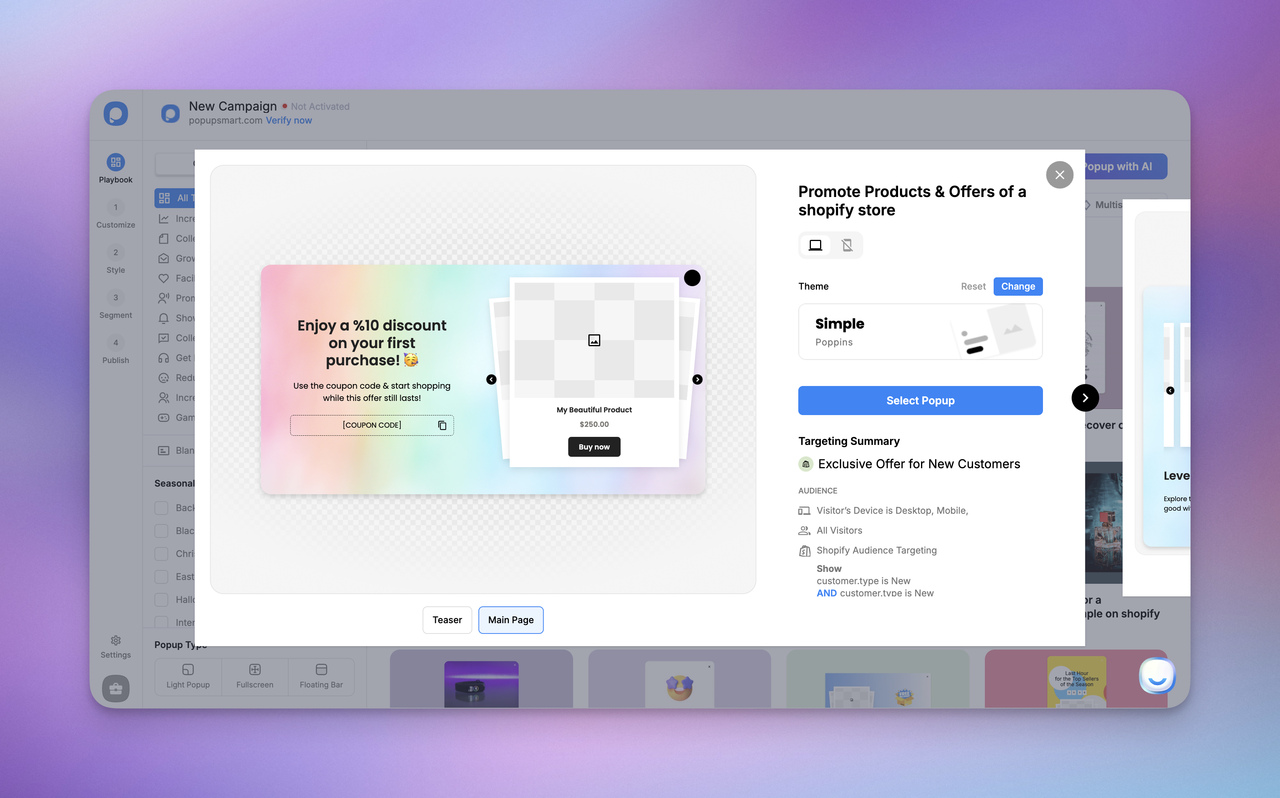
1. Welcome Newsletter Popup with First-Order Perk This popup appears after the visitor spends a little time on the homepage and offers a small benefit, for example, "Get 10% off your first order when you join our email list." It works because it feels like a friendly invitation rather than pressure, and it converts curious first-time visitors before they leave the site.
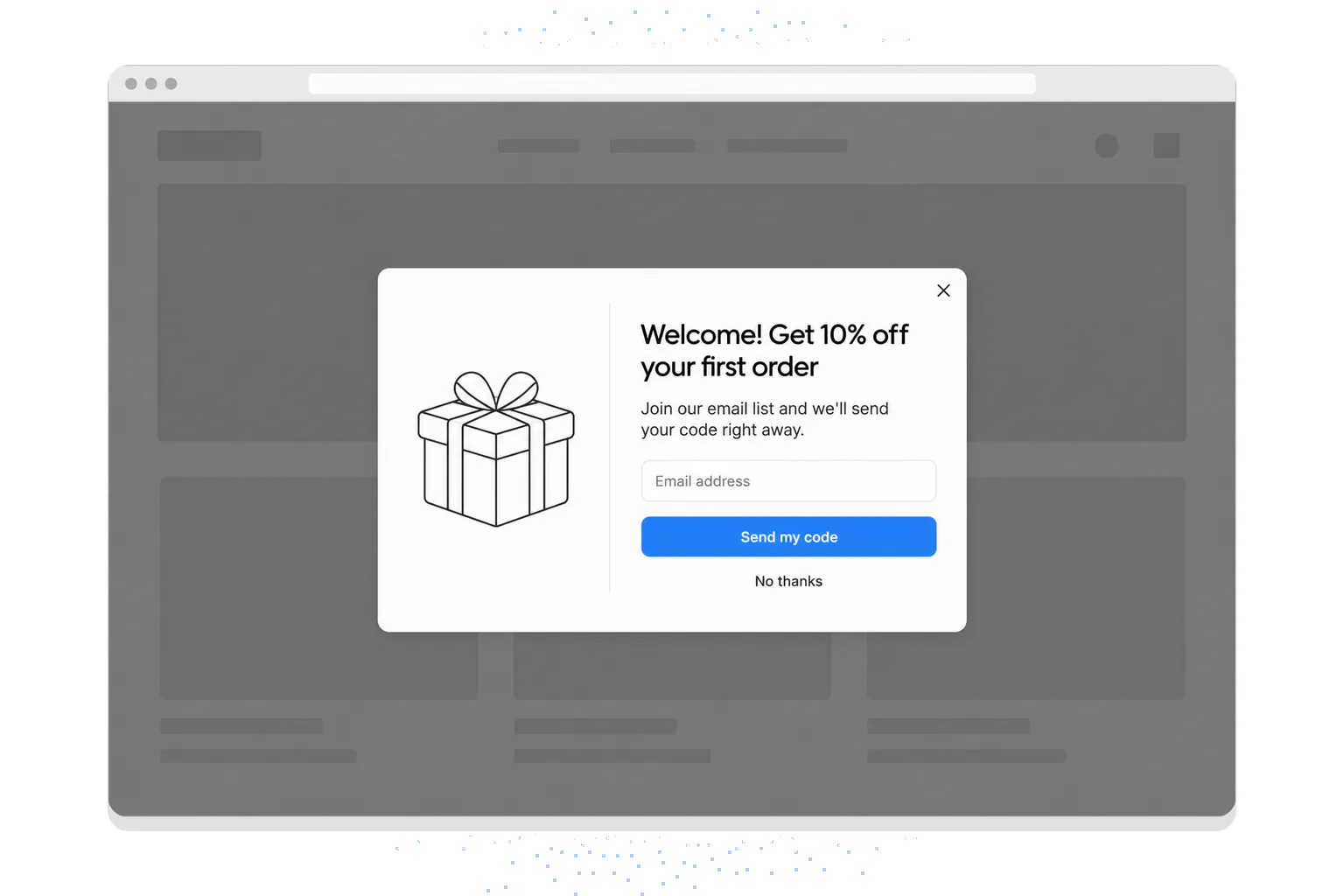
Package Free Shop, a zero-waste store on Shopify, ran this pattern as a newsletter popup: one email field and 10% off the first order, plus tips and tricks for reducing waste. The tips give subscribers a reason to open the emails after they've used the code.
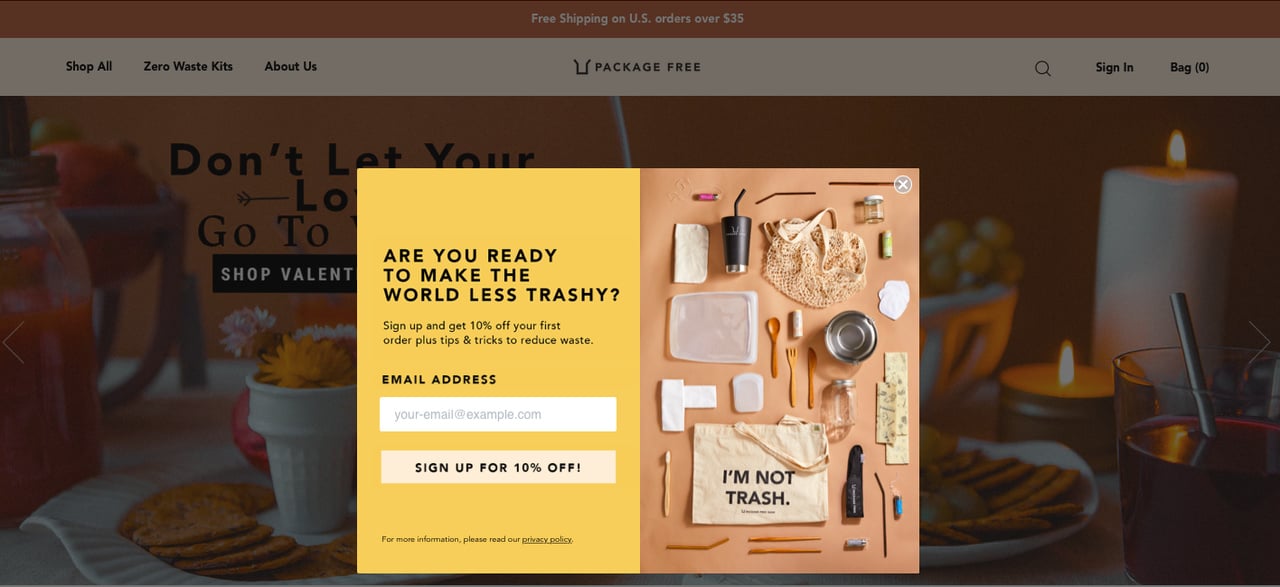
The first-order perk has data behind it. In Popupsmart's 2026 benchmark, signup popups that offer a discount code convert 1.46% vs 0.75% for signup popups without one, and popups targeted at new visitors only convert 1.13% vs 0.77% for popups shown to everyone. For more offer formats, see these discount popup examples and our guide to welcome popups.
2. Social-Proof Based Newsletter Popup Instead of using a discount, this popup highlights trust, such as "Join 50,000+ customers who get our updates." It appears after the visitor scrolls the page, and it works especially well for brands with a strong community, because people feel more confident subscribing when they see others already trust the brand. Use a number only if it's your store's real, current count.
3. Story-Based Brand Introduction Popup This popup briefly explains what the brand stands for, for example, sustainability or craftsmanship, and then invites users to subscribe for updates and useful content. It works because it appeals to visitors who connect with the brand story, not just promotions.
Shopify Product Page Email Popup Examples
On product pages, popups should support decision-making instead of interrupting it. These examples help shoppers feel more confident about a purchase.
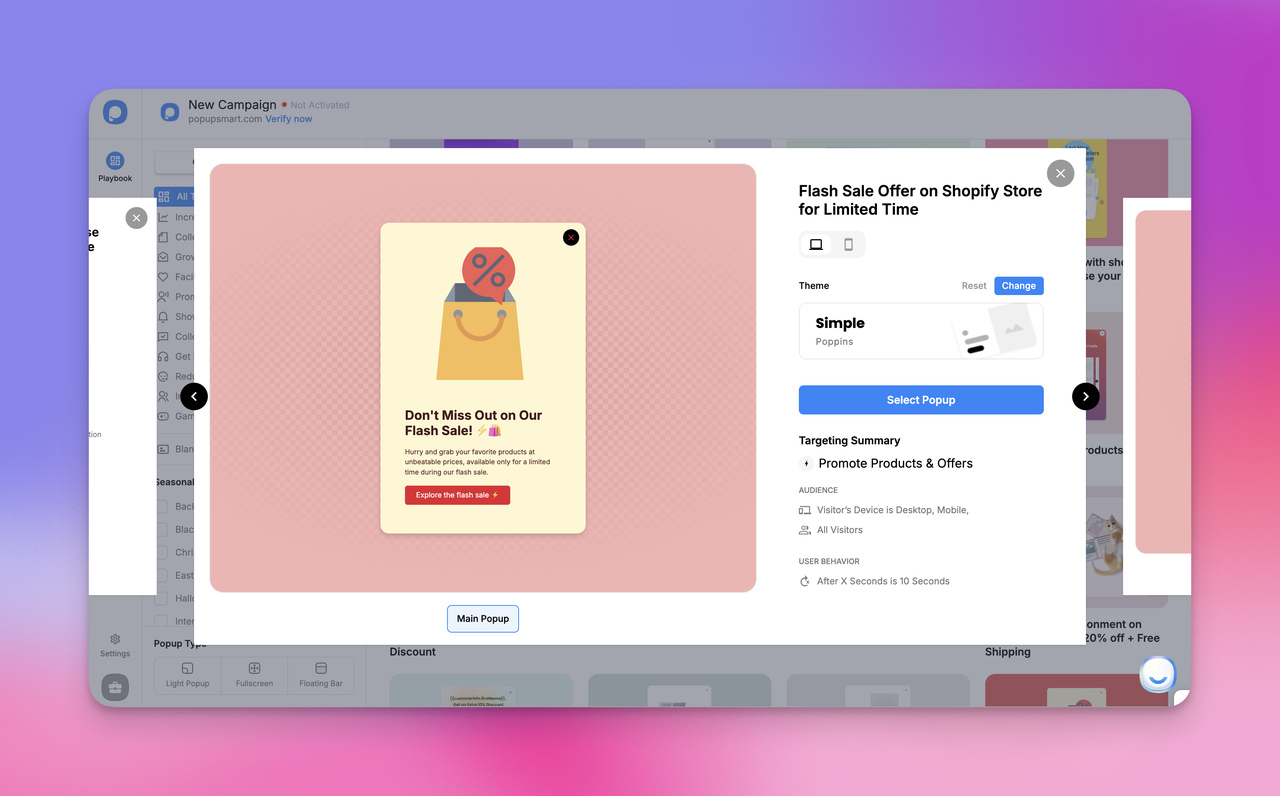
4. Size & Fit Guide Email Popup This popup appears when a shopper hesitates on the page and offers sizing or fit guidance via email. It works because it removes uncertainty (especially in fashion) and attracts people who already have strong buying intent.
5. Early-Access Product Drop Signup Popup Used for limited or upcoming products, this popup invites visitors to subscribe so they'll be the first to know when the item becomes available. It works because it creates exclusivity and anticipation, which motivates high-interest shoppers to join the list.
6. Usage & Care Tips Popup Instead of offering a discount, this popup promises helpful tips, such as skincare routines or product care instructions, delivered via email. It works because it provides value first and attracts long-term, engaged subscribers.
Cart & Checkout Email Popup Examples
At this stage, the visitor is close to purchasing, so these popups are designed to support and reassure, not distract. Cart and checkout pages are also where an email popup has the most to work with. In Popupsmart's 2026 benchmark, popups on cart and checkout pages convert 4.57% vs 1.07% on the home page (median campaign); blog pages convert 0.23%.
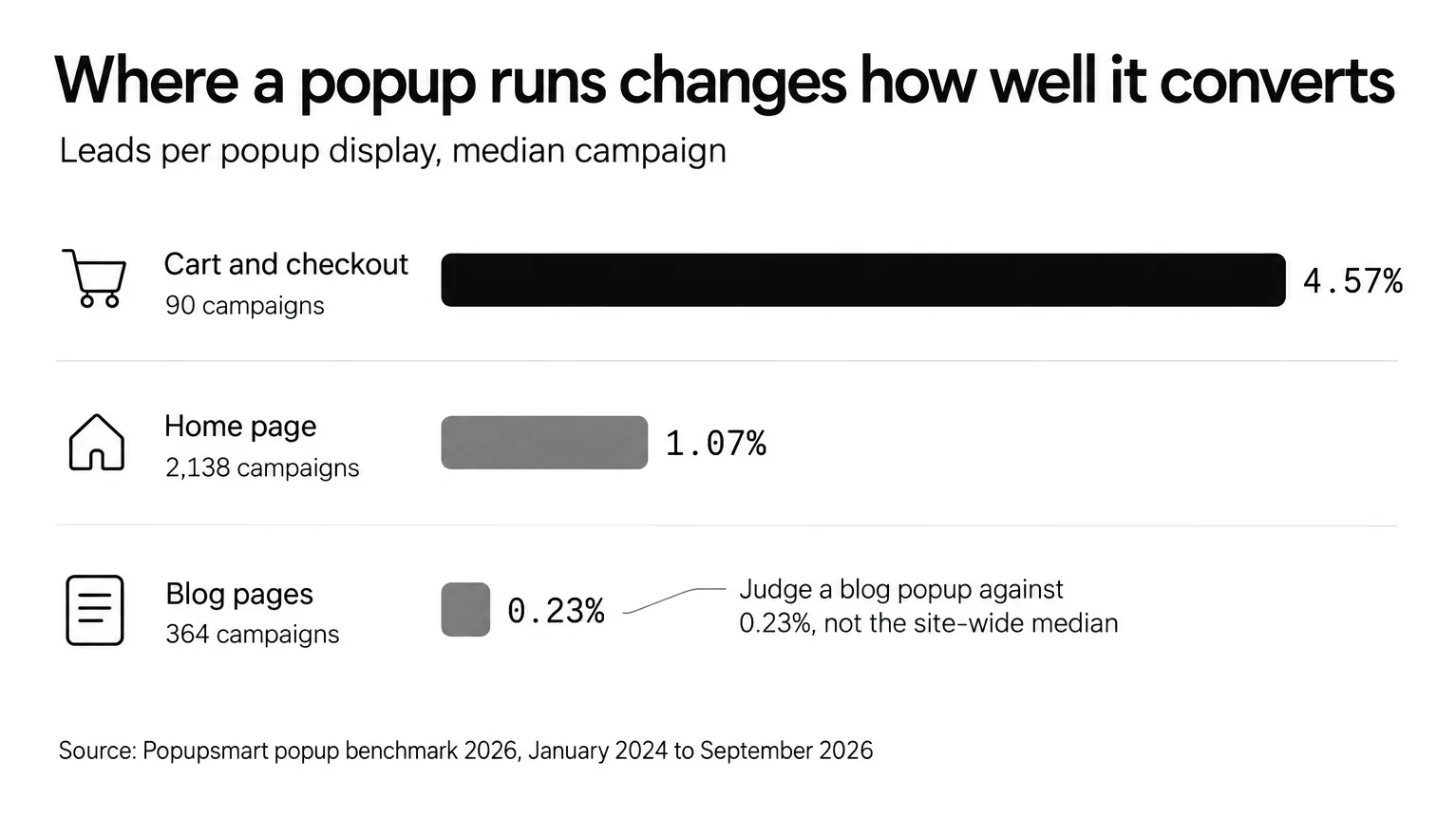
Median campaign, Popupsmart popup benchmark 2026.
On these numbers, the cart deserves at least as much of your attention as the welcome popup.
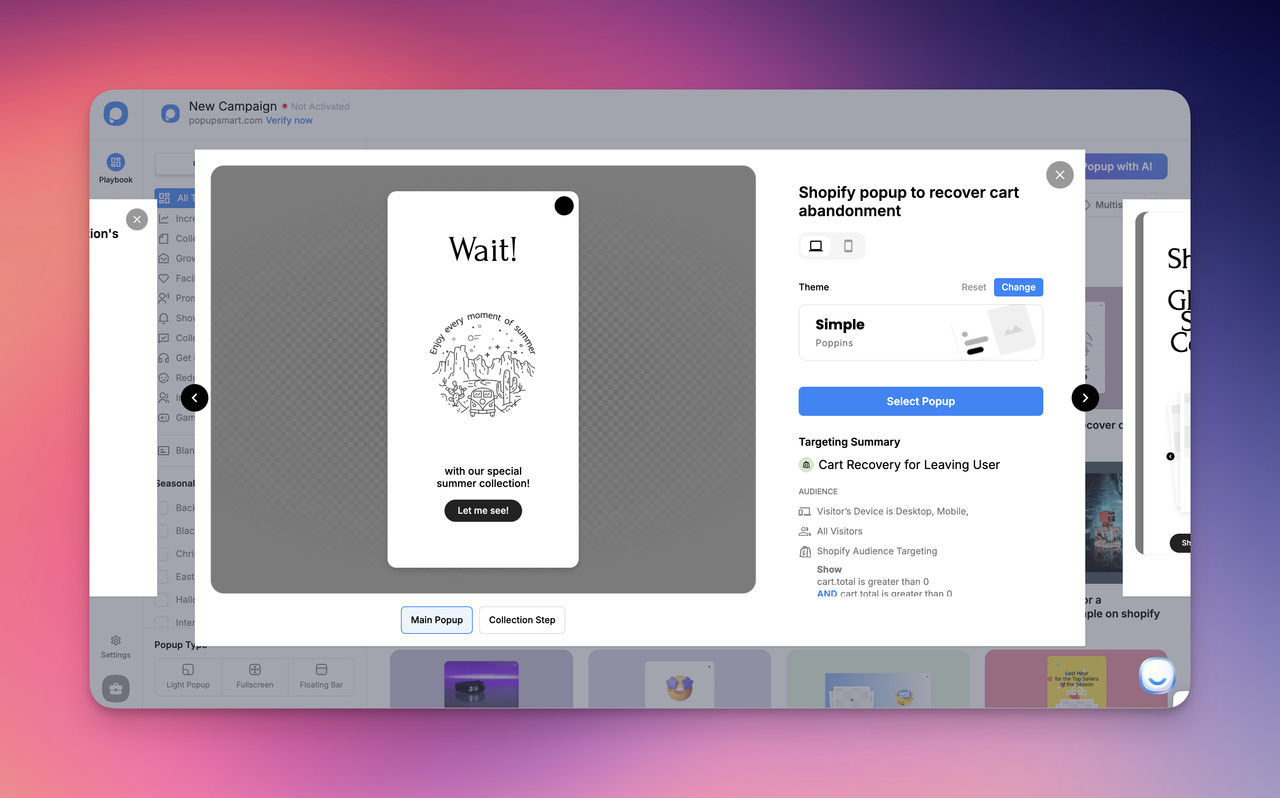
7. Exit-Intent Cart Recovery Popup This popup appears when a shopper moves their mouse toward closing the tab and asks whether they'd like a reminder or small perk via email. It works because it captures abandoning users at the exact moment they are about to leave. Don't expect the trigger alone to do the work, though. Exit intent shows no statistically reliable advantage: popups on the most sensitive exit-intent setting converted 1.10% vs 0.78% without exit intent (median campaign), a gap that could be chance. The Shopify exit-intent popup guide covers the setup, and these cart abandonment popup examples show more recovery offers.
8. Free-Shipping Threshold Reminder Popup Here, the popup tells the user they are close to unlocking free shipping and sends the reward to their email. It works because it increases both order value and email signups at the same time.
9. Trust & Delivery Updates Popup This popup reassures first-time customers by offering shipping updates and order notifications via email. First-time buyers worry about delivery, and this answers the worry before they pay.
Shopify Collection & Category Page Popup Examples
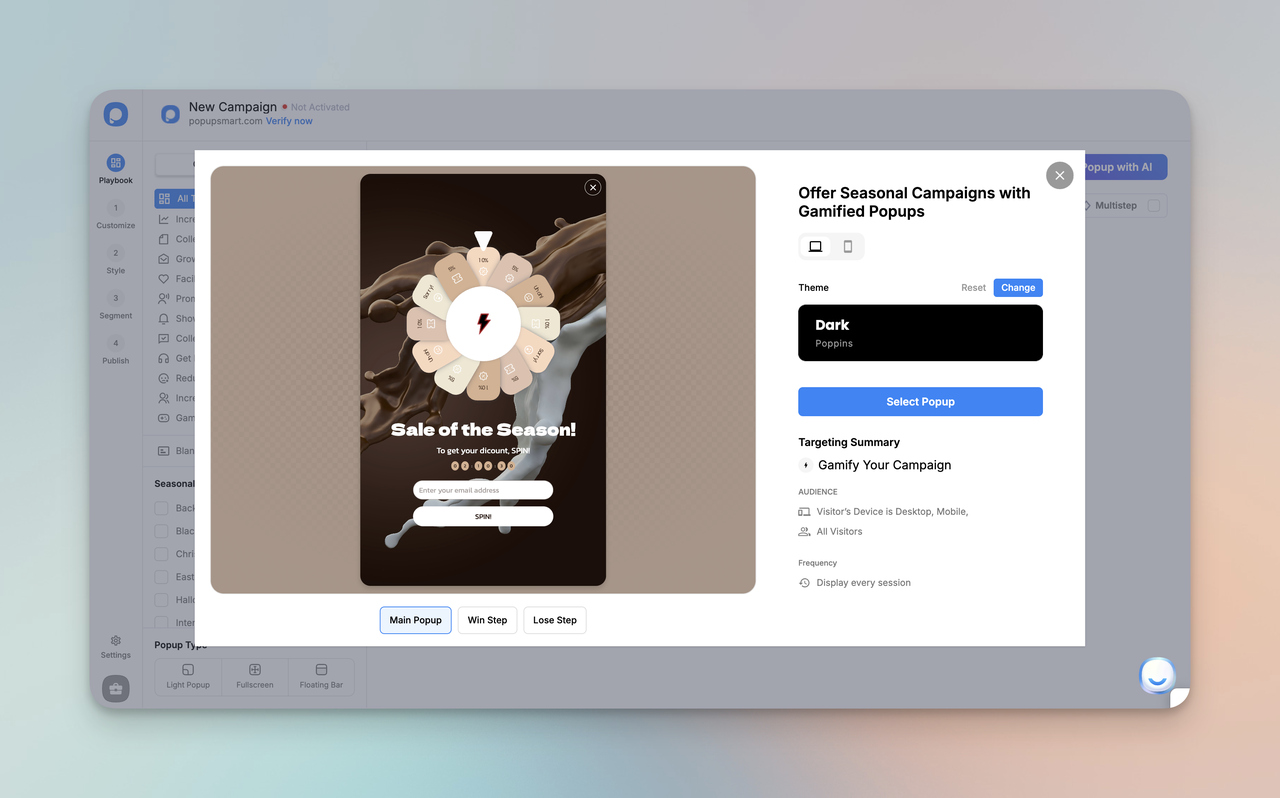
These popups respond to browsing interest, meaning they adapt to what the visitor is exploring.
10. Category-Specific Offer Popup If a visitor is browsing a specific collection (for example, home décor), the popup offers related content or updates for that category only. It works because the message matches the visitor's current interest, making it feel relevant.
11. Seasonal Collection Signup Popup This popup appears during seasonal campaigns and invites visitors to subscribe for launches, sales announcements, or holiday drops. The visitor is already shopping for the season, so the ask matches the visit.
12. Browsing-Preference Popup Instead of pushing an offer, this popup asks what type of products the visitor is interested in and sends tailored content via email. It works because personalization increases engagement and prevents irrelevant messaging.
Mobile-Optimized Shopify Email Popup Examples
Most popup views happen on phones: 63% of popup displays happen on mobile. Mobile visitors convert on popups at 1.02% vs 0.57% on desktop, and click at 2.99% vs 1.34% (median campaign). That's why these popups are designed to be simple, fast, and easy to interact with.
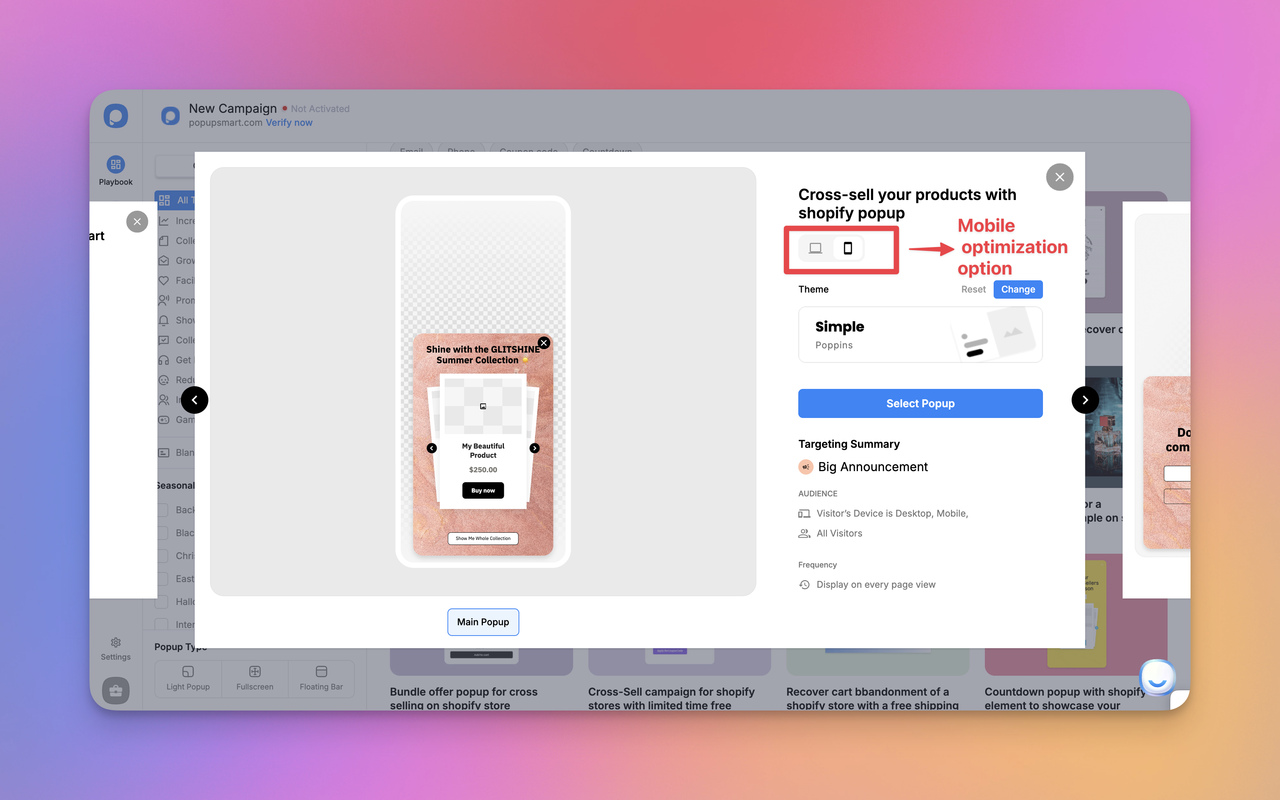
13. Full-Screen Mobile Popup with Large Buttons This popup is built specifically for small screens with minimal text and clear buttons. It works because it removes friction and makes subscribing effortless. Our mobile popup guide covers sizes and close buttons.
14. Slide-In Micro Popup A small popup that slides in softly from the bottom instead of blocking the full screen. It works because it feels lightweight and non-disruptive, especially for content readers. Know the trade-off before you choose it: center modal popups convert 0.88% vs 0.49% for corner/slide-in boxes (median campaign). Use the slide-in where you'd rather not interrupt reading, and expect fewer signups from it.
15. Reading-Intent Popup This popup appears only after someone spends time reading a page. It works because it targets engaged users, who are more likely to convert.
Creative & Gamified Shopify Email Capture Examples
These popups focus on interaction and engagement, making signup feel fun rather than transactional.
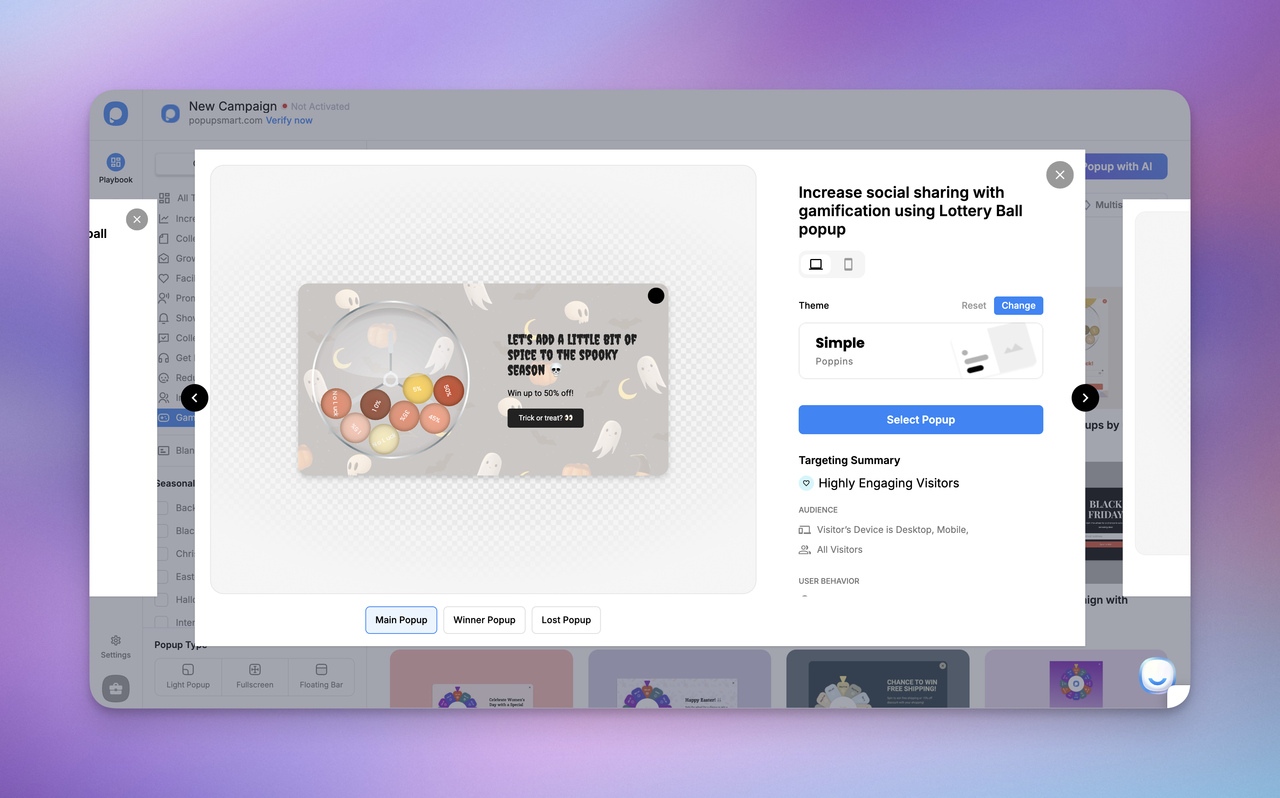
16. Spin-to-Win Gamified Popup Users spin a wheel to unlock a reward after subscribing. It works because interactive elements increase curiosity and get people to engage with the offer.
17. Quiz-Based Signup Popup The popup invites users to answer a short quiz and receive personalized results by email. It works because personalization begins before the signup happens.
18. Cause-Driven / Mission-Support Popup Instead of rewards, this popup connects subscription to a cause, such as sustainability or social impact. It works because emotional alignment motivates certain audiences to join willingly.
Lifecycle & Retention-Focused Popup Examples
These popups appear later in the journey, focusing on loyalty, retention, and return visits rather than first-time signups.
19. Post-Purchase Care & Usage Guide Popup Shown on the thank-you page, this popup invites customers to subscribe for product guidance and tips. It works because these customers have just trusted the brand with an order.
20. Rewards & Points Program Signup Popup Encourages customers to join the loyalty program after a purchase. It works because it strengthens repeat-buyer behavior.
21. Back-in-Stock Alert Popup Appears when a product is unavailable and lets shoppers subscribe for restock updates. It works because it captures strong buying intent instead of losing the visitor.
22. Variant / Size Restock Popup Triggers when a specific size or color is out of stock. It works because it converts frustration into future purchase intent.
23. Returning-Visitor Reminder Popup Recognizes users who have visited before and offers updates based on previous browsing. It works because relevance increases trust and signup motivation.
24. Browse-Recovery Popup Appears when someone revisits the same collection multiple times. It works because repeated viewing signals real purchase interest.
25. Geo-Aware Shipping & Local Offer Popup Shows localized messages for international visitors, for example, "Get delivery updates for your region." It works because it reduces doubt and builds confidence. Write it in the visitor's language where you can: when a visitor's browser language matches the popup's language, the same popup converts better in most campaigns.
For more designs beyond Shopify email capture, browse these website popup examples or start from Popupsmart's popup templates.
How to add a Shopify newsletter popup
You can add a newsletter popup to Shopify in two ways: with Shopify Forms, Shopify's own free app, or with a popup app such as Popupsmart. Your theme's Newsletter section collects emails too, but it sits on the page and doesn't pop up. None of the three needs theme code. The Shopify steps below follow Shopify's help center as of October 2026, and the best Shopify popup apps compared covers the other apps.
| Option | Shows as a popup? | Where the signups go |
|---|---|---|
| Your theme's Newsletter section | No, it sits in a page section or the footer | Customers, in the Email subscribers segment |
| Shopify Forms (free Shopify app) | Yes, as a floating form or an overlay | Customers, plus the form's own submissions list |
| Popupsmart (Shopify app) | Yes | Popupsmart's Leads page, plus Shopify Customers or your email tool once you connect them |
Shopify's own options: the Newsletter section and Shopify Forms
Shopify's Online Store 2.0 themes and its Horizon themes all come with a newsletter signup, either as a Newsletter section you can add to any page or as an email form in the footer. To add the section, go to Online Store, click Edit theme, pick the template, click + Add section and choose Newsletter. It stays put on the page.
For an actual popup, Shopify's answer is Shopify Forms. The app is free, but no plan comes with it installed, so add it from the Shopify App Store first. Then:
-
In the theme editor, open App embeds, turn on Forms and click Save. Popup forms don't show without this embed.
-
Go to Apps > Forms, click Create form and select Popup form.
-
Choose Floating or Overlay, write the title and button label, and set Marketing consent: sign people up when they submit, or only if they tick a box.
-
Under Behavior, pick the devices, the page types and the trigger: the first, second or third page view, straight away or after a delay, with an optional exit trigger on desktop.
-
Click Turn form on. A new form stays inactive until you do.
A form can show a discount code on its success screen and tag everyone who submits it. The limits: 25 forms per store, no multi-step forms, no conditional logic, and a dismissed popup doesn't come back in that browser unless the visitor clears their cache and cookies.
Where the theme's newsletter form code lives
If you're looking for the code itself, open Online Store, click the theme's ... menu and choose Edit code. In Dawn, a free Shopify theme, the Newsletter section is sections/newsletter.liquid and the footer signup is in sections/footer.liquid. Both use Shopify's Liquid customer form with an email input named contact[email]. Shopify's email consent guide for theme developers shows the full form; a signup through it creates a customer marked as accepting marketing.
That code gives you an inline form, not a popup. Making it pop up means writing your own overlay script, and Shopify warns that theme code changes can be removed when a theme update conflicts with them. It advises editing code only when an app or the theme editor can't do the job.
Adding a newsletter popup with Popupsmart
Popupsmart's Shopify app adds targeting on store data, such as cart total or whether the visitor is logged in, and can send the emails to your email tool as well as to Shopify. The step-by-step guide below covers the full setup; these choices make it a newsletter popup:
- Pick the Grow My Email List goal. Choose Collect emails with coupon if you're giving a first-order code; if the newsletter itself is the offer, pick a signup template without a coupon.
- Keep the template's Email field. If you want a consent line or a required checkbox with a link to your privacy policy, add a Notice and Consent input to the form.
- To reach shoppers who already have an account, use Shopify Targeting in the Advanced Editor's audience targeting. It includes
customer.accepts_marketing, which Popupsmart's help center suggests for inviting existing customers to subscribe. - In the Publish step, turn on Shopify Customer and open Field Mapping. Email is required; first name, last name, phone and tags are optional.
Where the newsletter signups go
The table above has the short answer. Two details it leaves out: Shopify Forms matches an existing customer to their profile but doesn't update their email or phone, and may not update their marketing consent either. Popupsmart keeps every lead on the app's Leads page, with the campaign it came from, even when you also send it to Shopify Customers or an email tool, and you can export the list from there.
From Customers you can send the newsletter with Shopify Messaging or an email app that syncs your customer list. Shopify asks you to send promotional email only to customers who agreed to receive it, so sign up once with a test address and check how that customer's email subscription shows in your admin before the first send.
Step-by-Step Guide to Implementing Email Capture Popup Templates on Shopify with Popupsmart
The fastest way to implement email capture popup templates on Shopify without code is a popup app. This walkthrough uses Popupsmart, a no-code popup builder designed for mobile-friendly popups that integrate smoothly with Shopify and email automation tools.
This walkthrough explains how to create, launch, and connect popup templates in Popupsmart so the emails they collect support segmentation, automation, and long-term list growth.
Why Use Popupsmart for Shopify Email Capture Popups?
Popupsmart is built for merchants who want speed, control, and clean performance without technical setup. Key advantages include:
- No coding or theme editing: the Shopify app installs in one click
- Mobile-ready popup templates, 500+ by Popupsmart's own count
- Behavior-based triggers (exit-intent, scroll, time-delay, page-targeting)
- A/B split testing on the Advanced plan and above, plus Google Analytics tracking
- Data collected through Popupsmart is recorded in accordance with GDPR and CCPA, according to Popupsmart
- Klaviyo, Mailchimp and HubSpot in the Shopify app, a native Shopify Customers sync, and ActiveCampaign, Brevo, Zapier and webhooks in the Advanced Editor
In practice, this means you can launch popups quickly while still keeping full control over design, targeting, and performance tracking.
Building Your First Email Capture Popup in Popupsmart (Hands-On Tutorial)
Step 1 — Connect Popupsmart to Your Shopify Store
Instead of manually adding a script to your theme, you can connect Popupsmart to Shopify using the official Popupsmart Shopify app and Shopify's App Embed feature. Once this is enabled, any popup you publish in Popupsmart will automatically work on your Shopify store. The steps below follow the flow in Popupsmart's help center (March 2026).
Here's how to do it step by step:
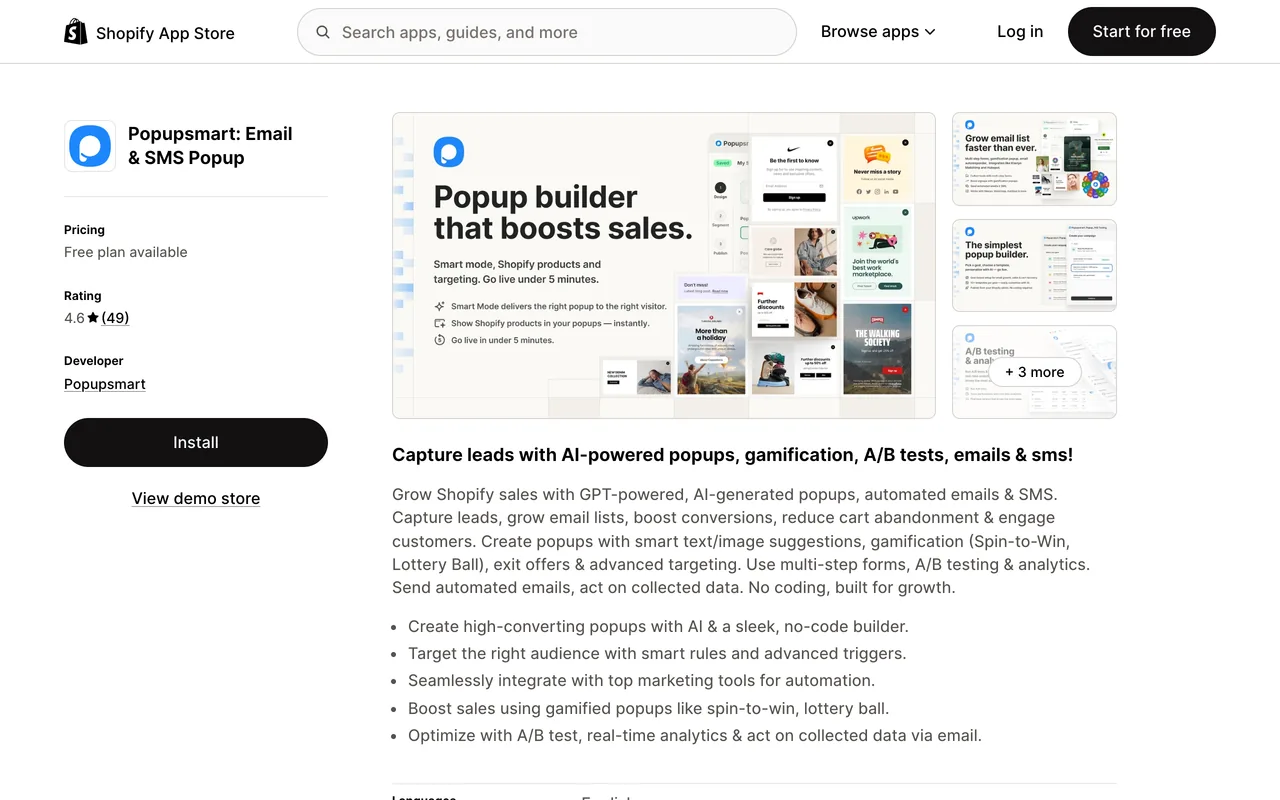
1. Install the Popupsmart app from the Shopify App Store
- Go to the Shopify App Store and search for "Popupsmart: Email & SMS Popup" (the listing's name on 30 September 2026).
- Click Install and follow the prompts to add it to your store.
2. Let the app create and link your account
After install, you'll be redirected to Popupsmart's interface. A Popupsmart account is created for you, and your Shopify store will be authenticated and linked automatically. Your store's fonts and colors are imported too, so the first template already looks like your store.
3. Create your popup campaign in Popupsmart
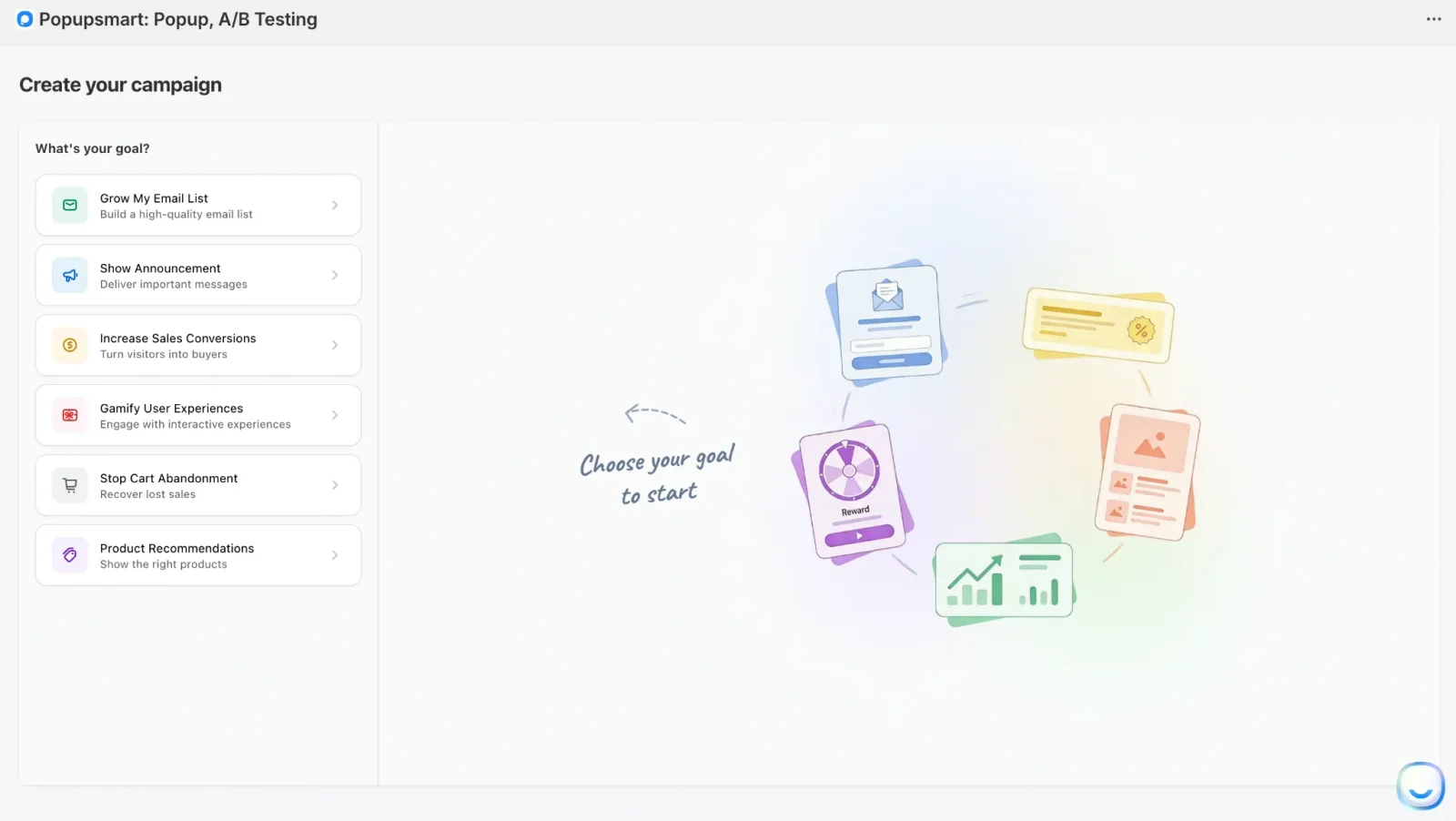
- On the Overview page, click Create first campaign and choose a goal (for example, the Grow My Email List goal for email capture).
- Pick a use case such as Collect emails with coupon.
- Customize your design, form fields, and targeting in the Design and Segment steps.
4. Go to the Publish step and connect your list
- Turn on the Shopify Customer toggle to send every new subscriber to your Shopify customer list, or click Add Integration for Klaviyo, Mailchimp or HubSpot.
- Click Publish campaign.
5. Enable the Popupsmart embed in your Shopify theme
If the app embed is not active yet, you'll see a message like "Verify Popupsmart App" with a button that takes you to your Shopify theme settings. The same fix applies if the popup doesn't show on your storefront:
- In your Shopify admin, go to Online Store → Themes → Customize.
- In the theme editor, open the App embeds panel (usually on the left side).
- Find Popupsmart Embed (or similar) in the list and toggle it On.
- Click Save in the theme editor.
6. Return to Popupsmart and check the campaign is live
- Go back to your Popupsmart dashboard and make sure your campaign is Active.
- Your popup will now load on your Shopify store according to the targeting and triggers you set, without adding any manual script tags.
Step 2 — Choose a Template Aligned With Your Goal
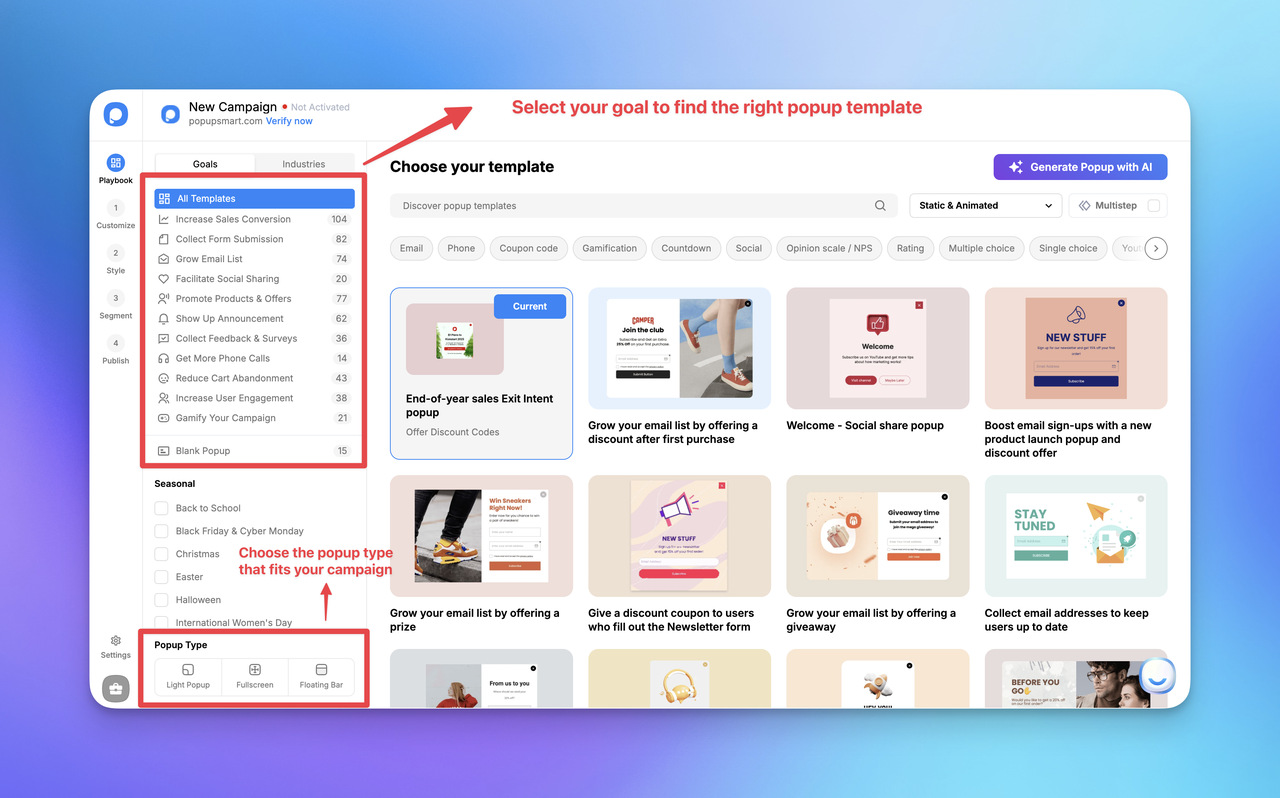
Log in to Popupsmart and select a popup template from the popup templates library based on your objective, such as:
- Exit-intent popup
- Welcome popup
- Timed popup
- Scroll-triggered popup
Update the headline to reflect your incentive, e.g.,
"Join to get early access to new drops" or "Sign up to receive style tips and offers."
Step 3 — Customize the Opt-In Form
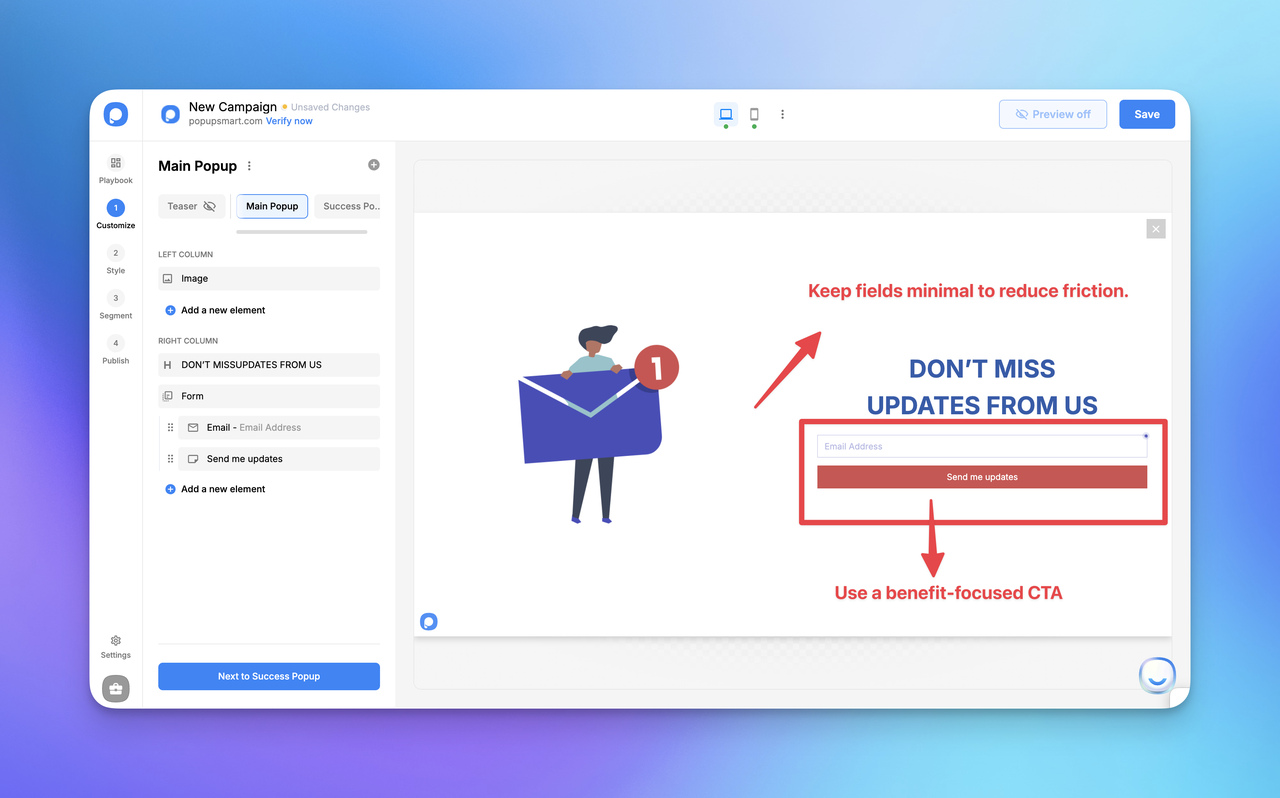
Keep fields minimal to reduce friction:
- Email (required)
- Name (optional, only if personalization adds value)
Popupsmart's 2026 benchmark supports the short form. Popups asking for one or two fields convert 0.88% and 0.94%, against 0.56% for three fields (median campaign; spin-to-win and other gamified popups are counted separately). Adding a name field alongside the email shows no reliable effect: the overall gap in its favour (1.25% vs 0.88% for email only) reverses among campaigns whose form rarely changed (0.74% vs 0.79%).
Use a benefit-focused CTA such as:
- "Join & Get Access"
- "Get My Discount Code"
- "Send Me Updates"
Match the layout to your brand so the popup feels native to your Shopify store.
Step 4 — Configure Triggers & Targeting
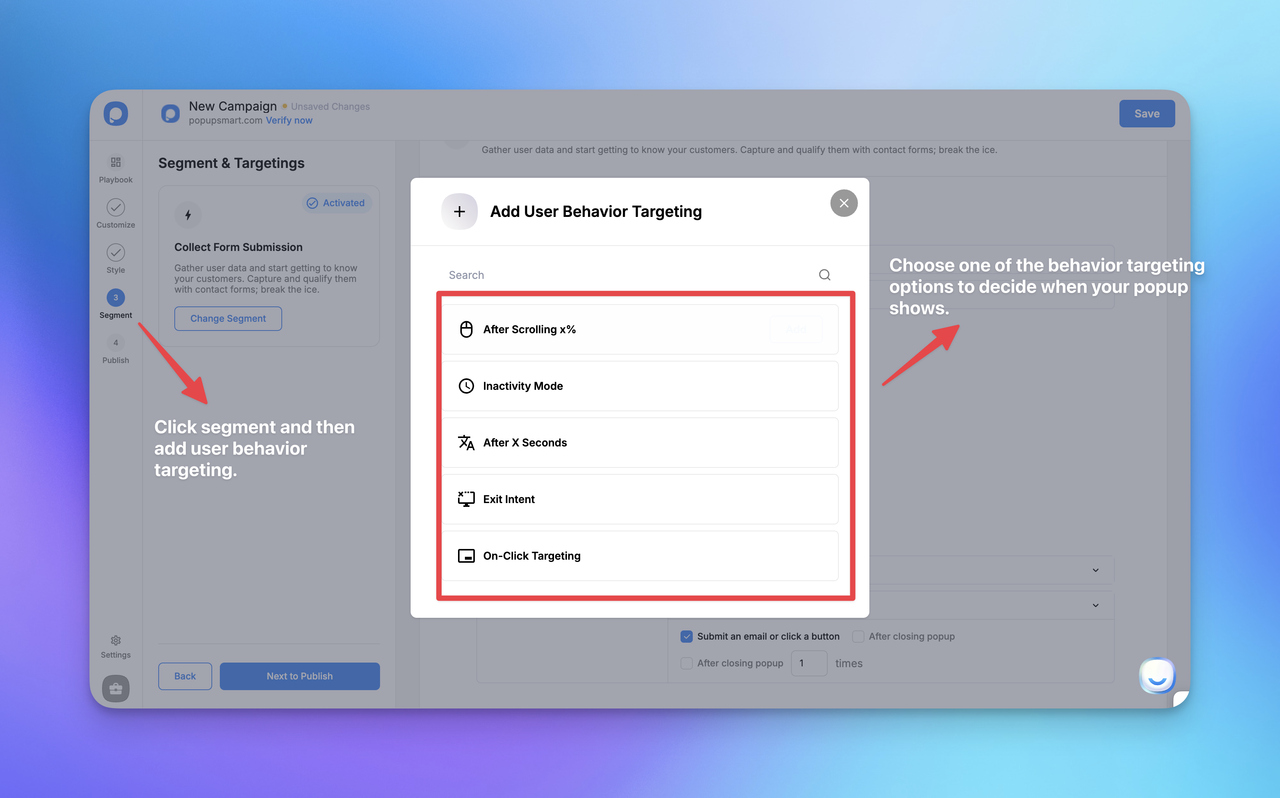
Popupsmart allows you to control when and where the popup appears:
- Exit-intent on desktop
- Scroll-based trigger on mobile
- Time-delay after engagement
- Page-specific targeting (homepage, PDP, collection, cart, blog, etc.)
This ensures the popup appears contextually, not interruptively.
Targeting is worth the extra minutes too. Popups set up with three targeting rules convert 1.09% vs 0.71% for popups with none or one (median campaign): a correlation, since marketers who target carefully may also write better offers.
Step 5 — Launch, Test, and Save as a Reusable Template
Before publishing:
- Test on desktop and mobile
- Check load speed and interaction flow
- Verify form submission and automation triggers
Then save time on the next one: duplicate the campaign from your dashboard so you can quickly reuse it for:
- campaigns
- collections
- seasonal offers
- different audience segments
Integrating Popupsmart With Email Automation & Analytics
Connect your popup directly to your email platform (e.g., Klaviyo, ActiveCampaign, Mailchimp) or send subscribers straight to Shopify.
Use tags and segmentation rules based on popup type or page intent to trigger:
- welcome flows
- product education sequences
- early-access or VIP drops
- retention-focused campaigns
Popupsmart integrations already cover popular email marketing and automation tools, making it easy to sync new subscribers and trigger standard flows right away. For a walkthrough with one tool, see how to add a Mailchimp popup to Shopify.
Shopify's own customer list is now the most common destination. Among external integrations, Mailchimp (5.2% of lead-collecting businesses) and Brevo (4.5%) are the most connected email tools; the Shopify Customers sync is used by 10.7%. The share of new campaigns connected to an external tool fell from 7.0% in 2024 to 3.1% in 2026, while native Shopify Customers sync rose from 1.0% to 9.1%.
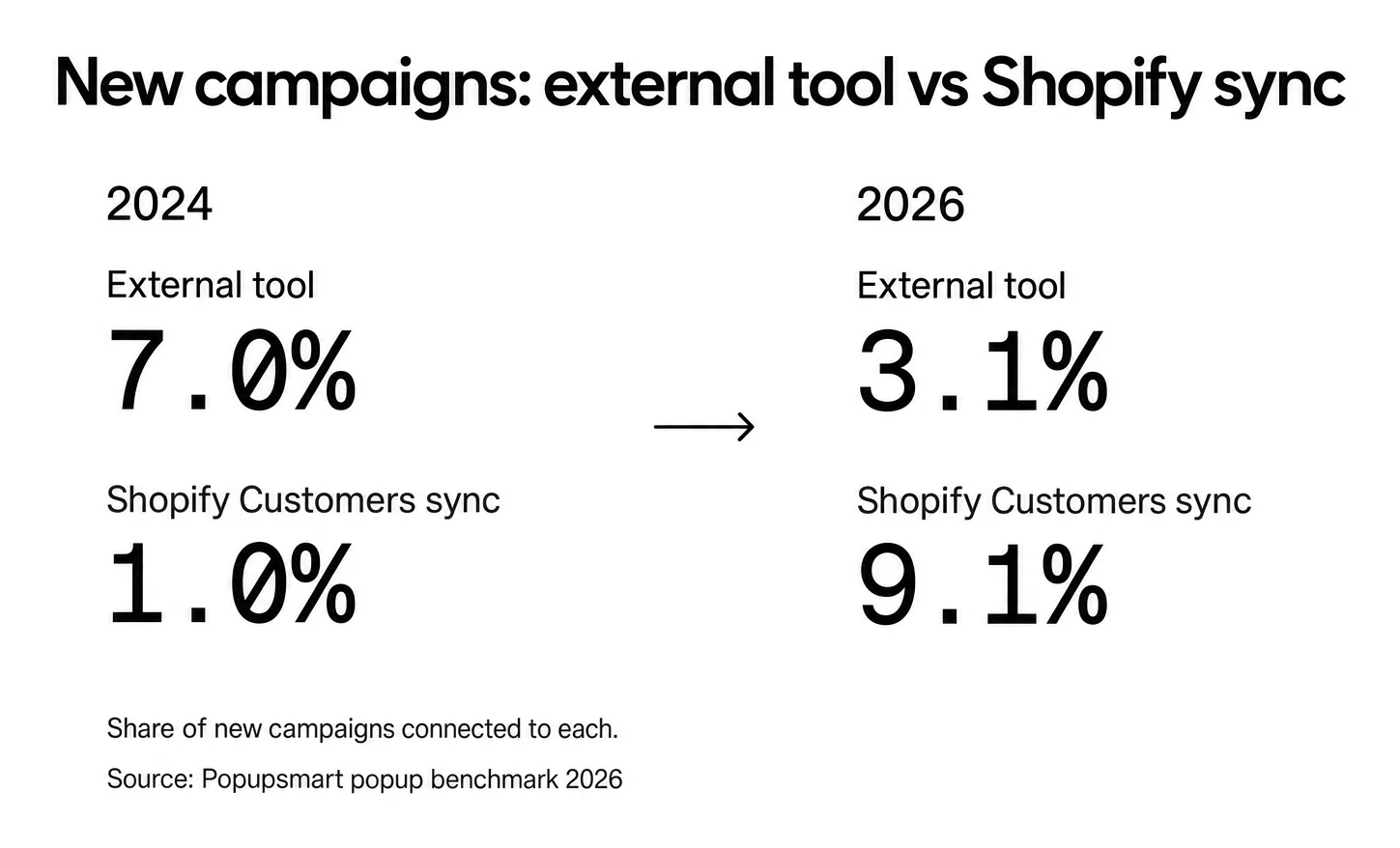
Does connecting a tool raise conversions? Not on its own. Popups connected to Brevo convert at 1.27% and popups synced to Shopify Customers at 1.23%, vs 0.63% for popups with no integration (median campaign): a correlation, since marketers who connect a tool also tend to run better campaigns.
For more advanced workflows, Popupsmart can also be connected to CRM systems via Zapier, allowing you to route Shopify email captures into highly specific drip campaigns or custom lifecycle automations, without manual work.
Why This Implementation Method Works
With Popupsmart as the single popup layer, your email capture popups stay:
- consistent across your Shopify store
- easy to scale and iterate
- automation-ready
- aligned with user intent and lifecycle marketing
Instead of one-off popups, you build a repeatable, data-driven acquisition system that supports long-term growth.
FAQs
1. Do email capture popups work well on Shopify stores?
Yes. When popups are timing-based, mobile-optimized, and value-driven, they convert strongly on Shopify, especially for welcome offers, early-access signups, product education, and cart-intent moments. The key is aligning the popup with user behavior instead of interrupting the browsing experience. In Popupsmart's 2026 benchmark, popups on Shopify stores convert at 1.07% vs 0.66% on WordPress sites (median campaign).
2. What is a good conversion rate for email capture popups on Shopify?
Across 3,034 Popupsmart popups that ask for an email or phone number (January 2024 to September 2026, each with at least 1,000 displays and 14 active days), the median converts 0.83% of its displays into leads; the top 25% reach 1.96% and the top 10% reach 3.87%. Popups on Shopify stores convert at 1.07% (median campaign). Measure your popup per display, not per visitor.
3. Where should I place email capture popups in my Shopify store?
High-performing placements include homepage welcome popups, product page education or early-access popups, cart and checkout exit-intent popups, out-of-stock restock alert popups, and post-purchase or thank-you-page retention popups. Placement should always match user intent and page context: in Popupsmart's 2026 benchmark, popups on cart and checkout pages convert 4.57% vs 1.07% on the home page (median campaign); blog pages convert 0.23%.
4. Do popups harm Shopify SEO or page performance?
No, as long as they follow Google's guidance on intrusive interstitials, load lightweight scripts, and do not block critical content. Google's concern is a popup that covers the content right after a visitor arrives from search, so use a delay or a scroll trigger on mobile. Ethical, non-intrusive popups with visible close options are considered safe and user-friendly.
Google's own page on avoiding intrusive interstitials lists what counts.
5. Do I need to offer a discount for email popups to work?
Not always. Many high-converting Shopify popup examples use value-based incentives instead of discounts, such as style or product usage guides, early-access or VIP drops, restock notifications, care tips and tutorials, and loyalty or rewards enrollment. These often attract higher-quality subscribers than discount-only lists. A discount does help: in Popupsmart's 2026 benchmark, signup popups that offer a discount code convert 1.46% vs 0.75% for signup popups without one.
6. Should I use different popups for new and returning visitors?
Yes, segmentation improves results. New visitors respond better to discovery-focused or welcome messaging, while returning visitors convert more from personalized reminders, restock alerts, or category-based updates. Popupsmart's 2026 benchmark supports separating them: popups targeted at new visitors only convert 1.13% vs 0.77% for popups shown to everyone. Build one welcome popup for first visits and a second campaign for returning visitors.