ChatGPT
 Perplexity
 Claude
 Grok
Grok Google AI Mode
Shopify stores have plenty of popup formats to choose from: classic newsletter popups, exit-intent offers, banners, slide-ins.
But lottery popups for Shopify stores stand out for one simple reason: they change how visitors feel about being interrupted.
Instead of asking for an email, you're offering a moment of interaction.
That interaction is what the game buys you: attention. Whether it also buys signups depends on the offer, the timing and the form, and that's what most of this guide is about.
Used well, lottery popups are a good fit for:
- growing email lists
- capturing hesitant visitors without hurting user experience
This guide breaks down how lottery popups actually work on Shopify, when to use them, how to design them so they convert without annoying your visitors, and how to run a Shopify giveaway with a popup as the entry form.
🏁 What This Guide Covers
This guide explains what a lottery popup on Shopify is, how it compares with standard email popups, and how to use it to grow your email list without hurting user experience. Inside, you'll learn:
- 🎱 What lottery popups are and how the gamified reward mechanic works
- 🧠 What gamification changes, and what Popupsmart's 2026 benchmark shows about clicks and leads
- 🎯 When to trigger lottery popups, and what the data says about timing
- 🎉 How to run a Shopify giveaway with a popup entry form
- ⚖️ Legal, UX, and ethical best practices for compliant signup experiences
- ⚙️ How to create and optimize a lottery popup using Popupsmart
By the end, you'll know how to use lottery popups strategically, not as a gimmick, but as a sustainable, user-friendly way to capture high-quality email subscribers on Shopify.
🎯 What Is a Lottery Popup on Shopify?
A lottery popup on Shopify is a gamified email capture popup that offers visitors a chance to receive a reward, such as a discount, free shipping, or exclusive access, in exchange for their email address.
Unlike standard email popups that rely on a direct subscription request, lottery popups introduce an element of chance and reward selection. Visitors aren't asked to "sign up". They're invited into a short game with an outcome, and that feels optional rather than forced.
Common rewards used in Shopify lottery popups include:
- Percentage discounts
- Free shipping offers
- Bonus or sample products
- Early or exclusive access to sales and launches
The incentive is the same one any discount popup offers. The lottery-style mechanic behind it is what sets a lottery popup apart from other email capture methods.
Rather than presenting a fixed offer upfront, lottery popups introduce uncertainty: visitors don't know exactly what they'll receive until they participate. This uncertainty creates curiosity and encourages engagement, especially among users who are still in the exploration phase of their shopping journey.
Why lottery popups are effective specifically on Shopify
Most Shopify traffic consists of first-time or low-intent visitors who are browsing rather than buying. A lottery popup works well in this environment because it:
- Captures attention without assuming purchase intent
- Offers perceived value before requesting personal information
- Feels like an experience, not a sales tactic
Popups also do better with new visitors. In Popupsmart's 2026 benchmark, new visitors convert on popups more often than visitors who were on the site in the previous 7 days: the same popup converts better for new visitors in 75% of campaigns (median gap 0.30 percentage points; pooled 1.28% vs 0.54% of displays).
For Shopify stores, this makes lottery popups a natural fit for the top of the funnel, where the primary goal is email list growth, not immediate conversion.
Implemented correctly, lottery popups also support better on-site engagement. They balance lead generation with user experience, and that balance keeps you clear of the bounce-rate problems that aggressive or poorly timed popups cause. For layouts that work, see these email capture popup examples for Shopify.
In short, a lottery popup on Shopify is a lead-generation tool designed to engage hesitant visitors, grow email lists sustainably, and do so without compromising user experience, as long as the offer and the timing are right.
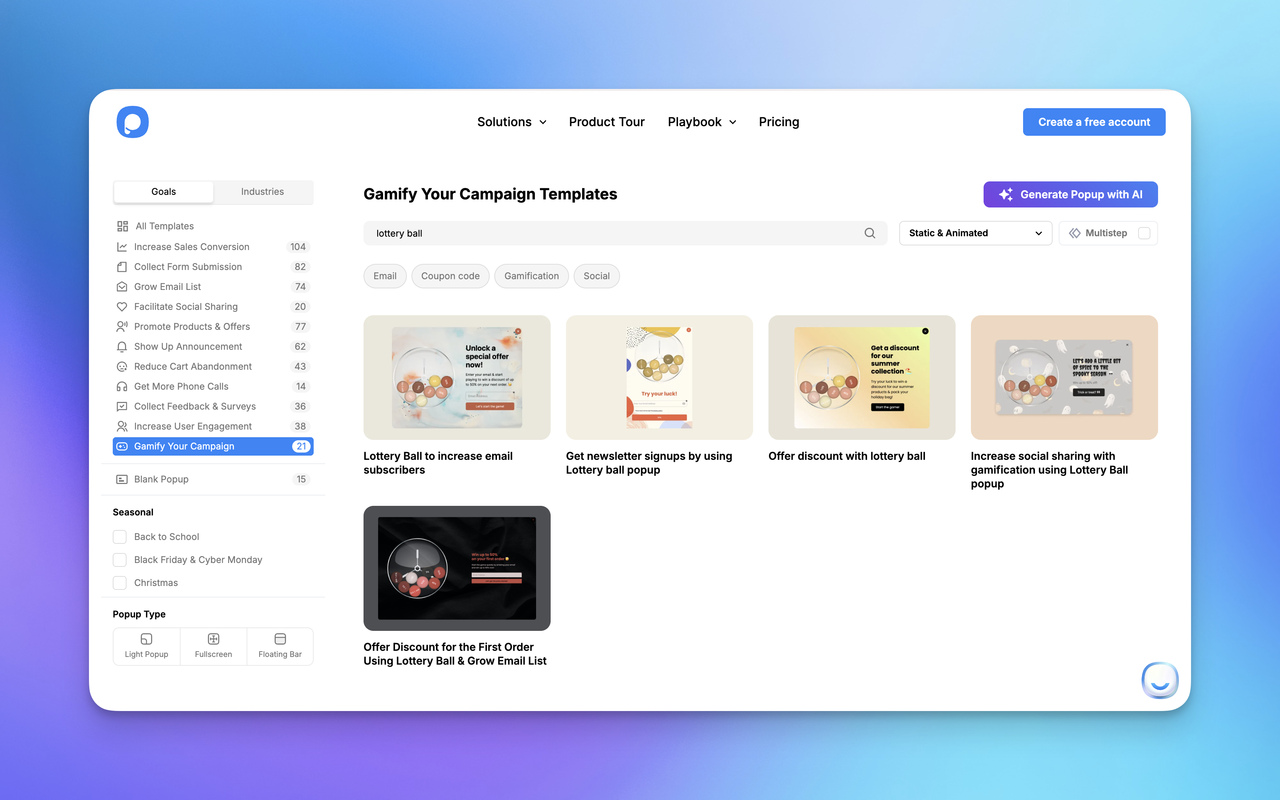
🎱 How to Create a Lottery Ball Popup on Shopify Using Popupsmart
To create a lottery ball popup on Shopify, install the Popupsmart Shopify app, start a campaign from a lottery ball template, set each reward in the Lottery Ball element's game settings, add a success step that shows the code, and publish.
If your Shopify store already uses Popupsmart, setting up a lottery ball popup is a straightforward process and doesn't require any custom code.
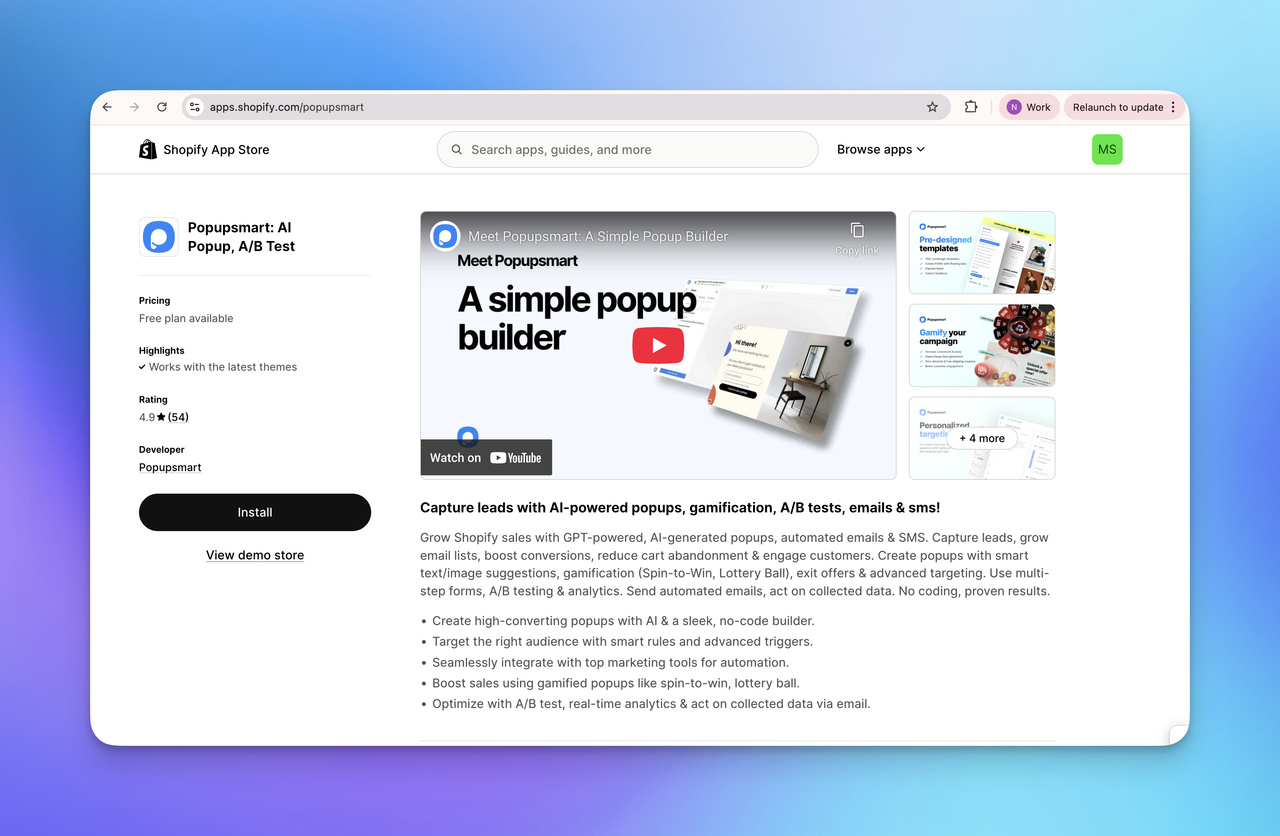
First, make sure the Popupsmart app is installed on your Shopify store. You can download it directly from the Shopify App Store and connect it to your site in just a few minutes. Installing it creates your Popupsmart account, connects it to your store and imports your store's fonts and colors. Once the app is active, all popup creation and targeting rules are managed from a single dashboard.
Inside Popupsmart, you can choose a gamified popup template and enable lottery ball mechanics instead of static rewards. Visitors play, the draw picks their reward, and the shopping flow carries on without a break.
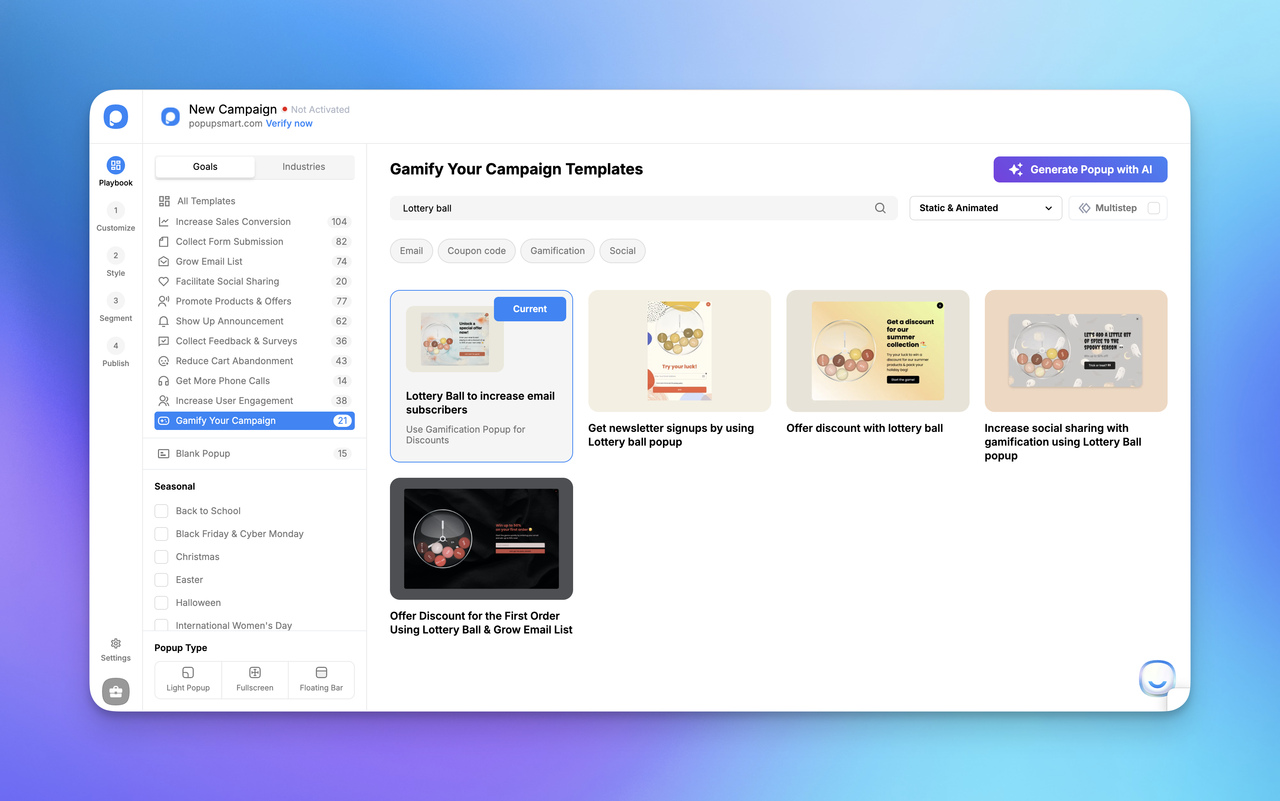
Step by step, the setup follows Popupsmart's help center:
Install the Popupsmart Shopify app
Open the Popupsmart listing on the Shopify App Store, click Install and approve the permissions. You land on the Overview page, where Create first campaign starts your first popup.
Start from a lottery ball template
Pick a ready-made lottery ball template (the Gamify Your Campaign goal lists them) or a blank popup. In the Shopify app's quick editor, open the Advanced Editor with the pencil icon on the design screen, because adding and editing elements happens there.
Add the Lottery Ball element
If your popup has an image or a Lottie animation, delete it first; the lottery ball takes its place. Click Add a new element, choose Lottery Ball and drag it where you want it.
Set the rewards in Game Settings
Under Game Settings, set each reward's label, discount code, weighting factor and success action. The weighting factor sets each reward's chance of coming up, so make it match anything the popup says about the odds.
Build the success and failure steps
Click Create a new step to add a Success step for winners and a Failure step for visitors who don't win. Put the Lottery Ball's Reward Smart Tag in the coupon code field on the Success step, so each visitor sees the code they won right away.
Style it and preview on mobile and desktop
Style the lottery ball in the Style step, then check the desktop and mobile previews before you save.
Choose who sees it, then publish
In the Segment step, pick a preset segment or set your own rules, such as exit intent, scroll depth, device or display frequency. In the Publish step, turn on the Shopify Customer toggle to send each new subscriber to Shopify Customers, or connect your email tool, then publish.
Once it's live, you can keep adjusting it:
- Customize rewards (discounts, free shipping, bonuses)
- Control when the popup appears (exit-intent, scroll, time-based)
- Stop showing it to visitors who already entered (the "stop when submit email" frequency option)
- Connect email tools to automatically collect and segment signups
For Shopify stores, the useful part is that you can adjust a lottery ball popup by visitor behavior, device type, and traffic source. So you can test engagement without harming user experience.
If you want a practical walkthrough, Popupsmart's help guide explains the full setup process step by step, from enabling lottery ball gamification to publishing the popup live on your Shopify store.
👉 To add advanced popups to your store, you can install Popupsmart Shopify app from the official store, and then follow the lottery ball popup setup guide to launch your first gamified popup in minutes.
🎉 How to do a giveaway on Shopify with a popup
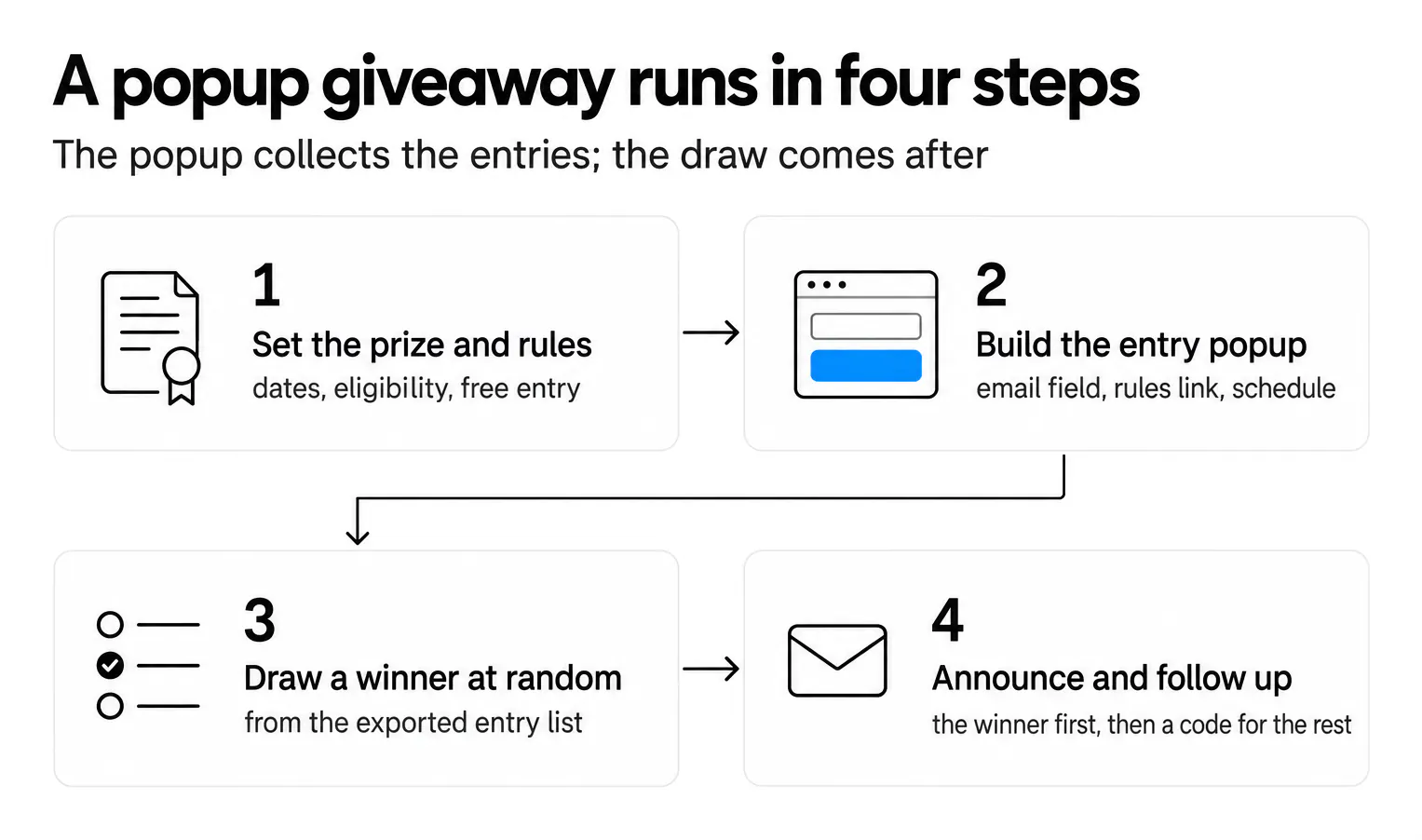
To do a giveaway on Shopify with a popup, use the popup as the entry form. It collects an email address, names the prize, links to the official rules and runs only between the giveaway's start and end dates. When entries close, you export the entry list, draw a winner at random, contact them, and send everyone else a consolation code.
A Shopify giveaway is a promotion where a store gives a prize to one or a few people picked from everyone who entered. Shopify contests work differently: a contest picks its winners on skill or merit (the best photo, the best review), while a giveaway or sweepstakes picks them by chance. Both can use the same entry popup.
Lottery popup vs draw-style giveaway
| Lottery popup | Draw-style giveaway | |
|---|---|---|
| Who wins | Any entrant whose draw lands on a reward | One or a few entrants, picked after entries close |
| Typical prize | A discount code or free shipping | A product, a bundle or a gift card |
| When the result shows | Instantly, on the popup's success step | After the draw, by email |
| What the popup does | Runs the game and shows the code | Collects entries and links to the rules |
| What you publish | How rewards are assigned | Official rules: dates, eligibility, prize, how the winner is picked |
The two combine well. Run the giveaway for one big prize, and let the entry popup's success step hand every entrant a small code, so nobody leaves with nothing.
Running the giveaway, step by step
-
Pick the prize and write the official rules. A prize from your own catalog draws entrants who want what you sell. The rules name your store as the sponsor and cover who can enter (age, countries), the entry period and its time zone, how to enter, the prize and its value, how and when the winner is picked and contacted, and what you do with entrants' data.
-
Build the entry popup. One email field, the prize, the closing date, a privacy policy checkbox and a link to the rules. Add Schedule Date and Time targeting so the popup runs only during the entry period (how popup scheduling works), and set the display frequency to stop once a visitor has entered.
-
Draw the winner at random. When entries close, export the entry list from Popupsmart's Leads section (CSV, PDF or XLS), remove duplicates and anyone the rules exclude, and pick a row with a random number generator. Keep a record of how you drew it.
-
Announce and follow up. Contact the winner first and give them a deadline to claim the prize. Then email the other entrants who agreed to marketing a consolation discount code; these discount popup examples show how to word the offer.
If you want social entry actions such as follows, shares or referral entries, run them through a dedicated giveaway app and keep the popup as the entry form on your store.
Giveaway rules: the legal basics
Keep entry free, and say so. The FTC's consumer page on prize and sweepstakes scams (September 2025) puts it plainly: real sweepstakes are free and winning is by chance, and it's illegal to ask people to pay or buy something to enter or to increase their odds of winning.
In the UK, the Gambling Commission's free draws and prize competitions guidance (updated 23 October 2024) says a draw with a paid entry route must let people take part without paying, through a free route that is no more expensive and no less convenient. Miss those requirements and you may be running an illegal lottery.
Big prizes add paperwork. In New York, a game of chance with prizes worth more than $5,000 must be registered with the secretary of state at least 30 days before it starts and backed by a trust account or a bond (General Business Law §369-e). Rules differ by country and state, so treat this section as a checklist, not legal advice.
🤌 Best Practices for Shopify Popup UX and Email Capture Strategies
Great popup UX is about timing, restraint, and clarity, not flashy animations. Lottery popups perform best when they feel like a natural part of the browsing experience rather than a forced interruption.
A well-executed lottery popup for Shopify balances engagement with respect for user intent. The goal is to invite visitors in at the right moment, with the right context, rather than to stop them.
Designing Non-Intrusive and Engaging Popups
When designed carefully, a lottery popup for Shopify becomes part of the user experience rather than a disruptive conversion tactic.
The most effective lottery popups are intentionally simple. They introduce interaction without blocking content or overwhelming the screen. Lightweight animations, fast load times, and clear messaging matter far more than visual complexity.
Mobile experience is especially critical. Most Shopify traffic is mobile-first, and even small usability issues, like tiny buttons or cramped layouts, can significantly reduce opt-in rates. In Popupsmart's 2026 benchmark, mobile visitors convert on popups at 1.02% vs 0.57% on desktop, and click at 2.99% vs 1.34% (median campaign).
To keep lottery popups user-friendly:
- Use minimal form fields (email only when possible)
- Always include a visible close or "No thanks" option
- Match visuals to your brand to avoid feeling out of place
- Trigger popups after meaningful engagement, not on page load
When popups respect browsing flow, they build trust instead of resistance.
Legal and Ethical Considerations for Lottery Popups
Compliance is a core part of good popup UX, not a legal afterthought. Any email signup lottery popup should clearly explain how rewards work and what users are opting into.
For Shopify stores operating in the US, following guidelines from the Federal Trade Commission means:
- Clearly disclosing prize mechanics
- Avoiding misleading odds or language
- Stating "no purchase necessary" when applicable
For international audiences, especially in the EU, double opt-in and transparent consent messaging are essential. In practice, these measures often improve lead quality by filtering out low-intent signups.
Best practices include:
- Linking to terms or rules directly in the popup
- Adding a privacy policy checkbox to the form
- Honoring unsubscribe requests immediately
- Keeping records of entries and rewards for accountability
For the US rules in detail, the FTC page linked in the giveaway section above is the place to start.
Integrating with Email Marketing and Analytics
A lottery popup's real value appears after the signup. Without proper integrations, even high opt-in rates won't translate into growth.
Connecting your popup to email marketing tools allows you to:
- Deliver rewards instantly
- Segment lottery subscribers separately
- Trigger tailored follow-up sequences
Analytics matter just as much. Beyond basic opt-in rates, track:
- Engagement with the popup itself
- Conversion paths after signup
- Purchase behavior of lottery-acquired subscribers
Tag lottery popup signups separately in your email tool. Then you can compare how they buy with subscribers from your plain signup form, instead of guessing.
Automation tools and integrations (including platforms like Popupsmart, with its Shopify Customers sync) take the manual work out of testing, measuring, and refining the popup.
The takeaway:
The best-performing lottery popups for Shopify succeed because they respect user experience first. When UX, compliance, and analytics work together, lottery popups become a reliable, scalable way to grow email lists, without sacrificing trust or usability.
If you want hands-on guidance, Popupsmart's lottery popup documentation walks through the setup and optimization process step by step.
🧠 Why gamification gets more clicks than standard popups
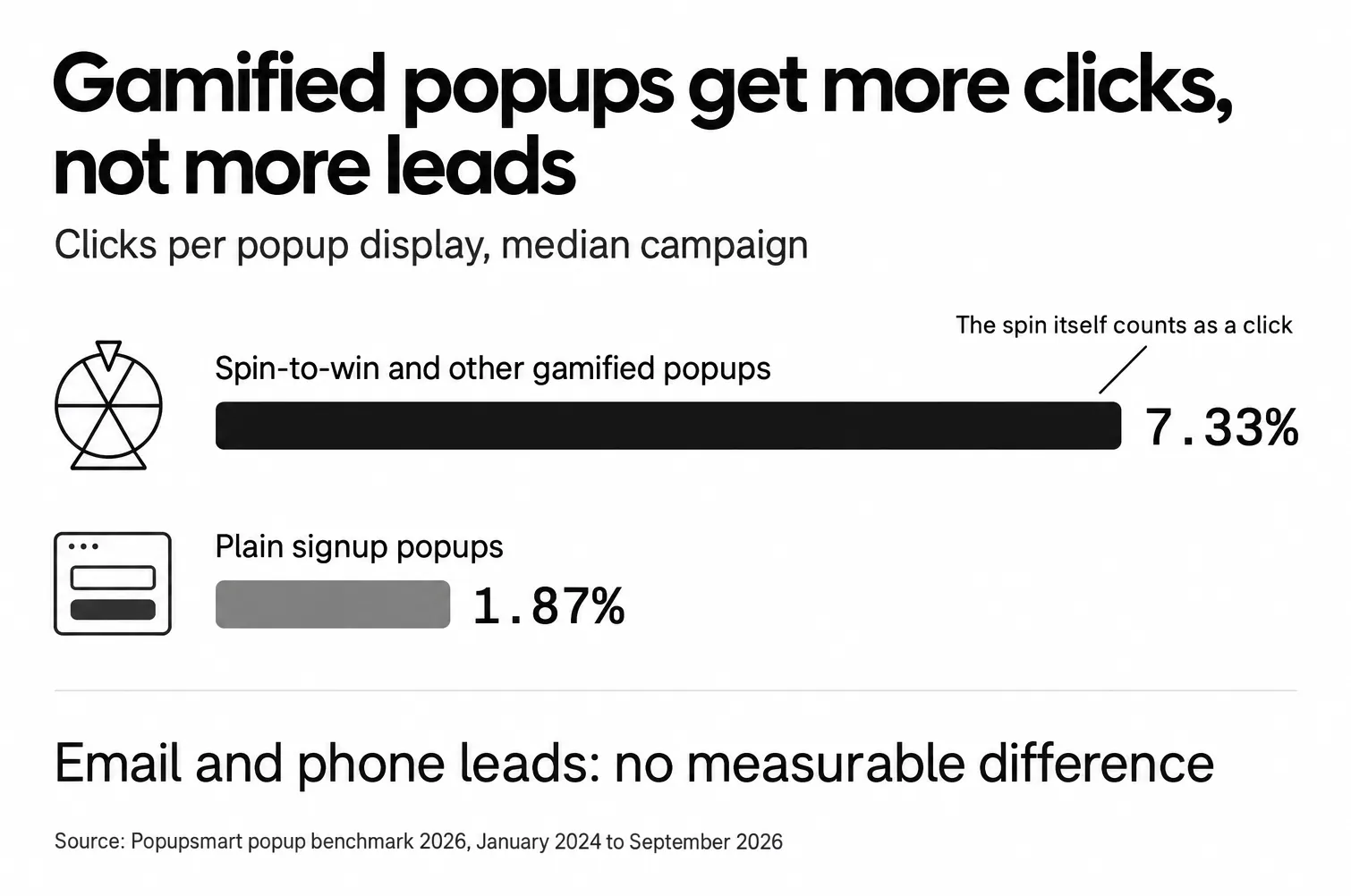
Gamified popups get more clicks because the game is itself the click: a visitor who plays has already interacted with the popup. In Popupsmart's 2026 benchmark, spin-to-win and other gamified popups get far more clicks (7.33% vs 1.87% of displays, median campaign; the spin itself counts as a click), but do not collect measurably more email or phone leads than plain signup popups.
Most popups fail because they feel transactional.
Lottery popups feel playful.
Lottery popups draw that interaction because they:
- trigger curiosity ("What will I get?")
- reduce perceived risk ("I might win something valuable")
- give users a sense of control (they choose to play)
Psychologically, this taps into variable reward systems, the same mechanism that makes games and loyalty programs addictive, but applied ethically in marketing.
The result?
More interaction without increasing friction. More signups is a separate question, and the game alone doesn't answer it. The offer and the form still have to do that work.
Count spins as signups and a lottery popup will always look like a winner.
The wheel version behaves the same way; our guide to wheel popups covers it, and these ecommerce gamification examples show where popups fit next to points, quizzes and loyalty tiers.
📊 Lottery popup vs standard email popup: what the data shows
Lottery popups and standard email popups differ most in clicks, not in leads. This is how the two compare in Popupsmart's 2026 benchmark:
| Spin-to-win and other gamified popups | Plain signup popups | |
|---|---|---|
| Clicks per display (median campaign) | 7.33% | 1.87% |
| Email or phone leads | Not measurably more than plain signup popups | The comparison point |
| What counts as a click | The spin itself counts as a click | A click on an element set to count as an interaction |
Lottery popups don't replace other popups. They win attention at the top of the funnel; whether that attention turns into signups depends on the offer and the form, the same as with any popup.
⏱️ When to Show a Lottery Popup on Shopify (Timing Matters)
Show a lottery popup once the visitor has had a moment with the page, not the instant it loads, and stop showing it after a couple of views. A common mistake is showing lottery popups too early.
Popupsmart's 2026 benchmark leans the same way, without proving it:
| Timing choice | What Popupsmart's 2026 benchmark shows |
|---|---|
| Wait, or show on page load | Popups that wait before appearing convert 0.83% vs 0.61% for popups shown the instant the page loads (median campaign); the direction holds in every year of data but the difference is not statistically reliable, so treat it as a lean, not a rule. |
| How long to wait | The exact delay length (0–5 seconds vs 21–60 seconds) makes no measurable difference to conversion. |
| Exit intent | Exit intent shows no statistically reliable advantage: popups on the most sensitive exit-intent setting converted 1.10% vs 0.78% without exit intent (median campaign), a gap that could be chance. |
| Repeat views | The first two times a visitor sees a popup in a week convert at similar rates (1.33% and 1.22% of displays, pooled); from the third view conversion falls, and from the sixth view it is 0.41%, 31% of the first-view rate. |
Triggers to start with:
- Exit-intent on product or collection pages
- Scroll-based triggers, once a visitor is partway down the page
- Time-based triggers after engagement (a short delay, not the instant the page loads)
Triggers to avoid:
- Immediate page load
- Checkout pages
- Repeated triggers on every visit
For the full picture, see our popup timing guide.
A lottery popup should feel like a second chance, not a demand.
🎁 What Rewards Convert Best in Lottery Popups?
A discount code is the reward with the clearest evidence behind it, and a bigger discount isn't automatically a better one.
Not all rewards perform equally. This is what Popupsmart's 2026 benchmark shows on offers:
| Reward question | What Popupsmart's 2026 benchmark shows |
|---|---|
| A discount code, or none | Signup popups that offer a discount code convert 1.46% vs 0.75% for signup popups without one. |
| 10% off, or no discount stated | Popups stating 10% off convert 1.25% vs 0.67% for popups that state no discount. |
| A bigger discount | Bigger discounts did not convert measurably better: 10% off converted 1.25%, 20% off 0.91% and 25–30% off 1.33%, but the larger-discount samples are small (78 and 46 campaigns), so the data cannot rule out a real difference either way. |
Rewards to start with
- A modest discount code, such as 10% off
- Free shipping
- A bonus item or sample
Rewards that tend to backfire
- "No prize" outcomes, unless the popup says up front that not every draw wins
- Generic messaging ("Join our newsletter")
One more rule:
👉 Keep the reward list short.
Too many options reduce clarity and increase hesitation.
🚀 Optimization Tips That Make Lottery Popups Convert
The tests worth running on a lottery popup are its copy, its button wording, the reward order and the mobile layout. Small tweaks here are cheap to test.
Things worth testing:
- Game copy ("Try Your Luck" vs a plain statement of the offer)
- Button wording: in Popupsmart's 2026 benchmark, first-person buttons ("Send my code") convert 1.18% vs 0.80% for neutral wording (English popups, median campaign).
- Reward order (best prize not always first)
- Mobile layout spacing
Button colour is a weaker bet than it looks. In the same benchmark, button colour, dark vs light popup backgrounds, urgency words and question headlines show no measurable effect on conversion; the data are too noisy to rule out modest effects.
Mobile optimization is critical. On Shopify stores where mobile traffic dominates, poorly sized lottery popups can kill conversions instantly.
❌ Common Mistakes Shopify Stores Make With Lottery Popups
Lottery popups usually fail for one of these reasons:
- rewards are unclear
- popups appear too aggressively
- discounts stack with existing promos
- users are forced to play to close
A lottery popup should always feel optional.
Forced gamification backfires fast.
⚙️ Measuring and Optimizing Your Shopify Lottery Popup Performance
Tracking the right data turns a good lottery popup for Shopify into a great one. Measure it on email or phone leads per popup display, the same definition Popupsmart's benchmark uses, rather than on spins or clicks.
Essential Metrics and Analytics Tools
Start with core numbers that reveal what's working. Focus on signup rates (leads divided by popup displays), which show how many visitors enter your lottery popup for Shopify, alongside engagement metrics like time spent interacting or click-throughs to prizes.
Don't overlook bounce rate either: high exits right after the popup can signal a user experience problem.
Integrate tools like Google Analytics for detailed tracking. Set up event goals to monitor popup views and conversions, then cross-reference with Shopify's built-in reports for sales tied to new leads. This combo helps spot patterns, such as which prize draw mechanics drive the most email signups.
Interpreting the data means looking beyond basics. Calculate true ROI by factoring in email marketing automation follow-ups: did signups lead to purchases? Tools like Hotjar add heatmaps for visual insights, showing where users drop off.
Shopify's sales analytics guide explains which store reports to read. Combine them with popup-specific dashboards to refine Shopify email capture strategies over time.
- Track opt-in rates daily to catch trends early.
- Monitor lead quality through open rates in your CRM.
- Use segmentation reports for targeted improvements.
Advanced Optimization and A/B Testing
Once you've got data flowing, optimize with A/B testing popups. Test variations like different headlines or timing for your lottery popup for Shopify: does a 10-second delay outperform exit-intent popups? In Popupsmart, A/B split testing is on the Advanced plan and up, and our guide to A/B testing Shopify popups walks through the setup.
Refine further by scaling giveaway incentives based on insights. If analytics tracking reveals low engagement from one traffic source or device, give that segment its own version of the popup with targeting rules. This keeps non-intrusive Shopify popups relevant.
Future-proof by monitoring data privacy compliance updates, like new GDPR rules, to avoid pitfalls.
- A/B test one element at a time for clear results.
- Scale by automating tests across traffic segments.
Optimizing a lottery popup for Shopify demands ongoing attention, and the payoff is signups you can measure. For more on testing, check Optimizely's testing guide.
Final Thoughts: Are Lottery Popups Worth It on Shopify?
Lottery popups are worth it on Shopify when you want attention and a non-intrusive way to grow your email list, and you judge them on leads rather than clicks.
They won't replace every popup.
They won't fix bad offers.
But when used intentionally, they turn hesitation into engagement.
In my view, the stores that win with lottery popups treat them as part of the user experience, not just another conversion trick.
If you want to test this approach without slowing down your site or hurting UX, tools like Popupsmart make it easy to launch lottery popups that are fast, mobile-friendly, and behavior-based. You can start small, measure results, and scale only what actually works, without touching code.
👉 If you're curious how a lottery popup would perform on your Shopify store, Popupsmart lets you set one up in minutes and optimize it based on real visitor behavior. Start with how to add a popup on Shopify.
Frequently Asked Questions About Lottery Popups on Shopify
1. What is a lottery popup on Shopify?
A lottery popup (a close cousin of the spin-to-win popup) is a gamified email capture popup where visitors enter their email address for a chance to win a reward, such as a discount, free shipping, or a bonus item. In Popupsmart, a lottery ball draw picks the reward, and the visitor sees the discount code they won on the popup's success step.
2. Do lottery popups actually increase email signups?
Not measurably. In Popupsmart's 2026 benchmark, spin-to-win and other gamified popups get far more clicks (7.33% vs 1.87% of displays, median campaign; the spin itself counts as a click), but do not collect measurably more email or phone leads than plain signup popups. Use a lottery popup to win attention, and judge it against a plain signup popup on leads per display.
3. Are lottery popups bad for user experience?
Not when they're implemented correctly. Problems usually come from poor timing or aggressive display rules. When shown after engagement (exit-intent, scroll-based, or timed), lottery popups feel optional rather than intrusive. On mobile, where 63% of popup displays happen in Popupsmart's 2026 benchmark, the popup should load fast, fit the screen properly, and have large, easy-to-tap buttons.
4. What rewards work best in Shopify lottery popups?
Discount codes are a safe start. In Popupsmart's 2026 benchmark, signup popups that offer a discount code convert 1.46% vs 0.75% for signup popups without one. Bigger discounts did not convert measurably better, though the larger-discount samples are small, so a modest code is enough. Free shipping and small bonus products work as prizes too. Simple, clearly valuable rewards are easier to grasp than complex prize structures.
5. How do you do a giveaway on Shopify?
Use a popup as the entry form. Pick a prize, publish official rules (dates, eligibility, how the winner is chosen), keep entry free, and schedule the popup to run only during the entry period. When entries close, export the entry list, draw a winner at random, contact them, and send the other entrants a consolation code if they agreed to marketing emails.
6. Are lottery popups legal to use?
Yes, as long as entry is free and the rules are clear. Clearly explain the reward mechanics, avoid misleading odds, and comply with GDPR, CAN-SPAM, and local promotion laws. The FTC's consumer guidance says it's illegal to ask people to pay or buy something to enter or to increase their odds of winning. Transparency is key, and large prizes deserve a lawyer's review.