ChatGPT
 Perplexity
 Claude
 Grok
Grok Google AI Mode
Your email list is an asset you own, unlike paid ads or social platforms that change the rules constantly.
Yet many Shopify merchants don't struggle with traffic. They struggle with conversion.
Common challenges include:
- Visitors browsing but not subscribing
- Popups that feel intrusive or get ignored
- Discounts that attract one-time buyers, not loyal customers
- Email tools installed but never properly optimized
The problem isn't email marketing itself, it's how list-building is executed.
This guide breaks down how to build an email list on Shopify step by step: where the list lives in your admin, how to add signup forms, how to export it, and 15 strategies to grow it. The Shopify steps follow Shopify's help center as checked on 10 October 2026. The popup numbers come from Popupsmart's 2026 popup benchmark, which covers 28,674 campaigns from 11,533 businesses that ran a popup with Popupsmart between January 2024 and September 2026.
What This Guide Covers
This guide walks you through Shopify email list building in clear, practical steps. You'll learn:
- Where your Shopify email list lives (the Customers page, Shopify Messaging, or an email platform such as Klaviyo or Omnisend)
- How to add a signup form with the theme's newsletter section, Shopify Forms, the checkout opt-in or a signup popup
- How to see, export and clean your mailing list
- 15 strategies to grow your email list, in five groups
- The KPIs that matter, and a 30-day plan
By the end, you'll have a simple framework to build and grow a high-quality Shopify email list that drives long-term revenue.
Where your Shopify email list lives
Your Shopify email list lives on the Customers page of your Shopify admin. Every customer who agrees to email marketing, at checkout, at sign-in, through a newsletter form or through an app that syncs with Shopify, is added to the default Email subscribers segment. Shopify's email subscriber list management guide puts it plainly: "Click the Email subscribers segment to review customers who have agreed to receive promotional emails."
Storing the list and sending to it are two different jobs. This is how they split on a Shopify store (checked October 2026):
| Where | What it does | Good to know |
|---|---|---|
| Shopify Customers, Email subscribers segment | Stores every subscriber and their email marketing status | Subscribers who unsubscribe, mark an email as spam or opt out in their account are removed; bouncing addresses are suppressed |
| Shopify Messaging (formerly Shopify Email) | Sends email, SMS and WhatsApp campaigns and automations to your subscribers | 10,000 free emails a month on the Basic, Grow, Advanced and Plus plans, then charged per 1,000 |
| An email platform such as Klaviyo or Omnisend | Syncs your Shopify subscribers into its own list and sends from there | Klaviyo's Shopify setup has a "Sync your Shopify email subscribers to Klaviyo" setting |
| A popup tool such as Popupsmart | Collects the address and passes it to Shopify Customers or your email platform | Doesn't send your campaigns |
Shopify Messaging, formerly Shopify Email
Shopify renamed Shopify Email to Shopify Messaging, and the Shopify Messaging help page now covers email, SMS and WhatsApp campaigns from the Shopify admin. It's the simplest place to start, because it sends straight to the Email subscribers segment and filters out anyone who hasn't accepted email marketing.
On pricing, Shopify's Shopify Messaging email pricing page says every store on the Basic, Grow, Advanced and Plus plans gets 10,000 free emails at the beginning of every month. After that you pay $1 per 1,000 emails up to 300,000, $0.65 per 1,000 after 300,000 and $0.55 per 1,000 after 750,000. Abandoned checkout automations are always free and don't count toward the 10,000, which helps if you send Shopify cart abandonment emails.
Klaviyo, Omnisend and other email platforms
A dedicated email platform makes sense once you want deeper segmentation, more automations or one list across several sales channels. These platforms don't replace the Shopify list; they copy it.
Klaviyo's Getting started with Shopify guide (updated 7 October 2026) describes a Sync your Shopify email subscribers to Klaviyo setting that adds customers who accept email marketing at checkout, or sign up through any Shopify signup form, to a Klaviyo list you choose. Klaviyo recommends picking the main list that triggers your welcome series. The same guide warns you to disconnect any previous email platform first, or your existing subscribers may get double opt-in emails again.
Both Klaviyo and Omnisend list a free plan on the Shopify App Store (checked October 2026). Whichever you pick, choose one list as the source of truth and let every form sync into it.
Where popup signups go
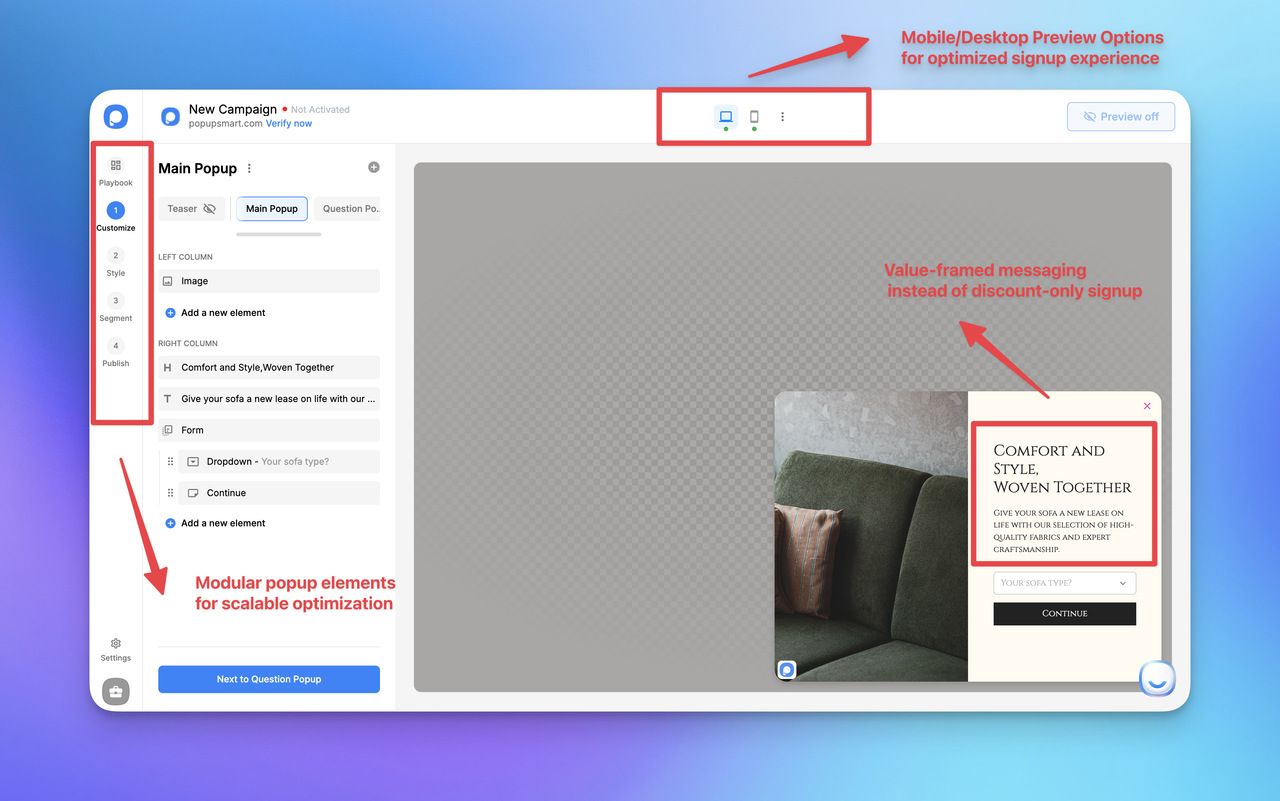
A popup tool collects the address and hands it to wherever your list lives. In Popupsmart's Shopify app, the Shopify Customer toggle in the campaign's Publish step sends each new subscriber's email, and optionally their name, phone number and tags, to the Customers page in your Shopify admin (send popup leads to Shopify Customers). Other integrations send the lead to Klaviyo (see the Klaviyo popup guide), to Mailchimp (see how to add a Mailchimp popup to Shopify) or to HubSpot instead. Popupsmart doesn't send your newsletters or campaigns; Shopify Messaging or your email platform does.
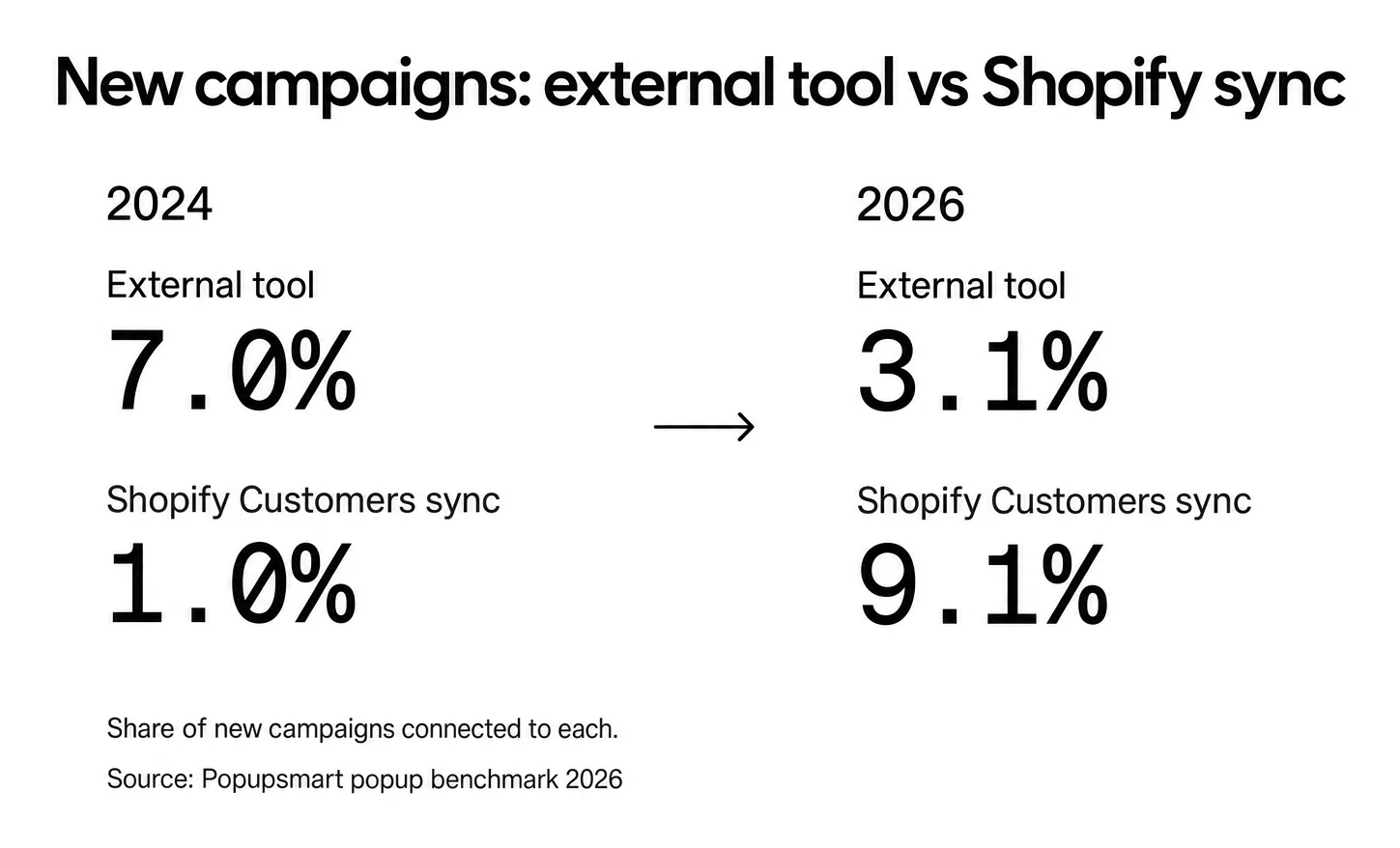
More Shopify stores now send popup leads straight to Shopify. In Popupsmart's 2026 benchmark, the share of new campaigns connected to an external tool fell from 7.0% in 2024 to 3.1% in 2026, while native Shopify Customers sync rose from 1.0% to 9.1%.
Popups connected to Brevo convert at 1.27% and popups synced to Shopify Customers at 1.23%, vs 0.63% for popups with no integration (median campaign): a correlation, since marketers who connect a tool also tend to run better campaigns. So turn the sync on because it puts every address where you email from, not because it lifts signups by itself.
How to add a signup form to your Shopify store
Shopify gives you four ways to collect email addresses: the theme's Newsletter section, the free Shopify Forms app, a consent checkbox at checkout and sign-in, and a popup app. You can run several at once, for example a quiet form in the footer, the checkbox at checkout and one popup that asks at the right moment.
| Method | Where it shows | Cost | Best for |
|---|---|---|---|
| Theme newsletter section | Any page template or the footer | Built into the theme | A permanent, quiet signup |
| Shopify Forms | Popup or inline form | Free app | A simple popup or inline form, with an optional discount |
| Checkout and sign-in opt-in | Checkout and customer sign-in | Built in | Customers who are already buying |
| Popup app such as Popupsmart | Popup on the pages, visitors and moments you choose | Popupsmart's Shopify app lists a free plan | Targeting by page, visitor and timing, with sync to Shopify Customers or your email platform |
The theme's newsletter section
Shopify's Add a newsletter signup guide says all Online Store 2.0 themes and the Horizon family of themes either have a newsletter signup section or let you add a newsletter form to the footer. Steps on desktop, checked 10 October 2026:
- From your Shopify admin, go to Online Store.
- Find the theme you want to edit and click Edit theme.
- From the dropdown menu, select the template you want the form on.
- Click + Add section, then select Newsletter.
- Edit the header, paragraph and email form blocks.
- Click Save.
Addresses submitted through the form land in the Email subscribers segment. If your theme has no Newsletter section, check its documentation: some themes add the form as a block inside another section.
Shopify Forms
Shopify Forms is Shopify's free app for popup and inline signup forms. According to Shopify's Shopify Forms guide, you can attach a new or existing discount to a form, tag the customers it collects and send them email with Shopify Messaging.
To create a popup form (checked 10 October 2026):
- Go to Online Store, click Edit theme on your active theme, open App embeds and turn on the Forms toggle. Click Save.
- Go to Apps > Forms and click Create form.
- Select Popup form, name it and click Create.
- Choose Floating or Overlay, then set up the teaser, the form and the success message.
- Preview the form and activate it.
Know the limits before you plan around it. Shopify's Create forms page lists up to 25 forms per store, no multi-step forms and no conditional logic. When an existing customer submits a form, their email and phone number on file aren't changed, and their marketing consent might not be updated either. If you need steps, see multi-step forms for Shopify.
The checkout and sign-in opt-in
The checkout checkbox reaches people who are already buying. Shopify's Collecting customer contact information guide gives these steps (checked 10 October 2026):
- From your Shopify admin, go to Settings > Checkout.
- In the Marketing opt-in section, select Email.
- Choose where the checkbox is preselected: Regions recommended by Shopify follows local law, and Regions you choose lets you pick regions yourself. Select no regions and every customer has to tick the box by hand.
- Click Save.
Consent is captured when the customer ticks the box and moves on with Pay now or Continue to shipping. If your store sends abandoned cart reminders, Shopify says you need to change the text next to the consent checkbox, which you edit through your theme's language editor.
Signup popups
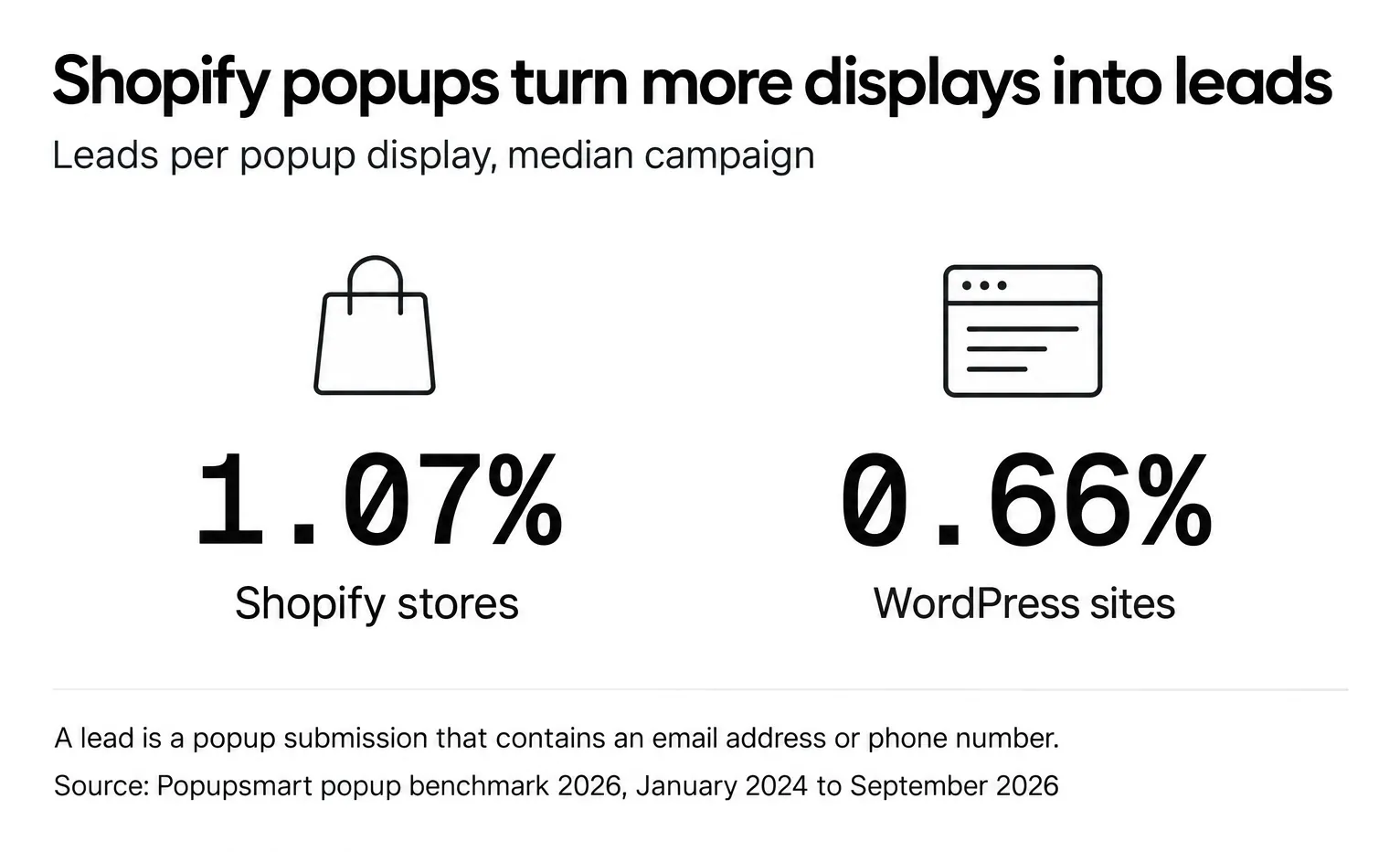
A signup popup asks for an email at a moment you choose, on the pages you choose, instead of waiting in the footer for someone to scroll down. In Popupsmart's 2026 benchmark, 35% of popup campaigns on Shopify stores ask for an email or phone number, against 25% on WordPress sites. Popups on Shopify stores convert at 1.07% vs 0.66% on WordPress sites (median campaign). Here a lead is a popup submission that contains an email address or phone number, counted per popup display.
To add a popup on Shopify with Popupsmart, following Popupsmart's Shopify getting-started guide:
- Install Popupsmart from the Shopify App Store and approve the permissions. Popupsmart creates your account and imports your store's fonts and colors.
- Pick a signup template from the popup templates and write the offer.
- Choose who sees it and when: page, new or returning visitors, device and timing.
- In the Publish step, turn on the Shopify Customer toggle and map the email field (plus name, phone and tags if you collect them).
- Publish, then run one test signup and check the customer in Shopify.
For layouts that work on real stores, see these email capture popup examples for Shopify.
How to see and export your Shopify mailing list
Your mailing list is the Email subscribers segment on the Customers page, and you export it from there as a CSV file. Shopify's Importing and exporting customer lists guide gives these steps (checked 10 October 2026):
- From your Shopify admin, go to Customers.
- Open the Email subscribers segment so the list is filtered to subscribers.
- Click Export.
- Select # customers matching your filters.
- Optional: check Customer tags to include tags.
- Choose CSV for Excel, Numbers, and other spreadsheet programs or Plain CSV file.
- Click Export customers.
If you export up to 50 customers, your browser downloads the file. Above 50, Shopify emails it to you, and to the store owner if that isn't you. Exported files are limited to 15 MB. The CSV includes an Accepts Email Marketing column (yes or no), so you can also export every customer and filter by it in a spreadsheet.
Turn on double opt-in
Double opt-in sends a confirmation email that the subscriber has to click before they join your list. Shopify's help center says it's required by law in some countries and a good way to collect more engaged subscribers. To turn it on (checked 10 October 2026):
- From your Shopify admin, go to Settings > Notifications.
- Click Customer notifications.
- In the Marketing double opt-in section, select Customer marketing confirmation.
Then change your newsletter form's confirmation message to something like "Check your email to confirm your subscription!" so people know to look for it. Shopify notes that the confirmation email should contain no marketing, and that people who subscribed before you turned it on aren't asked to confirm.
Remove a subscriber
To remove someone by hand, go to Customers, open the customer, choose Edit marketing settings, deselect Customer agreed to receive marketing emails and click Save. Shopify also recommends removing role-based addresses such as info@ or support@, because they usually go to a team rather than a person and are probably not monitored.
Why building an email list matters for your Shopify store
If you want a growth channel that doesn't disappear the moment an algorithm changes, email is it. Learning how to build an email list on Shopify means turning anonymous visitors into people you can reach again, on your terms.
Email = an owned growth channel
Email is a direct line to customers.
- You own the channel (no platform dependency)
- You control timing, messaging, and segmentation
- You can reach customers even when they're not actively shopping
Unlike social media or paid ads, where visibility can drop overnight, your email list stays with you. You can export it, as shown above, and take it to another email platform.
Why email beats other Shopify marketing channels
Compared to paid ads or social media, email offers clear long-term advantages:
- No algorithm risk: your reach doesn't depend on a feed
- Higher relevance: segmentation and automation let you send each group what it needs
- Lower cost over time: Shopify Messaging includes 10,000 free emails a month
- Stronger retention: it suits repeat purchases and loyalty
This is why email often becomes the backbone of a sustainable Shopify growth strategy.
Common myths (and why they're wrong)
Email list building still gets misunderstood, especially in e-commerce.
Email isn't spammy when people asked for it. Ethical opt-ins, clear value, and relevance change everything.
Email isn't outdated. Modern email relies on personalization, automation, and behavior-based targeting, far from old-school blasts.
Email doesn't take too much time. With the right Shopify tools, email capture can be automated and optimized without disrupting user experience.
The goal isn't volume. It's trust and relevance.
Done right, email list building is one of the most reliable ways to grow a Shopify store. It brings repeat sales and higher lifetime value, and that revenue isn't rented from someone else's platform.
15 Proven Strategies for Shopify Email List Building (Explained)
Email list growth doesn't come from random tactics. A list that keeps growing usually rests on five things: timing, relevance, user experience, behavioral targeting, and continuous optimization. Instead of treating email capture as a single popup or form, treat it as a system that adapts to user intent and improves through iteration.
The strategies below fall into five groups, with three strategies in each. Where Popupsmart's 2026 benchmark measured something relevant, the number is quoted as the benchmark states it. Everything else is a method to test on your own store, not a promised result. For a platform-neutral version of these tactics, see our email list building methods.
Building the Right Foundation for Sustainable Email List Growth
Shopify email list building is often treated as "adding more signup forms," but in practice, sustainable growth starts with store experience, intent alignment, and expectation clarity.
Stores that grow fast and then lose engagement often share one common problem: email was collected without context, purpose, or relational framing.
The stores that grow strong email lists treat email not as a UI element, but as the starting point of a relationship.
1. Turn high-intent store surfaces into natural entry points
The most reliable email signups happen where the user is already engaging with the brand experience:
- account creation flows
- checkout & notification preferences
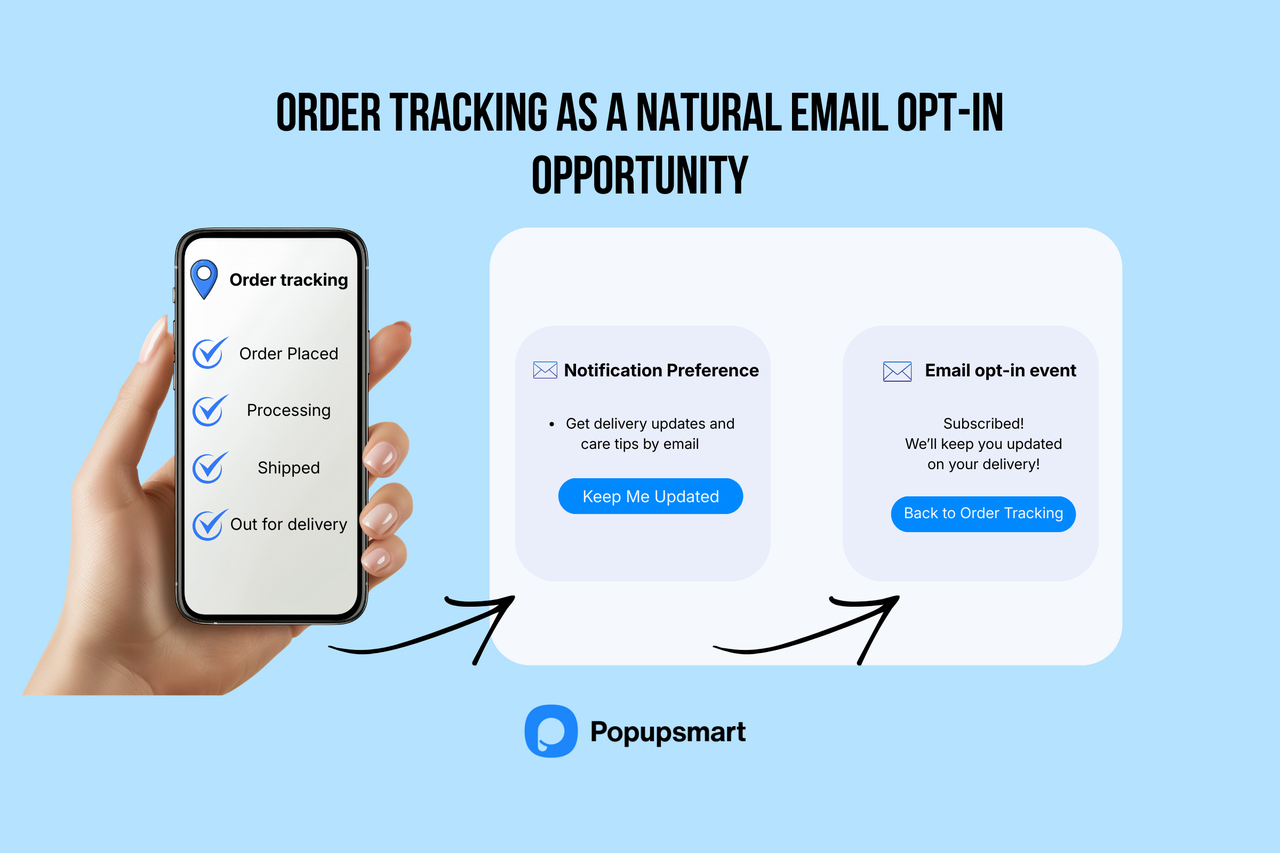
- order tracking and post-purchase pages
- subscription or loyalty touchpoints
These placements work because the user already expects communication in these contexts. The checkout opt-in and the sign-in checkbox described above cover the first two with Shopify's own settings.
Page context matters for popups too. In Popupsmart's 2026 benchmark, popups on cart and checkout pages convert 4.57% vs 1.07% on the home page (median campaign); blog pages convert 0.23%.
🚀 The takeaway: Shopify email list building is as much about experience alignment as about acquisition.
For example, a customer opens the order-tracking page to check their delivery status. Just below the tracking details, they see a subtle message: "Get delivery updates and care tips by email, join with one click." Since they already expect communication in this context, subscribing feels natural instead of forced.
2. Treat email signup as part of the brand journey
Weak email programs position signup as a discount tool.
High-performing stores position email as:
- an extension of brand storytelling
- an education and value channel
- a long-term relationship layer
For example, a sustainable clothing brand replaces "Get 10% off" with "Join our studio journal, behind-the-scenes process stories, fabric insights, and early-access releases." The user signs up because they want proximity to the brand, not just a discount.
The aim isn't explosive list size but a high-engagement, low-churn audience: people who open because they like what you send.
Practical takeaway for Shopify stores:
Before you decide the offer, test a brand-value signup variant (story, process, inspiration, learning content) against your discount version, and compare opens and unsubscribes over the following weeks, not just signups on day one.
Understanding the difference between discount-motivated signups and brand-driven signups is important because it shows if you're building a short-term list or a loyal, long-term audience.
| Comparison | User Who Signs Up for a Discount | User Who Signs Up for the Brand Story |
|---|---|---|
| Why do they sign up? | To get the discount only | Because they like the brand and feel connected |
| How long do they stay? | Stays for a short time, then loses interest | Stays longer and keeps following the brand |
| Chance of opening emails | Lower | Higher |
| Buying behavior | Buys mostly when there is a discount | Can buy even without a discount |
| Relationship with the brand | Weak and temporary | Strong and emotional connection |
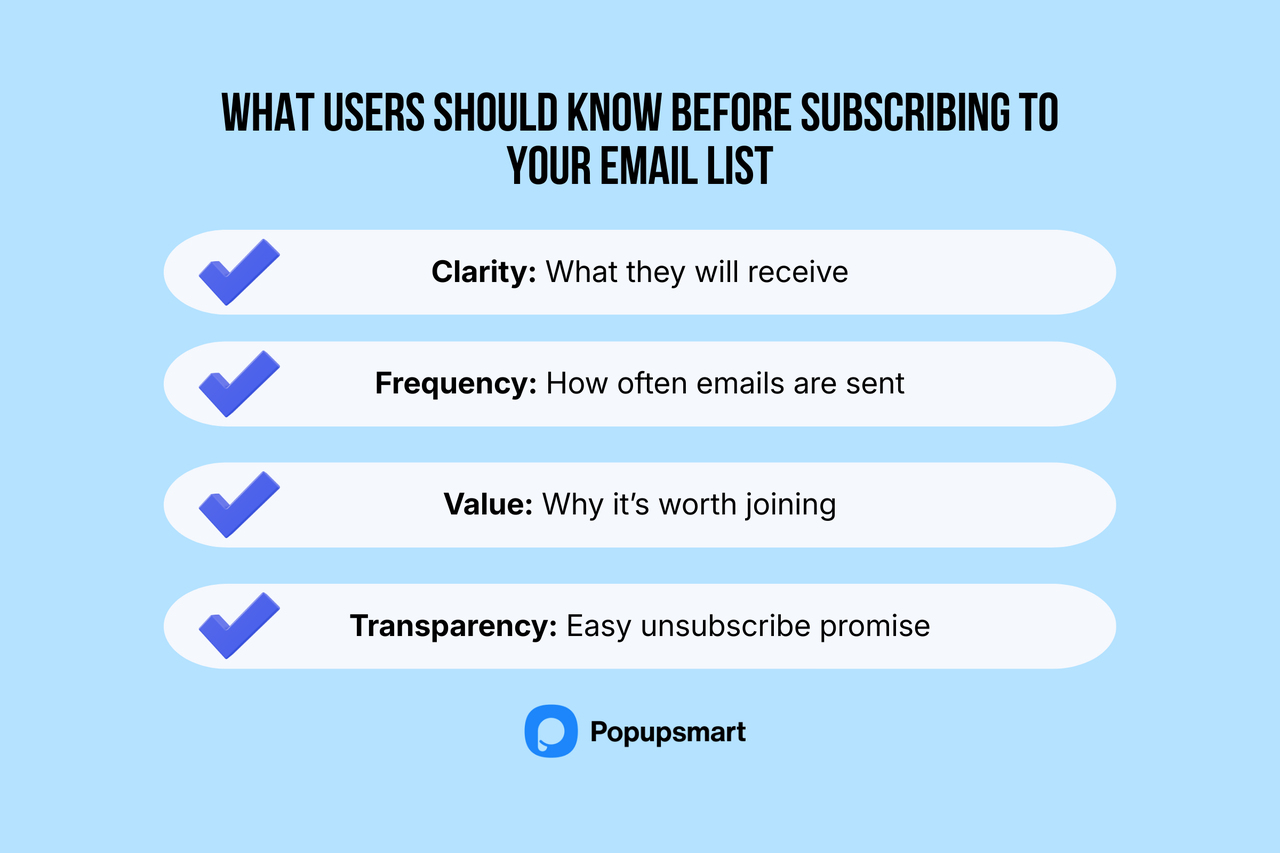
3. Set expectations from the very first interaction
The long-term health of an email list is determined at the moment of subscription.
Weak lists are built on:
- vague promises
- aggressive incentives
- transactional framing
Strong lists are built on:
- clarity about content and frequency
- value-first positioning
- user choice and transparency
This reduces complaints, maintains deliverability, and increases retention.
For instance, if right under the signup field, the brand clearly states: "We send 1–2 helpful emails per week, tutorials, usage tips, and early updates. You can unsubscribe anytime." This user feels in control and trusts the relationship.
👉 More emails won't fix a list. Framing the relationship correctly from the beginning will.
🧭 Before We Scale: Make Sure Your Shopify Email List Is Growth-Ready
Before applying the strategies in this guide, your email list needs to be structurally ready for growth. Stores that struggle with engagement often don't have a traffic problem; they have a weak foundation problem (messy imports, missing segmentation, no mobile-first forms, or no double opt-in).
This isn't about "how to set up email on Shopify." The setup steps are above.
It's about making sure your list can grow ethically, cleanly, and sustainably before you scale it.
Minimum growth-readiness checklist:
✔ A live, mobile-optimized signup form: a theme newsletter section, Shopify Forms, or a popup built in Popupsmart that sends addresses to Shopify Customers.
✔ Double opt-in enabled (Settings > Notifications > Customer notifications)
✔ Contacts organized with basic tags (New, Returning, VIP)
✔ Email platform connected for segmentation & automation
✔ Deliverability-safe list hygiene: no bought lists, no role-based addresses
Once these fundamentals are in place, every strategy that follows delivers better subscriber quality and stronger engagement, instead of inflating a list that isn't ready to scale.
Value, Motivation & Why People Actually Subscribe
Real email list growth isn't about getting someone on the list, it's about giving them a reason to want to stay.
In many Shopify stores, the email list grows through incentive mechanics, not value systems, and that's why churn arrives quickly.
4. Build incentives that remain meaningful after the first email
Discount-driven lists tend to generate:
- fast signup volume
- low retention
- brittle engagement
Value-driven lists grow slower, but aim for higher lifetime value.
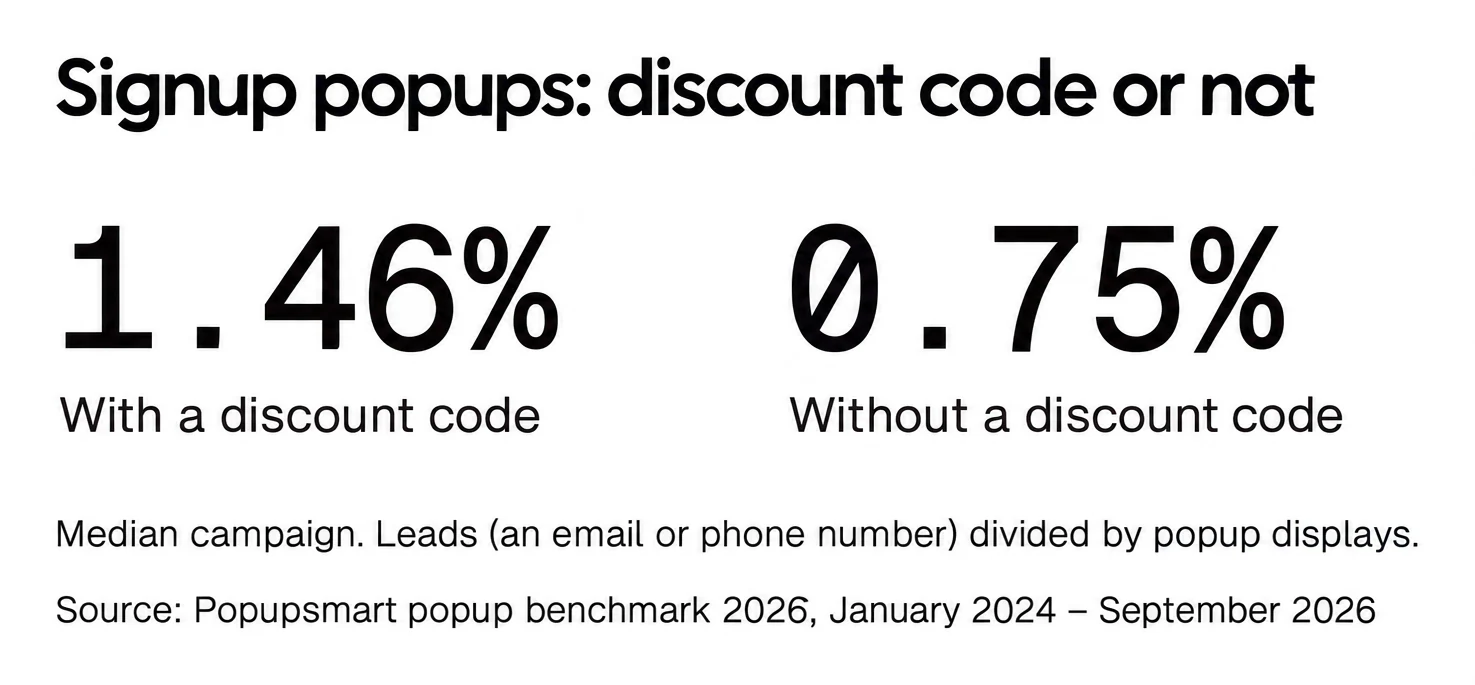
The discount still does its job at the signup moment. In Popupsmart's 2026 benchmark, signup popups that offer a discount code convert 1.46% vs 0.75% for signup popups without one. Bigger discounts did not convert measurably better: 10% off converted 1.25%, 20% off 0.91% and 25–30% off 1.33%, but the larger-discount samples are small (78 and 46 campaigns), so the data cannot rule out a real difference either way.
What the benchmark can't tell you is how those subscribers behave after the code is used. So pair a modest code with something that keeps working after the first email. High-performing incentives include:
- early access & member-tier perks
- knowledge or usage guides
- loyalty-integrated benefits
A good example of this is a home-care brand that, instead of offering a one-time coupon, promotes "Access our Care & Use Learning Library, routines, guides, and expert tips to get more value from your products."
The system works because it creates ongoing value, not a one-time trigger. For offer formats, see these discount popup examples.
Incentive Quality vs Incentive Speed
| Discount-Driven Incentive | Value-Driven Incentive | |
|---|---|---|
| Signup Speed | Fast signup spike | Slower, steady acquisition |
| Engagement Depth | Weak engagement depth | Deeper, repeated interaction |
| Unsubscribe Risk | High unsubscribe risk | Lower churn over time |
| Long-Term List Quality | Brittle, price-sensitive audience | Stronger, value-driven audience |
5. Match subscriber motivation to lifecycle stage
Not all subscribers join for the same reason.
- first-time visitors → discovery & understanding
- high-intent visitors → reassurance & clarity
- customers → loyalty, identity, belonging
Let's see this journey in action:
A new visitor sees "Beginner Starter Guide." A cart-stage visitor sees "Quality & Care Confidence Tips." A customer sees "Member-Only Perks & Rituals."
Each offer aligns with what that user needs at that moment.
Targeting first-time visitors separately is worth the setup. In Popupsmart's 2026 benchmark, popups targeted at new visitors only convert 1.13% vs 0.77% for popups shown to everyone. A welcome popup shown only to first-time visitors is the simplest way to act on it.
When incentives align with lifecycle context, growth may appear slower, but subscriber quality is what you're building.
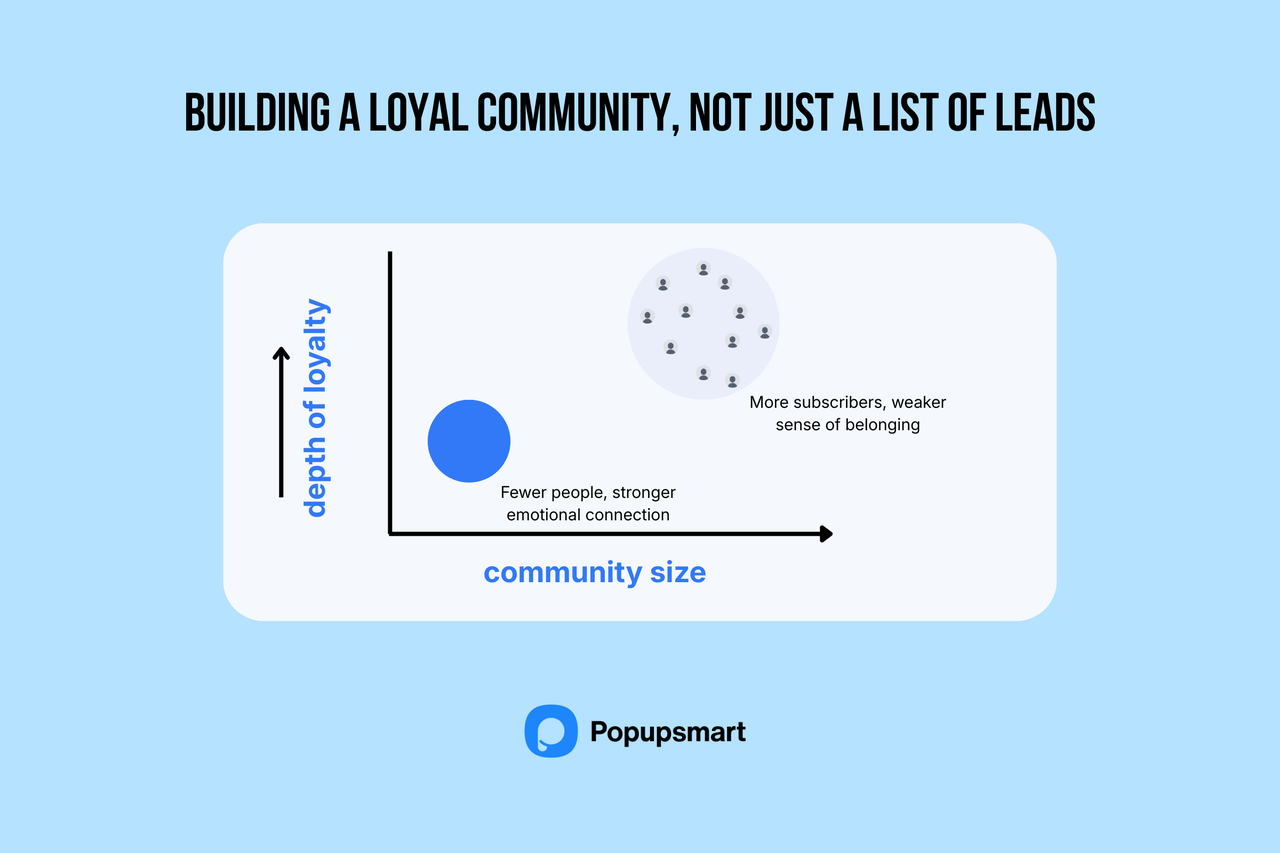
6. Build belonging, not just acquisition
For craft, lifestyle, and purpose-led Shopify brands, email turns into an identity channel.
These lists:
- grow smaller
- retain longer
- produce deeper loyalty behavior
In those brands, building the list is community and meaning-building as much as it is marketing.
For instance, a craft brand invites users with: "Join our maker circle, inspiration, creative process notes, and shared stories from real creators." The audience grows slower but becomes deeply loyal.
Segmentation, Relevance & Subscriber Quality
The strength of an email list isn't measured by its size, but by the quality of its behavioral segments.
Single-list messaging tends to wear engagement down over time, while segmentation turns the list into a living, adaptive system.
7. Build lifecycle-driven structural segments
The most consistently effective segment model includes:
- new subscribers
- first-purchase customers
- repeat customers
- dormant / re-engagement cohorts
This structure:
- shifts tone appropriately
- changes communication purpose
- improves relational trust
You can build these segments in Shopify itself: go to Customers > Segments, create a segment for each group, then click Use segment and Email to send it a Shopify Messaging campaign. Shopify's subscriber list guide lists re-engaging customers who haven't bought recently and rewarding loyal customers among the campaigns segments are for.
8. Personalize based on behavior, not assumptions
Demographics are rarely useful predictors.
Behavior is.
High-impact behavioral signals include:
- product exploration patterns
- browsing return cycles
- interaction frequency depth
Behavior-aligned content creates messaging that feels relevant but not artificial, personalization with context instead of gimmick.
Subscribers are grouped into: New → First-Purchase → Repeat → Dormant. Each group receives different tone, goals, and communication style, reflecting where they are in the relationship.
This is personalization as evidence-led messaging, not guessing.
9. Grow subscriber profiles progressively
High-quality lists don't ask for everything at signup.
Instead, they collect:
- email first
- preferences later
- contextual signals over time
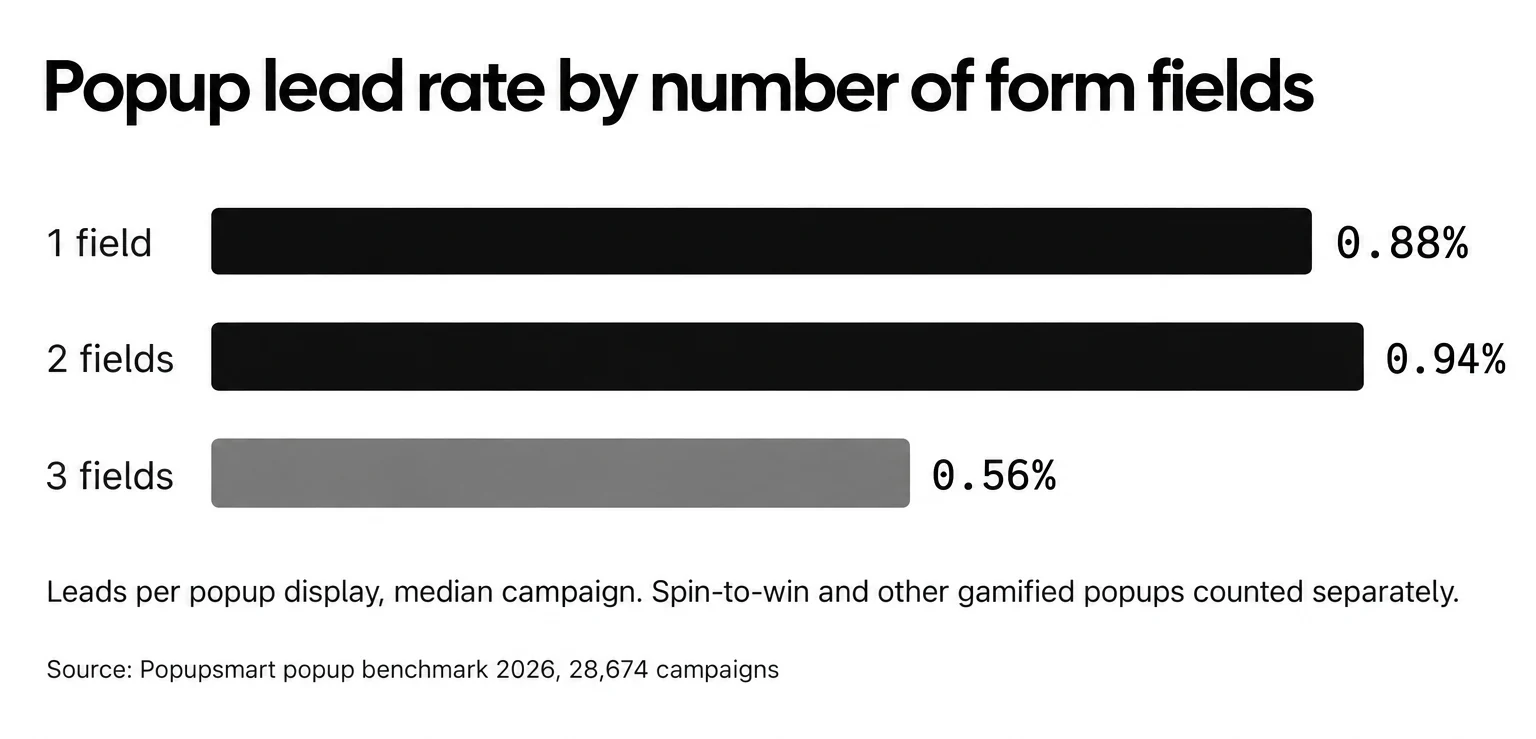
The benchmark backs the "email first" part. In Popupsmart's 2026 benchmark, popups asking for one or two fields convert 0.88% and 0.94%, against 0.56% for three fields (median campaign; spin-to-win and other gamified popups are counted separately). Adding a name field alongside the email shows no reliable effect: the overall gap in its favour (1.25% vs 0.88% for email only) reverses among campaigns whose form rarely changed (0.74% vs 0.79%).
This method delivers:
- lower friction at signup
- cleaner data, because people answer questions they care about
- richer relationship-based data over time
Instance scenario: At signup, the brand asks only for an email. After the first purchase, a short preference question appears: "Do you want care tips, inspiration, or product updates?" Data grows gradually instead of creating signup friction.
Volume follows once the list means something to the people on it.
Lifecycle Communication & Relationship-Driven Automation
Automation's job is to keep the relationship continuous and meaningful. Pushing sales comes second.
Overly aggressive automation can lift short-term revenue while engagement collapses. The best systems function more like a guided narrative experience.
10. Treat the welcome flow as orientation, not persuasion
High-performing welcome sequences:
- introduce the brand
- deliver useful or educational value
- build trust before promotion
Sales enters later, naturally, not as pressure.
The goal is to establish:
"You're in the right place, here's how we'll help you, step by step."
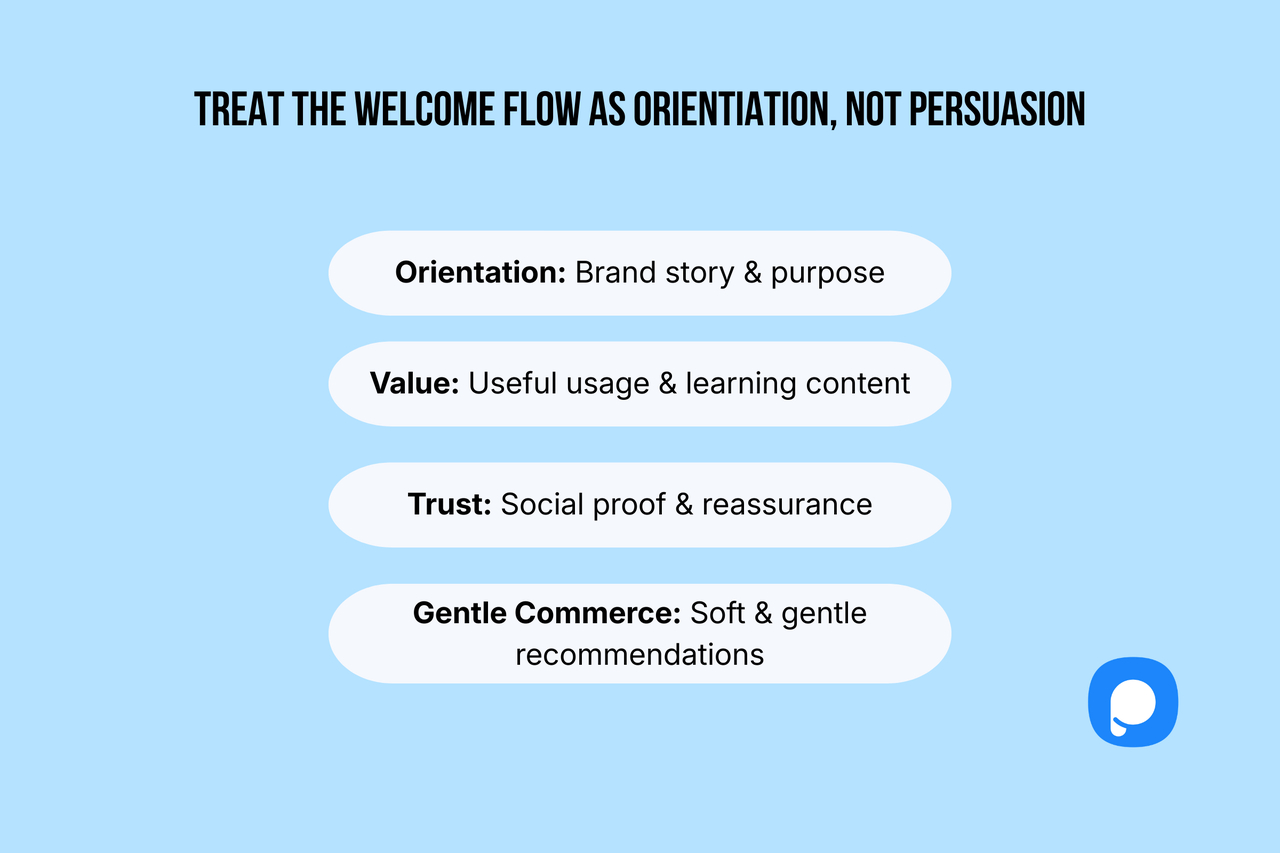
The welcome sequence starts with:
- Brand story and purpose
- Helpful usage or learning content
- Social proof and reassurance
- Soft, natural recommendations, no pressure
This approach leads to sustainable Shopify email list growth, instead of short-term spikes. For the setup in Shopify, see how to build a Shopify welcome email.
11. Use post-purchase flows to deepen relationship, not upsell aggressively
The strongest post-purchase flows emphasize:
- product care & guidance
- brand meaning and story layers
- soft-path recommendations
These flows:
- reduce churn
- strengthen attachment
- increase long-term value
Post-purchase subscribers have already trusted you with an order, which makes them the segment most worth looking after.
Relationship-Driven Email vs Aggressive Email Tactics
| Flow Type | Healthy, Relationship-Driven Approach | Harmful, Pressure-Driven Approach |
|---|---|---|
| Welcome Flow | Orientation, education, and trust-building before selling | Immediate persuasion and sales pressure |
| Post-Purchase Flow | Product guidance, brand meaning, and value-reinforcing content | Hard upsell attempts and discount-heavy messaging |
| Re-Engagement Flow | Listening, preference discovery, and context rebuilding | Urgency-based emails and repeated sending that leads to fatigue |
| Subscriber Outcome | Higher retention, deeper attachment, sustainable list growth | Short-term clicks but long-term churn and disengagement |
12. Re-engagement should restore trust, not force urgency
Think of a subscriber who hasn't engaged with your emails for a while. Instead of sending a pressure-based message like "Your discount ends now, last chance to stay on the list!", the brand takes a different approach.
The re-engagement email asks: "Would you like fewer emails, different topics, or a pause?"
By giving the subscriber control over the relationship, the conversation shifts from urgency to respect, and users return because their preferences are acknowledged, not forced.
Effective re-engagement flows:
- ask questions
- listen to preference signals
- rebuild context
Weak re-engagement flows:
- pressure
- over-send
- damage trust
What protects a strong list is respectful re-entry. Aggression wears it down.
Measurement, Adaptation & Long-Term Scaling
Email list building never really finishes. Treat it as an ongoing thinking discipline.
Growth comes from:
- measurement
- interpretation
- intentional iteration
Not from volume alone.
13. Treat KPIs as behavioral signals, not scoreboards
Imagine a team noticing that open rates have dropped over the past two campaigns. Instead of reacting with panic or blaming performance, they pause and ask a better question: "What behavior changed? Did the content lose relevance, or did user intent shift?"
Here, metrics are not treated as a scoreboard to win or lose, they become behavioral clues that guide smarter decisions and deeper understanding.
The right question isn't:
"What number changed?"
It's:
"What behavior is this number revealing?"
Meaning ≫ metrics.
14. Improve message clarity before improving aesthetics
Consider an email with a beautifully designed header that reads: "Explore more possibilities." Even though it looks premium, users don't immediately understand the value. The team replaces it with a clear, benefit-driven headline: "3 simple tips to make your product last longer."
Without changing the design at all, the message is easier to act on, which is why clarity is the first thing to test.
In most underperforming email systems, the problem isn't design, it's unclear communication.
Fix the words before you redesign the template.
Users respond to messages they instantly understand.
15. Scale growth through disciplined weekly decision cycles
Picture a marketing team that used to run scattered experiments every week, multiple tests, rushed changes, and no real learning. They adopt a calmer approach: each week focuses on just one meaningful improvement, such as testing a signup headline or refining a welcome email step.
They observe, learn, apply, and repeat. Over time, small disciplined optimizations compound into steady, sustainable growth.
The strongest growth systems do not operate on:
- panic
- urgency
- rushed iteration
They operate on:
- one meaningful improvement per week
- observation
- reflection
This rhythm turns a list into a long-term business asset, not a campaign tool.
Why This Shopify Email List Building System Delivers Long-Term Growth
This framework treats Shopify email list building as a behavior-driven relationship system rather than a pile of tactics.
Growth happens through:
- alignment, not aggression
- quality, not volume
- context, not pressure
In the long run, these are the systems that retain customers, protect trust, and scale predictably.
A 30-day plan to grow your Shopify email list
When you need a place to start, this four-week structure keeps the work to one focus a week:
- Week 1: Audit and optimize existing forms: the theme newsletter section, the checkout opt-in and double opt-in
- Week 2: Launch one strong incentive + A/B test
- Week 3: Add post-purchase and social signups
- Week 4: Review opt-in rate, opens, CTR, and cut what doesn't work
Growing an email list on Shopify comes down to timing, relevance, and respect for the user. Hacks and tools come after.
When you design email capture around how people behave on your store, email stops feeling like marketing. It starts to feel like part of the shopping experience.
📊 Measuring and Optimizing Your Shopify Email List Performance
Growing an email list is only half the job. The real gains come from measuring what matters and iterating fast. Small measurement gaps often hide the biggest opportunities.
Stores with healthy traffic can stall because they track vanity metrics instead of performance metrics.
This section covers the KPIs, tools, and optimization loops that improve email list performance on Shopify, without guessing.
🎯 Essential KPIs You Should Actually Track
You don't need dozens of metrics. You need the right few.
Core KPIs to start with:
- Signup rate → measures how many visitors your forms and popups turn into subscribers
- Open rate → measures subject line relevance
- Click-through rate (CTR) → shows content relevance
- Conversion rate → ties emails directly to revenue
- Subscriber growth rate → tracks list momentum
- Unsubscribe & spam rate → signals list quality issues
One mistake that's easy to make is ignoring churn. Look at unsubscribe spikes by campaign: a spike after one send tells you more than an average across the month.
How to calculate growth rate:
- (New subscribers − unsubscribes) ÷ total list size
🧪 Tools & Techniques for Ongoing Optimization
Shopify's native analytics are a solid starting point, but limited.
A typical stack:
- Shopify Analytics → baseline performance
- Google Analytics → email-driven on-site behavior
- Email platform reports → segmentation & revenue attribution
Most of the optimization happens in A/B testing. Test one variable at a time:
- Subject line framing
- Send time
- Incentive type
- CTA wording
Testing rules:
- Test one variable only
- Use a small sample (5–10% of list)
- Roll out winners quickly
- Review weekly, not monthly
This keeps experimentation fast and avoids overfitting data. The same rules apply to signup forms: here's how to A/B test Shopify popups.
🔁 Turning Metrics Into Action (The Missing Step)
Metrics alone don't grow lists, decisions do.
Here's how to translate data into action:
- Low opens → rewrite subject lines or adjust send time
- Low CTR → improve segmentation or email structure
- High churn → audit incentive alignment and frequency
- Strong revenue attribution → scale that flow, pause weaker ones
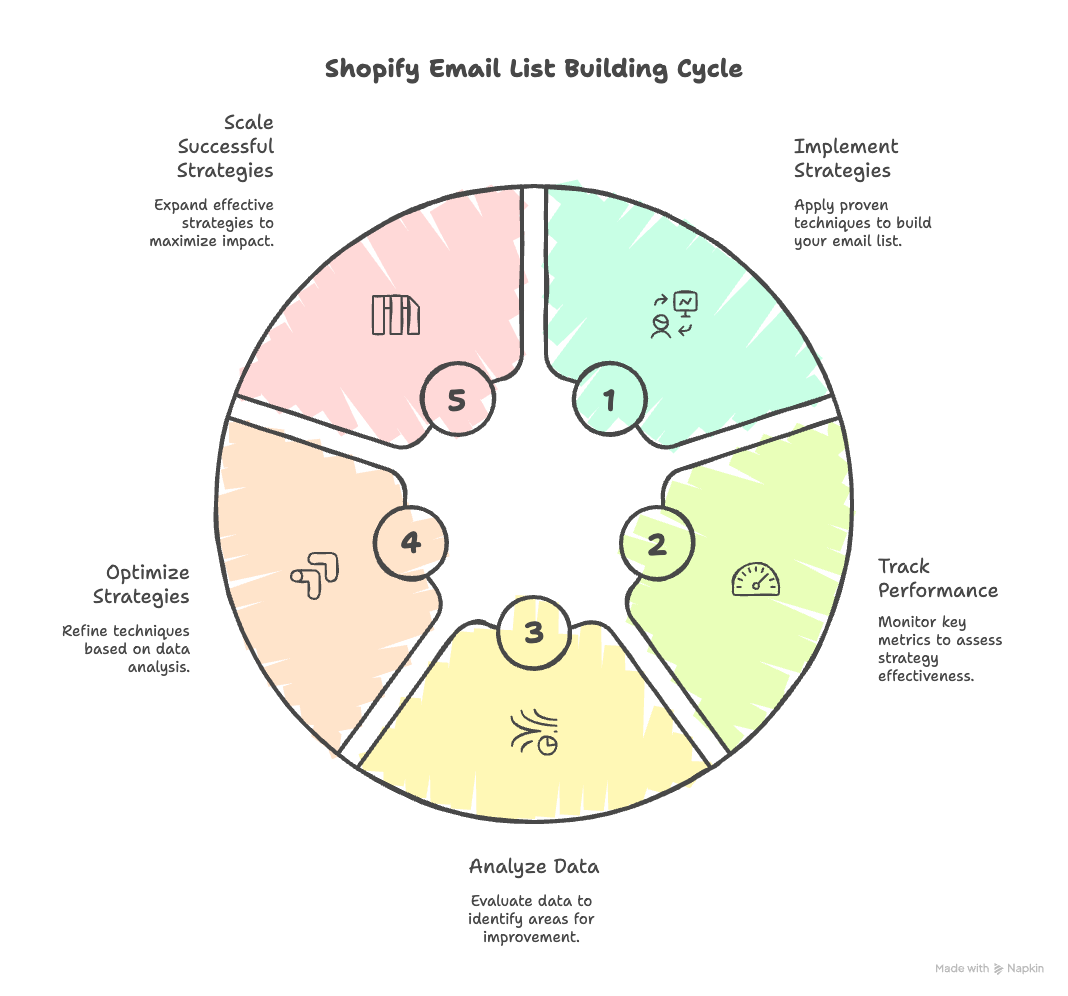
The pattern is always the same: measure → test → refine.
✅ Key Takeaway
Optimizing your Shopify email list is not a one-time task. It's a continuous feedback loop.
When you:
- Track the right KPIs
- Test intentionally
- Act on real user behavior
…your email list stops being a passive asset and becomes a predictable growth engine.
Making Shopify Email List Building Work Long Term
Successful Shopify email list building is a system you test, refine and improve over time. More forms and quick wins won't get you there. Small changes, like better timing, clearer copy, or mobile-focused optimization, often create the biggest impact.
In this guide, we covered where your list lives in Shopify, how to add signup forms and export the list, how to grow it with intent-based strategies, how to scale with segmentation and automation, and how to measure what works. When these pieces work together, email becomes a growth channel you actually control.
If you're not sure where to start, apply the 30-day plan: audit what you have, test one meaningful improvement at a time, and let results guide your next steps. You don't need more traffic, better execution is usually enough.
Done right, Shopify email list building turns visitors into long-term customers. If you want a signup popup that targets the right page and moment and sends every address to Shopify Customers or your email platform, you can build one with Popupsmart and its email list growth popups. Your campaigns still go out from Shopify Messaging or the email platform you already use.
FAQs About Building an Email List on Shopify
How do I see my mailing list on Shopify?
Go to Customers in your Shopify admin and open the Email subscribers segment. It lists every customer who agreed to receive email marketing, whether they signed up at checkout, through a newsletter form, through Shopify Forms or through an app that syncs with Shopify. To download it, click Export and choose the customers matching your filters.
How much does Shopify Email cost?
Shopify Email is now called Shopify Messaging. On the Basic, Grow, Advanced and Plus plans it includes 10,000 free emails at the start of every month. After that, Shopify charges $1 per 1,000 emails up to 300,000, then less per 1,000 at higher volumes. Abandoned checkout automations are free and don't count toward the limit (Shopify help center, October 2026).
Can I buy a list of Shopify users' emails?
This guide is about building your own store's list, not buying a list of Shopify merchants or shoppers. Shopify's help center says buying a list of email addresses and adding them to your subscriber list is prohibited by the Shopify Terms of Service, and purchased lists damage your sender reputation. Email only the people who opted in to hear from your store.
What is the best way to build an email list on Shopify without annoying visitors?
Pick the moment and keep the form short. In Popupsmart's 2026 benchmark, popups that wait before appearing convert 0.83% vs 0.61% for popups shown the instant the page loads (median campaign); the direction holds in every year of data but the difference is not statistically reliable, so treat it as a lean, not a rule. A footer form or a checkout checkbox never interrupts anyone.
What is a good signup rate for a Shopify email popup?
Across 3,034 Popupsmart popups that ask for an email or phone number (January 2024 – September 2026, each with at least 1,000 displays and 14 active days), the median converts 0.83% of its displays into leads; the top 25% reach 1.96% and the top 10% reach 3.87%. Popups on Shopify stores convert at 1.07% vs 0.66% on WordPress sites (median campaign).
How do I keep my Shopify email list high quality?
Turn on double opt-in (Settings > Notifications > Customer notifications > Customer marketing confirmation), avoid misleading incentives, and watch unsubscribe and spam rates after each send. Remove role-based addresses such as info@ and support@, as Shopify recommends, and clean out subscribers who stopped opening. A smaller list of people who want your emails beats a large list that ignores them.