 ChatGPT
 Perplexity
 Claude
 Grok
Grok Google AI Mode
What Is Average Order Value (AOV)?
Average order value (AOV) is the average amount a customer spends in a single transaction on your store. You calculate it by dividing total revenue by the number of orders over the same period. The global ecommerce AOV sits near $185, and lifting it grows revenue without buying more traffic.
AOV is one of the three levers behind ecommerce revenue, alongside traffic and conversion rate. Two stores with identical visitor counts and identical conversion rates can post wildly different revenue if one gets shoppers to spend $60 per order and the other gets $120. That gap is what these tactics close.
Benchmarks vary a lot by vertical, so a "good" AOV is relative. According to Dynamic Yield's AOV benchmarks, the spread between the highest and lowest categories is more than 6x.
| Segment | Average order value |
|---|---|
| Luxury & Jewelry (highest) | $386 |
| Global average (all industries) | $185 |
| Pet Care & Veterinary Services (lowest) | $63 |
Don't chase a universal target. The number that matters is your AOV versus your own trend and your category peers.
How to Calculate Average Order Value
The average order value formula is simple: AOV = total revenue / number of orders. Pick a time window, add up revenue, divide by the order count. That's it. No per-item math, no complicated weighting.
Here's a worked example. Say your store made $50,000 in revenue last month across 500 orders. Your AOV is $50,000 / 500 = $100. If you lift that to $115 without adding a single new customer, the same 500 orders now generate $57,500, a $7,500 gain from the same traffic.
A few practical notes. Use net revenue (after discounts, before shipping) for a cleaner read, and keep the window consistent so month-over-month comparisons hold. In Shopify, the built-in Analytics report calculates AOV for any date range automatically, so you don't have to export orders by hand.
Track AOV weekly once you start testing tactics. Small changes compound: a $15 lift on a store doing 2,000 monthly orders is $30,000 in extra monthly revenue, and it flows almost entirely to your bottom line.
Why Increasing AOV Beats Chasing More Traffic
Raising AOV grows revenue from visitors you already paid to acquire, which protects margin in a way that buying more traffic can't. Upselling alone can increase customer lifetime value by 20 to 40 percent, so a higher AOV compounds well beyond the single order it started with.
The economics are straightforward. Every new customer carries an acquisition cost (ad spend, agency fees, discounts). Once someone is on your product page, the marginal cost of getting them to add one more item is close to zero. According to Salesgenie's upselling research, upselling lifts CLV by 20 to 40 percent, because a customer who spends more per order tends to spend more over their lifetime too.
There's a second compounding effect: higher AOV improves your unit economics, which means you can afford to bid more for traffic than competitors and still stay profitable. It widens your acquisition ceiling.
That doesn't mean traffic and conversion don't matter. It means AOV is usually the cheapest lever to pull first. If you're already investing in upsell and cross-sell on Shopify, you're partway there, and the tactics below systematize it.
12 Proven Tactics to Increase Average Order Value
These 12 tactics range from quick wins you can ship this afternoon to structural plays that pay off over months. Each one includes what it is, why it works, and how to run it. Start with two or three that fit your catalog, then measure before you add more.
Here's the shortlist before we go deep:
| Tactic | What it lifts | Typical impact |
|---|---|---|
| Product bundling | Items per order | +20–35% AOV (Ringly) |
| Upselling to higher tiers | Revenue per item | 15–30% upsell conversion (Salesgenie) |
| Cross-selling complements | Items per order | Higher basket size |
| Free-shipping thresholds | Order minimum | 80% add items to qualify (Envive) |
| Recommendation popups | Discovery + basket | Drives 10–30% of revenue (Launchtip) |
| Volume / tiered discounts | Quantity per line | More units per order |
| Loyalty & rewards | Repeat spend | Repeat buyers spend 4.8x more (Ringly) |
| Time-limited offers | Urgency to add | Faster checkout, bigger cart |
| Post-purchase upsells | Add-on after checkout | Zero-friction incremental revenue |
| Gift-with-purchase | Threshold to unlock | Higher spend to qualify |
| BNPL / financing | Higher-ticket carts | Reduces price friction |
| Reviews & social proof | Confidence to add | Higher conversion on add-ons |
1. Product Bundling and "Frequently Bought Together"

Source: Amazon
Product bundling groups complementary items into a single package, often at a small discount versus buying each piece alone. "Frequently bought together" is the automated cousin: the store surfaces items that pair with what's in the cart. Both nudge shoppers from a one-item purchase to a multi-item one.
It works because bundling reframes the decision. Instead of "should I buy this second thing?" the question becomes "do I want the better-value set?" According to Ringly's 2026 ecommerce data, bundles lift AOV by 20 to 35 percent.
To run it: pick 3–5 natural pairings from your order data (what actually sells together), build a bundle at a 5–15% discount that still protects margin, and display it on the product page and in the cart. Name bundles by outcome ("Starter Kit," "Complete Setup") rather than by SKU. For inspiration on which combinations convert, see our product bundling examples.
2. Upsell to a Higher-Tier Product

Source: McDonald's
Upselling steers a shopper toward a more capable, higher-priced version of what they're already considering: a larger size, a premium tier, or a pro model. It's not adding a second product; it's trading up on the one they want.
The reason it lands: the customer has already decided to buy the category. Presenting the upgrade at that moment catches high intent, which is why Salesgenie's research puts the average upsell conversion rate at 15 to 30 percent — strong for an offer that costs nothing to show.
To implement: on the product page, show a compact comparison of the current pick versus the next tier up, with the extra value spelled out (not just the higher price). Keep the jump reasonable — a 20–40% price step converts far better than doubling the cost. Anchor the upgrade against the premium option so the mid-tier feels like the sensible choice. Our walkthrough on how to upsell your customers breaks down the messaging that works.
3. Cross-Sell Complementary Products
Cross-selling recommends items that go with the purchase rather than replace it: a case for a phone, filters for a coffee maker, socks with shoes. Where upselling trades up, cross-selling adds on.
It works because the primary purchase creates obvious adjacent needs, and surfacing them saves the shopper a search. Personalized cross-sells perform best: Careertrainer's data shows existing customers are 50% more likely to try new products and spend 31% more when the recommendation fits.
To run it: map each hero product to 2–3 genuine complements, then place them in the cart and at checkout where the "I'm buying anyway" mindset is strongest. Avoid cross-selling unrelated items to pad the basket, because irrelevant suggestions erode trust.
4. Set Free-Shipping Thresholds Above Your AOV

Source: WooCommerce
A free-shipping threshold is a spending minimum that unlocks free delivery ("Free shipping on orders over $75"). Set just above your current AOV, it gives shoppers a concrete reason to add one more item.
It works because shipping fees are the top checkout objection, and a threshold turns that pain into a goal. According to Envive's AOV research, setting thresholds 10 to 30 percent above your current AOV is effective, and 80 percent of shoppers are willing to add items to qualify.
To implement: if your AOV is $100, set the threshold around $115–$130. Show a live progress bar in the cart ("You're $18 away from free shipping"). The gap is what drives the add-on. Recommend a specific low-cost item that closes it.
5. Personalized Product-Recommendation Popups
A product-recommendation popup shows dynamic, relevant products inside an on-site popup — triggered on browse, on exit intent, or in the cart — pulled from a live product feed. Instead of static "you may also like" widgets, it surfaces the right items at the right moment and tracks which ones get clicked.
This is one of the highest-impact AOV tactics because recommendations do so much of the selling. According to Launchtip's ecommerce data, product recommendations drive 10 to 30 percent of ecommerce revenue.
Here's how to build it in Popupsmart. Use Popupsmart's Product Feed element to pull products dynamically into a popup, then display them in a Slide (carousel), Card, or Grid layout with click tracking so you can see what converts. The Product Feed element works for Magento, PrestaShop, or any store with a Google product feed; Shopify stores use Popupsmart's dedicated Shopify Product element instead. Trigger it in the cart to cross-sell, or on exit intent to rescue an abandoning session. Start from a ready popup templates layout, connect your feed, and set audience rules so returning visitors see products related to what they browsed.
6. Volume and Tiered Discounts ("Buy More, Save More")
Volume discounts reward larger quantities: buy 2 save 10%, buy 3 save 15%. Tiered pricing makes the per-unit cost drop as the order grows, which pushes shoppers to size up.
It works for consumables and gifting, where buying ahead is rational. The discount reframes a bigger purchase as the smart move rather than an indulgence. It's especially effective for products people reorder anyway, since you're pulling future purchases into today's cart.
To run it: build 2–3 quantity tiers on the product page and show the per-unit savings explicitly ("$12 each, or $10 each when you buy 3"). Cap the discount so the largest tier still clears your margin floor. Pair it with a subscription option for consumables so the volume behavior becomes recurring.
7. Loyalty and Rewards Programs

Source: Sephora
A loyalty program gives points, tiers, or perks for repeat purchases, encouraging customers to consolidate spend with you and buy more per visit to hit reward thresholds.
It works because loyal customers are already your highest spenders. According to Ringly's ecommerce data, repeat customers spend 4.8x more per order than first-timers, so nudging one-time buyers into a program compounds AOV over time.
To implement: award points on spend (not just orders) so bigger baskets earn faster, and set reward tiers that sit just above your AOV to pull orders upward. Surface the points-to-next-reward gap in the cart, the same way a shipping progress bar works, and use an on-site popup to promote the program so more first-time buyers opt in and start spending toward a reward.
8. Time-Limited Offers and Urgency
Time-limited offers attach a deadline to a deal (a 24-hour bundle price, a countdown on a gift-with-purchase) to compress the decision and pull the add-on into this session instead of "later."
Urgency works because it removes deliberation. A shopper weighing a second item is far likelier to add it when the offer expires tonight. The mechanism is loss aversion: nobody wants to miss the better price.
To run it: use a genuine deadline (fake countdowns that reset erode trust fast), pair the timer with a specific AOV-lifting offer like a threshold bundle, and show it in a popup or a cart banner. Reserve urgency for real moments — launches, seasonal windows, low stock — so it keeps its punch instead of becoming background noise.
9. Post-Purchase One-Click Upsells
A post-purchase upsell offers an add-on immediately after checkout, a one-click "add this to your order" that ships with the original purchase and needs no re-entry of payment details.
It's uniquely low-friction because the buying decision and the payment are already done. There's no risk of hurting the initial conversion, since the offer only appears after the sale is secured. That makes it pure upside for AOV.
To implement: place a single relevant offer on the order-confirmation step (one, not five), price it as a small add-on to the order they just placed, and make acceptance one tap. On Shopify, dedicated apps handle the one-click flow — our roundup of the best upsell app for Shopify compares the options. Keep the offer tightly related to the purchase; a random add-on reads as a cash grab.
10. Gift-With-Purchase Thresholds
A gift-with-purchase (GWP) unlocks a free item once the cart hits a set value ("Spend $80, get a free travel size"). Like free shipping, it turns a spending target into a reward the shopper works toward.
It works because a free gift often feels more motivating than an equivalent discount — people overweight "free." It also lets you move slow inventory or introduce a product you want customers to try, which can seed future full-price purchases.
To run it: set the GWP threshold 15–25% above your AOV, choose a gift with high perceived value but low cost to you, and show progress toward it in the cart. Rotate the gift seasonally so it stays fresh, and make the threshold visible on product pages, not just at checkout.
11. Offer Financing and BNPL for Higher-Ticket Carts
Buy-now-pay-later (BNPL) and financing split a purchase into installments, lowering the psychological barrier on higher-priced orders and making a bigger basket feel affordable.
It works on considered, higher-ticket categories (furniture, electronics, premium bundles) where the sticker price is the objection. Breaking $200 into four payments of $50 reframes affordability and lets shoppers say yes to the fuller order.
To implement: add a BNPL provider (Klarna, Afterpay, Shop Pay Installments) and, critically, show the installment price on the product page, not just at checkout. The "4 payments of $50" line is what lifts the cart. Feature it most prominently on your highest-ticket products and bundles, where the affordability reframe does the most work.
12. Bundle Social Proof and Reviews on Product Pages
Social proof — star ratings, review counts, "bestseller" tags, user photos — gives shoppers the confidence to add more to the cart. When an add-on or upgrade carries strong reviews, hesitation drops and basket size rises.
It works because the biggest blocker on a second item is uncertainty. A 4.8-star rating with 900 reviews answers "is this actually good?" before the shopper has to ask. Reviews on cross-sell and upsell items are especially powerful, since those are the purchases people are least sure about.
To run it: surface ratings directly on recommended and bundled products (not just hero items), add "frequently bought together" blocks backed by real purchase data, and include review counts on upsell tiers. Pair this with your recommendation popup from Tactic 5 so the suggested products arrive with proof attached.
Build These AOV Tactics with Popupsmart's Product Feed
You can run several of these tactics — cross-sells, product recommendations, and exit-intent recovery — from one no-code popup with Popupsmart's Product Feed element. It pulls live products straight from your store's feed, so the popup always shows real, in-stock items at current prices with no manual updates.
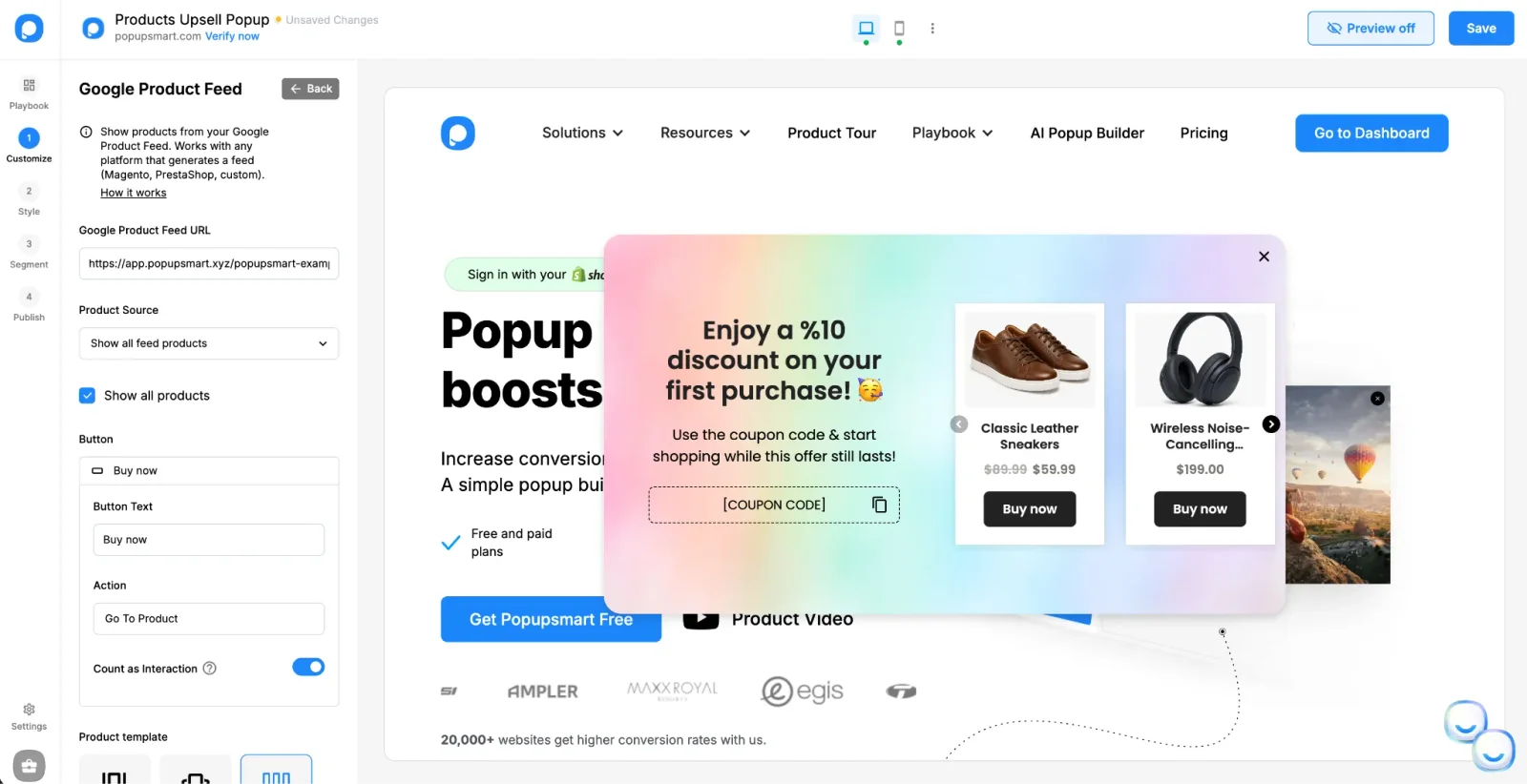
A products upsell popup built with the Product Feed element in Popupsmart
Point the element at your Google Product Feed URL, choose a Slide, Card, or Grid layout, and set the button action to "Go To Product." It works with Magento, PrestaShop, or any platform that generates a feed; Shopify stores use Popupsmart's dedicated Shopify Product element. Turn on Count as Interaction and you can see exactly which recommended products get clicked. There's a free plan to test one before you commit — the pricing page has the tiers.
Four AOV popups worth building with it:
- Cart cross-sell popup — trigger it when a shopper opens the cart and show complementary products in a Grid, so adding one more item is a single click.
- Exit-intent recovery — on exit intent, show a Slide carousel of bestsellers or items related to what the visitor viewed, turning an abandoning session into a bigger order instead of none.
- Browsing recommendations — a Card slide-in on category pages that surfaces "you may also like" picks while intent is high.
- Post-purchase upsell — on the thank-you page, recommend add-ons that ship with the order they just placed, at no risk to the original sale.
Helping Popupsmart users set these up, the pattern I keep seeing is that targeting beats design. The stores that lift AOV fastest don't ship a prettier popup — they show the right products to the right visitor: complements in the cart, bestsellers on exit, category-matched picks while browsing. Start with one trigger, read the interaction data, then expand from what actually converts.
How to Measure and Optimize Your AOV Over Time

Source: Shopify
Track AOV as a trend, not a snapshot, and segment it so you know which changes actually move the number. Watch it weekly, break it down by channel and device, and test one tactic at a time so results stay attributable.
Start with segmentation. A blended AOV hides a lot: mobile shoppers often spend less per order than desktop, paid-social traffic can convert differently than email, and new customers behave differently than repeat buyers. Segment AOV by channel, device, and customer type to find where the lift is easiest.
Then test deliberately. Change one variable — a free-shipping threshold, a bundle price — and measure against a control. According to Swanky's A/B testing case study, structured testing increased AOV by 32% for one FMCG retailer. Run each test long enough for significance before you call it.
Watch margin alongside AOV, not just the top-line number. A tactic that raises AOV while shrinking contribution margin can leave you worse off. Track AOV, contribution margin, and conversion rate together. If AOV climbs while conversion drops, you've pushed too hard.
Common AOV Mistakes to Avoid
The fastest way to sink an AOV program is to raise cart size while quietly damaging margin, conversion, or trust. Most failures trace back to four mistakes: discounting that erodes profit, upsells that annoy, ignoring mobile, and optimizing AOV in isolation.
Discounting that eats margin. Bundles and volume deals raise AOV, but a bigger order at a thinner margin can net less profit. Always model contribution margin per tier before launching, and set a floor no discount crosses.
Aggressive upsells that hurt UX and conversion. Stacking five popups and forced upsell screens raises friction, not AOV. If shoppers abandon because the path to checkout is cluttered, you've traded conversion for a marginal cart bump — a bad deal.
Ignoring mobile. Mobile is where most sessions happen and where cramped upsell flows break. A recommendation grid that looks great on desktop can be unusable on a phone. Test every AOV tactic on mobile first.
Optimizing AOV while tanking conversion rate. AOV is one lever, not the goal. Pushing minimums and upsells too hard can lift AOV while fewer people buy, leaving total revenue flat or down. Judge tactics on revenue and margin, not AOV alone.
Frequently Asked Questions
What does increasing AOV mean?
Increasing AOV means getting each customer to spend more per transaction, so the same order volume produces more revenue. You raise it by encouraging shoppers to add items, trade up to higher tiers, or hit a spending threshold, through upsells, bundles, cross-sells, and free-shipping incentives. Because it grows revenue from traffic you already paid for, it's one of the most efficient ways to increase ecommerce revenue.
What is the average order value formula?
The average order value formula is AOV = total revenue / number of orders. Take your revenue for a period and divide it by the count of orders in that same period. It measures the average amount a customer spends in a single transaction, not per item, and not per customer over their lifetime. Keep the time window consistent so you can compare AOV month over month.
How do you calculate Shopify average order value?
In Shopify, open Analytics, go to Reports, and select the "Average order value" report, which divides total sales by order count for your chosen date range automatically. You can also calculate it by hand: divide your store's total revenue by the number of orders placed in the same window. Track it weekly once you start testing AOV tactics so you can see which changes move the number.
How does customer lifetime value relate to average order value?
Average order value is a core input to customer lifetime value (CLV). CLV multiplies AOV by purchase frequency and average customer lifespan, so raising AOV lifts CLV directly. That's why upselling — which increases AOV — can also increase customer lifetime value by 20 to 40 percent. A shopper who spends more per order usually spends more across their relationship with your store too.
What is a good average order value?
A good AOV depends entirely on your industry. The global ecommerce average is roughly $185, but Luxury and Jewelry averages around $386 while Pet Care sits near $63. Rather than chasing a universal number, benchmark against your own vertical and against your store's past trend. A steadily rising AOV inside your category is a better signal than beating a global average.
What is AOV meaning in sales?
In sales, AOV (average order value) is the average revenue generated per order or transaction. It tells you how much a typical customer spends each time they buy. Alongside conversion rate and purchase frequency, AOV is a core monetization metric that shows how efficiently you turn each transaction into revenue, and it's one of the clearest levers for growing sales without more traffic.
What are the best ways to increase average order value in 2026?
The highest-impact tactics are product bundling, upselling to higher-tier products, cross-selling complementary items, free-shipping thresholds set above your current AOV, and personalized product-recommendation popups. Recommendation popups are especially effective because product recommendations drive 10 to 30 percent of ecommerce revenue. Start with two or three tactics that fit your catalog, then A/B test one change at a time while watching your margin.
Why focus on increasing AOV instead of getting more traffic?
Increasing AOV grows revenue from visitors you already acquired, so it improves margins without raising ad spend. With acquisition costs climbing across digital channels, lifting the value of each existing order is often cheaper and faster than buying more traffic. It also improves your unit economics, which lets you afford more for acquisition later. AOV is usually the cheapest revenue lever to pull first.