ChatGPT
 Perplexity
 Claude
 Grok
Grok Google AI Mode
We’ve all seen it: a popup that clearly isn’t meant for us. A U.S.-only discount while browsing from Europe, shipping info that doesn’t apply to our country, or pricing that feels confusing because it isn’t local. Moments like that break the experience.
That’s the problem geo-targeted popups solve.
Instead of showing the same message to everyone, they adapt to where the visitor is, highlighting local shipping, region-specific offers, currency details, or nearby availability. Suddenly, the message doesn’t feel generic anymore. It feels relevant, timely, and personal.
A shopper in Madrid might see EU-friendly delivery. Someone in Toronto might see free Canada shipping. A visitor in Dubai might get local fulfillment options. Same website, a different message for each of them.
This guide covers how geo-targeted popups work, where they help, how to set one up, and what Popupsmart's 2026 benchmark of popup campaigns says about visitor country and language.
What This Blog Covers 🏁
In this blog, you’ll find:
- ✔️ A clear explanation of what geo-targeted popups are and how they work
- ✔️ Real-world use cases like country-based shipping, local pricing, and regional campaigns
- ✔️ What Popupsmart's 2026 benchmark shows about visitor country, browser language and targeting rules
- ✔️ Practical benefits for e-commerce and SaaS (conversion, engagement, UX clarity)
- ✔️ Best practices on copy, timing, targeting, mobile UX, and privacy
- ✔️ A comparison of geo-targeted vs generic popups
- ✔️ Implementation guidance with a simple, repeatable workflow, plus the setup steps in Popupsmart
- ✔️ FAQs and takeaways you can use on your next campaign
By the end, you’ll know exactly when and how to use geo-targeted popups to create more relevant, context-aware on-site experiences.
📊 What Are Geo-Targeted Popups?
A geo-targeted popup is a popup whose message, or whether it appears at all, depends on where the visitor is browsing from. When we talk about geo-targeted popups, we’re referring to real website messages that automatically show different content depending on that location. In other words, instead of showing one generic popup to everyone, the message changes based on the user’s location data, such as country, region, or city.
Technically, this works by detecting a visitor’s IP address or geolocation data when they land on a site, and using that information to trigger a specific popup designed for that location. It’s the same principle behind how ads can be shown only to people in certain states or how search results tailor based on your city.
IP geolocation has limits worth knowing before you write the copy:
- It is usually right about the country, less reliable at city level, and it never reveals an exact address.
- VPNs, company networks and some mobile carriers can place a visitor in the wrong region.
- Precise location (GPS) needs the visitor's permission in the browser, which a popup shouldn't ask for just to pick a message.
That's why country-level rules carry most geo-targeted popups, and why every localized popup needs a fallback for visitors the lookup can't place.
📍 What Makes Geo-Targeted Popups Different
| Standard Popup | Geo-Targeted Popup |
|---|---|
| Same message for everyone | Message changes based on user’s location |
| Broad offer | Country-, state-, or city-specific offer |
| Generic shipping info | Local shipping and currency details |
| One-size-fits-all | Personalized and context-aware |
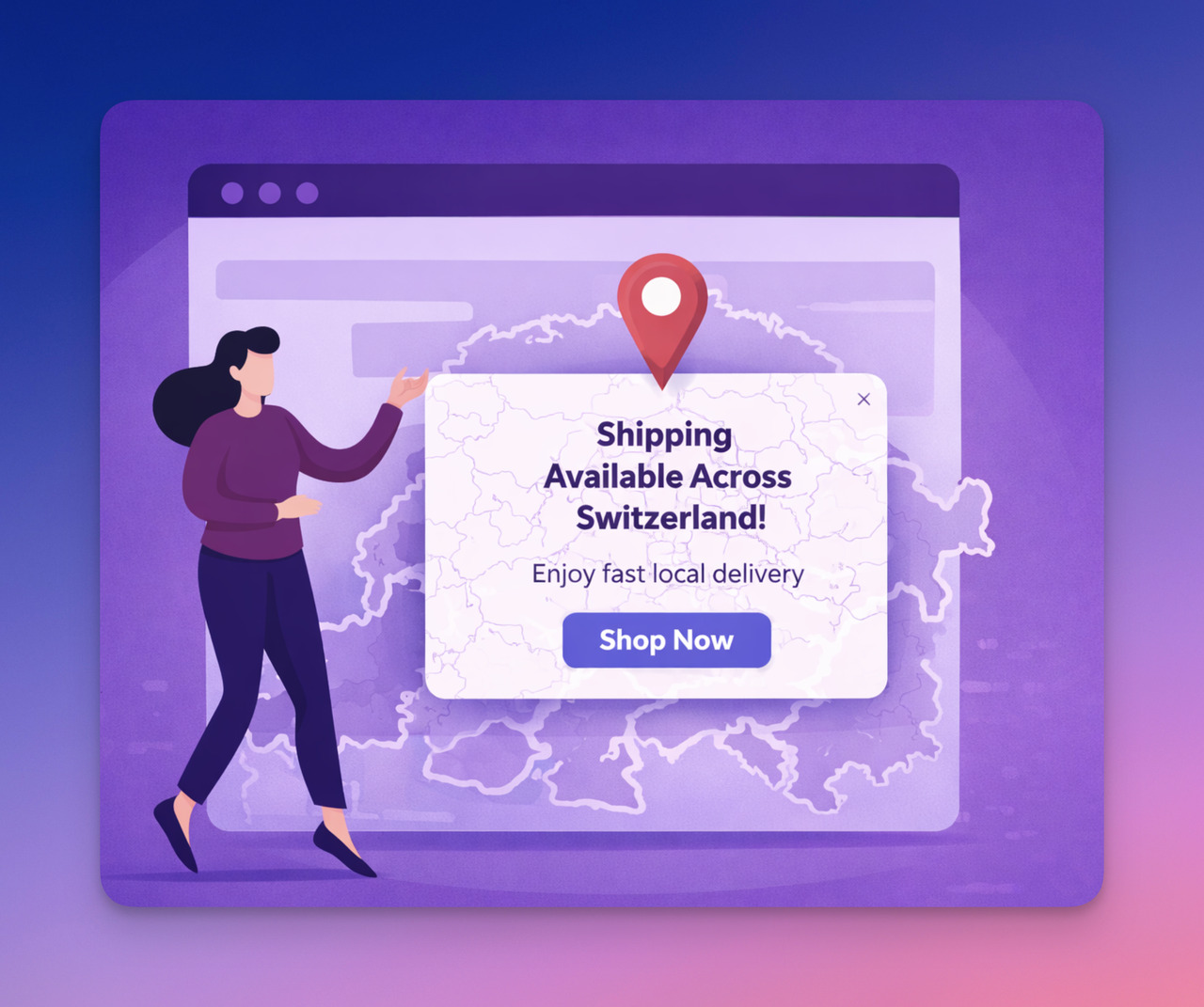
Unlike generic popups, geo-targeted popups recognize where visitors are located and show messaging that matches their local context, from shipping and currency to region-based promotions.
✨ Easy Examples of What They Do
- A visitor from Germany sees “Free shipping to Germany 🇩🇪!”
- Someone in California sees “Exclusive offer for California residents!”
- A user in Toronto gets “Prices in CAD + free shipping across Canada!”
These aren’t random ideas. They’re exactly how location-based targeting works in practice to make offers fit real visitors’ circumstances.
📈 Why Geo-Targeted Popups Work: Relevance, Context & Conversion
Geo-targeted popups work because they make the message feel relevant to the person seeing it, not generic or out of place. When a popup reflects a user’s country, currency, shipping reality, or regional conditions, it removes uncertainty and helps them decide faster.
💡 The Core Principle
👉 Location = Personalization trigger
Where a visitor is browsing from changes how they respond to popups. In Popupsmart's 2026 popup benchmark, by visitor country, popups convert 0.76% for visitors in the United Kingdom vs 0.34% in Germany, and 2.01% in Mexico vs 0.46% in the United States (median campaign).
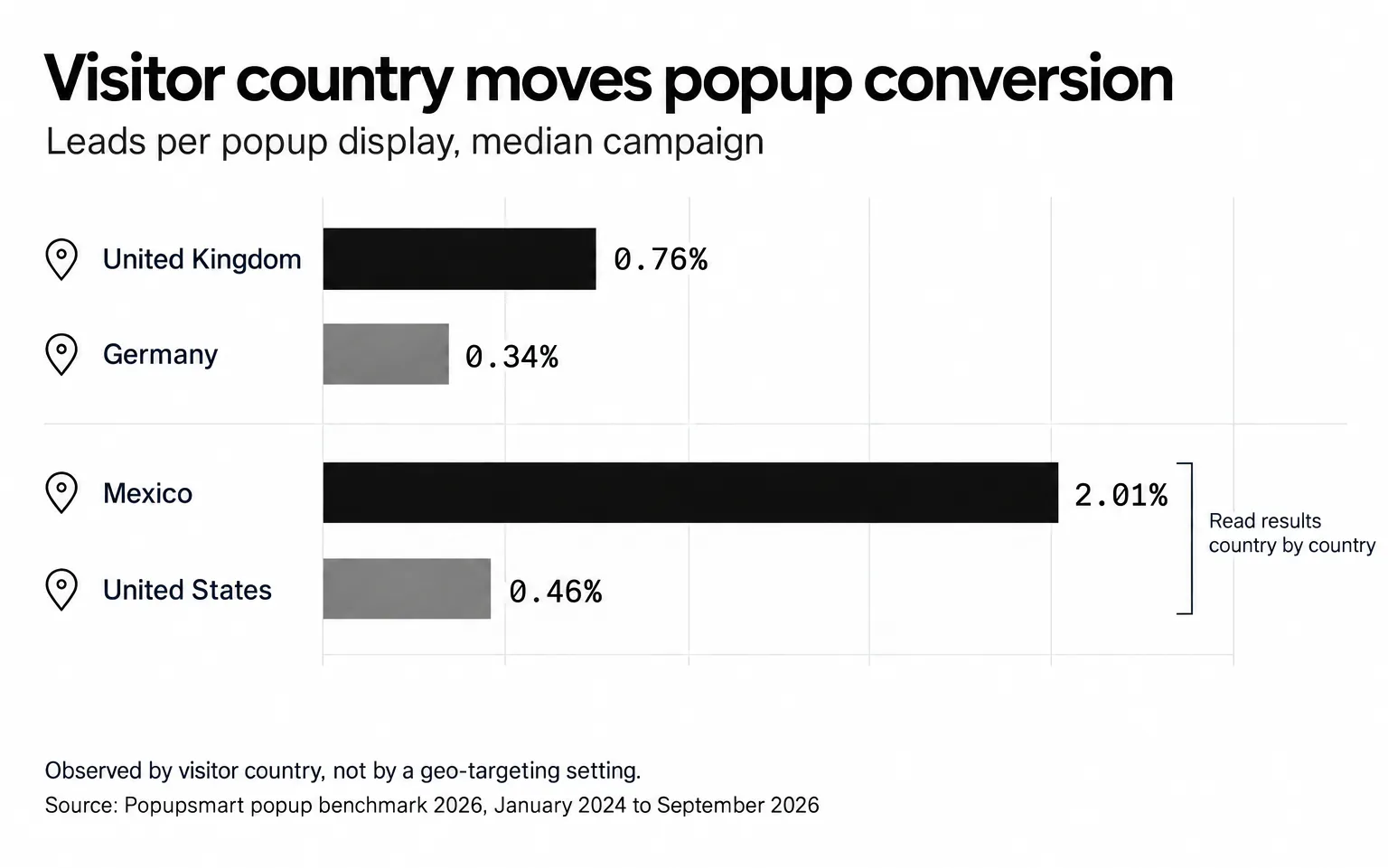
Read those numbers for what they are. They describe the visitors each country sent to popups across different sites and offers; they don't measure a geo-targeting setting, and they don't say a localized popup wins. What they do show is that one blended conversion rate can hide countries that behave very differently, which is the case for looking at your popup results, and your copy, one country at a time.
🎯 Why They Convert Better
| Reason | What It Means in Practice |
|---|---|
| Higher Relevance | Users see messaging that matches their local situation: shipping, pricing, availability, or regional conditions |
| Clearer Decision Path | Local details reduce hesitation and confusion during checkout |
| Stronger Engagement | People are more likely to interact with content that feels personally applicable |
✨ Simple Real-World Examples
- A visitor in Italy sees “Free shipping across Italy 🇮🇹”, not a global shipping notice
- A shopper in Canada sees “Prices shown in CAD + local returns”
- A user in the UAE sees “Delivery available across the UAE 🚚”
Each message is built on the visitor's real conditions, not a guess about them.
✅ The Short Version
Geo-targeted popups earn their place by removing uncertainty and building trust. That's why they're worth testing against a generic popup on your own traffic.
Key Use Cases of Geo-Targeted Popups 🌍
Geo-targeted popups shine the most when they solve location-specific concerns or motivations. Here are the most useful ways brands use them, with example messages for each.
🛒 1) Country-Based Shipping & Delivery Messages
Many shoppers abandon carts because shipping or availability is unclear across regions. Location-aware popups help remove that uncertainty before the cart, where cart abandonment popups usually step in.
Real example scenarios
- “Free shipping across Germany 🇩🇪”
- “We ship to the UK, no extra import fees”
- “Fast delivery available in New York 🚚”
Why it works
In Baymard Institute's cart abandonment research (page updated September 2025), 40% of US online shoppers who abandoned a checkout for a reason other than just browsing said extra costs such as shipping, tax and fees were too high. A shipping message shown early tells visitors what delivery will cost before the checkout does.
👉 A geo-targeted popup answers the question before hesitation happens.
💱 2) Local Currency & Pricing Reassurance
When visitors see unfamiliar currency, they hesitate, or leave.
Popup examples
- “Prices shown in CAD, pay in your local currency 🇨🇦”
- “EU-friendly pricing, VAT included”
- “Local checkout available in AUD”
A price in an unfamiliar currency makes the visitor do the conversion in their head and wonder what their card will actually be charged. A popup that names the currency, and whether tax is included, answers both before checkout.
👉 Currency + pricing clarity = fewer surprises at checkout.
🎟 3) City- or Region-Specific Campaigns & Events
Great for retailers, local services, events, and multi-location brands.
Real example scenarios
- “Special offer for customers in Chicago 🎉”
- “In-store pickup available in Berlin”
- “Local spring sale, Istanbul region only 🌼”
A real example: EuroDNS, a domain and hosting company based in Luxembourg, uses Popupsmart's geolocation targeting for seasonal discounts tailored by country, such as a campaign shown in French to visitors from France. The EuroDNS customer story shows how they run multilingual, region-specific campaigns without relying on developers.
👉 Region-specific popups feel purposeful, not generic.
🌤 4) Seasonal or Weather-Based Targeting
Seasons don't arrive everywhere at once: the first cold week in Oslo and the first hot week in Dubai fall months apart.
Example popup ideas
- “Cold week ahead in Oslo? Stay warm, 15% off jackets ❄️”
- “Hot days in Dubai, summer collection now live ☀️”
Popup tools target by location, not by forecast. In practice, a weather-based message is a city- or region-targeted popup that you schedule for the season, or switch on yourself when the forecast turns.
👉 Geo-targeted + seasonal = timely context.
🎯 Quick Summary
| Use Case | What the Popup Solves | Intended Outcome |
|---|---|---|
| Country-based shipping | Removes delivery uncertainty | Higher checkout confidence |
| Local currency & pricing | Reduces confusion at payment | Lower abandonment |
| City / region campaigns | Makes offers feel personal | Higher engagement |
| Weather-based messaging | Matches real-world context | Stronger intent & response |
Benefits of Geo-Targeted Popups for E-Commerce & SaaS 📈
Geo-targeted popups don’t just “sound smart”. They directly influence how users behave on a website. When the message matches a visitor’s location, expectations, and checkout reality, the popup answers a question the visitor already had instead of adding a new one.
🚀 Conversion & Engagement Impact
When offers feel relevant to the user’s situation, they’re more likely to take action.
What changes in practice
- Visitors get localized clarity instead of generic messaging
- Fewer doubts about shipping, currency, or availability
- Users feel the offer actually applies to them
Location is one targeting rule, and careful targeting tends to go with better results. In Popupsmart's 2026 benchmark, popups set up with three targeting rules convert 1.09% vs 0.71% for popups with none or one (median campaign): a correlation, since marketers who target carefully may also write better offers. A geo rule paired with a page rule and a visitor rule is what that careful setup looks like in practice.
👉 When users see a popup that speaks to their location, they’re more willing to interact with it, because it feels applicable to them. Your test is how you check that on your own site.
🧭 Bounce Rate & UX Improvements
A big reason users leave websites is uncertainty, especially around shipping, currency, or availability across regions.
Geo-targeted popups help by:
- Answering location-specific questions early
- Reducing confusion before checkout
- Preventing hesitation that leads to abandonment
Baymard's research puts extra costs at the top of the checkout reasons for abandonment, so a clear shipping and cost message early in the visit removes one of the most common reasons to leave.
👉 When visitors receive instant, location-relevant reassurance, they have one less reason to bounce.
Best Practices for Creating High-Converting Geo-Targeted Popups ✔️
A high-converting geo-targeted popup says one location-specific thing, at the moment it matters, in the visitor's language, and targets a country unless a city really changes the answer. These practices come from what location data can and can't tell you, and from how popups behave in Popupsmart's 2026 benchmark.
✍️ 1) Keep the Message Simple & Context-Focused
- Speak to one clear location-based benefit
- Avoid cluttered or overly promotional copy
- Emphasize clarity first, incentive second
👉 If the user needs to “think,” the popup already lost impact.
⏳ 2) Trigger at the Right Moment, Not Randomly
Great timing examples:
- On product pages → show shipping availability by region
- During scroll / intent → highlight local currency or pricing info
- Before exit → clarify cross-border or domestic delivery options
👉 Geo + behavior = stronger relevance. Don't count on the exit trigger to do the work, though. In Popupsmart's 2026 benchmark, exit intent shows no statistically reliable advantage: popups on the most sensitive exit-intent setting converted 1.10% vs 0.78% without exit intent (median campaign), a gap that could be chance. Our analysis of whether exit-intent popups work has the full picture.
📍 3) Target Broadly Enough, But Avoid Over-Segmentation
- Country-level targeting works best for most cases, and it's the level IP geolocation gets right most often
- City / micro-regions should be used only when meaningful
- Don’t create dozens of variations without purpose
Over-personalization can confuse users and complicate UX, especially when differences don’t matter.
👉 Personalize where it adds value, not everywhere.
📱 4) Optimize First for Mobile Users
In Popupsmart's 2026 benchmark, 63% of popup displays happen on mobile, which means:
- Larger tap areas
- Minimal text
- Lightweight visuals
- No overlapping UI elements
👉 If it isn’t mobile-friendly, it isn’t conversion-friendly. Our mobile popup design guide covers sizes, close buttons and triggers for phones.
🔒 5) Respect Privacy & Transparency
Good practice principles:
- Avoid implying precise location tracking
- Use broad phrasing (e.g., “We ship to your region”)
- Don’t misuse geolocation data beyond UX messaging
Trust-aligned, transparent design supports ethical personalization and user confidence. It matters legally too: Recital 30 of the GDPR lists IP addresses among the online identifiers that can be used to identify a person. Use location only to choose the message, don't store more than you need, and mention it in your privacy policy.
👉 The goal is relevance, not surveillance.

🗣️ 6) Match the visitor's language, not only their country
Country and language aren't the same thing. A visitor in Switzerland may read German, French or Italian, and a visitor in Germany may browse in English. Popupsmart's 2026 benchmark found that when a visitor's browser language matches the popup's language, the same popup converts better in most campaigns.
In Popupsmart, Browser Language targeting sits next to Geo-Location in the same Audience list, so you can show the French version of an offer to French-language browsers and keep the location rule for what really depends on location, like shipping.
👉 Use location for logistics, language for wording.
Geo-Targeted Popups vs Generic Popups 🥊
A generic popup shows everyone the same message; a geo-targeted popup changes it by location. The geo version is more specific, and it also adds versions to build, check and test.
| Aspect | Generic Popups | Geo-Targeted Popups |
|---|---|---|
| Message relevance | Same for everyone | Adjusts based on user location |
| User clarity | Often ambiguous | Answers local concerns (shipping, currency, availability) |
| Engagement level | Lower: feels generic | Higher: feels applicable |
| Friction during checkout | Likely to remain | Reduced through local context |
| Perceived value | Broad & impersonal | Specific and meaningful |
The table describes what each design sets out to do. Whether the geo version beats the generic one on your site is a test result, not a given, so the workflow below ends in a test.
How to Implement Geo-Targeted Popups Effectively (Practical Flow) ⚙️
To implement a geo-targeted popup, decide what changes by location, show it on the pages where that question comes up, test it against a generic version, and keep only the versions that win.
Instead of treating geo-targeted popups like one-off campaigns, the best results come from using a simple, repeatable workflow, from targeting logic to testing and iteration. Here’s a practical way to implement them step-by-step.
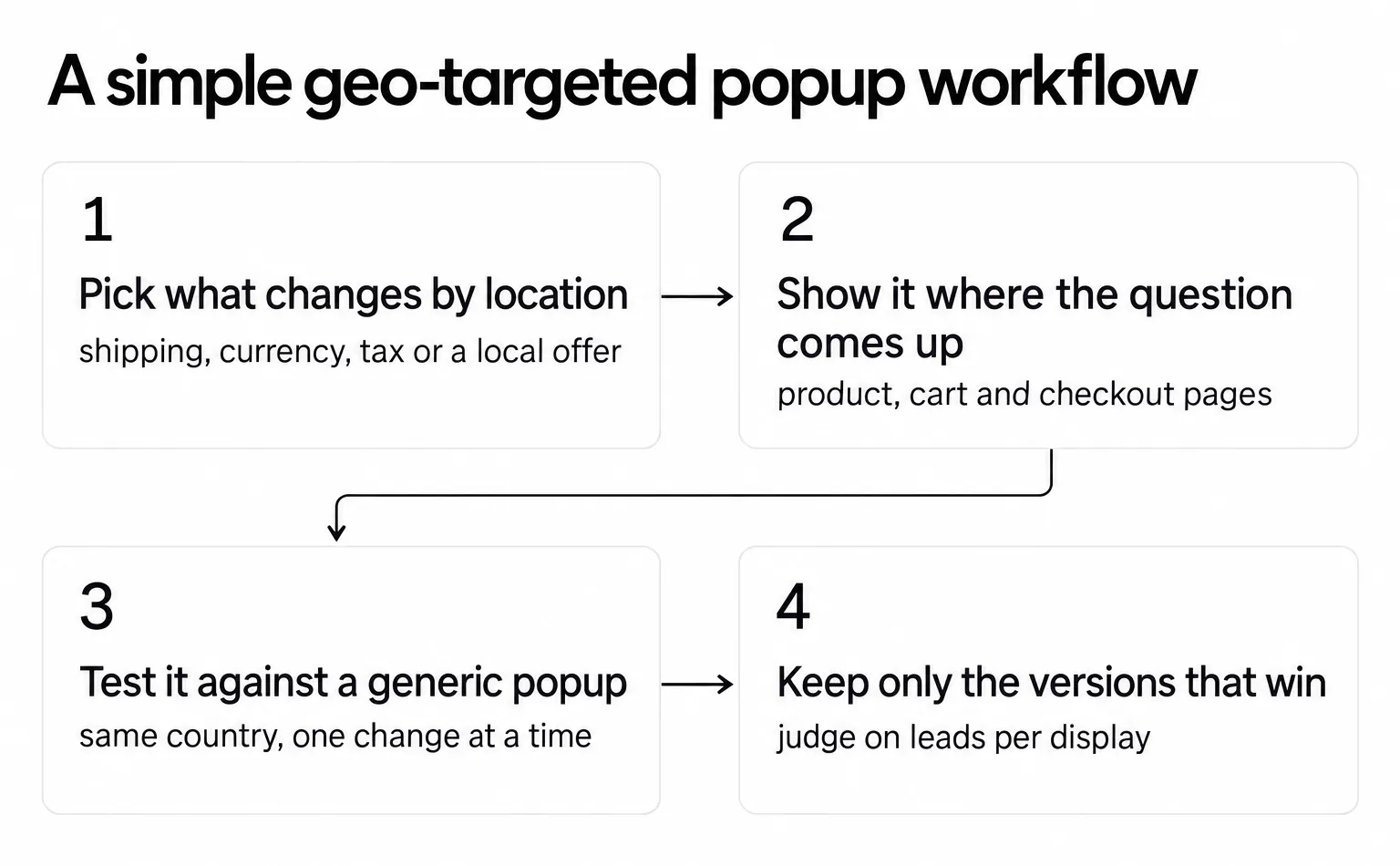
🧩 Step 1 — Define the Location Logic First (Not the Design)
Before writing copy or choosing visuals, decide what changes per location.
Good starting points:
- Country-based shipping / delivery messaging
- Local currency or tax clarification
- Region-specific availability or campaigns
- Cross-border reassurance (“Yes, we ship to your country”)
Shipping and costs are the usual first pick, since extra costs top Baymard's list of reasons shoppers abandon a checkout.
👉 Start with the problem the popup solves, then build the message around it.
🎛 Step 2 — Choose the Right Trigger & Page Context
Geo-targeted popups perform best when they appear at the moment the information becomes relevant, not randomly.
Recommended trigger patterns:
- Product pages → shipping or availability by region
- Cart / checkout → delivery, duties, currency reassurance
- Exit intent → cross-border shipping confirmation
- Homepage → localized welcome / regional info
Where the popup runs matters as much as who sees it. In Popupsmart's 2026 benchmark, popups on cart and checkout pages convert 4.57% vs 1.07% on the home page (median campaign); blog pages convert 0.23%. Those rates are observed by page type rather than caused by it, but they point the same way as the patterns above: put the shipping, duties or currency message where buying questions come up.
👉 Geo-targeting works best when it’s paired with page context and intent-based timing.
🧪 Step 3 — A/B Test Localized vs Generic Messaging
Don’t assume, measure.
What to test:
- Local vs non-localized copy
- Country-specific vs global offer text
- Currency reassurance vs discount messaging
- Delivery clarity vs generic value copy
Popupsmart's A/B testing splits a campaign's traffic between variants, with the original campaign as Variant A. Keep the location rule the same on both variants and change only the copy: same country, same pages, one change at a time. Judge the winner on leads per popup display, not clicks alone. Our guide to A/B testing popups covers how long to run a test and how to read it.
👉 Let the test decide whether clarity beats a discount for your visitors.
🔄 Step 4 — Iterate Based on Region-Level Performance
Geo-targeted popups shouldn’t multiply endlessly; instead, expand them only where data proves impact.
Smart iteration approach:
- Start with 3 or 4 key regions
- Monitor conversion / engagement deltas, comparing each country with its own generic version rather than with other countries
- Scale localization only where uplift is meaningful
- Sunset versions that add complexity without results
Visitor country alone moves popup conversion in Popupsmart's benchmark, so a country that converts lower with the localized popup may simply convert lower with every popup. Over-personalization also creates unnecessary cognitive load and operational overhead.
👉 Personalize strategically, not endlessly.
📊 Quick Implementation Flow
- Define the location-specific problem being solved
- Match the popup to page context + user intent
- Test localized vs generic messaging
- Scale only where results justify it
👉 Keep it small enough to measure.
⚙️ How to set up a geo-targeted popup in Popupsmart
Popupsmart's Geo-Location targeting shows or hides a campaign by country, region or city. Campaigns display in all locations by default, so you add the rule in the campaign's segment:
-
Open the campaign in the Popupsmart popup builder, go to the Segment step and click Edit Segment.
-
Click Add audience targeting under Audience.
-
Click Add next to Geo-Location Targeting.
-
Choose to target all locations, include specific locations or exclude specific locations.
-
Pick a Country, Region or City from the drop-down, or type a location name. Repeat to add more locations.
-
Click Save, then go to Publish and check the Targeting Summary.
To name the place inside the popup, use Smart Tags: {{country}}, {{region}} and {{city}} fill in the visitor's location. Give each one a fallback, such as {{country|fall=your country}}, so a visitor the lookup can't place reads "Free shipping to your country" instead of a gap. Geo-Location and Browsing Language targeting are included on every Popupsmart plan, the free one too.
Conclusion: Why Geo-Targeted Popups Create Smarter, More Human On-Site Experiences
Geo-targeted popups aren’t just about segmentation or technical targeting; they’re about removing friction and speaking to people in context. When a visitor sees a message that matches their location, shipping reality, currency, or regional conditions, the experience feels clearer, more relevant, and more trustworthy than a one-size-fits-all popup ever could.
Across real use cases, from country-based shipping reassurance to localized pricing and region-specific campaigns, the aim is always the same: less confusion, fewer abandoned sessions, and stronger engagement. And when they’re implemented thoughtfully, geo-targeted popups don’t feel intrusive. They feel like the website is simply answering the question a user already had in mind.
Good marketing meets people where they are. With a geo-targeted popup, that's meant literally.
Final Thought ✨
Personalization doesn’t always mean big, complex systems. Sometimes, it’s as simple as saying the right thing to the right visitor in the right place.
And location is one of the most meaningful places to start.
🌍 Ready to Make Your Popups Location-Aware?
Start with one country and one question it keeps asking, usually shipping. Build the localized popup, test it against your generic one, and keep it only if it wins on leads per display. Then add the next country.
FAQs
What are geo-targeted popups?
Geo-targeted popups are website popups that change their message, or only appear, based on the visitor's location: country, region or city. The site looks up the location from the visitor's IP address when the page loads and shows the version written for that place, such as local shipping terms, prices in the local currency or a regional offer.
How do websites detect a visitor's location for a popup?
Most popup tools use IP-based geolocation: the visitor's IP address is matched against a database that maps address ranges to places. It is usually right about the country, less reliable for the city, and it never gives an exact address. VPNs, company networks and mobile carriers can place a visitor in the wrong region, so keep a sensible fallback message.
Do geo-targeted popups improve conversions?
They can, but test it on your own site. Popupsmart's 2026 benchmark doesn't measure geo-targeting on its own. It does show that visitor country moves results (0.76% in the United Kingdom vs 0.34% in Germany, median campaign) and that the same popup converts better in most campaigns when the browser language matches the popup's language. Run the localized popup against a generic one.
Are geo-targeted popups GDPR compliant?
They can be. Showing a message by country doesn't ask the visitor for anything, but the lookup uses their IP address, which the GDPR counts among the online identifiers that can identify a person. Use location only to choose the message, don't store more than you need, mention it in your privacy policy, and never word a popup as if you know someone's exact address.
When should I use geo-targeted popups?
Use them when the right answer depends on where the visitor is: shipping costs and delivery times, currency, taxes and duties, product availability, store pickup, or an offer that only runs in some countries. If the message would be the same everywhere, a location rule adds work without adding relevance, so keep one popup for everyone.
How do I set up a geo-targeted popup in Popupsmart?
In the popup builder, open the Segment step, click Edit Segment, then Add audience targeting, and add Geo-Location Targeting. Choose to include or exclude specific locations, pick a country, region or city, save, and publish. Geo-Location and Browsing Language targeting are included on every Popupsmart plan, the free one too.