ChatGPT
 Perplexity
 Claude
 Grok
Grok Google AI Mode
"Are pop-ups bad for SEO?" and "What are Google's rules for displaying pop-up?"
We will go through which types of pop-ups would impact your SEO efforts negatively and which ones have the power to turn your visitors into customers while staying within Google's guidance.
Then, you will learn how to use pop-ups on your website efficiently without harming your previous SEO operations.
Popups are effective at earning conversions when they're aimed well. As you already know, it is difficult to get the attention of a visitor when they reach your website. This is where the need for pop-ups with clear calls-to-action and a good design arises.
Although pop-ups commanding the screen get higher engagement, they may detract from the overall user experience on a website and be perceived as aggravating. You need to be very careful about the display time and the way you show pop-ups to website visitors!
Since January 10, 2017, Google penalizes websites having "intrusive interstitials". This basically means that if a pop-up, or any secondary content on your website, hides the content a visitor came for, it can have a negative impact on your Google rankings. Whether the offer relates to your products or your brand doesn't decide it. In the words of Google's 2016 announcement, pages where content is not easily accessible to a user on the transition from the mobile search results "may not rank as high". Google now marks that post as possibly outdated. Its current page on intrusive interstitials and dialogs (last updated 10 December 2025, read on 30 September 2026) doesn't mention mobile at all.
How Do Popups Affect SEO Rankings?
An SEO popup is a website overlay designed to convert visitors while complying with Google's interstitial guidelines. It loads after user engagement (scroll, time delay, or exit intent), sits on top of the page instead of pushing it down, keeps the content readable on mobile, and includes a visible close button so it doesn't trigger ranking penalties.
Popups affect SEO through two direct mechanisms: Google's interstitial penalty and Core Web Vitals degradation. Google says intrusive interstitials make your content hard for search engines to understand, and that Core Web Vitals are used by its ranking systems. Both are triggered by poor popup implementation rather than popup use itself.
Google introduced its intrusive interstitials signal in January 2017 specifically targeting mobile popups that block content access from search results. The penalty applies when a popup covers the main content, and not only on arrival: the 2016 announcement lists a popup that covers the main content "either immediately after the user navigates to a page from the search results, or while they are looking through the page." According to TDMP's research, Core Web Vitals, which were introduced specifically to measure user experience, can be significantly impacted by pop-ups (TDMP is a UK agency that checks its clients' Core Web Vitals every quarter).
Here's how the SEO impact breaks down, using the thresholds in Google's Core Web Vitals documentation:
1. Cumulative Layout Shift (CLS): A popup that pushes page content down or shifts elements on load directly increases your CLS score. An overlay positioned on top of the page doesn't: web.dev's CLS guide counts a layout shift only when existing elements change their start position. Google's threshold is 0.1 or below. A poorly timed popup can push that past 0.25, landing you in the "poor" category. Shifts within 500 milliseconds of a tap, click or keypress are excluded, but a scroll doesn't count as input, so a bar that appears mid-scroll and shoves the article down does count.
2. Largest Contentful Paint (LCP): Heavy popup scripts and images loaded on page render delay your LCP, which should land within 2.5 seconds. If your popup loads JavaScript before the main content paints, you're adding to your load time. A popup that renders on load and is bigger than your hero image can even become the LCP element. Once the visitor taps, scrolls or presses a key, the browser stops picking new LCP candidates, so a popup that opens later can't.
3. Interaction to Next Paint (INP): INP measures how quickly the page responds to clicks, taps and key presses, and web.dev's INP guide says scrolling isn't counted. Good is 200 milliseconds or less. A popup script that ties up the main thread slows every tap, including the tap on its own close button. Google has used INP as a ranking factor since 12 March 2024, when it replaced First Input Delay as a Core Web Vital.
The good news? Most of this is in your hands. A popup that sits on top of the page, loads its script after the content and leaves the content readable avoids all three problems. The same choices avoid the popup UX mistakes that annoy visitors in the first place.
The conversion data tells a clear story. Across 3,034 Popupsmart popups that ask for an email or phone number (January 2024 – September 2026, each with at least 1,000 displays and 14 active days), the median converts 0.83% of its displays into leads; the top 25% reach 1.96% and the top 10% reach 3.87%. So the question isn't whether to use popups. It's how to use them without damaging your search visibility.
What Are Google's Requirements for Displaying Popups?
Google doesn't ban popups. It penalizes specific popup behaviors that block content access on mobile devices after a user clicks through from search results: that's the 2017 signal, and its announcement identifies three patterns that trigger the interstitial penalty. Google's current page describes intrusive interstitials and dialogs as page elements that "obstruct users' view of the content, usually for promotional purposes", and warns that they "make it hard for Google and other search engines to understand your content, which may lead to poor search performance." In Google's vocabulary, an interstitial overlays the whole page, a dialog overlays part of it, and a banner takes "only a small fraction of the screen."
According to Dynamic Yield's popup SEO guide, you should avoid popups that shift content down, require dismissal before content, or cover the main content. Dynamic Yield also says to avoid popups on organic search landing pages and on first page views, and to keep interstitials to 15% of the screen. Those are house rules, a cautious default rather than Google's.
What Google Penalizes
Google doesn't use the word "penalty". The 2016 announcement says affected pages "may not rank as high" and calls the signal "just one of hundreds of signals" used in ranking; in this guide, "penalty" is shorthand for that ranking effect. Here's everything the two pages flag:
- Interstitials that cover the whole page: "Don't obscure the entire page with interstitials", unless they're legally mandatory (current guidance, which doesn't limit this to mobile).
- Redirects to a consent or signup page: "Don't redirect the user to a separate page for their consent or input" (current guidance).
- Popups covering the main content: Any popup that covers the main content right after the visitor arrives from search, or while they read (2016, mobile).
- Standalone interstitials before content: Pages that require dismissing an overlay before the main content becomes visible (2016, mobile).
- Above-the-fold popups mimicking page content: Layouts where the above-the-fold portion looks like a standalone interstitial, and the actual content is pushed below the fold (2016, mobile).
What Google Allows
- Legal obligation popups: Cookie consent banners, age verification gates, and GDPR notices are exempt from the penalty. The 2016 announcement lists "interstitials that appear to be in response to a legal obligation", and the current page exempts mandatory interstitials such as a casino's age gate, while still asking you to overlay them on the content rather than redirect.
- Login dialogs for gated content: Paywalled content that isn't indexable doesn't trigger the interstitial signal, and neither do login dialogs on other private content, such as email (2016).
- Small banners using reasonable screen space: Banners that "use a reasonable amount of screen space and are easily dismissible" (2016), or in the current wording, banners that take up a small fraction of the screen. Google gives no percentage.
One point worth clarifying: the penalty specifically targets the mobile experience from organic search in its 2017 form, but Google's current page names no device and no traffic source. Waiting for engagement doesn't clear a popup either, because the 2016 list includes popups that cover the content "while they are looking through the page". What changes the risk is how much of the content your popup hides.
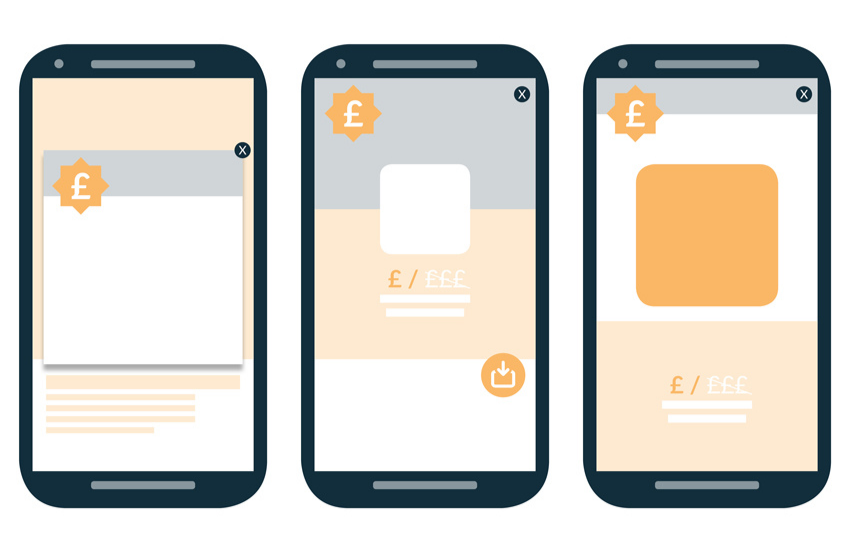
Examples of intrusive interstitials that trigger Google's mobile penalty (redrawn from the 2016 announcement)
What Google Never Specifies: Delays, Scroll Depth, Screen Size
Neither Google page gives a safe delay in seconds, a scroll depth or a maximum popup size. The "10 seconds", "30% of the viewport" and "15% of the screen" rules you'll read elsewhere, including in earlier versions of this guide, are practitioner and vendor rules of thumb. Google's page experience documentation (updated 22 September 2026) still asks "Do your pages avoid using intrusive interstitials?", says "There is no single signal", and adds that beyond Core Web Vitals, other page experience aspects "don't directly help your website rank higher in search results."
My reading: size and placement decide more than timing does. If the content stays readable with the popup open, you're on the right side of both Google pages. If it doesn't, no delay fixes that.
What Does Our 2026 Popup Data Say About Google-Friendly Popups?
Google's pages tell you what to avoid. They can't tell you whether the popups they discourage were worth running, and our 2026 benchmark can. One limit first: it measures popup conversion per display, not rankings, so none of these numbers show an SEO effect.
| Question | What the 2026 benchmark shows | Basis |
|---|---|---|
| Where do popups convert? | Blog pages 0.23% of displays, home page 1.07%, cart and checkout pages 4.57% | Median campaign |
| Does the traffic source matter? | Visitors from organic search convert on popups at 0.74%, vs 1.81% for visitors arriving from an email or SMS campaign | Median campaign |
| What does a smaller format cost? | Center modal popups convert 0.88% vs 0.49% for corner/slide-in boxes | Median campaign |
| Which screen? | 63% of popup displays happen on mobile; the median popup converts 1.02% on mobile vs 0.57% on desktop (mobile vs. desktop popup behavior) | All displays; median campaign |
| How often do visitors close? | 40.5% of popup displays end with the visitor closing the popup, and 71% of visitors who close a popup do so within 5 seconds of it appearing | All displays pooled, February 2025 – September 2026 (since close tracking began); visitors who closed |
| How fast do leads come? | 61% of popup leads are submitted within 30 seconds of the popup appearing | Popup leads |
Methodology: Popupsmart platform data, January 2024 to September 2026 (28,674 campaigns and 499.6 million popup displays); rates divide by popup displays, not visitors, and "median campaign" is the middle campaign among the 10,768 with at least 1,000 displays and 14 active days, with lead rates counting only the 3,034 popups that ask for an email or phone number.
Here's how I read these together. The popups Google's guidance worries about, big ones that cover an article as a search visitor starts reading, sit on the pages and in front of the visitors in the top two rows of that table. That's a weak trade before rankings even come into it. The honest other side is that Google's preferred small formats cost something. Our data has no banner cut, and the closest comparison, center modals against corner and slide-in boxes, favors the bigger box. So I don't pretend a small popup is free. I'd use the small format where visitors land from search and save the bigger formats for pages visitors reach by clicking through the site, like the cart.
What Are the Types of SEO Popups?
Not all popups carry the same SEO risk. The type of popup you choose determines whether Google treats it as user-friendly or intrusive, together with how much of the page it covers: Google's terms are banner, dialog and interstitial. Here are the four main categories, with our read of each.
Overlay Popups
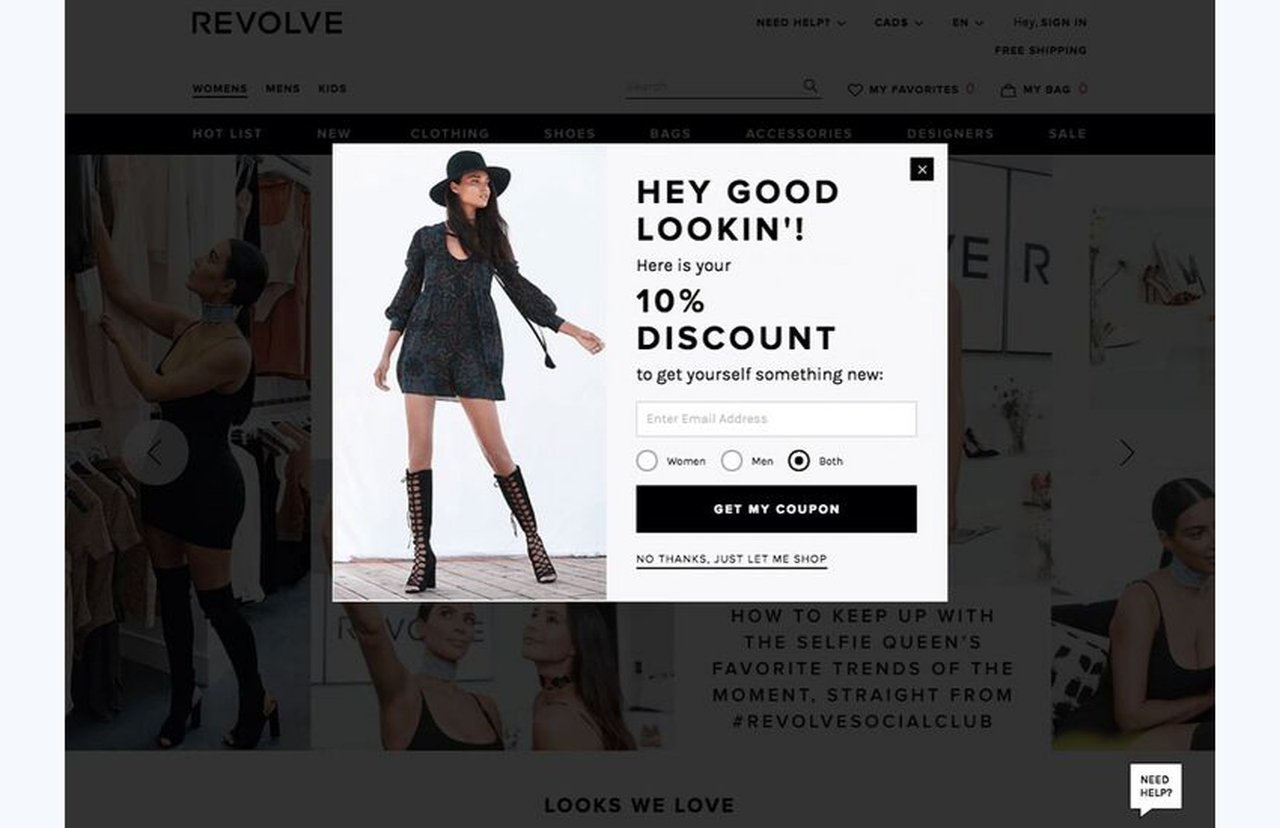
Overlay popups appear within the same browser tab, layered on top of the page content with a dimmed background. Small ones are the safest popup type for SEO because they don't create new browser windows, they don't block the back button, and they load within the existing DOM, while leaving most of the page visible. Positioned over the page, they don't cause layout shift either. The trigger doesn't decide whether Google sees one as intrusive, though; the size does. A small overlay along the bottom edge or in a corner is the banner Google recommends. A large one like Revolve's, with the page dimmed behind it, is what Google calls a dialog, and it's intrusive when it hides the content. We use this type across most email capture popup implementations at Popupsmart, in sizes from a corner box to a center overlay.
Modal Popups
Modals are functionally similar to overlays but typically require user action before dismissal (login forms, confirmations, critical notifications). They're SEO-safe when used for genuine user needs, and Google's exemptions explicitly cover login dialogs on content that isn't publicly indexable. The risk increases when modals are repurposed as marketing tools that appear immediately on page load, or that cover the article while the visitor reads. On pages that earn search traffic, keep modals for functional purposes and use overlays for marketing campaigns. Elsewhere, a center modal does convert more than a corner box in our data (see the table above); make it easy to close.
Interstitial Popups
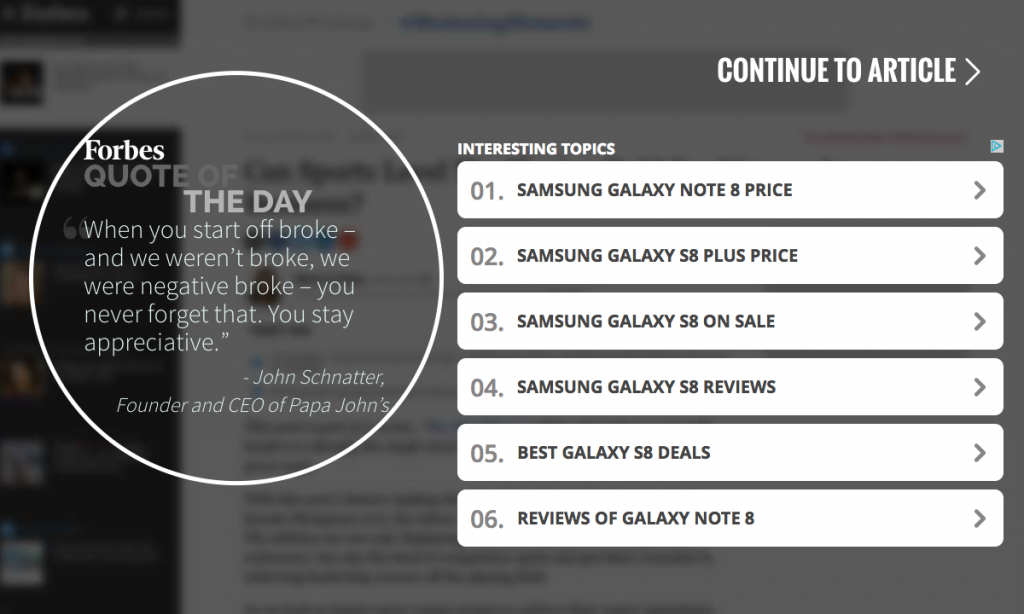
Interstitials cover the entire page and force a wait time or action before content becomes accessible. These are the primary target of Google's penalty (see the list above). High-authority sites like Forbes have historically used interstitials for ad revenue. Unless you're showing a legally required notice, avoid full-screen interstitial popups on pages that receive organic search traffic; that guide covers interstitial types, examples and both Google pages side by side.

A popup that fills the whole screen is an interstitial in Google's terms, whatever the builder calls it
New Window Popups
These open in a separate browser window entirely. Most modern browsers block them by default, and they're almost universally associated with spam. From an SEO perspective, new window popups don't fall under Google's interstitial guidance (since they're a separate window), but they destroy user trust and inflate bounce rates. Don't use them.
| Popup Type | SEO Risk (our read) | Best Use Case | Google's term | What decides the risk |
|---|---|---|---|---|
| Overlay: small bar, corner or slide-in | Low | Email capture, offers, announcements | Banner, the format Google recommends | Size, and whether it sits over the page or pushes it down |
| Modal: center box | Low-Medium | Login, notifications, confirmations | Dialog | Whether it hides the content; login dialogs on non-indexable content are exempt |
| Interstitial: whole page | High | Legal notices only | Interstitial | Exempt only when legally mandatory |
| New Window | Medium | None recommended | Not covered | Browser blocking and visitor trust |
Why Do SEO-Friendly Popups Matter for Your Business?
Running a B2B SaaS company without popups means leaving conversion opportunities on the table, and the same goes for a store or a blog. Here's where popups earn their place, and where our data argues for care.
- Lead generation at scale: A small signup popup collects emails and phone numbers from visitors who would otherwise leave anonymously, and it's the format Google's own guidance describes (see the Quick Insight above).
- Feedback collection: Feedback popups ask one question at the right moment, giving you a direct channel to user insights without disrupting the core experience.
- Cart abandonment recovery: Exit intent popups fire only when a user is about to leave, capturing value from traffic you'd otherwise lose completely.
- Audience segmentation: Popups triggered by traffic source, scroll depth, or page category let you tailor messaging. A visitor from a Google search for "popup SEO" gets a different message than someone browsing your pricing page. Popups set up with three targeting rules convert 1.09% vs 0.71% for popups with none or one (median campaign): a correlation, since marketers who target carefully may also write better offers.
- Zero SEO penalty when done right: A small, easy-to-dismiss popup that leaves the content readable isn't on either of Google's lists.
How Can You See SEO Popups in Practice?
Theory only goes so far. Here are real implementation patterns that balance conversion goals with SEO compliance.
Scroll-Triggered Email Capture
A B2B SaaS blog sets an overlay to trigger at 50% scroll depth, showing a content upgrade (PDF checklist) related to the article topic. The popup covers less than 25% of the viewport on mobile and includes a clear X button. This pattern avoids CLS impact because the overlay sits on top of the article instead of pushing it down; a scroll doesn't count as recent input, so a bar inserted into the page at the same moment would count as a shift. Judge its conversion rate against blog-page norms (the first row of the table above), not against a checkout popup.
Exit Intent Discount Offer
An ecommerce store uses mouse trajectory tracking (desktop) and a fast upward scroll (mobile, the way Popupsmart's exit-intent trigger reads it) to show a 10% discount code when a user is about to leave. Because the popup fires on exit rather than entry, it stays out of the way while the visitor reads. The mobile version uses a bottom slide-up covering only the lower third of the screen. Don't count on exit intent itself for a lift: our data doesn't show a reliable one (more in do exit-intent popups work).
Cookie Consent Banner
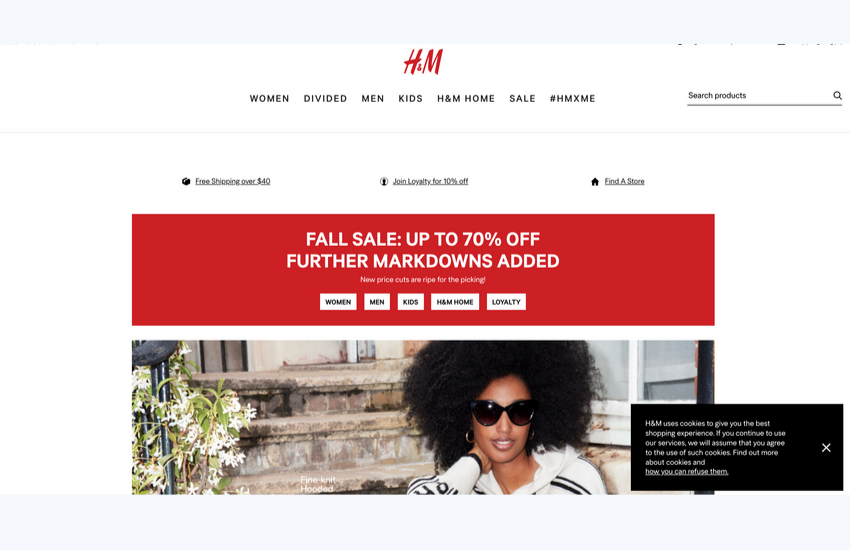
H&M's cookie consent banner is a textbook example of a legally required popup that Google explicitly exempts from penalties. It appears at the bottom of the screen, doesn't block content access, and uses clear, small controls: a close button and a link explaining how to refuse cookies (this is an older desktop screenshot). GDPR and CCPA compliance popups should follow this pattern: minimal screen coverage, no content blocking, and immediate dismissibility. Whether a given notice meets GDPR or CCPA is a legal question, not an SEO one.
How to Create SEO-Friendly Popups: 7 Best Practices
These practices come from years of building popup technology at Popupsmart and from our 2026 benchmark of 11,533 businesses that ran a popup with Popupsmart between January 2024 and September 2026, checked against Google's own pages. Each one maps to Google's guidance or to a user experience metric. For the full benchmark-graded list, see our popup best practices.
1. Keep the page a search visitor lands on readable: Never show a popup before the user has engaged with your content, and don't cover the content once they have. On the landing page, use a small banner, slide-in or bar, and save a bigger popup for the second page the visitor opens. Waiting is for the page's sake, not the conversion rate's: Google names no safe delay, and our data doesn't reward one much either. Popups that wait before appearing convert 0.83% vs 0.61% for popups shown the instant the page loads (median campaign); the direction holds in every year of data but the difference is not statistically reliable, so treat it as a lean, not a rule. The exact delay length (0–5 seconds vs 21–60 seconds) makes no measurable difference to conversion. More in our guide to popup timing.
2. Keep mobile popups under 30% of the viewport: Use bottom bars, slide-ins, or small center modals on mobile. Full-screen takeovers on mobile are the primary trigger for Google's penalty, and the current page says not to obscure the entire page on any device. The 30% is our rule of thumb, not Google's: Google gives no percentage. Test your popup on actual devices, not just responsive previews. Most popup displays happen on a phone (see the table above), so the mobile version is the one most visitors see.
3. Load popup scripts asynchronously after main content: Your popup JavaScript should never compete with your page's LCP element for loading priority. Use defer or dynamic imports so the popup library loads after the page renders. This protects LCP. Keep the script's work light when the popup opens, too, so taps on the page stay quick for INP.
4. Include a visible, tappable close button: The close button should be at least 48x48 pixels on mobile (Google's minimum tap target size per their web.dev accessibility guidelines, about the size of a finger pad). Place it in the top-right corner where users expect it. Visitors decide fast (see the close timing in the table above), and a close button they have to hunt for turns a quick "no" into frustration.
5. Use frequency capping: Don't show the same popup to the same visitor more than once per session. Repeated popups signal desperation to users and increase bounce rates, and they stop working: the first two times a visitor sees a popup in a week convert at similar rates (1.33% and 1.22% of displays, pooled); from the third view conversion falls, and from the sixth view it is 0.41%, 31% of the first-view rate. Set the cap in Popupsmart's display frequency settings.
6. Match popup content to page intent: A visitor reading about ecommerce optimization should see an ecommerce-related offer, not a generic newsletter signup. Relevance reduces dismissal rates and keeps users on page longer.
7. Test CWV impact before and after deployment: Use Google's PageSpeed Insights to measure CLS, LCP, and INP with your popup active. If any metric crosses from "good" to "needs improvement," adjust your implementation before going live.
Where to start: the first three rows take minutes; the rest depend on your stack.
| Practice | Effort | What it protects |
|---|---|---|
| 1. Keep the landing page readable | Low: one trigger setting | Google's interstitial guidance |
| 4. Visible close button | Low | Visitors who decide in seconds |
| 5. Frequency capping | Low | Conversion from repeat views |
| 2. Keep mobile popups under 30% | Medium: a mobile variant | Google's guidance, on the screen most visitors use |
| 3. Async script loading | Medium: depends on your stack | LCP and INP |
| 6. Match content to page intent | Medium | Relevance and dismissals |
| 7. Test CWV | Ongoing | CLS, LCP and INP |
What Are the Most Common SEO Popup Mistakes?
These are the mistakes that most often put a popup on the wrong side of Google's guidance or of our conversion data. Each one has a direct impact on either rankings or conversions.
- Showing popups immediately on page load from organic search: This is the single fastest way to trigger Google's interstitial penalty, and the first pattern in Google's 2016 list. The fix isn't a timer alone, since Google names no safe delay: keep a big popup off the landing page with a second-page-view trigger, or make the first touch a small banner.
- Using full-screen interstitials on mobile for marketing: Reserve full-screen overlays for legal requirements only (cookie consent, age gates). For marketing, use slide-ins, bottom bars, or small center modals that don't cover the primary content.
- Loading heavy popup images before main content: A popup with a 500KB hero image that loads on DOM ready can delay your LCP, or become the LCP element itself. Lazy-load popup assets. If you're using images in popups, compress them to WebP and keep them under 50KB.
- Stacking multiple popups on a single page: One popup per page, one purpose per popup. Stacking popups (welcome mat + newsletter + exit intent all on the same visit) destroys the user experience, and any of them that pushes the page adds to CLS. Your popup software should support rules that prevent popup conflicts.
- Ignoring popup performance on different devices: A popup that works on a 27-inch desktop monitor may completely block content on a 375px-wide phone. Always test mobile separately. Google uses the mobile version of a site's content, crawled with the smartphone agent, for indexing and ranking (mobile-first indexing), so mobile is the version that determines your ranking.
Frequently Asked Questions
What Is "Pop" in SEO?
There's no standard SEO term called "pop". Used loosely, as in "SEO pop-ups", in SEO context, "pop" refers to popup overlays, modals, and interstitials displayed on web pages. "POP" is also the short name of PageOptimizer Pro, an on-page SEO tool. These on-site elements interact with multiple ranking signals including Core Web Vitals (CLS, LCP, INP) and Google's intrusive interstitial penalty. The SEO impact depends entirely on implementation: properly timed, small-footprint popups carry no ranking penalty, while full-screen interstitials on mobile from organic search can trigger direct demotions, and Google's current guidance warns against hiding the content on any device.
Do Popups Affect SEO?
Yes, but the effect depends on how you implement them. Google's intrusive interstitial signal specifically targets popups that block content access on mobile after a user clicks from search results, and its current guidance (updated 10 December 2025) says intrusive interstitials and dialogs on any page may lead to poor search performance. Popups that leave the content readable, sit on top of the page instead of pushing it down, and are easy to dismiss avoid both problems. Popups and SEO can coexist when implementation follows Google's guidelines, although Google names no safe delay or screen percentage.
Is There a Google Popup Penalty?
Google doesn't call it a penalty. Its 2016 announcement says pages whose content isn't easily accessible on the transition from mobile search results "may not rank as high" (from 10 January 2017), and calls that signal "just one of hundreds of signals" used in ranking, so a page with great, relevant content may still rank highly. Its current guidance, last updated 10 December 2025, says intrusive interstitials and dialogs "may lead to poor search performance" because they make content hard for search engines to understand.
Why Are Some Popups Considered Intrusive?
Google considers popups intrusive when they prevent users from accessing the content they clicked on from search results. Three specific patterns trigger the penalty: popups covering the main content on arrival or while the visitor reads, standalone interstitials requiring dismissal, and layouts where the above-the-fold content looks like a standalone interstitial. Legal obligation popups (cookie consent, age verification) are exempt. The penalty was introduced in January 2017, and Google's page experience documentation still asks "Do your pages avoid using intrusive interstitials?"
What Popup Size Does Google Allow on Mobile?
Google gives no percentage. Its current guidance recommends "banners that take up only a small fraction of the screen", and its 2016 announcement accepted "banners that use a reasonable amount of screen space and are easily dismissible". Figures like 15% or 30% of the screen come from vendors and practitioners, not from Google. A practical test: on a 375px-wide phone, can the visitor still read the content they came for with the popup open?
How to Create SEO-Friendly Popups?
Start with three rules: delay display until after user engagement and keep a big popup off the page a search visitor lands on, keep mobile popups small, and load popup scripts after main content. Use overlay or modal formats instead of interstitials, positioned on top of the page instead of pushing content down. Set frequency caps to one popup per session per visitor. Test Core Web Vitals before and after deployment using PageSpeed Insights. Match popup content to page topic for relevance. These practices let you capture leads through popups while staying inside Google's guidance.
Do Popups Affect Core Web Vitals?
They can. A popup that pushes content down adds to Cumulative Layout Shift, while an overlay positioned on top of the page doesn't shift the layout. A heavy popup script can delay Largest Contentful Paint and slow the page's response to taps, which Interaction to Next Paint measures. Google says Core Web Vitals are used by its ranking systems, so build popups as overlays and load their scripts after the content.
What Are Examples of Intrusive Interstitials?
Intrusive interstitials include full-screen welcome mats that appear before content loads, mandatory signup forms that block the entire page until dismissed, and ad interstitials with countdown timers. A common example is a full-screen popup appearing immediately when a mobile user clicks through from Google, forcing them to find a small close button before seeing any content. Forbes, for instance, showed a "Quote of the Day" page with a "Continue to article" link before its articles, the standalone-interstitial pattern Google's 2016 announcement describes.
Do Exit Intent Popups Impact SEO?
Exit intent popups usually appear after the visitor has read the page, because they fire only when a user signals intent to leave it. On desktop, this is detected through mouse movement toward the browser's close or back button. On mobile, it can be triggered by back-button taps or rapid upward scrolls; Popupsmart reads a fast upward scroll. Since the user has already consumed the content, exit intent popups don't block content access, but Google doesn't mention exit intent, and its 2016 list includes popups that cover the content "while they are looking through the page". Kept small and easy to dismiss, they're one of the safest popup triggers for organic traffic pages. Don't expect a big lift: in our 2026 benchmark, exit intent shows no statistically reliable advantage (popups on the most sensitive exit-intent setting converted 1.10% vs 0.78% without exit intent, median campaign), a gap that could be chance.
Start Using SEO-Compliant Popups Today
SEO popups aren't a contradiction. They're a conversion tool that, when built within Google's guidelines, carries no ranking penalty and leaves the content readable for visitors and search engines alike. The formula is straightforward: trigger after engagement, keep the footprint small on mobile, load scripts asynchronously, and always include a clear close button. Sit on top of the page instead of pushing it, and keep a big popup off the page a visitor lands on.
I founded Popupsmart in 2018, and these are the first settings I'd check on any site that earns search traffic. Popupsmart has the controls this guide relies on: display frequency settings, an After X Page Visit trigger, traffic source targeting, and a mobile exit-intent trigger that reads a fast upward scroll. If you're currently running popups that might be hurting your SEO, or if you haven't started using popups because of SEO concerns, try Popupsmart's free popup builder and test a compliant popup on your site.
Re-checked every Google claim against Google's current guidance (updated 10 December 2025), the 2016 mobile announcement, the page experience documentation (updated 22 September 2026) and web.dev's Core Web Vitals guides, all read on 30 September 2026. Corrected claims that a delay, exit intent or a 30% size cap makes a popup safe in Google's eyes, and that Google cares whether a popup relates to your brand. Removed first-person claims about client results that we couldn't source. Replaced an "average" popup conversion rate and competitor figures with Popupsmart's 2026 benchmark, fixed the popup-type table, and added the FAQ questions on penalties, size and Core Web Vitals.
Initial publication.