ChatGPT
 Perplexity
 Claude
 Grok
Grok Google AI Mode
Launch a popup. Pick a headline. Add a discount. Hope it converts.
That's how many Shopify popups are created, and it's why many of them underperform. The problem isn't the popup itself; it's the lack of validation. When you A/B test a popup on Shopify, you move away from assumptions and let real visitor behavior decide what works. Instead of asking "Is this good enough?", you start answering "Which version performs better, and by how much?"
This guide is my practical walkthrough on how to A/B test Shopify popups without turning it into a data science project. I'll explain how I structure tests, what elements are actually worth testing (with what Popupsmart's 2026 benchmark says), and how to interpret results in a way that leads to real conversion gains, without crowning a false winner. No theory dumps, no random tweaks; just a clear process to help your popups improve on purpose.
What This Blog Post Covers
This post is designed to be practical from start to finish. I wrote it for anyone who wants to A/B test Shopify popups in a clear, structured way without turning the process into something overly technical or time-consuming.
As you go through the guide, you'll learn:
- What A/B testing actually means when applied to Shopify popups
- How to set up and run a popup A/B test step by step, in Popupsmart on Shopify
- Which popup elements are worth testing first (and which usually aren't), from our benchmark data
- How long to run tests and how to read results without jumping to conclusions
- Which tools support real A/B testing for Shopify popups, on which plan, and how to choose between them
- The most common mistakes that lead to misleading results
- Case studies with numbers you can check
- How to turn A/B testing into an ongoing improvement process instead of a one-time experiment
The goal isn't only to help you run a test. It's to help you understand why certain popups perform better than others, so every change you make is intentional, measurable, and easier to repeat.
What Is A/B Testing?
A/B testing a Shopify popup means showing two versions of the same popup, Version A and Version B, to randomly split groups of your store's visitors at the same time, and measuring which one gets more of the action you care about. At its core, A/B testing is just a structured way of answering a very simple question: which version performs better? You take two variations of the same thing, Version A and Version B, show them to similar users at the same time, and measure which one gets more of the action you care about. A/B testing only sounds intimidating until you realize it's really just controlled comparison, not complex math.
What makes A/B testing Shopify popups slightly different from testing a landing page or a product page is intent and timing. Popups interrupt a session by design, so even small changes, like wording or button text, can affect results. The offer, the form and who sees the popup tend to matter most; small cosmetic changes often matter less than you'd expect, as the benchmark section below shows.
How A/B Testing Actually Works
Here's how I explain it to anyone new to this:
- You create two versions of the same popup
- Only one element changes (headline, CTA, offer, timing, etc.)
- Traffic is split between the two versions
- You track a single primary metric (for a signup popup, leads per display)
- The better-performing version wins, or teaches you something
That's it. Nothing more to it.
What does matter, and this is where people often slip, is discipline. A/B testing only works if:
- Both versions run at the same time
- Traffic is split randomly
- The test runs until it reaches a sample size you set in advance
Change too many things at once, stop the test too early, or rely on "it feels better," and you're no longer A/B testing, you're experimenting blindly.
A/B Testing vs Multivariate Testing
I want to clear this up early, because the two get confused.
| Testing Type | What It Tests | When to Use It |
|---|---|---|
| A/B Testing | One change at a time | Most popup tests |
| Multivariate Testing | Multiple changes at once, in combinations | High traffic only |
For Shopify popups, A/B testing is almost always the better choice. A multivariate test splits your traffic across every combination of the elements you change, so each combination gets a fraction of the displays an A/B variant would. Most stores simply don't have the traffic volume needed to test multiple variables at the same time reliably. In my experience, single-variable A/B tests are faster, cleaner, and lead to clearer decisions.
What Makes Popup A/B Testing on Shopify Unique
Popup A/B testing is about balance as much as conversion rate.
You're testing:
- Attention vs interruption
- Incentive vs trust
- Urgency vs annoyance
That's why popup A/B tests often focus on a few elements:
- The offer (a discount code or none)
- The number of form fields
- A button label
- Who sees the popup, and on which page
- An exit-intent trigger instead of a time delay
Lead capture is a bigger share of popup work on Shopify than on other platforms. In Popupsmart's 2026 benchmark, 35% of popup campaigns on Shopify stores ask for an email or phone number, against 25% on WordPress sites.
Now, let's move into the practical part and break down exactly how I A/B test a popup on Shopify, step by step, starting with goal-setting and metrics.
Step-by-Step: How to A/B Test a Popup on Shopify
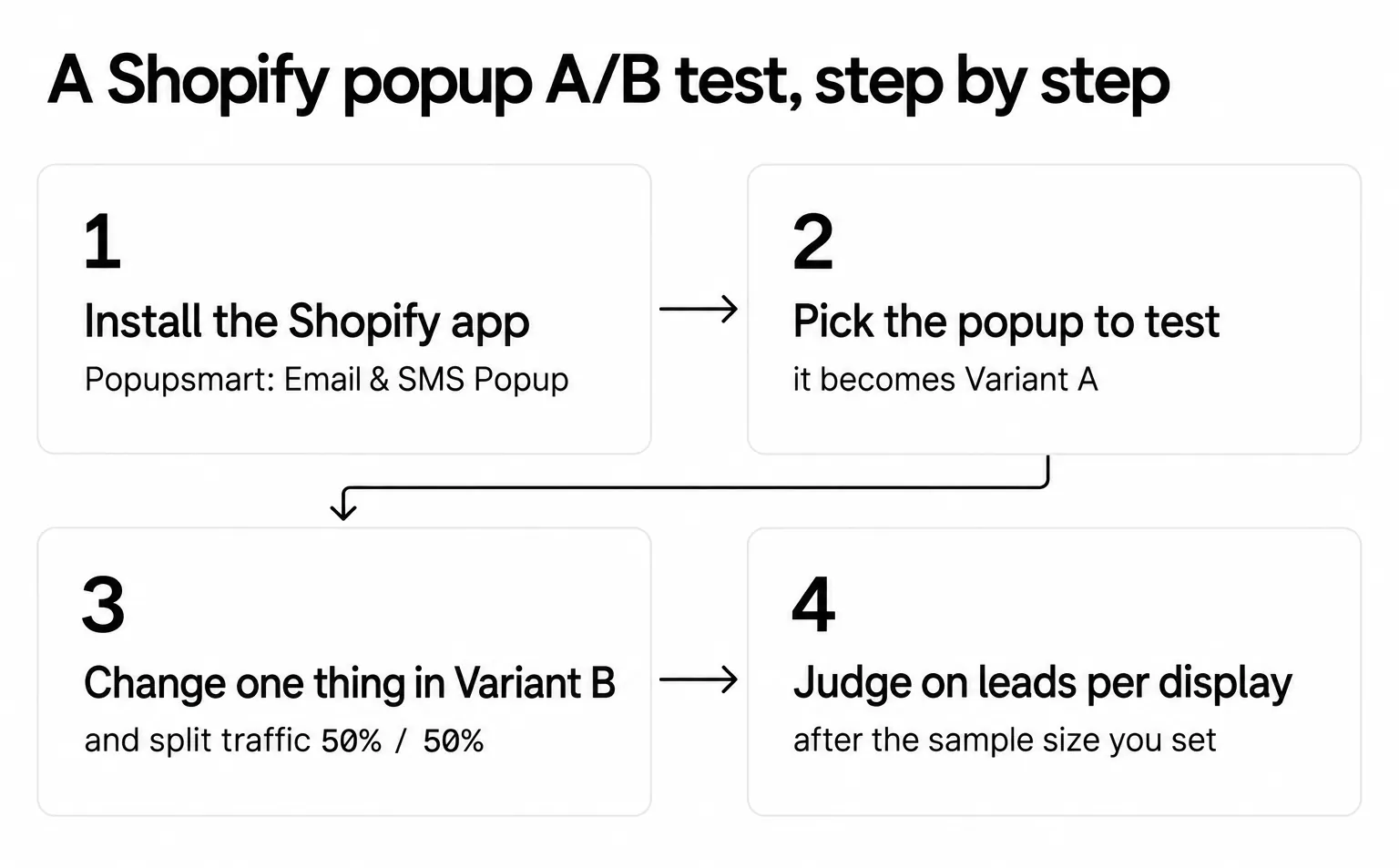
A Shopify popup A/B test has ten steps, from defining the goal to planning the next test. I'll walk you through exactly how I A/B test Shopify popups, step by step, without turning it into a CRO thesis. The clicks inside Popupsmart come in the next section.
Step 1: Define Your Goal
Before I touch copy, colors, or triggers, I ask myself one simple question:
What do I want this popup to achieve?
If you don't answer this clearly, your A/B test will be noisy no matter how "clean" the setup is.
Common popup goals on a Shopify store:
- Email signups
- Phone number opt-ins for your SMS tool
- Discount code claims
- Click-throughs to a collection or product
- Reduced exit rate (for exit-intent popups)
👉 Rule I follow: one popup = one primary goal.
Step 2: Choose the Right Metric to Measure Success
Once the goal is clear, the metric becomes obvious. I never track everything at once, just the one number that reflects success. Divide it by popup displays, so a variant that was shown more often doesn't win on volume alone.
| Popup Goal | Metric to Track |
|---|---|
| Email or phone signup | Leads per display (conversion rate) |
| Discount popup | Leads per display, then code redemptions in Shopify |
| CTA popup | Clicks per display (click-through rate) |
| Exit popup | Leads per display among exiting visitors |
Clicks and leads don't always move together, so don't let a click metric decide a signup test.
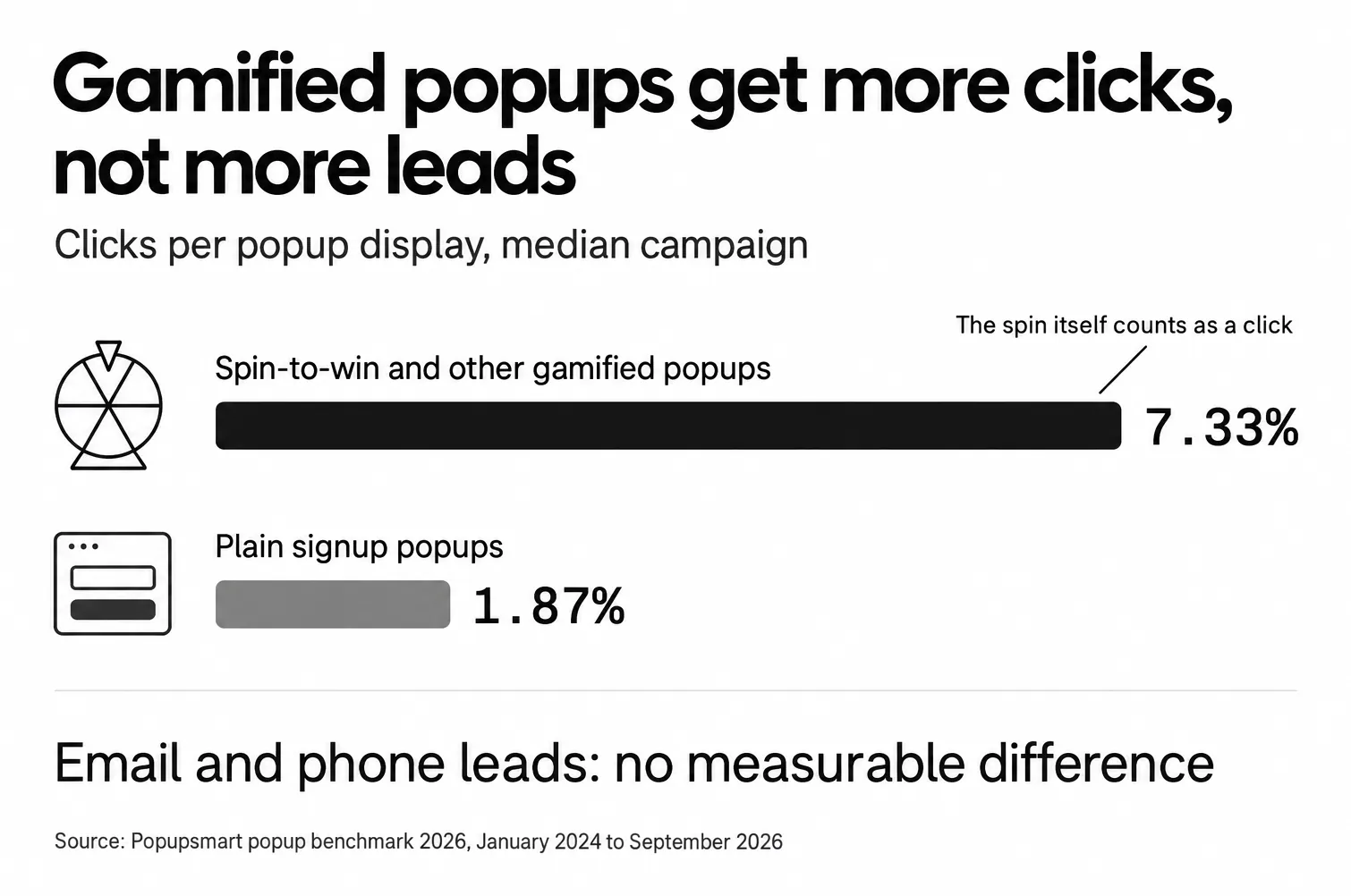
In Popupsmart's 2026 benchmark, spin-to-win and other gamified popups get far more clicks (7.33% vs 1.87% of displays, median campaign; the spin itself counts as a click), but do not collect measurably more email or phone leads than plain signup popups. If leads are the goal, leads per display is the metric. Tracking too many metrics at once also makes it harder to decide a winner; I'd rather be decisive than "data-rich."
Step 3: Establish a Baseline Performance
Before running any A/B test, I always check the popup's current numbers:
- Current conversion rate (leads per display)
- Average daily displays
- Average daily leads
Why? Because without a baseline, you can't size the test, and you don't know whether:
- Version B is better
- Or Version A was just having a bad week
Even a 7-14 day baseline is enough to anchor your expectations. For context, in Popupsmart's 2026 benchmark, popups on Shopify stores convert at 1.07% vs 0.66% on WordPress sites (median campaign). Our popup conversion benchmark report has the full method. Compare your popup with itself first; a store's own baseline is what the test has to beat.
Step 4: Create a Clear Hypothesis
This is where many popup tests quietly fail.
A good hypothesis is not:
"Let's see if this converts better."
A good hypothesis connects a change to a reason.
Here's the structure I use every time:
If I change X, then Y will happen, because Z.
Examples:
- If I change the CTA from "Submit" to "Get My Discount," the conversion rate will increase because the value is clearer.
- If I offer a discount code instead of "Join our newsletter," leads per display will increase because the reason to sign up is clearer.
Both hypotheses have support in our data. "Get My Discount" is first-person wording, and first-person buttons ("Send my code") convert 1.18% vs 0.80% for neutral wording (English popups, median campaign), and the offer test is the first one in the table under Step 5.
If I can't explain why a change might work, I usually don't test it.
Step 5: Decide What Popup Element to Test
I strongly believe in one variable per test. Especially for Shopify popups.
The order of tests matters, because each test spends traffic. Popupsmart's 2026 benchmark covers 28,674 campaigns from January 2024 to September 2026, and it found clear differences for some popup elements and none for others. These are comparisons between campaigns, not controlled experiments, so they tell you where to test first, not what will win in your store.
Test these first (the benchmark measured a difference):
| What to test | What Popupsmart's 2026 benchmark found |
|---|---|
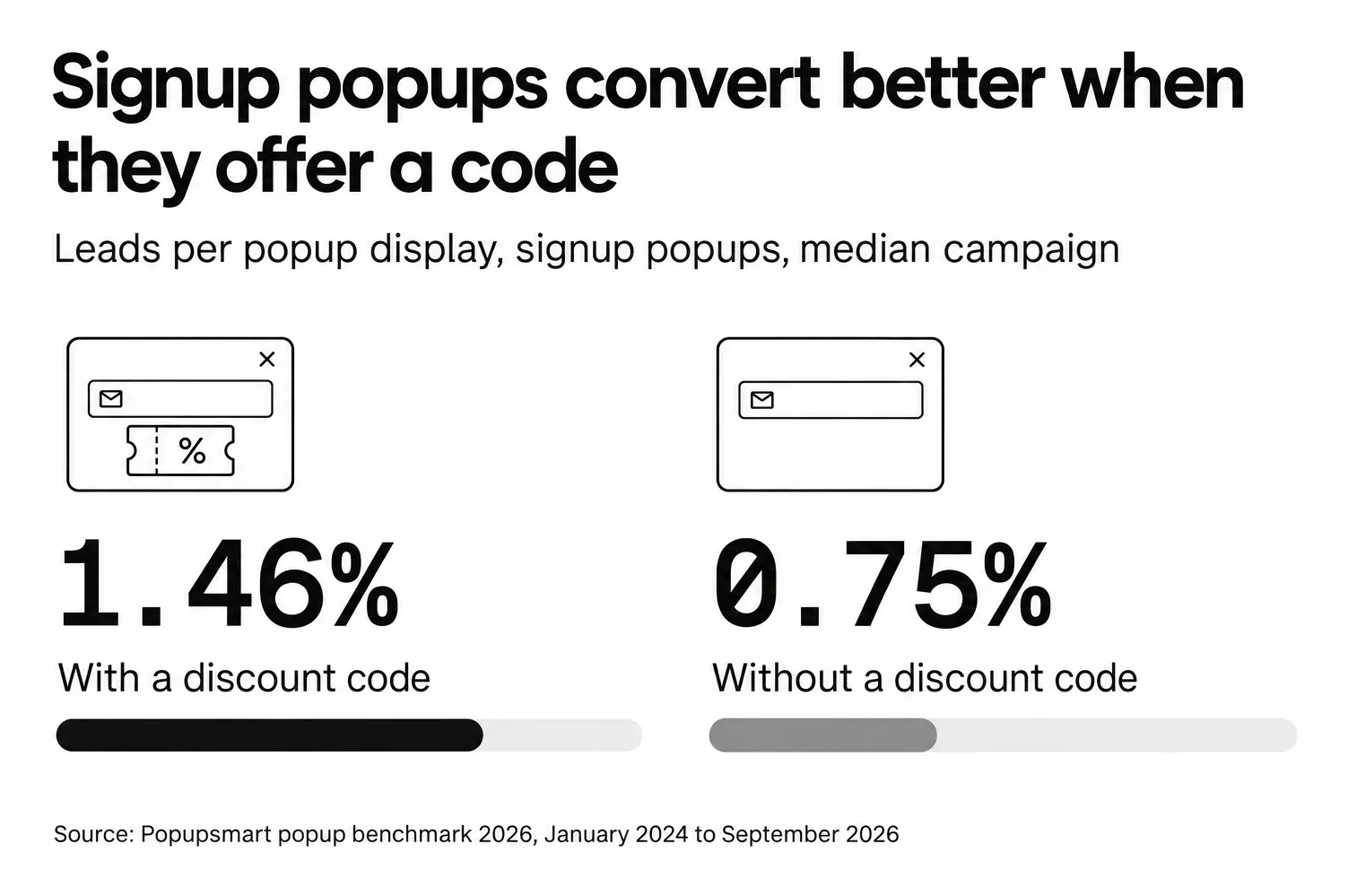
| Offer vs no offer | Signup popups that offer a discount code convert 1.46% vs 0.75% for signup popups without one. |
| Number of form fields | Popups asking for one or two fields convert 0.88% and 0.94%, against 0.56% for three fields (median campaign; spin-to-win and other gamified popups are counted separately). |
| Button wording | First-person buttons ("Send my code") convert 1.18% vs 0.80% for neutral wording (English popups, median campaign). |
| Who sees it | Popups targeted at new visitors only convert 1.13% vs 0.77% for popups shown to everyone. |
| Which page | Popups on cart and checkout pages convert 4.57% vs 1.07% on the home page (median campaign); blog pages convert 0.23%. |
These can wait: button colour, dark vs light popup backgrounds, urgency words and question headlines show no measurable effect on conversion; the data are too noisy to rule out modest effects. The exact delay length (0-5 seconds vs 21-60 seconds) makes no measurable difference to conversion either. Exit intent shows no statistically reliable advantage: popups on the most sensitive exit-intent setting converted 1.10% vs 0.78% without exit intent (median campaign), a gap that could be chance.
What I avoid early on:
- Testing multiple elements together
- Drastic redesigns
- "Let's change everything" tests
Our post on A/B testing for popups has the full list of findings, including the leans and the tests that showed no measurable difference. For offer ideas to put in Variant B, see these discount popup examples.
Step 6: Build Version A vs Version B
This part should feel boring, and that's a good thing.
- Version A = your current popup (control)
- Version B = same popup, one change only
I always double-check:
- Same trigger
- Same audience
- Same device targeting
- Same pages
If anything else changes, the test becomes unreliable.
Step 7: Split Traffic and Launch the Test
For most popup A/B tests, I use a 50/50 traffic split. It's simple. Both variants reach their sample size at the same time, too.
Before launching, I run a quick checklist:
- ✅ Both versions ready
- ✅ Tracking working
- ✅ Conversion event confirmed
- ✅ No overlap with other popup tests
Overlapping tests = messy data. When two tests run on the same visitors, you can't tell which one moved the number.
Step 8: How Long I Let a Popup A/B Test Run
How long a popup A/B test runs depends on traffic, not on the calendar: run it until each variant reaches the sample size you worked out before launch, and count it in whole weeks.
The sample size comes from three inputs: your baseline conversion rate, the smallest lift worth detecting, and the confidence you want. For a popup that converts 1% of its displays (a round number for the arithmetic, not a benchmark figure), the standard two-proportion calculation at 95% confidence and 80% power gives:
| If Version B would lift conversion from 1% to… | Displays needed per variant |
|---|---|
| 2% | about 2,300 |
| 1.5% | about 7,750 |
| 1.2% | about 42,700 |
Small lifts need a lot of traffic. That's the practical case for testing the offer or the form before the button colour. A free sample size calculator does the arithmetic for your own numbers.
Then round the duration up to whole weeks, so both variants see the same mix of weekdays, email sends and promotions.
I never stop a test just because:
- Version B "looks better" after one day
- I'm impatient
- Stakeholders want fast answers
Checking every day and stopping the moment one variant pulls ahead turns noise into false winners. Evan Miller's How Not To Run an A/B Test explains why.
Step 9: Analyze Results and Pick a Winner
When I analyze results, I look at:
- The difference in leads per display
- Total leads and displays (not just percentages)
- Whether the difference is statistically significant, usually at 95% confidence
- Consistency over time
If Version B wins clearly, great. If results are close, I ask:
- Did both variants reach the planned sample size?
- Was the hypothesis strong?
- Should I iterate instead of declaring a winner?
Check the split as well: if you set 50/50 and one variant got far more views, find out why before you read the conversion rates. Not every test needs a dramatic outcome to be useful.
Step 10: What I Do After a Test Ends
This is where real optimization happens.
After a test, I usually:
- Roll out the winning version
- Document the result (what changed + why it worked)
- Use that insight to plan the next test
A/B testing Shopify popups isn't about finding the perfect popup. It's about building a learning loop that keeps improving performance over time.
How to Set Up a Popup A/B Test in Popupsmart on Shopify
A popup A/B test in Popupsmart takes six steps on a Shopify store: install the app, build the popup, then create the test in the A/B Testing section, where you pick the campaign, set the variants and choose how the test ends. The steps below follow Popupsmart's Shopify getting-started guide and its A/B testing help article (updated March 2026).
A/B split testing is included on Popupsmart's Advanced ($69 a month), Pro and Expert plans; the Free and Basic plans don't include it. The Popupsmart pricing page lists what else each plan includes.
1. Install the Shopify app. Go to the Popupsmart: Email & SMS Popup listing on the Shopify App Store, click Install and approve the permissions. A Popupsmart account is created for your store, and your store's fonts and colors are imported.
2. Build the popup you want to test. On the Overview page, click Create first campaign, choose a goal (for example Grow My Email List) and a sub-goal, customize the design, then click Save & Next to Segment and Publish. This popup will be your control. Our email capture popup examples for Shopify can help you choose the starting design.
3. Create the A/B test. In your Popupsmart dashboard, go to A/B Testing in the left sidebar and click Create A/B Test. Search for the campaign you want to test and click Continue. The campaign you pick becomes Variant A, the original.
4. Set up the variants. Popupsmart creates Variant B as a variation of the original. Make Variant B differ from Variant A in the one element you're testing, and set each variant's traffic share, for example 50% / 50%. Add Variant lets you test more than two versions. Click Continue.
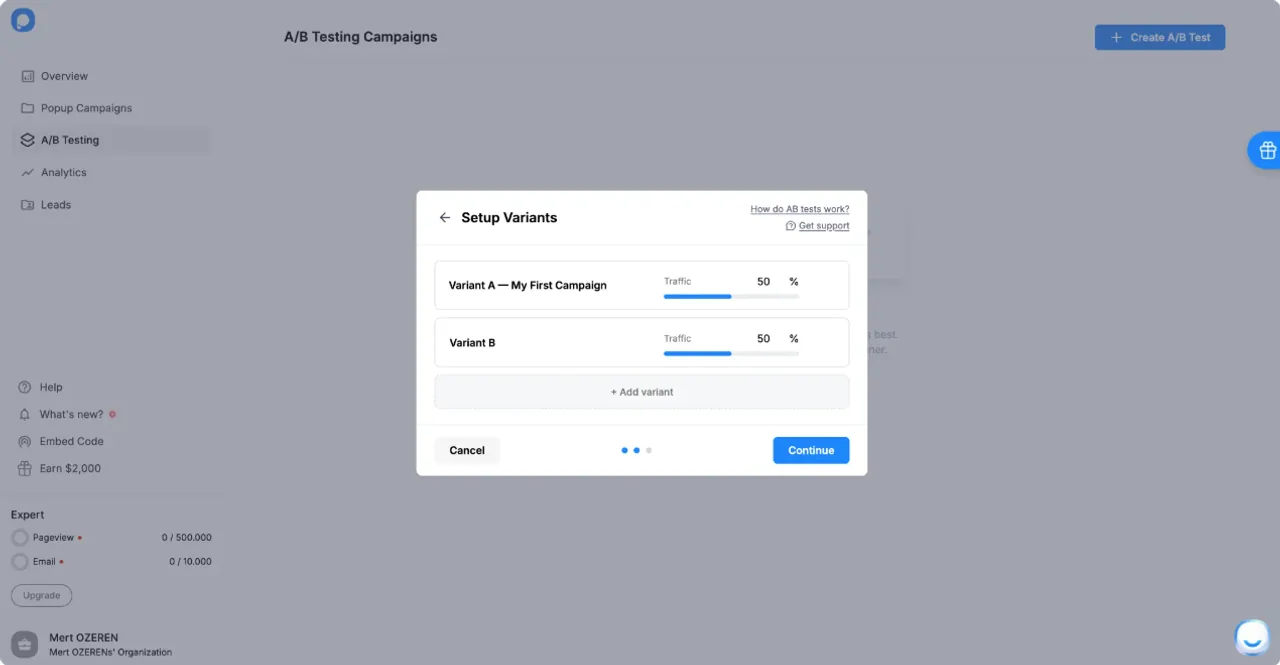
5. Configure the test conclusion. Pick Manually to select the winner yourself after reviewing the results (the test runs until you stop it), or Automatically to let Popupsmart pick the winner on a success metric (Lead Number, Interaction or Conversion Rate) when the end date you set is reached. Click Done.
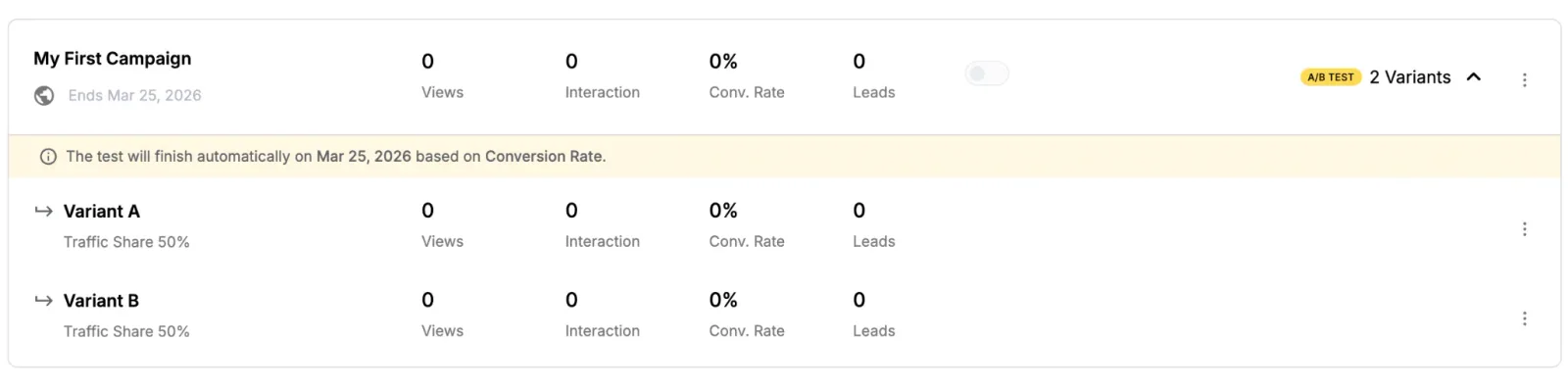
6. Compare the variants. The test appears in the A/B Testing section, where each variant shows its Views, Interactions, Conversion Rate and Leads. From the same list you can change the test conclusion settings, rename the campaign or delete the test.
Tools & Apps for A/B Testing Shopify Popups
Choosing the right tool is one of the most overlooked parts of A/B testing Shopify popups. In my experience, many popup tools look similar on the surface, but only a portion of them actually support real A/B testing with proper traffic splitting and reporting, and the plan that includes it differs from app to app. If the tool doesn't handle the experiment logic for you, the test usually ends up biased or abandoned.
Which Shopify Popup Builders Have A/B Testing?
Popupsmart, OptiMonk, Poptin, Privy, Justuno, Wisepops, Adoric and OptinMonster all include A/B testing for popups on Shopify stores. What differs is the plan it comes on. Not every popup app allows you to A/B test popups properly. Below are tools that do support popup-level A/B testing on Shopify and are commonly used for conversion optimization. The table shows where each one starts, from each vendor's pricing page as we read it in September 2026; check the page again before you buy, because plans change.
| Popup builder | A/B testing | Where it starts (read September 2026) |
|---|---|---|
| Popupsmart | ✅ Yes | Advanced plan ($69 a month); not on Free or Basic |
| OptiMonk | ✅ Yes | Every plan, the free one included |
| Poptin | ✅ Yes | Every plan, the free one included |
| Privy | ✅ Yes | Listed on its Pop-ups & Displays plan |
| Justuno | ✅ Yes | Entry plan, which includes every feature, multivariate testing among them |
| Wisepops | ✅ Yes | Its Shopify plan, with control-group tests |
| Adoric | ✅ Yes | Essentials plan and up |
| OptinMonster | ✅ Yes | Plus plan and up |
For a side-by-side look at prices and features, see Popupsmart vs OptiMonk, Popupsmart vs Poptin, Popupsmart vs Privy and Popupsmart vs Wisepops, or our roundup of the best Shopify popup apps.
The key thing I look for here isn't feature count. It's whether the tool lets me change one variable, split traffic evenly, and track leads per display clearly.
Spotlight: Popupsmart and A/B Testing on Shopify
I want to call this one out because it's often overlooked but gets the job done: Popupsmart supports A/B testing for Shopify popups in a straightforward, no-nonsense way.
What Popupsmart lets you do:
- Create two or more variants of the same popup campaign
- Split traffic between versions (e.g., 50/50 or custom ratios)
- Pick the winner yourself, or let it be chosen on Lead Number, Interaction or Conversion Rate at an end date you set
- See Views, Interactions, Conversion Rate and Leads for each variant inside the dashboard
What I appreciate most about Popupsmart is how easy it is to spin up variations and run experiments without jumping through technical hoops. If you want to test two headlines, different discount offers, or even timing triggers without custom scripts, Popupsmart makes that process accessible, especially for merchants who aren't full-time CRO nerds like me 😉
How I Choose the Right Popup A/B Testing Tool
I don't believe in a universal "best" tool. Instead, I match the tool to the store's reality.
Here's how I usually decide:
Traffic Level
- Low traffic → simple A/B testing, longer test duration, bigger changes
- High traffic → faster iteration, more frequent tests
Testing Maturity
- Beginners → easy setup, clear reporting
- Advanced teams → deeper targeting and segmentation
What's Being Tested
- Copy & CTA tests → lightweight tools work fine
- Timing & trigger tests → needs strong behavioral rules
- Design-heavy tests → visual editor quality matters more
Budget
- If A/B testing sits on a higher plan, count that plan's price, not the entry price
A Common Tool Mistake I See
One mistake I see over and over again is switching tools too quickly. A test doesn't deliver a big win, so the tool gets blamed. In my experience, the issue is almost always the testing strategy, not the software.
A clear hypothesis and a clean setup with a "good enough" tool will outperform a messy experiment on the most advanced platform.
Common A/B Testing Mistakes I See on Shopify Popups
Most popup A/B tests that mislead do so because of how they were set up. I've made some of these mistakes myself early on, and I still see them happen all the time. The frustrating part? Most of them have nothing to do with tools or traffic. They come from how the test is structured. If you avoid the mistakes below, your popup A/B tests on Shopify will already be ahead of the curve.
Testing Too Many Variables at Once
This is the most common mistake and the fastest way to learn nothing.
I'll often see tests like:
- New headline
- New CTA
- New offer
- New design
…all launched at the same time.
When conversion rate changes, you have no idea why.
What I do instead:
- One test = one variable
- Offer first
- Form fields second
- Button wording third
- Design last
If I can't explain the result in one sentence, the test was too complex.
Stopping the Test Too Early
I get the temptation. Version B looks amazing after one day. Someone gets excited. The test gets stopped.
That's usually a mistake.
Early data is volatile, especially with popups, where a few leads either way swing the rate. A variant that leads on day one has often had a lucky day.
My rule of thumb:
- Never stop before the planned sample size
- Count the run in whole weeks
- Don't edit either variant while the test runs
If traffic is low, patience matters more than precision.
Ignoring Sample Size and Context
A popup going from:
- 2 conversions → 4 conversions
might look like a 100% lift, but that doesn't mean much. One or two leads either way would flip it.
I always ask:
- How many total displays?
- How many total conversions?
- Was traffic stable during the test, or did a sale or an email blast land in the middle?
If numbers are too small, I treat the result as a directional signal, not a final decision.
Not Segmenting Traffic Properly
This one is subtle but dangerous.
If:
- Version A shows on mobile
- Version B shows mostly on desktop
You're not A/B testing anymore.
Device alone can make that difference: in Popupsmart's 2026 benchmark, on mobile the median popup converts 1.02% vs 0.57% on desktop.
I always double-check that:
- Device targeting is identical
- Page targeting is identical
- Audience rules are identical
Same users, same context; only one change.
Trusting Gut Feel Over Data
This hurts to admit, but it happens.
It's easy to like Version B more than Version A, with better copy and a cleaner design, and then watch Version A win. When that happens, go with the data.
What I've learned:
- You are not your average visitor
- "Feels better" ≠ converts better
- Data beats taste, as long as the test was sized properly
That doesn't mean creativity doesn't matter; it means it needs validation.
Treating A/B Testing as a One-Off Task
Another mistake I see is running one A/B test and calling it optimization.
Real results come from iteration.
Here's how I think about it:
| Bad Approach | Better Approach |
|---|---|
| One test, done | Continuous testing loop |
| Looking for a big win | Looking for consistent gains |
| Random ideas | Hypothesis-driven tests |
Every test, win or lose, should inform the next one.
Case Studies: Real Shopify Popup A/B Test Results
Popup A/B test case studies with measurable numbers are rare in public sources. The two below have sources you can check: one is a Popupsmart customer story, the other an aggregated dataset published by Recart, a Shopify marketing app.
Case Study 1: Somfy A/B Tests Its Flash Sale Popup Headlines
Somfy, the home automation company, runs Popupsmart popups across its country sites. According to Somfy's customer story, the team A/B tested popup headlines with Popupsmart, including an English "Flash Sale" headline against a French "Vente Flash" one, and the winning flash sale popup increased the number of checkouts.
What this teaches us:
- A headline test is cheap to run and easy to read when only the headline changes
- The goal was checkouts, so the team judged the test on checkouts, not on clicks
Another Popupsmart customer, RP Strength, ran an A/B test between two lead magnet offers, and the "Hypertrophy Volume" offer performed better. That's the offer test from Step 5 in practice. Neither story says the store runs on Shopify, but you can run the same kind of test on a Shopify store.
Case Study 2: Fullscreen Popups vs Lightbox (Email & SMS Conversion Lift)
A large aggregated A/B test dataset from Recart (its State of Popups report, 2025, based on over 600 popup A/B tests Recart ran with its own clients) shows conversion improvements when testing popup formats:
- Fullscreen popups outperformed lightbox popups by 23.64% on email capture
- On SMS capture, fullscreen outperformed lightbox by 21.63%
- Purchase conversion also increased modestly (1-7%) when fullscreen popups were used
These are relative lifts from one vendor's client tests, not a benchmark for every store.
What this teaches us:
- Format and presentation matter a lot, not just copy
- More attention on the popup (fullscreen) often means more conversions
- But subtlety still matters: the popup must feel legitimate rather than interruptive
Format shows up in our own data too: in Popupsmart's 2026 benchmark, center modal popups convert 0.88% vs 0.49% for corner/slide-in boxes (median campaign).
How to Use These Case Studies in Practice
I take two lessons from these examples into my own Shopify popup tests:
- Test the things that change what the visitor is offered. The headline and the lead magnet in the customer stories, and the offer and form in our benchmark, are where differences tend to show.
- Popup format alone can impact conversion performance. Fullscreen variants often outperform traditional lightbox styles, especially for email and SMS captures, as the Recart data suggests. Popupsmart's Shopify app offers Light, Fullscreen and Floating popup types, so a Light vs Fullscreen test is one Variant B away. Judge it on leads per display, and check that the bigger format doesn't hurt sales.
Both of these insights help you create better A/B tests and avoid tests that waste traffic without meaningful learning.
Conclusion: Why A/B Testing Turns Shopify Popups into Intentional Experiences
At the end of the day, A/B testing Shopify popups isn't about optimization tools or conversion rate graphs. It's about replacing assumptions with understanding. When you test different offers, forms or triggers, you're not just trying to "win" a test; you're learning how your visitors think, what they respond to, and where friction actually exists.
Across real popup experiments, whether it's a headline change, a timing adjustment, or a different incentive, the aim is the same: clearer communication, fewer ignored popups, and more intentional engagement. Well-tested popups don't feel louder or more aggressive. They feel more relevant. They answer a question the visitor already has instead of interrupting their experience.
Good on-site marketing doesn't come from guessing better. It comes from listening better. A/B testing is how Shopify popups start doing exactly that.
Final Thought ✨
Optimization doesn't require big redesigns or complex systems. Sometimes, the most meaningful improvement comes from changing one thing, and letting real users show you whether it worked.
And A/B testing is where that process begins.
🚀 Ready to Improve Your Shopify Popups with Confidence?
Start with one popup. Test one variable. Run it to the sample size you set. Learn from it.
That's how popups stop being static elements and start becoming a real growth channel.
A/B testing starts on Popupsmart's Advanced plan; see Popupsmart pricing to compare plans, and the spin-to-win popup guide if a gamified Variant B is on your list.
Frequently Asked Questions
Which Shopify popup builder has A/B testing?
Popupsmart, OptiMonk, Poptin, Privy, Justuno, Wisepops, Adoric and OptinMonster all include A/B testing, on different plans. OptiMonk and Poptin include it on every plan, the free one included; Popupsmart's starts on the Advanced plan ($69 a month); Adoric's on Essentials and OptinMonster's on Plus. Check the vendor's pricing page before you choose, because plans change.
What should I A/B test first on a Shopify popup?
Start with the offer. In Popupsmart's 2026 benchmark, signup popups that offer a discount code convert 1.46% vs 0.75% for signup popups without one. The number of form fields and first-person button wording also showed clear differences. Button colour and delay length showed no measurable difference, so they can wait.
How long should a popup A/B test run?
Until each variant reaches the sample size you worked out before launch, counted in whole weeks so both variants see the same mix of days. For a popup converting 1% of its displays, detecting a lift to 2% takes about 2,300 displays per variant at 95% confidence and 80% power. Smaller lifts take far longer.
Do I need high traffic to A/B test popups?
No. Low-traffic stores can still run useful tests by changing one variable and running tests longer. Low traffic does limit what you can detect: test big changes, such as offering a discount code or cutting a form field, because a large difference shows up in fewer displays. Small tweaks like button colour need far more traffic.
Can I A/B test Shopify popups without an app?
It's possible, but difficult. Most proper A/B tests require a tool that handles traffic splitting and tracking: it assigns each visitor to one version at random, keeps them there, and counts displays and leads per version. A popup app with built-in A/B testing does both for you.
Which Popupsmart plans include A/B testing?
A/B split testing is included on Popupsmart's Advanced, Pro and Expert plans. The Free and Basic plans don't include it. Advanced is $69 a month, on the website and on the Shopify App Store listing of the Popupsmart: Email & SMS Popup app.