ChatGPT
 Perplexity
 Claude
 Grok
Grok Google AI Mode
SMS marketing is still one of the most direct ways to reach your audience. The catch: you need a list of interested, qualified subscribers first.
And SMS popups are one of the simplest tools for building that list.
After reviewing 50+ e-commerce sites, I've selected 10 SMS popup examples with strategies you can replicate. For each one, I break down the offer, the form, the consent line and who should copy it, then add what our 2026 popup benchmark says about phone number capture.
What Is an SMS Popup?
An SMS popup is a targeted window that appears on your website to capture visitors' phone numbers for future text message campaigns. Unlike email popups that collect addresses, an SMS popup specifically asks for a mobile number, often paired with an incentive like a discount or exclusive access.
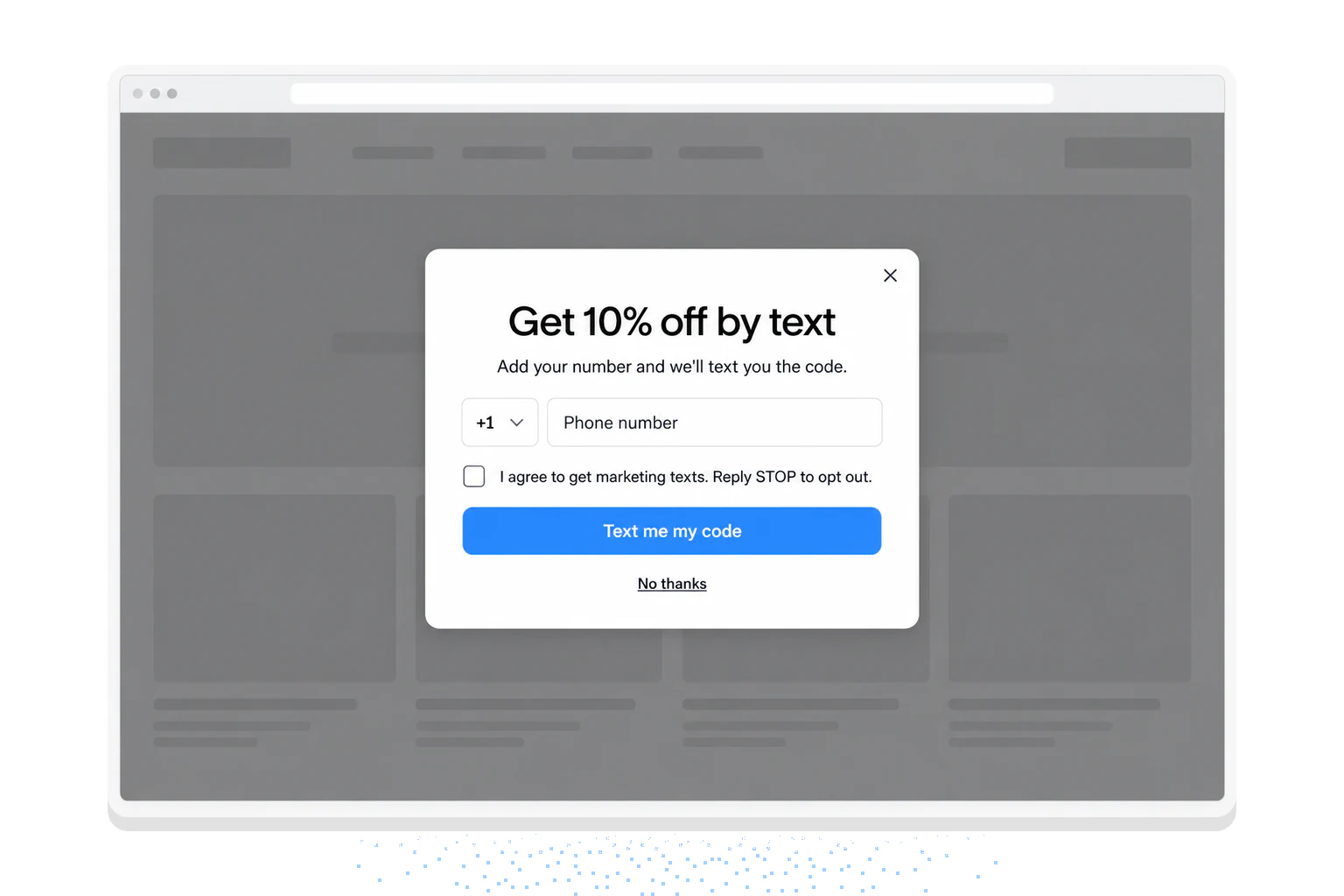
The popup does one job: it collects the number and the consent. The texts themselves come from your SMS tool (Klaviyo, Postscript, Attentive, Omnisend and others). Popupsmart works this way too: it collects phone numbers for your SMS list and does not send SMS itself.
Here's what happens, in order:
- The popup stays hidden while the visitor browses.
- A trigger shows it: a few seconds on the page, a scroll depth, exit intent, or a page such as a product page.
- The visitor types a phone number and ticks the SMS consent box, which starts unticked.
- The number and the consent go to your SMS tool, and the welcome text comes from there.
People do want those texts, when they asked for them. In a 2024 global survey of 8,781 people by Klaviyo and Recharge, 72% of people said they're willing to receive a text from a brand at least once a week. The popup is where that permission starts.
Why Should You Use SMS Popups for Lead Generation in 2026?
SMS popups are one of the most direct ways to capture leads: the visitor sees the offer and gives consent in the same moment. Our numbers back this up, and they've grown stronger heading into 2026.
I've been building popup tools at Popupsmart since 2018, and our benchmark of popups built with Popupsmart between January 2024 and September 2026 shows three things about phone numbers:
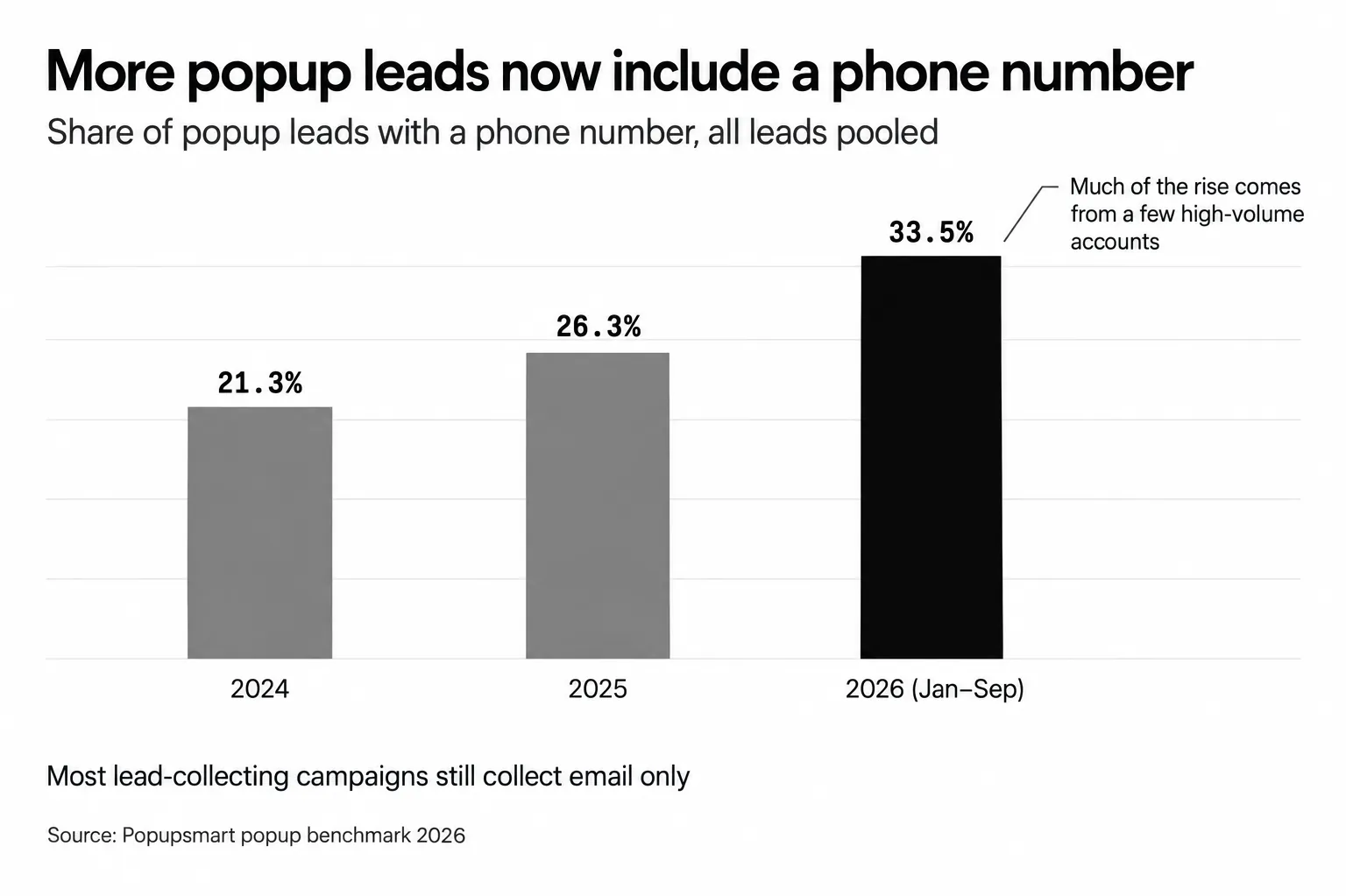
1. More popup leads now include a phone number. In our 2026 popup benchmark, the share of popup leads that include a phone number rose from 21.3% (2024) to 26.3% (2025) to 33.5% (2026) (all leads pooled); much of that comes from a few high-volume accounts that collect phone numbers, while most lead-collecting campaigns collect email only.
2. The list pays off when you bring people back. Visitors arriving from an email or SMS campaign convert on popups at 1.81% vs 0.74% for visitors from organic search. The subscribers you text come back to your site already warm.
3. Most of your competitors still aren't doing this. Read the first finding again: most lead-collecting campaigns collect email only. There's still room to build an SMS list before the stores you compete with do.
The timing matters too. The same Klaviyo and Recharge survey found that 62% of people are more likely to subscribe to SMS after they've made a purchase. That's a case for a second SMS popup on your order confirmation page, not only one for first-time visitors.
When someone willingly gives you their phone number, they're telling you they want to hear from you. Your job is to send the right message at the right time.
10 Best SMS Popup Examples from Real E-Commerce Brands
I reviewed over 50 e-commerce websites to find popups that do the job well, not just look nice. For each one you get what makes it work, the design and copy choices behind it, who should copy it, and how to build your own.
1. Live Tinted: The Discount-First SMS Popup
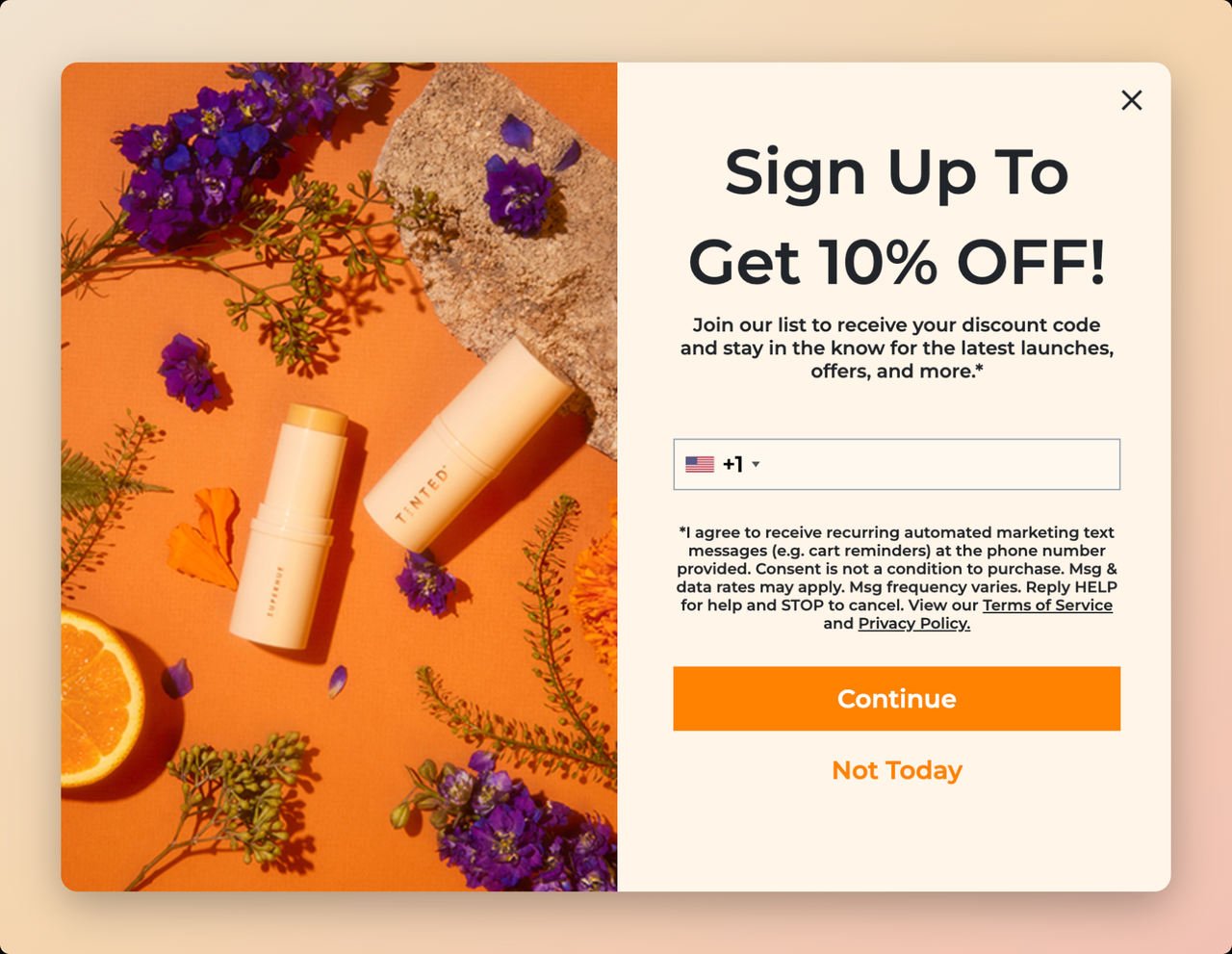
Brand: Live Tinted (Shopify beauty brand focused on inclusive, diverse beauty products)
What makes this SMS popup work:
The first thing you notice is the color. The product image on the left matches the orange CTA button, so your eye travels from the product straight to the button. That's deliberate.
The headline "Sign Up To Get 10% OFF!" does something most popups fail at: it leads with the benefit, not the ask. Visitors know exactly what they'll get before they see the phone number field. And there's only one field to complete. Not asking for too much information is a good popup design practice that leads to more user engagement.
Who should replicate this: E-commerce brands with visually appealing products that photograph well. The split-screen layout works best when your product imagery tells a story on its own. If you sell digital products or services, a different layout may work better.
Compliance detail worth noting: Live Tinted includes a consent section explaining why you'd want to sign up, how to contact them, and how to cancel at any time. That's the kind of disclosure TCPA consent relies on, and it builds trust at the same time.
Key takeaway: A single field with a clear discount offer keeps the ask small. If you're targeting international customers, show the right country code for each visitor.
How to replicate with Popupsmart: Add a Phone element and choose which countries its country-code list shows, add a Notice and Consent element for the SMS opt-in, set a 5-second time delay trigger, and use a split-screen template with your product hero image on one side. The form elements guide shows both elements.
2. Birchbox: The Dual-Channel Email and SMS Popup
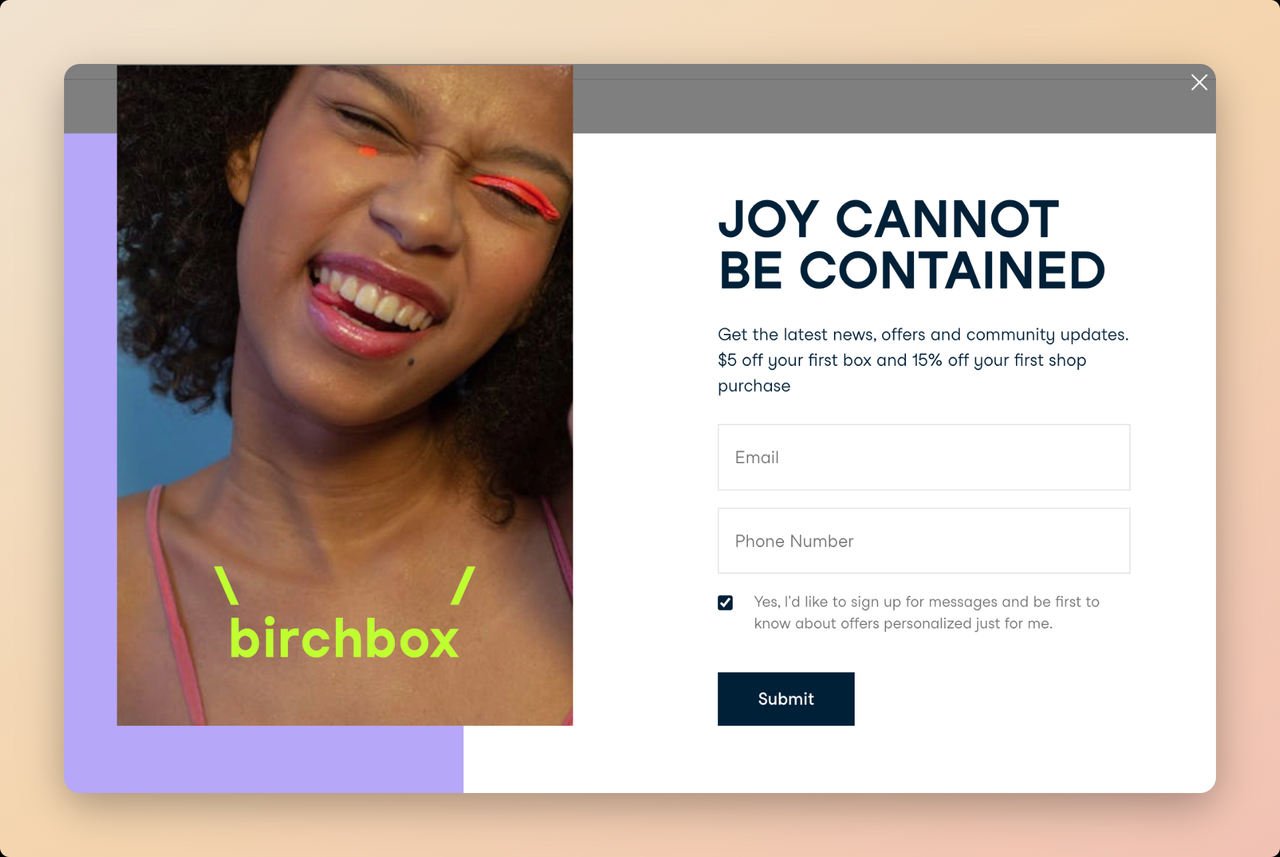
Brand: Birchbox (beauty subscription box service)
What makes this SMS popup work:
Birchbox doesn't force visitors to choose between email and SMS. This popup collects both at once, which is a strategy I recommend whenever your audience is warm enough to engage with two fields. The phrase "Joy Can Not Be Contained" paired with the smiling girl wearing the brand's products conveys a positive first impression before you even read the form.
The white background helps too. Form fields are easier to read on a clean background, and a visitor with less to look at is more likely to finish the form.
Who should replicate this: Subscription-based businesses and brands with strong lifestyle appeal. If your product creates an emotional connection (beauty, wellness, food, fitness), asking for both channels makes the most of that moment. Not ideal for first-time visitor campaigns on high-bounce-rate pages.
Why dual capture works here: When someone is willing to give both their email and phone number, you've got a highly engaged lead. You can nurture them via email for longer content and send time-sensitive SMS offers for flash sales and restocks. That's how you get more SMS subscribers and grow your email list at the same time.
Key takeaway: Don't make visitors choose between channels. But give each channel its own opt-in: an email signup doesn't count as consent to receive texts, so the SMS checkbox and its consent line stand on their own.
How to replicate: Use a scroll-triggered popup set at 10% scroll depth. Include both email and phone number fields. Place lifestyle imagery prominently and keep copy short and emotion-driven. Make the phone number field optional if you're concerned about form abandonment.
3. Elizabeth Mott: The Minimalist SMS Popup
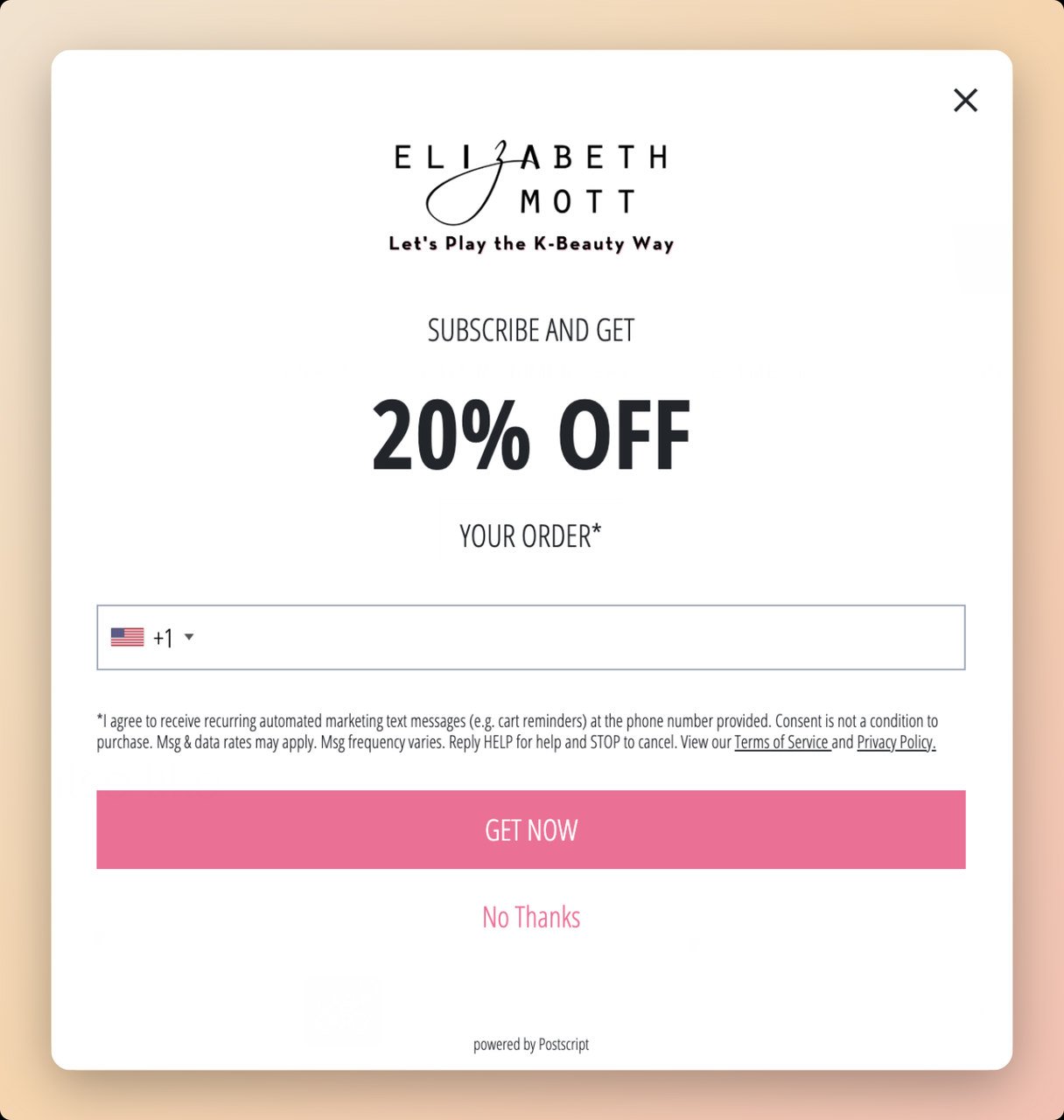
Brand: Elizabeth Mott (cruelty-free cosmetics)
What makes this SMS popup work:
Not every popup needs hero imagery and split-screen layouts. Elizabeth Mott shows how far a plain one can go. The entire popup is text and brand identity: logo at the top, "20% OFF" in bold, a phone number field, and a pink "Get Now" CTA. That's it.
This minimalism works because it removes every possible distraction. There's nothing competing for attention with the offer. Visitors see the discount, decide in seconds whether they want it, and either enter their number or close the popup. No decision fatigue.
Who should replicate this: Brands that want fast load times and minimal disruption to the browsing experience. This works especially well on mobile devices where screen real estate is limited. If your site already has heavy visuals, a plain text popup stands out by contrast.
The transparency angle: The popup clearly states that entering your number opts you into their SMS marketing list. No fine print buried in a footnote. Customers won't be annoyed when they receive promotional texts because the expectation was set upfront. That honesty keeps subscribers on the list longer.
Key takeaway: Don't over-design your SMS popup when a bold discount and clear CTA will do the job. Simplicity reduces friction, especially on mobile.
How to replicate: Choose a clean, single-column popup template. Remove product images. Make the discount the visual centerpiece with large, bold typography. Keep your CTA on-brand and ensure the SMS consent language is visible but not overwhelming.
4. To'ak Chocolate: The Information-First SMS Popup
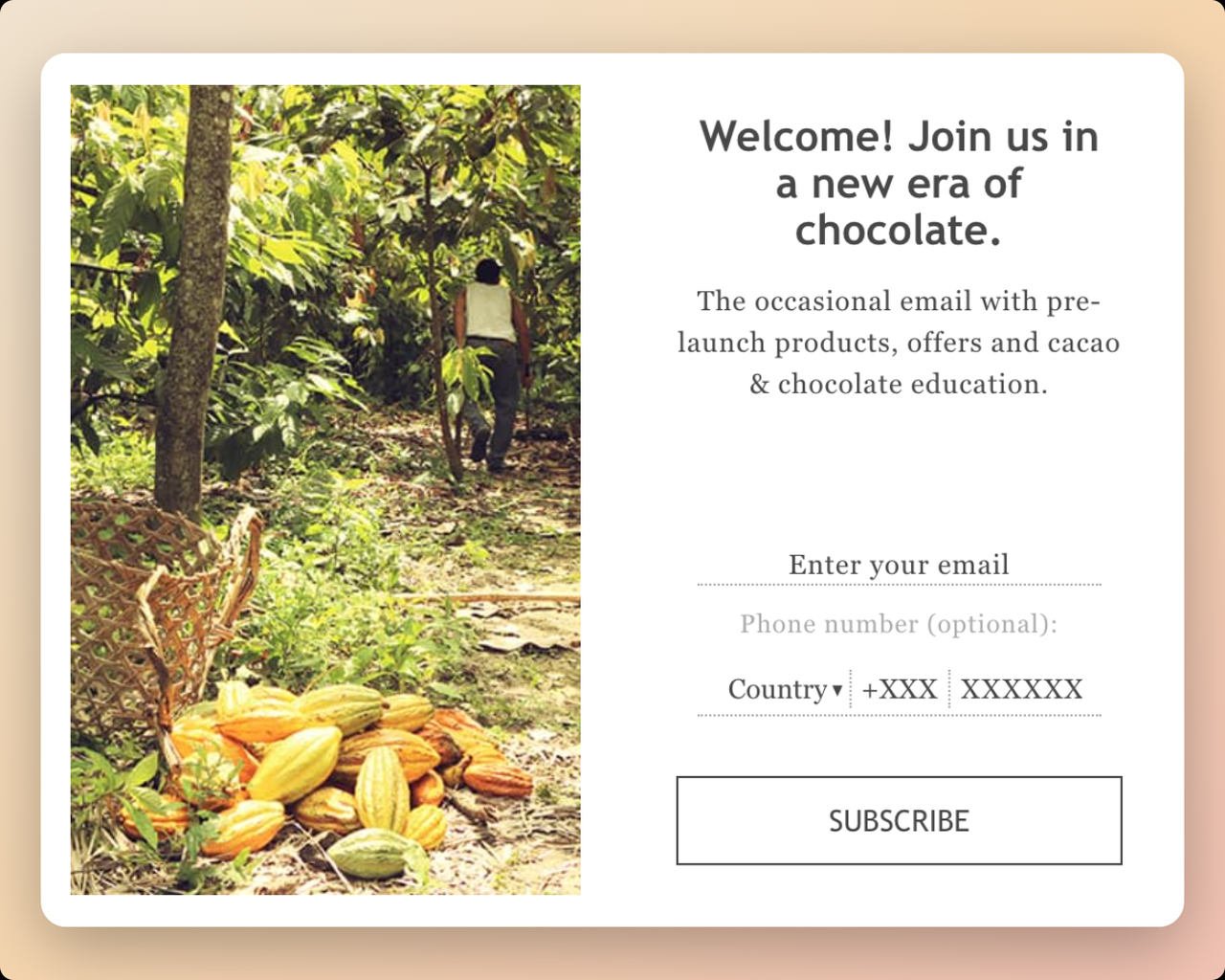
Brand: To'ak Chocolate (luxury single-origin chocolate)
What makes this SMS popup work:
This is the most unusual example on the list, and that's exactly why I included it. To'ak offers no discounts, no giveaways, and no percentage off. Instead, they offer something their target audience values more: "Occasional emails with pre-launch products, offers, and cacao and chocolate education."
For a brand selling luxury chocolate at premium prices, a 10% discount would cheapen the brand. An offer built on information fits an audience of serious chocolate enthusiasts who want to learn, not just save money.
Who should replicate this: Premium and luxury brands where discounting erodes brand value. Also effective for educational products, artisan goods, and any business where the audience is driven by knowledge and exclusivity rather than price savings.
Why the optional phone field is smart: Making the phone number optional while emphasizing "occasional" emails makes eager users want to sign up for SMS announcements too. It's a psychology play. When something is optional and exclusive, it feels more valuable. The people who do enter their phone number are your highest-intent prospects.
Key takeaway: Not every SMS popup needs a discount. If your brand serves a knowledgeable, passionate audience, offer education and insider access as the incentive.
How to replicate: Identify what your audience values beyond discounts. Use origin-story imagery to build authenticity. Make the phone number field optional but position it as exclusive access. Keep the frequency promise ("occasional") to ease spam concerns.
5. The Man Company: The No-Spam Promise SMS Popup
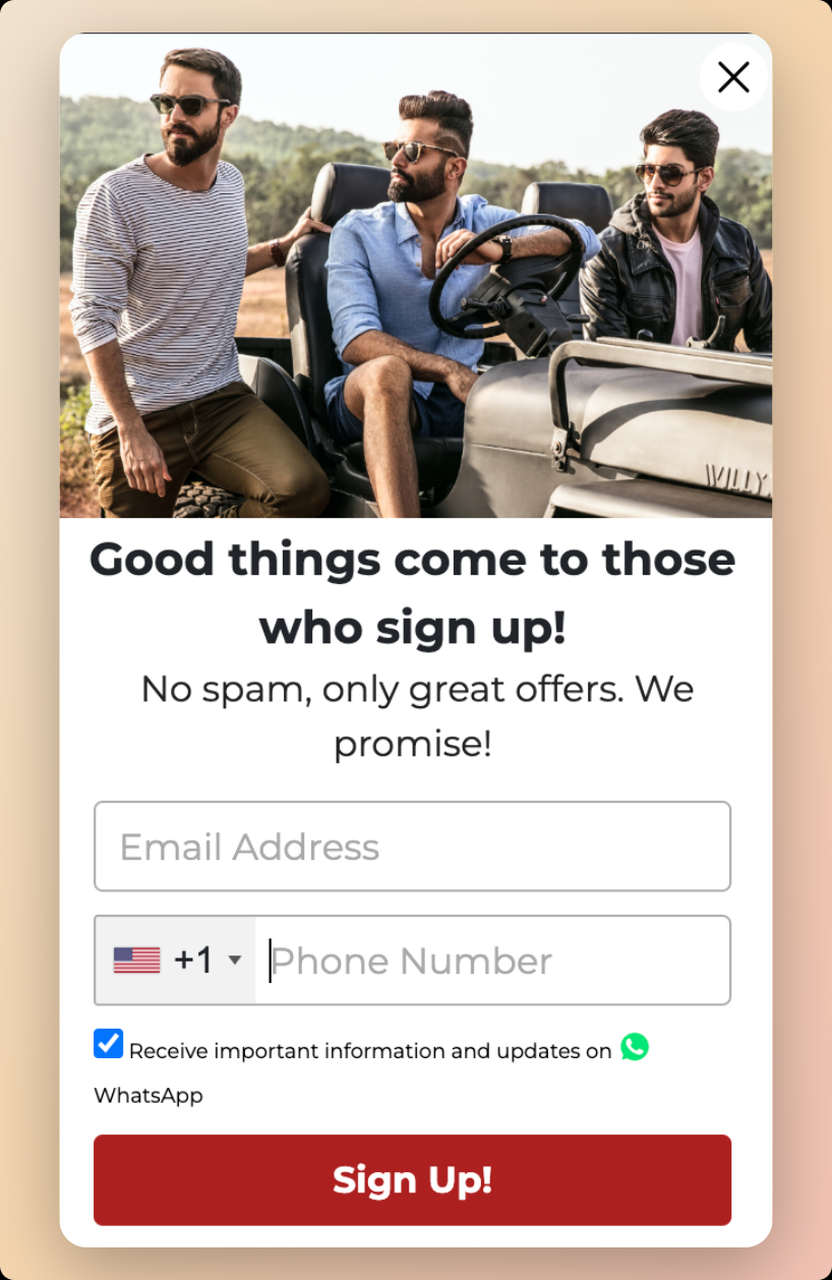
Brand: The Man Company (men's grooming products)
What makes this SMS popup work:
The Man Company directly addresses the biggest objection every SMS popup faces: "Will I get spammed?" Their no-spam guarantee isn't buried in terms and conditions. It's front and center as a trust element. From the picture of well-dressed men to the headline "good things await those who sign up," everything about this popup targets their specific audience.
Who should replicate this: Brands targeting audiences that are naturally skeptical of marketing messages. Also works well for B2B companies, financial services, and any industry where trust is the primary conversion barrier.
The WhatsApp angle: Offering WhatsApp as an alternative channel gives subscribers a choice. If you sell internationally, some of your customers may prefer it to SMS.
Key takeaway: Address spam fears head-on in your popup copy instead of raising the discount. In our benchmark, bigger discounts did not convert measurably better: 10% off converted 1.25%, 20% off 0.91% and 25-30% off 1.33%, but the larger-discount samples are small (78 and 46 campaigns), so the data cannot rule out a real difference either way. That one surprised us.
How to replicate: Add a clear "We don't spam" or "No spam, ever" message near the phone field. Include a WhatsApp option if you have international customers. Use contrasting CTA colors and lifestyle imagery that resonates with your target demographic.
6. Parachute Home: The Exclusive Access SMS Popup
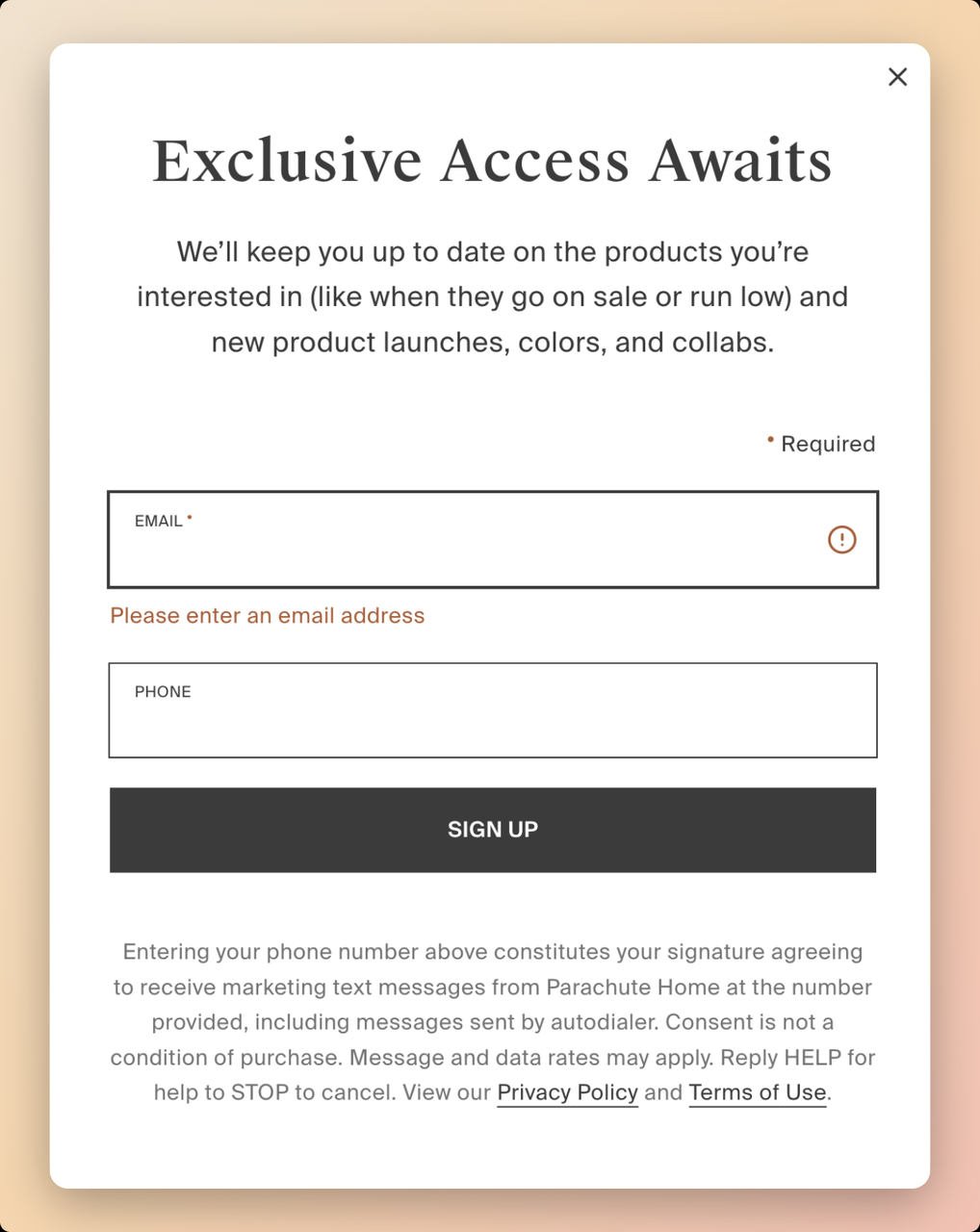
Brand: Parachute Home (premium home goods and bedding)
What makes this SMS popup work:
Parachute Home uses emotional trigger words that tap into FOMO (fear of missing out). "Exclusive Access Awaits" implies that non-subscribers are missing something, and that framing makes the signup feel like a privilege rather than a form.
The popup is straightforward: email address, phone number, and a dark "Sign Up" CTA. No flashy images, no complicated multi-step forms. It promises users they'll be first to know about new product launches and marketing campaigns.
Who should replicate this: Brands with a premium positioning where "exclusive" actually means something. Home goods, fashion, luxury electronics, and membership-based businesses all benefit from exclusivity-framed popups. If you're running regular 50%-off sales, the "exclusive" framing won't ring true.
The transparency play: Parachute Home explains all terms and conditions of signing up and provides privacy information. That openness tells visitors their number is in safe hands. Shoppers pay more attention to data privacy than they used to, so it counts.
Key takeaway: Exclusivity language ("exclusive access," "be the first," "members only") can replace discount offers for premium brands. Pair it with transparent privacy information to maintain trust.
How to replicate: Use trigger words like "exclusive," "first access," or "insider" in your headline. Keep the design clean and premium-looking. Include both email and phone fields but make the experience feel like joining a club, not filling out a form. Always display privacy terms prominently.
7. Death Wish Coffee: The Direct-Offer SMS Popup
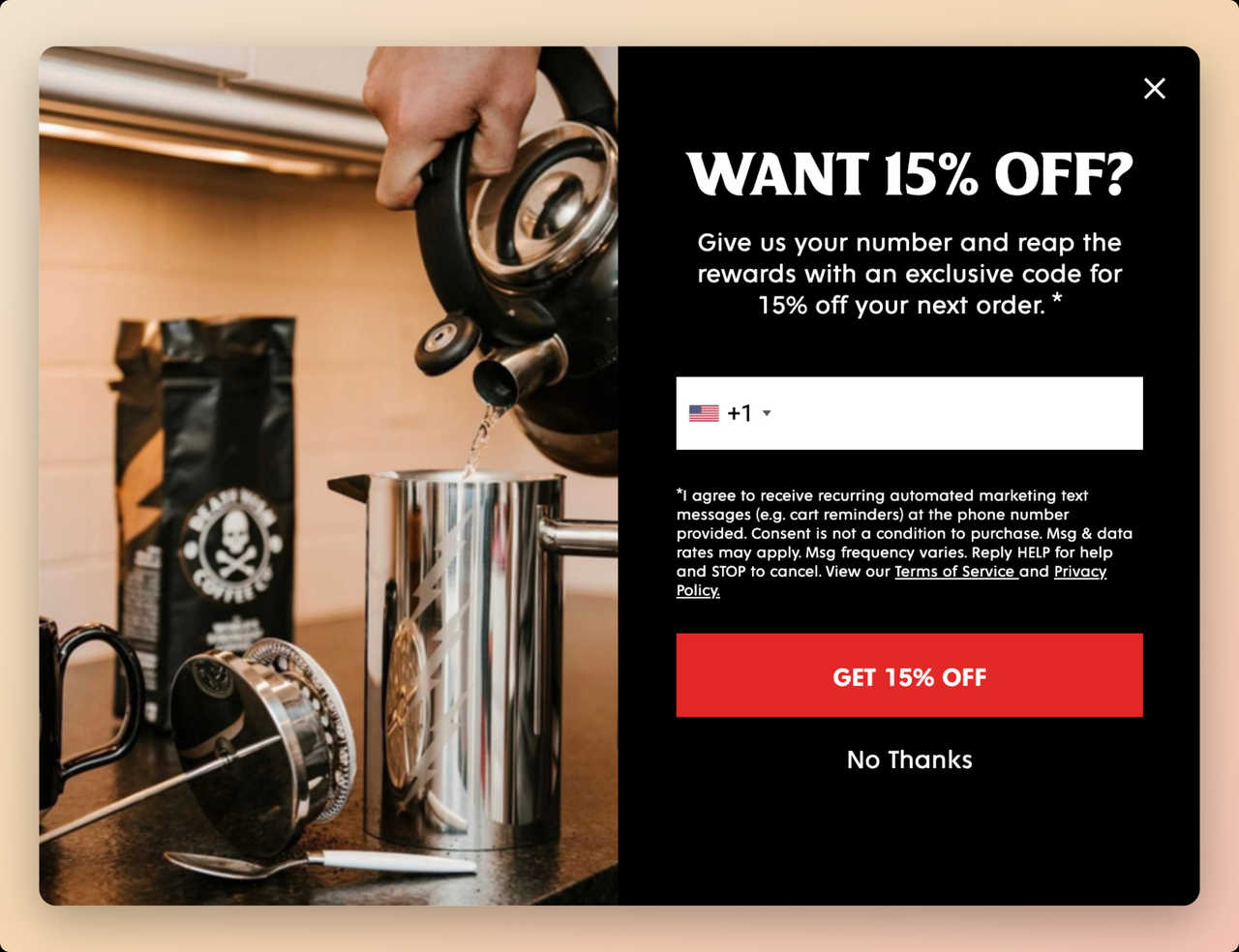
Brand: Death Wish Coffee (self-proclaimed world's strongest coffee, Shopify store)
What makes this SMS popup work:
Death Wish Coffee eliminates all ambiguity with a three-word question: "Want 15% Off?" There's no brand story and no education angle, just a trade: your phone number for a discount. This directness works because the audience already knows the brand and product. They're on the site to buy coffee.
The popup targets first-time visitors only, which is the right trigger. Returning customers who've already purchased don't need a 15% nudge. They need restocking reminders, which come later via the SMS list they're joining. Our benchmark points the same way: popups targeted at new visitors only convert 1.13% vs 0.77% for popups shown to everyone.
Who should replicate this: E-commerce brands selling consumable, repeat-purchase products (food, beverages, supplements, pet supplies). The direct-offer approach works best when the product is understood and the visitor just needs a final push. Less effective for complex or high-consideration purchases.
Why the product-in-use image matters: Showing coffee being prepared rather than just a bag of coffee beans creates an emotional connection. The visitor can almost smell the coffee. You'll find the same contextual imagery in many of our website popup examples.
Key takeaway: For impulse-buy and repeat-purchase products, skip the storytelling. Ask a simple question, offer a clear discount, and keep the form to a single field.
How to replicate: Use a new-visitor trigger. Ask a direct question as your headline ("Want X% Off?"). Show the product being used, not just the packaging. Use high-contrast color combinations (dark background + bright CTA) and require only a phone number.
8. Nine West: The Optional-Field SMS Popup
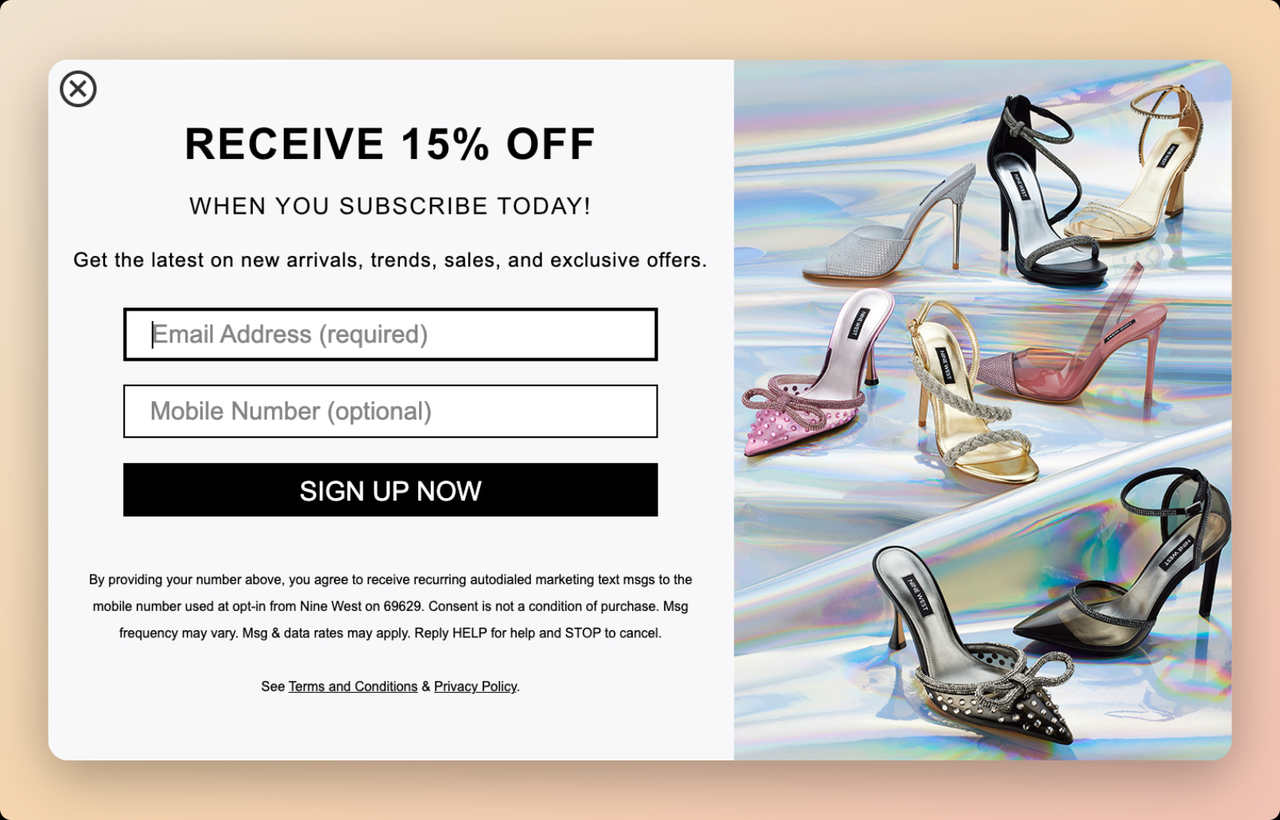
Brand: Nine West (women's shoes, handbags, and accessories)
What makes this SMS popup work:
Nine West takes a low-pressure approach. The email field is required for the 15% discount, but the phone number is optional. This removes the friction of mandatory SMS opt-in while still capturing phone numbers from visitors who are willing to share them. The visitors who do enter their number tend to be the most purchase-ready leads.
Everything in this popup matches the brand: the glitzy product imagery of shiny heels, the clean layout, and the "Receive 15% Off" headline that feels aspirational rather than pushy.
Who should replicate this: Fashion and lifestyle brands where the audience may be resistant to sharing phone numbers. The optional approach works well as a gradual list-building strategy. You'll capture fewer phone numbers but the ones you get will be higher quality. Also great for brands just starting with SMS marketing who want to test the channel without forcing it.
The "optional" psychology: When a field is optional, people don't feel coerced. The absence of pressure reduces resistance, and the visitors who do fill it in have chosen to.
Key takeaway: Making the phone number field optional keeps the email signup intact while you build a smaller, higher-quality SMS list of people who want text messages from your brand.
How to replicate: Require only email for the discount. Add a phone number field marked as "optional." Display product imagery that matches your brand's aesthetic. Include clear SMS marketing terms so optional opt-ins know what they're signing up for.
9. Miss A (Shopmissa): The Insider Deals SMS Popup
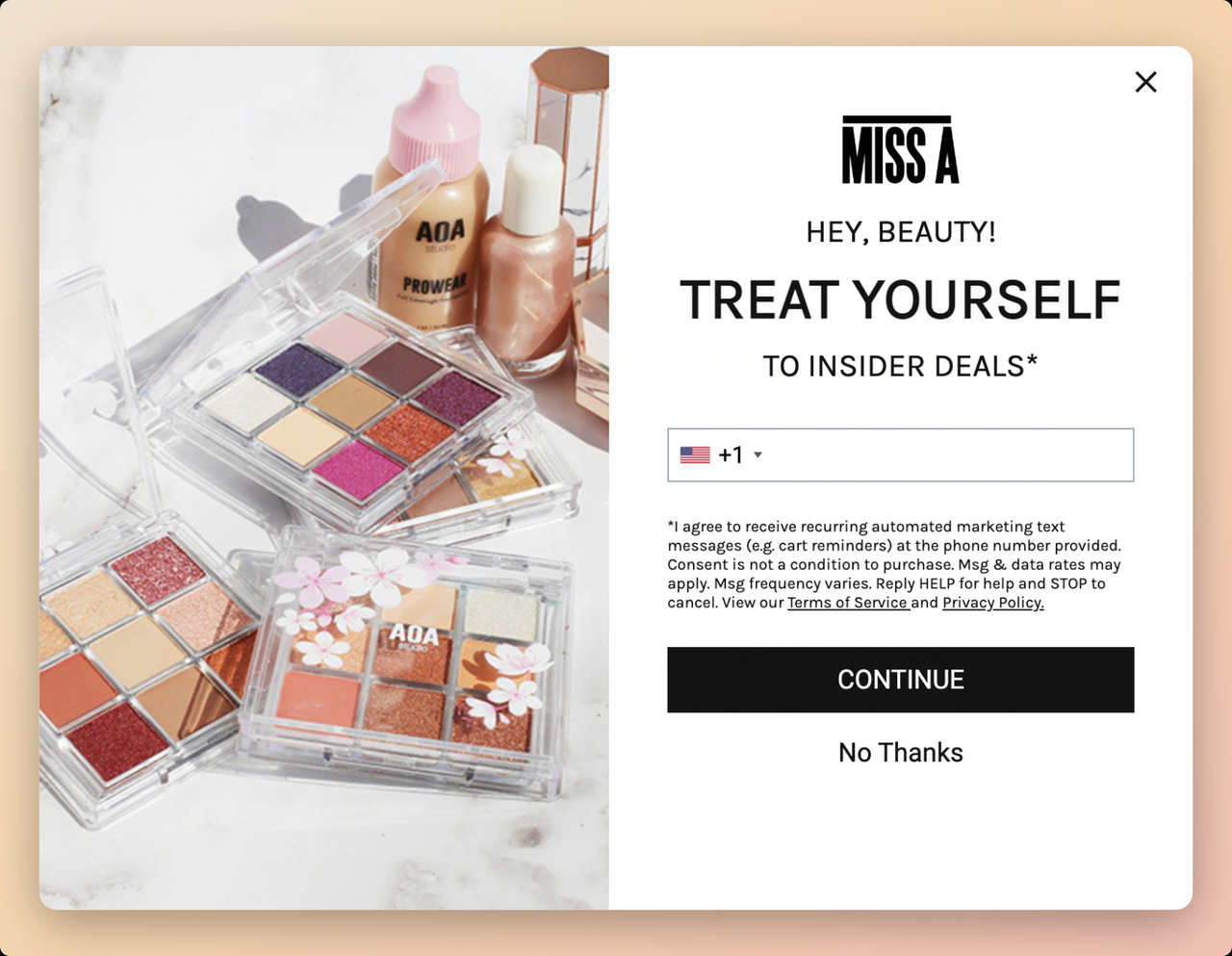
Brand: Miss A (Shopmissa) (affordable beauty and accessories brand)
What makes this SMS popup work:
Miss A nails the "insider" positioning. "Treat yourself to inside deals" does two things at once: it positions the subscriber as part of an exclusive group, and it frames the signup as self-care rather than marketing. For a beauty brand, that fits.
The popup uses Miss A's brand colors and fonts, so it feels like part of the website rather than an interruption. Most marketers underrate this. A popup that clashes with your site's design feels jarring, and more visitors close it.
Who should replicate this: Brands with strong visual identity and a community-driven audience. Beauty, fashion, wellness, and lifestyle brands can all benefit from the insider-deals framing. This works well with price-conscious audiences who love feeling like they're getting a deal others don't have access to.
The perceived value angle: Offering targeted promotional discounts this way increases the product's perceived value. When deals are framed as "insider" or "exclusive," the discount feels earned rather than expected. This prevents the discount-dependency trap where customers only buy during sales.
Key takeaway: Frame SMS signups as joining an insider community, not a marketing list. The language you use around the opt-in affects both conversion rates and long-term subscriber engagement.
How to replicate: Use "insider," "VIP," or "members-only" language in your popup copy. Match the popup design to your brand's visual identity exactly. Show your most appealing product in the imagery. Frame the CTA as self-care or a treat rather than a transaction.
10. 8and9: The Streetwear Community SMS Popup
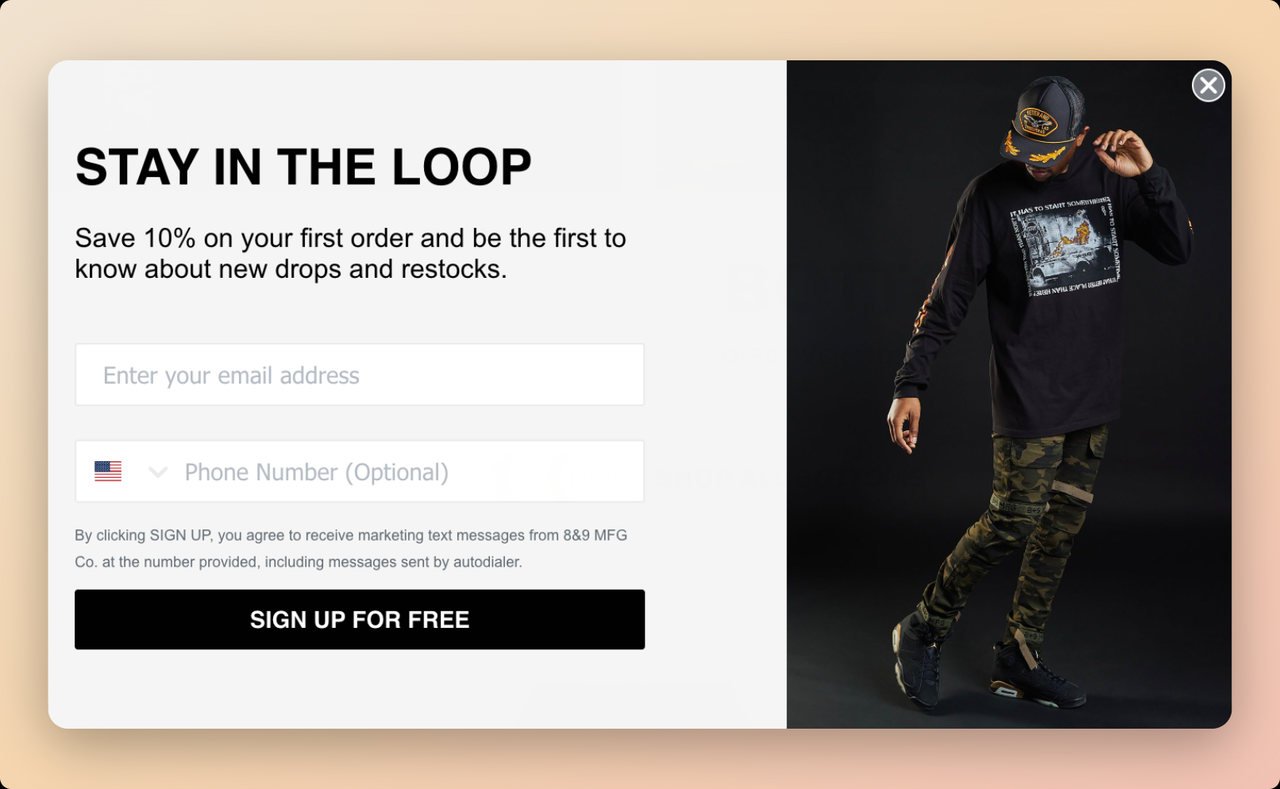
Brand: 8and9 (independent streetwear brand)
What makes this SMS popup work:
This popup knows its audience. The "Stay in the loop" headline speaks directly to streetwear culture, where being first matters. New drops sell out in minutes. Restocks are unpredictable. If you're not in the loop, you miss out. That urgency is baked into the popup's messaging without a single exclamation point.
The model wearing the brand's best-selling products is the social proof. It says: "This is what our community looks like. Join us." For an independent streetwear brand up against major labels, a simple popup that builds community this way does a lot of work.
Who should replicate this: Brands with limited-edition products, drop-based release models, or strong community followings. Streetwear, sneakers, collectibles, indie brands, and any business where scarcity drives demand. The "be first to know" angle is especially effective for products that sell out quickly.
Why "Sign up for free" works as a CTA: It removes a subconscious objection. Even though most people know a newsletter signup is free, stating it explicitly reduces the perceived commitment, which reads as friendlier than "Subscribe" or "Join Now."
Key takeaway: Match your popup's urgency level to your product's scarcity. If you run drops or limited editions, lean into the "be first" messaging. If your products are always available, this approach won't feel authentic.
How to replicate: Use "stay in the loop," "be the first," or "never miss a drop" as your headline. Feature a model or customer wearing/using your products. Include both email and phone fields with a free-signup CTA. Time the popup to appear after the visitor has browsed at least one product page.
What Are the Best Practices for SMS Popup Design?
The design principles below come from the 10 examples above and from our benchmark of 28,674 campaigns built with Popupsmart between January 2024 and September 2026. Where the data is only a lean, I say so.
Keep form fields to a minimum. Popups asking for one or two fields convert 0.88% and 0.94%, against 0.56% for three fields (median campaign; spin-to-win and other gamified popups are counted separately). For SMS popups, you need exactly one thing: a phone number. Our popup form guide covers the other fields.
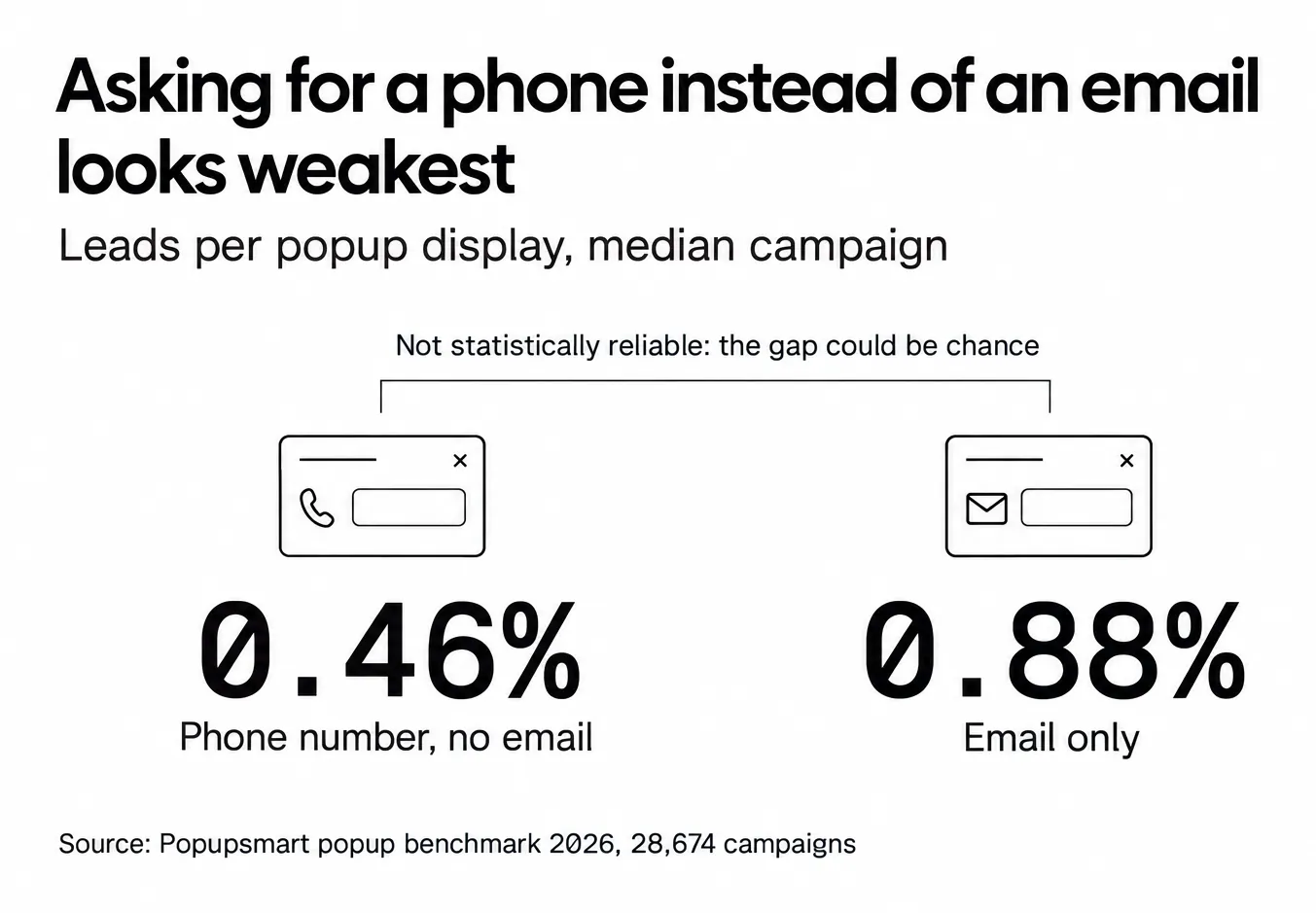
Expect a phone-only form to collect fewer leads than an email form. Forms that ask for a phone number instead of an email look weakest (0.46% vs 0.88% for email only), though that gap is not statistically reliable. That's no reason to skip SMS; it's a reason to make the offer worth a phone number.
Two steps are for clarity, not for lift. A two-step popup (email on the first screen, phone on the second) keeps each consent separate and each screen short. Don't build one expecting a jump in conversions, though: multi-step forms show no measurable conversion advantage over single-step forms once step-1 clicks without contact details are excluded. See our multi-step popup examples for layouts.
Match your popup design to your website. Popups that clash with your site's design feel like ads. Popups that match feel like part of the experience. Use the same fonts, colors, and photography style. This is especially true for popup message examples that convert well.
Lead with the benefit, not the ask. "Get 15% Off" works better than "Enter Your Phone Number." The visitor should understand what they receive before they see what you're asking for. A discount code helps: signup popups that offer a discount code convert 1.46% vs 0.75% for signup popups without one. Our discount popup guide goes deeper on offers.
Use a short wait instead of firing on page load. Popups that wait before appearing convert 0.83% vs 0.61% for popups shown the instant the page loads (median campaign); the direction holds in every year of data but the difference is not statistically reliable, so treat it as a lean, not a rule. The exact delay length (0-5 seconds vs 21-60 seconds) makes no measurable difference to conversion, so a few seconds is enough.
Include visible consent language. TCPA compliance isn't optional. But beyond legal requirements, visible consent text builds trust. When visitors see clear opt-in language, they're more confident sharing their number.
| Best Practice | Why It Matters | What our 2026 benchmark shows |
|---|---|---|
| One or two form fields | Reduces friction | 0.88% (one field) and 0.94% (two) vs 0.56% for three, median campaign |
| Clear discount headline | Immediate value proposition | Signup popups with a discount code: 1.46% vs 0.75% without |
| New-visitor targeting | Shows the offer to people who haven't subscribed | 1.13% for new visitors only vs 0.77% for everyone |
| Short wait before showing | Catches visitors who've started browsing | 0.83% vs 0.61% on page load; a lean, not statistically reliable |
| Visible consent text | Builds trust, ensures compliance | Not measured; required by carrier rules and the TCPA in the US |
| Mobile-first layout | 63% of popup displays are on mobile | 1.02% on mobile vs 0.57% on desktop |
Here are four copy patterns you can adapt. Each keeps the SMS consent on its own line.
| Pattern | Headline | Button | Consent line |
|---|---|---|---|
| Discount | "Get 10% off by text" | "Text me my code" | "I agree to get marketing texts. Msg frequency varies. Msg and data rates may apply. Reply STOP to opt out." |
| Early access | "Be first to know about drops" | "Get early access" | Same consent line, with how often you'll text |
| Back in stock | "Text me when it's back" | "Notify me" | Same consent line, stating the texts are about this product |
| Post-purchase | "Want shipping updates and VIP offers by text?" | "Yes, text me" | Same consent line, on the order confirmation page |
And A/B test your popups. Test your headline, offer amount, trigger timing, and form layout separately. Change one variable at a time so you know what moved the needle, and judge each test on leads per display, not clicks.
What Are Common SMS Popup Mistakes to Avoid?
The same mistakes keep showing up on SMS popups. Skip them and you're ahead of most brands running one.
Asking for too much information upfront. Name, email, phone number, birthday, location. I've seen popups with five or more fields. Every field you add is another reason for the visitor to close the popup. For SMS capture, you need a phone number. That's it. Collect everything else later through your SMS nurture sequence.
Showing popups immediately on page load. This is a fast way to annoy visitors. Give people a few seconds to understand where they are before interrupting them, or use scroll depth or exit-intent triggers that signal the visitor has engaged with your content.
Ignoring mobile design. 63% of popup displays happen on mobile. A popup designed for desktop that doesn't resize properly on mobile will either be unreadable or block the entire screen. Google also warns against intrusive mobile interstitials. Test your popup on actual phones before launching, and see our mobile popup guide for layouts.
No clear value proposition. "Subscribe to our SMS list" isn't a reason to hand over a phone number. "Get 15% off your first order" is. Every SMS popup needs to answer one question: what does the visitor get in exchange for their number?
Missing compliance language. Under the TCPA (47 U.S.C. § 227), a person can sue for $500 per violation, and a court can triple that to $1,500 when the violation was willful or knowing. Your popup must include consent language, frequency disclosure, and instructions for opting out. Visitors also trust a popup that tells them all this.
Never testing or iterating. Launching one popup and leaving it unchanged for months wastes it. The brands getting the best results from SMS popups keep A/B testing. Test offers, timing, design, copy, and placement on a regular schedule.
What does SMS consent need on a popup?
The popup is where consent is given, so it has to say what the visitor is agreeing to. This is marketing guidance, not legal advice; rules differ by market, and your SMS tool's consent guidance is the place to check the details for your country.
- In the US: marketing texts fall under the TCPA and the carriers' rules. The consent line usually names the brand, says the texts are recurring marketing messages, states how often you'll text, adds "Msg and data rates may apply" and explains how to reply STOP (and HELP). Consent can't be a condition of purchase. The FCC's rule, 47 CFR 64.1200, asks for prior express written consent for automated marketing texts (an electronic signature counts), treats a reply of "stop", "quit", "end", "revoke", "opt out", "cancel" or "unsubscribe" as a revocation, and gives you no more than ten business days to honor it.
- In the EU and UK: GDPR and the ePrivacy rules apply. Consent has to be freely given, specific and unticked by default, with a link to your privacy policy.
- Everywhere: give SMS its own checkbox, send only the kind of messages you promised, and keep the consent record (time, page, wording) in your SMS tool.
Many SMS tools also send a confirmation text ("Reply Y to confirm") before the first marketing message. That double opt-in step happens in your SMS tool, after the popup has done its part.
How Do You Measure SMS Popup Performance?
These are the metrics that tell you whether an SMS popup is working, with reference points from our benchmark where we have them.
Popup conversion rate is your primary metric. This is the share of popup displays that end with a submitted phone number. Across 3,034 Popupsmart popups that ask for an email or phone number (January 2024 - September 2026, each with at least 1,000 displays and 14 active days), the median converts 0.83% of its displays into leads; the top 25% reach 1.96% and the top 10% reach 3.87%. Remember that a phone-only form will likely sit below an email form.
Close rate tells you how many visitors dismiss the popup. 40.5% of popup displays end with the visitor closing the popup (all displays pooled, February 2025 - September 2026, since close tracking began). If yours closes far more often, your popup is appearing too early, too aggressively, or to the wrong audience segment. Adjust your triggers and targeting.
SMS list growth rate tracks how quickly your subscriber list is growing week over week. If growth stalls, you've likely saturated your current audience and need new traffic sources or different popup placements.
Revenue per subscriber connects your popup performance to actual business results. Track how much revenue each SMS subscriber generates over 30, 60, and 90 days. This helps you determine how much you can afford to spend (in discount value) to acquire each subscriber.
| Metric | What It Measures | Reference point |
|---|---|---|
| Popup conversion rate | Share of displays that end in a lead | Median 0.83%; top 25% 1.96%; top 10% 3.87% (median campaign, 2026 benchmark) |
| Close rate | Share of displays the visitor closes | 40.5% of displays, all displays pooled |
| SMS list growth rate | Monthly subscriber growth | Your own trend, week over week |
| Revenue per subscriber | $ generated per SMS contact | Varies by industry |
| Unsubscribe rate | % who opt out per campaign | Your SMS tool's report, per campaign |
One metric most brands overlook: time-to-first-purchase after SMS opt-in. This tells you how quickly your SMS welcome sequence converts new subscribers. If the gap between opt-in and first purchase is growing, your onboarding messages need work.
How to Create an SMS Popup Step by Step
If you're ready to build your first SMS popup, here's the process I recommend based on what works across our email capture popup examples and SMS campaigns. On Shopify, the Shopify SMS popup guide further down this page walks through the store-specific setup.
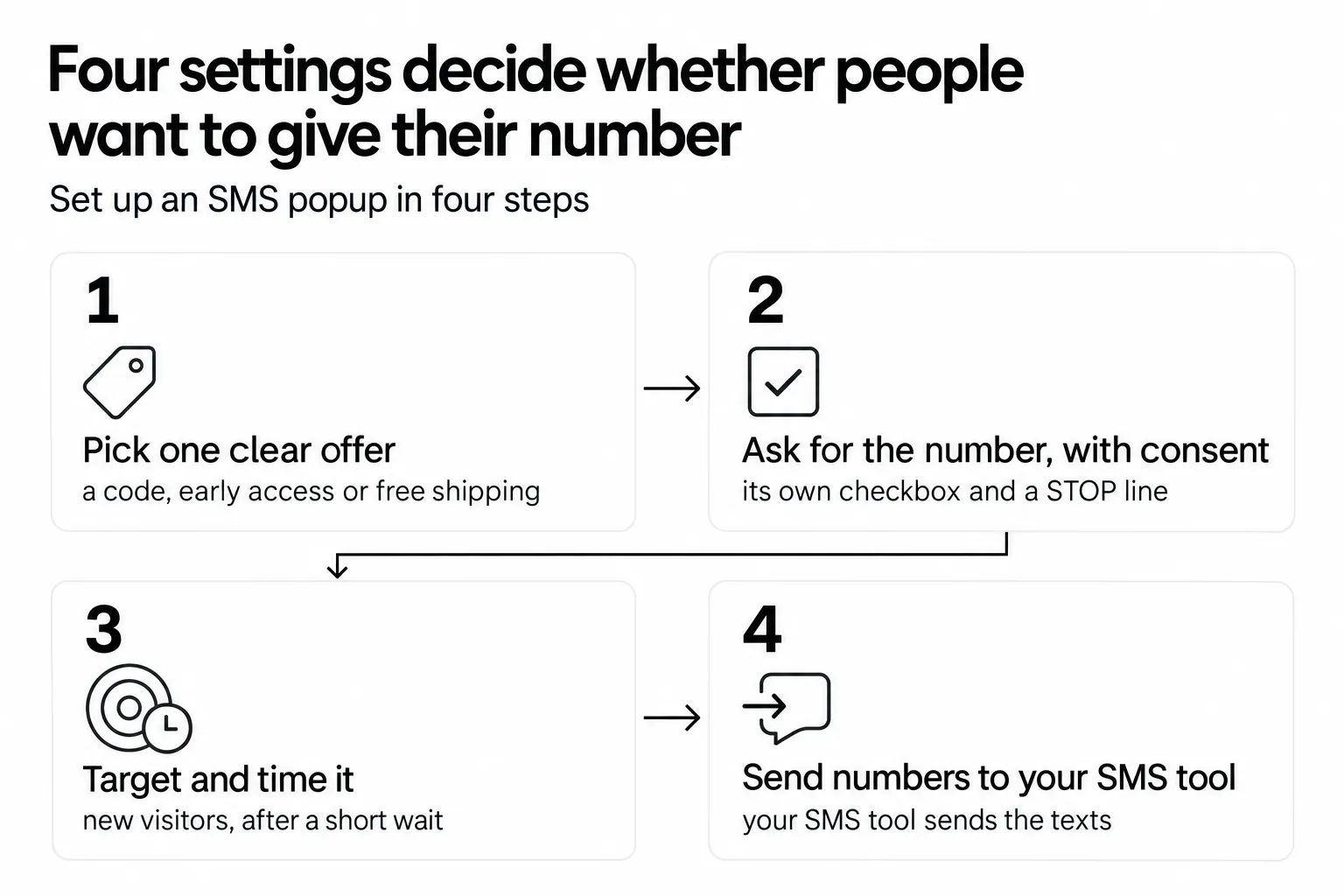
Step 1: Choose your popup builder. You need a tool that supports phone number collection, a consent checkbox, targeting rules, and integrations with your SMS platform. Popupsmart, Wisepops, Privy, and Justuno all handle SMS popups. The tool should let you set triggers (time delay, scroll depth, exit intent) and target specific audience segments.
Step 2: Define your offer. What will visitors get in exchange for their phone number? The most common offers are percentage discounts (10-20% off), free shipping, early access to sales, or exclusive content. Match the offer to your margins and audience expectations.
Step 3: Design the popup. Keep it simple. One headline, one form field, one CTA. Use your brand colors and a product image if you have a photogenic product. Check that it looks right on both desktop and mobile. Refer to the examples above for layout inspiration, or start from one of the types of popups that suits your page.
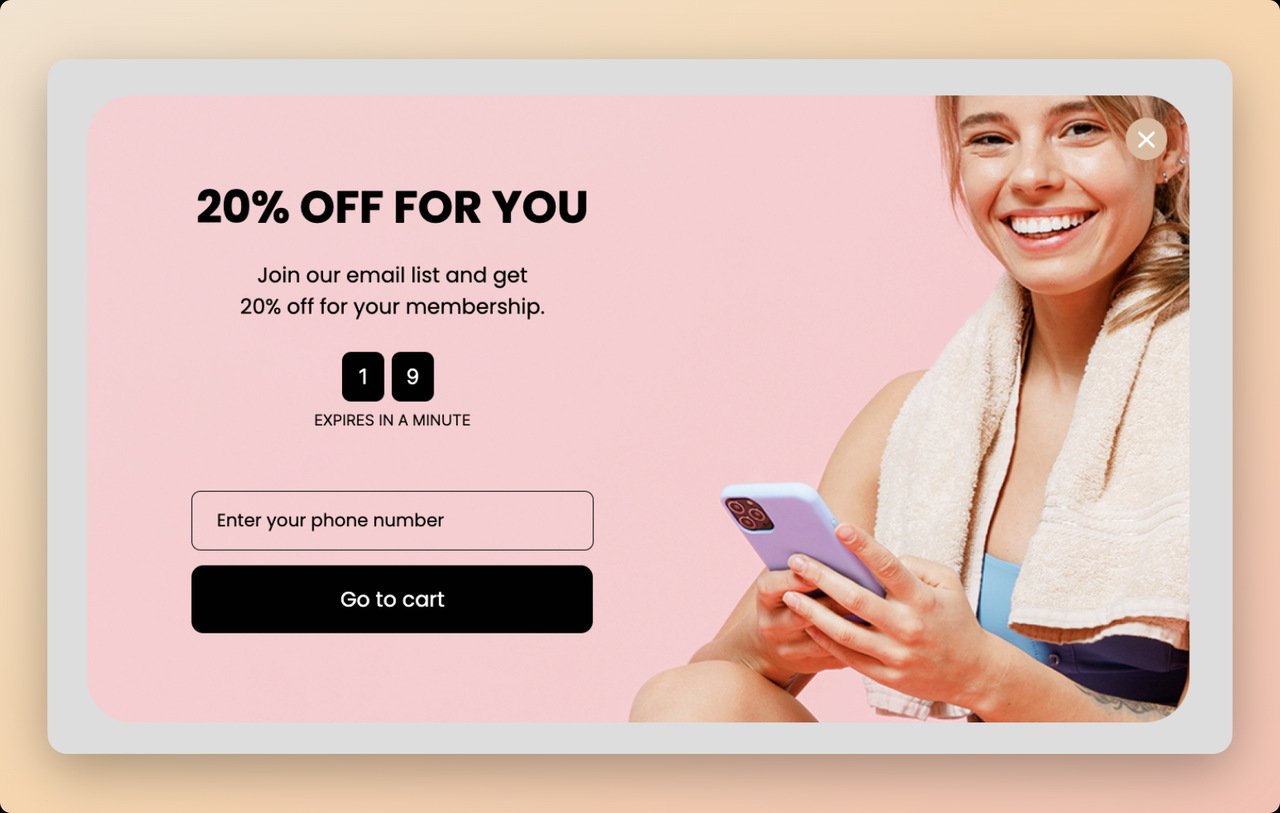
Step 4: Set your targeting rules. Don't show the popup to everyone. Target new visitors for acquisition popups. Exclude returning customers who've already subscribed. Use page-level targeting to show different offers on product pages vs. blog posts vs. your homepage.
Step 5: Add compliance language. Include consent text, message frequency disclosure, and opt-out instructions. Something like: "By checking this box, you agree to receive recurring marketing text messages from [Brand]. Msg frequency varies. Msg and data rates may apply. Reply STOP to unsubscribe, HELP for help." Check the wording against your SMS tool's consent guidance.
Step 6: Connect your SMS platform. Integrate the popup with your SMS marketing tool so new subscribers automatically enter your welcome flow. In Popupsmart, phone numbers and SMS consent map to Klaviyo, Mailchimp and HubSpot in the integration's Match Fields step; any other SMS tool connects through Zapier, Make or a webhook. The integrations page lists the destinations. Test the integration before going live.
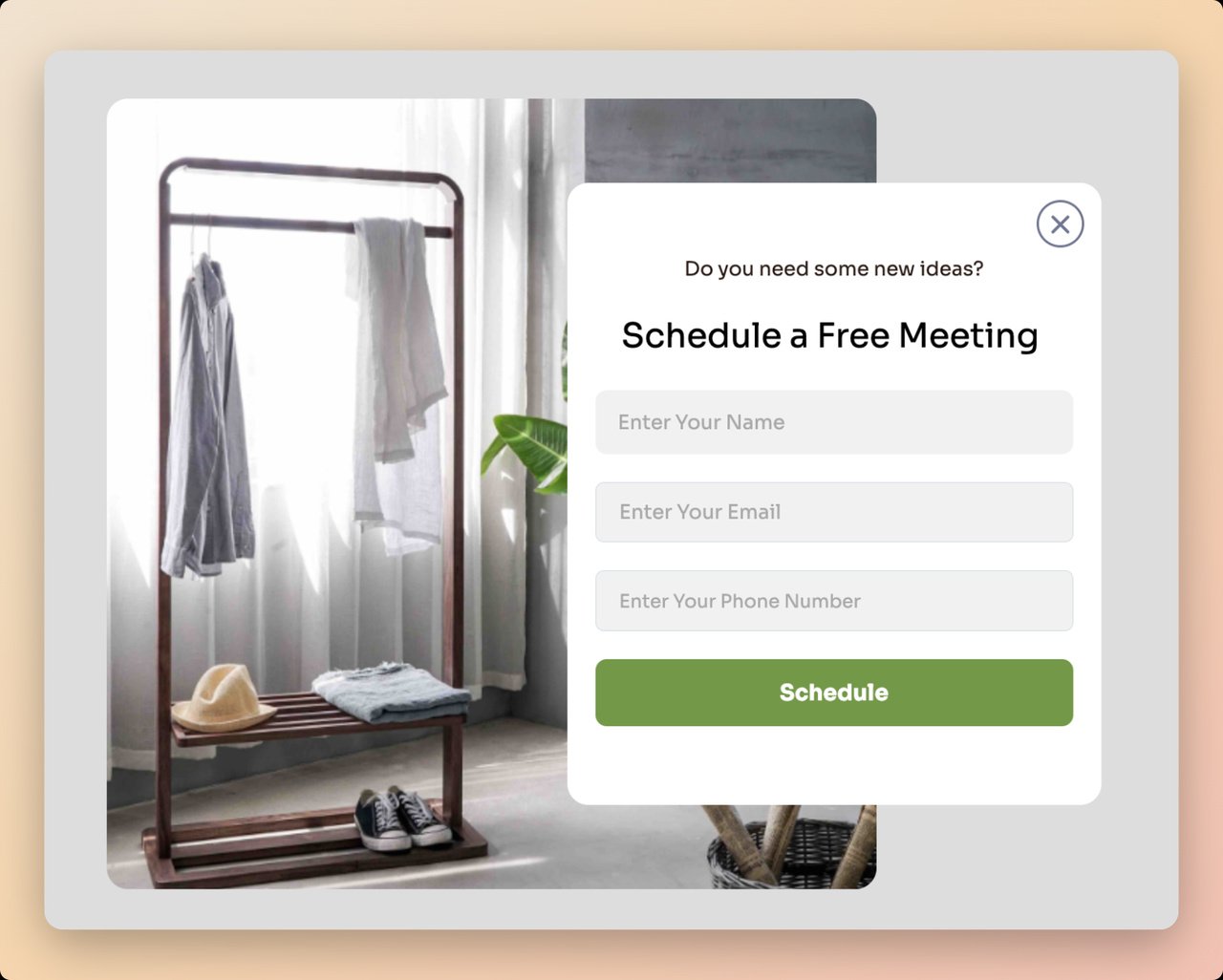
Step 7: Launch and monitor. Go live, then check your conversion rate daily for the first week. If you're well below the 0.83% median, adjust your offer, timing, or design. Then run a new A/B test every week.
What is a Shopify SMS popup?
A Shopify SMS popup is an SMS popup on a Shopify store. It asks shoppers for a phone number and SMS marketing consent while they browse (on a product page, in the cart, or on the way out) and hands both to the app that sends your texts. Everything above applies. Two things change on Shopify: the number can land on a customer profile in your Shopify admin, and Shopify already sends some texts for you.
Shopify's built-in SMS is not an SMS popup
Many people searching for this land on Shopify's own SMS settings first. They do different jobs:
- Checkout SMS notifications. If a customer enters a phone number instead of an email at checkout, Shopify sends a single order confirmation text, and only when the customer profile has no email address. It works when your business address is in a supported country and costs you nothing, according to Shopify's SMS notifications guide. Shipping updates by text need a transactional SMS app.
- The SMS marketing checkbox at checkout. Shopify can add an SMS opt-in to checkout, and to keep consent clear that box can't be preselected. It only reaches shoppers who get as far as checkout.
- Shopify Messaging. Shopify Messaging, formerly Shopify Email, added SMS marketing on December 10, 2025, in select regions, as the Shopify changelog announced. It sends marketing texts.
An SMS popup collects the number and the consent from someone who is still browsing, before checkout.
Types of Shopify SMS popups
| Type | Who sees it, and when | What it asks for |
|---|---|---|
| Welcome offer | First-time visitors, after a few seconds | A phone number for a first-order code |
| Exit intent | Desktop visitors about to leave | A phone number for an offer they'd otherwise miss |
| Back in stock | Visitors on a sold-out product page | A phone number for a restock text about that product |
| Cart page | Shoppers with items in the cart | A phone number for texts about that order |
| Email first, phone second | Any page; the phone step follows the email step | An email, then a phone number with its own consent |
| Customers without a phone | Signed-in customers whose profile has no phone number | A phone number only |
The last one is Shopify-specific. Popupsmart's Shopify audience targeting reads the customer's phone number (customer.phone), and the help center's use case for it is targeting customers who don't have one yet, for SMS and WhatsApp campaigns. Signed-in customers you can already text never see the ask.
Best practices for Shopify SMS popups
The design advice above holds on Shopify. These are the parts that differ:
- Ask on pages that carry intent. Target product, collection and cart pages before the home page or the blog. In our 2026 benchmark, popups on cart and checkout pages convert 4.57% vs 1.07% on the home page (median campaign); blog pages convert 0.23%.
- Keep an email field if you sync to Shopify Customers. Popupsmart's Shopify Customer integration requires an email, so a phone-only popup won't reach your Shopify customer list. Ask for the email first and the phone number second, or use both fields with separate consent.
- Match the consent line to the app that sends. If you text from Shopify Messaging, Shopify's SMS marketing requirements ask that your terms of service state the message frequency, that data rates might apply and how to opt out, and that your privacy policy explain how you collect phone numbers and who you share them with, SMS providers included. Your popup's consent line should say the same, next to an unticked box.
- Test one number end to end. Submit a test number, then find it under Customers in your Shopify admin and in your SMS app before launch.
How to add an SMS popup to your Shopify store
1. Install the Popupsmart app from the Shopify App Store. It loads once on the whole store, and each campaign decides where it shows. The Shopify popup integration guide covers the install.
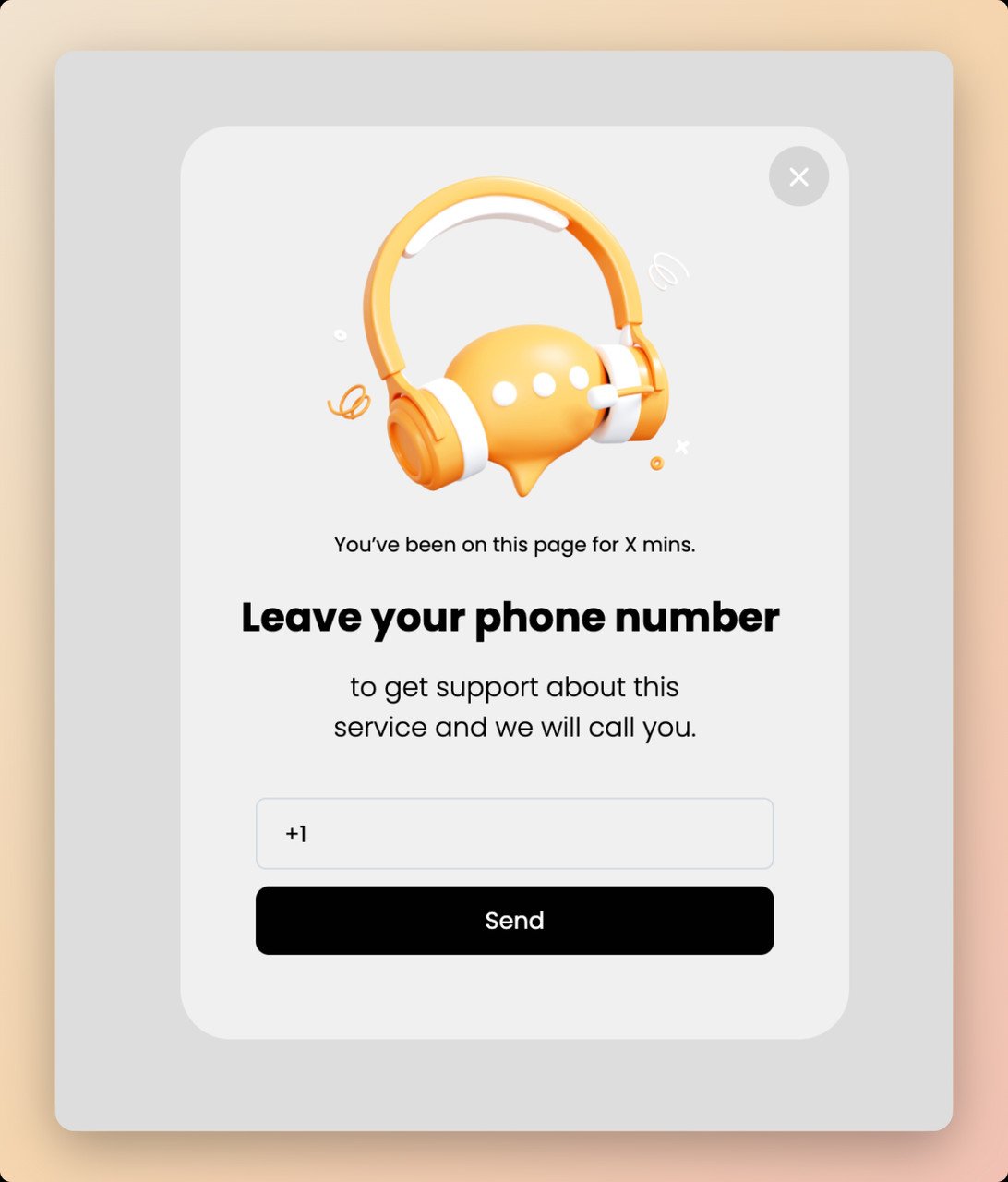
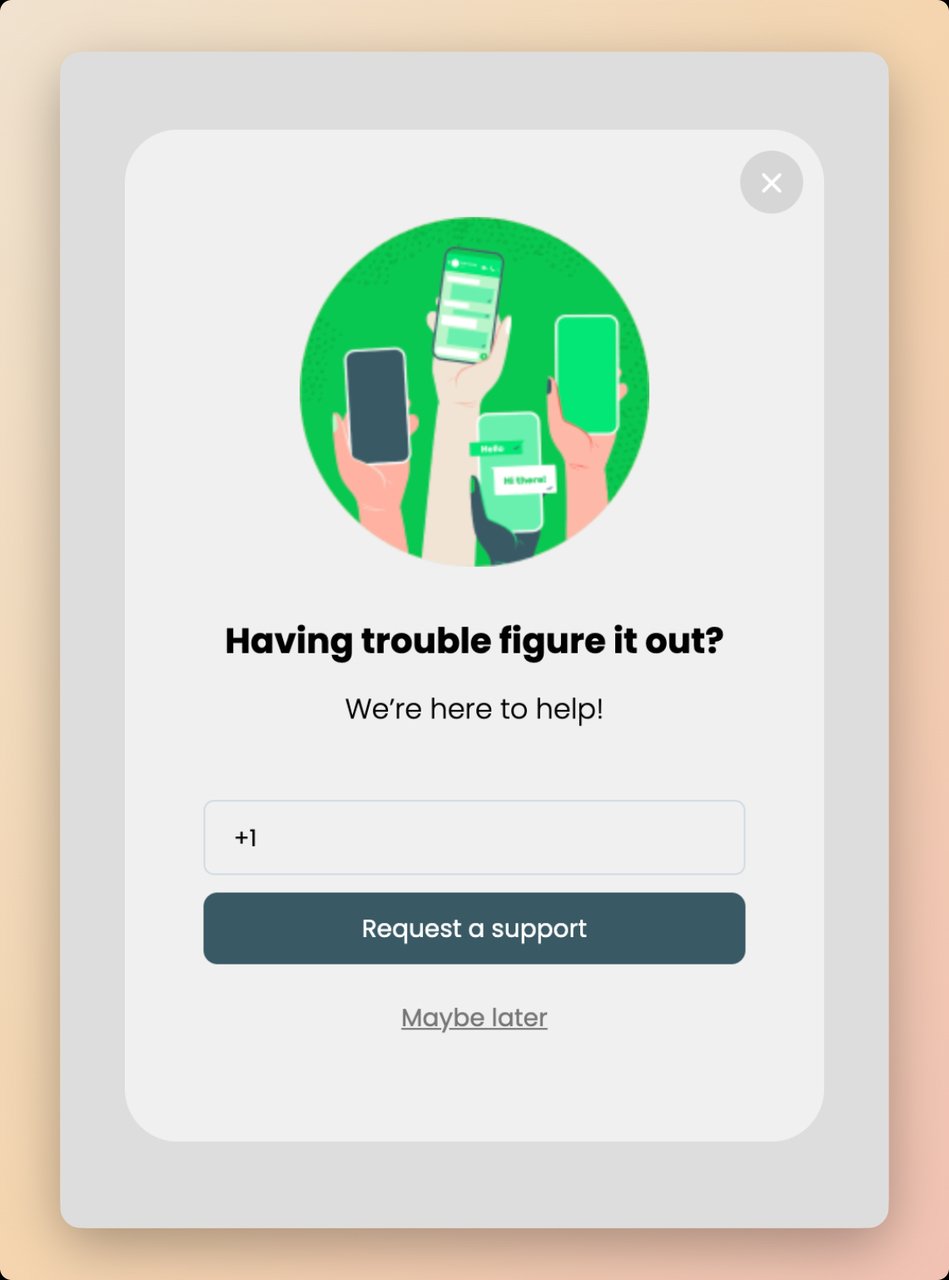
2. Start from a phone template or add a Phone element. The Playbook has phone-number templates such as "Collect SMS subscribers by offering support". The Phone element sets the placeholder, the countries shown and whether the field is required.
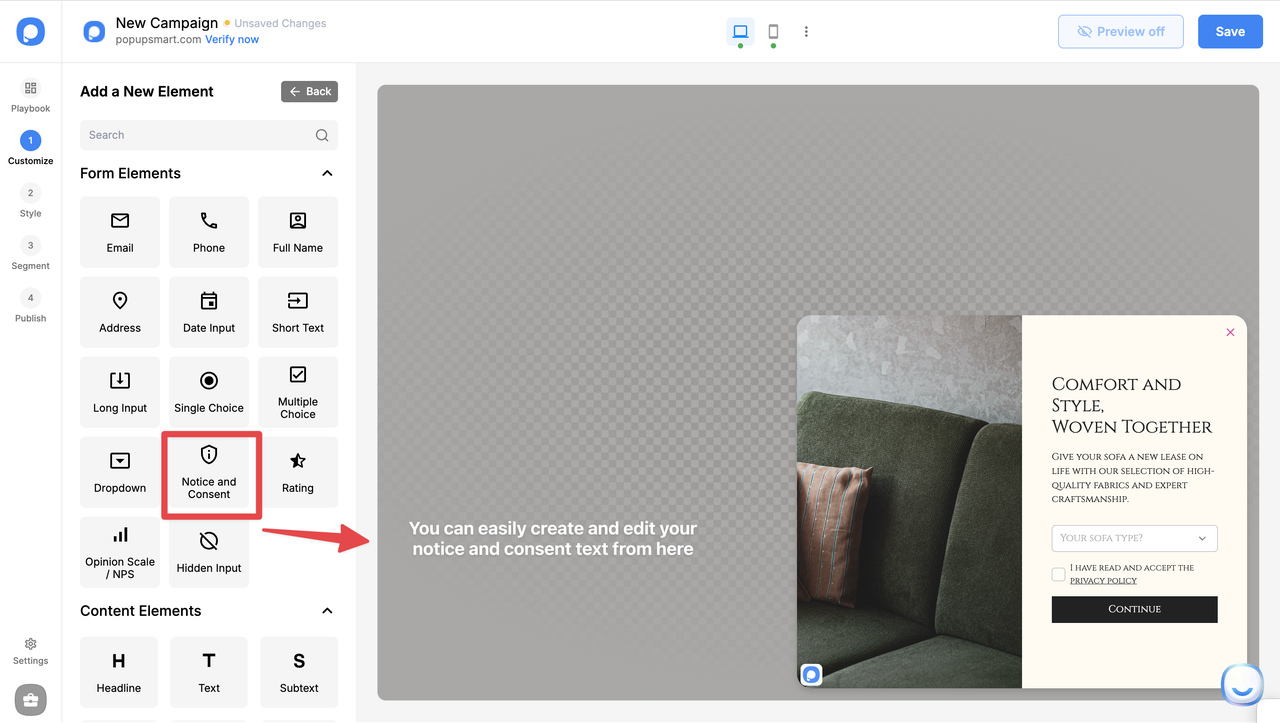
3. Add a Notice and Consent element under the phone field, write your SMS consent text and mark it required.
4. Choose who sees it and when. In the Segment step, pick a preset, or open the Advanced Editor for custom rules: after X seconds, scroll depth, exit intent, and the product or cart pages your offer fits.
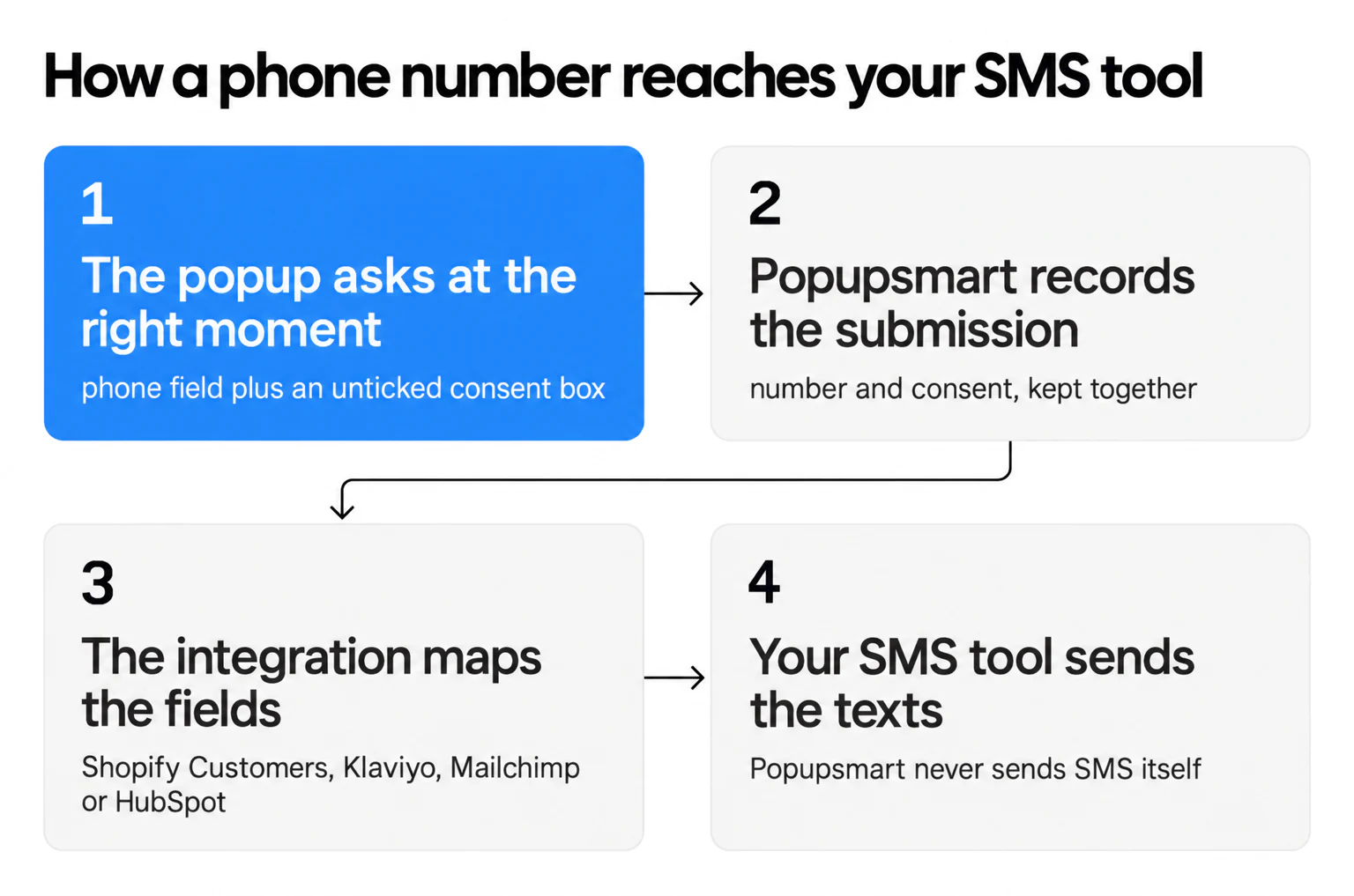
5. Send the number on, then publish. In the Publish step, turn on the Shopify Customer toggle and map Email and Phone, or add your Klaviyo, Mailchimp or HubSpot integration and map the phone number and SMS consent in Match Fields. Zapier, Make and webhooks are in the Advanced Editor.
With the Shopify Customer sync on, each submission shows up under Customers in your Shopify admin, with the phone number on the customer's profile (sending leads to Shopify Customers has the field mapping). Shopify keeps SMS marketing status separately, in the profile's marketing settings (Manage, then Edit marketing settings). Popupsmart's help center documents the phone mapping, not that status, so if you text from Shopify Messaging, open a test customer's marketing settings before your first send. With Klaviyo, Mailchimp or HubSpot, the SMS consent travels with the number.
More stores now keep their leads in Shopify first. In our 2026 benchmark, the share of new campaigns connected to an external tool fell from 7.0% in 2024 to 3.1% in 2026, while native Shopify Customers sync rose from 1.0% to 9.1%.
What Are the Best SMS Popup Tools and Platforms?
Each platform is good at different things. The first question is whether you want popups in the same app that sends your texts, or a popup builder that feeds the SMS tool you already use. Prices below are each vendor's own published figures, with the date we read them.
| Tool | Best For | SMS Popup Features | Starting Price (date read) |
|---|---|---|---|
| Popupsmart | Small teams and stores that keep their own SMS tool | Phone and consent elements, targeting, A/B testing; sends numbers to your SMS tool, doesn't text | Free plan (1 website, 5K pageviews a month); paid from $39 a month (2026-10-01) |
| Klaviyo | Shopify stores with email + SMS | Native SMS forms, advanced segmentation, flow builder | Free up to 250 active profiles, 500 email sends and $5 of mobile messages a month; its plan data lists Email from $20 and Email + SMS from $35 a month for 251–500 profiles (2026-10-01) |
| Postscript | Shopify SMS-first brands | Popups, checkout collection and opt-in forms, SMS automation | Starter $0 a month with a $49 monthly minimum spend; Growth $100 a month; plus per-message rates (2026-10-01) |
| Attentive | Enterprise e-commerce | Two-tap sign-up units, SMS and email | Custom pricing, based on list size and messages sent (2026-10-01) |
| Omnisend | Multi-channel marketing | Email + SMS forms, workflow automation, Shopify integration | Free for 250 contacts and 500 emails a month; Standard listed at $48 for three months for 500 contacts; SMS from $0.007 a message, varying by country (2026-10-01) |
| Privy | Small Shopify stores | Popups plus its own email and SMS sending | Displays from $24 a month (10K pageviews, no email or SMS); Email and SMS from $45 a month; 15-day trial (2026-09-26) |
| Wisepops | High-traffic stores that want a managed program | Popups, bars and web push, 14-day trial | $299 a month on the Shopify App Store for up to 500K pageviews; site plans from €599 a month (2026-09-26) |
| Justuno | E-commerce brands growing email and SMS lists | Popups, AI timing, product recommendations | $59 a month up to 10K visitors; 14-day trial (2026-09-22) |
I built Popupsmart to solve a specific problem: most popup builders were either too complicated or too limited for SMS capture. Popupsmart offers a free plan, and paid plans start at $39 a month. If you need a lead generation form that handles both email and phone number collection with targeting rules, it's worth trying the free plan and comparing Popupsmart's pricing with the table above.
For Shopify-specific needs, Postscript and Klaviyo have deep native integrations that reduce setup friction. Enterprise brands running large-scale SMS campaigns tend to pick Attentive for its sign-up units and popup overlay capabilities.
If you're weighing the popup-first tools, our side-by-side pages cover them in detail: Popupsmart vs Privy, Popupsmart vs Wisepops and the Justuno alternatives list.
Frequently Asked Questions About SMS Popups
What is a pop-up SMS?
A pop-up SMS (or SMS popup) is a website overlay that asks visitors to enter their phone number and agree to receive text message marketing. When a visitor submits their number and ticks the consent box, the popup passes both to the brand's SMS tool, which sends the promotional texts, order updates or exclusive offers. These popups typically appear based on triggers like time on page, scroll depth, or exit intent.
What is an SMS notification?
An SMS notification is a text message sent to a subscriber's phone that alerts them about something, such as a shipping update, account activity, appointment reminder, or promotional offer. Unlike an SMS popup (which collects phone numbers on a website), an SMS notification is the actual message delivered after someone has already opted in. Brands use SMS notifications for order confirmations, flash sales, abandoned cart reminders, and time-sensitive updates.
How do you create an effective SMS popup?
Start with a clear value proposition (discount, exclusive access, or useful content). Use a single phone number field to reduce friction, and give the SMS opt-in its own consent checkbox. Let the popup wait a few seconds instead of firing on page load, match the design to your brand, and connect it to your SMS tool. Launch, measure leads per display, and A/B test one headline, offer or design change at a time.
What are the benefits of SMS popups for lead generation?
SMS popups capture high-intent leads because visitors actively share their phone numbers. In Popupsmart's 2026 benchmark, the share of popup leads that include a phone number rose from 21.3% in 2024 to 33.5% in 2026 (all leads pooled). Once you have the list, the traffic you send back converts well: visitors arriving from an email or SMS campaign convert on popups at 1.81% vs 0.74% for visitors from organic search.
What is a good conversion rate for an SMS popup?
Across 3,034 Popupsmart popups that ask for an email or phone number (January 2024 to September 2026), the median converts 0.83% of its displays into leads; the top 25% reach 1.96% and the top 10% reach 3.87%. Forms that ask for a phone number instead of an email look weaker (0.46% vs 0.88% for email only), though that gap is not statistically reliable.
Who sends the texts after someone signs up through an SMS popup?
Your SMS tool does. Popupsmart collects phone numbers and SMS consent on your website and hands them to the SMS tool you already use. Phone numbers and SMS consent map to Klaviyo, Mailchimp and HubSpot in the integration's Match Fields step; other SMS tools connect through Zapier, Make or a webhook. On Shopify, the Shopify Customers sync adds the number to the customer's profile in your Shopify admin. Your SMS tool sends the messages and keeps the consent records.
Is an SMS popup legal?
Yes, as long as the person gives consent before you text them. In the US, marketing texts fall under the TCPA and carrier rules, which is why SMS popups show a consent line with message frequency, "Msg and data rates may apply" and how to reply STOP. In the EU, GDPR and ePrivacy rules apply. Rules differ by market, so check your SMS tool's consent guidance and get legal advice for your case.
How do you stop unwanted SMS popups on mobile?
If you're seeing unwanted popups on your phone, check your browser settings for notification permissions and revoke access for unfamiliar sites. On iPhone, go to Settings, then Safari, then Block Pop-ups. On Android, open Chrome settings, then Site Settings, then Pop-ups and redirects, and toggle the block on. If you're receiving unwanted SMS text messages, reply STOP to unsubscribe or report the number to your carrier.
What are the best apps for SMS popup notifications?
For building SMS popups on your website: Popupsmart, Klaviyo, Postscript, Attentive, Privy, Omnisend, Wisepops and Justuno. For sending the SMS campaigns after collection: Klaviyo, Postscript, Attentive, Omnisend and Privy's SMS plans handle automated text flows. The right choice depends on your platform (Shopify, WooCommerce, custom), budget, and whether you want popups in the same app as your texts or a popup builder that feeds the SMS tool you already use.
Start Building Your SMS List Today
The 10 examples above show there's no single right way to build an SMS popup. Some lead with a discount, some with information, some with exclusivity, and one with almost nothing at all. What they share is a fit with their brand and audience, and consent asked for in plain words.
Here's what I'd recommend as your next step: pick the example above that most closely matches your brand. Recreate a similar popup using Popupsmart or your preferred popup builder. Launch it this week, measure for 7 days, then start A/B testing.
Phone numbers already make up a third of popup leads in our 2026 data, yet most lead-collecting campaigns still collect email only. That leaves room for any store that starts now.