
How to Find Shopify Stores in Your Niche: 11 Quick Methods


 ChatGPT
 Perplexity
 Claude
 Grok
Grok Google AI Mode
Finding Shopify stores in your niche helps with competitor analysis, market research, inspiration, partnerships, pricing, and SEO. It outlines 11 discovery methods including Google queries, social media, tools like BuiltWith/SimilarWeb, IP lookup, ads, events, marketplaces, and podcasts.
Table of contents (21)
Are you looking for your Shopify competitors or researching to start a new business on Shopify?
You can find Shopify stores in your niche using Google search operators like site:myshopify.com, technology detection tools such as BuiltWith, IP lookup services, social media research, and ad library searches. With over 6.9 million live Shopify stores as of 2026, the right search method depends on whether you need competitor intelligence, supplier leads, or design inspiration.
What you'll need:
• A web browser with access to Google, social media platforms, and free tool websites
• Optional: Chrome extensions like BuiltWith Technology Profiler
• Optional: Accounts on SimilarWeb, FindNiche, or SEMrush (free tiers work)
• Time estimate: 30 minutes to 2 hours depending on depth
• Skill level: Beginner-friendly (no coding required)
Overview of all 11 methods:
1. Google search operators — Use queries like "keyword" site:myshopify.com to surface stores directly
2. Social media research — Search hashtags and join niche groups on Instagram, Facebook, and Reddit
3. BuiltWith — Detect website technology stacks and filter for Shopify-powered stores
4. Myip.ms IP lookup — Find all websites hosted on Shopify's IP address range
5. SimilarWeb — Analyze competitors and find related Shopify stores by traffic patterns
6. FindNiche — Browse a curated database of Shopify stores filtered by product category
7. SEO tools — Use backlink analysis in Moz, SEMrush, or Ahrefs to trace store networks
8. Industry events — Connect with Shopify store owners at trade shows and conferences
9. Online marketplaces — Cross-reference sellers on Etsy, Amazon, and eBay with their Shopify storefronts
10. Meta Ad Library — Search active ad campaigns to find stores investing in your niche
11. Podcasts and communities — Monitor e-commerce podcasts and Reddit threads for store mentions
Why Find Shopify Stores in Your Niche?
Before jumping into the methods, it helps to understand what you'll actually gain from this research. Finding Shopify stores in your niche isn't just about seeing what competitors sell. It gives you actionable data on pricing, product positioning, supplier relationships, and marketing tactics.
According to Redstag Fulfillment, Shopify stores have facilitated approximately $1 trillion in global online sales. That volume means every niche has dozens (often hundreds) of active stores you can study.
Here's what niche-specific Shopify store research gives you:
• Competitor analysis: Identify market gaps your store can fill. Seeing how competitors price products, structure their catalogs, and write product descriptions reveals weaknesses you can exploit.
• Market research: Understand actual demand in your niche. Reviewing similar stores helps you build detailed customer profiles and spot trending products before they saturate.
• Design and branding inspiration: Successful stores invest heavily in UX. Studying their layouts, color schemes, and checkout flows saves you months of trial and error.
• Supplier and partner identification: If you're a retailer or looking for what to sell on Shopify, finding competitor stores often reveals their dropshipping suppliers and wholesale partners.
• Pricing intelligence: Gathering pricing data across 10-20 niche stores gives you a realistic range to position your own unique selling proposition.
• SEO and content strategy: Examine which keywords, blog topics, and content formats drive traffic for stores in your space.
Method 1: Search Google With Shopify-Specific Operators
What This Method Does
Google search operators let you filter results to show only Shopify-powered websites matching your niche keywords. This is the fastest free method and requires zero tools beyond a browser.
Step-by-Step Instructions
Open Google and try these query combinations, replacing "keyword" with your niche term:
1. "keyword" inurl:myshopify.com — Finds stores still using their default myshopify.com subdomain
2. "keyword" site:shopify.com — Surfaces Shopify community pages and store listings mentioning your niche
3. "keyword" "powered by shopify" — Catches stores that haven't removed the Shopify footer credit
4. "keyword" intitle:"shopify store" — Narrows results to pages with "Shopify store" in the title tag
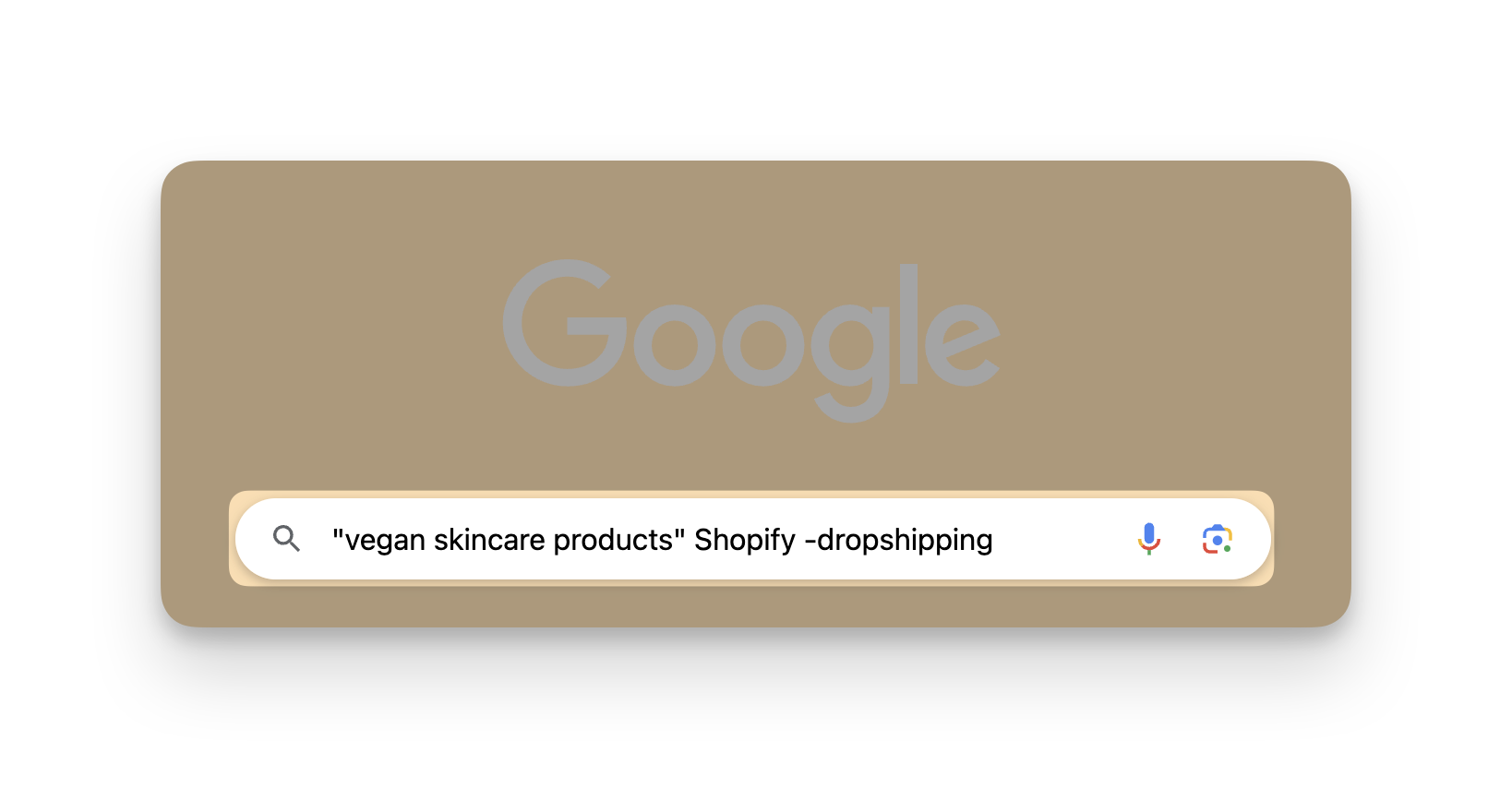
You can also combine operators. For example, "vegan skincare" inurl:myshopify.com -dropshipping excludes dropshipping-related results.
What to Look For
You'll know it's working when: Google returns results showing actual product pages, collection pages, or store homepages rather than generic articles about your keyword. Look for URLs containing ".myshopify.com" or product-style paths like "/products/" and "/collections/".
Common Mistakes
• Using too broad a keyword: Searching just "clothing" inurl:myshopify.com returns thousands of irrelevant results. Narrow it down: "sustainable bamboo clothing" or "plus-size athletic wear" gives you actionable results. Start specific, then broaden if you're not finding enough stores.
• Assuming all results are Shopify stores: A page mentioning "Shopify" in its content doesn't mean the site runs on Shopify. Always verify by checking the page source (Ctrl+U) and searching for "shopify" in the HTML, or use the BuiltWith extension from Method 3.
Pro tip: I've found that adding a location modifier gets you the most useful results. Try "organic coffee" inurl:myshopify.com "United States" or "UK" to find stores in a specific market. This works especially well when you need to analyze Shopify marketing strategies from stores targeting the same geographic audience.
Method 2: Search Social Media Platforms and Communities
What This Method Does
Social media platforms are where Shopify store owners promote their products, share behind-the-scenes content, and engage with potential customers. Searching these platforms surfaces stores that might not rank well on Google yet but are actively selling in your niche.
Step-by-Step Instructions
1. Instagram: Search hashtags like #shopifystore, #shopifyseller, plus your niche hashtag (e.g., #veganbeauty). Check the bios of accounts posting with these tags — most include a link to their store.
2. Facebook Groups: Join groups like "Shopify Entrepreneurs," "Shopify Dropshipping Community," or niche-specific groups. Store owners regularly share product launches and ask for feedback. Search within the group for your niche keywords.
3. Reddit: Browse r/shopify, r/ecommerce, and r/dropship. Use Reddit's search with your niche keyword plus "shopify" to find threads where store owners share their URLs for feedback.
4. Pinterest: Search your niche term and look for promoted pins. Many Shopify stores run Pinterest ads that link directly to product pages.
5. TikTok: Search your niche keyword. Stores running TikTok Shop or linking their Shopify store in bios often show up in product-related videos.
What to Look For
You'll know it's working when: You start finding store URLs in user bios, pinned posts, and comment threads. Build a spreadsheet and note each store's follower count, engagement rate, and posting frequency — these tell you which stores are actively growing.
Common Mistakes
• Only checking one platform: A store might be invisible on Instagram but have a strong Reddit presence. Cross-reference at least three platforms to get a complete picture of active stores in your niche.
• Ignoring niche-specific communities: Generic "Shopify" groups are noisy. A Facebook group about "handmade jewelry sellers" or a subreddit like r/skincare will surface stores more relevant to your niche than any general e-commerce group.
Pro tip: Reddit threads where store owners ask "please review my store" are goldmines. Search site:reddit.com "review my store" shopify "your niche keyword" on Google. These threads often include honest feedback from other store owners about design, pricing, and product selection — giving you competitive intelligence you can't get anywhere else.
Method 3: Detect Shopify Stores With BuiltWith
What This Method Does
BuiltWith scans websites and identifies their entire technology stack, including the e-commerce platform they run on. You can filter its database specifically for Shopify stores and then narrow by keyword or industry.
Step-by-Step Instructions
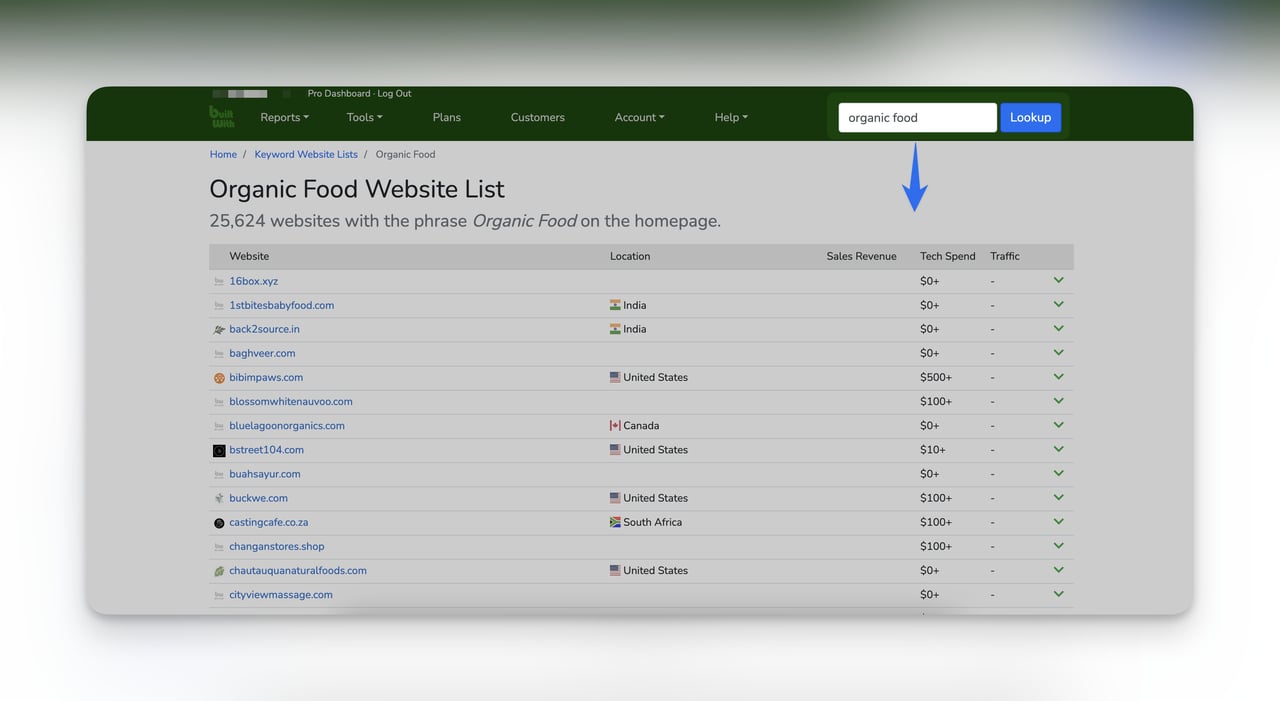
1. Go to builtwith.com and enter a competitor's URL or your niche keyword in the search bar
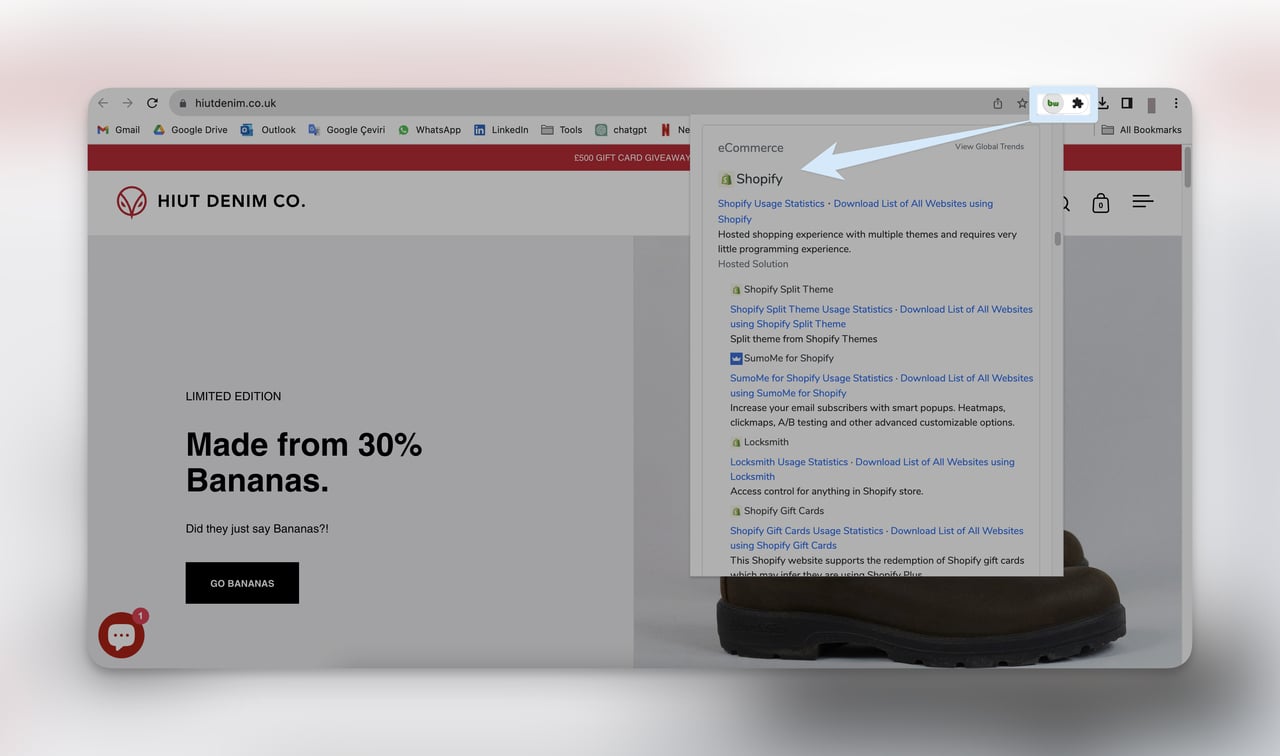
2. In the results, look for the "eCommerce" section — it will show "Shopify" if that site uses the platform
3. Click on the Shopify technology profile to see a list of all detected Shopify websites
4. Use keyword filters to narrow down to your specific niche
For quick on-the-fly checks, install the BuiltWith Technology Profiler Chrome extension. It shows the technology stack of any site you visit with one click.
What to Look For
You'll know it's working when: BuiltWith returns a list of domains with "Shopify" under the eCommerce technology category. The free tier shows limited results, but it's enough to confirm whether specific sites use Shopify and to get an initial list of stores.
Common Mistakes
• Relying only on the free tier: BuiltWith's free version limits how many results you can see. If you need a full database export of Shopify stores in a niche, you'll need a paid plan. For most research purposes though, combining the free version with the Chrome extension covers 80% of what you need.
• Not checking the technology date: BuiltWith sometimes caches old data. A site flagged as "Shopify" might have migrated to another platform months ago. Always verify by visiting the actual site and checking the source code for "cdn.shopify.com".
Pro tip: The real power of BuiltWith is seeing what other technologies a store uses alongside Shopify. If you notice a cluster of successful niche stores all using the same email marketing tool or analytics platform, that's a signal about what tech stack works in your market. I've used this to identify winning app combinations that consistently appear on high-traffic Shopify stores.
Method 4: Use Myip.ms for IP-Based Store Lookup
What This Method Does
Myip.ms performs IP lookups to find all websites hosted on a specific IP address range. Since Shopify hosts all its stores on a known set of IP addresses, you can pull a list of every domain pointing to Shopify's servers.
Step-by-Step Instructions
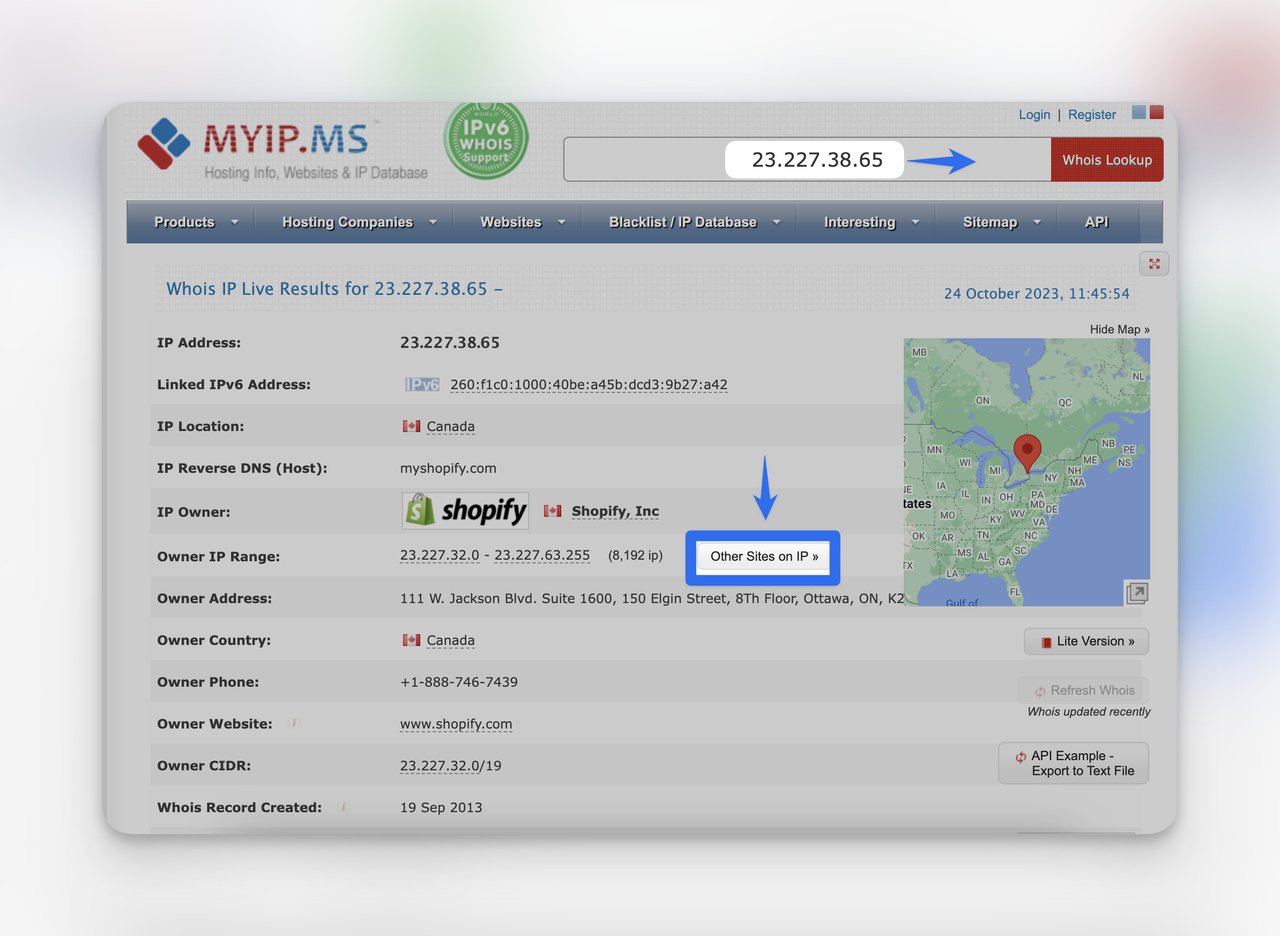
1. Go to myip.ms
2. Enter one of Shopify's known IP addresses in the search bar: 23.227.38.65
3. Click "Other Sites on IP" or "Websites on this IP" to see all domains hosted at that address
4. Browse the list and look for store names or domains matching your niche
Shopify stores may also resolve to these alternate IP addresses: 23.227.38.32, 23.227.38.36, or 23.227.38.74. Check all four for a more complete list.
What to Look For
You'll know it's working when: You see a long list of domain names that are all hosted on the same Shopify IP. The list will include both myshopify.com subdomains and custom domains. You'll need to manually visit some of these to find stores matching your niche, since Myip.ms doesn't categorize them by industry.
Common Mistakes
• Expecting categorized results: Myip.ms gives you raw domain lists without any niche filtering. You'll see thousands of domains across every industry. This method works best when paired with Google search or BuiltWith to cross-reference rather than used alone.
• Stopping after one IP address: Shopify uses multiple IP ranges, and your niche stores might be spread across them. Check all four known IPs mentioned above to avoid missing stores that were provisioned on different servers.
Pro tip: Export the domain list from Myip.ms and run it through a bulk site checker (like BuiltWith's bulk lookup or a simple script that checks each domain's HTML for niche keywords). This takes the manual work out of sifting through thousands of unrelated domains and gives you a filtered list in minutes instead of hours.
Method 5: Analyze Competitors With SimilarWeb
What This Method Does
SimilarWeb provides traffic analytics and competitive intelligence for any website. Enter a known Shopify store and SimilarWeb shows you similar sites, traffic sources, and audience overlap — revealing competitor stores you didn't know existed.
Step-by-Step Instructions
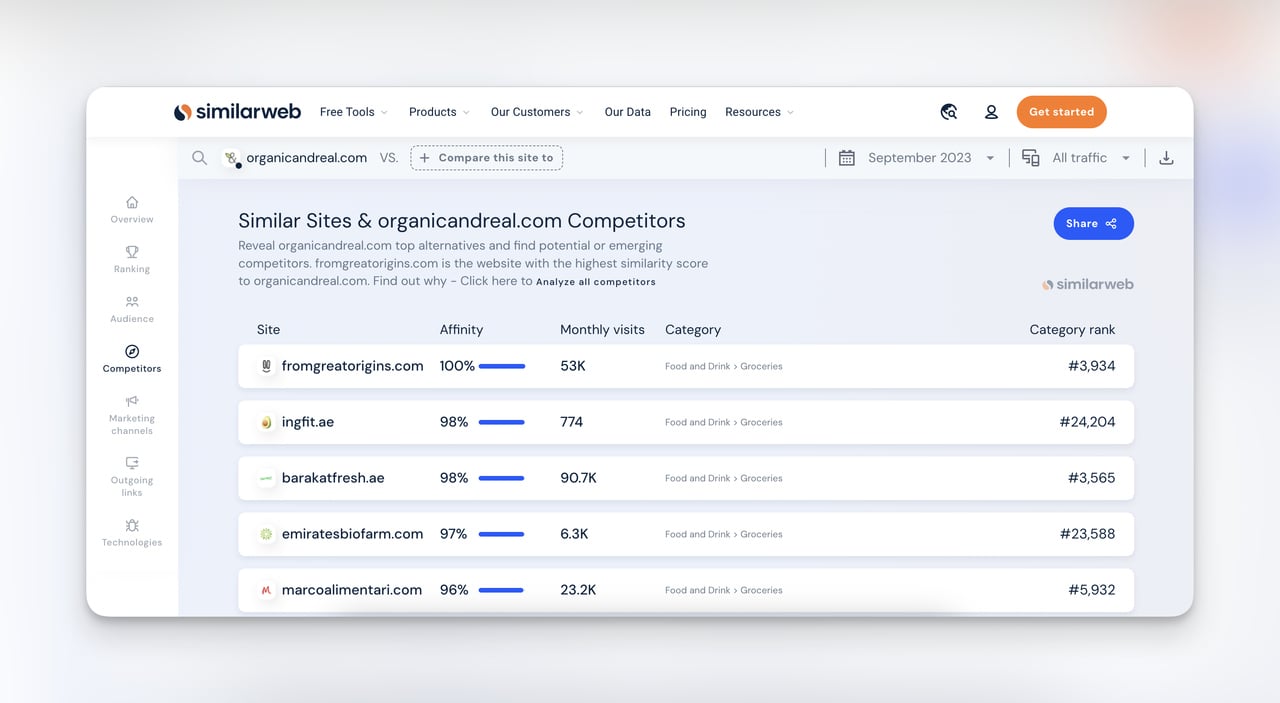
1. Go to similarweb.com and enter a known Shopify store URL from your niche
2. Scroll to the Competitors & Similar Sites section
3. Review the list of similar websites — note their domain names, traffic estimates, and traffic sources
4. Click into each competitor to see their top traffic sources, referral sites, and top-performing pages
5. Verify each result is a Shopify store using the source code check or BuiltWith extension
What to Look For
You'll know it's working when: SimilarWeb surfaces competitor domains you haven't seen before, along with their estimated monthly traffic and top traffic channels. Pay special attention to stores getting significant organic search traffic, since that indicates strong SEO you can learn from.
Common Mistakes
• Assuming all similar sites are on Shopify: SimilarWeb groups websites by audience similarity, not by platform. A store running on WooCommerce or BigCommerce might appear alongside Shopify stores. Always verify the platform before adding a site to your competitive analysis.
• Ignoring the traffic sources breakdown: The competitor list is useful, but the traffic sources data is where the real value sits. If a competitor gets 40% of traffic from Pinterest, that tells you Pinterest works for your niche — information that's more actionable than just knowing the store exists.
Pro tip: SimilarWeb's "Referral Sites" section often reveals niche blogs, review sites, and influencers that drive traffic to competitor stores. These are the exact sites you should target for your own outreach and partnership efforts.
Method 6: Browse FindNiche's Shopify Store Database
What This Method Does
FindNiche maintains a searchable database of Shopify stores and products. Unlike the previous methods that require you to piece together information, FindNiche lets you filter directly by niche category, product type, and performance metrics.
Step-by-Step Instructions
1. Go to findniche.com and create a free account
2. Navigate to the Shopify Stores or Products section
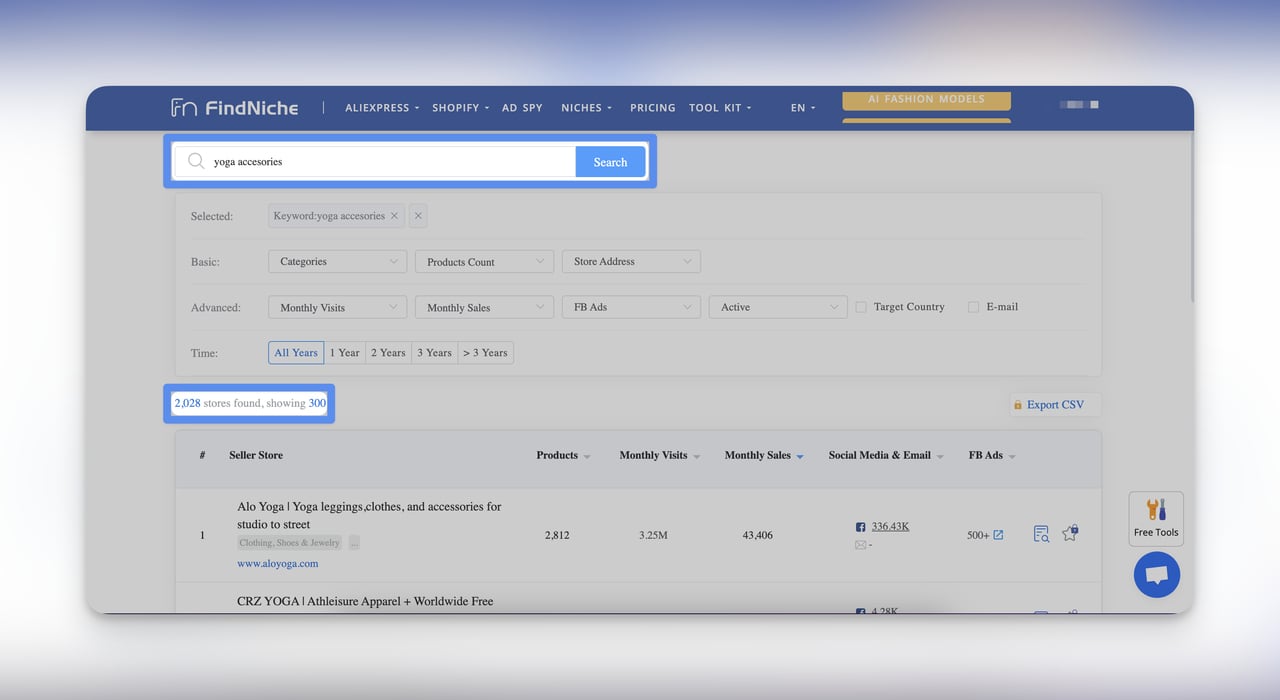
3. Enter your niche keyword in the search bar (e.g., "yoga accessories")
4. Apply filters for country, product category, estimated revenue range, or store creation date
5. Review the results and click into individual stores for detailed analytics including best-selling products, traffic trends, and ad spend estimates
What to Look For
You'll know it's working when: FindNiche returns a list of stores with key metrics like estimated monthly revenue, number of products, and ad activity. Focus on stores with consistent revenue rather than one-time spikes, since consistent performance signals a sustainable business model worth studying.
Common Mistakes
• Trusting revenue estimates at face value: FindNiche's revenue projections are estimates based on traffic and product data. They give you relative comparisons (store A probably earns more than store B) but shouldn't be treated as exact numbers.
• Only looking at top performers: The stores ranking highest by revenue are often large brands. Mid-range stores (positions 10-50 in your niche) are more relevant if you're starting out, since their strategies are more replicable with a smaller budget.
Method 7: Trace Store Networks With SEO Tools
What This Method Does
SEO tools like Moz, SEMrush, and Ahrefs track backlink profiles, keyword rankings, and referring domains for any website. By analyzing the backlinks pointing to known Shopify stores in your niche, you can uncover a network of related stores, suppliers, bloggers, and industry sites.
Step-by-Step Instructions
1. Enter a known competitor's Shopify store URL into your SEO tool's backlink analyzer
2. Review the Referring Domains list — look for other Shopify stores that link to your competitor
3. Check the Competing Domains report to find sites ranking for the same keywords
4. Use the Content Gap analysis to see which keywords competitor stores rank for that you don't
5. Export the referring domain list and filter for e-commerce domains (.com sites with "/products/" or "/collections/" in their link paths)
What to Look For
You'll know it's working when: The referring domains report shows other e-commerce sites, review blogs, and niche directories linking to your competitor. Stores frequently link to each other through supplier pages, guest posts, and "recommended stores" lists. These cross-links map out the entire ecosystem in your niche.
Common Mistakes
• Analyzing only one competitor: A single store's backlink profile gives you a partial picture. Run the same analysis on 3-5 competing stores and look for overlapping referring domains. Sites that link to multiple competitors in your niche are likely industry hubs or directories where your store should also appear.
• Ignoring keyword gap data: Many people use SEO tools only for backlinks and skip the keyword analysis. But the "Competing Domains" report in SEMrush or the "Content Gap" in Ahrefs directly shows you stores ranking for your target keywords — the most relevant competitors you need to study.
Method 8: Connect at Industry Events and Trade Shows
What This Method Does
Industry events, trade shows, and e-commerce conferences put you face-to-face with Shopify store owners. This offline method builds relationships that purely digital research can't replicate, and exhibitor lists are publicly available before events even start.
Step-by-Step Instructions
1. Search for events in your niche on Eventbrite, Meetup, and LinkedIn Events using keywords like "e-commerce [your niche]" or "Shopify meetup"
2. Check the exhibitor or speaker list on the event website — many exhibitors are Shopify store owners showcasing their products
3. Visit exhibitor websites before attending and note which ones run on Shopify (use the source code check or BuiltWith)
4. At the event, visit booths relevant to your niche and ask about their e-commerce setup, tools, and challenges
5. Follow up with connections on LinkedIn and add their stores to your research spreadsheet
Major e-commerce events like NRF Retail's Big Show, Retail Innovation Conference, and Shopify's own Unite conference attract thousands of store owners across every niche.
What to Look For
You'll know it's working when: You leave with 10-20 new store URLs from exhibitors and conversations, plus business cards from store owners willing to discuss their experience. The best leads come from smaller, niche-specific events rather than massive conferences where everyone is too busy for real conversation.
Common Mistakes
• Attending only large conferences: Events like NRF are valuable for trend spotting but overwhelming for niche research. Smaller meetups with 30-50 attendees (Shopify meetups, local e-commerce groups) give you direct access to store owners who have time to talk and are more willing to share specifics about their setup.
• Not checking exhibitor lists in advance: Showing up without preparation means you waste time at irrelevant booths. Download the exhibitor list a week before, research each company, and create a shortlist of the 5-10 you want to visit. This targeted approach yields better results in less time.
Pro tip: The after-event networking sessions (dinners, happy hours, Slack groups) are where the real intelligence gets shared. Store owners are much more candid about their challenges, tools, and revenue over drinks than they are on a trade show floor.
Method 9: Cross-Reference Online Marketplaces
What This Method Does
Many Shopify store owners also sell on marketplaces like Etsy, Amazon, and eBay. By searching these platforms for your niche products and then checking whether those sellers also operate independent Shopify stores, you find competitors who maintain multiple sales channels.
Step-by-Step Instructions
1. Search for your niche keyword on Etsy, Amazon, or eBay
2. Click on seller profiles that sell products matching your niche
3. Look for links to the seller's own website in their profile, "About" section, or packaging descriptions
4. Google the seller's brand name plus "Shopify" or ".com" to find their standalone store
5. Verify the found website runs on Shopify using source code inspection or BuiltWith
What to Look For
You'll know it's working when: You find seller profiles with links to external websites, or when Googling a seller's brand name surfaces a standalone .com store. Etsy sellers are most likely to maintain a separate Shopify store, since Etsy's fees often push established sellers toward their own storefronts.
Common Mistakes
• Assuming marketplace success equals Shopify success: A seller with 10,000 Etsy reviews might have a Shopify store that barely gets traffic. Their marketplace and independent store serve different customer segments, so evaluate each channel independently.
• Missing the brand name connection: Sellers often use slightly different brand names across platforms (abbreviations, extra words). Search for variations of the brand name and check social media bios where they might link to their primary store.
Pro tip: Pay attention to Etsy sellers who recently raised their prices or added a "visit our website for more" note in their product descriptions. These sellers are actively driving traffic to their Shopify store, which means the Shopify store is likely their growth focus. Following these sellers over time shows you what scaling a niche Shopify store actually looks like from the inside.
Method 10: Search the Meta Ad Library for Active Stores
What This Method Does
The Meta Ad Library (formerly Facebook Ad Library) is a public database of every active and inactive ad running across Facebook and Instagram. Searching for your niche keywords shows you exactly which stores are spending money to acquire customers in your space right now.
Step-by-Step Instructions
1. Go to Meta Ad Library
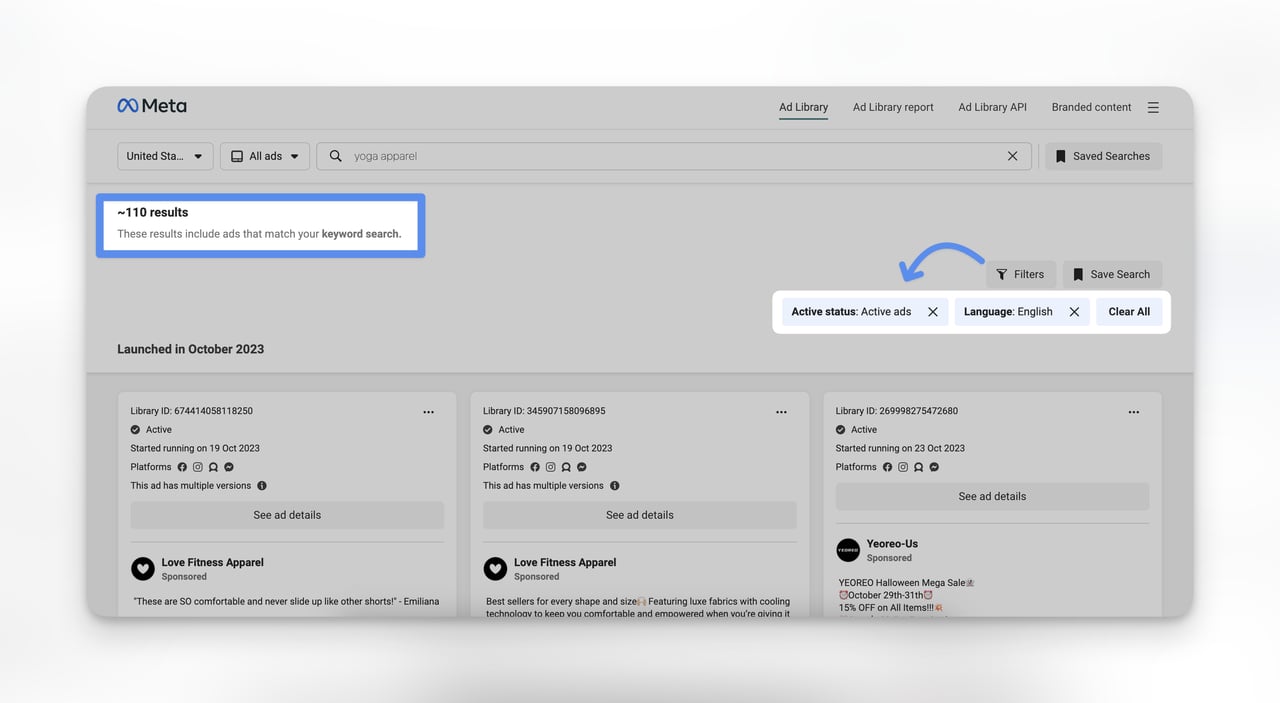
2. Set the country to your target market and select "All ads" from the category dropdown
3. Enter your niche keyword (e.g., "yoga apparel") in the search bar
4. Filter results to show active ads only to focus on stores currently investing in advertising
5. Click on an advertiser's page name to see all their active campaigns, then click through to their website
6. Verify the website runs on Shopify by checking the page source for "cdn.shopify.com"
What to Look For
You'll know it's working when: You see a stream of active ads from brands in your niche, complete with their ad creatives, copy, and landing page links. Stores running multiple active ads simultaneously are investing seriously in growth and worth studying in detail.
Common Mistakes
• Only looking at current ads: The Ad Library also shows inactive ads. Reviewing a store's ad history over the past 6-12 months reveals seasonal patterns, failed creative approaches, and messaging pivots. This historical data tells you what didn't work, which is just as valuable as seeing what's running now.
• Ignoring the ad creative itself: Don't just click through to the store — study the ad. The copy, images, offers, and calls-to-action reveal the store's positioning and target audience. If three competitors all lead with free shipping in their ads, that tells you free shipping is table stakes in your niche.
Pro tip: Sort by "longest running" ads when possible. An ad that's been active for 6+ months is almost certainly profitable — no store keeps spending on ads that don't convert. These long-running ads show you proven messaging and offers. I save screenshots of these ads and use them as benchmarks when creating campaigns for my own projects. If you need to convert the traffic these stores are getting, popup tools can help capture visitors who land on your store from similar ad campaigns.
Method 11: Monitor Podcasts and Online Communities
What This Method Does
E-commerce podcasts and online communities are where Shopify store owners openly discuss their businesses. Unlike public-facing store pages that only show polished products, these conversations reveal revenue numbers, tool stacks, traffic strategies, and growth challenges.
Step-by-Step Instructions
1. Search podcast platforms (Apple Podcasts, Spotify) for keywords like "Shopify [your niche]" or "e-commerce [your niche]"
2. Listen to episodes featuring guest store owners in your space — hosts typically introduce guests with their store name and URL
3. Check podcast show notes for direct links to featured stores
4. Browse Reddit communities (r/shopify, r/ecommerce, r/entrepreneur) for threads where store owners share results
5. Search YouTube for "Shopify store review [your niche]" to find video teardowns of actual stores
What to Look For
You'll know it's working when: You find podcast episodes or Reddit AMAs where store owners share specific details: monthly revenue, traffic sources, conversion rates, and the tools they use. This first-person data is more reliable than third-party estimates from tools like SimilarWeb or FindNiche.
Common Mistakes
• Treating podcast numbers as current: A store owner sharing "we hit $100K/month" on a podcast episode from 2024 might be at $300K or out of business by now. Always verify the current state of any store you find through older content by checking their website, social media activity, and recent reviews.
• Not engaging in the community: Reading Reddit threads passively gives you some information, but asking questions and contributing your own insights opens doors. Store owners are far more likely to share detailed competitive intelligence with someone who participates authentically than with someone who just lurks and takes notes.
How to Verify That a Website Runs on Shopify
Not every method above confirms the platform automatically. Here are four quick ways to verify any website runs on Shopify:
1. Check the page source: Right-click the page, select "View Page Source" (or press Ctrl+U), and search for "shopify" or "cdn.shopify.com". If it appears in the HTML, the site is built on Shopify.
2. Add /admin to the URL: Type example.com/admin in your browser. If it redirects to a Shopify login page, the store uses Shopify.
3. Check the cookies: Open your browser's developer tools (F12), go to the Application tab, and look for cookies starting with "_shopify" or "cart_sig".
4. Use the BuiltWith extension: One click shows the entire technology stack including the e-commerce platform.
How to Choose a Winning Niche on Shopify
Finding stores is step one. Choosing the right niche to compete in is what determines whether your store succeeds. Picking a niche with room to grow matters more now than ever.
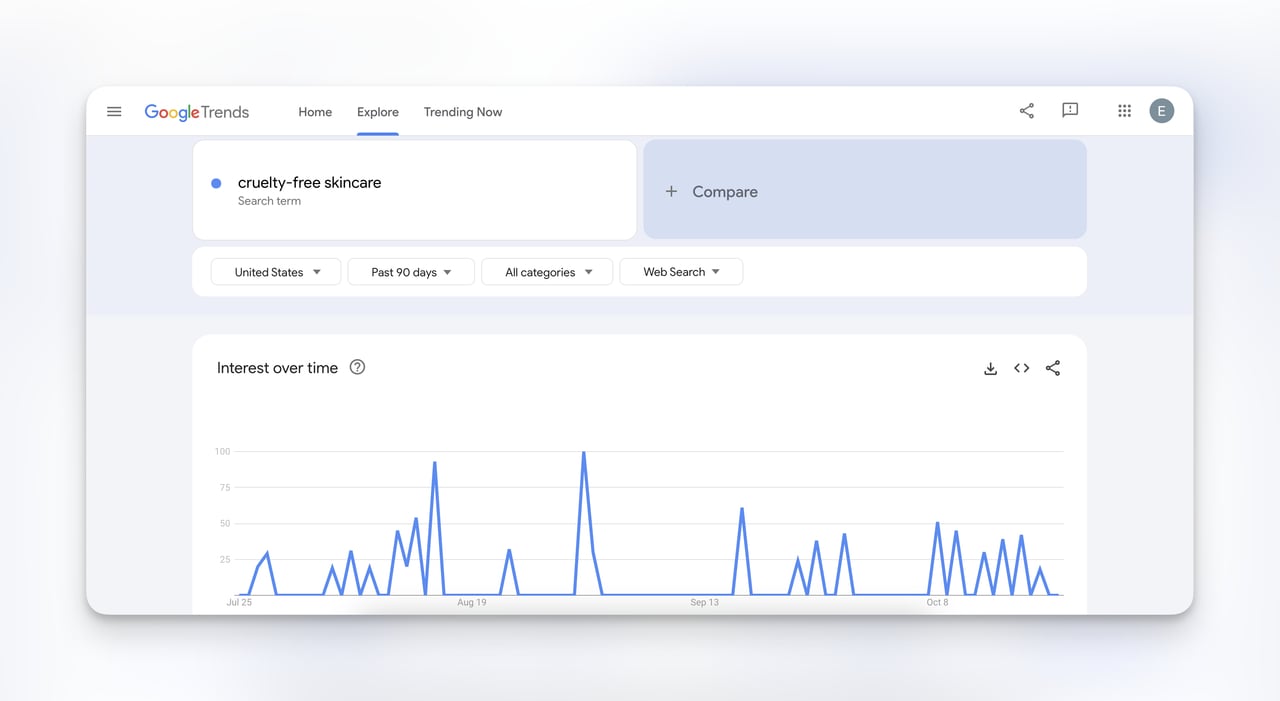
Start with data, not just passion. Use Google Trends to check whether demand for your niche is growing, flat, or declining over the past 12 months.
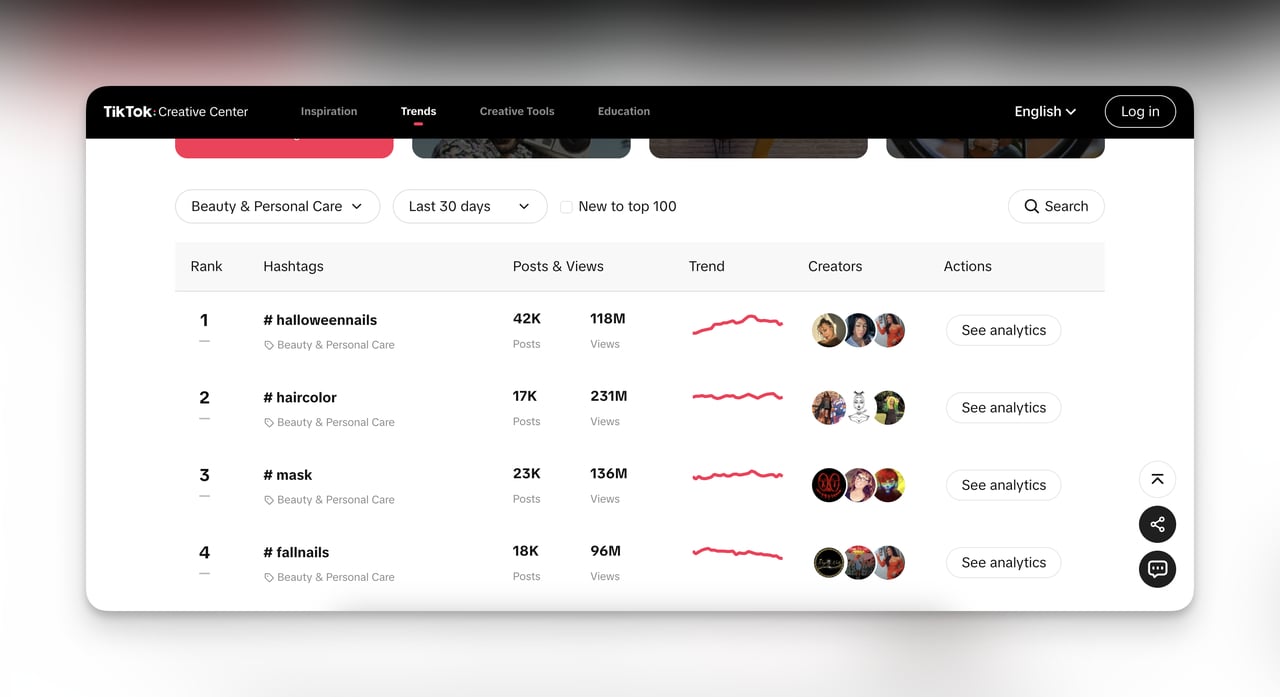
TikTok's Creative Center shows trending hashtags and products, giving you a real-time pulse on what's gaining traction with younger demographics.
Then validate with competition density. If your 11-method research above turns up fewer than 10 active Shopify stores, you've likely found an underserved niche. If you find 200+, you'll need a sharper angle — a sub-niche, a unique product feature, or a better marketing strategy to stand out.
Check profitability before committing. Research average price points and profit margins in your niche by looking at the stores you've found. If most stores price products under $15 with free shipping, the margins might not support sustainable growth unless you have a volume strategy.
Advanced Tips for Shopify Niche-Specific Searches
• Combine methods for cross-validation: Run a Google operator search (Method 1), then verify every result with BuiltWith (Method 3). Check the confirmed stores in SimilarWeb (Method 5) to find stores you missed. This layered approach catches stores that slip through any single method.
• Build a Shopify store database: Create a spreadsheet with columns for store URL, niche, estimated traffic (from SimilarWeb), platform confirmed (yes/no), ad activity (from Meta Ad Library), and last checked date. Update it monthly. After 3 months, you'll have competitive intelligence that would cost $500+/month from a paid research service.
• Set up automated monitoring: Use Google Alerts for new stores, follow competitor social media accounts, and check the Meta Ad Library monthly for new advertisers in your niche. Competitive markets shift fast — a quarterly check catches new entrants before they become threats.
• Look at the Shopify App Store reviews: Search the Shopify App Store for niche-specific apps (like "jewelry photography app" or "supplement label maker"). The reviews section often includes store names and URLs from real merchants using those apps. This surfaces stores too small to appear in other tools but actively operating in your niche.
• Use website analytics tools for deeper research: Once you've built your store list, tools like Google Analytics benchmarking reports can help you understand typical traffic patterns and conversion rates in your industry. This contextualizes the competitor data you've gathered.
Conclusion
These 11 methods give you a complete toolkit for finding Shopify stores in any niche. The Google search operator method (Method 1) and the Meta Ad Library (Method 10) are the best places to start because they're free and produce results in minutes.
For deeper research, layer in BuiltWith for platform verification, SimilarWeb for traffic analysis, and SEO tools for backlink mapping. The combination of three or four methods will surface stores that any single method misses.
Start today with one method. Open Google, run a search operator query for your niche, and add the first five Shopify stores you find to a spreadsheet. Then pick a second method tomorrow. Within a week, you'll have a competitive intelligence database that informs your product strategy, pricing, marketing, and store design.
Once you've identified your competitors and built your Shopify store, you can increase your Shopify sales by applying the insights from your research to your own marketing strategy.
Frequently Asked Questions
How do customers find Shopify stores?
Customers find Shopify stores primarily through Google searches, social media ads (Facebook, Instagram, TikTok), influencer recommendations, and word of mouth. According to Exploding Topics, there are over 6.9 million live Shopify stores as of February 2026, with roughly 5 million based in the United States. Stores that invest in SEO and paid advertising capture the most traffic, while smaller stores often rely on niche communities and social media presence for visibility.
What are the best free tools to find Shopify stores?
Google search operators (free, unlimited) are the most accessible starting point. The Meta Ad Library is completely free and shows active ad campaigns in any niche. Myip.ms offers free IP lookups to find Shopify-hosted domains. BuiltWith, SimilarWeb, and FindNiche each offer useful free tiers that cover basic research needs. For most small business owners, these free tools provide enough data to build a solid competitive analysis without paying for premium plans.
How to find Shopify stores for dropshipping?
Focus on Methods 6 (FindNiche) and 10 (Meta Ad Library) from this guide. FindNiche specifically tracks dropshipping-oriented Shopify stores and shows trending products with their suppliers. The Meta Ad Library reveals which stores are running ads for dropshipped products — look for stores advertising products with 10-14 day shipping times, which typically indicates a dropshipping model. Cross-reference the products you find with multi-vendor marketplace platforms to identify the original suppliers.
Is it legal to research Shopify competitors?
Yes. Collecting publicly available information about competitors — their websites, social media profiles, pricing, ad campaigns, and marketing strategies — is standard business practice. Tools like BuiltWith, SimilarWeb, and the Meta Ad Library are designed specifically for this purpose. The legal boundaries are clear: you can analyze anything publicly visible, but you can't access private systems, scrape data in violation of terms of service, or misrepresent yourself to obtain confidential information. Use these methods as research tools to inform your own strategy, not to copy another store's proprietary content or designs.
Check These Out:
How would you rate your experience with this article? 😊