ChatGPT
 Perplexity
 Claude
 Grok
Grok Google AI Mode
The 13 email list building methods in this article cover everything from opt-in form placement to AI-driven automation, each with step-by-step instructions and a first step to take this week. The popup methods carry Popupsmart's 2026 benchmark data, measured in popups between January 2024 and September 2026.
Email list building methods ranked by effort and yield
Not every method needs to launch at once. This is how I'd prioritize based on effort required and expected impact, with one first step for each that fits into this week. Yield here means new subscribers. Four of the methods (sending frequency, mobile-responsive emails, segmentation and AI automation) don't add anyone; they keep the subscribers you already have.
| Priority | Method | Effort | Impact | Best For | First step this week |
|---|---|---|---|---|---|
| 1 | Opt-In Form Optimization | Low | High | Any site with existing traffic | Put a one- or two-field form on your three most-visited pages |
| 2 | Permission-Based Collection | Low | High | New lists, compliance-first brands | Turn on double opt-in and save each form's consent wording |
| 3 | Lead Magnets | Medium | High | Content-heavy sites, B2B SaaS | Turn your most-read blog post into a one-page checklist |
| 4 | Signup Popups and Exit Intent | Low | High | Sites with 5K+ monthly visitors | Launch one signup popup on your highest-traffic page |
| 5 | Email Marketing Software | Medium | High | Teams outgrowing manual processes | Pick a free plan and connect it to your signup form |
| 6 | Mobile-Responsive Emails | Low | Medium | Anyone sending emails (non-negotiable) | Send your latest email to your own phone and fix what breaks |
| 7 | Email Segmentation | Medium | High | Lists over 1,000 subscribers | Tag every new subscriber with the form they signed up through |
| 8 | Blog-Driven List Growth | Medium | Medium | Blogs with 10+ published posts | Add an inline form to your three most-read posts |
| 9 | Gamification Campaigns | Low | Medium | E-commerce, Shopify stores | Test a spin-to-win popup on one product page |
| 10 | Social Media List Building | Medium | Medium | Brands with active social following | Put your signup link in every profile bio |
| 11 | Email Sending Frequency | Low | Medium | Lists experiencing high unsubscribes | Pick one fixed send day for the next four weeks |
| 12 | Offline List Building | High | Medium | Businesses with physical presence | Print a QR code that links to your signup page |
| 13 | AI-Powered Automation | High | High | Mature lists over 5,000 subscribers | Turn on send-time optimization if your plan has it |
Why Email List Building Still Matters?
What makes email different from social media or paid ads? You own your list. No algorithm change can tank your reach overnight. No platform suspension can erase years of work. And a subscriber who opted in has told you what they want to hear about, which a follower count never does.
If you're a marketing manager at a B2B SaaS company or an e-commerce store owner, growing your email list is the single most predictable growth channel you can invest in.
1. Permission-Based Collection: The Foundation of Every Quality List
Permission-based email collection means every subscriber on your list actively opted in. They gave you explicit consent to send them messages. In the EU that consent is the legal baseline for marketing email, and everywhere it protects your sender reputation from spam complaints that tank deliverability.
Buying email lists or scraping addresses might seem like a shortcut, but it backfires fast. Purchased lists carry high bounce rates, low engagement, and a real risk of getting your domain blacklisted by email service providers.
Email consent rules: GDPR, CAN-SPAM and double opt-in
In the EU, marketing email needs consent first. The ePrivacy Directive (Article 13) says email for direct marketing "may be allowed only in respect of subscribers or users who have given their prior consent", with one exception: a business may email its own customers about similar products if they could object when they bought and can object in every message. The GDPR sets what counts as consent: "freely given, specific, informed and unambiguous", given "by a statement or by a clear affirmative action" (Article 4(11)). Silence, pre-ticked boxes and inactivity don't count (Recital 32), you must be able to demonstrate consent (Article 7(1)), and withdrawing it must be as easy as giving it (Article 7(3)).
In the US, the CAN-SPAM Act works the other way round. It doesn't require consent before the first email, but the FTC's CAN-SPAM compliance guide says every commercial email needs a working opt-out that you honor within 10 business days, plus your valid physical postal address, and the law makes no exception for business-to-business email.
Double opt-in, where a new subscriber confirms by clicking a link in a first email, isn't named in either law. It's still the simplest way to keep the proof of consent the GDPR asks you to show.
How to implement permission-based collection
First step this week: turn on double opt-in in your email tool and save the exact consent wording each form shows.
1. Add a clear, single opt-in or double opt-in checkbox to every form on your site, and leave it unticked. Double opt-in adds a confirmation email step that filters out fake addresses
2. Spell out exactly what subscribers will receive: "Get our weekly growth tactics newsletter" is better than "Subscribe to updates"
3. Include an unsubscribe link in every email. It's required by law (CAN-SPAM asks for a working opt-out) and, counterintuitively, reduces spam complaints because people feel in control
4. Store consent records (timestamp, IP, form source) in your ESP so you can prove compliance if audited
5. Review your permission-based email marketing setup quarterly to stay current with regulation changes
2. Opt-In Form Optimization: Turn Passive Visitors into Subscribers
An opt-in form is the mechanism that captures a visitor's email address, typically a popup, embedded form, or sticky bar. Whether a form gets filled in or ignored comes down to three things: placement, copy, and friction. Most sites get at least one of these wrong.
How to implement opt-in form optimization
First step this week: put a one- or two-field form on your three most-visited pages.
1. Keep fields minimal by using first name and email address only, and drop the name if your emails won't use it. In popups, adding a name field alongside the email shows no reliable effect: the overall gap in its favour (1.25% vs 0.88% for email only) reverses among campaigns whose form rarely changed (0.74% vs 0.79%), according to Popupsmart's 2026 popup benchmark
2. Write a headline that states the benefit, not the action: "Get the 2026 Email Playbook" beats "Sign Up for Our Newsletter"
3. Use a contrasting color for your subscribe button so it stands out from the page background
4. Test placement across your header, within blog posts, and as a floating bar. Use a popup builder like Popupsmart to create and A/B test forms without developer help
5. Add social proof near the form, such as your real subscriber count once it's worth showing. Never round it up
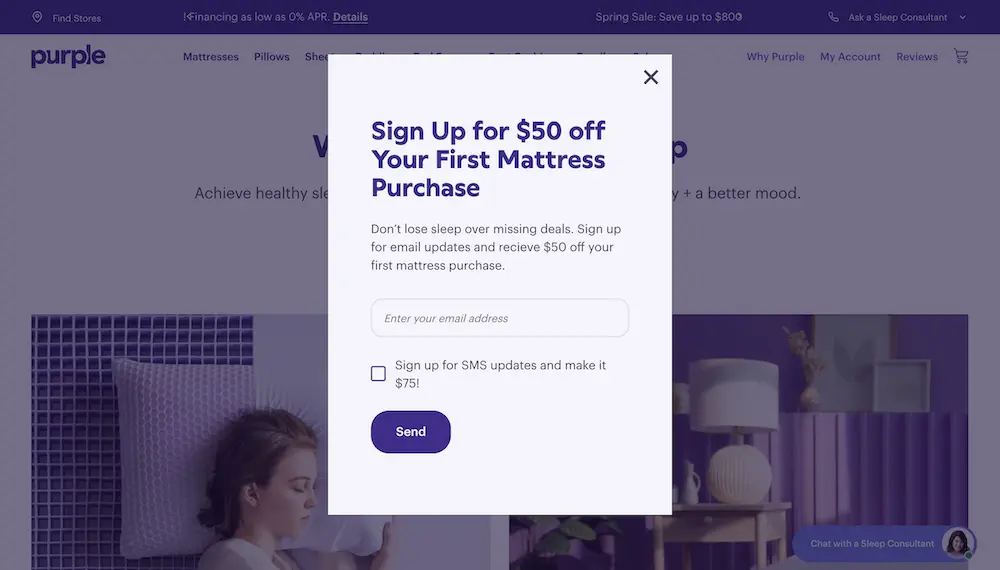
Purple's signup popup puts the reward in the headline and asks for one field, with an optional SMS checkbox (captured April 2026).
Change one thing at a time and test each change for at least 14 days before drawing conclusions. Check out these 13 opt-in page examples for more layout inspiration.
3. Lead Magnets: Trade Value for Email Addresses
A lead magnet is a free resource you offer in exchange for someone's email address. It can be an ebook, checklist, template, free tool trial, webinar recording, or discount code. What separates it from a generic "subscribe to our newsletter" pitch is specificity: a lead magnet solves one concrete problem for one specific audience segment.
The lead magnet types that work for most businesses:
- Checklists and cheat sheets
- Templates and swipe files
- Ebooks and guides
- Original reports and survey data
- Quizzes with personalized results
- Short email courses
- Webinar recordings
- Free tools and calculators
- Discount codes or free shipping, for online stores
- Free trials and demos, for software
How to implement lead magnets
First step this week: turn your most-read blog post into a one-page checklist and offer it on that post.
1. Pick a topic your audience already searches for. Use Google Search Console or your blog analytics to find your top-performing posts, then create a downloadable version that goes deeper
2. Match the magnet to the page context. A blog post about A/B testing should offer an A/B testing checklist, not a generic marketing guide
3. Keep the magnet easy to consume: a one-page checklist or template is quicker to deliver and quicker to use than a 40-page ebook
4. Deliver the magnet instantly via automated email (set this up in your ESP's welcome sequence)
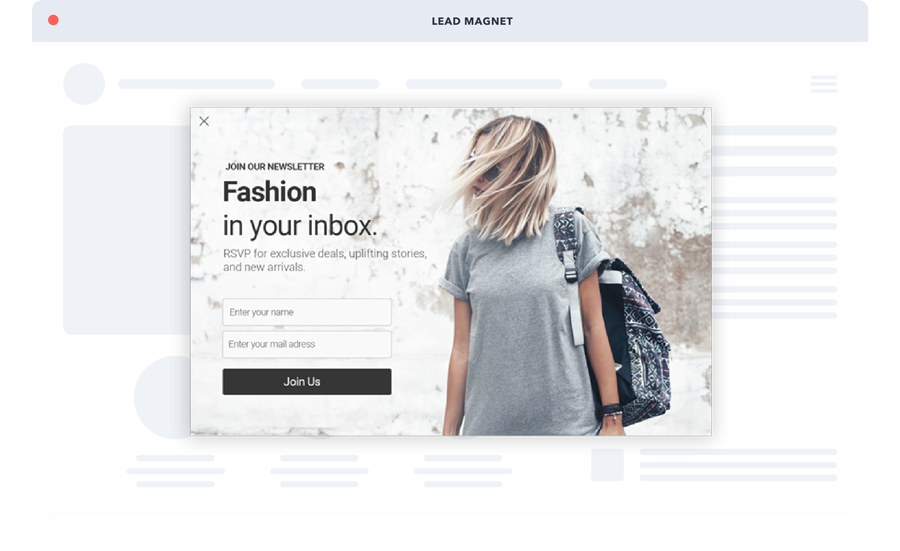
Even a newsletter popup works as a lead magnet when it names what subscribers get: here, exclusive deals and new arrivals.
Where you offer the magnet matters as much as what it is: on the post it extends, in a popup on that post, or on its own landing page. If you're putting the whole resource behind a form, read the gated content section below first.
Gated content: definition, when to gate, and examples
Gated content is a resource, such as a report, template, course or tool, that visitors can open only after they fill in a form, usually with their email address. It's a lead magnet with the price made explicit: the visitor pays with contact details.
When to gate content and when not to
Gate a resource when it's worth an email to the people you want on your list (original data, a template that saves hours, a course), when the landing page already gets traffic, and when a welcome email is ready to deliver it.
Don't gate it when the page is meant to rank in search or earn links. Search engines index the landing page, not the file behind the form, so the gated material itself earns no search traffic. Don't gate basic information that's free elsewhere either, or anything you have no follow-up for. The middle path is a partial gate: publish enough of the resource on the page to rank and to prove its value, then gate the full version.
Gated content landing page examples
1. HubSpot's 2026 State of Marketing Report. The report's landing page lays out its three sections, shares a few headline findings and a quote from a HubSpot marketing executive, and only then asks for first name, last name, email, website URL and company size (checked October 2026). The page sells the report before the form asks for anything.
2. Salesforce's State of Marketing report (tenth edition). A partial gate: the report page publishes the opening chapters, charts included, and tells readers "You're only seeing 20% of the report." (checked October 2026). The preview sits on the page itself, so search engines can read it while the full report collects leads.
3. A content upgrade in a popup. Instead of a separate landing page, the offer appears in a popup on the blog post it extends: a checklist on a how-to post, a template on an examples post. The gate is the popup's email field. These ebook popup examples show how brands word that offer.
4. Signup popups and exit intent: catch visitors before they leave
A signup popup is a window that appears over the page and asks the visitor for an email address, usually in exchange for a discount or a lead magnet. Exit intent is one way to time it: on desktop, exit-intent popups trigger when a visitor's cursor moves toward the browser's close button or address bar, detected via JavaScript's mouseleave event on the document boundary. Unlike timed popups that interrupt regardless of engagement, exit-intent fires only at the moment of abandonment. You're not disrupting the reading experience, you're catching people who were already gone.
Popupsmart builds the popup, collects the address and passes it to your email platform (Mailchimp, Klaviyo, MailerLite, Brevo, HubSpot and the other tools listed under Popupsmart integrations). It doesn't send the emails itself; your email platform does.
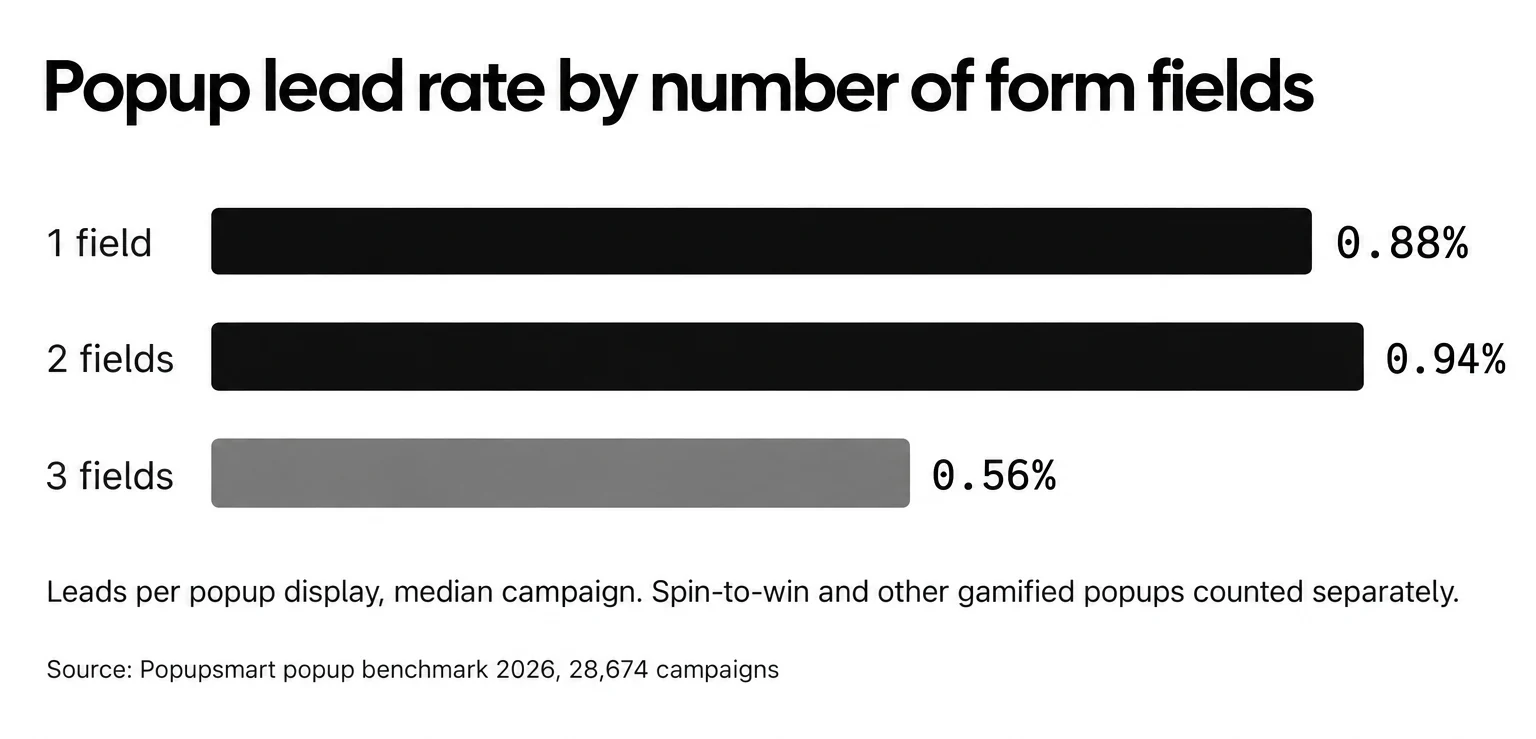
Field count shows up in the numbers, measured in popups by Popupsmart's 2026 benchmark. Popups asking for one or two fields convert 0.88% and 0.94%, against 0.56% for three fields (median campaign; spin-to-win and other gamified popups are counted separately). So does the offer in popups: signup popups that offer a discount code convert 1.46% vs 0.75% for signup popups without one. These discount popup examples show how stores word the offer.
Test exit intent; don't assume it. In the same benchmark, exit intent shows no statistically reliable advantage: popups on the most sensitive exit-intent setting converted 1.10% vs 0.78% without exit intent (median campaign), a gap that could be chance. The settings and the data behind that are in do exit-intent popups work.
How to implement a signup popup
First step this week: launch one signup popup with an email field and a clear offer on your highest-traffic page.
1. Create a campaign in Popupsmart with exit-intent targeting (or a short delay) from a signup template, and keep the form to one or two fields
2. Offer a lead magnet, not a newsletter signup. "Download our 2026 Email Growth Checklist" tells the visitor what they get; "Subscribe to updates" doesn't
3. Target returning visitors separately from first-time visitors. New visitors convert on popups more often than visitors who were on the site in the previous 7 days: the same popup converts better for new visitors in 75% of campaigns (median gap 0.30 percentage points; pooled 1.28% vs 0.54% of displays)
4. Set frequency capping per visitor per 7 days. The first two times a visitor sees a popup in a week convert at similar rates (1.33% and 1.22% of displays, pooled); from the third view conversion falls, and from the sixth view it is 0.41%, 31% of the first-view rate
5. For mobile, use scroll-depth triggers (70%+ scroll) or Popupsmart's mobile exit intent, which reads a fast upward scroll, since mobile browsers don't support cursor tracking
5. Gamification Campaigns: Make Email Capture Interactive
Gamification applies game mechanics (spin-to-win wheels, scratch cards, surprise boxes, countdown timers) to the email capture process. Instead of a static form, visitors interact with a game element and submit their email to receive a reward. The idea is that "playing" creates reciprocity: people feel they've earned something, which makes them more willing to share their email.
Popupsmart's 2026 benchmark shows where that holds and where it doesn't, measured in popups. Spin-to-win and other gamified popups get far more clicks (7.33% vs 1.87% of displays, median campaign; the spin itself counts as a click), but do not collect measurably more email or phone leads than plain signup popups. The wheel popups guide shows the setups and the data in detail.
How to implement a gamified popup
First step this week: test a spin-to-win popup on one product page against your plain signup popup.
1. Set up a spin-to-win popup using Popupsmart, configure prize segments with varying discounts (5% off, 10% off, free shipping, bonus content)
2. Make at least 60-70% of prizes valuable enough to feel like a real win. If most segments are "Try again," engagement drops sharply
3. Require an email address before the spin, not after, so every play that ends in a prize adds a subscriber
4. Show the prize code in the popup, and send the prize code immediately via automated email from your email platform so it's in the inbox when they're ready to buy
5. Limit gamified popups to specific pages (product pages, cart pages) rather than site-wide to avoid cheapening your brand
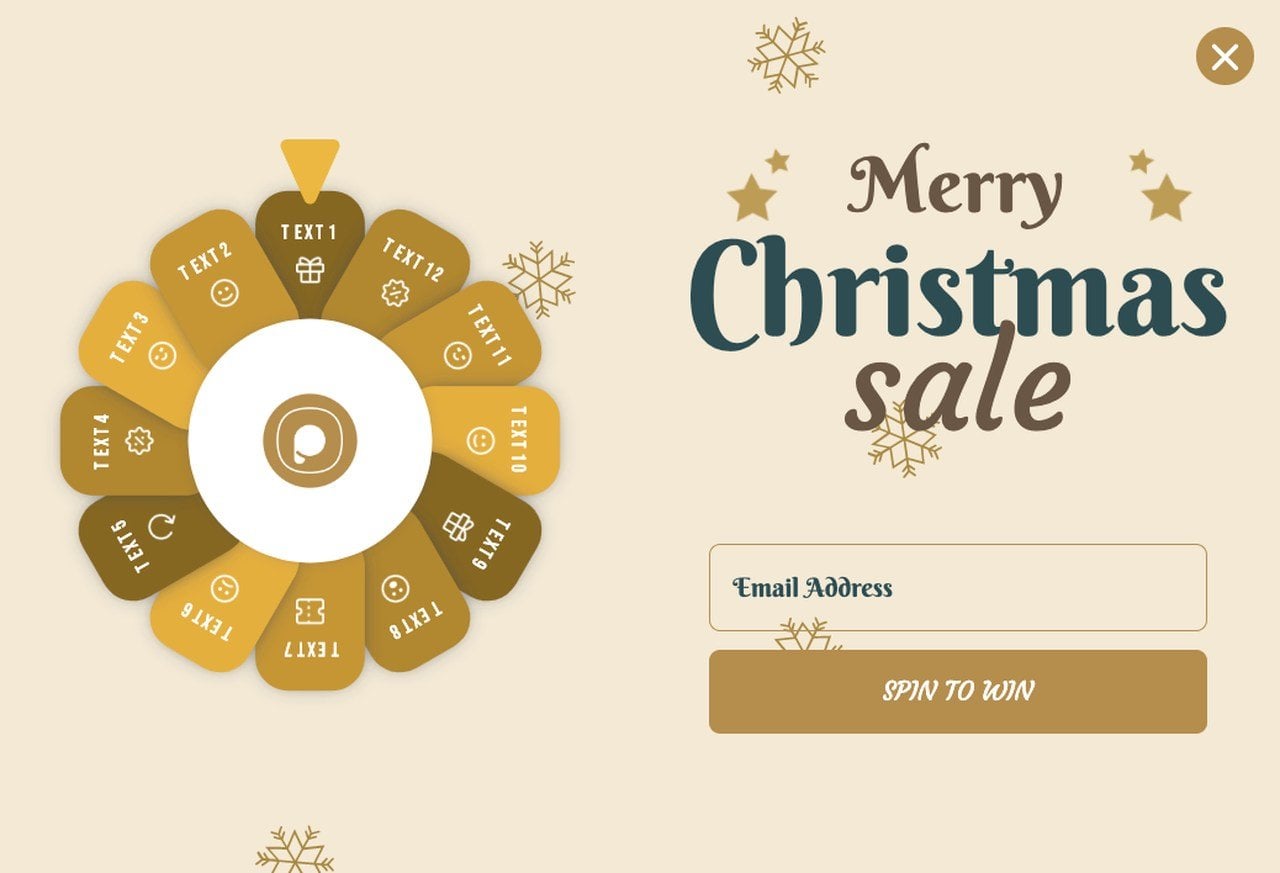
A spin-to-win wheel draws the clicks; the email field before the spin is what builds the list.
6. Email Sending Frequency: Reduce Unsubscribes by Finding the Right Rhythm
Sending frequency is the cadence at which you email your subscribers: daily, weekly, biweekly, or monthly. Get it wrong in either direction and you'll lose people. Send too often and subscribers hit "unsubscribe" or mark you as spam. Send too rarely and they forget who you are, which tanks open rates when you do finally show up in their inbox.
How to implement a sending schedule
First step this week: pick one fixed send day and put your next four sends on a calendar.
1. Start with one email per week for the first 60 days while you measure engagement patterns
2. Segment by engagement: subscribers who open every email can receive 2-3x weekly; those who open once a month should get monthly digests
3. Let subscribers choose their frequency during signup or via a preference center link in your email footer
4. Monitor your unsubscribe rate per send and compare it with your own recent sends. A jump right after you add a send means you've gone past what your audience wants
5. Test send times using your ESP's analytics rather than borrowing a "best day" from someone else's audience
7. Mobile-Responsive Emails: Capture the Audience Where They Read
Mobile-responsive emails automatically adjust layout, font size, images, and button targets to look correct on any screen size. A lot of email is read on a phone, and an email that renders poorly there gets deleted rather than read. Your opt-in forms, landing pages, and email templates all need to work on a 375px-wide screen.
How to implement mobile-responsive emails
First step this week: send your latest email to your own phone and fix whatever breaks.
1. Use a single-column layout for email campaigns: multi-column layouts break on most mobile clients
2. Set minimum button tap targets to 44x44 points (the default control size for iOS in Apple's Human Interface Guidelines) so a thumb can hit them
3. Preview every email in the mail apps your subscribers use most before sending; your ESP's reports show which ones they are
4. Put the important words at the start of the subject line, since phone inboxes cut long subject lines short
5. Test your landing pages on mobile too: a mobile-responsive email that links to a desktop-only landing page kills conversions
If your emails aren't mobile-responsive today, fix this before doing anything else. It's one of the lowest-effort changes on this list.
8. Email Marketing Software: Automate List Growth With the Right Tools
Email marketing software handles subscriber management, campaign design, automation sequences, segmentation, and analytics. The right tool depends on your list size, budget, and integration needs. The wrong tool creates friction that slows list growth because you're fighting the interface instead of optimizing campaigns.
How to choose and set up email marketing software
First step this week: pick a free plan, connect it to your signup form, and send yourself a test welcome email.
1. For your first 250 subscribers, a free plan is enough. MailerLite's Free plan covers up to 250 subscribers, 2,500 emails a month, 3 automations and 1 landing page, and Mailchimp's Free plan stops at 250 contacts (both checked October 2026)
2. When you outgrow a free plan, compare paid plans on contact limits and automation rather than template counts
3. Integrate your ESP with your popup tool, Popupsmart connects directly with major email platforms (Mailchimp, Klaviyo, MailerLite, Brevo and HubSpot among them), so new popup subscribers automatically enter the right list segment
4. Set up a 3-email welcome sequence immediately: Email 1 delivers the lead magnet, Email 2 introduces your brand story, Email 3 offers a soft CTA
In MailerLite's May 2024 case study collection, the appliance store Fridja presold 25% of a new product's initial stock by opening preorders through its newsletter a month before release. That kind of result depends on having software that lets you segment, automate, and personalize at scale, and a list to use it on.
9. Social Media List Building: Convert Followers Into Email Subscribers
Social media list building uses your existing followers on platforms like Facebook, LinkedIn, X (Twitter), and YouTube to drive email signups. The core problem with social media is that you don't own your audience. An algorithm change or an account suspension can wipe out years of follower growth overnight. Email gives you a direct, owned communication channel that no platform can take away.
How to implement social media list building
First step this week: put your signup link in every profile bio and pin one post that offers your lead magnet.
1. Add a signup link to your Instagram, LinkedIn, and X bios pointing to a dedicated landing page with a lead magnet
2. Run Facebook Lead Ads targeting your existing followers and lookalike audiences. The form opens inside Facebook or Instagram, so people sign up without leaving the app
3. Host LinkedIn Live sessions or X Spaces on topics your audience cares about, then share a post-session resource download that requires an email
4. Pin a tweet or LinkedIn post with your lead magnet link at the top of your profile
5. Use gated content on your site: promote the teaser on social, require email for the full version
Social media channels provide warm audiences ready to convert into email subscribers.
The key is treating social media as a feeder channel, not the destination.
10. Blog-Driven List Growth: Turn Readers Into Email Leads
Blog-driven list growth means using your existing blog content as the primary acquisition channel for new email subscribers. Since blog visitors already have intent (they searched for and clicked on your content), they're warmer leads than cold social traffic. The strategy is to place contextually relevant opt-in offers within and around your highest-traffic posts.
How to implement blog-driven list growth
First step this week: add an inline form after the second H2 of your three most-read posts.
1. Identify your top 10 blog posts by organic traffic using Google Analytics or Search Console
2. Create content-specific upgrades for each: if the post is about email subject lines, offer a swipe file of 50 subject line templates
3. Embed inline opt-in forms after the second or third H2. Mid-content forms catch readers while they're most engaged
4. Offer blog posts in PDF format behind an email gate for readers who want to save the content
5. Add a well-timed email capture popup that triggers after 60% scroll depth. It reaches readers who stayed, not the ones who bounced
Content upgrades work because the offer matches what the reader came to the post for.
11. Offline List Building: Capture Emails Beyond Your Website
Offline list building captures email addresses through physical interactions: trade shows, conferences, in-store signups, product packaging inserts, and print advertising. While digital marketers often overlook this channel, it's particularly effective for businesses with a physical presence or those attending industry events where face-to-face trust accelerates the opt-in decision.
How to implement offline list building
First step this week: print a QR code that links to your signup page and put it on your counter, packaging or business cards.
1. At events and trade shows, use a tablet with a simple signup form (Google Forms works; your ESP's mobile app is better). Offer a prize drawing entry in exchange for email opt-in
2. For physical product shipments, include a card inside the package: "Scan this QR code for 15% off your next order" linking to a landing page with email capture
3. Add a signup URL or QR code to business cards, brochures, menus, and receipts
4. At checkout counters, ask "Can we email you your receipt?" It's natural, useful, and non-pushy, as long as you ask separately before adding the address to your marketing list
5. Run direct mail campaigns to existing customers who haven't signed up for your email list, offering a digital-exclusive benefit
The downside is scale: you won't collect thousands of emails at a single event. Start tracking offline-to-online conversion within your ESP by tagging the source.
12. Email Segmentation: Send the Right Message to the Right Person
Email segmentation splits your subscriber list into smaller groups based on shared characteristics: demographics, behavior, purchase history, engagement level, or signup source. Instead of blasting the same email to everyone, you send tailored messages that match what each group cares about.
How to implement email segmentation
First step this week: tag every new subscriber with the form or popup they signed up through.
1. Start with three basic segments: new subscribers (joined in last 30 days), active subscribers (opened at least one email in last 60 days), and inactive subscribers (no opens in 90+ days)
2. Create a welcome sequence for new subscribers: 3-5 emails over 14 days that introduce your brand, deliver value, and make a soft offer
3. For e-commerce, add behavioral segments: cart abandoners, repeat buyers, and browse-but-didn't-buy visitors. Use Shopify email list building tactics if you're on that platform
4. Send re-engagement campaigns to inactive subscribers before removing them: "We miss you, here's 20% off" gives them a reason to stay
5. Use progressive profiling: ask one additional question in each email interaction to build richer profiles over time, rather than asking everything upfront
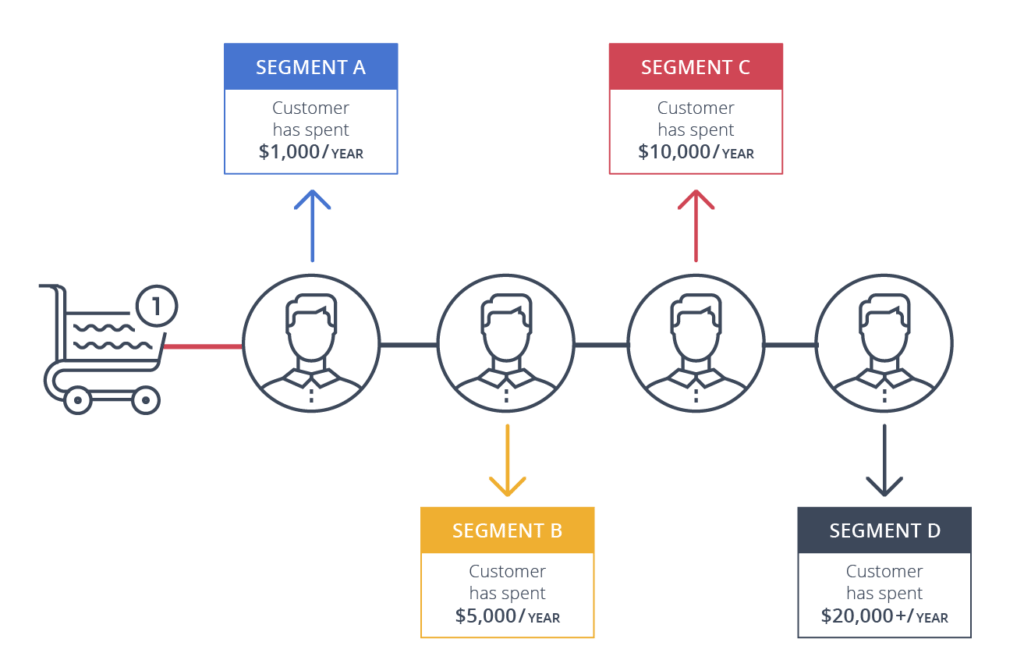
Segments by annual spend are one of the simplest behavioral splits to start with.
You'll see the first differences between segments in your first segmented send: which groups open, which click, and which ignore you.
13. AI-Powered Automation: Scale Email List Management
AI-powered email automation uses machine learning to optimize send times, personalize subject lines, predict subscriber churn, and score leads based on engagement patterns. This goes beyond basic autoresponders: AI tools analyze your subscriber data in real time and make adjustments you'd need a full-time analyst to replicate manually.
How to implement AI-powered automation
First step this week: turn on send-time optimization if your plan includes it.
1. Enable send-time optimization in your ESP (Mailchimp, Brevo, and Klaviyo all offer this). It delivers each email at the time each individual subscriber is most likely to open
2. Use AI subject line generators to A/B test variations at scale. Most tools will test 4-5 versions on a small segment, then send the winner to the rest
3. Set up predictive churn alerts. When AI flags subscribers likely to disengage, trigger a re-engagement sequence automatically
4. Implement lead scoring based on email engagement, website behavior, and signup source. Route high-scoring leads to sales; keep low-scoring leads in nurture sequences
Review AI email list building hacks for platform-specific implementation tips.
Where to Start With Email List Building Methods
Start with methods 1-4 in the ranking at the top. They're low effort, high impact, and work for any business size. Combine an optimized opt-in form (Strategy #2) with signup popups (Strategy #4) and a strong lead magnet (Strategy #3), and you'll have a list growth engine running within a week.
Email list building is an ongoing system, and it compounds. Every subscriber you add today becomes a potential customer for months or years. Start with the basics, measure what works, and layer in more advanced methods as your list grows. If you need a no-code way to get started, create a free Popupsmart account and launch your first email capture popup.
Frequently Asked Questions
What is email list building?
Email list building is the process of collecting email addresses from people who've given you permission to contact them. It involves creating opt-in opportunities across your website, social channels, and offline touchpoints, then nurturing those subscribers with relevant content. A well-built email list is your most valuable owned marketing asset because it gives you direct, algorithm-independent access to your audience. Unlike social followers, email subscribers can't be wiped out by a platform policy change.
How do I grow an email list from scratch?
Start with three things: a lead magnet that solves a specific problem for your target audience, an opt-in form on your website (a popup builder like Popupsmart makes this simple), and an email marketing platform to manage subscribers. Drive traffic to your opt-in form through your existing channels: blog content, social media profiles, and paid ads. Scale from there by adding exit-intent popups and content upgrades.
What is gated content?
Gated content is a resource, such as a report, template, course or tool, that visitors can open only after they fill in a form, usually with their email address. Gate it when the resource is worth an email to the people you want on your list and you have a welcome email ready to deliver it. Don't gate pages you want to rank: search engines index the landing page, not the file behind the form.
What are the best tools for email list building?
For capturing emails, Popupsmart gives you no-code and user-friendly popups, sticky bars, and form targeting without any developer involvement. For managing and emailing your list, MailerLite and Mailchimp both offer free plans for small lists (250 subscribers or contacts each, checked October 2026). For advanced segmentation and e-commerce integration, Klaviyo and Brevo are strong options. The best setup pairs a popup builder with an email service provider (ESP) that integrates directly, so new subscribers flow into the right automation sequences.
How can I build an email list ethically?
Ethical email list building comes down to three principles: get explicit consent before adding anyone, make it easy to unsubscribe, and deliver on what you promised during signup. Never buy email lists, never scrape addresses from websites, and never add someone who didn't actively opt in. Use double opt-in confirmation when possible: it reduces list size slightly, but it filters out fake addresses and gives you a record of each subscriber's consent.