ChatGPT
 Perplexity
 Claude
 Grok
Grok Google AI Mode
It works when the ebook matches the page, the form asks for one or two fields, and the file arrives at once. The popup itself pairs a tightly defined promise with one visible action. The hero headline names the outcome, the ebook cover proves the asset exists, the CTA uses a verb the reader wants to perform, and the form asks for as little as possible. Everything else, including trust signals and GDPR copy, sits in supporting roles. The 8 ebook popup examples below, written for SaaS and B2B sites, blogs, agencies and online stores, show what a working opt-in looks like right now, and the sections around them cover what the popup needs and how the file reaches the reader.
What Are Ebook Popups and Why Do They Work in 2026?
An ebook popup is a small overlay that offers a visitor a downloadable asset, usually a PDF guide, playbook, or checklist, in exchange for an email address. The ebook is the lead magnet, and the address it collects is the lead. Unlike discount popups, which trade money for an address, ebook popups trade knowledge. That's why they pull a different audience: readers who already want to learn something, not shoppers hunting for a code.
The format works because three ingredients land at the same time. The visitor has context (they are reading about a topic), the offer has specificity (a guide on that same topic), and the friction is low (one or two fields, one click). You are not asking strangers to commit; you are asking researchers to swap an address for a resource they would have googled anyway.
2026 has made ebook popups sharper rather than obsolete. AI-generated blog content has flooded search, which means original research, benchmarks, and playbooks carry more weight as lead magnets than generic tips. Pair that kind of asset with a well-targeted popup, and you get cleaner leads than a generic newsletter signup ever delivered.
You'll get fewer total signups. The leads you do get arrive with context your sales team can use.
When to offer an ebook in a popup
An ebook is the right offer when your visitors are researching, not buying, and when you have a document that answers the question they came with. That makes it a natural fit for B2B software, agencies, courses and any site whose blog carries most of the traffic. For more B2B patterns, including demo and webinar offers, see our B2B popup examples.
Use this quick test before you design anything:
| Your situation | Better offer | Why |
|---|---|---|
| Visitors read how-to or comparison content | Ebook, playbook or checklist | They want the next step on the same topic |
| Visitors browse products and prices | Discount or free shipping | They are closer to buying than to learning |
| You sell a considered B2B product | Ebook, template or research report | The lead needs education before a sales call |
| Traffic comes from many unrelated topics | Several topic-matched ebooks | One generic guide fits none of them well |
| You have no finished document yet | A newsletter signup | A thin PDF costs you the subscriber after the first email |
For a B2B ebook, that second number matters: a desktop signup is about twice as likely as a phone signup to come from a business or other non-consumer domain. That doesn't mean most work emails come from desktop, since 63% of popup displays happen on mobile. Label the field "Work email", and don't be surprised when mobile signups skew personal.
Benefits of Ebook Popups
The case for ebook popups has little to do with beating a sitewide discount bar on volume. They convert the right visitors. Three points explain why the format suits B2B SaaS teams and content-heavy sites.
First, the baseline. Popupsmart's 2026 popup benchmark covers 28,674 campaigns from 11,533 businesses that ran a popup with Popupsmart between January 2024 and September 2026. Across the 3,034 popups that ask for an email or phone number, the median converts 0.83% of its displays into leads; the top 25% reach 1.96% and the top 10% reach 3.87%. Those are rates per popup display, not per visitor, and they are the fair yardstick for any lead popup, ebook offers included.
Second, the page decides a lot. Popups on cart and checkout pages convert 4.57% vs 1.07% on the home page (median campaign); blog pages convert 0.23%. Most ebook popups live on blog pages, so expect a lower rate than a checkout popup and judge the campaign by what its leads do next. That is also why we suggest page-level targeting instead of sitewide firing.
Third, lead quality. A visitor who downloads your "Shopify Tax Playbook" has self-identified as a Shopify merchant with tax questions. That context carries forward into every email, sales call, and ad retarget. The lead is pre-qualified, which is something a 30% discount popup will never do for you.
Here is what the benchmark says about the choices an ebook popup makes:
| Choice | What Popupsmart's 2026 benchmark found |
|---|---|
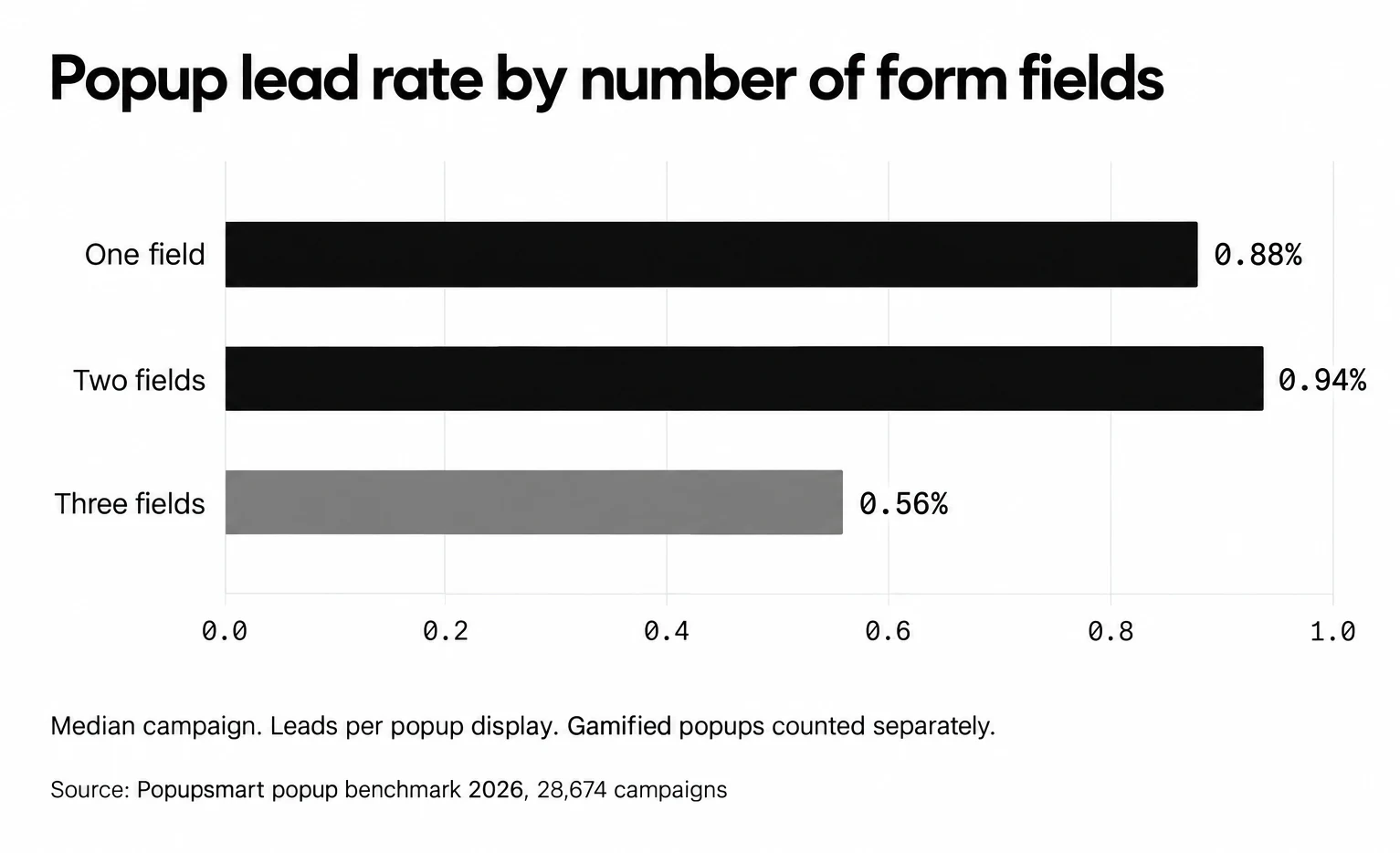
| Form length | Popups asking for one or two fields convert 0.88% and 0.94%, against 0.56% for three fields (median campaign; gamified popups counted separately) |
| Button wording | First-person buttons ("Send my code") convert 1.18% vs 0.80% for neutral wording (English popups, median campaign) |
| Timing | Popups that wait before appearing convert 0.83% vs 0.61% for popups shown the instant the page loads (median campaign); a lean, not a rule |
| Audience | Popups targeted at new visitors only convert 1.13% vs 0.77% for popups shown to everyone |
| Device | Mobile visitors convert on popups at 1.02% vs 0.57% on desktop (median campaign) |
The catch: ebook popups need an asset worth downloading. If your PDF is thin, visitors will unsubscribe after the first email. The format rewards real research, not recycled blog posts stapled into a cover.
Key Design Elements of a High-Converting Ebook Popup
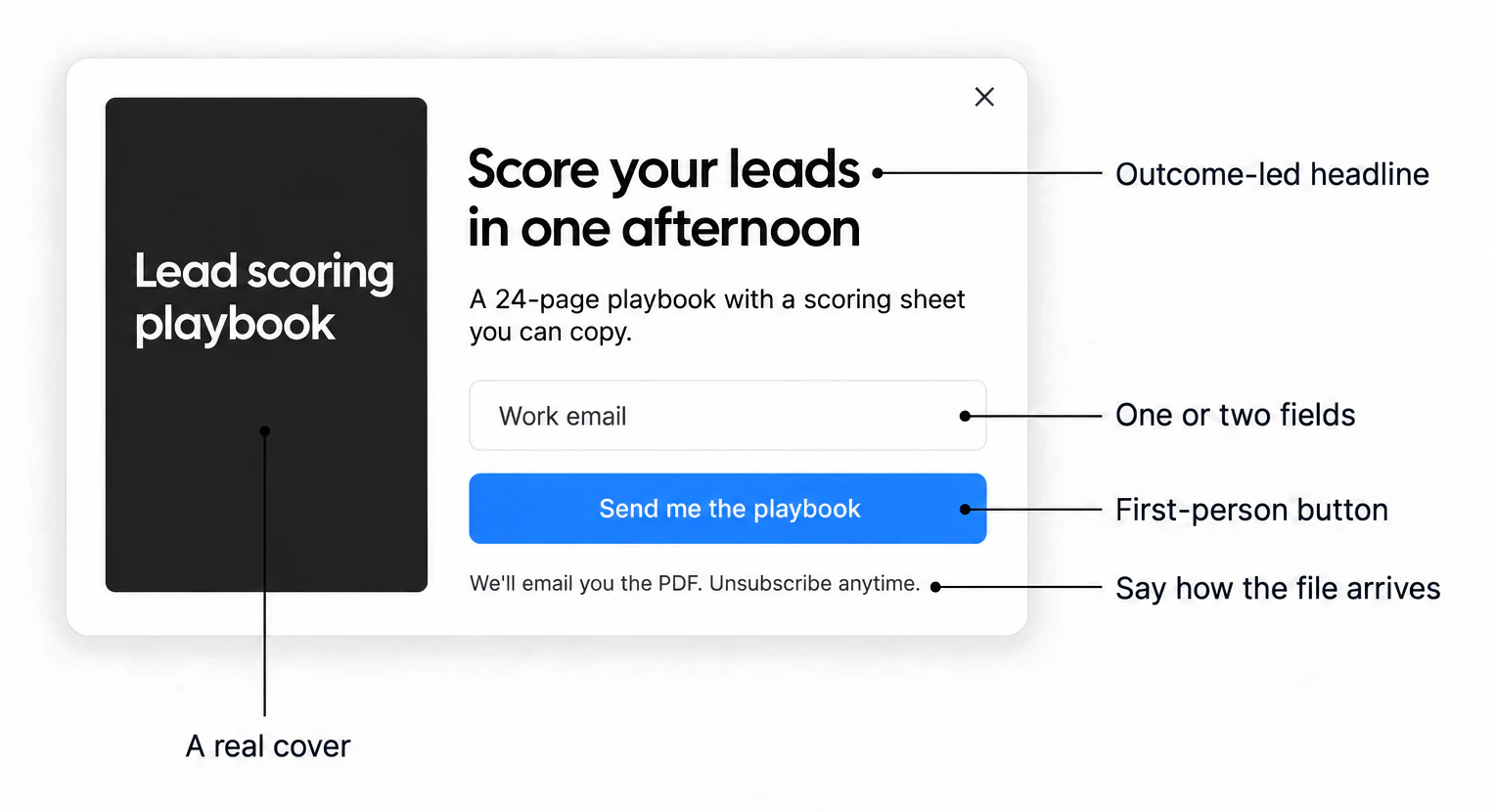
The popups that work keep showing six design elements in roughly the same arrangement. Miss one, and conversion starts leaking.
1. Hero Headline: A seven-to-ten word promise that names the outcome, not the format. "Rank on Page One in 90 Days" beats "Free SEO Ebook." The reader cares about the result, not the file type.
2. Value Proposition: Two lines underneath the headline that spell out who the ebook is for and what they will learn. Skip adjectives. "42 page breakdown with Shopify checkout templates you can paste in" works because it lists the assets.
3. Single CTA: One button, one verb, high-contrast color. "Download the Playbook" pulls more clicks than "Submit." Wording is worth more of your attention than colour: in our benchmark, first-person buttons ("Send my code") convert 1.18% vs 0.80% for neutral wording (English popups, median campaign), so "Send me the playbook" is a good default. If you add a secondary "maybe later" link, you give the visitor permission to leave. Don't.
4. Ebook Cover Visual: A small 3D-mockup or flat cover image proves the asset is real. A popup without a visible cover reads like a newsletter trap. The cover does not need to be beautiful; it needs to look like a finished document.
5. Trust Signal: One specific line that reduces perceived risk. "Used by 4,200 Shopify stores" or "No spam, unsubscribe in one click." Vague trust badges hurt more than they help because they read as generic. A line that says how the file arrives ("We'll email you the PDF") answers the visitor's next question before they ask it.
6. Frictionless Form: One or two fields. Email alone is the safe default; add a name only if your follow-up emails use it, because our data shows no reliable effect either way (more in the mistakes section below). Skip company and phone. If you need enrichment data, collect it through a post-download email, not the popup itself. Our guide to building a popup form walks through field setup step by step.
How to create an ebook popup and deliver the file
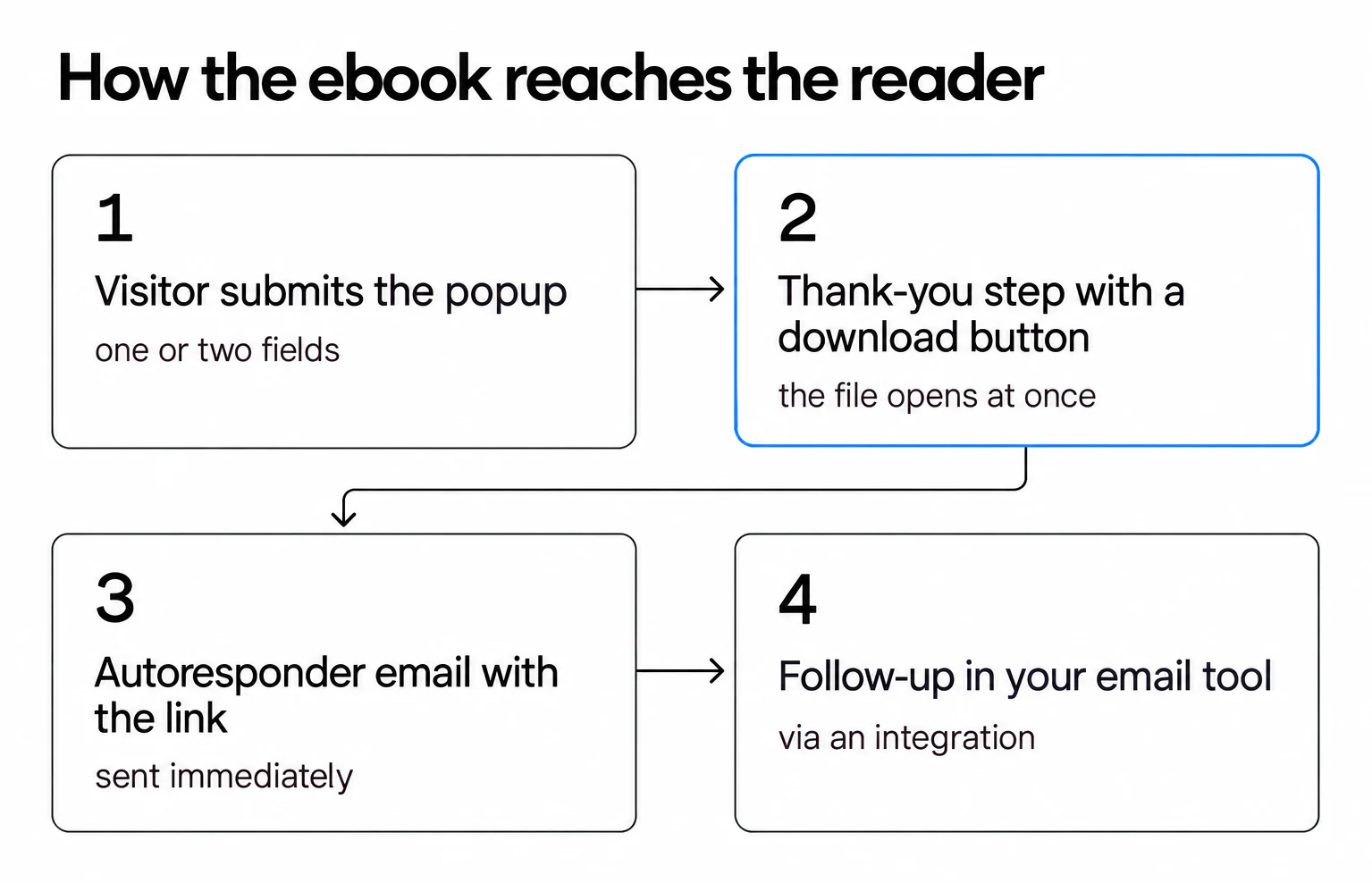
The popup is only the front door. What happens in the next ten seconds, and the next ten minutes, decides whether the reader remembers you. Here is the build in Popupsmart, from template to delivery. Host the PDF somewhere with a stable link first (your own site or a file storage link you control), because every delivery method below points to that URL.
1. Start from a template. Pick an email-capture layout from the popup templates library and replace the image with your ebook cover.
2. Write the offer. An outcome-led headline, one line on what's inside, one or two fields and a first-person button, as in the example above.
3. Add a thank-you step with a download button. In Popupsmart, a form button can send the visitor to another step of the popup. On that step, add a Button element and give it the Go to the URL Address action with your PDF's link (which elements you can add). The reader gets the file the moment they sign up.
4. Turn on the Email Autoresponder. In the popup's Publish step, switch on Email Autoresponder, set Send email after to 0 minutes, and put the download link on the email's call-to-action button (how the autoresponder works). Popupsmart sends it without an external email tool, and every autoresponder email carries an unsubscribe link and your privacy policy in its footer. Send yourself a test email before you publish.
5. Connect your email tool for the follow-up. The autoresponder sends one email per signup. The nurture sequence that follows belongs in your email platform or CRM, so connect it through one of Popupsmart's integrations, such as Mailchimp, HubSpot or Klaviyo.
6. Target and publish. Choose the pages, the trigger and the audience (the examples below show which trigger fits which situation), then publish.
| Delivery method | What the reader gets | When to use it |
|---|---|---|
| Thank-you step with a download button | The file at once, in the same tab or a new one | Always: it's the fastest path to the file |
| Autoresponder email with the link | The file in their inbox, to open later | Always, as a backup: many readers download later, on another device |
| Sequence in your email tool | Follow-up resources and a sales-ready CTA | When the ebook is the start of a nurture flow |
8 Ebook Popup Examples
These eight popup types (exit-intent, time-delayed, scroll-activated, contextual, slide-in, button-click, multi-step and countdown) cover the full range of ebook-capture triggers. Each one answers a different question: when should the popup appear, and why will the visitor respond? The examples are patterns, described as a business might use them: a running brand, a SaaS help center, a marketing agency, a tech blog, a fashion retailer, a productivity tool and an app launch. Example 4 also names a real customer, RP Strength, from its Popupsmart customer story. Where our benchmark covers the trigger, the numbers come from it. The screenshots are Popupsmart templates, which you can adapt to an ebook offer. Look past the screenshots. The lesson is in the trigger logic and the copy discipline.
| # | Pattern | Trigger | Example offer | Fields | Best for |
|---|---|---|---|---|---|
| 1 | Exit-intent last chance | Cursor heads for the tab bar | A running brand's marathon-training ebook | Readers leaving a related article | |
| 2 | Time-delayed engagement | A few seconds on the page | A SaaS ebook on getting more out of the software | Long-form posts and help articles | |
| 3 | Scroll-activated overlay | A scroll depth, such as 50% | An agency's "Growth Hacking Playbook" | Readers who are mid-article | |
| 4 | Contextual page match | Page URL or category | A tech blog's SEO ebook on SEO pages, analytics ebook on analytics pages | Sites with several topics and several ebooks | |
| 5 | Slide-in style guide | Corner slide-in | A fashion retailer's seasonal style guide | Pages where a modal would block sales | |
| 6 | Button-click opt-in | Visitor clicks a link or button | A SaaS product ebook at the end of a tutorial | High-intent content and pricing pages | |
| 7 | Multi-step checklist | A first question, then the form | A productivity tool's planning ebook, after a three-checkbox quiz | Quiz answer, then email | Segmenting readers before the ask |
| 8 | Countdown timer | A real deadline | An app startup's "Product Launch Strategies" ebook before launch day | Launches and webinars |
1. Exit-Intent Last Chance: The Final-Click Capture
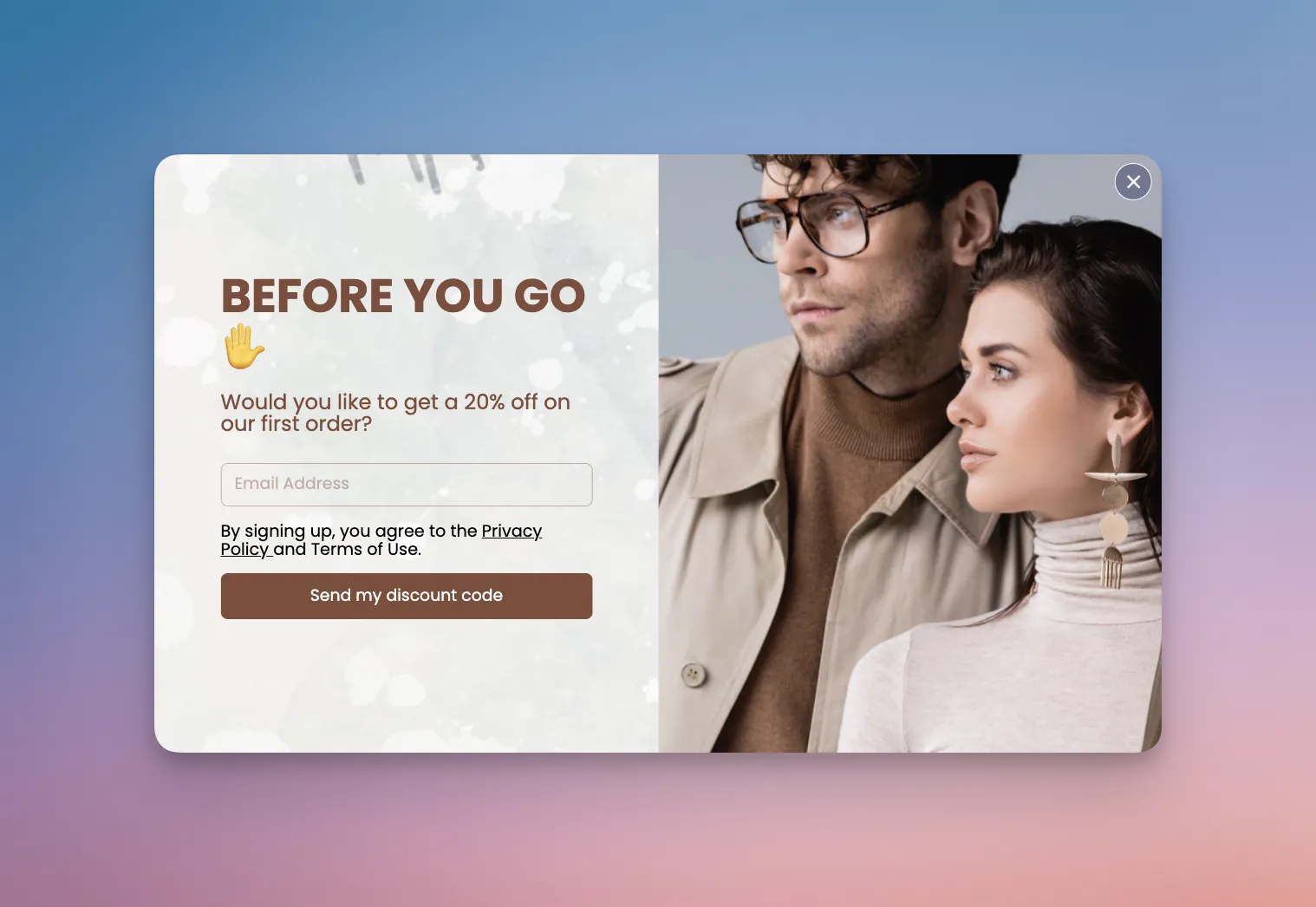
Exit-intent popups fire the moment a visitor's cursor signals they're about to close the tab. Picture a running brand wrapping a marathon-training ebook inside this trigger: a single promise, a plain email field and a cover mockup of the asset, shown to people who just read an article about marathon pacing.
Trigger match does the work here. Visitors who read an article about marathon pacing and then reach for the close tab have already shown topical intent; the popup hands them the next logical asset on their way out. Keep the expectation honest, though: in Popupsmart's 2026 benchmark, exit intent shows no statistically reliable advantage. Popups on the most sensitive exit-intent setting converted 1.10% vs 0.78% without exit intent (median campaign), a gap that could be chance. Set it up with exit-intent targeting.
Key takeaway: Exit-intent is the right trigger when the visitor is leaving after reading related content. Don't fire it on a homepage where the reader never engaged. You'll harvest low-intent emails that never open.
2. Time-Delayed Engagement: The Patience-Based Trigger
Time-delayed popups wait a set number of seconds before appearing. The delay itself is a proxy for engagement. A blogging platform might hold a "viral content" ebook back on long-form posts, and a SaaS company might wait on help-center articles before offering an ebook on getting more out of its software.
Why does it work? Selection bias, pointing the right way. Visitors who bounce in the first few seconds never see the popup, so the impression pool skews toward engaged readers. Our data supports waiting, as a lean: popups that wait before appearing convert 0.83% vs 0.61% for popups shown the instant the page loads (median campaign); the direction holds in every year of data but the difference is not statistically reliable. The exact delay length (0–5 seconds vs 21–60 seconds) makes no measurable difference to conversion, so a short wait does the job.
Key takeaway: Use time-delayed popups on content-heavy pages where reading equals interest. Any short delay beats firing on page load; don't spend a test on 5 seconds versus 30.
3. Scroll-Activated Overlay: The Depth-Based Trigger
Scroll-activated popups fire after the visitor crosses a scroll threshold, typically 40 to 60% of the page. A marketing agency could surface a "Growth Hacking Playbook" ebook at the 50% mark on blog posts; a health and wellness site could do the same with an ebook on healthy living tips.
Scroll depth is one of the cleanest intent signals available. Someone who has scrolled past half the article has already put in the reading time, so the popup catches them mid-read. Pair the trigger with a topic-matched ebook (growth article → growth ebook) and the offer reads as the next step, not an interruption. Popupsmart's after-scroll targeting sets the percentage.
Key takeaway: A timer filters for patience; scroll depth filters for engagement. Scroll depth isn't something we've measured, so treat 50% as a starting point and test 40% and 60% variants against it on your own traffic.
4. Contextual Page Match: The Topic-Aware Offer
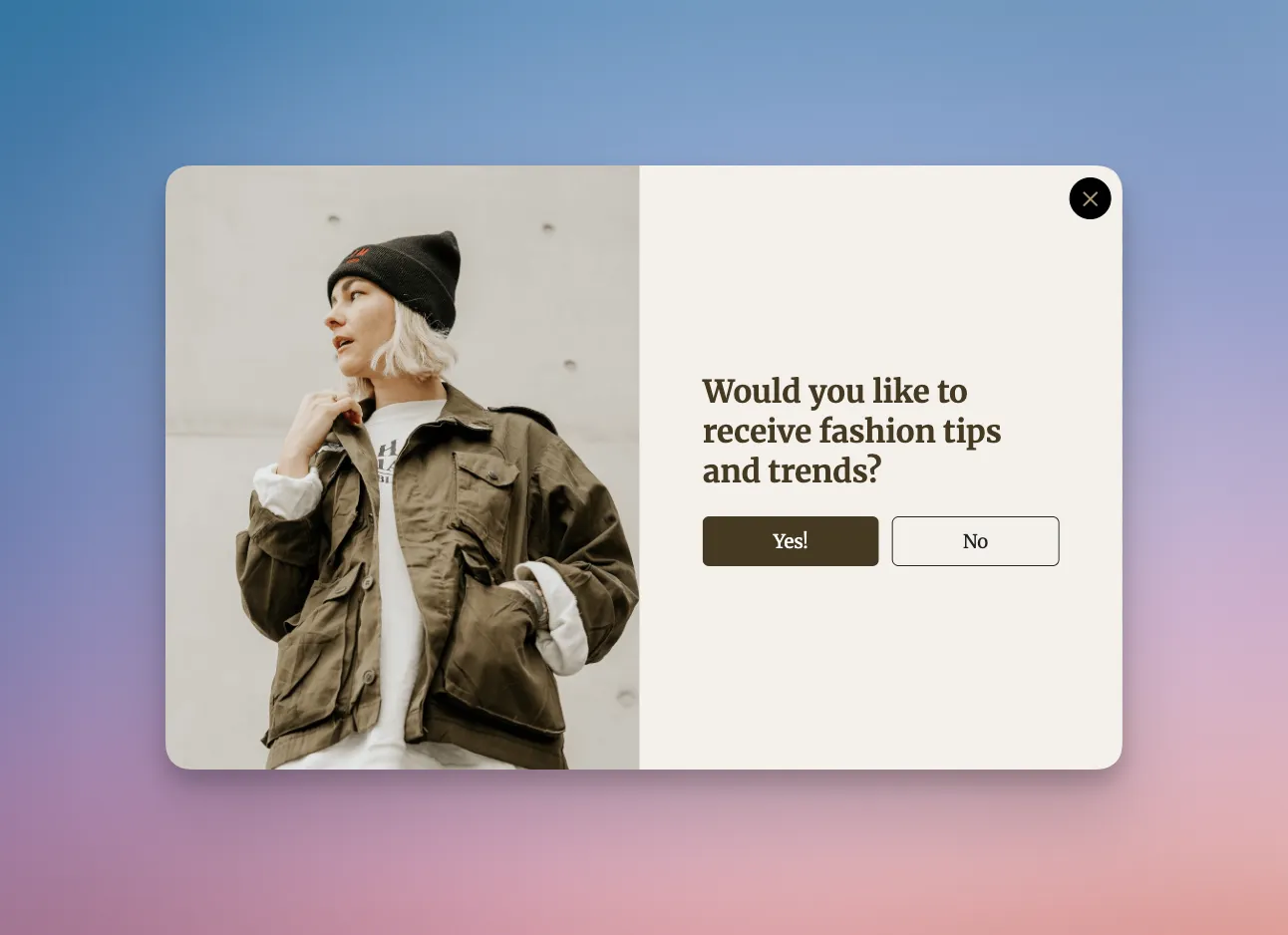
Contextual popups match the ebook to the page the visitor is already reading. A tech blog running this pattern serves one ebook on SEO category pages and a different ebook on analytics pages: same popup template, same layout, different asset. RP Strength, a fitness brand, ran the same idea at scale, according to its Popupsmart customer story: 10+ live campaigns, each targeting different URLs with relevant offers, including a popup promoting a training guide, for 65K+ leads from 1.5M+ popup views.
Notice the headline structure: it names the topic the visitor is already reading. "The 2026 Traffic Playbook" on an SEO post hits differently than "Free Marketing Ebook" would. Careful targeting shows up in our data too: popups set up with three targeting rules convert 1.09% vs 0.71% for popups with none or one (median campaign), a correlation, since marketers who target carefully may also write better offers. Use URL targeting to map each ebook to its pages.
Key takeaway: Build one popup template, then duplicate it per category with a different asset and headline. That's a small amount of extra work for an offer that fits every page it runs on.
5. Slide-In Style Guide: The Non-Intrusive Save
Slide-in popups enter from the corner of the screen instead of taking over the viewport. A mid-market fashion retailer could use one on category pages to offer a seasonal style guide ebook, designed to look like a print lookbook; a travel agency could do the same with an ebook on top destinations.
The lesson is restraint, and it has a price. In Popupsmart's 2026 benchmark, center modal popups convert 0.88% vs 0.49% for corner/slide-in boxes (median campaign). Slide-ins sit in the bottom corner and never block the product grid, so shoppers can keep browsing while the offer waits beside them. Match the popup typography to the site header so it doesn't feel like an ad crashing the experience. The more editorial it reads, the better it fits.
Key takeaway: On e-commerce category pages, a slide-in can be the better trade. You give up some conversion rate, and in return the product grid stays in view and shoppable.
6. Button-Click Trigger: The Self-Selected Opt-In
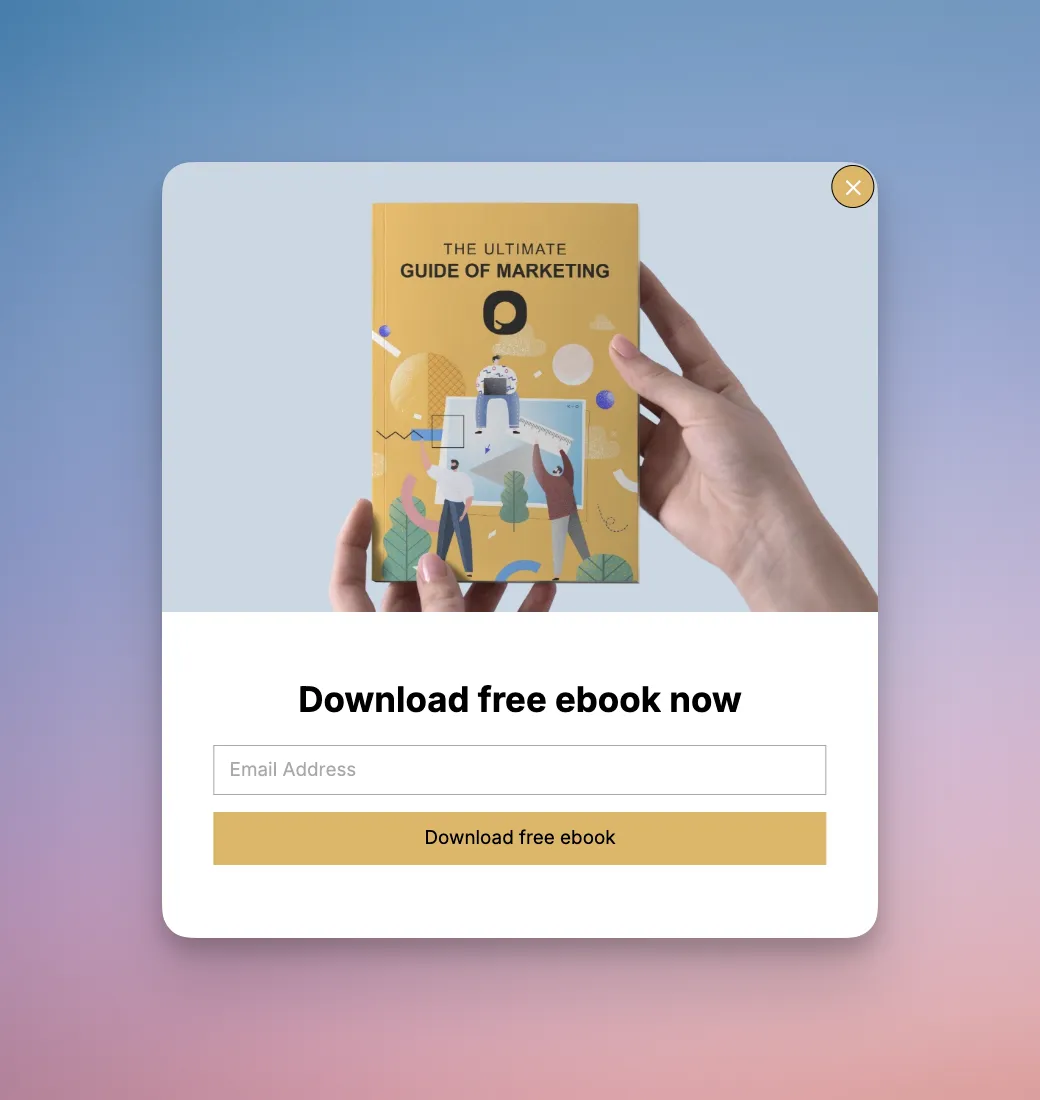
Button-click popups skip the automatic trigger entirely. A SaaS company can embed a "Download Free Ebook" button at the end of its tool-tutorial blog posts; clicking it opens a popup with a detailed ebook on using the product effectively. The opt-in only engages visitors who actively asked for the asset.
The mechanic is pure intent filtering. Everyone who sees the popup has already taken an action to get there, which means impressions skew toward motivated readers. The tradeoff: fewer impressions overall. Pair this trigger with contextual CTAs at the end of high-intent content (how-to guides, comparison posts, pricing FAQs) where asking for the asset is a natural next step. In Popupsmart, on-click targeting gives you a snippet to put on any button, link or image.
Key takeaway: Use button-click popups when you care about lead quality more than quantity. The volume drops, but every email in the list actively chose to be there.
7. Multi-Step Checklist: The Invested-Completion Hook
Multi-step popups break the opt-in into two or more interactions, usually with a low-friction first step and the email form at the end. A productivity platform could run a two-step popup: step one is a quick three-checkbox planning quiz, step two is the email form that gets them the full ebook.
Don't expect the extra step to raise the conversion rate by itself. Popupsmart's 2026 benchmark found that multi-step forms show no measurable conversion advantage over single-step forms once step-1 clicks without contact details are excluded. The first step earns its place in other ways: the answers segment the reader, so the ebook and the follow-up emails can match what they picked. Pair it with tight targeting, such as productivity articles only, and our multistep popups guide covers the setup.
Key takeaway: Use a multi-step popup when the first step collects something you'll use (a quiz answer, a role, a topic), not as a conversion trick. If step one is just "click to continue," you've added friction without adding information.
8. Countdown Timer Build: The Real-Deadline Offer
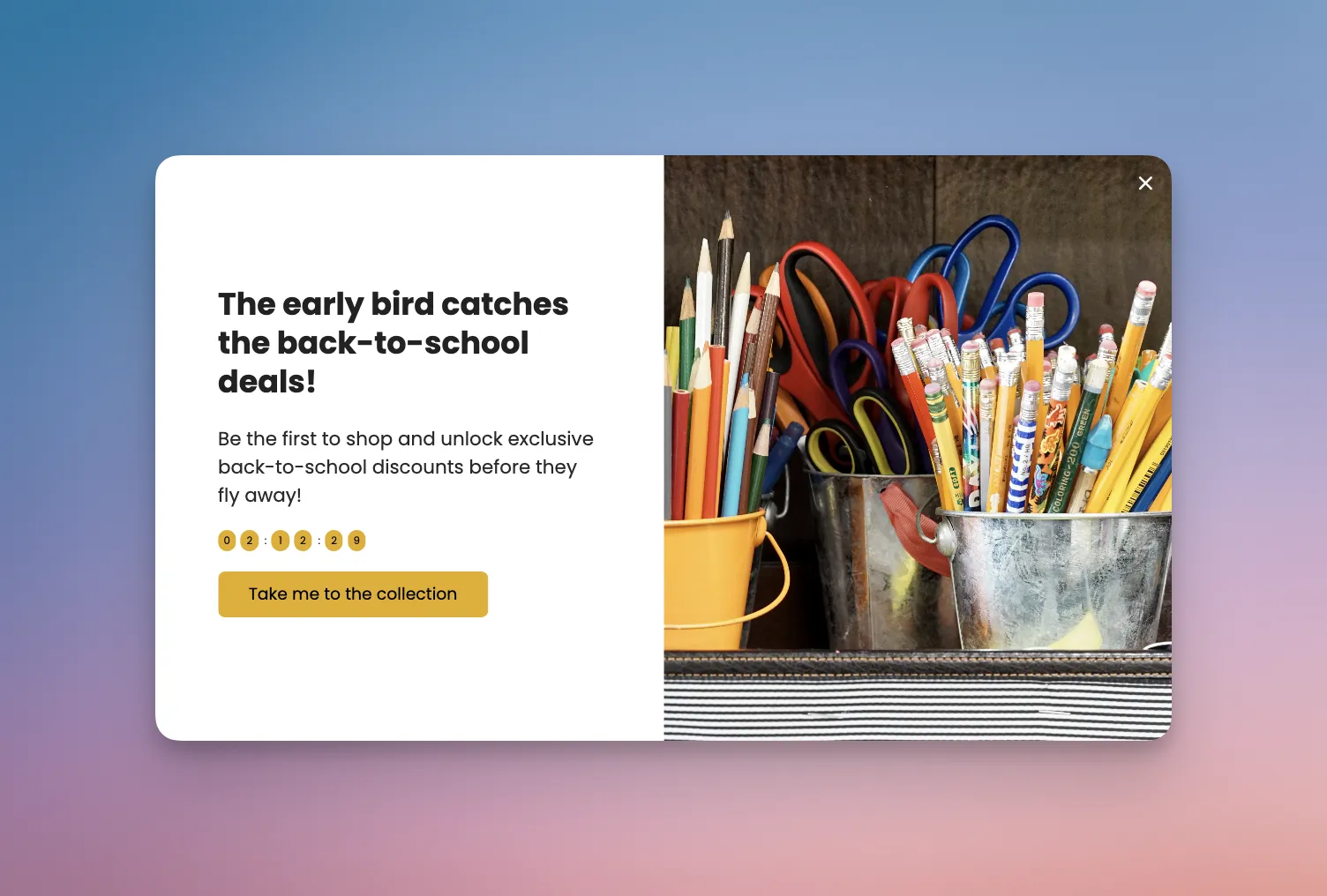
A mobile app startup running a pre-launch campaign could wrap a "Product Launch Strategies" ebook inside a countdown popup. The timer counts down to launch day, and the ebook is only promised to people who join before the clock hits zero.
The mechanic works because the countdown adds a real deadline instead of a fake one. Don't count on urgency to do the converting: in Popupsmart's 2026 benchmark, urgency words show no measurable effect on conversion, and the data are too noisy to rule out modest effects. The deadline's job is to make the offer true and time-bound, which is also why our countdown timer popup examples tie every timer to an actual event.
Key takeaway: Tie countdown popups to a real event: a launch, a webinar, a pricing change. Fake "24-hour offers" that reset every visit erode trust, and returning visitors catch it.
Best Practices for Ebook Popup Optimization
Best practices get repeated so often they lose meaning. These six come with a specific failure mode to avoid, because "optimize for conversion" isn't advice. For the full set, graded against our data, see popup best practices.
1. Fire on intent, not on page load: A popup that appears the instant a visitor lands gets dismissed because the visitor hasn't formed intent yet. A short delay, a scroll depth or an exit-intent trigger catches someone who has started reading. Waiting before showing a popup is a lean in our data (0.83% vs 0.61%, median campaign), not a rule.
2. Match the ebook to the page: If the reader is on a Shopify article, serve a Shopify ebook. A generic "marketing guide" lead magnet asks the reader to imagine why it's relevant; a topic-matched asset doesn't. This is how the 60+ types of popups playbook stays relevant. Different pages earn different assets.
3. Test one variable at a time: Running a headline test and a CTA color test simultaneously poisons both results. Pick one variable, give each variant enough displays to settle, then move on. Popup A/B testing fails more often from messy test design than from weak creative.
4. Cap frequency per visitor: Show the popup once per session, and never more than twice per week to the same visitor. In Popupsmart's 2026 benchmark, the first two times a visitor sees a popup in a week convert at similar rates (1.33% and 1.22% of displays, pooled); from the third view conversion falls, and from the sixth view it is 0.41%, 31% of the first-view rate.
5. Build mobile-first, then adapt: Mobile popups are constrained by screen size and touch targets, and 63% of popup displays happen on mobile. Design the mobile version first, then expand to desktop. You will avoid the classic mistake of a beautiful desktop popup that crushes on a phone.
6. Route leads the same day: An ebook lead that waits 48 hours for a welcome email has already cooled. Automate a same-day delivery email that ships the PDF, and a follow-up three days later that recommends a related resource. Tools for capturing emails from website visitors only matter if you do something with the capture.
A/B Testing Your Ebook Popups
A/B testing ebook popups is where a lot of teams stall out or over-engineer. Test what moves conversion, ignore what doesn't, and commit to a sample size before you start. In Popupsmart, A/B testing is included on the Advanced plan and above (pricing); our guide to A/B testing popups covers the setup.
1. Headline framing: The biggest lever is almost always the headline, right after the offer itself. Test outcome-based ("Rank on Page One in 90 Days") against format-based ("Free 42-Page SEO Ebook"), on your own audience, before you commit.
2. CTA verb: "Send me the playbook" versus "Get Instant Access" versus "Download the Ebook." Start with first-person wording: first-person buttons ("Send my code") convert 1.18% vs 0.80% for neutral wording (English popups, median campaign). Value verbs are a weaker bet: CTA buttons that promise value ("Get", "Claim", "Unlock") look stronger than "Subscribe" / "Join" buttons (1.06% vs 0.77%, English popups, median campaign), but the gap is not statistically reliable. Keep the button readable, too: WCAG's contrast minimum asks for at least 4.5:1 between normal text and its background.
3. Trigger timing: Test scroll-depth (40% versus 60%) against a short delay against exit-intent. Don't bother testing a 5-second delay against a 30-second one: our data found no measurable difference between delay lengths. Don't assume; test.
4. Form field count: Email only, versus email plus first name. Our benchmark found no reliable effect from adding a name field alongside the email: the overall gap in its favour (1.25% vs 0.88% for email only) reverses among campaigns whose form rarely changed (0.74% vs 0.79%). If sales qualifies harder with a name, the trade might be worth it for your team. Measure marketing-qualified leads, not raw signup volume.
5. Incentive framing: Same ebook, two framings: "Free Ebook" versus "The Playbook We Use." The second positions the asset as a behind-the-scenes artifact rather than a free giveaway, which usually pulls more qualified signups. Better still, test two different ebooks: RP Strength A/B tested two lead magnet offers and found its "Hypertrophy Volume" offer performed better, which a design tweak would never have told them.
Mobile-First and GDPR-Compliant Design
Mobile ebook popups fail more often from sloppy sizing than from bad copy. Phones have less real estate and more fragile touch targets, which means the popup you love on desktop often crushes on an iPhone. Designing mobile-first forces discipline. It pays off: mobile visitors convert on popups at 1.02% vs 0.57% on desktop (median campaign).
1. Sizing: The popup should cover no more than 80% of the viewport on a phone. Leave a visible strip of the underlying page so the overlay reads as an overlay, not a takeover. Google's guidance on intrusive interstitials and dialogs says popups that obstruct the page can make it hard for search engines to understand your content and may lead to poor search performance.
2. Thumb-friendly CTAs: The CTA button needs to be at least 44 pixels tall and positioned in the bottom half of the popup where thumbs actually reach. That matches WCAG's target size guidance, which recommends targets of at least 44 by 44 CSS pixels. A beautiful centered button that requires a two-handed reach on a 6.7-inch phone is a conversion killer.
3. GDPR consent: The consent checkbox is non-negotiable for EU traffic, and the wording matters. "I agree to receive the ebook and future emails" is clearer and more honest than a generic "subscribe" box. Never pre-tick it: GDPR Recital 32 says silence, pre-ticked boxes or inactivity should not constitute consent.
4. Cookie banner stacking: If your cookie banner is already active on page load, firing an ebook popup on top creates a stacked experience that many visitors dismiss both layers from. Delay the ebook popup until after cookie consent is resolved, or until the visitor engages with the page.
5. Load performance: Mobile networks vary wildly. If the popup assets (cover image, form script) are slow to load after the trigger fires, visitors can close a half-drawn popup before it renders. Compress the cover image, lazy-load non-essential scripts, and keep the popup light.
Common Mistakes to Avoid While Creating Ebook Popups
These mistakes show up again and again on first ebook popups. None of them are fatal on their own, but stacking two or three tanks conversion fast.
1. The "free ebook" headline: "Free" is not a benefit; it is a price tag. If the headline leads with "free," the reader hasn't learned anything about what the ebook delivers. Lead with the outcome, mention "free" in the subtext if at all. The better fix: name the specific asset ("The 2026 Shopify Tax Playbook"), not the cost.
2. Too many form fields: Marketers love collecting company, role and phone on the first touch. The trade is real: popups asking for one or two fields convert 0.88% and 0.94%, against 0.56% for three fields (median campaign; spin-to-win and other gamified popups are counted separately). Forms that ask for a phone number instead of an email look weakest (0.46% vs 0.88% for email only), though that gap is not statistically reliable.
3. Sitewide firing with no targeting: A single ebook popup that shows on every page to every visitor asks one asset to fit every reader. The fix is usually trivial: set page-level rules, build a second asset for your top-traffic topic, and swap between them based on URL pattern. Pages like top popup use cases map out the targeting tree for most sites.
4. Dishonest trust signals: "Join 50,000 subscribers" on a site that clearly doesn't have 50,000 subscribers reads as a lie, and visitors notice. Use real numbers ("Used by 420 Shopify stores") even if they are smaller. A small, specific number beats a big vague one.
5. No follow-up sequence: The ebook popup collects the email, the welcome email ships the PDF, and then silence. Visitors expect a follow-up sequence. At minimum: welcome email with the PDF, a second email three days later with a related resource, and a third email a week later with the sales-qualified CTA. Without this, your ebook popup is a PDF distribution tool, not a lead gen channel.
Ship Your First Ebook Popup This Week
The eight examples above share more than good design; they share discipline. Each one picks a trigger that matches intent, names a specific outcome, and keeps the form short. That is the whole playbook.
Your three actions for this week: one, pick the example closest to your audience and copy its structure, not its copy. Two, write one outcome-led headline and one format-led headline, and A/B test them until each has enough displays to compare. Three, wire up a thank-you step with a download button and a same-day autoresponder email that ships the PDF, because the popup is only the front door.
If you want a running start, our own popup design templates include lead magnet layouts you can adapt to an ebook. Pick a template, swap in your cover mockup, and the rest is measurement.
Frequently Asked Questions
What is an ebook popup, and is it an opt-in popup?
An ebook popup is a popup that offers a free ebook or guide in exchange for an email address. It is one kind of opt-in popup: a popup form the visitor fills in to opt in to something. Here the ebook is the lead magnet and the email address is the lead. Discount, newsletter and webinar popups are opt-in popups with a different offer.
What are free ebook popup examples?
Free ebook popup examples are opt-in overlays that offer a downloadable guide at no cost in exchange for an email address. The eight examples in this post are sorted by trigger: an exit-intent last-chance offer, a time-delayed popup, a scroll-activated overlay, a contextual offer matched to the page, a slide-in, a button-click popup, a multi-step popup, and a countdown popup tied to a real deadline. Each one costs the visitor nothing but an email and delivers a topic-matched PDF.
How do I deliver an ebook from a popup?
Use two methods. Add a thank-you step to the popup with a download button that opens the PDF, so the reader gets the file at once. Then send an automatic email with the download link, so it's in their inbox later. In Popupsmart, the button's Go to the URL Address action handles the first, and the built-in Email Autoresponder, sent 0 minutes after signup, handles the second. The follow-up sequence belongs in your email tool, connected through an integration.
How many form fields should an ebook popup have?
One or two. In Popupsmart's 2026 benchmark, popups asking for one or two fields convert 0.88% and 0.94%, against 0.56% for three fields (median campaign; spin-to-win and other gamified popups are counted separately). Adding a name field alongside the email shows no reliable effect, so ask for a name only if your follow-up uses it.
Do ebook popups work on blog pages?
They work, but expect lower rates than on shopping pages. In Popupsmart's 2026 benchmark, popups on cart and checkout pages convert 4.57% vs 1.07% on the home page (median campaign); blog pages convert 0.23%. An ebook popup on a blog earns its place through lead quality and a topic match, so judge it by what the leads do next, not by the rate alone.
Are ebook popups GDPR compliant?
They can be. Tell the visitor what they will receive, including any future emails, and don't pre-tick a consent box: GDPR Recital 32 says pre-ticked boxes should not constitute consent. Link your privacy policy, and make unsubscribing easy in every email that follows.
Check out these blog posts as well:
• 21 Discount Popup Examples for Ecommerce + How to Create
• 55 Exit Intent Popup Examples to Increase Conversions