

🏁 What This Guide Covers
This guide explains how SMS popups work on Shopify and how to use them to collect phone numbers without annoying visitors. You’ll learn:
- 📱 What SMS popups are and when they should trigger
- ⚖️ How to collect consent legally and transparently
- 🎯 UX-friendly tactics for growing a high-intent SMS list
- ⚙️ How to set up and optimize SMS popups with Popupsmart
By the end, you’ll know how to build an SMS subscriber list that converts, without disrupting the shopping experience.
📱 What Is an SMS Popup for Shopify and How It Works
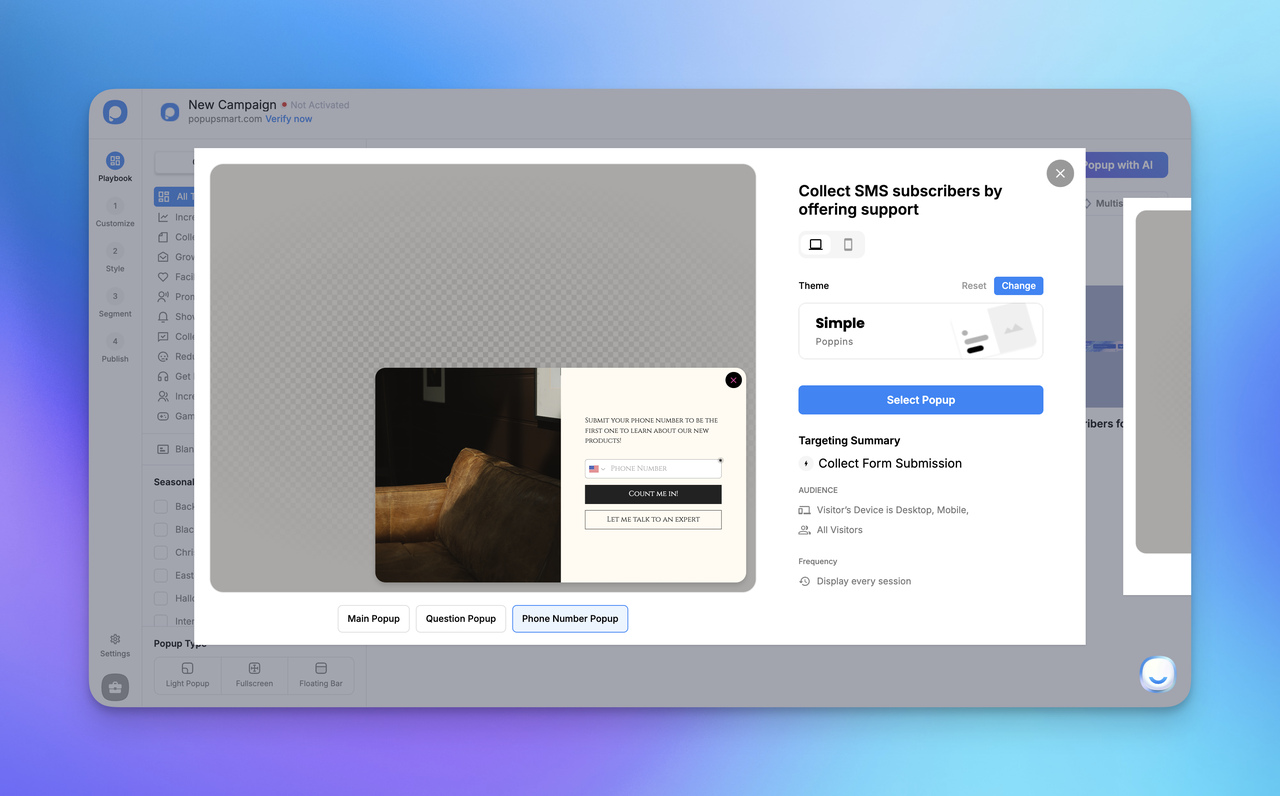
An SMS popup for Shopify is an on-site prompt designed to collect a visitor’s phone number and turn it into a permission-based SMS subscriber, without disrupting the shopping experience. Instead of asking for an email address, it invites shoppers to opt in to text messages in exchange for something valuable, like early access, order updates, or exclusive offers.
At its core, an SMS popup is about intent and timing.
Rather than blocking content the moment someone lands on a page, modern SMS popups appear when a visitor shows interest, after scrolling, spending time on a product page, or preparing to leave. This makes the opt-in feel natural, not forced.
How SMS Popups Work on Shopify
The mechanics are simple, but the impact can be significant:
- Visitor lands on your Shopify store
- The popup stays hidden while the shopper browses normally.
- A trigger activates the SMS popup
- This could be time-based, scroll-based, exit intent, or page-specific behavior.
- The visitor enters their phone number
- The message is clear about what they’ll receive; discounts, alerts, or updates.
- Consent is recorded and synced
- The phone number is securely captured and passed into your SMS marketing flow, ready for campaigns or automated messages.
Because SMS popups integrate directly with Shopify, phone numbers can be tied to customer profiles, orders, and behavior. This makes follow-up messaging more relevant, whether it’s a back-in-stock alert or a post-purchase update.
SMS Popups vs. Email Popups
Email popups are familiar, and they still work, but SMS popups serve a different purpose.
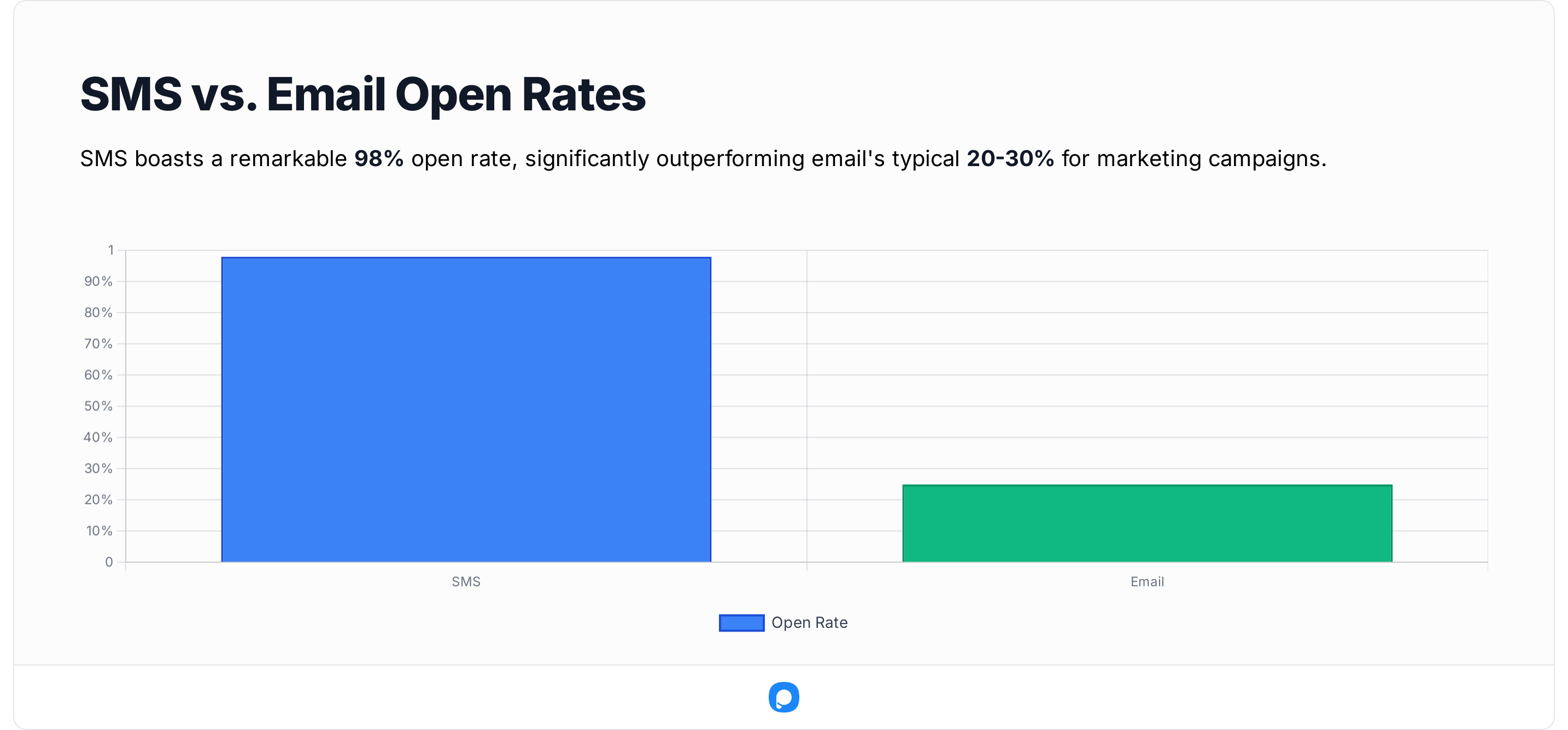
Email is often long-term and promotional, while SMS is immediate and action-driven. Text messages are typically read within minutes, which makes SMS ideal for:
- Flash sales
- Limited inventory alerts
- Order and shipping updates
From what we’ve seen across Shopify stores, SMS popups usually attract fewer, but higher-intent, subscribers. A phone number is more personal than an email address, so when someone opts in, they’re signaling stronger buying intent and trust.
Legal Basics: What You Need to Know
Any discussion of SMS popups needs to include compliance. In most regions, including the U.S., SMS marketing is governed by regulations like TCPA (Telephone Consumer Protection Act).
In practice, this means:
- Clear opt-in language explaining what messages users will receive
- No pre-checked consent boxes
- Easy opt-out instructions (e.g., “Reply STOP to unsubscribe”)
Handled properly, compliance doesn’t hurt conversions, it actually builds trust and sets expectations from the start.
Where SMS Popups Fit in Visitor Engagement
SMS popups aren’t meant to replace every other popup on your site. They work best as part of a broader visitor engagement strategy, alongside email capture, product recommendations, and behavioral targeting.
Think of them as the fastest path from anonymous visitor to direct conversation. When used thoughtfully, SMS popups help Shopify brands engage shoppers at the right moment, with the right message, without sacrificing user experience.
➕ Benefits of Using SMS Popup Shopify for Your Store
Real growth doesn’t come from adding more tools, it comes from using the right ones in the right way. Over the past five years working in growth marketing, I’ve seen one pattern repeat itself: Shopify stores that use SMS popup Shopify strategically don’t just grow their lists, they grow revenue, with far less friction.
With more than 875 million unique shoppers visiting Shopify stores in 2024, even capturing a small, high-intent slice of that traffic through non-intrusive SMS opt-ins can make a measurable difference. An SMS popup Shopify allows you to collect phone numbers naturally on-site and plug them directly into SMS campaigns that outperform most other channels in speed and engagement.
Driving Higher Engagement and Conversions
Engagement isn’t accidental, it’s designed.
An SMS popup Shopify enables timely, personalized communication that reaches shoppers where they’re most responsive. Text messages are typically read within minutes, making SMS ideal for:
- Abandoned cart reminders
- Back-in-stock alerts
- Post-purchase upsells and loyalty nudges
Because SMS popups can be triggered by real visitor behavior, such as product views or time on site, the messages feel relevant, not random. In practice, I’ve seen brands increase repeat purchases simply by segmenting subscribers based on browsing or purchase intent.
Personalization plays a huge role here. According to Shopify automation insights, tailored messaging creates experiences that keep customers coming back. Tailored offers consistently outperform generic ones, and stores that lean into data-driven SMS flows often see 10–15% lifts across key conversion points.
Why it works:
- Instant reach: Messages arrive immediately, driving faster action
- Mobile-first: Perfect for where most Shopify traffic already lives
- Optimizable: Engagement data helps refine future campaigns
Cost-Effective List Building for Small Businesses
For smaller Shopify stores, budget matters. An SMS popup Shopify is one of the most cost-efficient ways to build an owned audience, without relying heavily on paid ads.
Instead of paying repeatedly for clicks, you focus on organic phone number capture from visitors who already show intent. Even modest improvements can compound quickly. I’ve worked with stores where a low monthly investment in SMS tools unlocked thousands in recovered revenue through abandoned cart and re-engagement messages alone.
The setup is lightweight, scalable, and easy to test:
- Start with simple offers
- Measure opt-in and response rates
- Scale what works as your list grows
This approach often lowers customer acquisition costs by prioritizing quality over volume.
Solving Common Popup Pain Points
Popups only fail when they’re poorly timed or poorly designed. A well-executed SMS popup Shopify avoids this by:
- Using behavioral triggers instead of instant displays
- Clearly communicating value and consent
- Syncing with inventory and campaign logic to avoid over-promising
Through A/B testing copy, timing, and incentives, opt-in rates can improve dramatically. In several fashion and lifestyle stores I’ve worked with, small refinements led to 20%+ increases in SMS signups without hurting user experience.
Why SMS Popup Shopify Delivers Long-Term Value
The benefits go beyond short-term conversions. An SMS popup Shopify helps you build a direct, high-intent communication channel that grows with your store, driving engagement, improving ROI, and supporting sustainable growth without overwhelming shoppers.
Used thoughtfully, it’s not just another popup. It’s one of the most efficient growth levers available to Shopify brands today.
Wrapping this up, the benefits of an SMS popup Shopify go beyond basics, they drive measurable ROI through smarter, non-intrusive methods. From higher conversions to cost savings, it's a tool that evolves with your store. I've watched it work wonders; now, consider how it fits yours.
For deeper dives, explore Shopify SMS strategies to get started right.
👣 How to Add an SMS Popup on Shopify the Right Way (User-Friendly Setup Guide)
Getting an SMS popup on Shopify live doesn’t need to feel intrusive or complicated. Based on real implementations I’ve worked on with Shopify stores, the highest-converting SMS popups all share the same principle, they collect phone numbers without disrupting the shopping experience. The difference isn’t the tool itself, it’s how thoughtfully the popup is implemented.
This guide walks you through how to collect phone numbers on Shopify in a way that feels natural, supports trust, and still drives meaningful opt-ins.
🧩 Preparing Your Store Before Adding an SMS Popup
A little preparation makes a big difference, especially if you want SMS popups to feel helpful rather than interruptive.
1) Start with compliance and transparency
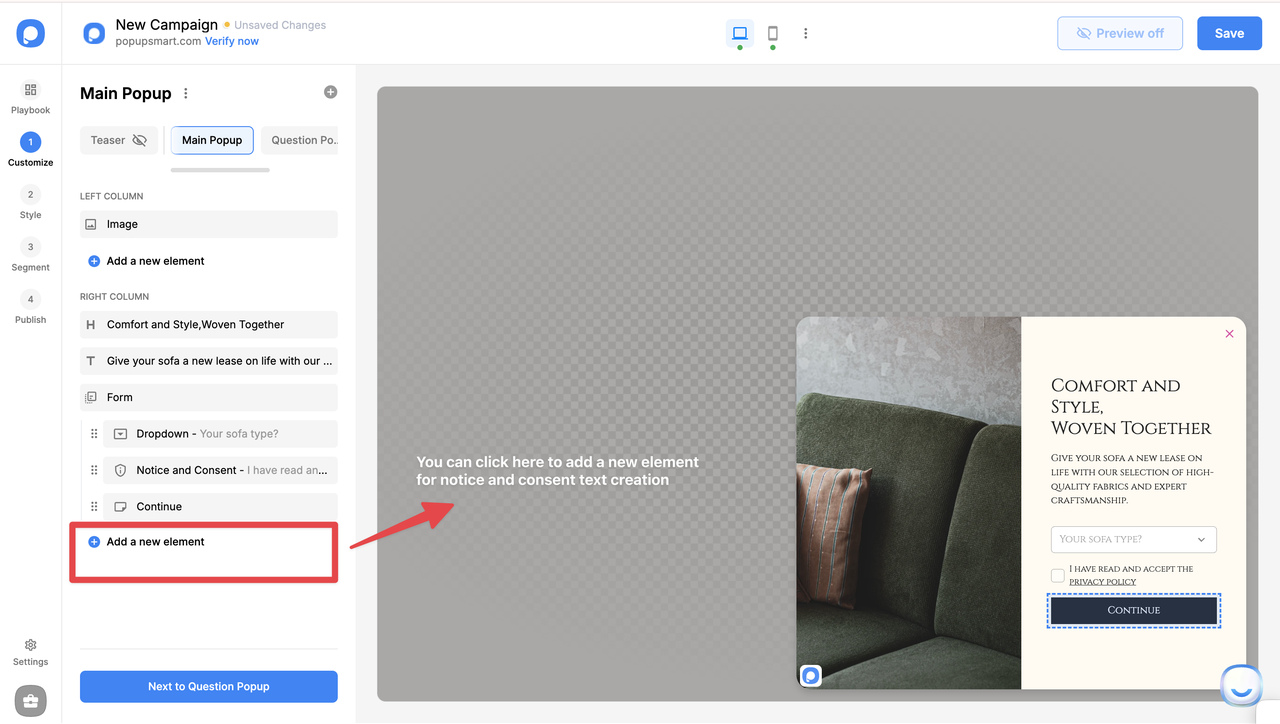
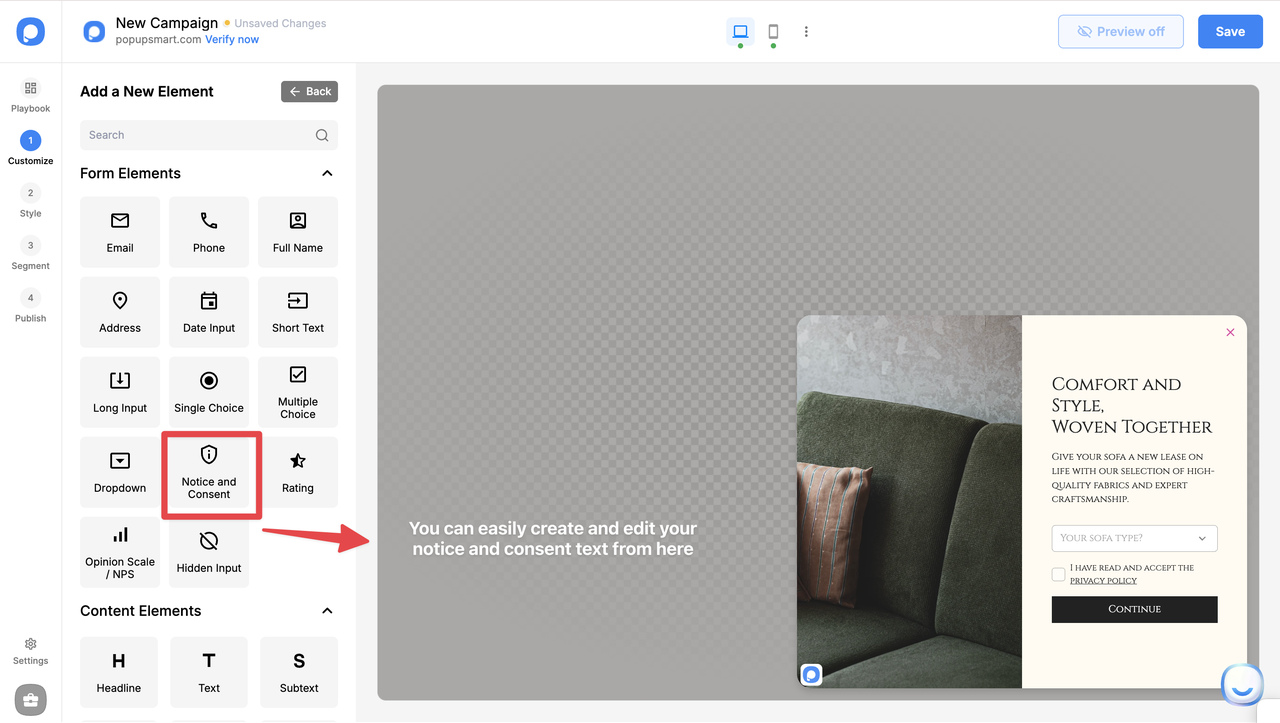
SMS requires explicit consent. Your popup should clearly explain what users are signing up for, include an unchecked consent box, and explain how to opt out. When expectations are clear, visitors feel safer opting-in, and trust directly improves conversions.
(Tools like Popupsmart help you add compliant consent text and opt-in language without coding.)
Use resources like FCC TCPA overview to confirm consent requirements.
2) Use Popupsmart setup that prioritizes control, not interruption
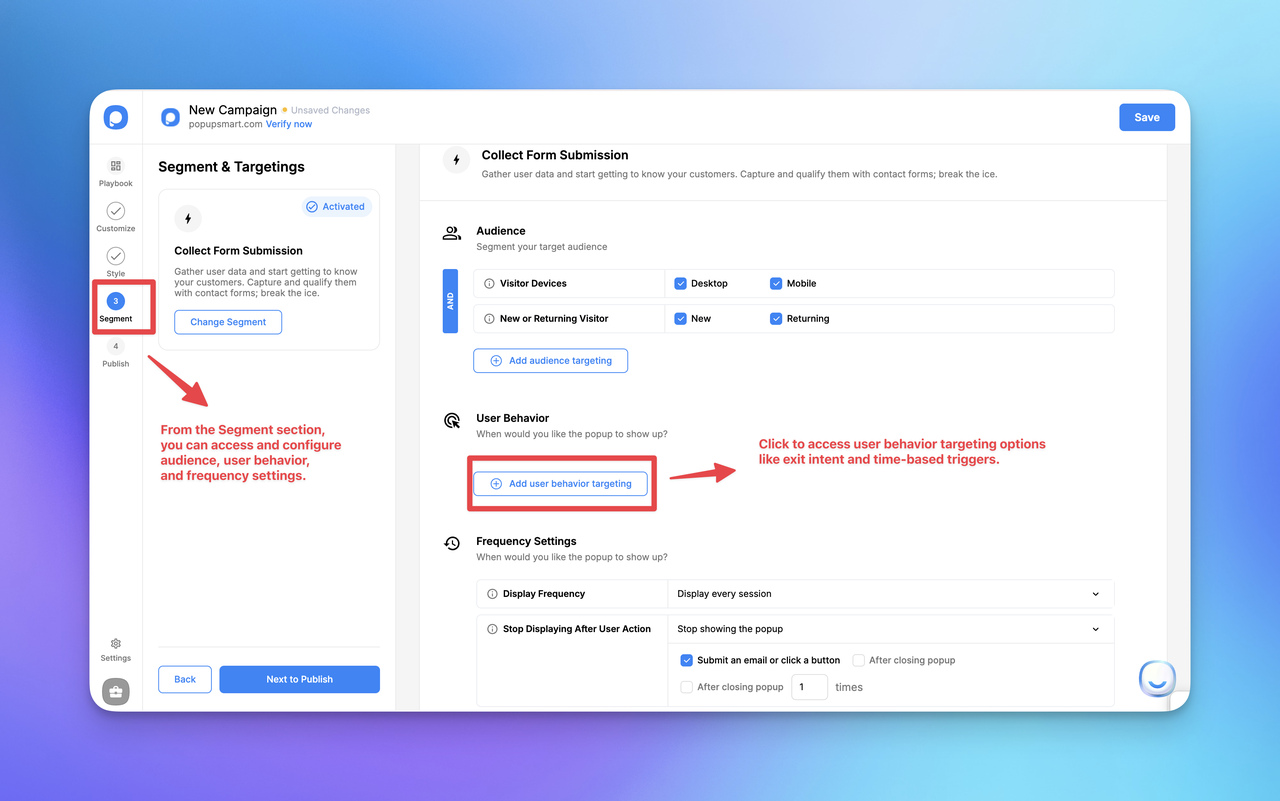
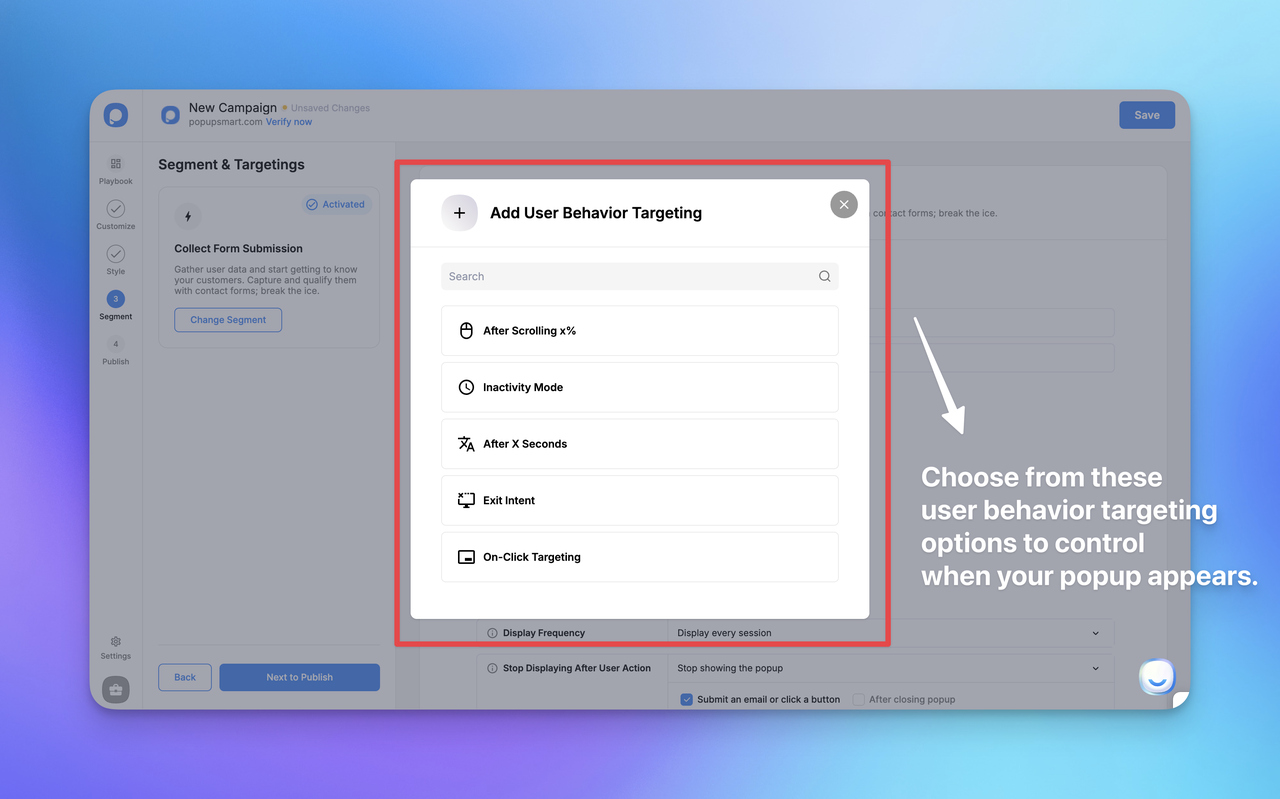
From my hands-on testing across Shopify stores, the highest-performing SMS popups are the ones that don’t appear instantly, they trigger based on real user behavior. Popupsmart is especially useful here because it gives you granular control over when and how the popup displays, instead of forcing a one-size-fits-all approach.
With Popupsmart, you can configure:
- behavioral targeting (show only to engaged visitors)
- exit-intent triggers for desktop
- scroll-depth triggers for readers who show interest
- mobile-aware timing to avoid intrusive interruptions
- device-specific targeting to optimize UX across screens
This approach helps you collect phone numbers without breaking the browsing flow, which leads to higher opt-ins and lower frustration compared to always-on popups.
3) Define realistic opt-in expectations
For most Shopify stores, a 10–20% SMS opt-in rate is a healthy benchmark when using Popupsmart. Stores that try to push numbers higher too fast usually end up switching to aggressive designs or instant triggers, and engagement drops.
Popupsmart makes it easier to scale responsibly because you can:
- run A/B tests on timing, copy, and incentives
- compare scroll-trigger vs exit-intent performance
- track opt-ins alongside bounce and exit metrics
Instead of chasing volume, you optimize for high-intent subscribers.
Quick-prep checklist (Popupsmart-ready)
- Theme supports popup overlays without layout conflicts
- Clear SMS value proposition (alerts, drops, shipping updates)
- High-intent pages selected inside Popupsmart targeting (product, cart, collection)
4. Collect phone numbers using contextual, moment-based prompts (instead of interruptive popups)
One of the most effective ways to collect phone numbers on Shopify without annoying visitor, is to trigger SMS opt-ins only at moments when the user already expects communication instead of forcing a popup during browsing.
Context-based collection works especially well on:
- checkout & order notification preferences
- shipping updates or delivery tracking pages
- back-in-stock and price-drop interest forms
- post-purchase “order confirmation + updates” prompts
In these moments, the user is already seeking reassurance, status updates, or time-sensitive alerts, which makes SMS feel helpful rather than intrusive.
In my experience working with Shopify merchants, contextual SMS prompts consistently drive fewer, but higher-intent and lower-churn subscribers compared to generic browsing-based popups.
Why this approach works for Shopify SMS list building:
- the request matches the user’s current goal
- SMS is framed as utility, not marketing
- trust improves because the timing feels natural
- opt-ins come from people who genuinely want updates
From what we’ve seen across real stores, contextual SMS prompts convert more quietly, but more meaningfully, helping you collect phone numbers without disrupting the shopping experience.
👉 This supports the core principle of Shopify SMS list building: focus on relevance and timing, not pressure or volume.
⚙️ Installing and Configuring Your SMS Popup in Popupsmart
Once the groundwork is ready, you can create your SMS popup directly inside Popupsmart’s Shopify popup builder and publish it without touching code.
At this stage, clarity beats creativity, focus on usefulness before design polish.
Recommended Popupsmart configuration
- trigger after 15–25 seconds or on exit-intent
- use scroll-based triggers on content-heavy pages
- keep copy short and benefit-driven
- make SMS consent visible, but not friction-heavy
From testing, Popupsmart popups that trigger after intent signals consistently outperform instant popups and feel much less intrusive to visitors.
If you need a deeper walkthrough on building and designing the popup itself, check out our SMS popup setup guide.
🧪 Testing and Optimizing Before Scaling
Before rolling out site-wide, test the full experience end-to-end.
- Preview the popup on desktop and mobile
- Submit test numbers to confirm validation
- Check consent and tracking logs
For optimization:
- A/B test one element at a time (timing, CTA, copy)
- Monitor opt-ins alongside bounce & exit metrics
- Prioritize mobile, most SMS signups happen on phones
Across several stores I’ve worked with, simply adjusting trigger timing increased SMS opt-ins by 15–18% while keeping the experience interruption-free.
Popupsmart's features like built-in A/B testing and behavioral analytics, help here , so you can iterate without guesswork.
🔁 Making SMS Popups Part of a Long-Term Engagement System
An SMS popup shouldn’t function as a standalone tactic. When connected to email flows, loyalty programs, restock alerts, and post-purchase messaging, it turns a single opt-in into an ongoing customer relationship.
Done right, SMS popups help you grow a high-intent Shopify SMS list without annoying visitors, supporting sustainable revenue growth rather than short-term spikes.
If you want a lightweight way to build and optimize user-friendly SMS popups on Shopify, you can create and test them easily using Popupsmart’s no-code popup builder for Shopify.
🚀 Getting Started with SMS Popup Shopify
If there’s one clear takeaway from this guide, it’s this: an SMS popup Shopify is one of the simplest ways to turn passive traffic into an owned, high-intent audience, without hurting user experience.
When implemented thoughtfully, SMS popups deliver real advantages:
- Higher engagement than traditional email popups
- Faster, more personal communication with shoppers
- Easy setup that fits naturally into existing Shopify workflows
- Sustainable list growth without annoying visitors
The setup process is straightforward, the costs are manageable, and the upside compounds over time. You don’t need complex automation or aggressive discounts to start. Even a single, well-timed SMS popup on high-intent pages can begin collecting valuable phone numbers and unlocking new revenue opportunities.
Looking ahead, SMS marketing on Shopify is only getting smarter. We’re already seeing trends toward:
- More personalization based on browsing and purchase behavior
- AI-driven timing and segmentation for better message relevance
- Stronger compliance tooling, making opt-ins clearer and safer
- Multi-channel coordination, where SMS, email, and onsite messaging work together
Stores that adopt SMS popups early, and do so with a UX-first mindset, will have a clear advantage as competition increases.
If you haven’t tested an SMS popup Shopify yet, now is the right time to start small, measure results, and iterate. The barrier to entry is low, but the potential impact is significant.
FAQs
What is an SMS popup Shopify?
An SMS popup Shopify is an on-site opt-in form that collects visitors’ phone numbers so you can send permission-based SMS messages like alerts, updates, and offers.
1. Are SMS popups better than email popups?
They serve different roles. SMS popups usually attract fewer subscribers, but those subscribers are higher intent and engage faster than email-only audiences.
2. Will SMS popups annoy visitors?
Not if they’re timed correctly. Using behavioral triggers and clear value propositions keeps the experience smooth and non-intrusive.
3. Is SMS popup Shopify setup complicated?
No. Most apps can be installed and configured in minutes, with no coding required.
4. Is SMS marketing compliant with regulations?
Yes—when done properly. Clear consent language, opt-out instructions, and compliance-ready forms are essential.
5. When should I add an SMS popup to my store?
As soon as you have consistent traffic. Even small stores benefit from starting early and refining over time.
You may also like:


