
IntroductionEmail Autoresponder
How to Use Product Cards in the Email Autoresponder
Here you can find all information about Product Cards element you can use in the email content which you can send automatically by using Popupsmart Email Autoresponder.
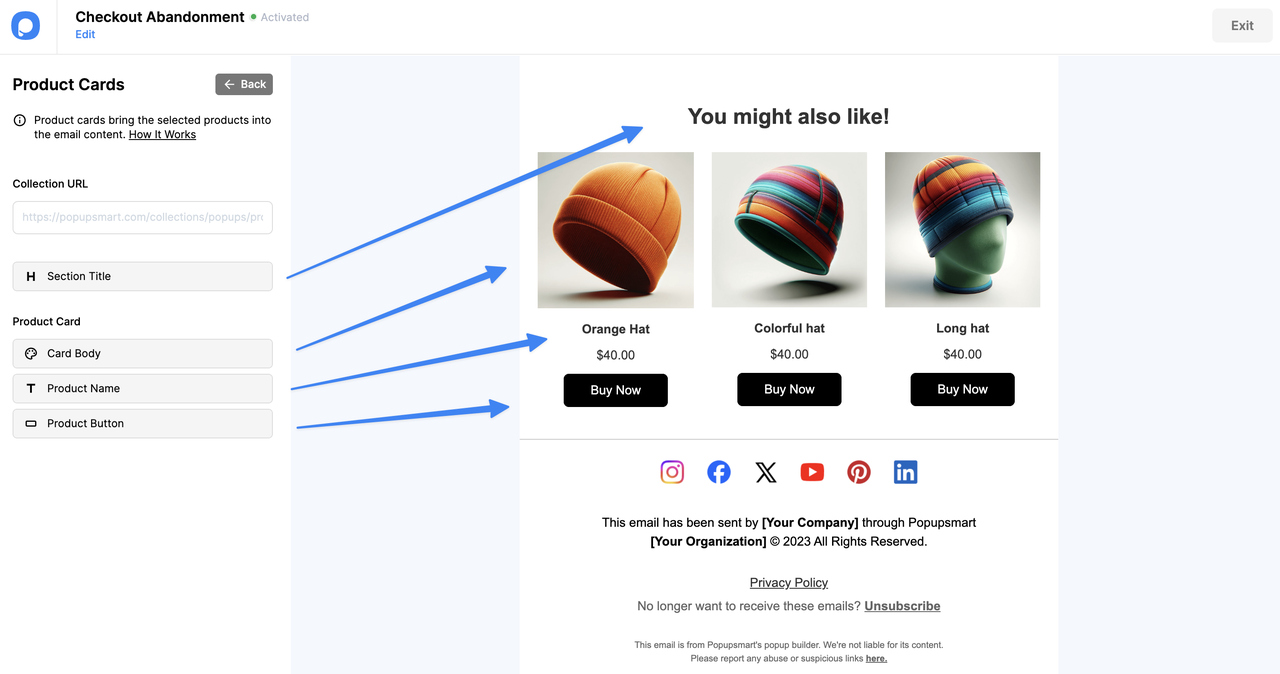
Increase your conversion rates with Product Cards—a special element for Shopify store owners. Embed products from your collections directly into emails to drive sales through email autoresponder.
Collection URL Formats
URL Formats
To add products from your Shopify store, use these URL formats:
- Specific collection:
https://www.myshopifystore.com/collections/mycollection/products.json - All collections:
https://www.myshopifystore.com/collections/all/products.json - All products:
https://www.myshopifystore.com/products.json
Paste the URL into the "Collection URL" input area in the product card element.
Customization Options
| Section | Options |
|---|---|
| Section Title | Enter your message to tell your audience about the collection and encourage them to check the products. |
| Card Body | Choose radius type (rounded, square, or circular), change filling and border colors, select a shadow size. |
| Product Name | Adjust font size, change line height, set text color. |
| Product Buttons | Change button text, adjust font size and line height, set radius type, choose filling, border, and text colors. |
Button Actions
Assign an action to buttons to direct your audience when they click:
- Add to cart & go to cart page — Adds product and redirects to cart
- Go to cart page — Redirects directly to cart
- Go to product — Opens the product page
- Go to the URL address — Redirects to a custom URL
💡 You can also edit other elements in your email content.
How is this guide?